פריסה ושימוש בכלי האיסוף

במאמר הזה מוסבר איך לפרוס את OpenTelemetry Collector, להגדיר את ה-Collector לשימוש ב-exporter‏ otlphttp וב-Telemetry (OTLP) API, ולהפעיל מחולל טלמטריה כדי לכתוב מדדים ל-Cloud Monitoring. אחר כך תוכלו לראות את המדדים האלה ב-Cloud Monitoring.

אם אתם משתמשים ב-Google Kubernetes Engine, אתם יכולים לפעול לפי ההוראות במאמר Managed OpenTelemetry for GKE במקום לפרוס ולהגדיר באופן ידני OpenTelemetry Collector שמשתמש ב-Telemetry API.

אם אתם משתמשים ב-SDK כדי לשלוח מדדים מאפליקציה ישירות אל Telemetry API, כדאי לעיין במאמר שימוש בערכות SDK לשליחת מדדים מאפליקציות לקבלת מידע נוסף ודוגמאות.

אפשר גם להשתמש ב-OpenTelemetry Collector וב-Telemetry API בשילוב עם OpenTelemetry zero-code instrumentation. מידע נוסף זמין במאמר בנושא שימוש ב-OpenTelemetry zero-code instrumentation ל-Java.

לפני שמתחילים

בקטע הזה מוסבר איך להגדיר את הסביבה לפריסה של כלי האיסוף ולשימוש בו.

בוחרים או יוצרים Google Cloud פרויקט

בוחרים פרויקט Google Cloud למדריך הזה. אם עדיין אין לכם Google Cloud פרויקט, אתם יכולים ליצור אחד:

  1. נכנסים לחשבון Google Cloud . אם אתם משתמשים חדשים ב- Google Cloud, צרו חשבון כדי שתוכלו להעריך את הביצועים של המוצרים שלנו בתרחישים מהעולם האמיתי. לקוחות חדשים מקבלים בחינם גם קרדיט בשווי 300$ להרצה, לבדיקה ולפריסה של עומסי העבודה.
  2. In the Google Cloud console, on the project selector page, select or create a Google Cloud project.

    Roles required to select or create a project

    • Select a project: Selecting a project doesn't require a specific IAM role—you can select any project that you've been granted a role on.
    • Create a project: To create a project, you need the Project Creator role (roles/resourcemanager.projectCreator), which contains the resourcemanager.projects.create permission. Learn how to grant roles.

    Go to project selector

  3. Verify that billing is enabled for your Google Cloud project.

  4. In the Google Cloud console, on the project selector page, select or create a Google Cloud project.

    Roles required to select or create a project

    • Select a project: Selecting a project doesn't require a specific IAM role—you can select any project that you've been granted a role on.
    • Create a project: To create a project, you need the Project Creator role (roles/resourcemanager.projectCreator), which contains the resourcemanager.projects.create permission. Learn how to grant roles.

    Go to project selector

  5. Verify that billing is enabled for your Google Cloud project.

התקנה של כלי שורת הפקודה

במסמך הזה אנחנו משתמשים בכלי שורת הפקודה הבאים:

  • gcloud
  • kubectl

הכלים gcloud ו-kubectl הם חלק מ-Google Cloud CLI. מידע על התקנת הרכיבים מופיע במאמר ניהול רכיבי Google Cloud CLI. כדי לראות את הרכיבים של ה-CLI של gcloud שהתקנתם, מריצים את הפקודה הבאה:

gcloud components list

כדי להגדיר את ה-CLI של gcloud לשימוש, מריצים את הפקודות הבאות:

gcloud auth login
gcloud config set project PROJECT_ID

הפעלת ממשקי ה-API

מפעילים את Cloud Monitoring API ואת Telemetry API בGoogle Cloud פרויקט. כדאי לשים לב במיוחד ל-Telemetry API, telemetry.googleapis.comיכול להיות שזו הפעם הראשונה שאתם נתקלים ב-API הזה.

מפעילים את ממשקי ה-API באמצעות הפקודות הבאות:

gcloud services enable monitoring.googleapis.com
gcloud services enable telemetry.googleapis.com

יצירת אשכול

יוצרים אשכול GKE.

  1. כדי ליצור אשכול Google Kubernetes Engine בשם otlp-test, מריצים את הפקודה הבאה:

    gcloud container clusters create-auto --location CLUSTER_LOCATION otlp-test --project PROJECT_ID
    
  2. אחרי שיוצרים את האשכול, מתחברים אליו באמצעות הפקודה הבאה:

    gcloud container clusters get-credentials otlp-test --region CLUSTER_LOCATION --project PROJECT_ID
    

אישור חשבון השירות של Kubernetes

הפקודות הבאות מקצות את התפקידים הנדרשים בניהול הזהויות והרשאות הגישה (IAM) לחשבון השירות של Kubernetes. הפקודות האלה מניחות שאתם משתמשים באיחוד זהויות של עומסי עבודה ל-GKE:

export PROJECT_NUMBER=$(gcloud projects describe PROJECT_ID --format="value(projectNumber)")

gcloud projects add-iam-policy-binding projects/PROJECT_ID \
  --role=roles/logging.logWriter \
  --member=principal://iam.googleapis.com/projects/$PROJECT_NUMBER/locations/global/workloadIdentityPools/PROJECT_ID.svc.id.goog/subject/ns/opentelemetry/sa/opentelemetry-collector \
  --condition=None

gcloud projects add-iam-policy-binding projects/PROJECT_ID \
  --role=roles/monitoring.metricWriter \
  --member=principal://iam.googleapis.com/projects/$PROJECT_NUMBER/locations/global/workloadIdentityPools/PROJECT_ID.svc.id.goog/subject/ns/opentelemetry/sa/opentelemetry-collector \
  --condition=None

gcloud projects add-iam-policy-binding projects/PROJECT_ID \
  --role=roles/telemetry.tracesWriter \
  --member=principal://iam.googleapis.com/projects/$PROJECT_NUMBER/locations/global/workloadIdentityPools/PROJECT_ID.svc.id.goog/subject/ns/opentelemetry/sa/opentelemetry-collector \
  --condition=None

אם חשבון השירות שלכם הוא בפורמט אחר, אתם יכולים להשתמש בפקודה שמופיעה במסמכי התיעוד של השירות המנוהל של Google Cloud ל-Prometheus כדי לתת הרשאה לחשבון השירות, עם השינויים הבאים:

  • מחליפים את שם חשבון השירות gmp-test-sa בחשבון השירות שלכם.
  • צריך להקצות את התפקידים שמוצגים בסדרת הפקודות הקודמת, ולא רק את התפקיד roles/monitoring.metricWriter.

פריסת OpenTelemetry Collector

יוצרים את הגדרות האוסף על ידי העתקה של קובץ ה-YAML הבא והצבה שלו בקובץ בשם collector.yaml. אפשר גם למצוא את ההגדרה הבאה ב-GitHub במאגר otlp-k8s-ingest.

בנוסח שלכם, הקפידו להחליף את המופע של ${GOOGLE_CLOUD_PROJECT} במזהה הפרויקט שלכם, PROJECT_ID.

פרוטוקול OTLP למדדים של Prometheus פועל רק כשמשתמשים בגרסה 0.140.0 או בגרסה חדשה יותר של OpenTelemetry Collector.

# Copyright 2024 Google LLC
#
# Licensed under the Apache License, Version 2.0 (the "License");
# you may not use this file except in compliance with the License.
# You may obtain a copy of the License at
#
#     http://www.apache.org/licenses/LICENSE-2.0
#
# Unless required by applicable law or agreed to in writing, software
# distributed under the License is distributed on an "AS IS" BASIS,
# WITHOUT WARRANTIES OR CONDITIONS OF ANY KIND, either express or implied.
# See the License for the specific language governing permissions and
# limitations under the License.

exporters:
  # The googlecloud exporter is used for logs
  googlecloud:
    log:
      default_log_name: opentelemetry-collector
    user_agent: Google-Cloud-OTLP manifests:0.4.0 OpenTelemetry Collector Built By Google/0.128.0 (linux/amd64)
  googlemanagedprometheus:
    user_agent: Google-Cloud-OTLP manifests:0.4.0 OpenTelemetry Collector Built By Google/0.128.0 (linux/amd64)
  # The otlphttp exporter is used to send traces to Google Cloud Trace and
  # metrics to Google Managed Prometheus using OTLP http/proto.
  # The otlp exporter could also be used to send them using OTLP grpc
  otlphttp:
    encoding: proto
    endpoint: https://telemetry.googleapis.com
    # Use the googleclientauth extension to authenticate with Google credentials
    auth:
      authenticator: googleclientauth


extensions:
  # Standard for the collector. Used for probes.
  health_check:
    endpoint: ${env:MY_POD_IP}:13133
  # This is an auth extension that adds Google Application Default Credentials to http and gRPC requests.
  googleclientauth:


processors:
  # This filter is a standard part of handling the collector's self-observability metrics. Not related to OTLP ingestion.
  filter/self-metrics:
    metrics:
      include:
        match_type: strict
        metric_names:
        - otelcol_process_uptime
        - otelcol_process_memory_rss
        - otelcol_grpc_io_client_completed_rpcs
        - otelcol_googlecloudmonitoring_point_count

  # The recommended batch size for the OTLP endpoint is 200 metric data points.
  batch:
    send_batch_max_size: 200
    send_batch_size: 200
    timeout: 5s

  # The k8sattributes processor adds k8s resource attributes to metrics based on the source IP that sent the metrics to the collector.
  # k8s attributes are important for avoiding errors from timeseries "collisions".
  # These attributes help distinguish workloads from each other, and provide useful metadata (e.g. namespace) when querying.
  k8sattributes:
    extract:
      metadata:
      - k8s.namespace.name
      - k8s.deployment.name
      - k8s.statefulset.name
      - k8s.daemonset.name
      - k8s.cronjob.name
      - k8s.job.name
      - k8s.replicaset.name
      - k8s.node.name
      - k8s.pod.name
      - k8s.pod.uid
      - k8s.pod.start_time
    passthrough: false
    pod_association:
    - sources:
      - from: resource_attribute
        name: k8s.pod.ip
    - sources:
      - from: resource_attribute
        name: k8s.pod.uid
    - sources:
      - from: connection

  # Standard processor for gracefully degrading when overloaded to prevent OOM.
  memory_limiter:
    check_interval: 1s
    limit_percentage: 65
    spike_limit_percentage: 20

  # Standard processor for enriching self-observability metrics. Unrelated to OTLP ingestion.
  metricstransform/self-metrics:
    transforms:
    - action: update
      include: otelcol_process_uptime
      operations:
      - action: add_label
        new_label: version
        new_value: Google-Cloud-OTLP manifests:0.4.0 OpenTelemetry Collector Built By Google/0.128.0 (linux/amd64)

  # The resourcedetection processor, similar to the k8sattributes processor, enriches metrics with important metadata.
  # The gcp detector provides the cluster name and cluster location.
  resourcedetection:
    detectors: [gcp]
    timeout: 10s

  # This transform processor avoids ingestion errors if metrics contain attributes with names that are reserved for the prometheus_target resource.
  transform/collision:
    metric_statements:
    - context: datapoint
      statements:
      - set(attributes["exported_location"], attributes["location"])
      - delete_key(attributes, "location")
      - set(attributes["exported_cluster"], attributes["cluster"])
      - delete_key(attributes, "cluster")
      - set(attributes["exported_namespace"], attributes["namespace"])
      - delete_key(attributes, "namespace")
      - set(attributes["exported_job"], attributes["job"])
      - delete_key(attributes, "job")
      - set(attributes["exported_instance"], attributes["instance"])
      - delete_key(attributes, "instance")
      - set(attributes["exported_project_id"], attributes["project_id"])
      - delete_key(attributes, "project_id")

  # The relative ordering of statements between ReplicaSet & Deployment and Job & CronJob are important.
  # The ordering of these controllers is decided based on the k8s controller documentation available at
  # https://kubernetes.io/docs/concepts/workloads/controllers.
  # The relative ordering of the other controllers in this list is inconsequential since they directly
  # create pods.
  transform/aco-gke:
    metric_statements:
    - context: datapoint
      statements:
      - set(attributes["top_level_controller_type"], "ReplicaSet") where resource.attributes["k8s.replicaset.name"] != nil
      - set(attributes["top_level_controller_name"], resource.attributes["k8s.replicaset.name"]) where resource.attributes["k8s.replicaset.name"] != nil
      - set(attributes["top_level_controller_type"], "Deployment") where resource.attributes["k8s.deployment.name"] != nil
      - set(attributes["top_level_controller_name"], resource.attributes["k8s.deployment.name"]) where resource.attributes["k8s.deployment.name"] != nil
      - set(attributes["top_level_controller_type"], "DaemonSet") where resource.attributes["k8s.daemonset.name"] != nil
      - set(attributes["top_level_controller_name"], resource.attributes["k8s.daemonset.name"]) where resource.attributes["k8s.daemonset.name"] != nil
      - set(attributes["top_level_controller_type"], "StatefulSet") where resource.attributes["k8s.statefulset.name"] != nil
      - set(attributes["top_level_controller_name"], resource.attributes["k8s.statefulset.name"]) where resource.attributes["k8s.statefulset.name"] != nil
      - set(attributes["top_level_controller_type"], "Job") where resource.attributes["k8s.job.name"] != nil
      - set(attributes["top_level_controller_name"], resource.attributes["k8s.job.name"]) where resource.attributes["k8s.job.name"] != nil
      - set(attributes["top_level_controller_type"], "CronJob") where resource.attributes["k8s.cronjob.name"] != nil
      - set(attributes["top_level_controller_name"], resource.attributes["k8s.cronjob.name"]) where resource.attributes["k8s.cronjob.name"] != nil
  # For each Prometheus unknown-typed metric, which is a gauge, create a counter that is an exact copy of this metric.
  # The GCP OTLP endpoint will add appropriate the appropriate suffixes for the counter and gauge.
  transform/unknown-counter:
    metric_statements:
    - context: metric
      statements:
      # Copy the unknown metric, but add a suffix so we can distinguish the copy from the original.
      - copy_metric(Concat([metric.name, "unknowncounter"], ":")) where metric.metadata["prometheus.type"] == "unknown" and not HasSuffix(metric.name, ":unknowncounter")
      # Change the copy to a monotonic, cumulative sum.
      - convert_gauge_to_sum("cumulative", true) where HasSuffix(metric.name, ":unknowncounter")
      # Delete the extra suffix once we are done.
      - set(metric.name, Substring(metric.name, 0, Len(metric.name)-Len(":unknowncounter"))) where HasSuffix(metric.name, ":unknowncounter")

  # When sending telemetry to the GCP OTLP endpoint, the gcp.project_id resource attribute is required to be set to your project ID.
  resource/gcp_project_id:
    attributes:
    - key: gcp.project_id
      # MAKE SURE YOU REPLACE THIS WITH YOUR PROJECT ID
      value: ${GOOGLE_CLOUD_PROJECT}
      action: insert
  # The metricstarttime processor is important to include if you are using the prometheus receiver to ensure the start time is set properly.
  # It is a no-op otherwise.
  metricstarttime:
    strategy: subtract_initial_point

receivers:
  # This collector is configured to accept OTLP metrics, logs, and traces, and is designed to receive OTLP from workloads running in the cluster.
  otlp:
    protocols:
      grpc:
        endpoint: ${env:MY_POD_IP}:4317
      http:
        cors:
          allowed_origins:
          - http://*
          - https://*
        endpoint: ${env:MY_POD_IP}:4318

  # Push the collector's own self-observability metrics to the otlp receiver.
  otlp/self-metrics:
    protocols:
      grpc:
        endpoint: ${env:MY_POD_IP}:14317

service:
  extensions:
  - health_check
  - googleclientauth
  pipelines:
    # Recieve OTLP logs, and export logs using the googlecloud exporter.
    logs:
      exporters:
      - googlecloud
      processors:
      - k8sattributes
      - resourcedetection
      - memory_limiter
      - batch
      receivers:
      - otlp
    # Recieve OTLP metrics, and export metrics to GMP using the otlphttp exporter.
    metrics/otlp:
      exporters:
      - otlphttp
      processors:
      - k8sattributes
      - memory_limiter
      - resource/gcp_project_id
      - resourcedetection
      - transform/collision
      - transform/aco-gke
      - transform/unknown-counter
      - metricstarttime
      - batch
      receivers:
      - otlp
    # Scrape self-observability Prometheus metrics, and export metrics to GMP using the otlphttp exporter.
    metrics/self-metrics:
      exporters:
      - otlphttp
      processors:
      - filter/self-metrics
      - metricstransform/self-metrics
      - k8sattributes
      - memory_limiter
      - resource/gcp_project_id
      - resourcedetection
      - batch
      receivers:
      - otlp/self-metrics
    # Recieve OTLP traces, and export traces using the otlphttp exporter.
    traces:
      exporters:
      - otlphttp
      processors:
      - k8sattributes
      - memory_limiter
      - resource/gcp_project_id
      - resourcedetection
      - batch
      receivers:
      - otlp
  telemetry:
    logs:
      encoding: json
    metrics:
      readers:
      - periodic:
          exporter:
            otlp:
              protocol: grpc
              endpoint: ${env:MY_POD_IP}:14317

הגדרת OpenTelemetry Collector שנפרס

מגדירים את פריסת האוסף על ידי יצירת משאבי Kubernetes.

  1. כדי ליצור את מרחב השמות opentelemetry וליצור את הגדרות האוסף במרחב השמות, מריצים את הפקודות הבאות:

    kubectl create namespace opentelemetry
    
    kubectl create configmap collector-config -n opentelemetry --from-file=collector.yaml
    
  2. כדי להגדיר את האוסף עם משאבי Kubernetes, מריצים את הפקודות הבאות:

    kubectl apply -f https://raw.githubusercontent.com/GoogleCloudPlatform/otlp-k8s-ingest/refs/heads/otlpmetric/k8s/base/2_rbac.yaml
    
    kubectl apply -f https://raw.githubusercontent.com/GoogleCloudPlatform/otlp-k8s-ingest/refs/heads/otlpmetric/k8s/base/3_service.yaml
    
    kubectl apply -f https://raw.githubusercontent.com/GoogleCloudPlatform/otlp-k8s-ingest/refs/heads/otlpmetric/k8s/base/4_deployment.yaml
    
    kubectl apply -f https://raw.githubusercontent.com/GoogleCloudPlatform/otlp-k8s-ingest/refs/heads/otlpmetric/k8s/base/5_hpa.yaml
    
  3. מחכים עד שה-pods של כלי האיסוף יגיעו למצב 'פועל' ויהיו מוכנים עם 1/1 קונטיינרים. התהליך הזה נמשך כ-3 דקות ב-Autopilot, אם זו עומס העבודה הראשון שפורס. כדי לבדוק את ה-pods, משתמשים בפקודה הבאה:

    kubectl get po -n opentelemetry -w
    

    כדי להפסיק את הצפייה בסטטוס של ה-Pod, מקישים על Ctrl+C כדי להפסיק את הפקודה.

  4. אפשר גם לבדוק את היומנים של כלי האיסוף כדי לוודא שאין שגיאות ברורות:

    kubectl logs -n opentelemetry deployment/opentelemetry-collector
    

פריסת מחולל הטלמטריה

אתם יכולים לבדוק את ההגדרה באמצעות הכלי telemetrygen בקוד פתוח. האפליקציה הזו יוצרת טלמטריה ושולחת אותה אל המרכז.

  1. כדי לפרוס את אפליקציית telemetrygen במרחב השמות opentelemetry-demo, מריצים את הפקודה הבאה:

    kubectl apply -f https://raw.githubusercontent.com/GoogleCloudPlatform/otlp-k8s-ingest/refs/heads/main/sample/app.yaml
    
  2. אחרי שיוצרים את הפריסה, יכול להיות שיעבור זמן מה עד שה-pods ייווצרו ויתחילו לפעול. כדי לבדוק את הסטטוס של הפודים, מריצים את הפקודה הבאה:

    kubectl get po -n opentelemetry-demo -w
    

    כדי להפסיק את הצפייה בסטטוס של ה-Pod, מקישים על Ctrl+C כדי להפסיק את הפקודה.

שליחת שאילתה לגבי מדד באמצעות Metrics Explorer

הכלי telemetrygen כותב למדד שנקרא gen. אפשר להריץ שאילתה על המדד הזה גם בממשק של הכלי ליצירת שאילתות וגם בעורך השאילתות של PromQL ב-Metrics Explorer.

נכנסים לדף  Metrics explorer במסוף Google Cloud :

כניסה אל Metrics Explorer

אם משתמשים בסרגל החיפוש כדי למצוא את הדף הזה, בוחרים בתוצאה שבה הכותרת המשנית היא Monitoring.

  • אם משתמשים בממשק ליצירת שאילתות ב-Metrics Explorer, השם המלא של המדד הוא prometheus.googleapis.com/gen/gauge.
  • אם משתמשים בכלי לעריכת שאילתות PromQL, אפשר לשלוח שאילתה על המדד באמצעות השם gen.

התמונה הבאה מציגה תרשים של המדד gen ב-Metrics Explorer:
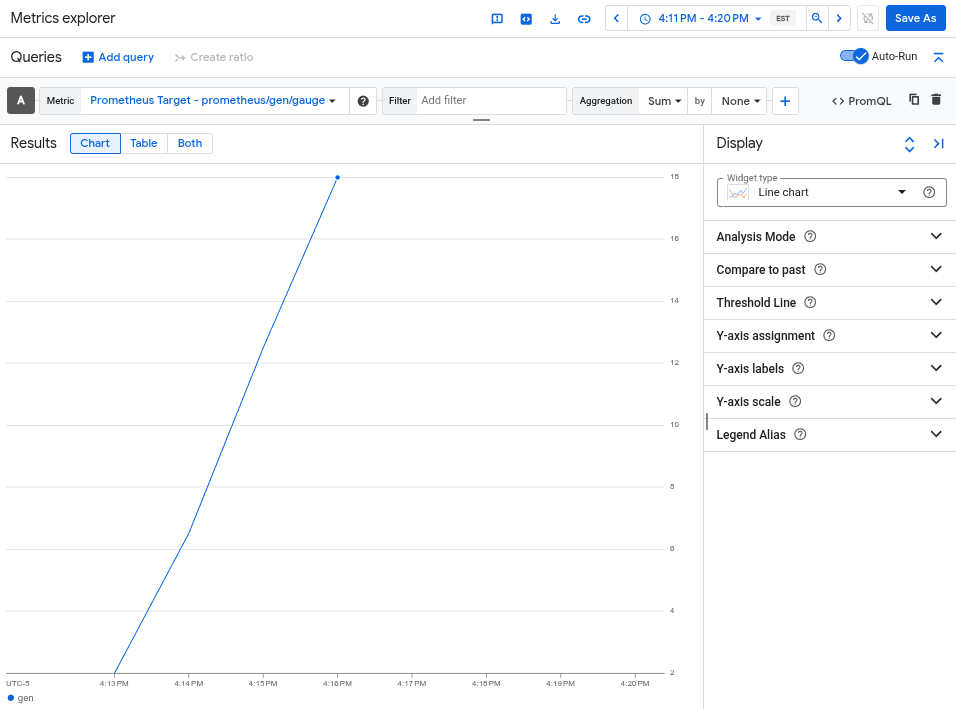
בתרשים מוצג מדד ה-gen, שנאסף על ידי otlphttp exporter.

מחיקת האשכול

אחרי שמאמתים את הפריסה על ידי שליחת שאילתה למדד, אפשר למחוק את האשכול. כדי למחוק את האשכול, מריצים את הפקודה הבאה:

gcloud container clusters delete --location CLUSTER_LOCATION otlp-test --project PROJECT_ID

שימוש באמצעי איסוף אחרים שמבוססים על OpenTelemetry

יכול להיות שתוכלו להשתמש באמצעי איסוף אחרים שמבוססים על OpenTelemetry כדי לשלוח מדדים של OTLP אל Telemetry API, אבל Google Cloud לא מספקת תמיכה בלקוחות לגבי אמצעי איסוף לא סטנדרטיים שמבוססים על OpenTelemetry.

לדוגמה, אפשר לשלוח מדדים באמצעות Grafana Alloy בגרסה 1.16.0 ומעלה על ידי אימות באמצעות הרכיב otelcol.auth.google והגדרה שלו באופן דומה ל-OpenTelemetry Collector רגיל, לפי ההוראות במסמך הזה.

המאמרים הבאים