

Integrating SAP infrastructure and application logs into your security operations helps you defend business-critical data against unauthorized access, data exfiltration, and fraud without needing specialized SAP expertise or custom log pipelines.
To deploy and manage this integration, make sure that you're familiar with the following concepts:
- Security operations: Basic understanding of security information and event management (SIEM) concepts, security orchestration, automation, and response (SOAR) concepts, log parsing, alert management, and automated response playbooks.
- Google SecOps concepts: Understanding of Unified Data Model (UDM) and YARA-L syntax is helpful but isn't required for initial setup.
Target audience
Google SecOps for SAP is designed for the following personas:
- SAP Basis administrators: Configure SAP log extraction and manage the health of the connection to Google SecOps.
- SecOps teams and analysts: Use Google SecOps to monitor SAP-specific threats alongside the rest of the IT landscape.
- Chief Information Security Officer (CISO) and compliance teams: Monitor enterprise security posture and ensure regulatory compliance through unified visibility.
Key benefits
Integrating your SAP logs into Google SecOps provides the following benefits:
- Unified enterprise-wide visibility: Gain a centralized view for monitoring threats across your entire IT infrastructure, including on-premises, cloud, and SAP RISE environments.
- Business-critical protection: Defend sensitive data, such as financial records, customer information, and intellectual property, by using Google's threat intelligence and curated SAP-specific security detections.
- Actionable intelligence: Use SAP-specific YARA-L detection rules and automated response (SOAR) playbooks to identify threats and contain incidents across your SAP systems.
- Operational efficiency: Stop building and maintaining complex, custom log pipelines. Use SAP-specific standard parsers to normalize raw SAP data into the UDM without requiring deep SAP technical expertise.
- AI-powered insights: Use Gemini in Google SecOps to accelerate threat hunting, summarize complex cases, and automate response workflows with natural language prompts.
- Expertise without the overhead: Help your existing SecOps team detect and respond to SAP threats in near real-time using standard security terminology and playbooks.
Supported log sources
You can use Google SecOps for SAP to help secure your entire SAP landscape, regardless of where your SAP system is hosted or how your landscape is managed.
Supported environments
You can monitor SAP systems running in the following environments:
- SAP RISE: Managed SAP landscapes on Google Cloud or other cloud platforms.
- Self-managed cloud: SAP systems that you manage on Google Cloud or other cloud platforms.
- On-premises: SAP systems that run in your local data centers.
Supported log types
Google SecOps for SAP provides ingestion and parsing capabilities for critical logs across both infrastructure and application layers:
| Log category | SAP log sources |
|---|---|
| Infrastructure | SAP HANA Audit, SAP ICM, SAP Gateway, and SAP Web Dispatcher |
| Application | SAP Security Audit Logs and SAP Change Documents |
For information about how these logs are ingested and the extraction mechanisms used for each environment, see Plan for log ingestion.
Integration workflows
The Google SecOps for SAP solution operates across two workflows: an inbound pipeline for log ingestion and threat detection, and an outbound pipeline for automated response.
Log ingestion and detection workflow
The following diagram shows how the integration workflow routes your SAP logs from the source environment to Google SecOps for analysis.
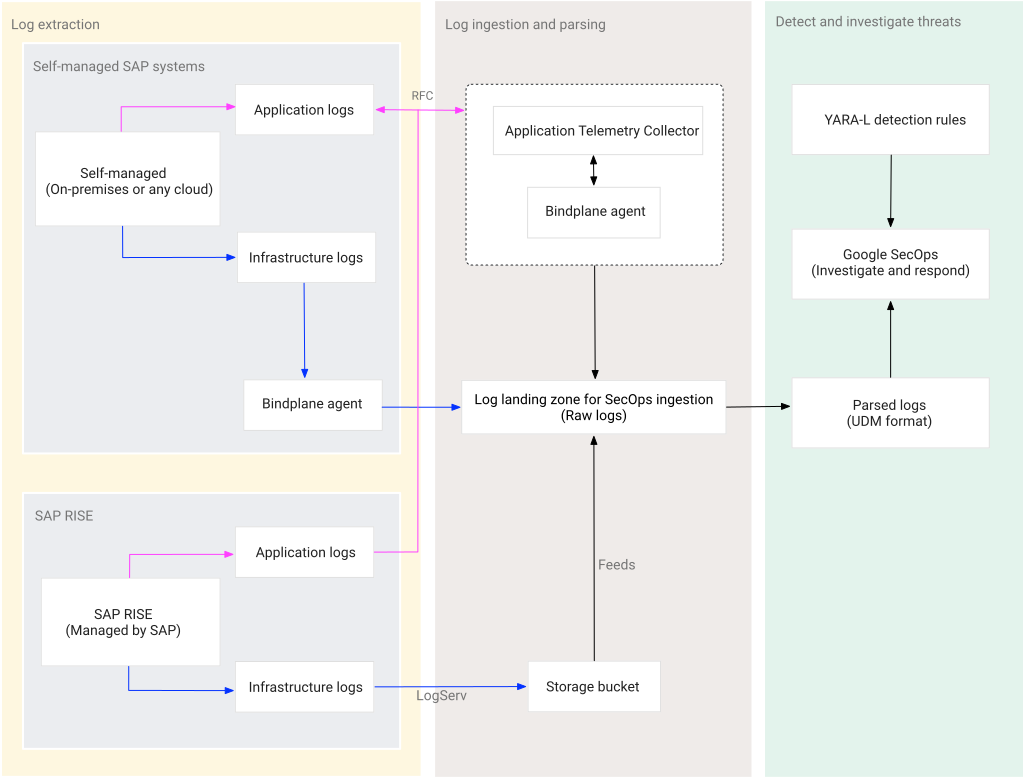
The integration lifecycle includes the following stages:
Log extraction: Capture logs from your SAP source and route the data to Google SecOps:
- Data capture: Infrastructure and application logs are gathered from your environment using SAP LogServ, the Application Telemetry Collector, or the Bindplane agent.
- Data movement: Captured logs are then securely transferred to Google SecOps through the Bindplane server or feeds.
Log ingestion and parsing: Receive and normalize raw SAP logs within Google SecOps using standard SAP parsers to prepare the logs for analysis:
- Data ingestion: Google SecOps receives logs directly or pulls them from storage buckets.
- Automated parsing: Google SecOps uses SAP-specific standard parsers to convert complex logs into the structured UDM format.
Detect, investigate, and respond to threats: Transition from data collection to active SIEM and SOAR operations:
- Threat detection (SIEM): Monitor your SAP landscape using curated YARA-L rules designed by Google security experts.
- Automated response (SOAR): Respond to alerts by triggering automated SOAR playbooks.
Automated response workflow
The following diagram shows how the automated response workflow transitions your SAP logs from the source environment into actionable security insights.
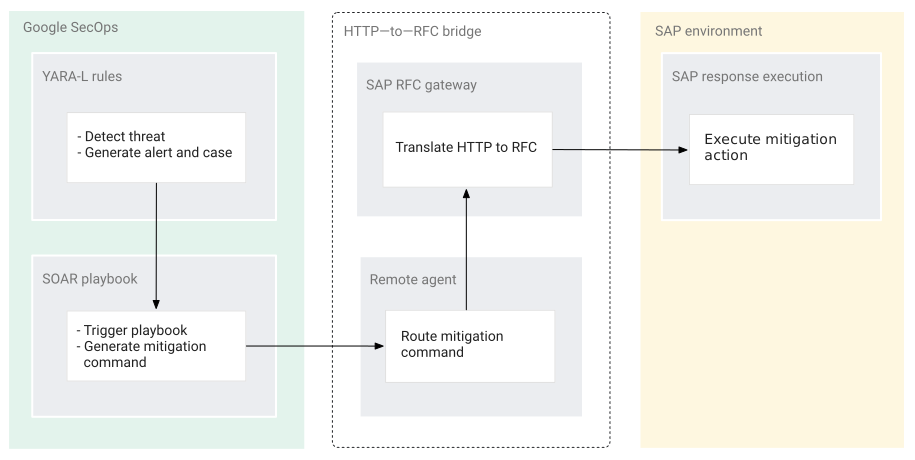
While the ingestion workflow pulls data into Google SecOps, the automated response workflow connects Google SecOps back to your SAP environment to execute mitigation actions as follows:
- Threat detection and case creation: A predefined YARA-L rule detects a threat and generates an alert. Google SecOps then groups the alert into a case.
- Playbook execution: In response to this alert or case, Google SecOps triggers a SOAR playbook that generates a mitigation command.
- Command routing: Google SecOps formats the mitigation command as an HTTP request and routes it to your Google SecOps remote agent.
- Gateway translation: The remote agent forwards this HTTP request to the SAP RFC Gateway that runs on Cloud Run.
- SAP mitigation: The SAP RFC Gateway translates the HTTP request into a Remote Function Call (RFC) and executes the action (for example, locking a user) directly in your SAP system.
Solution components and pricing
To use Google SecOps for SAP, you combine the core security platform, specialized ingestion components, and curated security content.
Google SecOps: The central SaaS platform that provides SIEM and SOAR capabilities. Google SecOps serves as the destination for your SAP logs, featuring built-in log types and parsers that transform raw, complex SAP data into actionable security insights. Google SecOps is available in packages and pricing is based on ingestion. For more information, see the Google SecOps pricing guide and Understand your Google SecOps billing components.
Bindplane (Google Edition): Acts as the high-performance ingestion pipeline for transporting logs from self-managed SAP systems and from the Application Telemetry Collector. While Bindplane (Google Edition) is included at no additional cost for Google SecOps customers, you're responsible for the infrastructure costs of the host machines.
Application Telemetry Collector: A specialized, Docker-based log collector used to extract high-value application security logs, such as Security Audit Logs and Change Documents. Google provides the collector image at no cost. You're responsible for the infrastructure costs where the collector is hosted, as well as any associated Google Cloud service costs.
SAP RFC Gateway: A containerized HTTP-to-RFC bridge that you deploy on Cloud Run. It lets Google SecOps SOAR execute automated mitigation actions in your SAP systems. Google provides the gateway image at no cost. You're responsible for the infrastructure costs of the hosting environment, such as Cloud Run, and any associated Google Cloud services.
Google Cloud services: Depending on your ingestion path, you incur charges for using the following Google Cloud services:
- Cloud Storage: Stores logs from SAP LogServ and hosts dependencies for the Application Telemetry Collector. For information about pricing, see Cloud Storage pricing.
- Pub/Sub: Required for SAP RISE environments to provide the notification mechanism for near real-time ingestion. For information about pricing, see Pub/Sub pricing.
- Secret Manager: Securely stores SAP service user credentials for the Application Telemetry Collector. For information about pricing, see Secret Manager pricing.
- Cloud Run: Hosts the containerized SAP RFC Gateway required for automated response capabilities. For information about pricing, see Cloud Run pricing.
SAP RISE (LogServ): Provides streamlined access to infrastructure logs for customers in SAP RISE environments. SAP manages this service, which delivers logs to a storage bucket and uses an event-driven notification mechanism, such as Pub/Sub, to achieve near real-time ingestion with minimal latency. To use LogServ and understand its pricing, contact your SAP account representative.
Solution versioning and maintenance
Google SecOps for SAP consists of the following components, and each component follows its own versioning and maintenance lifecycle:
- Application Telemetry Collector: Google distributes the collector as a
container image in Artifact Registry. To support all log sources, distributed
locking, and performance optimizations, you must update to the latest
General Availability (GA) image of the collector. You update the collector
by pulling the latest image tag (such as
1.1orlatest) from Artifact Registry. To update the collector, see the update instructions for your environment: Self-managed systems or SAP RISE. - SAP RFC Gateway: Google distributes the gateway as a container image that you deploy to Cloud Run. When Google releases response actions or security updates, you update the gateway by deploying the latest container image tag. For deployment instructions, see Deploy the SAP RFC Gateway.
- SAP transport: Google provides the transport as an SAP transport request
containing custom function modules (
/GOOG/READ_CHANGE_DOCUMENTSand/GOOG/ACTIVATE_SEC_AUDIT_LOG). When Google releases function modules updates or patches, you re-import the transport as described in Import the SAP transport. - Google SecOps parsers and detection content: Google manages and automatically updates standard SAP parsers and UDM mappings in the cloud without requiring manual intervention. When Google updates the SAP YARA-L detection rules on GitHub, you can download and import the updated files into your environment.
Licensing
Google SecOps for SAP downloadable components (for example, the Application Telemetry Collector and the SAP RFC Gateway) are made available as "Software" under the agreement governing your use of Google Cloud Platform, including the Service Specific Terms available at https://cloud.google.com/terms/service-terms. Without limiting the generality of the Service Specific Terms, you may not modify or distribute these components without express written permission from Google.
These components are offered at no cost. For clarity, your use of other "Software" and "Services" under the agreement governing your use of Google Cloud Platform, such as Google SecOps, Cloud Storage, Pub/Sub, and Secret Manager, incurs a cost.
Google SecOps for SAP components do not include any license to SAP software (such as the SAP Java Connector) or third-party solutions (such as Bindplane); you must separately procure appropriate licenses for those products.
Get support
For issues related to Google SecOps for SAP, contact Google SecOps support. Our team provides assistance or guides you to the right resource to help ensure a timely resolution.
For issues involving SAP systems or the LogServ service, contact SAP support. For issues related to other third-party products, such as Bindplane, contact the appropriate third-party vendor for assistance.
Get technical answers and peer support in the Google SecOps Community.