

Integrate business-critical SAP telemetry into Google Security Operations (SecOps) to help secure your enterprise applications. Google SecOps for SAP closes the visibility gap between SAP environments and security operations, enabling your analysts to detect, investigate, and respond to SAP-specific threats alongside the broader IT landscape.
Integrating SAP infrastructure and application logs into your security operations helps you defend business-critical data against unauthorized access, data exfiltration, and fraud without needing deep SAP technical expertise or custom log pipelines.
To successfully deploy and manage this integration, make sure that you're familiar with the following concepts:
- Security operations: Basic understanding of security information and event management (SIEM) concepts, log parsing, and alert management.
- Google SecOps concepts: Understanding of Unified Data Model (UDM) and YARA-L syntax is helpful but not required for initial setup.
Target audience
Google SecOps for SAP is designed for the following personas:
- SAP Basis administrators: Configure SAP log extraction and manage the health of the connection to Google SecOps.
- SecOps teams and analysts: Use Google SecOps to monitor SAP-specific threats alongside the rest of the IT landscape.
- Chief Information Security Officer (CISO) and compliance teams: Monitor enterprise security posture and ensure regulatory compliance through unified visibility.
Key benefits
Integrating your SAP logs into Google SecOps provides the following benefits:
- Unified enterprise-wide visibility: Gain a centralized view for monitoring threats across your entire IT infrastructure, including on-premises, cloud, and SAP RISE environments.
- Business-critical protection: Defend sensitive data, such as financial records, customer information, and intellectual property, by using Google's comprehensive threat intelligence and curated SAP-specific security detections.
- Operational efficiency: Stop building and maintaining complex, custom log pipelines. Use SAP-specific standard parsers to normalize raw SAP data into the UDM without requiring deep SAP technical expertise.
- AI-powered insights: Use Gemini in Google SecOps to accelerate threat hunting, summarize complex cases, and automate response workflows with natural language prompts.
- Expertise without the overhead: Help your existing SecOps team detect and respond to SAP threats in near real-time using standard security terminology and playbooks.
Supported log sources
You can use Google SecOps for SAP to help secure your entire SAP landscape, regardless of where your SAP system is hosted or how your landscape is managed.
Supported environments
You can monitor SAP systems running in the following environments:
- SAP RISE: Managed SAP landscapes on Google Cloud or other cloud platforms.
- Self-managed cloud: SAP systems you manage on Google Cloud or other cloud platforms.
- On-premises: SAP systems running in your local data centers.
Supported log types
Google SecOps for SAP includes out-of-the-box ingestion and parsing for critical logs across both infrastructure and application layers:
| Log category | SAP log sources |
|---|---|
| Infrastructure | SAP HANA Audit, SAP ICM, SAP Gateway, and SAP Web Dispatcher |
| Application | SAP Security Audit Logs and SAP Change Documents |
For information about how these logs are ingested and the extraction mechanisms used for each environment, see Plan for log ingestion.
Integration workflow
The following diagram shows how the integration workflow transitions your SAP logs from the source environment into actionable security insights.
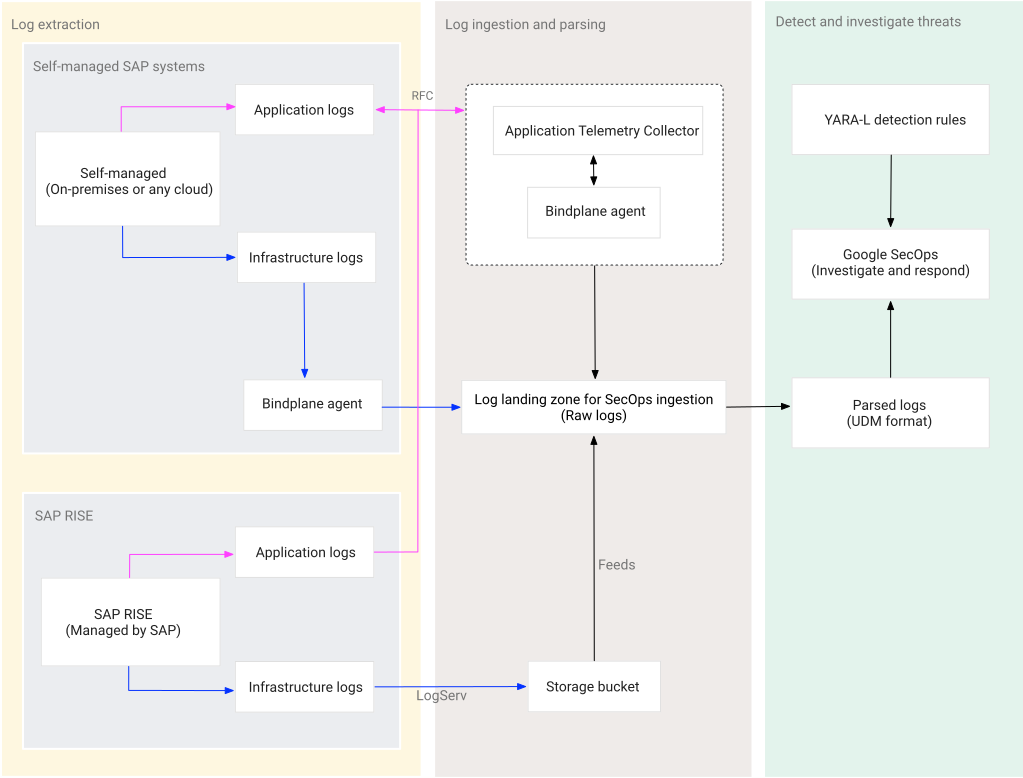
The integration lifecycle is organized into the following stages:
Log extraction: Capture logs from your SAP source and route the data to Google SecOps:
- Data capture: Infrastructure and application logs are gathered from your environment using SAP LogServ, the Application Telemetry Collector, or the Bindplane agent.
- Data movement: Captured logs are then securely transferred to Google SecOps through the Bindplane server or feeds.
Log ingestion and parsing: Receive and normalize raw SAP logs within Google SecOps using the standard SAP parsers to prepare the logs for analysis:
- Data ingestion: Logs are received directly by Google SecOps or pulled from storage buckets.
- Automated parsing: Google SecOps uses SAP-specific standard parsers to convert complex logs into the structured UDM format.
Detect and investigate threats: Transition from data collection to active security operations and analysis:
- Threat detection: Monitor your SAP landscape using out-of-the-box, curated YARA-L rules designed by Google security experts.
- Incident response: Pivot from alerts to action using standard investigative tools to search UDM logs and trigger automated response playbooks.
Solution components and pricing
To use Google SecOps for SAP, you combine the core security platform, specialized ingestion components, and curated security content.
Google SecOps: The central SaaS platform that provides SIEM and SOAR capabilities. Google SecOps serves as the ultimate destination for your SAP logs, featuring built-in log types and parsers that transform raw, complex SAP data into actionable security insights. Google SecOps is available in packages and pricing is based on ingestion. For more information, see the Google SecOps pricing guide and Understand your Google SecOps billing components.
Bindplane (Google Edition): Acts as the high-performance ingestion pipeline for transporting logs from self-managed SAP systems and from the Application Telemetry Collector. While Bindplane (Google Edition) is included at no additional cost for Google SecOps customers, you're responsible for the infrastructure costs of the host machines.
Application Telemetry Collector: A specialized, Docker-based log collector used to extract high-value application security logs, such as Security Audit Logs and Change Documents. Google provides the collector image at no cost. You're responsible for the infrastructure costs where the collector is hosted, as well as any associated Google Cloud service costs.
Google Cloud services: Depending on your ingestion path, you're responsible for the costs of Google Cloud services that you use:
- Cloud Storage: Stores logs from SAP LogServ and hosts dependencies for the Application Telemetry Collector. For information about pricing, see Cloud Storage pricing.
- Pub/Sub: Required for SAP RISE environments to provide the notification mechanism for near real-time ingestion. For information about pricing, see Pub/Sub pricing.
- Secret Manager: Securely stores SAP service user credentials for the Application Telemetry Collector. For information about pricing, see Secret Manager pricing.
SAP RISE (LogServ): Provides streamlined access to infrastructure logs for customers in SAP RISE environments. SAP manages this service, which delivers logs to a storage bucket and uses an event-driven notification mechanism, such as Pub/Sub, to achieve near real-time ingestion with minimal latency. To use LogServ and understand its pricing, contact your SAP account representative.
SAP Content Reference: An open-source collection of sample YARA-L rules designed to help your team identify threats within your SAP logs using Google's deep security expertise.
Get support
For issues related to Google SecOps for SAP, contact Google SecOps support. Our team provides assistance or guides you to the right resource to help ensure a timely resolution.
For issues involving SAP systems or the LogServ service, contact SAP support. For issues related to other third-party products, such as Bindplane, contact the appropriate third-party vendor for assistance.
Get technical answers and peer support in the Google SecOps Community.