

This document describes how to use SAP function calling with the following Agent Platform hosted models, by using the Agent Platform SDK for ABAP:
You can define custom functions and provide them to the Gemini, Claude, and Gemma models using the Function Calling feature. The models do not directly invoke the custom functions, but instead generate structured data output that specifies the function name and suggested arguments. This output lets you write applications that take the structured output and call external APIs. You can then incorporate the resulting API output into a further model prompt, allowing for more comprehensive query responses.
To invoke custom logic written in SAP function modules by using the Agent Platform SDK for ABAP, you can do the following:
- Pass SAP function module names to the model as function declarations, describing the name of the function, its purpose, and related parameters.
- Automatically invoke the SAP function module when calling the model.
The following steps illustrate how you invoke an SAP function module:
- You provide an input prompt.
- The SDK passes the input prompt and function declarations to the model.
- The model reviews the prompt and declared functions to derive the function to call and suggests the parameter values to call the function.
- If you enable automatic invocation, then the SDK calls the SAP function module.
- The SDK then invokes the model with the output of the called function.
- The model responds to the final prompt with an answer enriched by the output of the called function.
- The SDK returns the response to you.
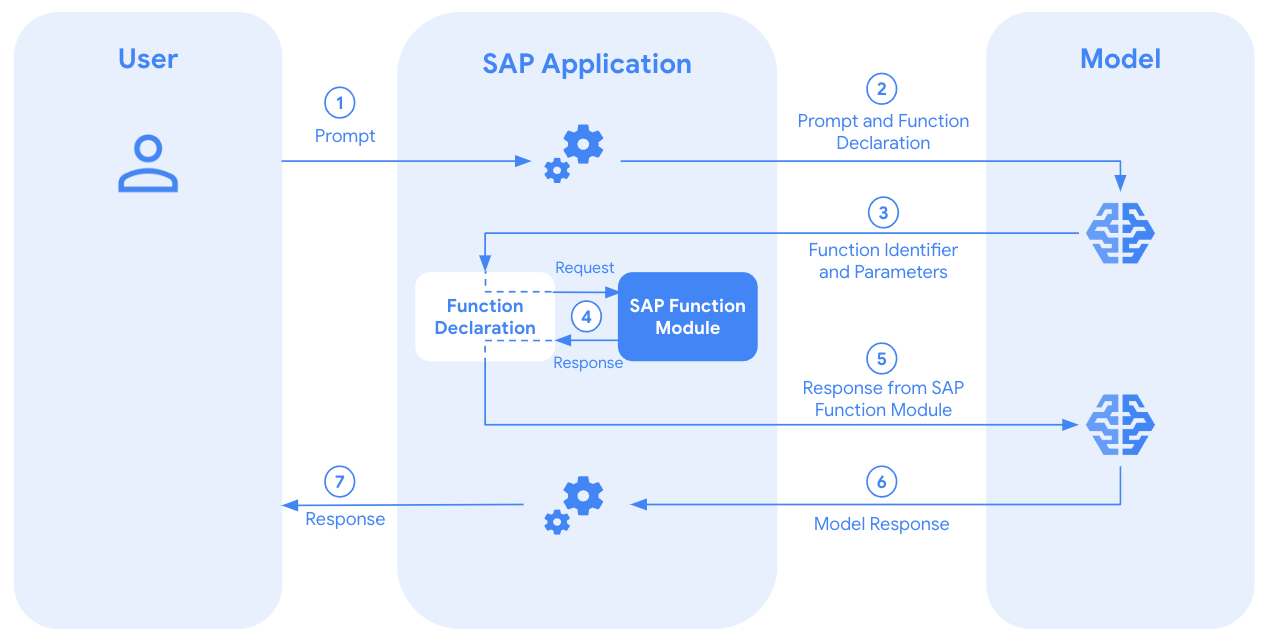
If you choose not to auto invoke SAP function modules, then the SDK lets you use the function calling feature without any SAP function module invocation. In this case, you can follow the typical function calling workflow to use external tools such as APIs and functions.
Before you begin
Before using the Agent Platform SDK for ABAP for SAP function calling, make sure that you or your administrators have completed the following prerequisites:
- Enabled the Agent Platform API in your Google Cloud project.
- Installed the Agent Platform SDK for ABAP in your SAP environment.
- Set up authentication to access the Agent Platform API.
For Gemini:
For Claude:
- Enabled a supported Claude model from the Model Garden in your Google Cloud project.
- Configured the model generation parameters.
For Gemma models:
Enrich the AI model context with SAP data
This section explains how you can enrich the AI model context with SAP data by using the Agent Platform SDK for ABAP.
Instantiate the multimodal invoker class
To invoke function calling in SAP with the Gemini models,
you use the /GOOG/CL_GENERATIVE_MODEL class.
To invoke function calling in SAP with the Claude models,
you use the /GOOG/CL_MODEL_CLAUDE class.
To invoke function calling in SAP with the Gemma models, you use the following classes:
- For Gemma on Agent Platform:
/GOOG/CL_GEMMA_ON_VERTEXAI - For Gemma on Cloud Run or
through the Gemini API:
/GOOG/CL_GEMMA_ON_CLOUDRUN
You instantiate the class by passing the model key configured in the model generation parameters.
Gemini
DATA(lo_model) = NEW /goog/cl_generative_model( iv_model_key = 'MODEL_KEY' ).
Claude
DATA(lo_model) = NEW /goog/cl_model_claude( iv_model_key = 'MODEL_KEY' ).
Gemma
" For Gemma models deployed on Agent Platform, you use the /GOOG/CL_GEMMA_ON_VERTEXAI class.
TRY.
    DATA(lo_model) = NEW /goog/cl_gemma_on_vertexai(
      iv_model_key   = 'MODEL_KEY'
      iv_project_id  = 'PROJECT_NUMBER'
      iv_location_id = 'REGION'
      iv_endpoint_id = 'AGENT_PLATFORM_ENDPOINT_ID'
    ).
  CATCH /goog/cx_sdk INTO DATA(lo_exception).
    cl_demo_output=>display( lo_exception->get_text( ) ).
    RETURN.
ENDTRY.
" For Gemma models accessed through Cloud Run, you use the /GOOG/CL_GEMMA_ON_CLOUDRUN class.
TRY.
    DATA(lo_model) = NEW /goog/cl_gemma_on_cloudrun(
      iv_model_key = 'MODEL_KEY'
    ).
  CATCH /goog/cx_sdk INTO DATA(lo_exception).
    cl_demo_output=>display( lo_exception->get_text( ) ).
    RETURN.
ENDTRY.
Replace the following:
MODEL_KEY: The model key name, which is configured in the model generation parameters.PROJECT_NUMBER: Your Google Cloud project number where the Gemma model is deployed.REGION: The Google Cloud region where your Agent Platform endpoint is deployed.AGENT_PLATFORM_ENDPOINT_ID: The ID of the Agent Platform endpoint to which your Gemma model is deployed.
Create an SAP function module
To create an SAP function module for automatic invocation by the SDK, follow the provided schema:
| Category | Parameter name | Associated type |
|---|---|---|
| Importing | IT_FUNCTION_PARAMETERS |
/GOOG/T_FUNCTION_PARAMETERS |
| Exporting | EV_FUNCTION_RESPONSE |
STRING |
| Changing | CV_PROMPT |
STRING |
| Exceptions | /GOOG/CX_SDK |
Exception Class |
Based on the importing parameters, write your custom logic within the function module,
which can be either fetching SAP data through SELECT
queries, or calling an external API or module
to get the missing information.
Set the EV_FUNCTION_RESPONSE exporting parameter with the information
to pass to the large language model (LLM) context. You can also change or modify
the prompt text
in the CV_PROMPT changing parameter based on the custom logic and your
business requirement to further instruct the LLM based on different business
scenarios.
Add function declaration
To add a function declaration to the LLM context, you can use the
ADD_FUNCTION_DECLARATION method. Call the ADD_FUNCTION_DECLARATION method
each time you need to add a function to the context.
Gemini
DATA lt_parameters TYPE /goog/cl_generative_model=>tt_parameter_properties.
APPEND VALUE #( parameter_name = 'PARAMETER_NAME'
            type           = 'PARAMETER_TYPE'
            description    = 'PARAMETER_DESCRIPTION'
            is_required    = 'PARAMETER_IS_REQUIRED' ) TO lt_parameters.
lo_model->add_function_declaration( iv_name        = 'FUNCTION_MODULE_NAME'
                                iv_description = 'FUNCTION_MODULE_DESCRIPTION'
                                it_parameters  = lt_parameters ).
Claude
DATA lt_parameters TYPE /goog/cl_model_claude=>tt_parameter_properties.
APPEND VALUE #( parameter_name = 'PARAMETER_NAME'
            type           = 'PARAMETER_TYPE'
            description    = 'PARAMETER_DESCRIPTION'
            is_required    = 'PARAMETER_IS_REQUIRED' ) TO lt_parameters.
lo_model->add_function_declaration( iv_name        = 'FUNCTION_MODULE_NAME'
                                iv_description = 'FUNCTION_MODULE_DESCRIPTION'
                                it_parameters  = lt_parameters ).
Gemma
DATA lt_parameters TYPE /goog/cl_model_gemma_base=>tt_parameter_properties.
APPEND VALUE #( parameter_name = 'PARAMETER_NAME'
        type           = 'PARAMETER_TYPE'
        description    = 'PARAMETER_DESCRIPTION'
        is_required    = 'PARAMETER_IS_REQUIRED' ) TO lt_parameters.
lo_model->add_function_declaration( iv_name        = 'FUNCTION_MODULE_NAME'
                            iv_description = 'FUNCTION_MODULE_DESCRIPTION'
                            it_parameters  = lt_parameters ).
Replace the following:
PARAMETER_NAME: Name of the parameter.PARAMETER_TYPE: The data type of the parameter, such asstring,integer, orboolean.PARAMETER_DESCRIPTION: A clear explanation of the parameter's purpose and expected format.PARAMETER_IS_REQUIRED: If this parameter is mandatory for the function to operate, then pass theABAP_TRUEvalue.FUNCTION_MODULE_NAME: Name of the SAP function module.FUNCTION_MODULE_DESCRIPTION: Description of the SAP function module.
You can also declare a function without parameters, which can serve as a fallback or backup function. If a user prompt doesn't provide enough information to call a specific function, you can instruct the model to select this fallback function.
Automatically invoke an SAP function module
To automatically invoke an SAP function that the model selects, you can use the
SET_AUTO_INVOKE_SAP_FUNCTION method.
If you pass the ABAP_TRUE value in the IV_AUTO_INVOKE importing parameter,
the SDK invokes the function module and includes its response in the LLM
context to generate the final response.
You must define your function module by following the schema described in the section Create SAP function module.
lo_model->set_auto_invoke_sap_function( abap_true ).
Generate content with function calling
To pass your prompt text to a model, you can use the GENERATE_CONTENT method.
To get the response
generated by the model with the additional context
added from the SAP function module through function calling, use the GET_TEXT method.
DATA(lv_response) = lo_model->generate_content( iv_prompt_text ='PROMPT'
                           )->get_text( ).
Replace PROMPT with your text prompt.
Get the selected function name and parameter values
To get the function selected by the model
(from among the declared functions) and its suggested parameters,
use the GET_FUNCTION_CALL method:
DATA(lo_response) = lo_model_key->generate_content( iv_prompt_text = 'PROMPT' ).
lo_response->get_function_call( IMPORTING ev_function_name       = lv_function_name
                                          et_function_parameters = lt_function_parameters ).
You can also use the GET_FUNCTION_CALL method when you automatically invoke an SAP function module
is enabled. In this case, you retrieve the name and parameters of the function
that the SDK selected and automatically invoked:
DATA(lo_response) = lo_model_key->set_auto_invoke_sap_function( abap_true
                               )->generate_content( iv_prompt_text = 'PROMPT' ).
lo_response->get_function_call( IMPORTING ev_function_name       = DATA(lv_function_name)
                                          et_function_parameters = DATA(lt_function_parameters) ).
Replace PROMPT with your text prompt.
You can get the name of the selected function from the
LV_FUNCTION_NAME variable and the suggested parameters from the
LT_FUNCTION_PARAMETERS table.
You can use this information to validate, track, and log model's
actions according to your enterprise security information and event management guidelines.
Get thought signature
To use function calls with Gemini 3.1 Pro models, the
Agent Platform SDK for ABAP automatically captures and circulates the
model's internal reasoning state, also known as a
thoughtSignature
value, across multiple cycles.
For Gemini 3.0 and later models, passing a thoughtSignature
value is mandatory during function calling to maintain reasoning context. If
this signature is missing, the model returns a validation error (400 status
code).
The Agent Platform SDK for ABAP automatically manages the
thoughtSignature value for you.
However, when you automatically invoke an SAP function, you can also
retrieve the signature from the model's response using the GET_FUNCTION_CALL
method if your application logic requires it:
DATA(lo_response) = lo_model_key->generate_content( iv_prompt_text = 'PROMPT' ).
lo_response->get_function_call( IMPORTING ev_function_name       = DATA(lv_function_name)
                                          et_function_parameters = DATA(lt_function_parameters)
                        ev_thought_signature   =  DATA(lv_thought_signature) ).
If you already use the function calling feature, then you don't need to make manual changes to your code. Update your SDK to the latest version to ensure that your ABAP-based AI agents continue to work seamlessly with newer models.
Set thought signature
If you invoke function calling with Gemini 3.1 models
without automatic invocation, then you must capture the thought signature along
with the function name and parameters by using the GET_FUNCTION_CALL method.
After you execute the function, to continue the conversation with the model
and get the final response,
you must pass the captured thought signature by using
the SET_FUNCTION_CALL method.
DATA(lo_response) = lo_model_key->generate_content( iv_prompt_text = 'PROMPT' ).
lo_response->get_function_call( IMPORTING ev_function_name       = DATA(lv_function_name)
                                          et_function_parameters = DATA(lt_function_parameters)
                                          ev_thought_signature   = DATA(lv_thought_signature) ).

" Call function and capture function response

lv_model_response = lo_model_key->set_function_call(
                                          iv_function_name       = lv_function_name
                                          it_function_parameters = lt_function_parameters
                                          iv_thought_signature   = lv_thought_signature
                                        )->set_function_response(
                                          iv_function_name     = lv_function_name
                                          iv_function_response = lv_function_response
                                        )->generate_content(
                                              iv_prompt_text = 'PROMPT'
                                        )->get_text( ).
Code sample
The following code sample illustrates how to use SAP function calling to receive a final response from the model.
Gemini
DATA lt_parameters TYPE /goog/cl_generative_model=>tt_parameter_properties.
TRY.
DATA(lo_model) = NEW /goog/cl_generative_model( iv_model_key = 'MODEL_KEY' ).
APPEND VALUE #( parameter_name = 'PARAMETER_NAME'
                type           = 'PARAMETER_TYPE'
                description    = 'PARAMETER_DESCRIPTION'
                is_required    = 'PARAMETER_IS_REQUIRED' ) TO lt_parameters.
DATA(lv_response) = lo_model->add_function_declaration(
                                  iv_name        = 'FUNCTION_MODULE_NAME'
                                  iv_description = 'FUNCTION_MODULE_DESCRIPTION'
                                  it_parameters  = lt_parameters
                            )->set_auto_invoke_sap_function( abap_true
                            )->generate_content( iv_prompt_text ='PROMPT'
                            )->get_text( ).
IF lv_response IS NOT INITIAL.
    cl_demo_output=>display( lv_response ).
ENDIF.
CATCH /goog/cx_sdk INTO DATA(lo_cx_sdk).
cl_demo_output=>display( lo_cx_sdk->get_text( ) ).
ENDTRY.
Claude
DATA lt_parameters TYPE /goog/cl_model_claude=>tt_parameter_properties.
TRY.
DATA(lo_model) = NEW /goog/cl_model_claude( iv_model_key = 'MODEL_KEY' ).
APPEND VALUE #( parameter_name = 'PARAMETER_NAME'
                type           = 'PARAMETER_TYPE'
                description    = 'PARAMETER_DESCRIPTION'
                is_required    = 'PARAMETER_IS_REQUIRED' ) TO lt_parameters.
DATA(lv_response) = lo_model->add_function_declaration(
                                  iv_name        = 'FUNCTION_MODULE_NAME'
                                  iv_description = 'FUNCTION_MODULE_DESCRIPTION'
                                  it_parameters  = lt_parameters
                            )->set_auto_invoke_sap_function( abap_true
                            )->generate_content( iv_prompt_text ='PROMPT'
                            )->get_text( ).
IF lv_response IS NOT INITIAL.
    cl_demo_output=>display( lv_response ).
ENDIF.
CATCH /goog/cx_sdk INTO DATA(lo_cx_sdk).
cl_demo_output=>display( lo_cx_sdk->get_text( ) ).
ENDTRY.
Gemma
DATA: lt_parameters TYPE /goog/cl_model_gemma_base=>tt_parameter_properties.
" Instantiate Gemma Client using /goog/cl_gemma_on_vertexai or /goog/cl_gemma_on_cloudrun
DATA(lo_model) = NEW /goog/cl_gemma_on_cloudrun( iv_model_key = 'MODEL_KEY' ).
cl_demo_output=>begin_section( 'Function Calling (Auto-Invoke)' ).
" Define a simplistic function for demo
APPEND VALUE #( parameter_name = 'PARAMETER_NAME'
              type           = 'PARAMETER_TYPE'
              description    = 'PARAMETER_DESCRIPTION'
              is_required    = 'PARAMETER_IS_REQUIRED' ) TO lt_parameters.
" Add function declaration and enable auto-invoke
lo_model->add_function_declaration(
    iv_name        = 'FUNCTION_MODULE_NAME'
    iv_description = 'FUNCTION_MODULE_DESCRIPTION'
    it_parameters  = lt_parameters
    )->set_auto_invoke_sap_function( abap_true ).
DATA(lo_response) = lo_model->generate_content( iv_prompt_text = 'PROMPT'
                                              iv_api_key     = mv_api_key ).
IF lo_response IS BOUND.
cl_demo_output=>write( '--- Final Model Response ---' ).
cl_demo_output=>write( lo_response->get_text( ) ).
ENDIF.
  cl_demo_output=>display( ).
Replace the following:
MODEL_KEY: The model key name, which is configured in the model generation parameters.PARAMETER_NAME: Name of the parameter.PARAMETER_TYPE: The data type of the parameter, such asstring,integer, orboolean.PARAMETER_DESCRIPTION: A clear explanation of the parameter's purpose and expected format.PARAMETER_IS_REQUIRED: If this parameter is mandatory for the function to operate, then pass theABAP_TRUEvalue.FUNCTION_MODULE_NAME: Name of the SAP function module.FUNCTION_MODULE_DESCRIPTION: Description of the SAP function module.PROMPT: Your text prompt.
Automatic function chaining
The automatic function chaining feature lets you invoke multiple user-defined function modules for generating a response. You can use this feature only when you enable automatic invocation for SAP function modules.
The following code sample illustrates automatic function chaining.
For the Get the air quality in my current location prompt, the model
first invokes the Z_GET_CURRENT_LOCATION function module to get
the longitude and latitude information, and then passes this information to the Z_GET_CURRENT_AIR_QUALITY function module to get the air quality for that location.
Gemini
gv_prompt = 'Get the air quality in my current location'.
gv_system_instruction = 'You are a helpful weather assistant bot. You can
turn find my location and get the weather information like temperature' &&
'You can also alert me about EarthQuakes and Storm.' &&
'You can also provide me information on Air Quality based on a location' &&
'Do not perform any other tasks.'.
TRY.
    DATA(lo_model_key) = NEW /goog/cl_generative_model( iv_model_key = 'gemini-flash-2' ).
    gv_final_op = lo_model_key->gs_ai_config-model_id.
    lo_model_key->add_function_declaration( iv_name        = 'Z_GET_CURRENT_LOCATION'
                                            iv_description = 'Get the current location'
                                            it_parameters  = gt_parameters ).
    CLEAR gt_parameters.
    gs_parameter-parameter_name = |Latitude|.
    gs_parameter-type = 'string'.
    gs_parameter-description = |Latitude|.
    gs_parameter-is_required = abap_true.
    APPEND gs_parameter TO gt_parameters.
    CLEAR gs_parameter.
    gs_parameter-parameter_name = |Longitude|.
    gs_parameter-type = 'string'.
    gs_parameter-description = |Longitude|.
    gs_parameter-is_required = abap_true.
    APPEND gs_parameter TO gt_parameters.
    CLEAR gs_parameter.
    lo_model_key->add_function_declaration( iv_name        = 'Z_GET_WEATHER_INFORMATION'
                                            iv_description = 'Gets weather information like temperature for a given location which is latitude and longitude'
                                            it_parameters  = gt_parameters ).
    lo_model_key->add_function_declaration( iv_name        = 'Z_GET_CURRENT_AIR_QUALITY'
                                            iv_description = 'Gets weather information like temperature for a given location which is latitude and longitude'
                                            it_parameters  = gt_parameters ).
    lo_model_key->add_function_declaration( iv_name        = 'GET_EARTHQUAKE_POSSIBILITY'
                                            iv_description = 'Gets possibility of Earthquake for a given location which is latitude and longitude'
                                            it_parameters  = gt_parameters ).
    lo_model_key->add_function_declaration( iv_name        = 'GET_STORM_POSSIBILITY'
                                            iv_description = 'Gets possibility of a STORM for a given location which is latitude and longitude'
                                            it_parameters  = gt_parameters ).
    lo_model_key->set_system_instructions(
      EXPORTING
        iv_text = gv_system_instruction
    ).
    DATA(lo_response) = lo_model_key->set_auto_invoke_sap_function( abap_true
                                  )->generate_content( iv_prompt_text = gv_prompt ).
    DATA(ls_response) = lo_response->get_response( ).
    /ui2/cl_json=>serialize(
      EXPORTING
        data   = ls_response-candidates[ 1 ]-content-parts           " Data to serialize
      RECEIVING
        r_json = DATA(lv_json_string)                 " JSON string
    ).
    IF lv_json_string IS NOT INITIAL.
      CLEAR gv_output.
      gv_output = lv_json_string.
    ENDIF.
  CATCH /goog/cx_sdk INTO DATA(lo_cx_sdk).
  cl_demo_output=>display( lo_cx_sdk->get_text( ) ).
ENDTRY.
lo_model_key->close( ).
CLEAR lo_model_key.
CLEAR lo_response.
CLEAR ls_response.
Claude
gv_prompt = 'Get the air quality in my current location'.
gv_system_instruction = 'You are a helpful weather assistant bot. You can turn find my location and get the weather information like temperature' &&
'You can also alert me about EarthQuakes and Storm.' &&
'You can also provide me information on Air Quality based on a location' &&
'Do not perform any other tasks.'.
TRY.
    DATA(lo_model_key) = NEW /goog/cl_model_claude( iv_model_key = 'claude' ).
    gv_final_op = lo_model_key->gs_ai_config-model_id.
    lo_model_key->add_function_declaration( iv_name        = 'Z_GET_CURRENT_LOCATION'
                                            iv_description = 'Get the current location'
                                            it_parameters  = gt_parameters ).
    CLEAR gt_parameters.
    gs_parameter-parameter_name = |Latitude|.
    gs_parameter-type = 'string'.
    gs_parameter-description = |Latitude|.
    gs_parameter-is_required = abap_true.
    APPEND gs_parameter TO gt_parameters.
    CLEAR gs_parameter.
    gs_parameter-parameter_name = |Longitude|.
    gs_parameter-type = 'string'.
    gs_parameter-description = |Longitude|.
    gs_parameter-is_required = abap_true.
    APPEND gs_parameter TO gt_parameters.
    CLEAR gs_parameter.
    lo_model_key->add_function_declaration( iv_name        = 'Z_GET_WEATHER_INFORMATION'
                                            iv_description = 'Gets weather information like temperature for a given location which is latitude and longitude'
                                            it_parameters  = gt_parameters ).
    lo_model_key->add_function_declaration( iv_name        = 'Z_GET_CURRENT_AIR_QUALITY'
                                            iv_description = 'Gets weather information like temperature for a given location which is latitude and longitude'
                                            it_parameters  = gt_parameters ).
    lo_model_key->add_function_declaration( iv_name        = 'GET_EARTHQUAKE_POSSIBILITY'
                                            iv_description = 'Gets possibility of Earthquake for a given location which is latitude and longitude'
                                            it_parameters  = gt_parameters ).
    lo_model_key->add_function_declaration( iv_name        = 'GET_STORM_POSSIBILITY'
                                            iv_description = 'Gets possibility of a STORM for a given location which is latitude and longitude'
                                            it_parameters  = gt_parameters ).
    lo_model_key->set_system_instructions(
      EXPORTING
        iv_text = gv_system_instruction
    ).
    DATA(lo_response) = lo_model_key->set_auto_invoke_sap_function( abap_true
                                  )->generate_content( iv_prompt_text = gv_prompt ).
    DATA(ls_response) = lo_response->get_response( ).
    /ui2/cl_json=>serialize(
      EXPORTING
        data   = ls_response-candidates[ 1 ]-content-parts           " Data to serialize
      RECEIVING
        r_json = DATA(lv_json_string)                 " JSON string
    ).
    IF lv_json_string IS NOT INITIAL.
      CLEAR gv_output.
      gv_output = lv_json_string.
    ENDIF.
  CATCH /goog/cx_sdk INTO DATA(lo_cx_sdk).
  cl_demo_output=>display( lo_cx_sdk->get_text( ) ).
ENDTRY.
lo_model_key->close( ).
CLEAR lo_model_key.
CLEAR lo_response.
CLEAR ls_response.
Gemma
Function chaining is not supported.
To disable automatic function chaining and get only the first function's response
from the LLM, use the SET_FUNCTION_CALLING_CONFIG method and pass
the ABAP_TRUE value in the IV_DISABLE_FUNCTION_CHAINING parameter. For example:
      lo_model_key->set_function_calling_config( iv_disable_function_chaining = abap_true ).
      DATA(lo_response) = lo_model_key->set_auto_invoke_sap_function( abap_true
                                     )->generate_content( iv_prompt_text = gv_prompt ).
If you want to get all the function modules invoked by the SDK and the
parameters passed to them, then call the GET_ALL_FUNCTION_CALLS method:
      DATA(lo_response) = lo_model_key->set_auto_invoke_sap_function( abap_true
                                     )->generate_content( iv_prompt_text = gv_prompt ).

      DATA(ls_response) = lo_response->get_all_function_calls( ).
What's next
- Learn about application development with the on-premises or any cloud edition of ABAP SDK for Google Cloud.
- Ask your questions and discuss the Agent Platform SDK for ABAP with the community on Cloud Forums.