

This guide provides an overview of the BigQuery Connector for SAP, detailing its capabilities and how it facilitates data integration between SAP systems and Google Cloud. The connector provides near real-time replication of your SAP data to the following targets:
BigQuery: Replicate SAP data to BigQuery for high-performance analytics. You can either use streaming data replication to send your data directly to BigQuery or use CDC replication to BigQuery through Pub/Sub. Once your SAP data is in BigQuery, you can perform analytics with artificial intelligence or machine learning on live SAP application data, and integrate your SAP data with data from other sources.
Cloud Storage: Replicate SAP data to Cloud Storage for high-volume staging or cost-effective storage. This file-based approach captures SAP data changes as JSON files. Once the files are available in your Cloud Storage bucket, the connector's role is complete. From this point, you assume ownership of the subsequent integration steps to BigQuery to fit your requirements.
BigQuery Connector for SAP installs into SAP Landscape Transformation Replication Server (SAP LT Replication Server) and uses the standard interfaces and capabilities of SAP Landscape Transformation Replication Server. BigQuery Connector for SAP supports all of the data sources that SAP LT Replication Server supports.
Google Cloud has developed the BigQuery Connector for SAP as an implementation of an SAP Business Add In (BAdI) for SAP LT Replication Server, following the SAP LT Replication Server SDK process. The connector uses the change data capture (CDC) feature of SAP LT Replication Server.
Data processing
BigQuery Connector for SAP allows only minimal data transformation, conforming to an extract, load, transform model (ELT), as opposed to an extract, transform, and load (ETL) model. For more information about these models, see Procedures and patterns for data pipelines.
For replication to BigQuery, the connector automatically suggests the fields, field names, and data types for the target table based on the source data. Before the target BigQuery table is created, you can modify the suggested values as needed. The suggested names for the target fields are based on the descriptions of the fields in the source table. For more information, see Default naming options for fields.
Although the connector automatically suggests the BigQuery data types for most fields, boolean, timestamp, and hexadecimal values cannot be interpreted automatically, so you need to map them manually. For more information, see Data type mapping.
If a target table doesn't already exist in BigQuery, then the connector creates one. For CDC replication through Pub/Sub to BigQuery, the connector also automatically creates the necessary Pub/Sub topic, schema, and subscription.
For replication to Cloud Storage, the connector captures SAP changes and delivers them as JSON files to your Cloud Storage bucket.
Regardless of the replication target, the connector provides several enhancement spots where you can insert your own custom enhancements into BigQuery Connector for SAP code. For more information, see Enhancement exits.
Supported replication paths
The BigQuery Connector for SAP supports the following replication paths:
- Change Data Capture (CDC) replication to BigQuery through Pub/Sub
- Streaming data replication to BigQuery
- File-based replication to Cloud Storage
Change Data Capture (CDC) replication to BigQuery through Pub/Sub
Use this path to keep your BigQuery tables synchronized with the current state of your SAP source systems.
Process: When a record in an SAP table is updated or deleted, the BigQuery Connector for SAP publishes this change to a Pub/Sub topic. A BigQuery subscription then streams the change directly to the corresponding BigQuery table, ensuring that the table reflects the most recent update.
User benefit: By using the Storage Write API (gRPC) CDC capabilities, this path automatically applies changes to your data. This eliminates the need for manual deduplication, ensuring that your analytics reflect the live state of your SAP application.
Streaming data replication to BigQuery
Use this path to maintain a continuous, append-only history of every change made in your SAP source system.
Process: The connector uses the BigQuery streaming API to continuously append new records, reflecting every change as a distinct entry in an insert-only mode. Existing records are never modified, instead, each update is captured as a distinct row. The most recently inserted instance of the record reflects the current state of the record in the source table.
User benefit: This approach provides a full audit trail. While the most recently inserted record represents the current state, you retain access to all previous versions of a record for time-series analysis or compliance auditing.
File-based replication to Cloud Storage
Use this path when you require the flexibility of high-volume staging or a cost-effective storage layer before data is ingested into BigQuery.
Process: The connector captures SAP changes and uses the Cloud Storage JSON API to deliver them as JSON files to your bucket. Once these files are available in your bucket, the connector's automated delivery is complete.
User benefit: This path provides maximum control over your data journey. Because the connector's role ends at the bucket, you assume ownership of the subsequent integration steps. This gives you the flexibility to load data and implement deduplication logic according to your specific schedules and downstream requirements.
The following diagram illustrates both data replication paths from SAP to Google Cloud, by using the BigQuery Connector for SAP:
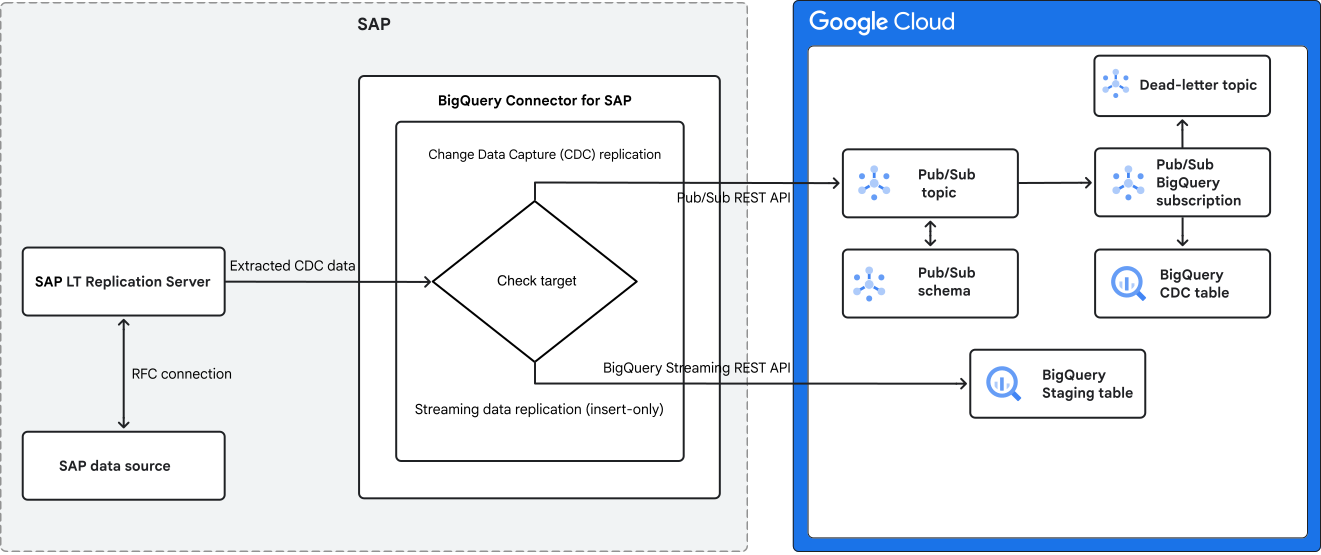
The breakdown of the data flow and components for each path is as follows:
Data extraction and initial processing (Common to all paths)
- SAP data source: Originates the data within the SAP environment.
- SAP LT Replication Server: Connects to the SAP data source through an RFC connection. Its primary role is to extract CDC data from the SAP source.
- BigQuery Connector for SAP: Receives the extracted CDC data and determines which replication path the data is going to take based on the configurations.
CDC replication path
This path focuses on replicating changes to a BigQuery CDC table through Pub/Sub. The data flow for this path is as follows:
- Pub/Sub REST API: BigQuery Connector for SAP publishes the CDC data to Pub/Sub by using the Pub/Sub REST API.
- Pub/Sub topic: This acts as a central message broker, receiving the published CDC data.
- Pub/Sub schema: Associated with the Pub/Sub topic, the schema enforces the data structure, which maintains data consistency.
- Pub/Sub BigQuery subscription: Subscribes to the Pub/Sub topic and streams the CDC data to the BigQuery CDC table.
- BigQuery CDC table: The final destination for the CDC data in BigQuery. It applies changes (updates/deletes) and inserts new records, maintaining a deduplicated, up-to-date view of the SAP data.
- Dead-letter topic: A Pub/Sub topic where messages that fail to be processed by the BigQuery subscription are sent for further manual investigation, making sure no data loss.
Streaming data replication (Insert-only) path
This path is designed for continuously inserting new records into a BigQuery staging table, preserving every change as a new entry. The data flow for this path is as follows:
- BigQuery Streaming REST API: BigQuery Connector for SAP streams the data directly to BigQuery by using the BigQuery streaming REST API.
- BigQuery staging table: The destination for the streaming data. In this insert-only mode, every change (including updates and deletes to existing SAP records) results in a new row being appended to this table.
File-based replication to Cloud Storage path
This path is designed for high-volume staging or cost-effective storage by delivering data as files before subsequent ingestion into BigQuery. The data flow for this path is as follows:
Cloud Storage JSON API: The BigQuery Connector for SAP uses the Cloud Storage JSON API to deliver the captured SAP changes to the target Cloud Storage bucket.
Cloud Storage: Acts as the staging destination where SAP data changes are stored as JSON files.
User-managed ingestion to BigQuery: Represents the boundary of the connector's automated role. Once the files are available in your bucket, the connector's role is complete and you assume ownership of the following steps:
Data ingestion: Moving the JSON files from the Cloud Storage bucket into a BigQuery staging table using your choice of ingestion methods, such as BigQuery Data Transfer Service or batch load jobs.
BigQuery staging table: The destination in BigQuery for the ingested data. Because this path is decoupled from the final analytics target, you must implement manual deduplication logic to accurately reflect the current state of your SAP data.
Choose your replication path
This section compares the replication paths to help you decide which best fits your specific data needs and operational requirements.
| Factor | CDC replication through Pub/Sub to BigQuery | Streaming data replication to BigQuery | File-based replication to Cloud Storage |
|---|---|---|---|
| How it works | Captures and applies only the changes to the BigQuery table. | Inserts every change as a new record to the BigQuery table. | Captures changes and delivers them as JSON files to a Cloud Storage bucket. |
| BigQuery result | Maintains a single, up-to-date record by natively updating or deleting existing rows. | Each change creates a new entry, leading to multiple versions of the same record. | Data is stored in a Cloud Storage bucket. The final BigQuery state depends on your custom ingestion and deduplication logic. |
| Key benefits | Provides high data consistency with the latest data. | Useful for basic ingestion and provides an audit trail. | Offers maximum flexibility for high-volume staging and cost-effective storage. | Ownership | Fully managed. The connector automates the end-to-end journey from SAP to BigQuery. | Fully managed. The connector automates the end-to-end journey from SAP to BigQuery. | Shared. The connector automates replication to the bucket, but you manage the subsequent ingestion and deduplication in BigQuery. |
Deployment architectures
You install the BigQuery Connector for SAP as a Business Add-In (BAdI) within an SAP LT Replication Server instance.
The SAP LT Replication Server instance can be on Google Cloud, on-premises, or on another cloud provider. We recommended that you place your SAP LT Replication Server instance as close to the SAP data source as possible. Work with your network team to make sure that there is low latency and high throughput between the source SAP system, SAP LT Replication Server, and your BigQuery dataset.
The following sections describe common, recommended architectures for BigQuery Connector for SAP.
Deployment architectures for CDC replication through Pub/Sub to BigQuery
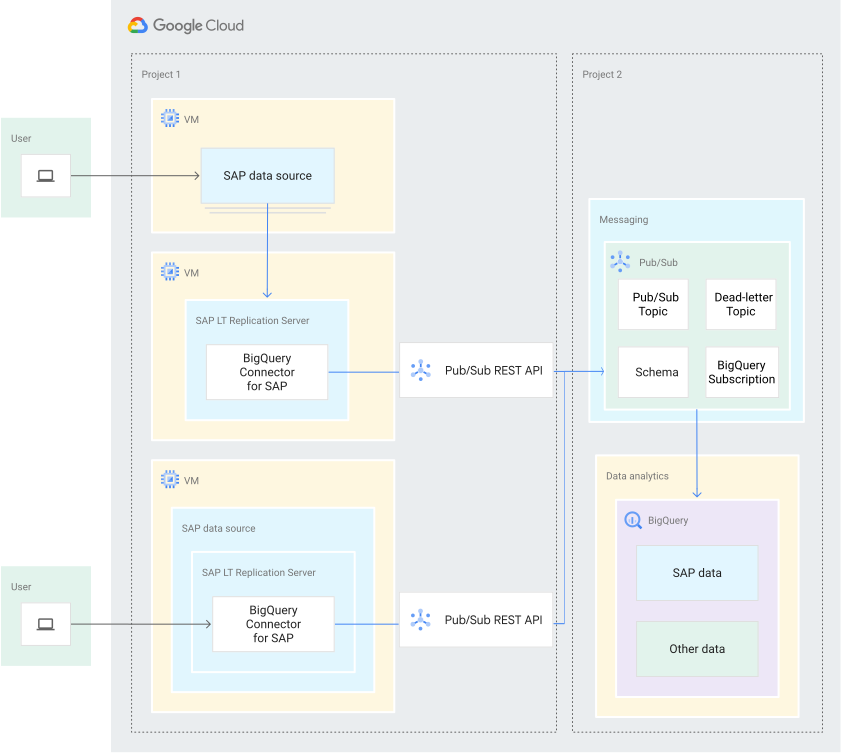
Architecture for SAP data sources on Google Cloud
The following diagram shows two example SAP LT Replication Server installations on Google Cloud, with the SAP data source on Google Cloud.
To show an example of each architecture, one installation uses an SAP LT Replication Server standalone architecture, in which SAP LT Replication Server is installed on a separate server, and the other uses an SAP LT Replication Server embedded architecture, in which SAP LT Replication Server is installed in the SAP source system server.
Because the SAP LT Replication Server instances are installed on Google Cloud, BigQuery Connector for SAP connects to the Pub/Sub API endpoint directly, without requiring a Cloud Interconnect or Cloud VPN connection.
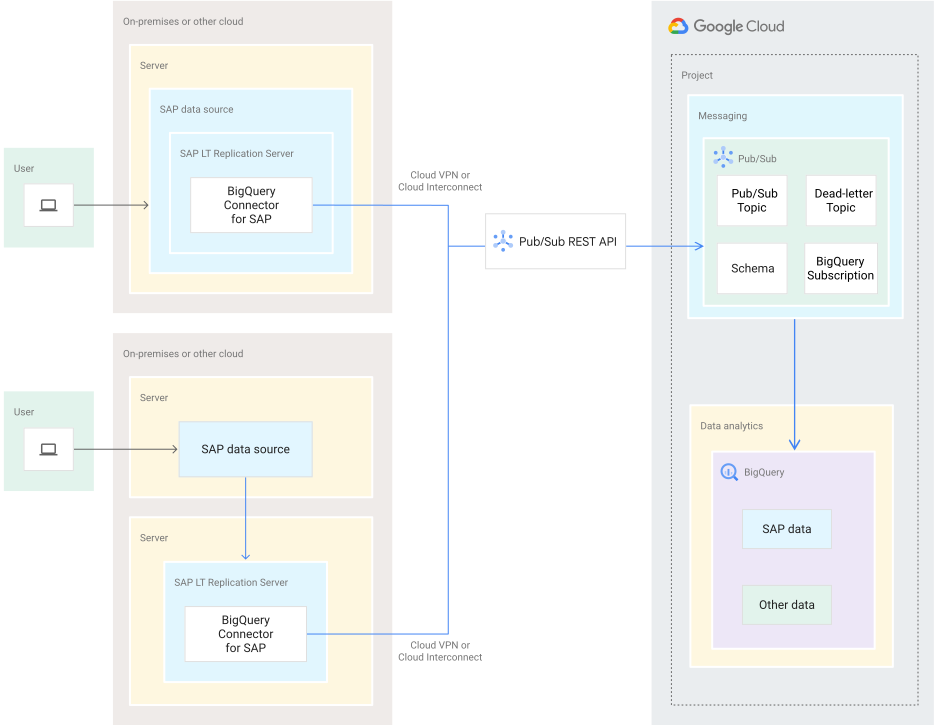
Architecture for SAP data sources on-premises or on another cloud provider
The following diagram shows two example SAP LT Replication Server installations that are running either on-premises or on another cloud provider.
To show an example of each architecture, one installation uses an SAP LT Replication Server standalone architecture and the other uses an SAP LT Replication Server embedded architecture.
In both examples, SAP LT Replication Server is installed in the same environment as the SAP data source.
The connection from BigQuery Connector for SAP in SAP LT Replication Server to Pub/Sub is provided by either a Cloud Interconnect connection or a Cloud VPN connection.
Detailed architectural view of the data flow
The following diagram shows where BigQuery Connector for SAP fits into the SAP LT Replication Server data flow:
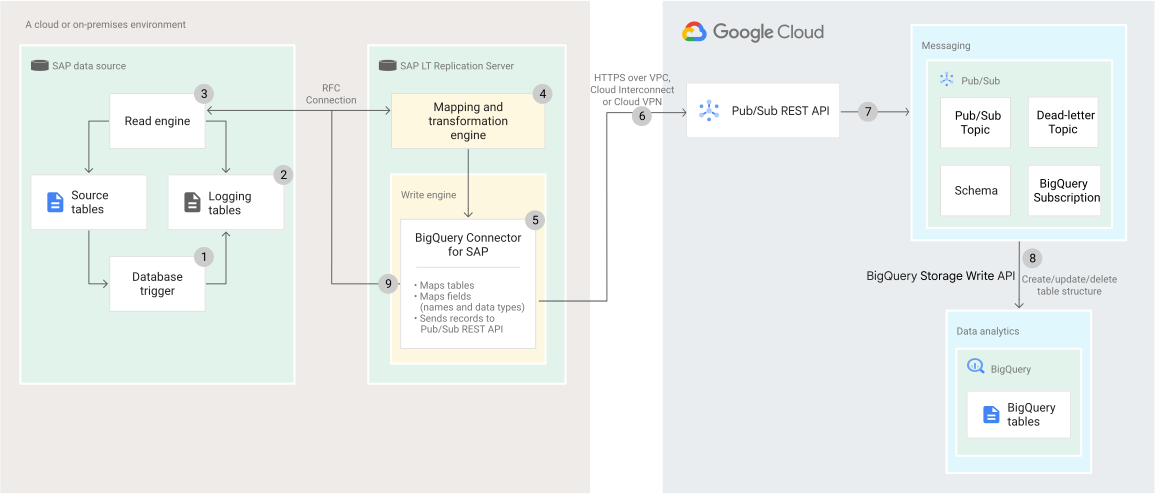
The following numbered explanations correspond to the numbers in the diagram:
- After SAP LT Replication Server is initialized, when records in the source tables are inserted, updated, or deleted, the database trigger records the changes in the logging tables.
- SAP LT Replication Server continuously checks the logging tables for new entries using RFC calls.
- If SAP LT Replication Server finds new entries, then the Read engine reads the records and calls the Mapping and transformation engine.
- The Mapping and transformation engine calls the Write engine, which invokes BigQuery Connector for SAP.
- The Write engine passes the processed data to the BigQuery Connector for SAP. Here, the connector's
custom BAdI implementation transforms the SAP change records into an Avro-compliant JSON format.
It populates specific metadata fields as follows:
_CHANGE_TYPE: Populated based on the SAP SLT operation. For example,UPSERTfor inserts or updates,DELETEfor deletions._CHANGE_SEQUENCE_NUMBER: A granular timestamp for chronological ordering and conflict resolution in BigQuery.
- The transformed messages are then published by the BigQuery Connector for SAP to Pub/Sub through the Pub/Sub REST API, by using HTTPS over a secure connection.
- Upon receiving the data, Pub/Sub takes the following
actions:
- Performs validation checks according to the schema.
- Sends an HTTP 200 (
OK) status code back to BigQuery Connector for SAP for valid messages. - Inserts the records into the BigQuery target table through the BigQuery subscription.
- Captures the messages that fail BigQuery ingestion, in a dead-letter topic, preventing data loss and simplifying troubleshooting.
- The BigQuery Storage Write API (gRPC) uses the
_CHANGE_TYPEand_CHANGE_SEQUENCE_NUMBERfields in the messages to apply the changes. The API performs insert, update, or delete operations, thereby maintaining synchronized data in the BigQuery tables for data analytics. - BigQuery Connector for SAP passes the HTTP
OKstatus code back to SAP LT Replication Server, which deletes the replicated entries from the logging table and frees resources on the SAP source system.
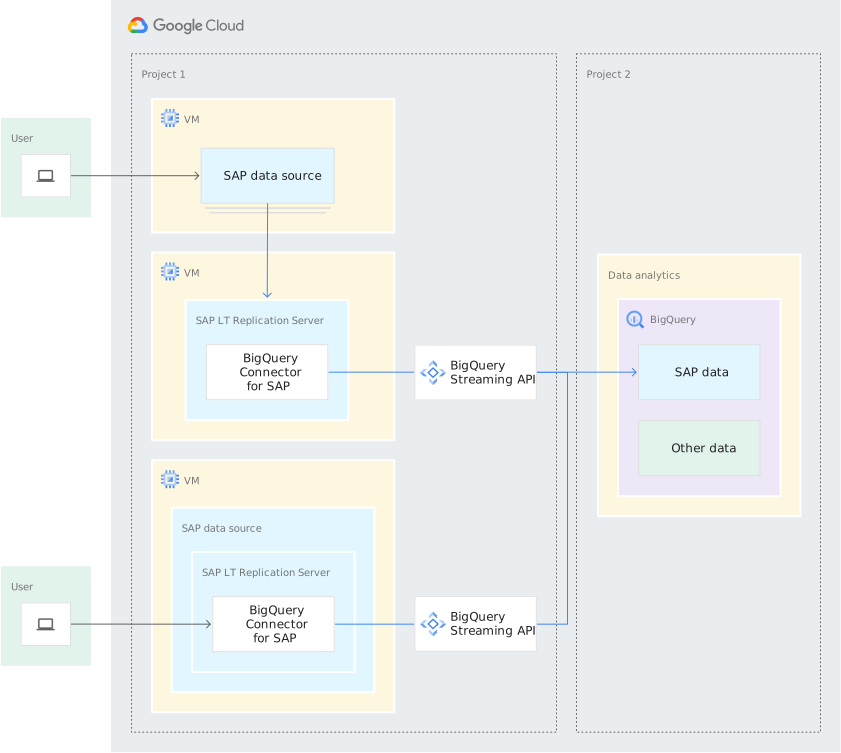
Deployment architectures for streaming data replication to BigQuery
The following diagram shows two example SAP LT Replication Server installations on Google Cloud, with the SAP data source on Google Cloud.
To show an example of each architecture, one deployment uses an SAP LT Replication Server standalone architecture, in which SAP LT Replication Server is installed on a separate server, and the other uses an SAP LT Replication Server embedded architecture, in which SAP LT Replication Server is installed in the SAP source system server.
Because the SAP LT Replication Server instances are installed on Google Cloud, BigQuery Connector for SAP connects to the BigQuery API endpoint directly, without requiring a Cloud Interconnect or Cloud VPN connection.
In the diagram, the SAP systems and BigQuery are shown in different Google Cloud projects, but you can use the same project for both, if necessary.
Architecture for SAP data sources on-premises or on another cloud provider
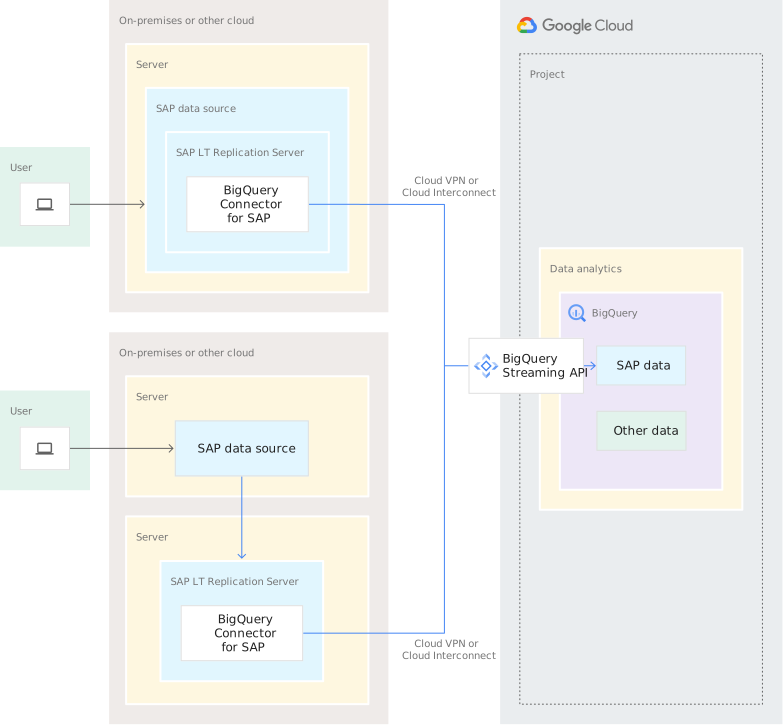
The following diagram shows two example SAP LT Replication Server installations that are running either on-premises or on another cloud provider.
To show an example of each architecture, one installation uses an SAP LT Replication Server standalone architecture and the other uses an SAP LT Replication Server embedded architecture.
In both examples, SAP LT Replication Server is installed in the same environment as the SAP data source.
The connection from BigQuery Connector for SAP in SAP LT Replication Server to BigQuery is provided by either a Cloud Interconnect connection or a Cloud VPN connection.
Detailed architectural view of the data flow
The following diagram shows where BigQuery Connector for SAP fits into the SAP LT Replication Server data flow:
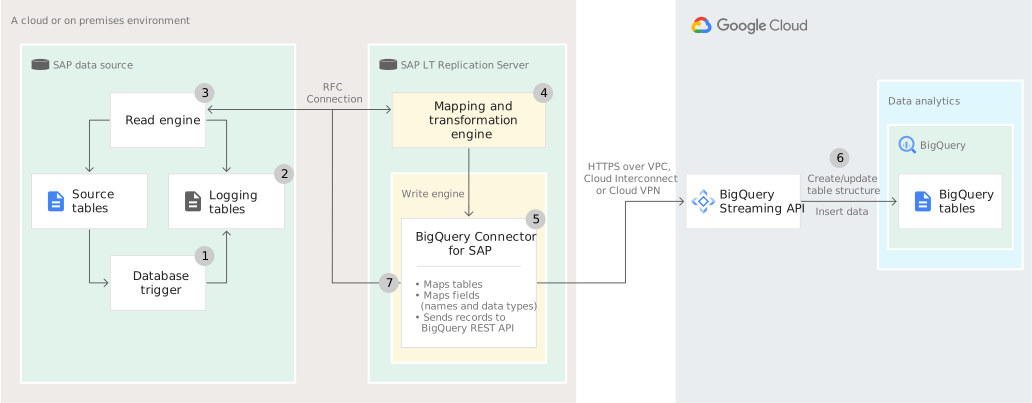
The following numbered explanations correspond to the numbers in the diagram:
- After SAP LT Replication Server is initialized, when records in the source tables are inserted, updated, or deleted, the database trigger records the changes in the logging tables.
- SAP LT Replication Server continuously checks the logging tables for new entries using RFC calls.
- If SAP LT Replication Server finds new entries, then the Read engine reads the records and calls the Mapping and transformation engine.
- The Mapping and transformation engine calls the Write engine, which invokes BigQuery Connector for SAP.
- BigQuery Connector for SAP performs the following actions:
- Maps the SAP data to the target table name, field names, and BigQuery data types.
- Creates the BigQuery table, if necessary.
- Sends the records to BigQuery in chunks through the BigQuery streaming API.
- Upon receiving the data, BigQuery takes the following
actions:
- Performs validation checks.
- Inserts the records into the target table.
- Sends an HTTP 200 (
OK) status code back to BigQuery Connector for SAP.
- BigQuery Connector for SAP passes the HTTP
OKstatus code back to SAP LT Replication Server, which deletes the replicated entries from the logging table and frees resources on the SAP source system.
Deployment architectures for file-based replication to Cloud Storage
Architecture for SAP data sources on Google Cloud
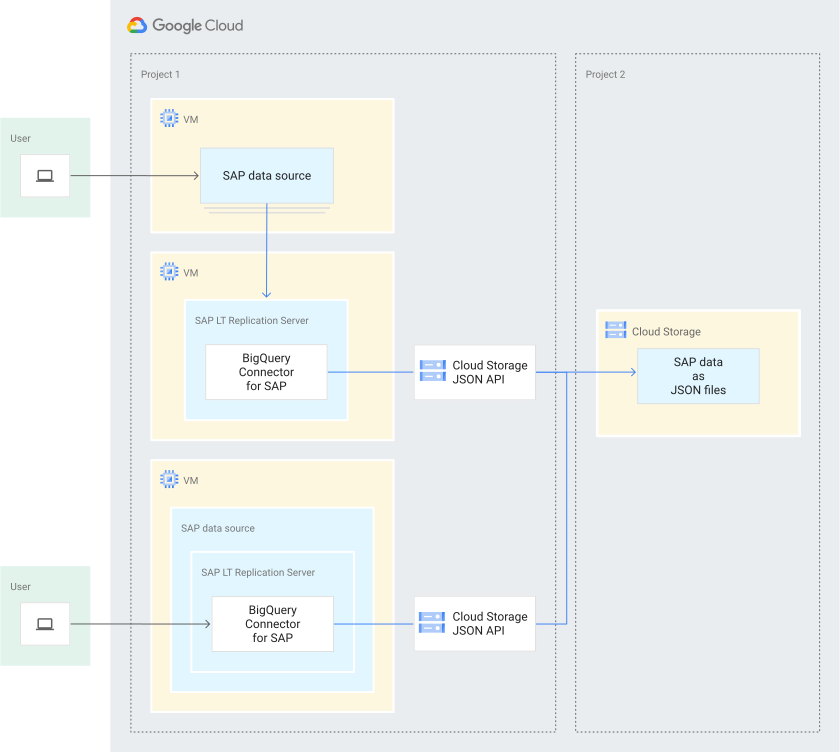
The following diagram shows two example SAP LT Replication Server installations on Google Cloud, with the SAP data source on Google Cloud.
To show an example of each architecture, one deployment uses an SAP LT Replication Server standalone architecture, in which SAP LT Replication Server is installed on a separate server, and the other uses an SAP LT Replication Server embedded architecture, in which SAP LT Replication Server is installed in the SAP source system server.
Because the SAP LT Replication Server instances are installed on Google Cloud, BigQuery Connector for SAP connects to the Cloud Storage endpoint directly, without requiring a Cloud Interconnect or Cloud VPN connection.
In the diagram, the SAP systems and Cloud Storage are shown in different Google Cloud projects, but you can use the same project for both, if necessary.
Architecture for SAP data sources on-premises or on another cloud provider
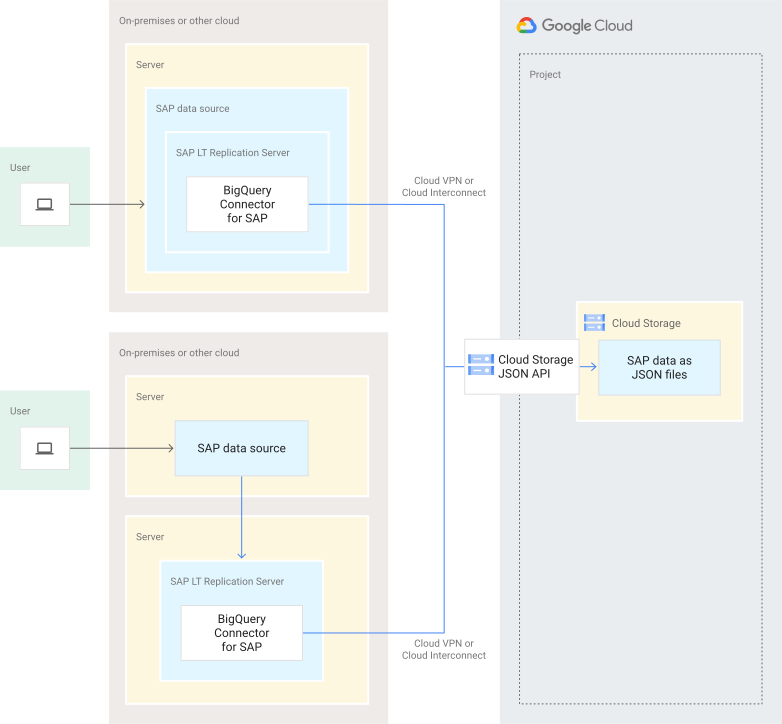
The following diagram shows two example SAP LT Replication Server installations that are running either on-premises or on another cloud provider.
To show an example of each architecture, one installation uses an SAP LT Replication Server standalone architecture and the other uses an SAP LT Replication Server embedded architecture.
In both examples, SAP LT Replication Server is installed in the same environment as the SAP data source.
The connection from BigQuery Connector for SAP in SAP LT Replication Server to Cloud Storage is provided by either a Cloud Interconnect connection or a Cloud VPN connection.
Detailed architectural view of the data flow
The following diagram shows where BigQuery Connector for SAP fits into the SAP LT Replication Server data flow:
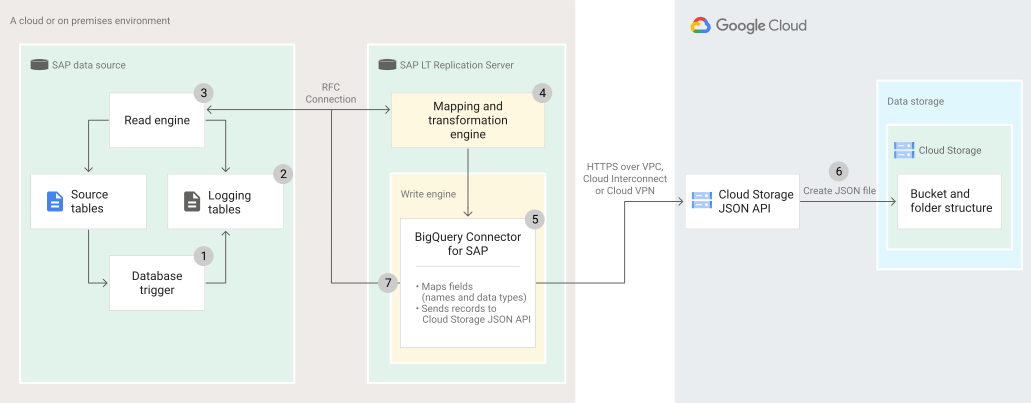
The following numbered explanations correspond to the numbers in the diagram:
- After SAP LT Replication Server is initialized, when records in the source tables are inserted, updated, or deleted, the database trigger records the changes in the logging tables.
- SAP LT Replication Server continuously checks the logging tables for new entries using RFC calls.
- If SAP LT Replication Server finds new entries, then the Read engine reads the records and calls the Mapping and transformation engine.
- The Mapping and transformation engine calls the Write engine, which invokes BigQuery Connector for SAP.
- BigQuery Connector for SAP receives the SAP data records and sends them in chunks to Cloud Storage through the Cloud Storage JSON API as JSON files.
- Upon receiving the data, Cloud Storage takes the following
actions:
- Performs validation checks.
- Stores the records as JSON files in the target bucket.
- Sends an HTTP 200 (
OK) status code back to BigQuery Connector for SAP.
- BigQuery Connector for SAP passes the HTTP
OKstatus code back to SAP LT Replication Server, which deletes the replicated entries from the logging table and frees resources on the SAP source system.
What's next
For information about planning the installation and configuration of the BigQuery Connector for SAP, see the BigQuery Connector for SAP planning guide.