

Compute Engine bare metal machine types such as X4 or X5 are designed to run multi-terabyte SAP HANA workloads. These machine require maintenance for regular software and firmware updates. These maintenance activities help ensure optimal, secure, and reliable performance of your bare metal instances.
Unlike other Compute Engine machine types, X4 and X5 don't support the live migration process during maintenance events. This means that, to perform host maintenance events, Google must stop and update the underlying host servers, making these events disruptive to your SAP HANA workloads that run on the bare metal instances.
Types of host maintenance events
Host maintenance events for Compute Engine bare metal instances are of two types:
Planned maintenance: A planned host maintenance event is a scheduled activity that begins with a 60-day advance notification to you.
Unplanned maintenance: Depending on the nature of the underlying issue, this can be emergent or critical.
Critical maintenance: This type of maintenance is performed to address a critical security update or a host error that caused your bare metal instance to crash. Because of their unplanned and critical nature, there is no advance notification period for these events.
Emergent maintenance: An emergent host maintenance event is an unplanned maintenance that is needed to address security, hardware, or software issues of medium to high severity that have a high potential for causing outages. Because the change is deemed non-critical, Google provides you with a 14-day window of time during which you can start the maintenance at a time that minimizes the disruption to your workloads. During emergent maintenance, your bare metal instance is moved to a different, healthy host.
Maintenance lifecycle
The lifecycle of a host maintenance event depends on whether it's a planned or an unplanned maintenance.
Triggering a maintenance event: During their advance notification period, you can manually trigger a planned or emergent maintenance. If you don't trigger any of these events before their planned start date and time, then Google automatically triggers it on the planned start date, at the planned start time or within a few minutes of it.
When the host server of your bare metal instance undergoes an emergent maintenance, it is moved to a different, healthy host.
Maintenance duration: A host maintenance event typically lasts up to 2 hours, during which Google stops and restarts the running instance if needed.
Frequency of maintenance events: The frequency of maintenance events depends on the type of maintenance. After a planned maintenance is complete, the earliest when Google notifies you about the next planned maintenance is at least after 30 days. However, emergent or unplanned maintenance might still occur during this period based on the criticality of the underlying issue.
Zonal isolation: Host maintenance events respect zonal isolation. This means that a Compute Engine instance in one zone of a region won't see a maintenance event within the same time window as an instance in another zone in that region.
The following sections describe the two ways in which a host maintenance event is triggered: manually by you or automatically by Google.
Maintenance event manually triggered by you
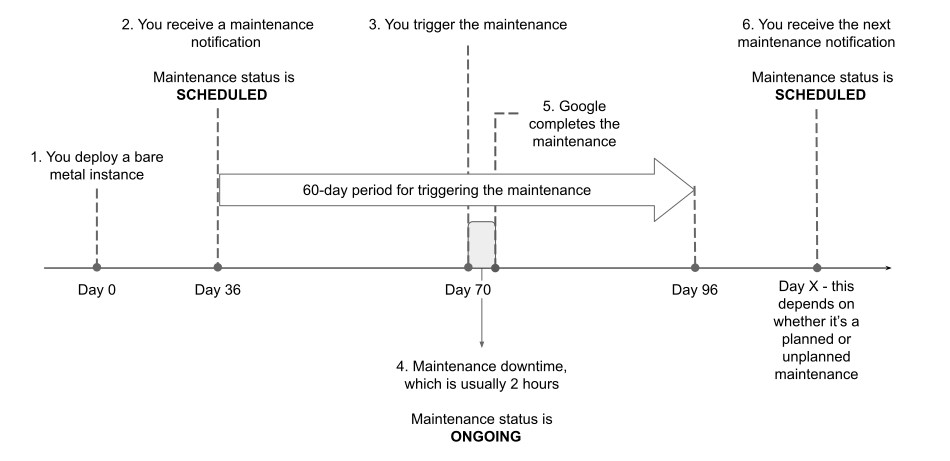
The following steps show an example sequence of actions that occur in the scenario where you trigger a planned host maintenance event. Triggering an emergent host maintenance event is the same, except that its advance notification period is 14 days.
- On day 0, you deploy a Compute Engine bare metal instance.
On day 36, you receive a notification from Google about a planned host maintenance event.
If you check the description of your bare metal instance by using the
gcloud compute instances describecommand, then you see"maintenanceStatus": "PENDING"in its response.Between day 36 and 96 (the 60-day advance notification period), you have the option to trigger the host maintenance event.
In some rare scenarios, a host maintenance event that you're notified about might become inapplicable for your bare metal instance. For more information, see Maintenance event no longer applicable.
On day 70, after you create a backup of any data or configuration stored locally on your bare metal instance, you trigger the planned host maintenance event for that instance.
For information about how to trigger a maintenance event for your bare metal instance, see Trigger a maintenance event.
Google powers down your bare metal instances for maintenance. The maintenance duration is usually 2 hours. During emergent maintenance, your bare metal instance is moved to a different, healthy host.
You can use the
gcloud compute instances describecommand to see that the instance'smaintenanceStatusfield is set toONGOING.After the maintenance activities are successfully completed, Google restarts your bare metal instances if needed.
After the planned maintenance completes, the earliest when Google notifies you about the next planned maintenance event is at least after 30 days. However, emergent or unplanned maintenance might still occur during this period based on the criticality of the underlying issue.
The following diagram illustrates the preceding set of steps:
Maintenance event automatically triggered by Google
When a host maintenance event's advance notification period concludes and you didn't trigger it manually, Google triggers the maintenance event for you on the event's planned start date, at the planned start time or within a few minutes of it.
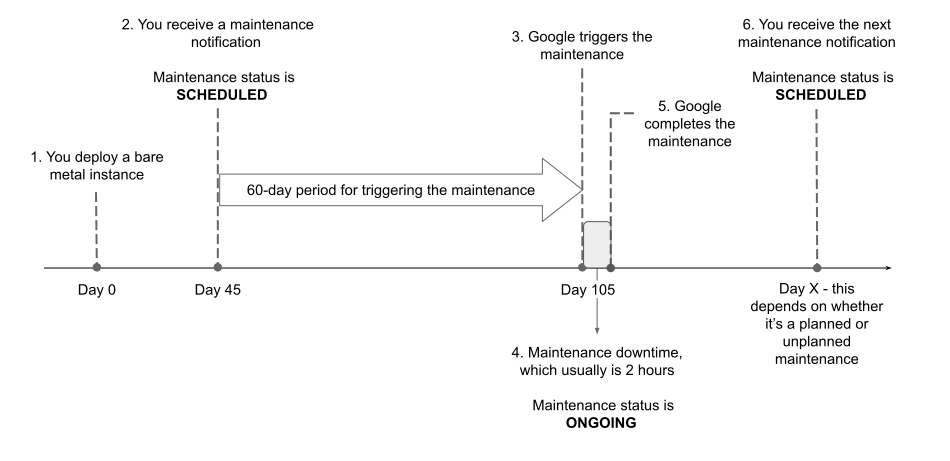
The following steps show an example sequence of actions that occur in the scenario where Google triggers a planned host maintenance event. These actions are the same for an emergent host maintenance event, except that its advance notification period is 14 days.
- On day 0, you deploy a Compute Engine bare metal instance.
On day 45, you receive from Google the notification about a planned host maintenance event.
If you check the description of your bare metal instance by using the
gcloud compute instances describecommand, then you see"maintenanceStatus": "PENDING"in its response.On day 105, which is the host maintenance event's planned start date, Google triggers the host maintenance event. Maintenance typically starts at the planned start time or within a few minutes of it.
If you check the description of your bare metal instance by using the
gcloud compute instances describecommand, then you see"maintenanceStatus": "ONGOING"in its response.Google powers down your bare metal instances for maintenance.
The maintenance window is usually 2 hours. During emergent maintenance, your bare metal instance is moved to a different, healthy host.
After the maintenance activities are successfully completed, Google restarts your bare metal instances if needed.
After the planned maintenance event completes, Google can notify you of the next planned or unplanned maintenance event. The next maintenance event adheres to the same constraints that are described in this document.
The following diagram illustrates the preceding set of steps:
View information about a maintenance event
For each host maintenance event, Google sends you an advance
notification. The notification period depends on the type of maintenance - it's
60 days for a planned host maintenance event and 14 days for an emergent host
maintenance event. All planned host maintenance events for bare metal instances are classified as
SCHEDULED maintenance, and all emergent host maintenance events are classified as
UNSCHEDULED maintenance.
To view information about a host maintenance event for your bare metal instance, you can do the following:
- Query your instance by using the Google Cloud CLI
- Query your instance by using REST API
- Query your instance's metadata server
- Check the logs in Cloud Logging
For information about how to perform these actions, including the required IAM roles and permissions, see Monitor and plan for a host maintenance event.
While using these options, you can filter for your instance by using the
machineType metadata field, which shows the machine type name of your instance.
The following is an example of how information about an instance appears in
the Logs Explorer:
metadata: {
  canReschedule: true
  latestWindowStartTime: "2025-07-21T00:00:01Z"
  machineType: "x4-1920-32t-metal"
  maintenanceStatus: "PENDING"
  type: "SCHEDULED"
  windowEndTime: "2025-07-21T04:00:00Z"
  windowStartTime: "2025-07-21T00:00:00Z"
}
methodName: "compute.instances.upcomingMaintenance"
Simulate a maintenance event
To observe the end-to-end process of a host maintenance event, or to test any integration or automation that you might have implemented, you can simulate a host maintenance event for your bare metal instance by using the gcloud CLI or REST API.
When you try to simulate a host maintenance event on a bare metal instance, the
instance terminates and restarts because the onHostMaintenance property for
bare metal instances is set to the value TERMINATE. For more information, see
Available host maintenance properties.
For information about how to simulate a host maintenance event, see Simulate host maintenance for compute instances that terminate.
Trigger a maintenance event
You can trigger a host maintenance event at any time before the event's advance notification period concludes.
To begin a host maintenance event for your X4 instance, you must stop and then start that instance. This is because manually triggering host maintenance doesn't work for X4 instances. For information about how to stop and start a Compute Engine instance, see Stop or restart a Compute Engine instance.
To trigger a host maintenance event for an X5 instance, or to check the event status, see Manually start a host maintenance event.
Maintenance event no longer applicable
In the rare event of an unplanned maintenance issue affecting your bare metal instance, Google Cloud automatically migrates the instance to a different, healthy host. Similarly, if you manually stop and start your bare metal instance during the advance notification period of a host maintenance event, then the instance is provisioned on an available host.
Google Cloud aims to maintain an up-to-date fleet of host servers to run bare metal instances. If the new host for your bare metal instance runs the latest firmware, then the previously notified host maintenance event is no longer applicable for your instance. In this situation, the host maintenance event is automatically resolved, potentially saving downtime for your SAP HANA workload.
Verify the completion of a maintenance event
To verify the successful completion of a host maintenance event for your Compute Engine bare metal instance, you can do the following:
Query you instance by using the gcloud CLI or REST API. The response won't include the
upcomingMaintenancefield.For information about how to query your instance, see Check instances for a maintenance event notification.
In Cloud Logging, check the logs for your instance. You see a log message similar to the following:
Maintenance window is completed for this instance. All maintenance notifications on the instance has been removed.
For information about how to search the logs for your instance, see Check Cloud Logging for a maintenance event notification.
Monitor maintenance events
Setting up monitoring for host maintenance events of your Compute Engine bare metal instances can help in keeping your team informed about the status of ongoing events and also about upcoming events.
You can monitor these host maintenance events as follows:
Because each maintenance event sends multiple messages to Cloud Logging, you can set up a log-based alerting policy to search for specific maintenance event notifications and send alerts by using a notification channel.
You can filter the logs by using the
machineTypemetadata field, which contains the machine type name corresponding to your bare metal instance, such asx4-960-16t-metalorx5-488-12t-metal.For information about how to configure alerts for host maintenance events, see Configure alerts for host maintenance notifications.
Create a monitoring dashboard in your Google Cloud project by importing the
maintenance-system-events.jsontemplate. This dashboard template is available in the GoogleCloudPlatform/sapagent GitHub repository.For information about how to create a monitoring dashboard by uploading a JSON file, see Install a dashboard template.