


המחבר של BigQuery ל-Apache Spark מאפשר למדעני נתונים לשלב את העוצמה של מנוע SQL עם יכולת שינוי קנה מידה חלקה עם היכולות של Apache Spark Machine Learning. במדריך הזה נראה איך להשתמש ב-Managed Service for Apache Spark, ב-BigQuery וב-Apache Spark ML כדי לבצע למידת מכונה בקבוצת נתונים.
מטרות
משתמשים ברגרסיה לינארית כדי ליצור מודל של משקל הלידה כפונקציה של חמישה גורמים:- שבועות הריון
- גיל האם
- הגיל של האב
- עלייה במשקל של האם במהלך ההיריון
- ציון אפגר
אפשר להשתמש בכלים הבאים:
- BigQuery, כדי להכין את טבלת הקלט של הרגרסיה הליניארית, שנכתבת לפרויקט Google Cloud
- Python, להרצת שאילתות ולניהול נתונים ב-BigQuery
- Apache Spark, כדי לגשת לטבלת הרגרסיה הליניארית שמתקבלת
- Spark ML, כדי ליצור ולהעריך את המודל
- Managed Service for Apache Spark PySpark job, to invoke Spark ML functions
עלויות
במסמך הזה משתמשים ברכיבים הבאים של Google Cloud, והשימוש בהם כרוך בתשלום:
- Compute Engine
- Managed Service for Apache Spark
- BigQuery
כדי ליצור הערכת עלויות בהתאם לשימוש החזוי, אתם יכולים להשתמש במחשבון התמחור.
לפני שמתחילים
באשכול Managed Service for Apache Spark מותקנים רכיבי Spark, כולל Spark ML. כדי להגדיר אשכול של Managed Service for Apache Spark ולהריץ את הקוד בדוגמה הזו, צריך לבצע את הפעולות הבאות (או לוודא שהן בוצעו):
- נכנסים לחשבון Google Cloud . אנחנו ממליצים למשתמשים חדשים ב- Google Cloud ליצור חשבון כדי שיוכלו להעריך את הביצועים של המוצרים שלנו בתרחישים מהעולם האמיתי. לקוחות חדשים מקבלים בחינם גם קרדיט בשווי 300$ להרצה, לבדיקה ולפריסה של עומסי העבודה.
-
In the Google Cloud console, on the project selector page, select or create a Google Cloud project.
Roles required to select or create a project
- Select a project: Selecting a project doesn't require a specific IAM role—you can select any project that you've been granted a role on.
-
Create a project: To create a project, you need the Project Creator role
(
roles/resourcemanager.projectCreator), which contains theresourcemanager.projects.createpermission. Learn how to grant roles.
Enable the Dataproc, BigQuery, Compute Engine APIs, if any are not already enabled.
Roles required to enable APIs
To enable APIs, you need the
serviceusage.services.enablepermission. If you created the project, then you likely already have this permission through the Owner role (roles/owner). Otherwise, you can get this permission through the Service Usage Admin role (roles/serviceusage.serviceUsageAdmin). Learn how to grant roles.-
Install the Google Cloud CLI.
-
If you're using an external identity provider (IdP), you must first sign in to the gcloud CLI with your federated identity.
-
To initialize the gcloud CLI, run the following command:
gcloud init -
In the Google Cloud console, on the project selector page, select or create a Google Cloud project.
Roles required to select or create a project
- Select a project: Selecting a project doesn't require a specific IAM role—you can select any project that you've been granted a role on.
-
Create a project: To create a project, you need the Project Creator role
(
roles/resourcemanager.projectCreator), which contains theresourcemanager.projects.createpermission. Learn how to grant roles.
Enable the Dataproc, BigQuery, Compute Engine APIs, if any are not already enabled.
Roles required to enable APIs
To enable APIs, you need the
serviceusage.services.enablepermission. If you created the project, then you likely already have this permission through the Owner role (roles/owner). Otherwise, you can get this permission through the Service Usage Admin role (roles/serviceusage.serviceUsageAdmin). Learn how to grant roles.-
Install the Google Cloud CLI.
-
If you're using an external identity provider (IdP), you must first sign in to the gcloud CLI with your federated identity.
-
To initialize the gcloud CLI, run the following command:
gcloud init - יוצרים אשכול של Managed Service for Apache Spark בפרויקט. באשכול צריך להפעיל גרסה של Managed Service for Apache Spark עם Spark 2.0 ומעלה (כולל ספריות של למידת מכונה).
יצירת קבוצת משנה של נתוני לידות ב-BigQuery
בקטע הזה, תיצרו מערך נתונים בפרויקט, ואז תיצרו טבלה במערך הנתונים שאליה תעתיקו קבוצת משנה של נתוני שיעור הילודה ממערך הנתונים הציבורי natality ב-BigQuery. בהמשך המדריך הזה תשתמשו בנתוני קבוצת המשנה שבטבלה הזו כדי לחזות את משקל הלידה כפונקציה של גיל האם, גיל האב ושבועות ההיריון.
אפשר ליצור את קבוצת המשנה של הנתונים באמצעות מסוף Google Cloud או על ידי הפעלת סקריפט Python במחשב המקומי.
המסוף
יוצרים מערך נתונים בפרויקט.
- עוברים לממשק המשתמש האינטרנטי של BigQuery.
- בחלונית הניווט הימנית, לוחצים על שם הפרויקט ואז על CREATE DATASET (יצירת מערך נתונים).
- בתיבת הדו-שיח יצירת מערך נתונים:
- בשדה Dataset ID מזינים natality_regression.
- בשדה Data location, אפשר לבחור מיקום למערך הנתונים. מיקום ברירת המחדל הוא
US multi-region. אחרי שיוצרים את מערך הנתונים, אי אפשר לשנות את המיקום שלו. - בקטע Default table expiration (תפוגה של טבלה שמוגדרת כברירת מחדל), בוחרים באחת מהאפשרויות הבאות:
- אף פעם (ברירת מחדל): צריך למחוק את הטבלה באופן ידני.
- Number of days (מספר הימים): הטבלה תימחק אחרי מספר הימים שצוין ממועד היצירה שלה.
- בקטע הצפנה, בוחרים באחת מהאפשרויות הבאות:
- Google-owned and Google-managed encryption key (ברירת מחדל).
- מפתח בניהול הלקוח: ראו הגנה על נתונים באמצעות מפתחות Cloud KMS.
- לוחצים על יצירת מערך נתונים.
מריצים שאילתה במערך הנתונים הציבורי natality, ואז שומרים את תוצאות השאילתה בטבלה חדשה במערך הנתונים.
- מעתיקים את השאילתה הבאה ומדביקים אותה בעורך השאילתות, ואז לוחצים על Run (הפעלה).
CREATE OR REPLACE TABLE natality_regression.regression_input as
SELECT
weight_pounds,
mother_age,
father_age,
gestation_weeks,
weight_gain_pounds,
apgar_5min
FROM
`bigquery-public-data.samples.natality`
WHERE
weight_pounds IS NOT NULL
AND mother_age IS NOT NULL
AND father_age IS NOT NULL
AND gestation_weeks IS NOT NULL
AND weight_gain_pounds IS NOT NULL
AND apgar_5min IS NOT NULL
- אחרי שהשאילתה מסתיימת (תוך דקה בערך), התוצאות נשמרות כטבלה ב-BigQuery בשם regression_input במערך הנתונים
natality_regressionבפרויקט.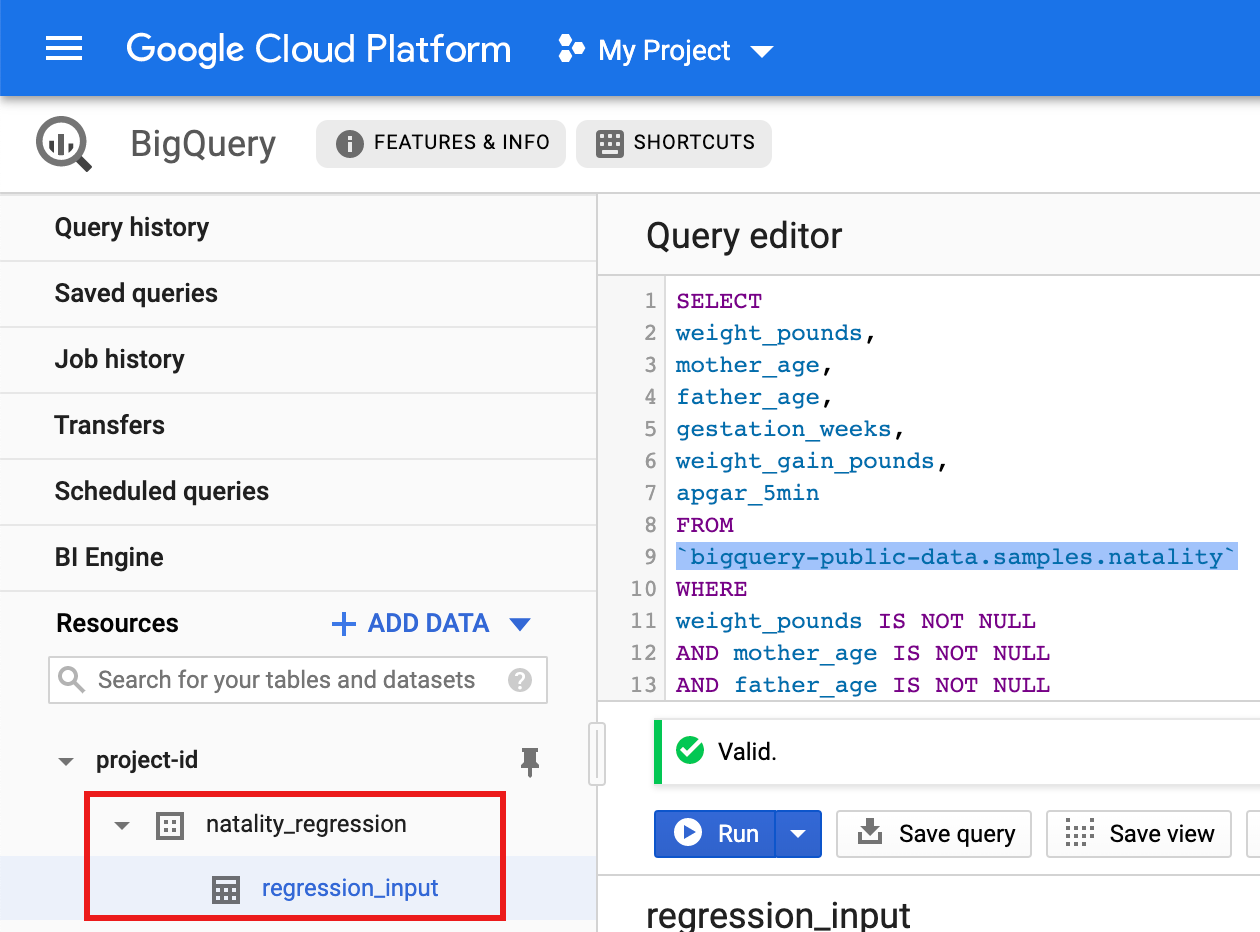
- מעתיקים את השאילתה הבאה ומדביקים אותה בעורך השאילתות, ואז לוחצים על Run (הפעלה).
Python
לפני שמנסים את הדוגמה הזו, צריך לפעול לפי Pythonההוראות להגדרה במאמר התחלה מהירה של Managed Service for Apache Spark באמצעות ספריות לקוח. מידע נוסף מופיע במאמרי העזרה של Managed Service for Apache Spark Python API.
כדי לבצע אימות ל-Managed Service for Apache Spark, מגדירים את ה-Application Default Credentials. מידע נוסף זמין במאמר הגדרת אימות לסביבת פיתוח מקומית.
הוראות להתקנת Python וספריית הלקוח של Google Cloud ל-Python (שנדרשת להרצת הקוד) מופיעות במאמר בנושא הגדרת סביבת פיתוח ב-Python. מומלץ להתקין ולהשתמש ב-Python
virtualenv.מעתיקים את הקוד
natality_tutorial.pyשבהמשך ומדביקים אותו במעטפתpythonבמחשב המקומי. מקישים על המקש<return>במעטפת כדי להריץ את הקוד וליצור מערך נתונים בשם natality_regression ב-BigQuery בפרויקט ברירת המחדלGoogle Cloud עם טבלה בשם regression_input, שאוכלסת בחלק מנתוניnatalityהציבוריים.מאשרים את היצירה של מערך הנתונים
natality_regressionושל הטבלהregression_input.
הרצת רגרסיה ליניארית
בקטע הזה מריצים רגרסיה לינארית של PySpark על ידי שליחת העבודה אל Managed Service for Apache Spark באמצעות מסוף Google Cloud או על ידי הפעלת הפקודה gcloud ממסוף מקומי.
המסוף
מעתיקים את הקוד הבא ומדביקים אותו בקובץ
natality_sparkml.pyחדש במחשב המקומי."""Run a linear regression using Apache Spark ML. In the following PySpark (Spark Python API) code, we take the following actions: * Load a previously created linear regression (BigQuery) input table into our Cloud Dataproc Spark cluster as an RDD (Resilient Distributed Dataset) * Transform the RDD into a Spark Dataframe * Vectorize the features on which the model will be trained * Compute a linear regression using Spark ML """ from pyspark.context import SparkContext from pyspark.ml.linalg import Vectors from pyspark.ml.regression import LinearRegression from pyspark.sql.session import SparkSession # The imports, above, allow us to access SparkML features specific to linear # regression as well as the Vectors types. # Define a function that collects the features of interest # (mother_age, father_age, and gestation_weeks) into a vector. # Package the vector in a tuple containing the label (`weight_pounds`) for that # row. def vector_from_inputs(r): return (r["weight_pounds"], Vectors.dense(float(r["mother_age"]), float(r["father_age"]), float(r["gestation_weeks"]), float(r["weight_gain_pounds"]), float(r["apgar_5min"]))) sc = SparkContext() spark = SparkSession(sc) # Read the data from BigQuery as a Spark Dataframe. natality_data = spark.read.format("bigquery").option( "table", "natality_regression.regression_input").load() # Create a view so that Spark SQL queries can be run against the data. natality_data.createOrReplaceTempView("natality") # As a precaution, run a query in Spark SQL to ensure no NULL values exist. sql_query = """ SELECT * from natality where weight_pounds is not null and mother_age is not null and father_age is not null and gestation_weeks is not null """ clean_data = spark.sql(sql_query) # Create an input DataFrame for Spark ML using the above function. training_data = clean_data.rdd.map(vector_from_inputs).toDF(["label", "features"]) training_data.cache() # Construct a new LinearRegression object and fit the training data. lr = LinearRegression(maxIter=5, regParam=0.2, solver="normal") model = lr.fit(training_data) # Print the model summary. print("Coefficients:" + str(model.coefficients)) print("Intercept:" + str(model.intercept)) print("R^2:" + str(model.summary.r2)) model.summary.residuals.show()
מעתיקים את הקובץ המקומי
natality_sparkml.pyלקטגוריה של Cloud Storage בפרויקט.gcloud storage cp natality_sparkml.py gs://bucket-name
מריצים את הרגרסיה מהדף Submit a job (שליחת עבודה) ב-Managed Service for Apache Spark.
בשדה Main python file (קובץ ה-Python הראשי), מזינים את ה-URI של
gs://קטגוריה של Cloud Storage שבה נמצא העותק של קובץnatality_sparkml.py.בוחרים באפשרות
PySparkבתור סוג העבודה.מזינים
gs://spark-lib/bigquery/spark-bigquery-latest_2.12.jarבשדה Jar files (קבצי Jar). כך, מחבר spark-bigquery-connector זמין לאפליקציית PySpark בזמן הריצה, ומאפשר לה לקרוא נתונים מ-BigQuery לתוך Spark DataFrame.ממלאים את השדות Job ID (מזהה המשימה), Region (אזור) ו-Cluster (אשכול).
לוחצים על Submit כדי להריץ את העבודה באשכול.
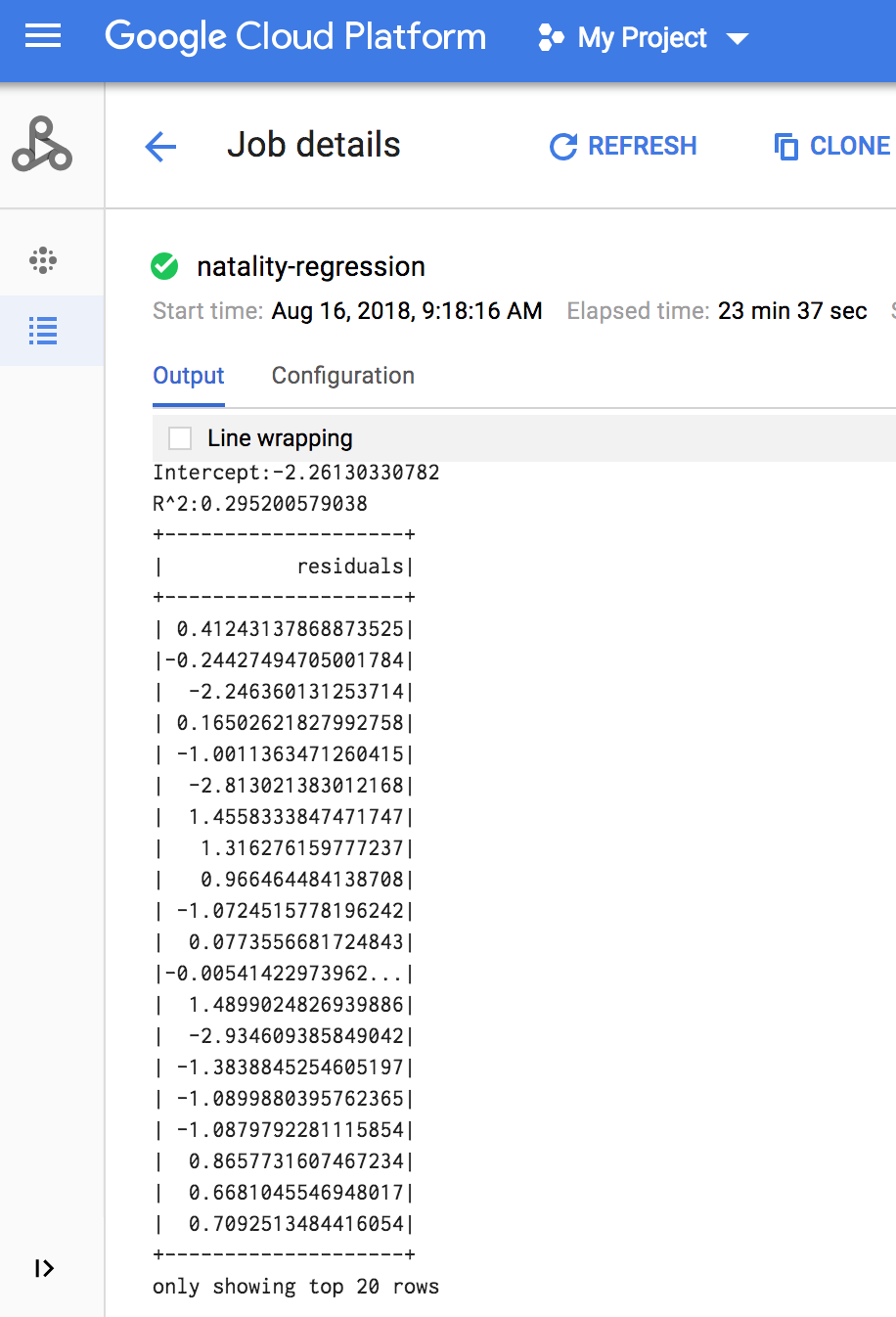
כשהעבודה מסתיימת, סיכום של מודל הפלט של הרגרסיה הלינארית מופיע בחלון פרטי העבודה של Managed Service for Apache Spark.
gcloud
מעתיקים את הקוד הבא ומדביקים אותו בקובץ
natality_sparkml.pyחדש במחשב המקומי."""Run a linear regression using Apache Spark ML. In the following PySpark (Spark Python API) code, we take the following actions: * Load a previously created linear regression (BigQuery) input table into our Cloud Dataproc Spark cluster as an RDD (Resilient Distributed Dataset) * Transform the RDD into a Spark Dataframe * Vectorize the features on which the model will be trained * Compute a linear regression using Spark ML """ from pyspark.context import SparkContext from pyspark.ml.linalg import Vectors from pyspark.ml.regression import LinearRegression from pyspark.sql.session import SparkSession # The imports, above, allow us to access SparkML features specific to linear # regression as well as the Vectors types. # Define a function that collects the features of interest # (mother_age, father_age, and gestation_weeks) into a vector. # Package the vector in a tuple containing the label (`weight_pounds`) for that # row. def vector_from_inputs(r): return (r["weight_pounds"], Vectors.dense(float(r["mother_age"]), float(r["father_age"]), float(r["gestation_weeks"]), float(r["weight_gain_pounds"]), float(r["apgar_5min"]))) sc = SparkContext() spark = SparkSession(sc) # Read the data from BigQuery as a Spark Dataframe. natality_data = spark.read.format("bigquery").option( "table", "natality_regression.regression_input").load() # Create a view so that Spark SQL queries can be run against the data. natality_data.createOrReplaceTempView("natality") # As a precaution, run a query in Spark SQL to ensure no NULL values exist. sql_query = """ SELECT * from natality where weight_pounds is not null and mother_age is not null and father_age is not null and gestation_weeks is not null """ clean_data = spark.sql(sql_query) # Create an input DataFrame for Spark ML using the above function. training_data = clean_data.rdd.map(vector_from_inputs).toDF(["label", "features"]) training_data.cache() # Construct a new LinearRegression object and fit the training data. lr = LinearRegression(maxIter=5, regParam=0.2, solver="normal") model = lr.fit(training_data) # Print the model summary. print("Coefficients:" + str(model.coefficients)) print("Intercept:" + str(model.intercept)) print("R^2:" + str(model.summary.r2)) model.summary.residuals.show()
מעתיקים את הקובץ המקומי
natality_sparkml.pyלקטגוריה של Cloud Storage בפרויקט.gcloud storage cp natality_sparkml.py gs://bucket-name
שולחים את משימת Pyspark אל Managed Service for Apache Spark על ידי הרצת הפקודה
gcloudשמוצגת בהמשך, מחלון טרמינל במחשב המקומי.- ערך הדגל --jars מאפשר למחבר spark-bigquery-connector להיות זמין למשימת PySpark בזמן הריצה, כדי שיוכל לקרוא נתונים מ-BigQuery לתוך Spark DataFrame.
gcloud dataproc jobs submit pyspark \
    gs://your-bucket/natality_sparkml.py \
    --cluster=cluster-name \
    --region=region \
    --jars=gs://spark-lib/bigquery/spark-bigquery-with-dependencies_SCALA_VERSION-CONNECTOR_VERSION.jar
- ערך הדגל --jars מאפשר למחבר spark-bigquery-connector להיות זמין למשימת PySpark בזמן הריצה, כדי שיוכל לקרוא נתונים מ-BigQuery לתוך Spark DataFrame.
פלט הרגרסיה הלינארית (סיכום המודל) מופיע בחלון הטרמינל כשהמשימה מסתיימת.
<<< # Print the model summary. ... print "Coefficients:" + str(model.coefficients) Coefficients:[0.0166657454602,-0.00296751984046,0.235714392936,0.00213002070133,-0.00048577251587] <<< print "Intercept:" + str(model.intercept) Intercept:-2.26130330748 <<< print "R^2:" + str(model.summary.r2) R^2:0.295200579035 <<< model.summary.residuals.show() +--------------------+ | residuals| +--------------------+ | -0.7234737533344147| | -0.985466980630501| | -0.6669710598385468| | 1.4162434829714794| |-0.09373154375186754| |-0.15461747949235072| | 0.32659061654192545| | 1.5053877697929803| | -0.640142797263989| | 1.229530260294963| |-0.03776160295256...| | -0.5160734239126814| | -1.5165972740062887| | 1.3269085258245008| | 1.7604670124710626| | 1.2348130901905972| | 2.318660276655887| | 1.0936947030883175| | 1.0169768511417363| | -1.7744915698181583| +--------------------+ only showing top 20 rows.
הסרת המשאבים
אחרי שמסיימים את המדריך, אפשר למחוק את המשאבים שנוצרו, כדי שהם יפסיקו להשתמש במכסה ולצבור חיובים. בסעיפים הבאים מוסבר איך למחוק או להשבית את המשאבים האלו.
מחיקת הפרויקט
הדרך הקלה ביותר לבטל את החיוב היא למחוק את הפרויקט שיצרתם בשביל המדריך הזה.
כדי למחוק את הפרויקט:
- במסוף Google Cloud , נכנסים לדף Manage resources.
- ברשימת הפרויקטים, בוחרים את הפרויקט שרוצים למחוק ולוחצים על Delete.
- כדי למחוק את הפרויקט, כותבים את מזהה הפרויקט בתיבת הדו-שיח ולוחצים על Shut down.