


יצירת אשכול באמצעות ספריות לקוח
בדוגמת הקוד לדוגמה שבהמשך מוצג איך להשתמש בספריות הלקוח של Cloud כדי ליצור אשכול של Managed Service for Apache Spark, להריץ עבודה באשכול ואז למחוק את האשכול.
אפשר גם לבצע את המשימות האלה באמצעות:
- בקשות API ל-REST במדריכים לתחילת העבודה באמצעות API Explorer
- המסוף ב Google Cloud יצירת אשכול באמצעות המסוף Google Cloud
- Google Cloud CLI במאמר יצירת אשכול באמצעות Google Cloud CLI
לפני שמתחילים
- נכנסים לחשבון Google Cloud . אם אתם משתמשים חדשים ב- Google Cloud, צרו חשבון כדי שתוכלו להעריך את הביצועים של המוצרים שלנו בתרחישים מהעולם האמיתי. לקוחות חדשים מקבלים בחינם גם קרדיט בשווי 300$ להרצה, לבדיקה ולפריסה של עומסי העבודה.
-
In the Google Cloud console, on the project selector page, select or create a Google Cloud project.
Roles required to select or create a project
- Select a project: Selecting a project doesn't require a specific IAM role—you can select any project that you've been granted a role on.
-
Create a project: To create a project, you need the Project Creator role
(
roles/resourcemanager.projectCreator), which contains theresourcemanager.projects.createpermission. Learn how to grant roles.
-
Verify that billing is enabled for your Google Cloud project.
Enable the Dataproc API, if it is not already enabled.
Roles required to enable APIs
To enable APIs, you need the
serviceusage.services.enablepermission. If you created the project, then you likely already have this permission through the Owner role (roles/owner). Otherwise, you can get this permission through the Service Usage Admin role (roles/serviceusage.serviceUsageAdmin). Learn how to grant roles.-
In the Google Cloud console, on the project selector page, select or create a Google Cloud project.
Roles required to select or create a project
- Select a project: Selecting a project doesn't require a specific IAM role—you can select any project that you've been granted a role on.
-
Create a project: To create a project, you need the Project Creator role
(
roles/resourcemanager.projectCreator), which contains theresourcemanager.projects.createpermission. Learn how to grant roles.
-
Verify that billing is enabled for your Google Cloud project.
Enable the Dataproc API, if it is not already enabled.
Roles required to enable APIs
To enable APIs, you need the
serviceusage.services.enablepermission. If you created the project, then you likely already have this permission through the Owner role (roles/owner). Otherwise, you can get this permission through the Service Usage Admin role (roles/serviceusage.serviceUsageAdmin). Learn how to grant roles.
הרצת הקוד
כדי לנסות את ההדרכה: לוחצים על Open in Cloud Shell (פתיחה ב-Cloud Shell) כדי להריץ הדרכה של ספריות לקוח של Python Cloud שיוצרת אשכול, מריצה משימת PySpark ואז מוחקת את האשכול.
Go
- מתקינים את ספריית הלקוח. מידע נוסף זמין במאמר הגדרת סביבת הפיתוח.
- הגדרת אימות
- משכפלים ומריצים את קוד הדוגמה ב-GitHub.
Java
- מתקינים את ספריית הלקוח. מידע נוסף זמין במאמר הגדרת סביבת פיתוח בשפת Java.
- הגדרת אימות
- משכפלים ומריצים את קוד הדוגמה ב-GitHub.
Node.js
- התקנת ספריית הלקוח מידע נוסף זמין במאמר הגדרת סביבת פיתוח של Node.js.
- הגדרת אימות
- משכפלים ומריצים את קוד הדוגמה ב-GitHub.
Python
- מתקינים את ספריית הלקוח. מידע נוסף זמין במאמר הגדרת סביבת פיתוח בשפת Python.
- הגדרת אימות
- משכפלים ומריצים את קוד הדוגמה ב-GitHub.
צפייה בפלט
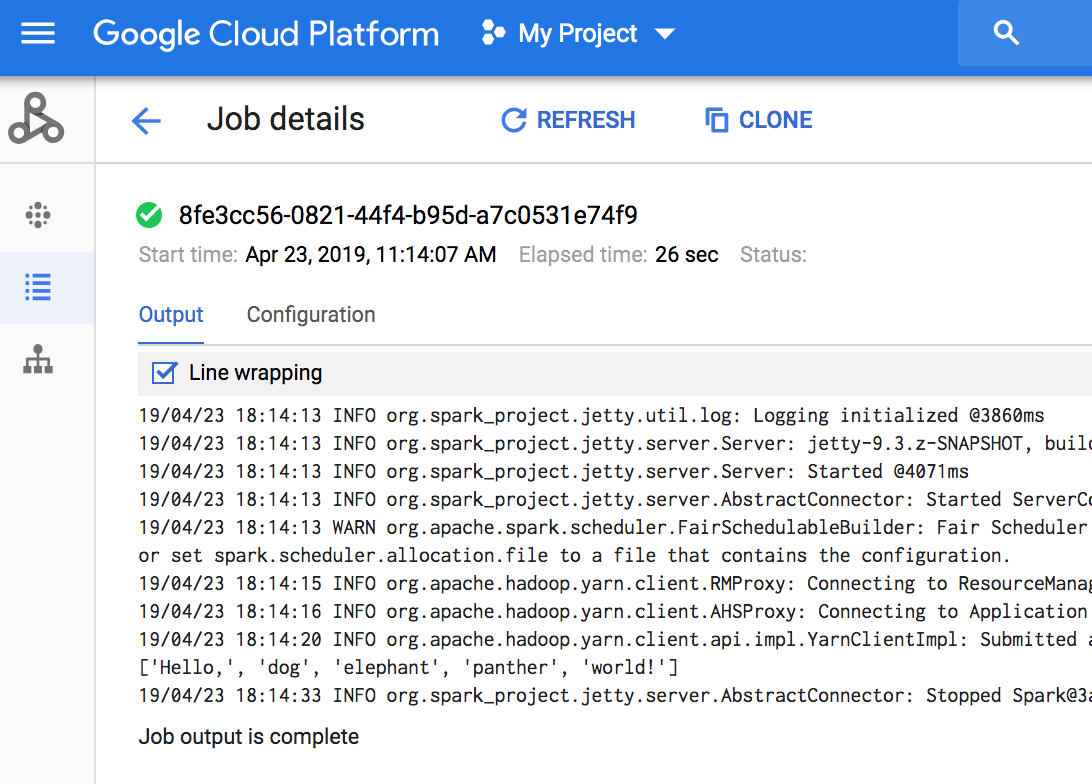
הקוד מוציא את יומן מנהל המשימות לקטגוריית ההכנה של Managed Service for Apache Spark ב-Cloud Storage. אפשר לראות את הפלט של מנהל המשימות של העבודה במסוף Google Cloud בדף Jobs של Managed Service for Apache Spark של הפרויקט במסוף Google Cloud . לוחצים על מזהה משימה כדי לראות את הפלט של העבודה בדף פרטי העבודה.
המאמרים הבאים
- משאבים נוספים בנושא Managed Service for Apache Spark Cloud Client Library