

This document describes how Gemini Enterprise integrates with Knowledge Catalog to give agents read-only tools to search for data that a user has access to and look up technical and business context.
You don't need to create a separate data store to connect to Knowledge Catalog. Instead, the Knowledge Catalog integration is automatically enabled when you connect a BigQuery, Spanner, Cloud SQL, or AlloyDB for PostgreSQL data store in federated query mode to your Gemini Enterprise app. Rather than appearing as a data store, Knowledge Catalog is a configuration option on the Assistant tab of your Gemini Enterprise app. You can also manually turn the integration on or off at any time, even outside of the companion Data Cloud connectors.
How Knowledge Catalog and Data Cloud connectors work together
In Knowledge Catalog, every cataloged data asset across your Google Cloud environment is stored as a metadata record called an entry. Because Data Cloud connectors in federated query mode have broad access to all resources that an authenticated user can view—rather than being restricted to a single dataset or table—the agent doesn't initially know where the relevant data resides.
When Knowledge Catalog is enabled for your Gemini Enterprise app—either automatically when you attach a federated Data Cloud connector, or manually on the Assistant tab—the integration provides the agent with built-in skills and read-only tools to do the following:
- Search for accessible data: Search across cataloged data assets in Knowledge Catalog that the authenticated user has permission to access.
- Look up technical and business context: Retrieve enriched metadata—including table schemas, column descriptions, business glossary terms, and pre-verified sample queries (golden queries). When paired with a companion Data Cloud connector, the agent uses these golden queries to prevent join hallucinations on complex schemas and passes this context to the connector to generate and run an accurate query.
Example workflow
The following diagram illustrates how Knowledge Catalog and a federated Data Cloud connector work together to answer a user's question:
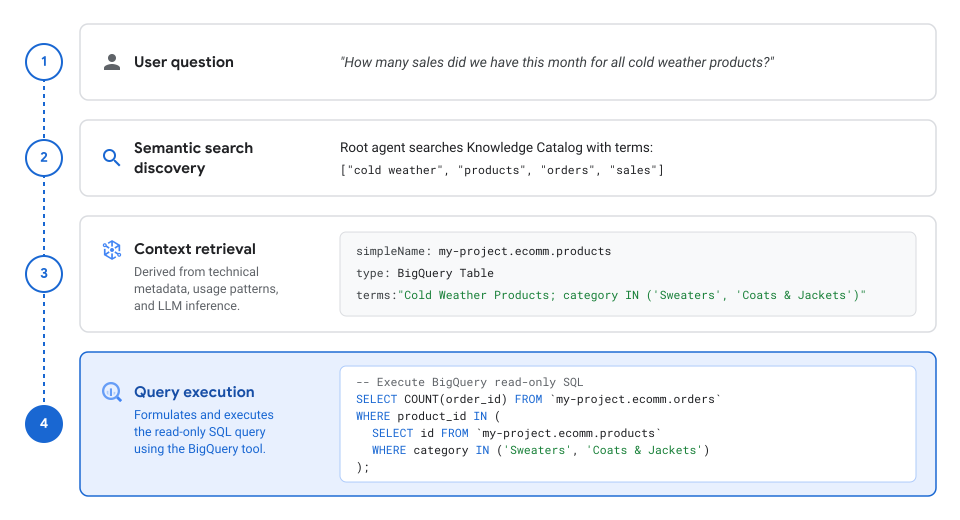
In this workflow, Gemini Enterprise completes the following steps:
User question: A user asks a natural-language question in Gemini Enterprise:
"How many sales did we have this month for all cold weather products?"Semantic search discovery: The Gemini Enterprise root agent searches Knowledge Catalog using search terms extracted from the user's question:
["cold weather", "products", "orders", "sales"]Context retrieval: For the matching entries that the user has access to, the agent looks up enriched context in Knowledge Catalog (derived from technical metadata, usage patterns, business glossaries, and LLM inference):
simpleName: my-project.ecomm.products
type: BigQuery Table
terms: "Cold Weather Products; category IN ('Sweaters', 'Coats & Jackets')"
Query execution: Using the retrieved table metadata and business definition, the agent formulates and executes a read-only SQL query through the federated BigQuery connector:
-- Execute BigQuery read-only SQL
SELECT COUNT(order_id) FROM `my-project.ecomm.orders`
WHERE product_id IN (
  SELECT id FROM `my-project.ecomm.products`
  WHERE category IN ('Sweaters', 'Coats & Jackets')
);
Before you begin
The Knowledge Catalog integration is read-only and uses internal APIs, so you don't need to enable the Dataplex API or grant MCP tool permissions, and users don't need permissions to create or modify resources in Knowledge Catalog.
Because the integration authenticates requests using end-user credentials, the agent can only find and discover data assets that the authenticated user has Identity and Access Management (IAM) permission to view:
- Separation of metadata and data access with search result trimming:
Knowledge Catalog enforces search result trimming based on
the authenticated user's permissions in the underlying data source. If a user
lacks read permissions (such as
roles/bigquery.dataViewerorroles/bigquery.metadataViewer) on a dataset or table, that asset is automatically filtered out of catalog search results and cannot be discovered by the assistant. - First-party Google Cloud data sources: Permissions for first-party
data sources—such as
BigQuery,
AlloyDB for PostgreSQL,
Spanner,
and
Cloud SQL—are
inherited automatically. For example, granting a user the BigQuery Data Viewer
(
roles/bigquery.dataViewer) role gives them access to search and discover the corresponding table and dataset metadata in Knowledge Catalog. - Additional metadata and third-party data sources: For custom metadata,
business glossaries, or third-party data assets added to
Knowledge Catalog, ensure that users have the required view
permissions in Knowledge Catalog (such as
roles/dataplex.dataDomainEntryReaderorroles/dataplex.catalogViewer) so the agent can discover that data. For more information, see Manage access with IAM in the Knowledge Catalog documentation.
Enable or disable Knowledge Catalog in your app
When you attach a BigQuery, Spanner, Cloud SQL, or AlloyDB for PostgreSQL data store in federated query mode to a Gemini Enterprise app, Knowledge Catalog and its built-in agent skills are automatically enabled for the app.
You can also manually turn the Knowledge Catalog integration on or off at any time—even outside of the companion Data Cloud connectors (for example, to enable Knowledge Catalog without attaching a Data Cloud connector, or to turn it off while keeping a Data Cloud connector active)—on the Assistant tab of your app's Configurations page:
In the Google Cloud console, go to the Gemini Enterprise page.
Click the name of the app that you want to configure.
Click Configurations, and then select the Assistant tab.
In the Enable Knowledge Catalog section, use the toggle to turn the Knowledge Catalog integration on or off.
Click Save and publish.
For more information about assistant settings, see Configure the assistant.
Next steps
- Connect a Data Cloud data source in federated query mode:
- Learn about Best practices for Data Cloud connectors that use conversational analytics.