


L'agente predefinito che hai creato nell'ultimo passaggio richiede un webhook. In questo tutorial, i webhook vengono ospitati in Cloud Run Functions per semplicità, ma esistono molti altri modi per ospitare un servizio webhook. L'esempio utilizza anche il linguaggio di programmazione Go, ma puoi utilizzare qualsiasi linguaggio supportato da Cloud Run Functions.
Crea la funzione
Le funzioni Cloud Run possono essere create con la console Google Cloud (consulta la documentazione, apri la console). Per creare una funzione per questo tutorial:
È importante che l'agente Dialogflow e la funzione si trovino nello stesso progetto. Questo è il modo più semplice per consentire a Dialogflow di avere accesso sicuro alla tua funzione. Prima di creare la funzione, seleziona il progetto dalla console Google Cloud .
Apri la pagina della panoramica di Cloud Run Functions.
Fai clic su Crea funzione e imposta i seguenti campi:
- Ambiente: 1ª generazione.
- Nome funzione: tutorial-telecommunications-webhook
- Regione: se hai specificato una regione per l'agente, utilizza la stessa regione.
- Tipo di trigger HTTP: HTTP
- URL: fai clic sul pulsante Copia qui e salva il valore. Questo URL ti servirà durante la configurazione del webhook.
- Autenticazione: Richiedi autenticazione
- Richiedi HTTPS: selezionato
Fai clic su Salva.
Fai clic su Avanti (non sono necessarie impostazioni speciali di runtime, build, connessioni o sicurezza).
Imposta i seguenti campi:
- Runtime: seleziona il runtime Go più recente.
- Codice sorgente: editor incorporato
- Punto di ingresso: HandleWebhookRequest
Sostituisci il codice con il seguente:
package cxtwh

import (
	"context"
	"encoding/json"
	"fmt"
	"log"
	"net/http"
	"os"
	"strings"

	"cloud.google.com/go/spanner"
  "google.golang.org/grpc/codes"
)

// client is a Spanner client, created only once to avoid creation
// for every request.
// See: https://cloud.google.com/functions/docs/concepts/go-runtime#one-time_initialization
var client *spanner.Client

func init() {
	// If using a database, these environment variables will be set.
	pid := os.Getenv("PROJECT_ID")
	iid := os.Getenv("SPANNER_INSTANCE_ID")
	did := os.Getenv("SPANNER_DATABASE_ID")
	if pid != "" && iid != "" && did != "" {
		db := fmt.Sprintf("projects/%s/instances/%s/databases/%s",
			pid, iid, did)
		log.Printf("Creating Spanner client for %s", db)
		var err error
		// Use the background context when creating the client,
		// but use the request context for calls to the client.
		// See: https://cloud.google.com/functions/docs/concepts/go-runtime#contextcontext
		client, err = spanner.NewClient(context.Background(), db)
		if err != nil {
			log.Fatalf("spanner.NewClient: %v", err)
		}
	}
}

type fulfillmentInfo struct {
	Tag string `json:"tag"`
}

type sessionInfo struct {
	Session    string         `json:"session"`
	Parameters map[string]any `json:"parameters"`
}

type text struct {
	Text []string `json:"text"`
}

type responseMessage struct {
	Text text `json:"text"`
}

type fulfillmentResponse struct {
	Messages []responseMessage `json:"messages"`
}

// webhookRequest is used to unmarshal a WebhookRequest JSON object. Note that
// not all members need to be defined--just those that you need to process.
// As an alternative, you could use the types provided by the Dialogflow protocol buffers:
// https://pkg.go.dev/google.golang.org/genproto/googleapis/cloud/dialogflow/cx/v3#WebhookRequest
type webhookRequest struct {
	FulfillmentInfo fulfillmentInfo `json:"fulfillmentInfo"`
	SessionInfo     sessionInfo     `json:"sessionInfo"`
}

// webhookResponse is used to marshal a WebhookResponse JSON object. Note that
// not all members need to be defined--just those that you need to process.
// As an alternative, you could use the types provided by the Dialogflow protocol buffers:
// https://pkg.go.dev/google.golang.org/genproto/googleapis/cloud/dialogflow/cx/v3#WebhookResponse
type webhookResponse struct {
	FulfillmentResponse fulfillmentResponse `json:"fulfillmentResponse"`
	SessionInfo         sessionInfo         `json:"sessionInfo"`
}

// detectCustomerAnomaly handles same-named tag.
func detectCustomerAnomaly(ctx context.Context, request webhookRequest) (
	webhookResponse, error) {
	// Create session parameters that are populated in the response.
	// This example hard codes values, but a real system
	// might look up this value in a database.
	p := map[string]any{
		"anomaly_detect":        "false",
		"purchase":              "device protection",
		"purchase_amount":       "12.25",
		"bill_without_purchase": "54.34",
		"total_bill":            "66.59",
		"first_month":           "January 1",
	}
	// Build and return the response.
	response := webhookResponse{
		SessionInfo: sessionInfo{
			Parameters: p,
		},
	}
	return response, nil
}

// validatePhoneLine handles same-named tag.
func validatePhoneLine(ctx context.Context, request webhookRequest) (
	webhookResponse, error) {
	// Create session parameters that are populated in the response.
	// This example hard codes values, but a real system
	// might look up this value in a database.
	p := map[string]any{
		"domestic_coverage":   "true",
		"phone_line_verified": "true",
	}
	// Build and return the response.
	response := webhookResponse{
		SessionInfo: sessionInfo{
			Parameters: p,
		},
	}
	return response, nil
}

// cruisePlanCoverage handles same-named tag.
func cruisePlanCoverage(ctx context.Context, request webhookRequest) (
	webhookResponse, error) {
	// Get the existing parameter values
	port := request.SessionInfo.Parameters["destination"].(string)
	port = strings.ToLower(port)
	// Check if the port is covered
	covered := "false"
	if client != nil {
		// A Spanner client exists, so access the database.
		// See: https://pkg.go.dev/cloud.google.com/go/spanner#ReadOnlyTransaction.ReadRow
		row, err := client.Single().ReadRow(ctx,
			"Destinations",
			spanner.Key{port},
			[]string{"Covered"})
		if err != nil {
			if spanner.ErrCode(err) == codes.NotFound {
				log.Printf("Port %s not found", port)
			} else {
				return webhookResponse{}, err
			}
		} else {
			// A row was returned, so check the value
			var c bool
			err := row.Column(0, &c)
			if err != nil {
				return webhookResponse{}, err
			}
			if c {
				covered = "true"
			}
		}
	} else {
		// No Spanner client exists, so use hardcoded list of ports.
		coveredPorts := map[string]bool{
			"anguilla": true,
			"canada":   true,
			"mexico":   true,
		}
		_, ok := coveredPorts[port]
		if ok {
			covered = "true"
		}
	}
	// Create session parameters that are populated in the response.
	// This example hard codes values, but a real system
	// might look up this value in a database.
	p := map[string]any{
		"port_is_covered": covered,
	}
	// Build and return the response.
	response := webhookResponse{
		SessionInfo: sessionInfo{
			Parameters: p,
		},
	}
	return response, nil
}

// internationalCoverage handles same-named tag.
func internationalCoverage(ctx context.Context, request webhookRequest) (
	webhookResponse, error) {
	// Get the existing parameter values
	destination := request.SessionInfo.Parameters["destination"].(string)
	destination = strings.ToLower(destination)
	// Hardcoded list of covered international monthly destinations
	coveredMonthly := map[string]bool{
		"anguilla":  true,
		"australia": true,
		"brazil":    true,
		"canada":    true,
		"chile":     true,
		"england":   true,
		"france":    true,
		"india":     true,
		"japan":     true,
		"mexico":    true,
		"singapore": true,
	}
	// Hardcoded list of covered international daily destinations
	coveredDaily := map[string]bool{
		"brazil":    true,
		"canada":    true,
		"chile":     true,
		"england":   true,
		"france":    true,
		"india":     true,
		"japan":     true,
		"mexico":    true,
		"singapore": true,
	}
	// Check coverage
	coverage := "neither"
	_, monthly := coveredMonthly[destination]
	_, daily := coveredDaily[destination]
	if monthly && daily {
		coverage = "both"
	} else if monthly {
		coverage = "monthly_only"
	} else if daily {
		coverage = "daily_only"
	}
	// Create session parameters that are populated in the response.
	// This example hard codes values, but a real system
	// might look up this value in a database.
	p := map[string]any{
		"coverage": coverage,
	}
	// Build and return the response.
	response := webhookResponse{
		SessionInfo: sessionInfo{
			Parameters: p,
		},
	}
	return response, nil
}

// cheapestPlan handles same-named tag.
func cheapestPlan(ctx context.Context, request webhookRequest) (
	webhookResponse, error) {
	// Create session parameters that are populated in the response.
	// This example hard codes values, but a real system
	// might look up this value in a database.
	p := map[string]any{
		"monthly_cost":   70,
		"daily_cost":     100,
		"suggested_plan": "monthly",
	}
	// Build and return the response.
	response := webhookResponse{
		SessionInfo: sessionInfo{
			Parameters: p,
		},
	}
	return response, nil
}

// Define a type for handler functions.
type handlerFn func(ctx context.Context, request webhookRequest) (
	webhookResponse, error)

// Create a map from tag to handler function.
var handlers map[string]handlerFn = map[string]handlerFn{
	"detectCustomerAnomaly": detectCustomerAnomaly,
	"validatePhoneLine":     validatePhoneLine,
	"cruisePlanCoverage":    cruisePlanCoverage,
	"internationalCoverage": internationalCoverage,
	"cheapestPlan":          cheapestPlan,
}

// handleError handles internal errors.
func handleError(w http.ResponseWriter, err error) {
	log.Printf("ERROR: %v", err)
	http.Error(w,
		fmt.Sprintf("ERROR: %v", err),
		http.StatusInternalServerError)
}

// HandleWebhookRequest handles WebhookRequest and sends the WebhookResponse.
func HandleWebhookRequest(w http.ResponseWriter, r *http.Request) {
	var request webhookRequest
	var response webhookResponse
	var err error

	// Read input JSON
	if err = json.NewDecoder(r.Body).Decode(&request); err != nil {
		handleError(w, err)
		return
	}
	log.Printf("Request: %+v", request)

	// Get the tag from the request, and call the corresponding
	// function that handles that tag.
	tag := request.FulfillmentInfo.Tag
	if fn, ok := handlers[tag]; ok {
		response, err = fn(r.Context(), request)
	} else {
		err = fmt.Errorf("Unknown tag: %s", tag)
	}
	if err != nil {
		handleError(w, err)
		return
	}
	log.Printf("Response: %+v", response)

	// Send response
	if err = json.NewEncoder(w).Encode(&response); err != nil {
		handleError(w, err)
		return
	}
}
Fai clic su Esegui il deployment.
Attendi finché l'indicatore di stato non mostra che il deployment della funzione è stato eseguito correttamente. Durante l'attesa, esamina il codice di cui hai appena eseguito il deployment.
Configura il webhook per l'agente
Ora che il webhook esiste come servizio, lo assocerai al tuo agente. Per configurare il webhook per l'agente:
- Apri la console Dialogflow CX.
- Scegli il tuo progetto Google Cloud.
- Seleziona l'agente.
- Seleziona la scheda Gestisci.
- Fai clic su Webhook.
- Fai clic sul webhook esistente (creato dall'agente predefinito).
- Aggiorna l'URL webhook con l'URL webhook che hai salvato durante la creazione della funzione.
- Imposta Sottotipo su Standard.
- Fai clic su Salva.
Prova l'agente
Ora l'agente è pronto per essere provato. Fai clic sul pulsante Test Agent per aprire il simulatore. Prova ad avere la seguente conversazione con l'agente:
| Turno di conversazione | Tu | Agente |
|---|---|---|
| 1 | Ciao | Ciao! Sono l'agente virtuale per le telecomunicazioni. Posso aiutarti a risolvere i problemi relativi alla fatturazione e ai piani, a risolvere i problemi e ad aggiungere piani di viaggio e di crociera. Come posso aiutarti oggi? |
| 2 | Voglio aggiungere un piano di crociera | Fammi dare un'occhiata. Qual è il tuo numero di telefono con noi? |
| 3 | 123-123-1234 | Quanti giorni dura la tua crociera? |
| 4 | 7 | L'opzione 1 include chiamate e messaggi. Il costo è di [XX] $/giorno. Scopri di più qui [URL]. L'opzione 2 include chiamate, messaggi e dati. Il costo è di [XX] $/giorno. Scopri di più qui [URL]. Quale piano di crociera vuoi aggiungere? |
| 5 | Opzione 1 | Ok. Ho aggiunto il piano al tuo account. Durante la crociera, potresti aver bisogno di copertura anche a terra. In quale porto farai scalo? |
| 6 | Messico | E quanti giorni trascorrerai lì? |
| 7 | 3 | Ottime notizie. Il Messico ha una copertura senza costi sulla terraferma. Ecco fatto. Posso fare qualcos'altro per aiutarti oggi? |
Questa particolare conversazione è stata gestita dal flusso Cruise Plan.
Al turno di conversazione n. 6, hai fornito "Messico" come porto di destinazione.
Il porto di destinazione e il numero di giorni di permanenza vengono acquisiti come parametri del modulo destination e trip_duration della pagina Collect Port.
Sfoglia l'agente per trovare queste definizioni dei parametri.
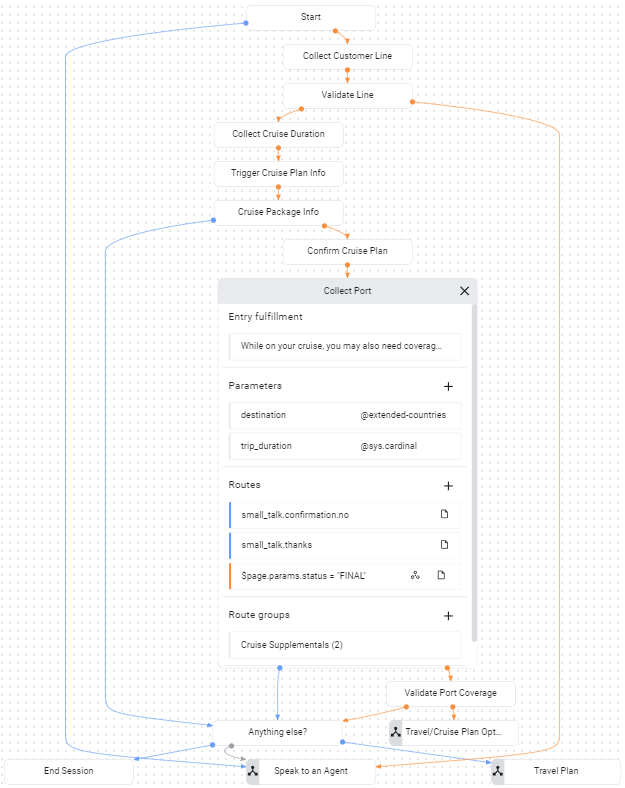
Nella pagina Collect Port,
esiste un percorso di condizione per il completamento del modulo:
$page.params.status = "FINAL".
Una volta forniti i due parametri del modulo, viene chiamata questa route.
Questo percorso chiama il webhook e fornisce il tag cruisePlanCoverage al webhook.
Se esamini il codice del webhook riportato sopra,
noterai che questo tag attiva la chiamata della funzione con nome.
Questa funzione determina se la destinazione fornita è coperta dal piano. La funzione controlla se sono impostate variabili di ambiente specifiche con informazioni per la connessione al database. Se queste variabili di ambiente non sono impostate, la funzione utilizza un elenco di destinazioni impostato come hardcoded. Nei passaggi successivi, modificherai l'ambiente della funzione in modo che recuperi i dati da un database per convalidare la copertura del piano per le destinazioni.
Risoluzione dei problemi
Il codice del webhook include istruzioni di log. Se riscontri problemi, prova a visualizzare i log della funzione.
Ulteriori informazioni
Per ulteriori informazioni sui passaggi precedenti, consulta: