

For an agent's conversational turn, the agent must respond to the end-user with an answer to a question, a query for information, or session termination. Your agent may also need to contact your service to generate dynamic responses or take actions for a turn. Fulfillment is used to accomplish all of this.
A fulfillment may contain any of the following:
- Static response messages.
- Webhook calls for dynamic responses and/or to take actions.
- Parameter presets to set or override parameter values.
During an agent's turn, it is possible (and sometimes desirable) to call multiple fulfillments, each of which may generate a response message. Dialogflow CX maintains these responses in a response queue. Once the agent's turn is over, Dialogflow CX sends the ordered responses to the end-user.
Fulfillment use cases
Fulfillment lets you provide response messages in the following places:
For each of these use cases, the console opens a fulfillment editing pane.
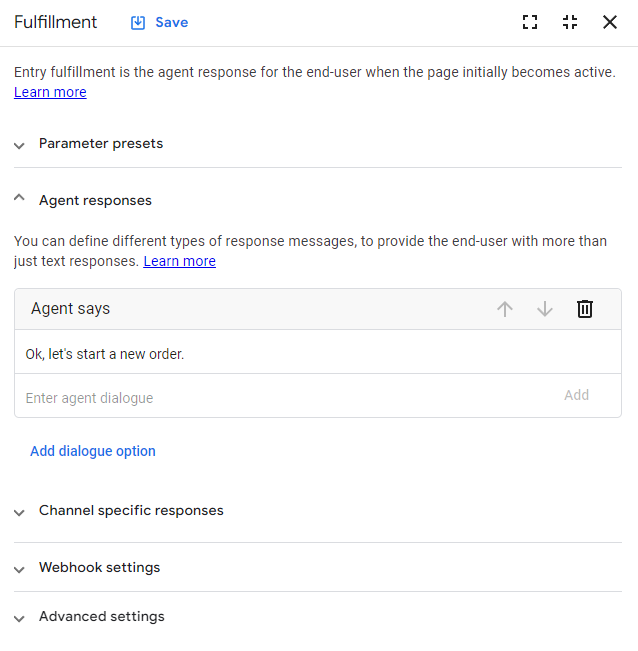
Agent responses (dialogue options)
Define agent response messages at design time when creating fulfillment. At runtime, these responses are added to the response queue.
There are several types of response messages, which are described in the following subsections. When using the console, a fulfillment panel has an initial Agent dialogue card, but you can click Add dialogue response to add more cards for other response message types.
Static text response
Static text response messages provide text dialogue to the user. If your detect intent API calls or integration calls use speech synthesis, this text generates audio content. For these messages, supplied text uses the Speech Synthesis Markup Language (SSML).
You can define multiple text response cards and multiple text responses within each card. If you define multiple cards, they are concatenated for a single response at runtime. If you define multiple responses within a card, one of the messages in the card is selected randomly at runtime.
These text messages can contain parameter references and inline system functions.
Custom payload
Some integrations support a custom payload response to handle rich responses. These custom payloads must be supplied in the JSON format defined in the integration documentation. For example, see the Dialogflow CX Messenger custom payload format.
You can include parameter references in your custom payload JSON. Wrap them in double quotes to treat them as JSON string values. For example:
{
  "someField": "$session.params.date"
}
Custom payload JSON must be limited to 24 levels of depth.
You can also send a custom payload to integrations that you develop. It won't be processed by Dialogflow CX, so you must handle it in your own business logic.
For more information, see custom payload templates.
Live agent handoff
This response signals to the detect intent API caller that the conversation should be handed off to a human agent. Dialogflow CX uses this signal only to identify conversations handed off for measurement purposes; it does not alter the session state.
Your system or integration can use this signal to take any actions necessary to hand off the conversation. Because Dialogflow CX does not impose structure on this data, you can choose any structure that suits your system.
Conversation success metadata
This response signals to the detect intent API caller that the conversation with the Dialogflow CX agent succeeded. Dialogflow CX uses this signal to identify conversations that succeeded for measurement purposes, and it doesn't alter the session state in any way.
Your system or integration can use this signal to take any actions that are necessary. Dialogflow CX doesn't impose any structure on this data, so you can choose any structure that suits your system.
Play prerecorded audio
This response plays an audio file for integrations that support this feature.
Audio file format requirements might differ for different integrations. For example, see the requirements for Dialogflow CX Phone Gateway.
For partner telephony integrations, the URL for the audio file must be accessible by the partner. A publicly available URL, such as a public file in Cloud Storage, is always accessible by the partner. The partner may also provide restricted access for audio files. See the partner documentation for details.
Output audio text
This response is similar to the text response, but it is only applicable to speech synthesis. If your agent can handle both text and voice sessions, you can use unique text and output audio text responses to create a different user experience for text versus voice. If output audio text is supplied for a voice session, the plain text responses are ignored.
If your agent handles both text and voice sessions and you want the same response messages, use text responses for both text and voice sessions.
Output audio text is concatenated similarly to text responses. If the output audio text responses are a mixture of text and SSML, the concatenated result is treated as SSML. You should ideally use either text or SSML consistently.
Conditional response
This response type provides conditional responses:
The general format is:
if [condition]
  [response]
elif [condition]
  [response]
elif [condition]
  [response]
else
  [response]
endif
where:
[condition]uses the same format as route conditions.[response]is a text response.elifandelseblocks are optional.
For example:
if $session.params.user-age >= 21
  Ok, you may enter.
else
  Sorry, you cannot enter.
endif
Both [condition] and [response] can use inline system functions to
generate dynamic values during conversations. For more information, see
system functions and
route conditions. The
[condition] is resolved based on the session state at the beginning of the
fulfillment. If the [response] relies on the session state, it is resolved
based on the updated session state at the end of fulfillment.
For multilingual agents,
[condition] is common for all languages, while [response] is
language-specific. When you change [condition] for one language in the console,
this part is updated in all of the agent's languages. Because it becomes a new
condition, [response] is cleared for all languages other than the language you
selected when updating [condition].
Telephony call transfer
Call transfers are available only for the Dialogflow CX Phone Gateway.
For some telephony integrations, you can specify a phone number in the US for call transfers. At runtime, when the Dialogflow CX agent triggers a fulfillment with call transfer, the call is transferred to the specified number and agent handling is suspended.
Data store tool response
This response type configures agent responses returned from linked data store tools. If you configured a data store tool in this fulfillment, a data store tool response card is populated automatically.
- Source links: Set the maximum number of citations to return to the user after the response. A citation is a link to the source of information in the data store, rendered as buttons. The default is 1.
- Inline citations: Limit the number of inline citations returned per sentence instead of listing links after the response.
- Generative fallback: Configure the agent to attempt an AI-generated response if the data store returns an empty result. If this fails, the agent uses static responses.
- Static responses: Enter static text responses in the final field to send to the user word-for-word.
Channel-specific response messages
When defining fulfillment, you can create channel-specific response messages to create targeted responses for text chat, voice, SMS, or specific integrations that support channels. Any response messages that are not specific to a channel are called default response messages.
At runtime, Dialogflow CX selects either the default response message or a channel-specific response message when a detect intent request specifies a channel. As a best practice, you should define default response messages, even if you are using channel-specific response messages. The default response messages act as a fallback when your system fails to provide a valid channel.
A channel name is a custom field that you can set to any text. If you use the Dialogflow CX API directly for runtime calls, you can use any channel names that you like. If you use an existing integration, you must use the channel names that the integration recognizes.
Setting channel-specific response messages at design time
To provide channel-specific response messages for fulfillment when using the console:
- Click Add channel after adding default response messages to add channel-specific response messages. Click Add channel again to add additional channels.
To provide channel-specific response messages for fulfillment when using the API:
- Set the
Fulfillment.messages[i].channelfield to the chosen channel for each response message. If this field is not set, the response is treated as a default response message.
Utilizing channel-specific response messages at runtime
If you are using an existing integration that supports channels, the integration implementation performs these steps.
To receive a channel-specific response message, you must specify the channel
in the detect intent request message. See the queryParams.channel field in
the detectIntent method of the Sessions type.
Select a protocol and version for the Session reference:
| Protocol | V3 | V3beta1 |
|---|---|---|
| REST | Session resource | Session resource |
| RPC | Session interface | Session interface |
| C++ | SessionsClient | Not available |
| C# | SessionsClient | Not available |
| Go | SessionsClient | Not available |
| Java | SessionsClient | SessionsClient |
| Node.js | SessionsClient | SessionsClient |
| PHP | Not available | Not available |
| Python | SessionsClient | SessionsClient |
| Ruby | Not available | Not available |
Dialogflow CX returns the default response message if a request defines no channel or if fulfillment finds no matching channel.
Custom payload templates
If you use custom payloads often, use custom payload templates. Custom payloads are sometimes large and complex, so using templates simplifies the agent creation process.
Provide these templates in your agent settings to make them available for selection when creating fulfillment for your agent.
For example, the JSON payload for "yes" and "no" buttons can be defined as custom payload templates. When creating fulfillment that requires these buttons, select the template when creating fulfillment.
When you select a template for a fulfillment custom payload, the contents of the template are inserted into the payload. You can then edit the payload as needed.
If you change a template, changes don't propagate automatically to all fulfillment payloads where it has been referenced.
To create a custom payload template, see the agent general settings.
To select a custom payload template when creating fulfillment, click Select template when creating a fulfillment custom payload.
Webhook calls
When a fulfillment triggers a webhook, the agent sends a request to your service. Your webhook can perform actions, provide dynamic response messages, override parameter values, and change the current page.
The following describes webhook settings for fulfillment:
| X | Item |
|---|---|
| Enable webhook | This enables webhook for the fulfillment. |
| Webhook | Select the webhook resource. |
| Tag | The text tag you provide here will get populated in the WebhookRequest.fulfillmentInfo.tag field of the webhook request sent to your webhook service. This can be used to control the webhook behavior in a way that is fulfillment-specific. |
| Return partial response | Allows cancellation of a partial response playback. For details, see Advanced speech settings. |
Parameter presets
Use fulfillment to provide presets that set or override current parameter values. These presets are applied before resolving static response messages or calling a webhook.
You can also use system functions to preset a parameter to a dynamically generated value.
Some examples include:
Setting a parameter
nowto the current time:Parameter Value now $sys.func.NOW() Incrementing an existing parameter
counterby 1:Parameter Value counter $sys.func.ADD($session.params.counter, 1) Setting a parameter
new-costto theother-costparameter value, while maintaining the full composite object value:Parameter Value new-cost $sys.func.IDENTITY($session.params.other-cost)
Data store tools
For more information about this feature, see the data store tools documentation.
Advanced speech settings
These advanced speech settings can override the page speech settings, flow speech settings, and agent speech settings.
Response queue
During an agent's turn, you can call multiple fulfillments, each of which may generate a response message. Dialogflow CX maintains these responses in a response queue.
Partial response for streaming API
By default, Dialogflow CX only sends ordered responses to end-users after the agent's turn ends. You can also enable the Return partial response option in fulfillment to return queued responses as a partial response when using the streaming APIs. To learn more, see Lifecycle of a page.
For example, if your webhook is likely to run for a long time, you can add a static response in the fulfillment and enable partial response. This causes Dialogflow CX to flush the response queue and send all messages as a partial response before calling the webhook.
Partial response is not supported for the following:
- Audio inputs in the simulator.
- Partner telephony integrations might not support partial response. See the partner documentation to verify.
To test this feature in the simulator, enable partial response.
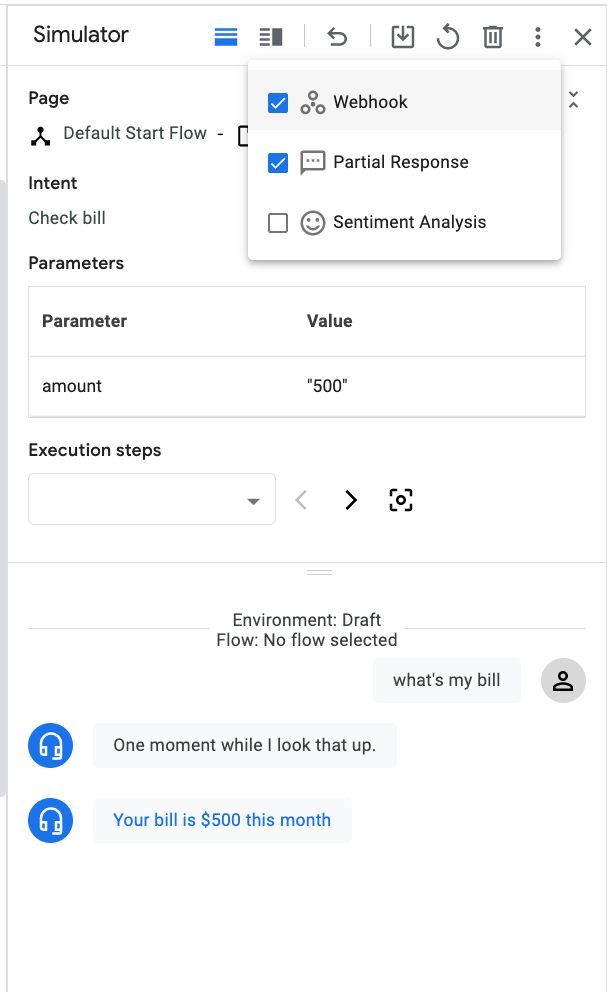
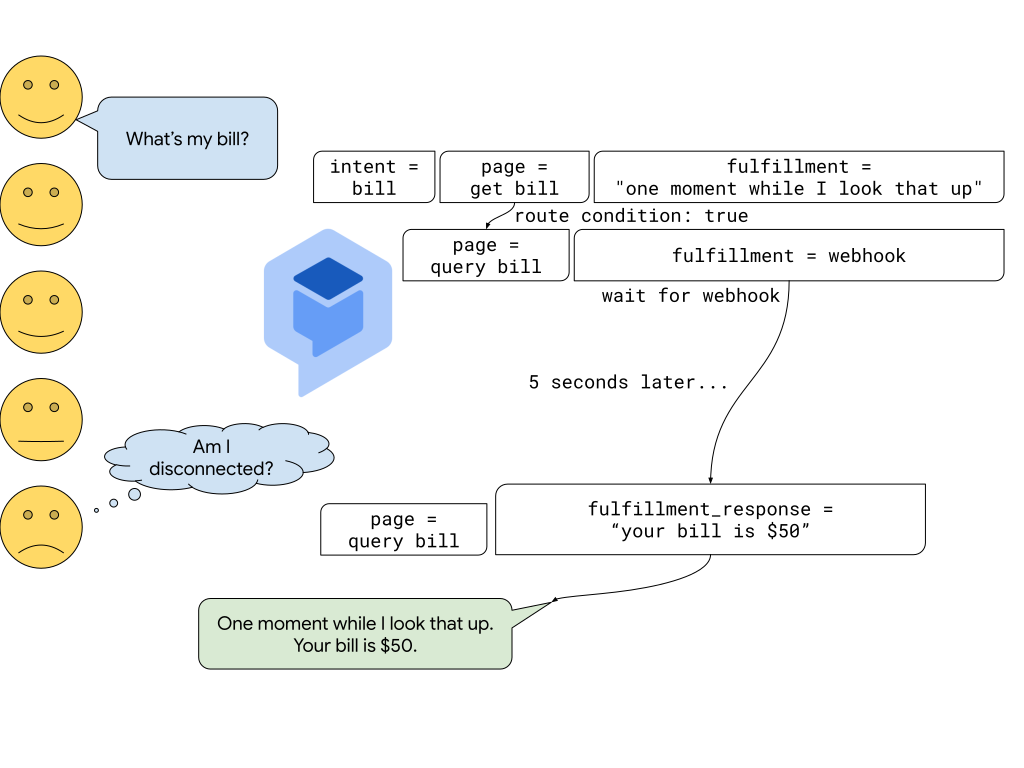
In the following example, consider that your webhook takes 5 seconds to complete and you don't enable partial response. The Dialogflow CX agent's conversational turn is not over until the webhook completes. During this 5- second turn, responses are queued while waiting for the webhook, and they are not returned to the end-user until the turn is complete. This leads to a bad user experience.
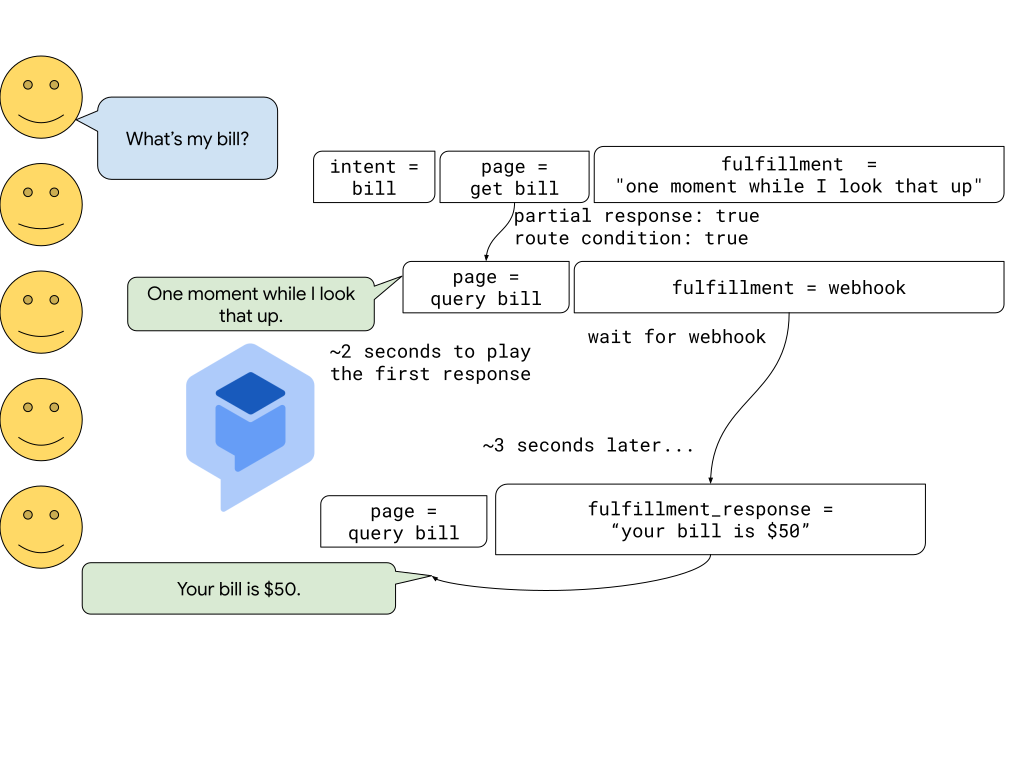
If you enable partial response in the first fulfillment, Dialogflow CX returns the first fulfillment message quickly and calls the webhook. After the webhook completes, Dialogflow CX returns the final response. This scenario improves the end-user experience because the end-user is told to expect a short wait. In addition, the webhook call executes concurrently with a response sent to the end-user.
Speech Synthesis Markup Language (SSML)
You can use Speech Synthesis Markup Language (SSML) in text or output audio text fulfillment fields. This lets you customize your audio response by providing details on pauses and audio formatting for acronyms, dates, times, abbreviations, or text that should be censored.
For syntax details, see the Text-to-speech SSML documentation.