

使用关联工作表
关联工作表可将 BigQuery 的扩缩功能引入熟悉的 Google 表格界面。借助“关联工作表”,您可以预览 BigQuery 数据,并在由整个数据集构建的数据透视表、公式和图表中使用这些数据。
除此之外,您还可以实现以下目的:
在熟悉的电子表格界面中与合作伙伴、分析人员或其他利益相关方展开协作。
确保使用唯一的可靠来源进行数据分析,而无需额外导出电子表格。
简化报告和信息中心的工作流程。
关联工作表会根据您的请求或按照定义的时间表,代表您运行 BigQuery 查询。相应查询结果会保存在您的电子表格中,以供分析和共享之用。
实际使用示例
以下几个用例展示了关联工作表如何帮助您分析表格中的大量数据,而无需了解 SQL。
业务计划:构建和准备数据集,从而使其他人可以从数据中发掘洞见。例如,分析销售数据以确定哪些产品在不同位置有更好的销量。
客户服务:找出哪些商店的每 10000 名客户投诉量最多。
销售:创建内部财务报告和销售报告,并向销售代表分享收入报告。
访问权限控制
在 BigQuery 中,对 BigQuery 数据集和表的直接访问受到控制。如果您只想向用户授予 Google 表格访问权限,请共享电子表格而不授予 BigQuery 访问权限。
仅拥有 Google 表格访问权限的用户可以在表格中执行分析并使用其他 Google 表格功能,但无法执行以下操作:
- 在表格中手动刷新 BigQuery 数据。
- 计划刷新表中的数据。
当您在“关联工作表”中过滤数据时,系统会根据您选择的项目刷新您发送到 BigQuery 的查询。您可以在相关项目中使用以下日志过滤器查看执行的查询:
resource.type="bigquery_resource"
protoPayload.metadata.firstPartyAppMetadata.sheetsMetadata.docId != NULL_VALUE
VPC Service Controls
您可以使用 VPC Service Controls 来限制对Google Cloud 资源的访问权限。由于 VPC Service Controls 不支持表格,因此您可能无法访问 VPC Service Controls 所保护的 BigQuery 数据。如果您拥有允许的权限并满足 VPC Service Controls 访问权限限制,则可以配置 VPC Service Controls 边界,以允许通过关联工作表发出的查询。为此,您必须使用以下命令来配置边界:
- 访问权限级别或入站流量规则,以允许来自边界外的可信 IP 地址、身份和受信任的客户端设备发出的请求。
- 出站规则,以允许将查询结果复制到用户的电子表格中。
了解如何配置入站和出站政策以及如何配置访问权限级别以正确配置规则。如需将边界配置为允许所需的数据复制,请使用以下 YAML 文件:
# Allows egress to Sheets through the Connected Sheets feature
- egressTo:
    operations:
    - serviceName: 'bigquery.googleapis.com'
      methodSelectors:
      - permission: 'bigquery.vpcsc.importData'
    resources:
    - projects/628550087766 # Sheets-owned Google Cloud project
  egressFrom:
    identityType: ANY_USER_ACCOUNT
准备工作
首先,确保您满足在表格中访问 BigQuery 数据的要求,如 Google Workspace 主题在 Google 表格中开始使用 BigQuery 数据中的“所需条件”部分中所述。
如果您没有已设置结算功能的 Google Cloud 项目,请按照下列步骤操作:
- Sign in to your Google Cloud account. If you're new to Google Cloud, create an account to evaluate how our products perform in real-world scenarios. New customers also get $300 in free credits to run, test, and deploy workloads.
-
In the Google Cloud console, on the project selector page, select or create a Google Cloud project.
Roles required to select or create a project
- Select a project: Selecting a project doesn't require a specific IAM role—you can select any project that you've been granted a role on.
-
Create a project: To create a project, you need the Project Creator role
(
roles/resourcemanager.projectCreator), which contains theresourcemanager.projects.createpermission. Learn how to grant roles.
-
Verify that billing is enabled for your Google Cloud project.
-
In the Google Cloud console, on the project selector page, select or create a Google Cloud project.
Roles required to select or create a project
- Select a project: Selecting a project doesn't require a specific IAM role—you can select any project that you've been granted a role on.
-
Create a project: To create a project, you need the Project Creator role
(
roles/resourcemanager.projectCreator), which contains theresourcemanager.projects.createpermission. Learn how to grant roles.
-
Verify that billing is enabled for your Google Cloud project.
- 新项目会自动启用 BigQuery。如需在预先存在的项目中激活 BigQuery,请前往
Enable the BigQuery API.
Roles required to enable APIs
To enable APIs, you need the Service Usage Admin IAM role (
roles/serviceusage.serviceUsageAdmin), which contains theserviceusage.services.enablepermission. Learn how to grant roles. 创建或打开一个 Google 表格电子表格。
点击 Data,点击 Data connectors,然后点击 Connect to BigQuery。
选择已启用结算功能的 Google Cloud 项目。
点击 Public datasets。
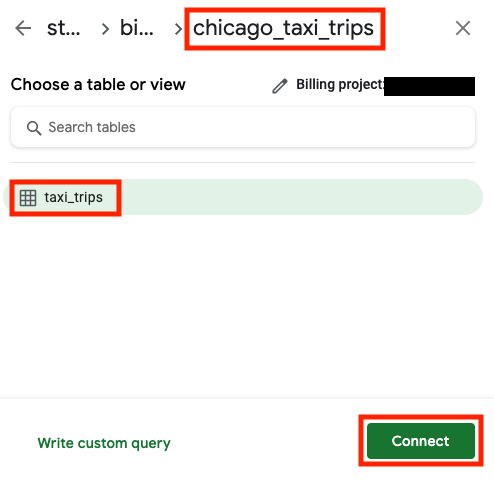
在搜索框中输入 chicago,然后选择 chicago_taxi_trips 数据集。
选择 taxi_trips 表,然后点击 Connect。
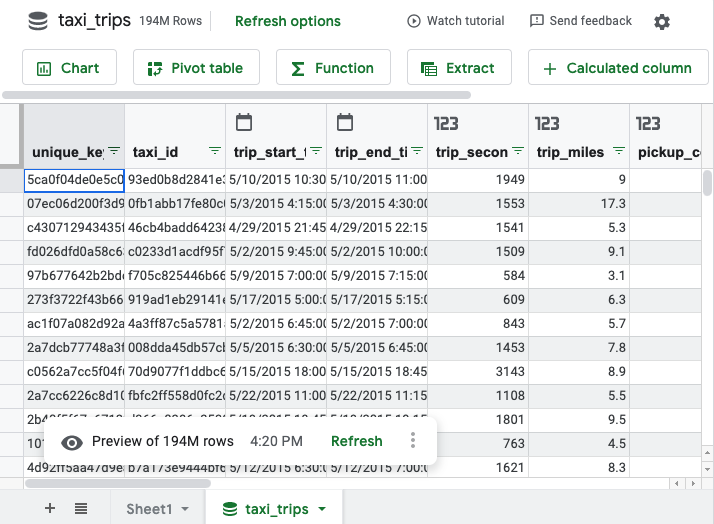
您的电子表格应类似于如下所示:
- 如果行数小于或等于 5 万,则没有单元格限制。
- 如果行数大于 5 万但小于或等于 50 万,则单元格数量必须小于或等于 500 万。
- 如果行数超过 50 万,则不支持数据拉取。
- 选择您创建的单元格或图表。
- 将指针悬停在 刷新上。
- 可选:如需刷新关联工作表中的查询结果,请点击 刷新。
如需在 BigQuery 中查看查询,请点击 BigQuery 上的查询详细信息。
查询会在 Google Cloud 控制台中打开。
在 Google Cloud 控制台中,前往 BigQuery 页面。
在左侧窗格中,点击 探索器:

如果您没有看到左侧窗格,请点击 展开左侧窗格以打开该窗格。
在探索器窗格中,展开您的项目,点击数据集,然后点击包含要在 Google 表格中打开的表的相应数据集。
点击概览 > 表,然后在表名称旁边,点击 查看操作,然后选择打开方式 > 关联工作表。
在 Google Cloud 控制台中,前往 BigQuery 页面。
在左侧窗格中,点击 探索器:
在探索器窗格中,展开您的项目,然后点击查询。 找到要在关联工作表中打开的保存的查询。
点击保存的查询旁边的 查看操作,然后点击打开方式 > 关联工作表。
或者,点击保存的查询的名称以在详细信息窗格中打开该查询,然后点击打开方式 > 关联工作表。
- In the Google Cloud console, go to the Manage resources page.
- In the project list, select the project that you want to delete, and then click Delete.
- In the dialog, type the project ID, and then click Shut down to delete the project.
参阅 Google Workspace 中的开始在 Google 表格中处理 BigQuery 数据主题以了解详情。
在 YouTube 上观看使用关联工作表播放列表中的视频。
为避免继续计费,您可以删除自己创建的资源。如需了解详情,请参阅清理。
从关联工作表打开 BigQuery 数据集
以下示例使用公共数据集来展示如何从 Google 表格连接到 BigQuery:
开始使用电子表格。您可以使用熟悉的 Google 表格技术创建数据透视表、公式、图表、计算列和预定查询。如需了解详情,请参阅关联工作表教程。
虽然电子表格显示的预览只有 500 行,但所有数据透视表、公式和图表都会使用整组数据。数据透视表所返回结果的行数上限为 20 万。
您还可以将数据提取到 Google 表格。数据提取所返回结果的行数和列数上限取决于以下条件:
当您使用关联工作表根据数据创建图表、数据透视表、公式或其他计算单元格时,关联工作表会代表您在 BigQuery 中运行查询。如需查看此查询,请执行以下操作:
在关联工作表中打开表
如需在关联工作表中打开表,请按以下步骤操作:
在关联工作表中打开保存的查询
如需在关联工作表中打开保存的查询,请按照以下步骤操作:
在关联工作表中监控 BigQuery 使用情况
作为 BigQuery 管理员,您可以监控和审核关联工作表的资源消耗情况,以便了解使用模式、管理费用并确定常用报告。以下部分提供了示例 SQL 查询,可帮助您在组织级和项目级监控此使用情况。如需了解详情,请参阅 JOBS 视图。
源自关联工作表的所有查询都会分配一个唯一作业 ID 前缀:sheets_dataconnector。您可以使用此前缀在 INFORMATION_SCHEMA.JOBS 视图中过滤作业。
组织级用户汇总的关联工作表使用情况
以下查询会提供您组织中过去 30 天内使用关联工作表最多的用户摘要,并按总账单数据量进行排名。该查询会汇总每位用户的查询总数、结算总字节数和总槽毫秒数。此信息有助于了解采用情况,并确定资源消耗量最大的用户。
SELECT
  user_email,
  COUNT(*) AS total_queries,
  SUM(total_bytes_billed) AS total_bytes_billed,
  SUM(total_slot_ms) AS total_slot_ms
FROM
  `region-REGION_NAME.INFORMATION_SCHEMA.JOBS_BY_ORGANIZATION`
WHERE
  -- Filter for jobs created in the last 30 days
  creation_time >= TIMESTAMP_SUB(CURRENT_TIMESTAMP(), INTERVAL 30 DAY)
  -- Filter for jobs originating from Connected Sheets
  AND job_id LIKE 'sheets_dataconnector%'
  -- Filter for completed jobs
  AND state = 'DONE'
  AND (statement_type IS NULL OR statement_type <> 'SCRIPT')
GROUP BY
  1
ORDER BY
  total_bytes_billed DESC;
将 REGION_NAME 替换为项目的区域。
例如 region-us。
结果类似于以下内容:
+---------------------+---------------+--------------------+-----------------+
| user_email          | total_queries | total_bytes_billed | total_slot_ms   |
+---------------------+---------------+--------------------+-----------------+
| alice@example.com   | 152           | 12000000000        | 3500000         |
| bob@example.com     | 45            | 8500000000         | 2100000         |
| charles@example.com | 210           | 1100000000         | 1800000         |
+---------------------+---------------+--------------------+-----------------+
查找组织级关联工作表查询的作业日志
以下查询提供了由关联工作表运行的每个单独查询的详细日志。此信息有助于审核和识别特定的高费用查询。
SELECT
  job_id,
  creation_time,
  user_email,
  project_id,
  total_bytes_billed,
  total_slot_ms,
  query
FROM
  `region-REGION_NAME.INFORMATION_SCHEMA.JOBS_BY_ORGANIZATION`
WHERE
  creation_time >= TIMESTAMP_SUB(CURRENT_TIMESTAMP(), INTERVAL 30 DAY)
  AND job_id LIKE 'sheets_dataconnector%'
  AND state = 'DONE'
  AND (statement_type IS NULL OR statement_type <> 'SCRIPT')
ORDER BY
  creation_time DESC;
将 REGION_NAME 替换为项目的区域。
例如 region-us。
结果类似于以下内容:
+---------------------------------+---------------------------------+-----------------+------------+--------------------+---------------+--------------------------------+
| job_id                          | creation_time                   | user_email      | project_id | total_bytes_billed | total_slot_ms |  query                         |
+---------------------------------+---------------------------------+-----------------+------------+--------------------+---------------+--------------------------------+
| sheets_dataconnector_bquxjob_1  | 2025-11-06 00:26:53.077000 UTC  | abc@example.com | my_project | 12000000000        | 3500000       | SELECT ... FROM dataset.table1 |
| sheets_dataconnector_bquxjob_2  | 2025-11-06 00:24:04.294000 UTC  | xyz@example.com | my_project | 8500000000         | 2100000       | SELECT ... FROM dataset.table2 |
| sheets_dataconnector_bquxjob_3  | 2025-11-03 23:17:25.975000 UTC  | bob@example.com | my_project | 1100000000         | 1800000       | SELECT ... FROM dataset.table3 |
+---------------------------------+---------------------------------+-----------------+------------+--------------------+---------------+--------------------------------+
项目级用户汇总的关联工作表使用情况
如果您没有组织级权限,或者只需要监控特定项目,请运行以下查询,以确定过去 30 天内项目中最常使用关联工作表的用户。该查询会汇总每位用户的查询总数、结算总字节数和总槽毫秒数。此信息有助于了解采用情况,并确定资源消耗量最大的用户。
SELECT
  user_email,
  COUNT(*) AS total_queries,
  SUM(total_bytes_billed) AS total_bytes_billed,
  SUM(total_slot_ms) AS total_slot_ms
FROM
  -- This view queries the project you are currently running the query in.
  `region-REGION_NAME`.INFORMATION_SCHEMA.JOBS_BY_PROJECT
WHERE
  -- Filter for jobs created in the last 30 days
  creation_time >= TIMESTAMP_SUB(CURRENT_TIMESTAMP(), INTERVAL 30 DAY)
  -- Filter for jobs originating from Connected Sheets
  AND job_id LIKE 'sheets_dataconnector%'
  -- Filter for completed jobs
  AND state = 'DONE'
  AND (statement_type IS NULL OR statement_type <> 'SCRIPT')
GROUP BY
  user_email
ORDER BY
  total_bytes_billed DESC
LIMIT
  10;
将 REGION_NAME 替换为项目的区域。
例如 region-us。
结果类似于以下内容:
+---------------------+---------------+--------------------+-----------------+
| user_email          | total_queries | total_bytes_billed | total_slot_ms   |
+---------------------+---------------+--------------------+-----------------+
| alice@example.com   | 152           | 12000000000        | 3500000         |
| bob@example.com     | 45            | 8500000000         | 2100000         |
| charles@example.com | 210           | 1100000000         | 1800000         |
+---------------------+---------------+--------------------+-----------------+
查找项目级关联工作表查询的作业日志
如果您没有组织级权限,或者只需要监控特定项目,请运行以下查询,查看当前项目的所有关联工作表查询的详细日志:
SELECT
  job_id,
  creation_time,
  user_email,
  total_bytes_billed,
  total_slot_ms,
  query
FROM
  -- This view queries the project you are currently running the query in.
  `region-REGION_NAME.INFORMATION_SCHEMA.JOBS_BY_PROJECT`
WHERE
  creation_time >= TIMESTAMP_SUB(CURRENT_TIMESTAMP(), INTERVAL 30 DAY)
  AND job_id LIKE 'sheets_dataconnector%'
  AND state = 'DONE'
  AND (statement_type IS NULL OR statement_type <> 'SCRIPT')
ORDER BY
  creation_time DESC;
将 REGION_NAME 替换为项目的区域。
例如 region-us。
结果类似于以下内容:
+---------------------------------+---------------------------------+------------------+--------------------+-----------------+---------------------------------+
| job_id                          | creation_time                   | user_email       | total_bytes_billed | total_slot_ms   |  query                          |
+---------------------------------+---------------------------------+------------------+--------------------+-----------------+---------------------------------+
| sheets_dataconnector_bquxjob_1  | 2025-11-06 00:26:53.077000 UTC  | abc@example.com  | 12000000000        | 3500000         |  SELECT ... FROM dataset.table1 |
| sheets_dataconnector_bquxjob_2  | 2025-11-06 00:24:04.294000 UTC  | xyz@example.com  | 8500000000         | 2100000         |  SELECT ... FROM dataset.table2 |
| sheets_dataconnector_bquxjob_3  | 2025-11-03 23:17:25.975000 UTC  | bob@example.com  | 1100000000         | 1800000         |  SELECT ... FROM dataset.table3 |
+---------------------------------+---------------------------------+------------------+--------------------+-----------------+---------------------------------+
清理
为避免因本教程中使用的资源导致您的 Google Cloud 账号产生费用,请执行以下操作: