

BiDiStreamingAnalyzeContent API הוא ה-API העיקרי לחוויות אודיו ומולטי-מודאליות מהדור הבא, גם בסוכנים וירטואליים וגם ב-Agent Assist. ה-API הזה מאפשר סטרימינג של נתוני אודיו ומחזיר תמלילים או הצעות של נציג אנושי.
בניגוד לממשקי API קודמים, הגדרת האודיו הפשוטה כוללת תמיכה משופרת בשיחות בין אנשים ומגבלת זמן מורחבת של 15 דקות. מלבד תרגום בזמן אמת, ה-API הזה תומך גם בכל התכונות של Agent Assist שנתמכות ב-StreamingAnalyzeContent.
מידע בסיסי על סטרימינג
בתרשים הבא מוצג אופן הפעולה של הזרם.
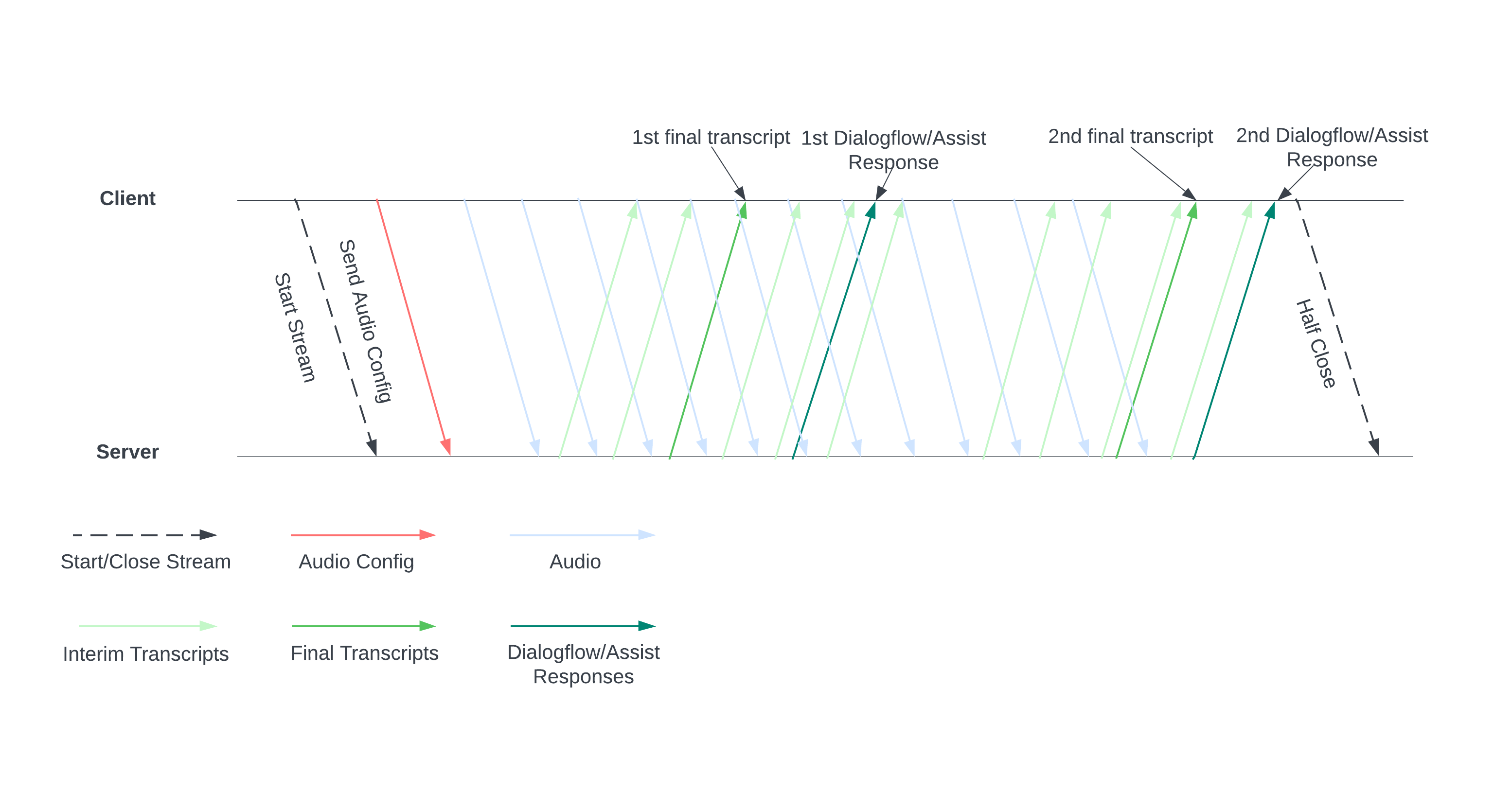
מתחילים שידור חי על ידי שליחת הגדרות אודיו לשרת. אחר כך שולחים קובצי אודיו, והשרת שולח תמליל או הצעות לסוכן אנושי. כדאי לשלוח עוד נתוני אודיו כדי לקבל עוד תמלילים והצעות. ההחלפה הזו נמשכת עד שמסיימים אותה על ידי סגירה חלקית של הסטרימינג.
מדריך לסטרימינג
כדי להשתמש ב-API של BiDiStreamingAnalyzeContent בזמן הריצה של השיחה, צריך לפעול לפי ההנחיות האלה.
- מבצעים קריאה לשיטה
BiDiStreamingAnalyzeContentומגדירים את השדות הבאים:BiDiStreamingAnalyzeContentRequest.participant- (אופציונלי)
BiDiStreamingAnalyzeContentRequest.voice_session_config.input_audio_sample_rate_hertz(אם מציינים ערך, הוא מבטל את ההגדרה מ-ConversationProfile.stt_config.sample_rate_hertz). - (אופציונלי)
BiDiStreamingAnalyzeContentRequest.voice_session_config.input_audio_encoding(אם מציינים ערך, הוא מבטל את ההגדרה מ-ConversationProfile.stt_config.audio_encoding).
- מכינים את הסטרימינג ומגדירים את האודיו באמצעות בקשת
BiDiStreamingAnalyzeContentהראשונה. - בבקשות הבאות, שולחים בייטים של אודיו לסטרימינג דרך
BiDiStreamingAnalyzeContentRequest.audio. - אחרי ששולחים את הבקשה השנייה עם מטען ייעודי (payload) של אודיו, אמורים לקבל
BidiStreamingAnalyzeContentResponsesמהזרם.- תוצאות התמלול הזמניות והסופיות זמינות באמצעות הפקודה הבאה:
BiDiStreamingAnalyzeContentResponse.recognition_result. - כדי לגשת להצעות של נציגים אנושיים ולהודעות מעובדות בשיחה, מריצים את הפקודה הבאה:
BiDiStreamingAnalyzeContentResponse.analyze_content_response.
- תוצאות התמלול הזמניות והסופיות זמינות באמצעות הפקודה הבאה:
- אפשר לסגור את השידור בחצי מסך בכל שלב. אחרי שסוגרים את הסטרימינג באופן חלקי, השרת שולח בחזרה את התגובה שמכילה את תוצאות הזיהוי שנותרו, יחד עם הצעות פוטנציאליות של Agent Assist.
- צריך להתחיל או להפעיל מחדש שידור חדש במקרים הבאים:
- השידור לא תקין. לדוגמה, השידור נפסק כשהוא לא היה אמור להיפסק.
- השיחה שלך מתקרבת למקסימום הבקשה של 15 דקות.
- כדי לקבל את האיכות הכי טובה, כשמתחילים שידור, צריך לשלוח נתוני אודיו שנוצרו אחרי
speech_end_offsetהאחרון שלBiDiStreamingAnalyzeContentResponse.recognition_resultעםis_final=trueאלBidiStreamingAnalyzeContent.
שימוש ב-API באמצעות ספריית לקוח Python
ספריות לקוח עוזרות לכם לגשת אל Google APIs משפת קוד מסוימת. אפשר להשתמש בספריית הלקוח של Python עבור Agent Assist עם BidiStreamingAnalyzeContent באופן הבא.
from google.cloud import dialogflow_v2beta1
from google.api_core.client_options import ClientOptions
from google.cloud import storage

import time
import google.auth
import participant_management
import conversation_management


PROJECT_ID="your-project-id"
CONVERSATION_PROFILE_ID="your-conversation-profile-id"
BUCKET_NAME="your-audio-bucket-name"

SAMPLE_RATE =48000
# Calculate the bytes with Sample_rate_hertz * bit Depth / 8 -> bytes
# 48000(sample/second) * 16(bits/sample) / 8 = 96000 byte per second,
# 96000 / 10 = 9600 we send 0.1 second to the stream API
POINT_ONE_SECOND_IN_BYTES = 9600
FOLDER_PTAH_FOR_CUSTOMER_AUDIO="your-customer-audios-files-path"
FOLDER_PTAH_FOR_AGENT_AUDIO="your-agent-audios-file-path"
client_options = ClientOptions(api_endpoint="dialogflow.googleapis.com")
credentials, _ = google.auth.default(scopes=["https://www.googleapis.com/auth/cloud-platform",
                                             "https://www.googleapis.com/auth/dialogflow"])

storage_client = storage.Client(credentials = credentials, project=PROJECT_ID)

participant_client = dialogflow_v2beta1.ParticipantsClient(client_options=client_options,
                                                           credentials=credentials)

def download_blob(bucket_name, folder_path, audio_array : list):
    """Uploads a file to the bucket."""
    bucket = storage_client.bucket(bucket_name, user_project=PROJECT_ID)
    blobs = bucket.list_blobs(prefix=folder_path)
    for blob in blobs:
      if not blob.name.endswith('/'):
          audio_array.append(blob.download_as_string())

def request_iterator(participant : dialogflow_v2beta1.Participant, audios):
    """Iterate the request for bidi streaming analyze content
    """

    yield dialogflow_v2beta1.BidiStreamingAnalyzeContentRequest(
        config={
            "participant": participant.name,
            "voice_session_config": {
                "input_audio_encoding": dialogflow_v2beta1.AudioEncoding.AUDIO_ENCODING_LINEAR_16,
                "input_audio_sample_rate_hertz": SAMPLE_RATE,
            },
        }
    )
    print(f"participant {participant}")

    for i in range(0, len(audios)):
      audios_array = audio_request_iterator(audios[i])
      for chunk in audios_array:
        if not chunk:
            break
        yield dialogflow_v2beta1.BidiStreamingAnalyzeContentRequest(
        input={
            "audio":chunk
            },
        )
        time.sleep(0.1)
    time.sleep(0.1)

def participant_bidi_streaming_analyze_content(participant, audios):
    """call bidi streaming analyze content API
    """
    bidi_responses = participant_client.bidi_streaming_analyze_content(
        requests=request_iterator(participant, audios)
    )

    for response in bidi_responses:
        bidi_streaming_analyze_content_response_handler(response)

def bidi_streaming_analyze_content_response_handler(response: dialogflow_v2beta1.BidiStreamingAnalyzeContentResponse):
    """Call Bidi Streaming Analyze Content
    """
    if  response.recognition_result:
         print(f"Recognition result: { response.recognition_result.transcript}", )

def audio_request_iterator(audio):
    """Iterate the request for bidi streaming analyze content
    """
    total_audio_length = len(audio)
    print(f"total audio length {total_audio_length}")
    array = []
    for i in range(0, total_audio_length, POINT_ONE_SECOND_IN_BYTES):
        chunk = audio[i : i + POINT_ONE_SECOND_IN_BYTES]
        array.append(chunk)
        if not chunk:
            break
    return array

def python_client_handler():
    """Downloads audios from the google cloud storage bucket and stream to
    the Bidi streaming AnalyzeContent site.
    """
    print("Start streaming")
    conversation = conversation_management.create_conversation(
        project_id=PROJECT_ID, conversation_profile_id=CONVERSATION_PROFILE_ID_STAGING
    )
    conversation_id = conversation.name.split("conversations/")[1].rstrip()
    human_agent = human_agent = participant_management.create_participant(
        project_id=PROJECT_ID, conversation_id=conversation_id, role="HUMAN_AGENT"
    )

    end_user =    end_user = participant_management.create_participant(
        project_id=PROJECT_ID, conversation_id=conversation_id, role="END_USER"
    )

    end_user_requests = []
    agent_request= []
    download_blob(BUCKET_NAME, FOLDER_PTAH_FOR_CUSTOMER_AUDIO, end_user_requests)
    download_blob(BUCKET_NAME, FOLDER_PTAH_FOR_AGENT_AUDIO, agent_request)

    participant_bidi_streaming_analyze_content( human_agent, agent_request)
    participant_bidi_streaming_analyze_content( end_user, end_user_requests)

    conversation_management.complete_conversation(PROJECT_ID, conversation_id)
הפעלה של שילוב SipRec לטלפוניה
אתם יכולים להפעיל שילוב של SipRec לטלפוניה כדי להשתמש ב-BidiStreamingAnalyzeContent לעיבוד אודיו. אתם יכולים להגדיר את עיבוד האודיו באמצעות מסוף Agent Assist או באמצעות בקשת API ישירה.
המסוף
כדי להגדיר את עיבוד האודיו לשימוש ב-BidiStreamingAnalyzeContent, פועלים לפי השלבים הבאים.
נכנסים אל מסוף Agent Assist ובוחרים את הפרויקט.
לוחצים על פרופילים של שיחות > השם של הפרופיל.
עוברים אל הגדרות טלפוניה.
לוחצים כדי להפעיל את האפשרות שימוש ב-API של סטרימינג דו-כיווני> שמירה.
API
אפשר לקרוא ל-API ישירות כדי ליצור או לעדכן פרופיל שיחה על ידי הגדרת הדגל ב-ConversationProfile.use_bidi_streaming.
הגדרה לדוגמה:
{
"name": "projects/PROJECT_ID/locations/global/conversationProfiles/CONVERSATION_PROFILE_ID",f
"displayName": "CONVERSATION_PROFILE_NAME",
"automatedAgentConfig": {
},
"humanAgentAssistantConfig": {
  "notificationConfig": {
    "topic": "projects/PROJECT_ID/topics/FEATURE_SUGGESTION_TOPIC_ID",
    "messageFormat": "JSON"
      },
  },
"useBidiStreaming": true,
"languageCode": "en-US"
}
מכסות
מספר הבקשות המקבילות של BidiStreamingAnalyzeContent מוגבל על ידי מכסת ConcurrentBidiStreamingSessionsPerProjectPerRegion חדשה. ב Google Cloud מדריך המכסות מוסבר איך לבדוק את ניצול המכסות ואיך לבקש להגדיל את המכסות.
במכסות, השימוש בבקשות BidiStreamingAnalyzeContent לנקודות הקצה הגלובליות של Dialogflow ולנקודות הקצה של האזור הגיאוגרפי בארה"ב שכולל מספר אזורים מתבצע באזור us-central1.