

L'API BiDiStreamingAnalyzeContent est l'API principale pour les expériences audio et multimodales de nouvelle génération dans les agents conversationnels et Agent Assist. Cette API facilite le streaming des données audio et vous renvoie des transcriptions ou des suggestions d'agents humains.
Contrairement aux API précédentes, la configuration audio simplifiée est optimisée pour les conversations entre personnes et offre une limite de délai étendue à 15 minutes. À l'exception de la traduction en direct, cette API est également compatible avec toutes les fonctionnalités d'Agent Assist prises en charge par StreamingAnalyzeContent.
Principes de base du streaming
Le schéma suivant illustre le fonctionnement du flux.
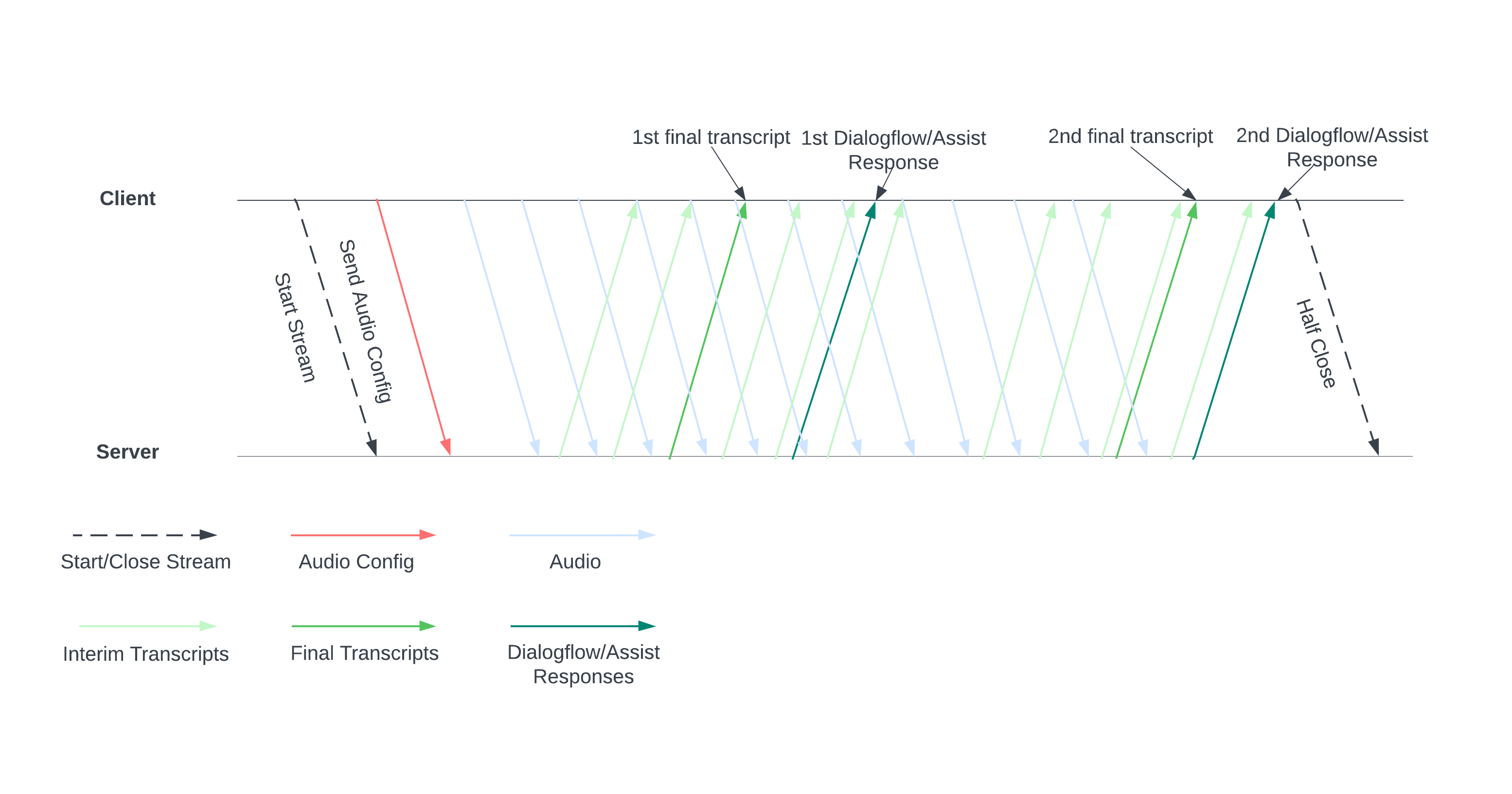
Démarrez un flux en envoyant une configuration audio au serveur. Vous envoyez ensuite des fichiers audio, et le serveur vous envoie une transcription ou des suggestions pour un agent humain. Envoyez plus de données audio pour obtenir plus de transcriptions et de suggestions. Cet échange se poursuit jusqu'à ce que vous le terminiez en fermant partiellement le flux.
Guide de streaming
Pour utiliser l'API BiDiStreamingAnalyzeContent lors de l'exécution d'une conversation, suivez ces consignes.
- Appelez la méthode
BiDiStreamingAnalyzeContentet définissez les champs suivants :BiDiStreamingAnalyzeContentRequest.participant- (Facultatif)
BiDiStreamingAnalyzeContentRequest.voice_session_config.input_audio_sample_rate_hertz(si spécifié, cela remplace la configuration deConversationProfile.stt_config.sample_rate_hertz). - (Facultatif)
BiDiStreamingAnalyzeContentRequest.voice_session_config.input_audio_encoding(si spécifié, cela remplace la configuration deConversationProfile.stt_config.audio_encoding).
- Préparez le flux et définissez votre configuration audio avec votre première requête
BiDiStreamingAnalyzeContent. - Dans les requêtes suivantes, envoyez des octets audio au flux via
BiDiStreamingAnalyzeContentRequest.audio. - Après avoir envoyé la deuxième requête avec une charge utile audio, vous devriez recevoir des
BidiStreamingAnalyzeContentResponsesdu flux.- Les résultats de transcription intermédiaires et finaux sont disponibles avec la commande suivante :
BiDiStreamingAnalyzeContentResponse.recognition_result. - Vous pouvez accéder aux suggestions d'agents humains et aux messages de conversation traités à l'aide de la commande suivante :
BiDiStreamingAnalyzeContentResponse.analyze_content_response.
- Les résultats de transcription intermédiaires et finaux sont disponibles avec la commande suivante :
- Vous pouvez fermer partiellement le flux à tout moment. Une fois le flux à moitié fermé, le serveur renvoie la réponse contenant les résultats de reconnaissance restants, ainsi que les suggestions potentielles d'Assistance pour les agents.
- Démarrez ou redémarrez un flux dans les cas suivants :
- Le flux est interrompu. Par exemple, le flux s'est arrêté alors qu'il n'aurait pas dû.
- Votre conversation approche la durée maximale de 15 minutes.
- Pour une qualité optimale, lorsque vous démarrez un flux, envoyez les données audio générées après le dernier
speech_end_offsetduBiDiStreamingAnalyzeContentResponse.recognition_resultavecis_final=trueàBidiStreamingAnalyzeContent.
Utiliser l'API via la bibliothèque cliente Python
Les bibliothèques clientes vous permettent d'accéder aux API Google à partir d'un langage de programmation spécifique. Vous pouvez utiliser la bibliothèque cliente Python pour Agent Assist avec BidiStreamingAnalyzeContent comme suit.
from google.cloud import dialogflow_v2beta1
from google.api_core.client_options import ClientOptions
from google.cloud import storage

import time
import google.auth
import participant_management
import conversation_management


PROJECT_ID="your-project-id"
CONVERSATION_PROFILE_ID="your-conversation-profile-id"
BUCKET_NAME="your-audio-bucket-name"

SAMPLE_RATE =48000
# Calculate the bytes with Sample_rate_hertz * bit Depth / 8 -> bytes
# 48000(sample/second) * 16(bits/sample) / 8 = 96000 byte per second,
# 96000 / 10 = 9600 we send 0.1 second to the stream API
POINT_ONE_SECOND_IN_BYTES = 9600
FOLDER_PTAH_FOR_CUSTOMER_AUDIO="your-customer-audios-files-path"
FOLDER_PTAH_FOR_AGENT_AUDIO="your-agent-audios-file-path"
client_options = ClientOptions(api_endpoint="dialogflow.googleapis.com")
credentials, _ = google.auth.default(scopes=["https://www.googleapis.com/auth/cloud-platform",
                                             "https://www.googleapis.com/auth/dialogflow"])

storage_client = storage.Client(credentials = credentials, project=PROJECT_ID)

participant_client = dialogflow_v2beta1.ParticipantsClient(client_options=client_options,
                                                           credentials=credentials)

def download_blob(bucket_name, folder_path, audio_array : list):
    """Uploads a file to the bucket."""
    bucket = storage_client.bucket(bucket_name, user_project=PROJECT_ID)
    blobs = bucket.list_blobs(prefix=folder_path)
    for blob in blobs:
      if not blob.name.endswith('/'):
          audio_array.append(blob.download_as_string())

def request_iterator(participant : dialogflow_v2beta1.Participant, audios):
    """Iterate the request for bidi streaming analyze content
    """

    yield dialogflow_v2beta1.BidiStreamingAnalyzeContentRequest(
        config={
            "participant": participant.name,
            "voice_session_config": {
                "input_audio_encoding": dialogflow_v2beta1.AudioEncoding.AUDIO_ENCODING_LINEAR_16,
                "input_audio_sample_rate_hertz": SAMPLE_RATE,
            },
        }
    )
    print(f"participant {participant}")

    for i in range(0, len(audios)):
      audios_array = audio_request_iterator(audios[i])
      for chunk in audios_array:
        if not chunk:
            break
        yield dialogflow_v2beta1.BidiStreamingAnalyzeContentRequest(
        input={
            "audio":chunk
            },
        )
        time.sleep(0.1)
    time.sleep(0.1)

def participant_bidi_streaming_analyze_content(participant, audios):
    """call bidi streaming analyze content API
    """
    bidi_responses = participant_client.bidi_streaming_analyze_content(
        requests=request_iterator(participant, audios)
    )

    for response in bidi_responses:
        bidi_streaming_analyze_content_response_handler(response)

def bidi_streaming_analyze_content_response_handler(response: dialogflow_v2beta1.BidiStreamingAnalyzeContentResponse):
    """Call Bidi Streaming Analyze Content
    """
    if  response.recognition_result:
         print(f"Recognition result: { response.recognition_result.transcript}", )

def audio_request_iterator(audio):
    """Iterate the request for bidi streaming analyze content
    """
    total_audio_length = len(audio)
    print(f"total audio length {total_audio_length}")
    array = []
    for i in range(0, total_audio_length, POINT_ONE_SECOND_IN_BYTES):
        chunk = audio[i : i + POINT_ONE_SECOND_IN_BYTES]
        array.append(chunk)
        if not chunk:
            break
    return array

def python_client_handler():
    """Downloads audios from the google cloud storage bucket and stream to
    the Bidi streaming AnalyzeContent site.
    """
    print("Start streaming")
    conversation = conversation_management.create_conversation(
        project_id=PROJECT_ID, conversation_profile_id=CONVERSATION_PROFILE_ID_STAGING
    )
    conversation_id = conversation.name.split("conversations/")[1].rstrip()
    human_agent = human_agent = participant_management.create_participant(
        project_id=PROJECT_ID, conversation_id=conversation_id, role="HUMAN_AGENT"
    )

    end_user =    end_user = participant_management.create_participant(
        project_id=PROJECT_ID, conversation_id=conversation_id, role="END_USER"
    )

    end_user_requests = []
    agent_request= []
    download_blob(BUCKET_NAME, FOLDER_PTAH_FOR_CUSTOMER_AUDIO, end_user_requests)
    download_blob(BUCKET_NAME, FOLDER_PTAH_FOR_AGENT_AUDIO, agent_request)

    participant_bidi_streaming_analyze_content( human_agent, agent_request)
    participant_bidi_streaming_analyze_content( end_user, end_user_requests)

    conversation_management.complete_conversation(PROJECT_ID, conversation_id)
Activer l'intégration SipRec pour la téléphonie
Vous pouvez activer l'intégration SipRec de la téléphonie pour utiliser BidiStreamingAnalyzeContent pour le traitement audio. Configurez le traitement audio avec la console Agent Assist ou une requête API directe.
Console
Suivez ces étapes pour configurer le traitement audio afin d'utiliser BidiStreamingAnalyzeContent.
Accédez à la console Agent Assist, puis sélectionnez votre projet.
Cliquez sur Profils de conversation > le nom d'un profil.
Accédez aux paramètres de téléphonie.
Cliquez pour activer l'option Utiliser l'API de streaming bidirectionnel > Enregistrer.
API
Vous pouvez appeler directement l'API pour créer ou modifier un profil de conversation en configurant le flag sur ConversationProfile.use_bidi_streaming.
Exemple de configuration :
{
"name": "projects/PROJECT_ID/locations/global/conversationProfiles/CONVERSATION_PROFILE_ID",f
"displayName": "CONVERSATION_PROFILE_NAME",
"automatedAgentConfig": {
},
"humanAgentAssistantConfig": {
  "notificationConfig": {
    "topic": "projects/PROJECT_ID/topics/FEATURE_SUGGESTION_TOPIC_ID",
    "messageFormat": "JSON"
      },
  },
"useBidiStreaming": true,
"languageCode": "en-US"
}
Quotas
Le nombre de requêtes BidiStreamingAnalyzeContent simultanées est limité par un nouveau quota ConcurrentBidiStreamingSessionsPerProjectPerRegion. Consultez le Google Cloud guide sur les quotas pour en savoir plus sur l'utilisation des quotas et découvrir comment demander une augmentation de la limite de quota.
Pour les quotas, l'utilisation des requêtes BidiStreamingAnalyzeContent vers les points de terminaison Dialogflow globaux et multirégionaux aux États-Unis se trouve dans la région us-central1.