

This voice integration uses a Five9 Classic Connector and Five9 MediaStream (formerly called Voicestream) to provide Agent Assist suggestions to your agents in Five9 Agent Desktop Plus.
Before you begin
To integrate Agent Assist UI modules with Five9, you need access to the following resources.
Required system dependencies
- Google Cloud CLI
- Install Google Cloud CLI as instructed.
- Authenticate using
gcloud auth login.
- Agent Assist integration backend deployment
- Follow the instructions to set up the integration.
- In addition to normal setup, and before running the deploy script, configure the following environment variables in
aa-integration-backend/.env:AUTH_OPTION: Set this toFive9.FIVE9_TRUST_TOKEN: Generate this by running the following:cd platforms/five9cp .env.sample .envmake generate-trust-token
- Agent Assist conversation profile: See Create a conversation profile for details.
- Five9 administrator access: This is required to configure Mediastream subscription and Classic Connector.
- Make: Used for running deployment scripts.
Optional system dependencies
- Podman (optional): For container building and local testing.
- grpcurl (optional): For verifying gRPC stream health.
Integration architecture overview
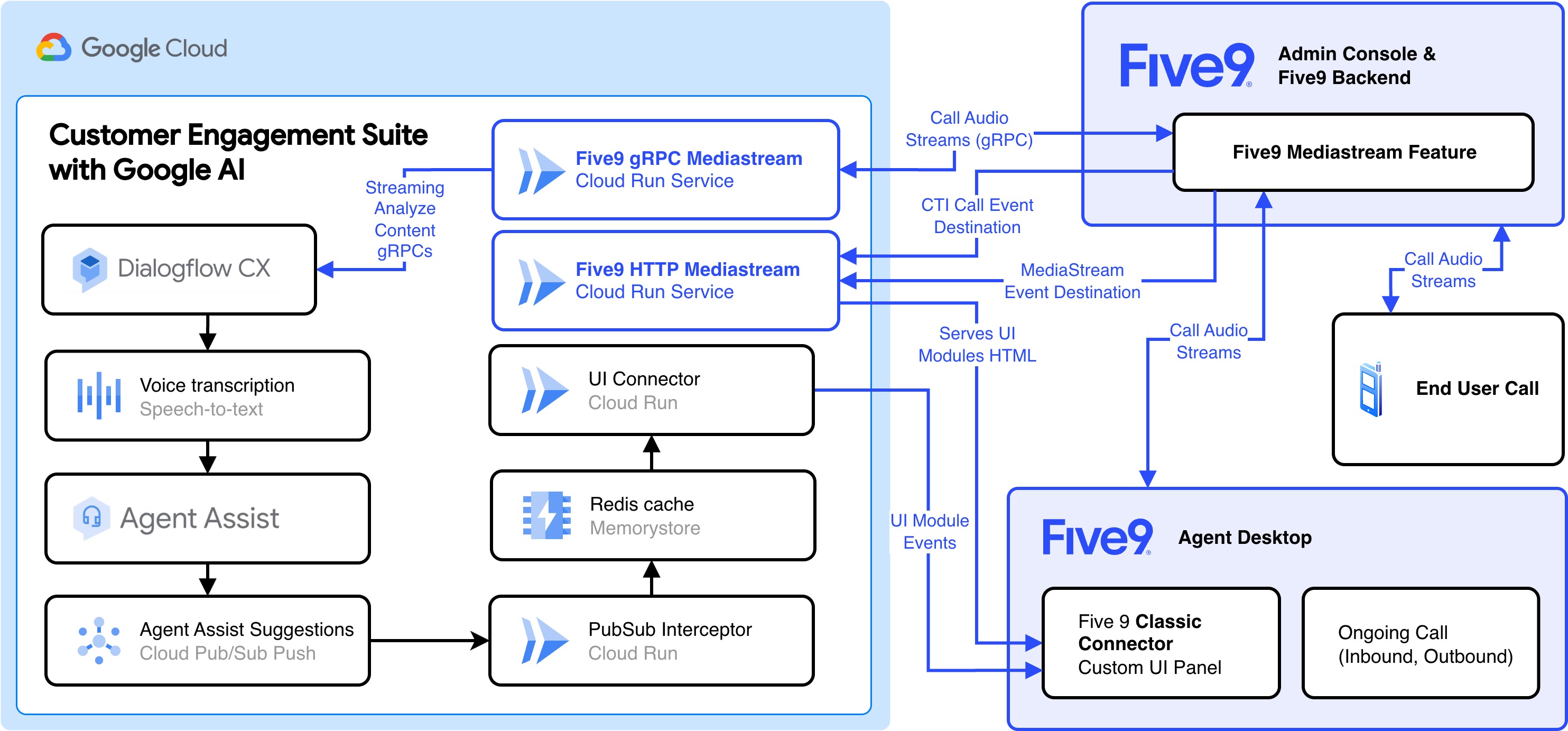
The solution uses a split-service architecture to handle the distinct requirements of Five9's protocol: real-time bi-directional audio streaming (gRPC) and asynchronous event handling (HTTP). These two Cloud Run services bridge Five9 MediaStream with Google Cloud Agent Assist, enabling real-time transcription and generative AI suggestions:
- mediastream-grpc-service: Handles the bi-directional gRPC audio stream from Five9 MediaStream.
- mediastream-http-service: Presents Agent Assist UI modules and handles CTI and MediaStream events.
High-level data flow
- Call initiation: Five9 triggers a CTI event to the HTTP Service, initiating the session.
- Audio streaming: Five9 opens a secure gRPC connection to the gRPC Service for real-time audio exchange.
- Processing: The gRPC service forwards audio to Google Cloud Agent Assist.
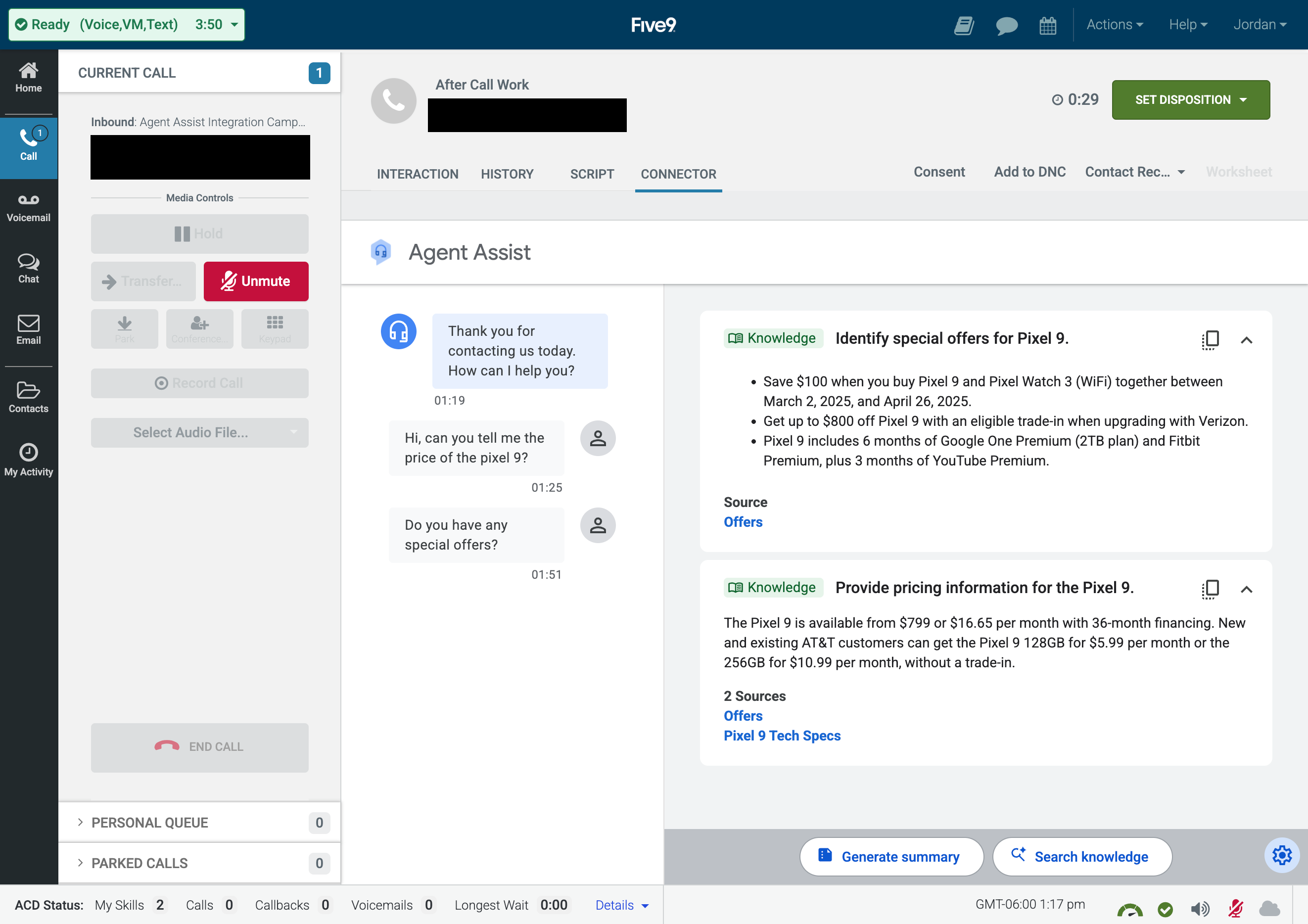
- Suggestions: Agent Assist returns transcription and agent coaching suggestions through Pub/Sub, which are forwarded to the Agent Assist UI Modules over a Socket.IO (WebSockets) connection with the UI Connector Cloud Run service. These suggestions are rendered in a Five9 Classic Connector iframe in Five9 Agent Desktop Plus during calls.
gRPC service (mediastream-grpc)
- Role: Handles high-performance, real-time bi-directional audio streaming.
- Implementation: Python gRPC server using
grpcio. - Concurrency: Uses
grpc.aio(AsyncIO) for high-performance non-blocking I/O. - Protocol: Defines the service contract using
mediastream-grpc/proto/voice.proto. - Core module:
VoiceServicerimplementation inservices/get_suggestions.pyorchestrates the audio stream handling and Agent Assist API calls.
HTTP service (mediastream-http)
- Role: Handles control plane events, token validation, and serving static UI assets.
- Implementation: Flask web server.
- Endpoints:
GET /: A health check endpoint for the server.GET /agent-assist-ui-modules: Serves the Agent Assist UI Modules for the Five9 classic connector.GET /cti-call-event-destination/: Validates theFIVE9_TRUST_TOKEN(returns SHA256 hash).POST /cti-call-event-destination/: Receives call CTI events and metadata.POST /mediastream-event-destination/subscriptions/<id>: Receives async errors or status updates from the media stream.
Security
- Trust token: The integration implements a shared-secret security model. A
FIVE9_TRUST_TOKENis generated and configured in both Five9 and the Cloud Run service. The HTTP service provides a validation endpoint (GET /cti-call-event-destination/) that returns the SHA256 hash of the configured token for verification. - This trust token is also reused as the shared secret authenticating requests from the MediaStream HTTP Service to the UI Connector.
Deployment guide
The following sections describe how to deploy this Agent Assist Five9 integration and test it in Five9 Agent Desktop Plus.
Configure environment variables
- First, run
cd aa-integration-backend/platforms/five9to change directory. Check that you have a
.envfile that you copied from.env.samplein the Required system dependencies section. The last line should contain theFIVE9_TRUST_TOKENyou generated at that time.Environment variables: Fill your
.envfile out with the following details.Variable Description PROJECT_IDYour Google Cloud Project ID REGIONThe region where your Cloud Run services will be deployed. CONVERSATION_PROFILE_NAMEThe Agent Assist Conversation Profile Resource ID. FEATURESThe features to enable for Agent Assist. See the UI Modules Container V2 Properties documentation. FIVE9_API_KEYSet this to your Five9 API Key that you got when setting up the MediaStream subscription. FIVE9_TRUST_TOKENThe shared secret you generated in Before you begin, which allows the mediastream-http-serviceto authenticate with theui-connectorCloud Run service.
Deploy to Google Cloud Run
Deploy both the gRPC and HTTP services to Cloud Run using the provided automation:
make deploy
This script will:
- Build the container images.
- Push them to Google Container Registry (GCR) or Artifact Registry.
- Deploy two Cloud Run services: one for gRPC (Voice) and one for HTTP (Events).
- Output the service URLs upon completion.
Five9 configuration
After deployment, configure Five9 to send streams to your service. Refer to the Five9 MediaStream Technical Guide for detailed steps.
Initial Five9 configuration
Follow these steps to configure your Five9 Admin Console for the Agent Assist integration.
- Create a new skill, for example Agent Assist Integration.
- Assign users to the skill.
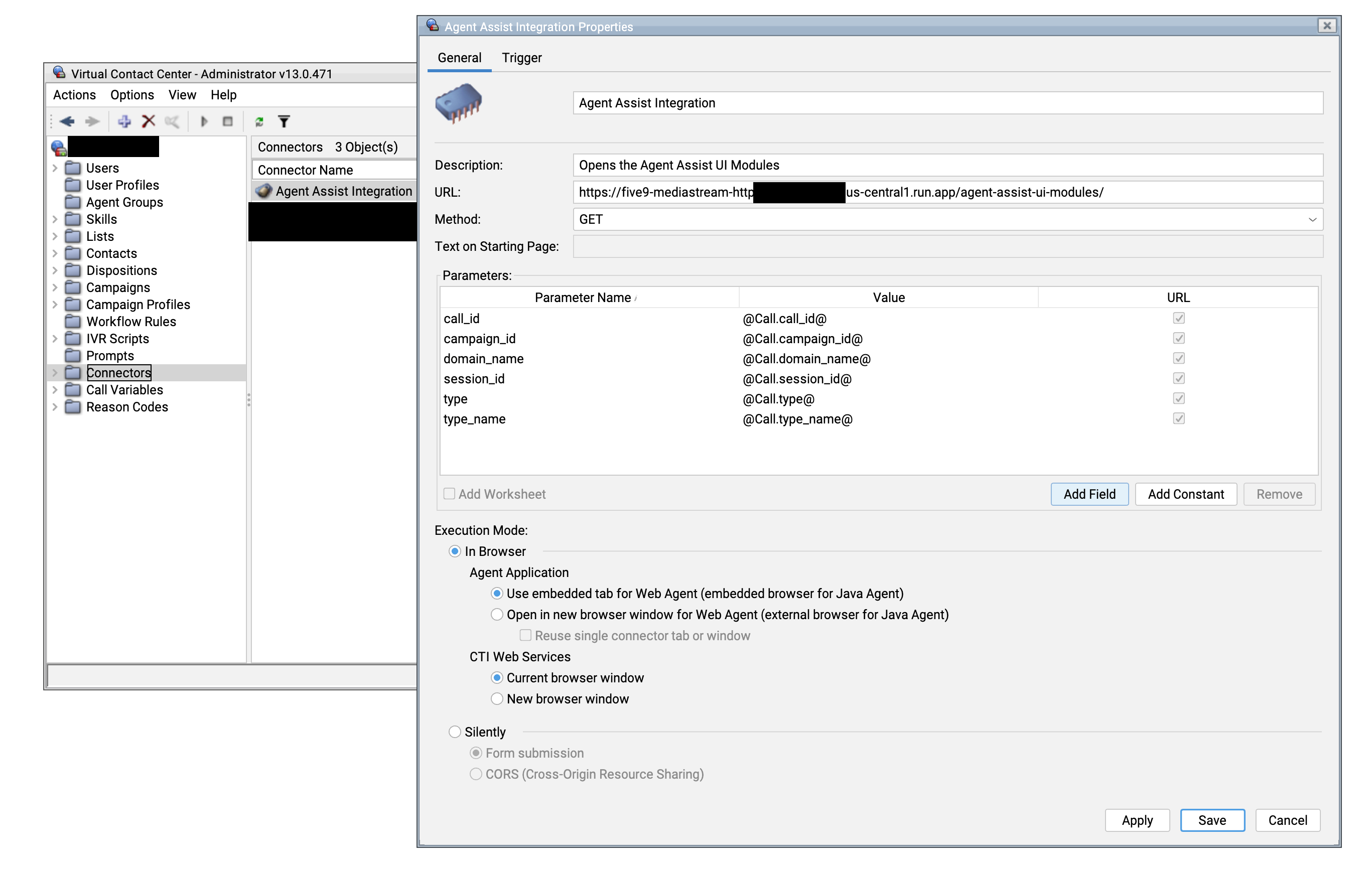
- Configure a Five9 classic connector for your campaign, iframing the MediaStream Cloud Run Service URL you deployed in a previous step:
- URL:
{mediastream-http-service-url}/agent-assist-ui-modules/ - Method:
GET - Parameters:
call_id - Execution Mode:
In Browser- Agent Application:
Use embedded tab for Web Agent - CTI Web Services:
Current browser window
- Agent Application:
- Trigger (Next tab):
On Call Accepted
- URL:
- Create an IVR script to define the behavior when receiving calls through your Five9 DNIS number.
- Create an inbound campaign
- Associate the IVR script with the campaign
- Optionally, create an outbound campaign to enable Agent Assist for outbound calls. This involves the following:
- Associate a skill with the outbound campaign.
- Create a copy of the classic connector and associate it with the outbound campaign. Change the trigger of the classic connector copy to On Contact Selected.
- Start the campaign. To test, place an outbound call in Agent Desktop Plus, selecting the outbound campaign from the drop-down.
Create a MediaStream subscription
- Subscription Name: Agent Assist Integration Media Stream
- Streaming Type: Voice streaming
- Streaming Destination: Other (Self-Service)
- Streaming Protocol: gRPC
- Primary Streaming Destination:
<five9-mediastream-grpc-deployment-url-without-protocol>:443- For example:
five9-mediastream-grpc-123412341234.us-central1.run.app:443
- CTI Call Event Destination:
https://<five9-mediastream-http-deployment-url>/cti-call-event-destination/- For example:
https://five9-mediastream-http-123412341234-uc.a.run.app/cti-call-event-destination/
- Mediastream Event Destination:
https://<five9-mediastream-http-deployment-url>/mediastream-event-destination/- For example:
https://five9-mediastream-http-123412341234-uc.a.run.app/mediastream-event-destination/
- Trust Token: The
FIVE9_TRUST_TOKENyou generated in an earlier step. - API Key: This field will be generated after saving your Mediastream subscription. Copy the
FIVE9_API_KEYyou receive toplatforms/five9/.env. You will need this during the next step. - Streaming Filter:
- Custom filter: Checked
- Filter Type: Campaigns
- Search added campaigns: Search for your campaign and add it.
Redeploy to Google Cloud Run
- Important: After creating your MediaStream subscription, you will need to add the
FIVE9_API_KEYyou received to yourplatforms/five9/.envfile, then redeploy by runningmake deploy.
Deployment verification
Confirm that the services you deployed are reachable on Cloud Run:
make test-http-reachable
make test-grpc-reachable
Simulate a call by streaming a .wav file to the mediastream-grpc-service:
make test-grpc-stream
You're now ready to test Agent Assist transcription and suggestions while taking calls in Five9 Agent Desktop Plus.
Local testing (optional)
For troubleshooting or testing without deployment, you can run the services locally using Docker/Podman. Stop containers, build, and run locally with Podman compose.
make all
Run all tests (health, unit), except stream
make test
Simulate a call by streaming a .wav file
make test-grpc-stream LOCAL=true