

思考特征是模型内部思考过程的加密表示形式。思考签名在多轮和多步对话期间保留 Gemini 推理状态,这在使用函数调用时非常有用。回答可以在任何内容部分中包含 thought_signature 字段,例如 text、functionCall 等部分。
与之前的 Gemini 版本相比,Gemini 3 模型会对思考签名执行更严格的验证,因为这有助于提高模型在函数调用方面的性能。为了确保模型在多轮对话中保持完整上下文,您必须在后续请求中返回来自先前回答的思考签名,即使在使用 MINIMAL 思考水平时也是如此。如果在使用 Gemini 3 模型时未返回必需的思考签名,模型将返回 400 错误。
虽然 Gemini 3 Pro Image 不强制执行此验证,但为了确保模型在多轮对话中保持完整上下文,您仍必须在后续请求中返回来自先前回答的思考签名。如果未返回思考签名,Gemini 3 Pro Image 不会返回 400 错误。如需查看使用 Gemini 3 Pro Image 进行多轮图片修改的相关代码示例,请参阅使用思考签名进行多轮图片修改的示例。
如果您使用的是官方 Google Gen AI SDK(Python、Node.js、Go 或 Java),并且使用的是标准聊天记录功能或将完整模型回答附加到历史记录中,则思考签名会被自动处理。
为什么它们很重要?
当思考模型调用外部工具时,它会暂停其内部推理过程。思路签名充当“保存状态”,让模型在您提供函数结果后能够无缝恢复其思维链。 如果没有思考签名,模型会在工具执行阶段“忘记”其具体的推理步骤。传回签名可确保:
- 上下文连续性:模型会保留并可以检查证明调用工具合理的推理步骤。
- 复杂推理:支持多步任务,其中一个工具的输出会为下一个工具的推理提供信息。
轮次和步骤
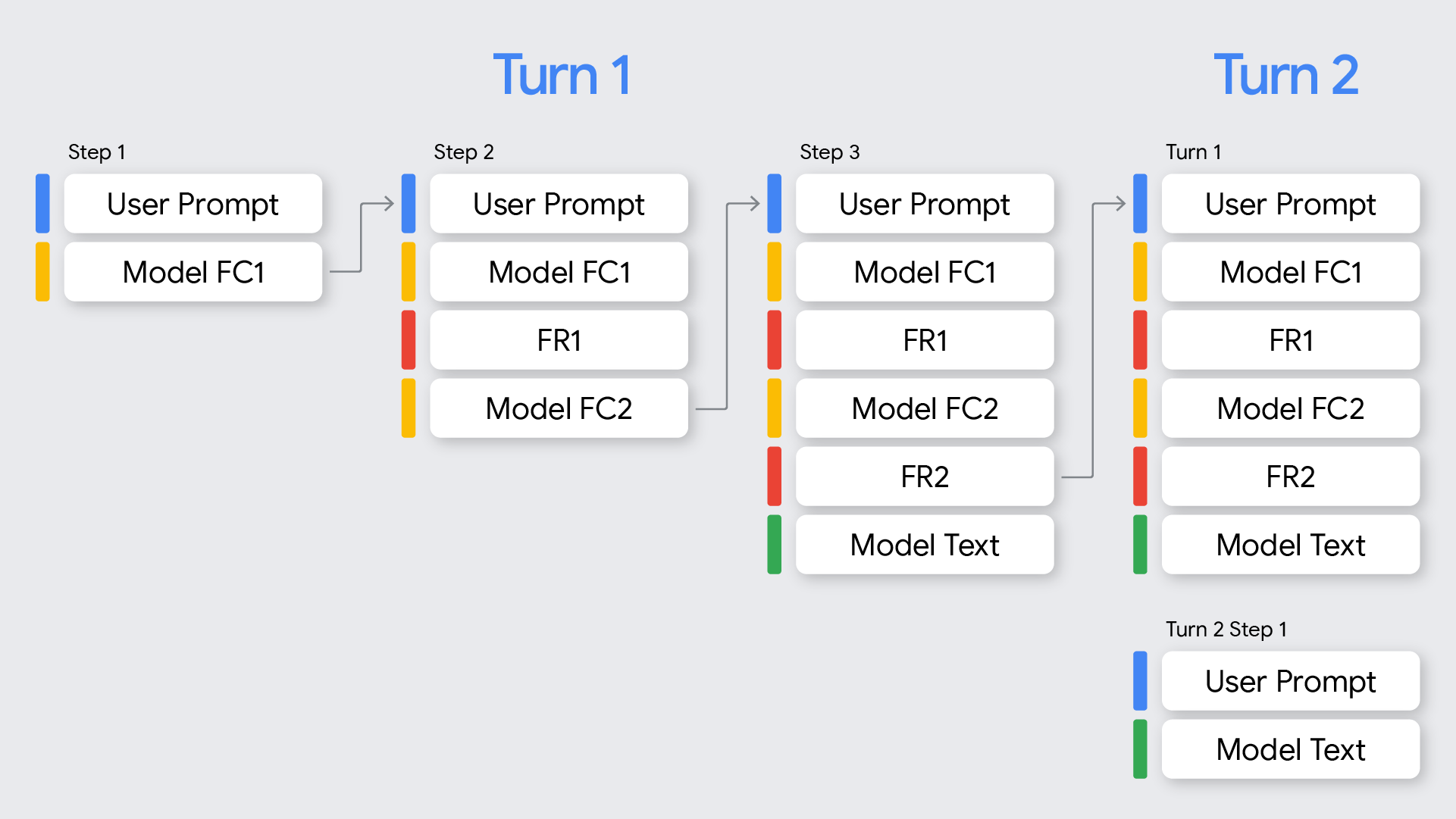
在函数调用的上下文中,请务必了解轮次和步骤之间的区别:
- 轮次代表一次完整的对话交流,从用户发送提示开始,到模型针对该提示提供最终的非函数调用回答结束。
- 步骤发生在单个轮次内,即在模型调用函数并需要函数响应才能继续其推理过程时发生。如图所示,如果模型需要按顺序调用多个函数来满足用户的请求,则单个轮次可能涉及多个步骤。
如何使用思考签名
处理思考签名的最简单方法是,在发送新请求时,将对话历史记录中所有先前消息的所有 Part 完全按模型返回的原样包含在内。
如果您不使用 Google Gen AI SDK,或者您需要修改或截断对话历史记录,则必须确保保留思考签名并将其发送回模型。
使用 Google Gen AI SDK 时(推荐)
当使用 SDK 的聊天记录功能或将上一个回答中的模型 content 对象附加到下一个请求的 contents 中时,签名会被自动处理。
以下 Python 示例展示了该自动处理过程:
from google import genai
from google.genai.types import Content, FunctionDeclaration, GenerateContentConfig, Part, ThinkingConfig, Tool

client = genai.Client()

# 1. Define your tool
get_weather_declaration = FunctionDeclaration(
   name="get_weather",
   description="Gets the current weather temperature for a given location.",
   parameters={
       "type": "object",
       "properties": {"location": {"type": "string"}},
       "required": ["location"],
   },
)
get_weather_tool = Tool(function_declarations=[get_weather_declaration])

# 2. Send a message that triggers the tool
prompt = "What's the weather like in London?"
response = client.models.generate_content(
   model="gemini-2.5-flash",
   contents=prompt,
   config=GenerateContentConfig(
       tools=[get_weather_tool],
       thinking_config=ThinkingConfig(include_thoughts=True)
   ),
)

# 3. Handle the function call
function_call = response.function_calls[0]
location = function_call.args["location"]
print(f"Model wants to call: {function_call.name}")

# Execute your tool (for example, call an API)
# (This is a mock response for the example)
print(f"Calling external tool for: {location}")
function_response_data = {
   "location": location,
   "temperature": "30C",
}

# 4. Send the tool's result back
# Append this turn's messages to history for a final response.
# The `content` object automatically attaches the required thought_signature behind the scenes.
history = [
   Content(role="user", parts=[Part(text=prompt)]),
   response.candidates[0].content, # Signature preserved here
   Content(
     role="tool",
     parts=[
         Part.from_function_response(
             name=function_call.name,
             response=function_response_data,
         )
     ],
   )
]

response_2 = client.models.generate_content(
   model="gemini-2.5-flash",
   contents=history,
   config=GenerateContentConfig(
       tools=[get_weather_tool],
       thinking_config=ThinkingConfig(include_thoughts=True)
   ),
)

# 5. Get the final, natural-language answer
print(f"\nFinal model response: {response_2.text}")
使用 REST 或手动处理时
如果您直接与 API 交互,则必须根据 Gemini 3 Pro 的以下规则实现签名处理:
- 函数调用:
- 如果模型回答包含一个或多个
functionCall部分,则需要thought_signature才能正确处理。 - 如果单个回答中存在并行函数调用,则只有第一个
functionCall部分会包含thought_signature。 - 如果一个轮次中存在跨多个步骤的顺序函数调用,则每个
functionCall部分都会包含一个thought_signature。 - 规则:构建下一个请求时,您必须包含含有
functionCall及其thought_signature的part,且完全按模型返回的原样包含在内。对于顺序(多步)函数调用,系统会对当前轮次中的所有步骤执行验证,如果在当前轮次的任何步骤中省略了第一个functionCall部分所需的thought_signature,则会导致400错误。一个轮次始于最近的一条非functionResponse的用户消息。 - 如果模型返回并行函数调用(例如
FC1+signature、FC2),您的回答必须包含所有函数调用,后跟所有函数响应(FC1+signature、FC2、FR1、FR2)。交错响应(FC1+signature、FR1、FC2、FR2)会导致400错误。 - 在极少数情况下,您可能需要提供并非由 API 生成的
functionCall部分,因此这些部分没有关联的思考签名(例如,从不包含思考签名的模型传输历史记录时)。您可以将thought_signature设置为skip_thought_signature_validator,但这应作为最后的手段,因为它会对模型性能产生负面影响。
- 如果模型回答包含一个或多个
- 非函数调用:
- 如果模型回答不包含
functionCall,则可能会在回答的最后一个part(例如,最后一个text部分)中包含thought_signature。 - 规则:为了获得最佳性能,建议在下一个请求中包含此签名,但省略它不会导致错误。进行流式传输时,此签名可能会在一个具有空文本内容的部分中返回,因此请务必解析所有部分,直到模型返回
finish_reason。
- 如果模型回答不包含
请遵循以下规则以确保保留模型的上下文:
- 始终将
thought_signature在其原始Part内发送回模型。 - 不要将包含签名的
Part与不包含签名的部分合并。这会破坏思考的位置上下文。 - 不要组合两个都包含签名的
Part,因为签名字符串无法合并。
顺序函数调用示例
以下示例展示了一个多步函数调用示例,其中用户要求“查看 AA100 的航班状态,如果航班延误则预订出租车”,这需要执行多个任务。
REST
以下示例演示了如何使用 REST API 在顺序函数调用工作流中跨多个步骤处理思考签名。
第 1 轮,第 1 步(用户请求)
{
  "contents": [
    {
      "role": "user",
      "parts": [
        {
          "text": "Check flight status for AA100 and book a taxi 2 hours before if delayed."
        }
      ]
    }
  ],
  "tools": [
    {
      "functionDeclarations": [
        {
          "name": "check_flight",
          "description": "Gets the current status of a flight",
          "parameters": {
            "type": "object",
            "properties": {
              "flight": {
                "type": "string",
                "description": "The flight number to check"
              }
            },
            "required": [
              "flight"
            ]
          }
        },
        {
          "name": "book_taxi",
          "description": "Book a taxi",
          "parameters": {
            "type": "object",
            "properties": {
              "time": {
                "type": "string",
                "description": "time to book the taxi"
              }
            },
            "required": [
              "time"
            ]
          }
        }
      ]
    }
  ]
}
第 1 轮,第 1 步(模型响应)
{
"content": {
        "role": "model",
        "parts": [
          {
            "functionCall": {
              "name": "check_flight",
              "args": {
                "flight": "AA100"
              }
            },
            "thoughtSignature": "<SIGNATURE_A>"
          }
        ]
  }
}
第 1 轮,第 2 步(用户响应 - 发送工具输出)
由于此用户轮次仅包含 functionResponse(没有新文本),因此我们仍处于第 1 轮。您必须保留 <SIGNATURE_A>。
{
      "role": "user",
      "parts": [
        {
          "text": "Check flight status for AA100 and book a taxi 2 hours before if delayed."
        }
      ]
    },
    {
        "role": "model",
        "parts": [
          {
            "functionCall": {
              "name": "check_flight",
              "args": {
                "flight": "AA100"
              }
            },
            "thoughtSignature": "<SIGNATURE_A>"
          }
        ]
      },
      {
        "role": "user",
        "parts": [
          {
            "functionResponse": {
              "name": "check_flight",
              "response": {
                "status": "delayed",
                "departure_time": "12 PM"
                }
              }
            }
        ]
}
第 1 轮,第 2 步(模型响应)
模型现在根据上一个工具输出决定预订出租车。
{
      "content": {
        "role": "model",
        "parts": [
          {
            "functionCall": {
              "name": "book_taxi",
              "args": {
                "time": "10 AM"
              }
            },
            "thoughtSignature": "<SIGNATURE_B>"
          }
        ]
      }
}
第 1 轮,第 3 步(用户响应 - 发送工具输出)
如要发送出租车预订确认,您必须包含此循环中所有函数调用的签名(<SIGNATURE_A> 和 <SIGNATURE_B>)。
{
      "role": "user",
      "parts": [
        {
          "text": "Check flight status for AA100 and book a taxi 2 hours before if delayed."
        }
      ]
    },
    {
        "role": "model",
        "parts": [
          {
            "functionCall": {
              "name": "check_flight",
              "args": {
                "flight": "AA100"
              }
            },
            "thoughtSignature": "<SIGNATURE_A>"
          }
        ]
      },
      {
        "role": "user",
        "parts": [
          {
            "functionResponse": {
              "name": "check_flight",
              "response": {
                "status": "delayed",
                "departure_time": "12 PM"
              }
              }
            }
        ]
      },
      {
        "role": "model",
        "parts": [
          {
            "functionCall": {
              "name": "book_taxi",
              "args": {
                "time": "10 AM"
              }
            },
            "thoughtSignature": "<SIGNATURE_B>"
          }
        ]
      },
      {
        "role": "user",
        "parts": [
          {
            "functionResponse": {
              "name": "book_taxi",
              "response": {
                "booking_status": "success"
              }
              }
            }
        ]
    }
}
聊天补全
以下示例演示了如何使用 Chat Completions API 在顺序函数调用工作流中跨多个步骤处理思考签名。
第 1 轮,第 1 步(用户请求)
{
  "model": "google/gemini-3-pro-preview",
  "messages": [
    {
      "role": "user",
      "content": "Check flight status for AA100 and book a taxi 2 hours before if delayed."
    }
  ],
  "tools": [
    {
      "type": "function",
      "function": {
        "name": "check_flight",
        "description": "Gets the current status of a flight",
        "parameters": {
          "type": "object",
          "properties": {
            "flight": {
              "type": "string",
              "description": "The flight number to check."
            }
          },
          "required": [
            "flight"
          ]
        }
      }
    },
    {
      "type": "function",
      "function": {
        "name": "book_taxi",
        "description": "Book a taxi",
        "parameters": {
          "type": "object",
          "properties": {
            "time": {
              "type": "string",
              "description": "time to book the taxi"
            }
          },
          "required": [
            "time"
          ]
        }
      }
    }
  ]
}
第 1 轮,第 1 步(模型响应)
{
      "role": "model",
        "tool_calls": [
          {
            "extra_content": {
              "google": {
                "thought_signature": "<SIGNATURE_A>"
              }
            },
            "function": {
              "arguments": "{\"flight\":\"AA100\"}",
              "name": "check_flight"
            },
            "id": "function-call-1",
            "type": "function"
          }
        ]
    }
第 1 轮,第 2 步(用户响应 - 发送工具输出)
由于此用户轮次仅包含 functionResponse(没有新文本),因此我们仍处于第 1 轮。您必须保留 <SIGNATURE_A>。
"messages": [
    {
      "role": "user",
      "content": "Check flight status for AA100 and book a taxi 2 hours before if delayed."
    },
    {
      "role": "model",
        "tool_calls": [
          {
            "extra_content": {
              "google": {
                "thought_signature": "<SIGNATURE_A>"
              }
            },
            "function": {
              "arguments": "{\"flight\":\"AA100\"}",
              "name": "check_flight"
            },
            "id": "function-call-1",
            "type": "function"
          }
        ]
    },
    {
      "role": "tool",
      "name": "check_flight",
      "tool_call_id": "function-call-1",
      "content": "{\"status\":\"delayed\",\"departure_time\":\"12 PM\"}"
    }
  ]
第 1 轮,第 2 步(模型响应)
模型现在根据上一个工具输出决定预订出租车。
{
"role": "model",
"tool_calls": [
{
"extra_content": {
"google": {
"thought_signature": "<SIGNATURE_B>"
}
            },
            "function": {
              "arguments": "{\"time\":\"10 AM\"}",
              "name": "book_taxi"
            },
            "id": "function-call-2",
            "type": "function"
          }
       ]
}
第 1 轮,第 3 步(用户响应 - 发送工具输出)
如要发送出租车预订确认,您必须包含此循环中所有函数调用的签名(<SIGNATURE_A> 和 <SIGNATURE_B>)。
"messages": [
    {
      "role": "user",
      "content": "Check flight status for AA100 and book a taxi 2 hours before if delayed."
    },
    {
      "role": "model",
        "tool_calls": [
          {
            "extra_content": {
              "google": {
                "thought_signature": "<SIGNATURE_A>"
              }
            },
            "function": {
              "arguments": "{\"flight\":\"AA100\"}",
              "name": "check_flight"
            },
            "id": "function-call-1d6a1a61-6f4f-4029-80ce-61586bd86da5",
            "type": "function"
          }
        ]
    },
    {
      "role": "tool",
      "name": "check_flight",
      "tool_call_id": "function-call-1d6a1a61-6f4f-4029-80ce-61586bd86da5",
      "content": "{\"status\":\"delayed\",\"departure_time\":\"12 PM\"}"
    },
    {
      "role": "model",
        "tool_calls": [
          {
            "extra_content": {
              "google": {
                "thought_signature": "<SIGNATURE_B>"
              }
            },
            "function": {
              "arguments": "{\"time\":\"10 AM\"}",
              "name": "book_taxi"
            },
            "id": "function-call-65b325ba-9b40-4003-9535-8c7137b35634",
            "type": "function"
          }
        ]
    },
    {
      "role": "tool",
      "name": "book_taxi",
      "tool_call_id": "function-call-65b325ba-9b40-4003-9535-8c7137b35634",
      "content": "{\"booking_status\":\"success\"}"
    }
  ]
并行函数调用示例
以下示例展示了一个并行函数调用示例,其中用户要求“查询巴黎和伦敦的天气”。
REST
以下示例演示了如何使用 REST API 在并行函数调用工作流中处理思考签名。
第 1 轮,第 1 步(用户请求)
{
  "contents": [
    {
      "role": "user",
      "parts": [
        {
          "text": "Check the weather in Paris and London."
        }
      ]
    }
  ],
  "tools": [
    {
      "functionDeclarations": [
        {
          "name": "get_current_temperature",
          "description": "Gets the current temperature for a given location.",
          "parameters": {
            "type": "object",
            "properties": {
              "location": {
                "type": "string",
                "description": "The city name, e.g. San Francisco"
              }
            },
            "required": [
              "location"
            ]
          }
        }
      ]
    }
  ]
}
第 1 轮,第 1 步(模型响应)
{
  "content": {
    "parts": [
      {
        "functionCall": {
          "name": "get_current_temperature",
          "args": {
            "location": "Paris"
          }
        },
        "thoughtSignature": "<SIGNATURE_A>"
      },
      {
        "functionCall": {
          "name": "get_current_temperature",
          "args": {
            "location": "London"
          }
        }
      }
    ]
  }
}
第 1 轮,第 2 步(用户响应 - 发送工具输出)
您必须完全按接收时的原样保留第一部分的 <SIGNATURE_A>。
[
  {
    "role": "user",
    "parts": [
      {
        "text": "Check the weather in Paris and London."
      }
    ]
  },
  {
    "role": "model",
    "parts": [
      {
        "functionCall": {
          "name": "get_current_temperature",
          "args": {
            "city": "Paris"
          }
        },
        "thought_signature": "<SIGNATURE_A>"
      },
      {
        "functionCall": {
          "name": "get_current_temperature",
          "args": {
            "city": "London"
          }
        }
      }
    ]
  },
  {
    "role": "user",
    "parts": [
      {
        "functionResponse": {
          "name": "get_current_temperature",
          "response": {
            "temp": "15C"
          }
        }
      },
      {
        "functionResponse": {
          "name": "get_current_temperature",
          "response": {
            "temp": "12C"
          }
        }
      }
    ]
  }
]
聊天补全
以下示例演示了如何使用 Chat Completions API 在并行函数调用工作流中处理思考签名。
第 1 轮,第 1 步(用户请求)
{
  "contents": [
    {
      "role": "user",
      "parts": [
        {
          "text": "Check the weather in Paris and London."
        }
      ]
    }
  ],
  "tools": [
    {
      "functionDeclarations": [
        {
          "name": "get_current_temperature",
          "description": "Gets the current temperature for a given location.",
          "parameters": {
            "type": "object",
            "properties": {
              "location": {
                "type": "string",
                "description": "The city name, e.g. San Francisco"
              }
            },
            "required": [
              "location"
            ]
          }
        }
      ]
    }
  ]
}
第 1 轮,第 1 步(模型响应)
{
"role": "assistant",
        "tool_calls": [
          {
            "extra_content": {
              "google": {
                "thought_signature": "<SIGNATURE_A>"
              }
            },
            "function": {
              "arguments": "{\"location\":\"Paris\"}",
              "name": "get_current_temperature"
            },
            "id": "function-call-f3b9ecb3-d55f-4076-98c8-b13e9d1c0e01",
            "type": "function"
          },
          {
            "function": {
              "arguments": "{\"location\":\"London\"}",
              "name": "get_current_temperature"
            },
            "id": "function-call-335673ad-913e-42d1-bbf5-387c8ab80f44",
            "type": "function"
          }
        ]
}
第 1 轮,第 2 步(用户响应 - 发送工具输出)
您必须完全按接收时的原样保留第一部分的 <SIGNATURE_A>。
"messages": [
    {
      "role": "user",
      "content": "Check the weather in Paris and London."
    },
    {
      "role": "assistant",
        "tool_calls": [
          {
            "extra_content": {
              "google": {
                "thought_signature": "<SIGNATURE_A>"
              }
            },
            "function": {
              "arguments": "{\"location\":\"Paris\"}",
              "name": "get_current_temperature"
            },
            "id": "function-call-f3b9ecb3-d55f-4076-98c8-b13e9d1c0e01",
            "type": "function"
          },
          {
            "function": {
              "arguments": "{\"location\":\"London\"}",
              "name": "get_current_temperature"
            },
            "id": "function-call-335673ad-913e-42d1-bbf5-387c8ab80f44",
            "type": "function"
          }
        ]
    },
    {
      "role":"tool",
      "name": "get_current_temperature",
      "tool_call_id": "function-call-f3b9ecb3-d55f-4076-98c8-b13e9d1c0e01",
      "content": "{\"temp\":\"15C\"}"
    },
    {
      "role":"tool",
      "name": "get_current_temperature",
      "tool_call_id": "function-call-335673ad-913e-42d1-bbf5-387c8ab80f44",
      "content": "{\"temp\":\"12C\"}"
    }
  ]
非 functionCall Part 中的签名
即使不存在函数调用,Gemini 也可能会在回答的最后一个 Part 中返回 thought_signature。
- 行为:模型返回的最后内容
Part(text、inlineData等)可能包含thought_signature。 - 要求:建议返回此签名,以确保模型保持高质量的推理,特别是对于遵循复杂指令或模拟代理工作流的情况。
- 验证:API 不会严格强制验证非
functionCall部分中的签名。如果您省略它们,不会收到阻塞性错误,但性能可能会下降。
文本部分包含签名的模型回答示例:
以下示例展示了一个模型回答,其中 thought_signature 包含在非 functionCall Part 中,以及如何在后续请求中处理它。
第 1 轮,第 1 步(模型响应)
{
  "role": "model",
  "parts": [
    {
      "text": "I need to calculate the risk. Let me think step-by-step...",
      "thought_signature": "<SIGNATURE_C>" // OPTIONAL (Recommended)
    }
  ]
}
第 2 轮,第 1 步(用户)
[
  { "role": "user", "parts": [{ "text": "What is the risk?" }] },
  {
    "role": "model",
    "parts": [
      {
        "text": "I need to calculate the risk. Let me think step-by-step...",
        // If you omit <SIGNATURE_C> here, no error will occur.
      }
    ]
  },
  { "role": "user", "parts": [{ "text": "Summarize it." }] }
]
使用思考签名进行多轮图片修改的示例
以下示例演示了如何在使用 Gemini 3 Pro Image 进行多轮图片创建和修改期间检索和传递思考签名。
第 1 轮:获取回答并保存包含思考签名的数据
chat = client.chats.create(
   model="gemini-3-pro-image-preview",
   config=types.GenerateContentConfig(
       response_modalities=['TEXT', 'IMAGE']
   )
)
message = "Create an image of a clear perfume bottle sitting on a vanity."
response = chat.send_message(message)
data = b''
for part in response.candidates[0].content.parts:
   if part.text:
       display(Markdown(part.text))
   if part.inline_data:
       data = part.inline_data.data
       display(Image(data=data, width=500))
第 2 轮:传递包含思考签名的数据
response = chat.send_message(
   message=[
       types.Part.from_bytes(
           data=data,
           mime_type="image/png",
       ),
       "Make the perfume bottle purple and add a vase of hydrangeas next to the bottle.",
   ],
)
for part in response.candidates[0].content.parts:
   if part.text:
       display(Markdown(part.text))
   if part.inline_data:
       display(Image(data=part.inline_data.data, width=500))