


関数呼び出し(ツールの使用とも呼ばれます)は、LLM に外部ツール(get_current_weather 関数など)の定義を提供します。プロンプトを処理するときに、モデルはツールが必要かどうかをインテリジェントに判断し、必要な場合は、呼び出すツールとそのパラメータ(get_current_weather(location='Boston') など)を指定する構造化データを出力します。アプリケーションはこのツールを実行し、結果をモデルにフィードバックします。これにより、モデルは動的な実世界の情報やアクションの結果を使用してレスポンスを完了できます。これにより、LLM とシステムが効果的に連携し、機能が拡張されます。
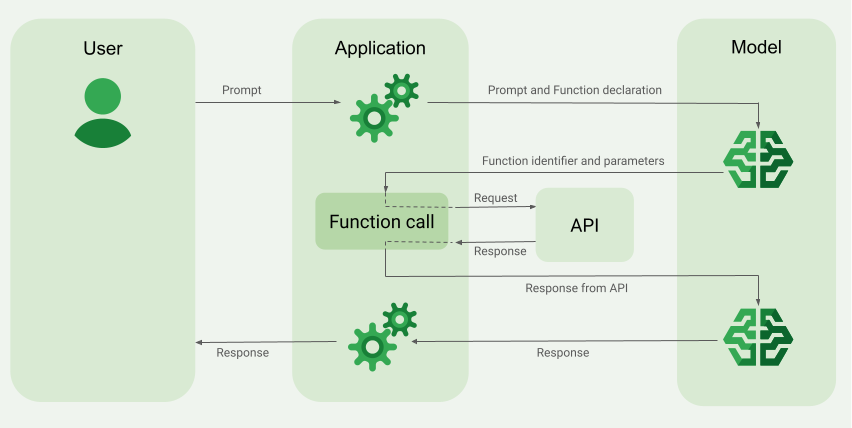
関数呼び出しでは、次の 2 つの主なユースケースが可能です。
データの取得: 現在の天候、通貨換算、ナレッジベースや API からの特定のデータ(RAG)など、モデルのレスポンスに必要な最新情報を取得します。
アクションの実行: フォームの送信、アプリケーションの状態の更新、エージェント ワークフローのオーケストレーション(会話の引き継ぎなど)などの外部オペレーションを実行します。
関数呼び出しを活用したその他のユースケースと例については、ユースケースをご覧ください。
機能と制限事項
次のモデルは関数呼び出しをサポートしています。
- Gemini モデル:
クリックして、サポートされているモデルを開く
オープンモデル:
関数は OpenAPI スキーマ形式で定義します。
Gemini 3 以降のモデルでは、モデルに送り返す
functionResponseメッセージにマルチモーダル コンテンツ(画像と PDF)を含めることができます。詳細については、マルチモーダル関数レスポンスをご覧ください。Gemini 3 以降のモデルでは、
functionCallingConfigでstreamFunctionCallArgumentsをtrueに設定することで、関数呼び出し引数を生成時にストリーミングできます。詳細については、ストリーミング関数呼び出しの引数をご覧ください。名前と説明に関するヒントなど、関数宣言に関するベスト プラクティスについては、ベスト プラクティスをご覧ください。
オープンモデルについては、こちらのユーザーガイドをご覧ください。
関数呼び出しのアプリケーションを作成する方法
関数呼び出しを使用するには、次のタスクを行います。
ステップ 1: プロンプトと関数宣言をモデルに送信する
OpenAPI スキーマと互換性のあるスキーマ形式で Tool を宣言します。詳細については、スキーマの例をご覧ください。
次の例では、プロンプトと関数宣言を Gemini モデルに送信します。
REST
PROJECT_ID=myproject
LOCATION=us-central1
MODEL_ID=gemini-2.5-flash

curl -X POST \
  -H "Authorization: Bearer $(gcloud auth print-access-token)" \
  -H "Content-Type: application/json" \
  https://${LOCATION}-aiplatform.googleapis.com/v1/projects/${PROJECT_ID}/locations/${LOCATION}/publishers/google/models/${MODEL_ID}:generateContent \
  -d '{
    "contents": [{
      "role": "user",
      "parts": [{
        "text": "What is the weather in Boston?"
      }]
    }],
    "tools": [{
      "functionDeclarations": [
        {
          "name": "get_current_weather",
          "description": "Get the current weather in a given location",
          "parameters": {
            "type": "object",
            "properties": {
              "location": {
                "type": "string",
                "description": "The city name of the location for which to get the weather.",
                "default": {
                  "string_value": "Boston, MA"
                }
              }
            },
            "required": [
              "location"
            ]
          }
        }
      ]
    }]
  }'
Google Gen AI SDK for Python
from google import genai
from google.genai.types import GenerateContentConfig, Part

# The project and location are passed directly to the client,
# and vertexai=True is added to specify the use of the Agent Platform backend.
client = genai.Client(vertexai=True, project="PROJECT_ID", location="global")

def get_current_weather(location: str) -> str:
  """Returns the current weather.

  Args:
    location: The city and state, e.g. San Francisco, CA
  """
  return 'sunny'

response = client.models.generate_content(
    model="gemini-2.5-flash",
    contents="What is the weather in boston?",
    config=GenerateContentConfig(tools=[get_current_weather]),
)
Agent Platform SDK
スキーマは、Python 辞書を使用して手動で指定することも、from_func ヘルパー関数を使用して自動的に指定することもできます。次の例は、関数を手動で宣言する方法を示しています。
import vertexai
from vertexai.generative_models import (
    Content,
    FunctionDeclaration,
    GenerationConfig,
    GenerativeModel,
    Part,
    Tool,
    ToolConfig
)

# Initialize Agent Platform
# TODO(developer): Update the project
vertexai.init(project="PROJECT_ID", location="us-central1")

# Initialize Gemini model
model = GenerativeModel(model_name="gemini-2.5-flash")

# Manual function declaration
get_current_weather_func = FunctionDeclaration(
    name="get_current_weather",
    description="Get the current weather in a given location",
    # Function parameters are specified in JSON schema format
    parameters={
        "type": "object",
        "properties": {
            "location": {
              "type": "string",
              "description": "The city name of the location for which to get the weather.",
              "default": {
                "string_value": "Boston, MA"
              }
           }
        },
    },
)

response = model.generate_content(
    contents = [
      Content(
        role="user",
          parts=[
              Part.from_text("What is the weather like in Boston?"),
          ],
      )
    ],
    generation_config = GenerationConfig(temperature=0),
    tools = [
      Tool(
        function_declarations=[get_current_weather_func],
      )
    ]
)
次の例に示すように、from_func ヘルパー関数を使用して関数を自動的に宣言することもできます。
def get_current_weather(location: str = "Boston, MA"):
  """
  Get the current weather in a given location

  Args:
      location: The city name of the location for which to get the weather.

  """
  # This example uses a mock implementation.
  # You can define a local function or import the requests library to call an API
  return {
    "location": "Boston, MA",
    "temperature": 38,
    "description": "Partly Cloudy",
    "icon": "partly-cloudy",
    "humidity": 65,
    "wind": {
        "speed": 10,
        "direction": "NW"
    }
  }
get_current_weather_func = FunctionDeclaration.from_func(get_current_weather)
Node.js
この例では、1 つの関数と 1 つのプロンプトを使用したテキストのシナリオを示します。
Node.js
このサンプルを試す前に、クライアント ライブラリを使用した Agent Platform クイックスタートの Node.js の手順に沿って設定を行ってください。
Agent Platform で認証を行うには、アプリケーションのデフォルト認証情報を設定します。詳細については、ローカル開発環境の認証の設定をご覧ください。
Go
この例では、1 つの関数と 1 つのプロンプトを使用したテキストのシナリオを示します。
Go をインストールまたは更新する方法について学びます。
詳しくは、SDK リファレンス ドキュメントをご覧ください。
Vertex AI で Google Gen AI SDK を使用するための環境変数を設定します。
# Replace the `GOOGLE_CLOUD_PROJECT` and `GOOGLE_CLOUD_LOCATION` values
# with appropriate values for your project.
export GOOGLE_CLOUD_PROJECT=GOOGLE_CLOUD_PROJECT
export GOOGLE_CLOUD_LOCATION=global
export GOOGLE_GENAI_USE_ENTERPRISE=True
C#
この例では、1 つの関数と 1 つのプロンプトを使用したテキストのシナリオを示します。
C#
このサンプルを試す前に、クライアント ライブラリを使用した Agent Platform クイックスタートの C# の手順に沿って設定を行ってください。
Agent Platform で認証を行うには、アプリケーションのデフォルト認証情報を設定します。詳細については、ローカル開発環境の認証の設定をご覧ください。
Java
Java
このサンプルを試す前に、クライアント ライブラリを使用した Agent Platform クイックスタートの Java の手順に沿って設定を行ってください。
Agent Platform で認証を行うには、アプリケーションのデフォルト認証情報を設定します。詳細については、ローカル開発環境の認証の設定をご覧ください。
モデルが特定の関数の出力が必要と判断した場合、アプリケーションがモデルから受け取るレスポンスには、関数名と、その関数を呼び出すためのパラメータ値が含まれます。
ユーザー プロンプト「ボストンの天気は?」に対するモデル レスポンスの例を次に示します。モデルは、パラメータ Boston, MA を指定して get_current_weather 関数を呼び出すことを提案します。
candidates {
  content {
    role: "model"
    parts {
      function_call {
        name: "get_current_weather"
        args {
          fields {
            key: "location"
            value {
              string_value: "Boston, MA"
            }
          }
        }
      }
    }
  }
  ...
}
ステップ 2: API 出力をモデルに提供する
外部 API を呼び出し、API 出力をモデルに返します。
次の例では、擬似データを使用して外部 API からのレスポンス ペイロードをシミュレートし、出力をモデルに返送します。
REST
PROJECT_ID=myproject
MODEL_ID=gemini-2.5-flash
LOCATION="us-central1"

curl -X POST \
-H "Authorization: Bearer $(gcloud auth print-access-token)" \
-H "Content-Type: application/json" \
https://${LOCATION}-aiplatform.googleapis.com/v1/projects/${PROJECT_ID}/locations/${LOCATION}/publishers/google/models/${MODEL_ID}:generateContent \
-d '{
"contents": [
{
  "role": "user",
  "parts": {
    "text": "What is the weather in Boston?"
  }
},
{
  "role": "model",
  "parts": [
    {
      "functionCall": {
        "name": "get_current_weather",
        "args": {
          "location": "Boston, MA"
        }
      }
    }
  ]
},
{
  "role": "user",
  "parts": [
    {
      "functionResponse": {
        "name": "get_current_weather",
        "response": {
          "temperature": 20,
          "unit": "C"
        }
      }
    }
  ]
}
],
"tools": [
{
  "function_declarations": [
    {
      "name": "get_current_weather",
      "description": "Get the current weather in a specific location",
      "parameters": {
        "type": "object",
        "properties": {
          "location": {
            "type": "string",
            "description": "The city name of the location for which to get the weather."
          }
        },
        "required": [
          "location"
        ]
      }
    }
  ]
}
]
}'
Agent Platform SDK
function_response_contents = []
function_response_parts = []

# Iterates through the function calls in the response in case there are parallel function call requests
for function_call in response.candidates[0].function_calls:
    print(f"Function call: {function_call.name}")

    # In this example, we'll use synthetic data to simulate a response payload from an external API
    if (function_call.args['location'] == "Boston, MA"):
      api_response = { "location": "Boston, MA", "temperature": 38, "description": "Partly Cloudy" }
    if (function_call.args['location'] == "San Francisco, CA"):
      api_response = { "location": "San Francisco, CA", "temperature": 58, "description": "Sunny" }

    function_response_parts.append(
        Part.from_function_response(
            name=function_call.name,
            response={"contents": api_response}
        )
    )
    # Add the function call response to the contents
    function_response_contents = Content(role="user", parts=function_response_parts)

# Submit the User's prompt, model's response, and API output back to the model
response = model.generate_content(
  [
    Content( # User prompt
      role="user",
      parts=[
          Part.from_text("What is the weather like in Boston?"),
      ],
    ),
    response.candidates[0].content,  # Function call response
    function_response_contents   # API output
  ],
  tools=[
    Tool(
      function_declarations=[get_current_weather_func],
    )
  ],
)
# Get the model summary response
print(response.text)
API 呼び出しに関するベスト プラクティスについては、ベスト プラクティス - API 呼び出しをご覧ください。
モデルが複数の並列関数呼び出しを提案した場合、アプリケーションはすべてのレスポンスをモデルに返す必要があります。詳細については、並列関数呼び出しの例をご覧ください。
モデルは、プロンプトに応答するために別の関数の出力が必要であると判断する場合があります。この場合、アプリケーションがモデルから受信するレスポンスには、別の関数名と別のパラメータ値のセットが含まれます。
API のレスポンスがユーザーのプロンプトへの回答に十分であるとモデルが判断した場合、モデルは自然言語レスポンスを作成してアプリケーションに返します。この場合、ユーザーには、アプリケーションがレスポンスを返す必要があります。自然言語レスポンスの例を次に示します。
It is currently 38 degrees Fahrenheit in Boston, MA with partly cloudy skies.
思考を伴う関数呼び出し
thinking を有効にして関数を呼び出す場合は、モデル レスポンス オブジェクトから thought_signature を取得し、関数の実行結果をモデルに送信するときに返す必要があります。例:
Python
# Call the model with function declarations
# ...Generation config, Configure the client, and Define user prompt (No changes)

# Send request with declarations (using a thinking model)
response = client.models.generate_content(
  model="gemini-2.5-flash", config=config, contents=contents)

# See thought signatures
for part in response.candidates[0].content.parts:
  if not part.text:
    continue
  if part.thought and part.thought_signature:
    print("Thought signature:")
    print(part.thought_signature)
思考シグネチャを表示する必要はありませんが、ステップ 2 を調整して、関数実行の結果とともにシグネチャを返す必要があります。これにより、思考を最終レスポンスに組み込むことができます。
Python
# Create user friendly response with function result and call the model again
# ...Create a function response part (No change)

# Append thought signatures, function call and result of the function execution to contents
function_call_content = response.candidates[0].content
# Append the model's function call message, which includes thought signatures
contents.append(function_call_content)
contents.append(types.Content(role="user", parts=[function_response_part])) # Append the function response

final_response = client.models.generate_content(
    model="gemini-2.5-flash",
    config=config,
    contents=contents,
)

print(final_response.text)
思考シグネチャを返す場合は、次のガイドラインに従ってください。
- モデルは、レスポンスの他の部分(関数呼び出し、テキスト、思考サマリーなど)にシグネチャを返します。後続のターンで、すべての部分を含むレスポンス全体をモデルに返します。
- シグネチャを含むパートを、シグネチャを含む別のパートと結合しないでください。シグネチャを連結することはできません。
- シグネチャ付きのパートとシグネチャなしのパートを結合しないでください。結合すると、シグネチャで表される思考の正しい位置付けが損なわれます。
思考シグネチャの制限事項と使用方法、および思考モデルについて詳細をご確認ください。
並列関数呼び出し
「Get weather details in Boston and San Francisco?」のようなプロンプトでは、モデルが複数の並列関数呼び出しを提案する場合があります。並列関数呼び出しをサポートするモデルの一覧については、サポートされているモデルをご覧ください。
REST
この例では、1 つの get_current_weather 関数を使用するシナリオを示します。ユーザー プロンプトは「Get weather details in Boston and San Francisco?」です。モデルは、パラメータ Boston を指定した場合と、パラメータ San Francisco を指定した場合の get_current_weather 関数の 2 つの並列呼び出しを提案しています。
{
"candidates": [
  {
    "content": {
      "role": "model",
      "parts": [
        {
          "functionCall": {
            "name": "get_current_weather",
            "args": {
              "location": "Boston"
            }
          }
        },
        {
          "functionCall": {
            "name": "get_current_weather",
            "args": {
              "location": "San Francisco"
            }
          }
        }
      ]
    },
    ...
  }
],
...
}
次のコマンドは、関数の出力をモデルに提供する方法を示しています。my-project は、 Google Cloud プロジェクトの名前に置き換えます。
モデルのリクエスト
PROJECT_ID=my-project
MODEL_ID=gemini-2.5-flash
LOCATION="us-central1"
curl -X POST \
-H "Authorization: Bearer $(gcloud auth print-access-token)" \
-H "Content-Type: application/json" \
https://${LOCATION}-aiplatform.googleapis.com/v1/projects/${PROJECT_ID}/locations/${LOCATION}/publishers/google/models/${MODEL_ID}:generateContent \
-d '{
"contents": [
{
  "role": "user",
  "parts": {
    "text": "What is difference in temperature in Boston and San Francisco?"
  }
},
{
  "role": "model",
  "parts": [
    {
      "functionCall": {
        "name": "get_current_weather",
        "args": {
          "location": "Boston"
        }
      }
    },
    {
      "functionCall": {
        "name": "get_current_weather",
        "args": {
          "location": "San Francisco"
        }
      }
    }
  ]
},
{
  "role": "user",
  "parts": [
    {
      "functionResponse": {
        "name": "get_current_weather",
        "response": {
          "temperature": 30.5,
          "unit": "C"
        }
      }
    },
    {
      "functionResponse": {
        "name": "get_current_weather",
        "response": {
          "temperature": 20,
          "unit": "C"
        }
      }
    }
  ]
}
],
"tools": [
{
  "function_declarations": [
    {
      "name": "get_current_weather",
      "description": "Get the current weather in a specific location",
      "parameters": {
        "type": "object",
        "properties": {
          "location": {
            "type": "string",
            "description": "The city name of the location for which to get the weather."
          }
        },
        "required": [
          "location"
        ]
      }
    }
  ]
}
]
}'
モデルによって作成された自然言語のレスポンスは次のようになります。
モデルのレスポンス
[
{
    "candidates": [
        {
            "content": {
                "parts": [
                    {
                        "text": "The temperature in Boston is 30.5C and the temperature in San Francisco is 20C. The difference is 10.5C. \n"
                    }
                ]
            },
            "finishReason": "STOP",
            ...
        }
    ]
    ...
}
]
Python
この例では、1 つの get_current_weather 関数を使用するシナリオを示します。ユーザー プロンプトは「What is the weather like in Boston and San Francisco?」です。
my-project は、 Google Cloud プロジェクトの名前に置き換えます。
import vertexai
from vertexai.generative_models import (
    Content,
    FunctionDeclaration,
    GenerationConfig,
    GenerativeModel,
    Part,
    Tool,
    ToolConfig
)

# Initialize Agent Platform
# TODO(developer): Update the project
vertexai.init(project="my-project", location="us-central1")

# Initialize Gemini model
model = GenerativeModel(model_name="gemini-2.5-flash")

# Manual function declaration
get_current_weather_func = FunctionDeclaration(
    name="get_current_weather",
    description="Get the current weather in a given location",
    # Function parameters are specified in JSON schema format
    parameters={
        "type": "object",
        "properties": {
            "location": {
              "type": "string",
              "description": "The city name of the location for which to get the weather.",
              "default": {
                "string_value": "Boston, MA"
              }
          }
        },
    },
)

response = model.generate_content(
    contents = [
      Content(
        role="user",
          parts=[
              Part.from_text("What is the weather like in Boston and San Francisco?"),
          ],
      )
    ],
    generation_config = GenerationConfig(temperature=0),
    tools = [
      Tool(
        function_declarations=[get_current_weather_func],
      )
    ]
)
次のコマンドは、関数の出力をモデルに提供する方法を示しています。
function_response_contents = []
function_response_parts = []

# You can have parallel function call requests for the same function type.
# For example, 'location_to_lat_long("London")' and 'location_to_lat_long("Paris")'
# In that case, collect API responses in parts and send them back to the model

for function_call in response.candidates[0].function_calls:
    print(f"Function call: {function_call.name}")

    # In this example, we'll use synthetic data to simulate a response payload from an external API
    if (function_call.args['location'] == "Boston, MA"):
      api_response = { "location": "Boston, MA", "temperature": 38, "description": "Partly Cloudy" }
    if (function_call.args['location'] == "San Francisco, CA"):
      api_response = { "location": "San Francisco, CA", "temperature": 58, "description": "Sunny" }

    function_response_parts.append(
        Part.from_function_response(
            name=function_call.name,
            response={"contents": api_response}
        )
    )
    # Add the function call response to the contents
    function_response_contents = Content(role="user", parts=function_response_parts)

function_response_contents

response = model.generate_content(
    contents = [
        Content(
        role="user",
          parts=[
              Part.from_text("What is the weather like in Boston and San Francisco?"),
          ],
        ),  # User prompt
        response.candidates[0].content,  # Function call response
        function_response_contents,  # Function response
    ],
    tools = [
      Tool(
        function_declarations=[get_current_weather_func],
      )
    ]
)
# Get the model summary response
print(response.text)
Go
マルチモーダル関数レスポンス
Gemini 3 以降のモデルでは、モデルに送信する関数レスポンス部分にマルチモーダル コンテンツを含めることができます。モデルは、次のターンでこのマルチモーダル コンテンツを処理して、より多くの情報に基づいたレスポンスを生成できます。関数レスポンスのマルチモーダル コンテンツでは、次の MIME タイプがサポートされています。
- 画像:
image/png、image/jpeg、image/webp - ドキュメント:
application/pdf、text/plain
関数レスポンスにマルチモーダル データを含めるには、functionResponse 部分内にネストされた 1 つ以上の部分としてデータを含めます。各マルチモーダル部分には、inlineData または fileData を含める必要があります。構造化された response フィールド内からマルチモーダル パートを参照する場合は、一意の displayName を含める必要があります。
JSON 参照形式 {"$ref": "<displayName>"} を使用して、functionResponse 部分の構造化された response フィールド内からマルチモーダル部分を参照することもできます。モデルは、レスポンスの処理時に参照をマルチモーダル コンテンツに置き換えます。各 displayName は、構造化された response フィールドで 1 回だけ参照できます。
次の例は、get_image という名前の関数の functionResponse と、画像データを含むネストされた部分を含むメッセージを示しています。functionResponse の response フィールドは、この画像部分を参照します。
Python
from google import genai
from google.genai import types

client = genai.Client()

# This is a manual, two turn multimodal function calling workflow:

# 1. Define the function tool
get_image_declaration = types.FunctionDeclaration(
  name="get_image",
  description="Retrieves the image file reference for a specific order item.",
  parameters={
      "type": "object",
      "properties": {
          "item_name": {
              "type": "string",
              "description": "The name or description of the item ordered (e.g., 'green shirt')."
          }
      },
      "required": ["item_name"],
  },
)
tool_config = types.Tool(function_declarations=[get_image_declaration])

# 2. Send a message that triggers the tool
prompt = "Show me the green shirt I ordered last month."
response_1 = client.models.generate_content(
  model="gemini-3.5-flash",
  contents=[prompt],
  config=types.GenerateContentConfig(
      tools=[tool_config],
  )
)

# 3. Handle the function call
function_call = response_1.function_calls[0]
requested_item = function_call.args["item_name"]
print(f"Model wants to call: {function_call.name}")

# Execute your tool (e.g., call an API)
# (This is a mock response for the example)
print(f"Calling external tool for: {requested_item}")

function_response_data = {
  "image_ref": {"$ref": "dress.jpg"},
}

function_response_multimodal_data = types.FunctionResponsePart(
  file_data=types.FunctionResponseFileData(
    mime_type="image/png",
    display_name="dress.jpg",
    file_uri="gs://cloud-samples-data/generative-ai/image/dress.jpg",
  )
)

# 4. Send the tool's result back
# Append this turn's messages to history for a final response.
history = [
  types.Content(role="user", parts=[types.Part(text=prompt)]),
  response_1.candidates[0].content,
  types.Content(
    role="tool",
    parts=[
        types.Part.from_function_response(
          name=function_call.name,
          response=function_response_data,
          parts=[function_response_multimodal_data]
        )
    ],
  )
]

response_2 = client.models.generate_content(
  model="gemini-3.5-flash",
  contents=history,
  config=types.GenerateContentConfig(
      tools=[tool_config],
      thinking_config=types.ThinkingConfig(include_thoughts=True)
  ),
)

print(f"\nFinal model response: {response_2.text}")
REST
"contents": [
  ...,
  {
    "role": "user",
    "parts": [
      {
        "functionResponse": {
          "name": "get_image",
          "response": {
            "image_ref": {
              "$ref": "wakeupcat.jpg"
            }
          },
          "parts": [
            {
              "fileData": {
                "displayName": "wakeupcat.jpg",
                "mimeType": "image/jpeg",
                "fileUri": "gs://cloud-samples-data/vision/label/wakeupcat.jpg"
              }
            }
          ]
        }
      }
    ]
  }
]
ストリーミング関数呼び出し引数
Gemini 3 以降のモデルでは、引数の完全なセットが生成されるのを待つのではなく、モデルによって生成された関数呼び出し引数をストリーミングするようにリクエストできます。これは、関数を呼び出す必要がある場合に認識されるレイテンシの短縮に役立ちます。
この機能には次の制限があります。
- この機能は、
v1とv1beta1の両方の API バージョンで使用できます。
関数呼び出し引数のストリーミングを有効にするには、streamGenerateContent を呼び出すときに toolConfig.functionCallingConfig 内の streamFunctionCallArguments を true に設定します。
streamFunctionCallArguments が有効になっている場合、中間レスポンスには partialArgs フィールドと willContinue フィールドを含む functionCall オブジェクトが含まれます。partialArgs には、生成された引数フラグメントが含まれます。willContinue は、関数呼び出しの追加のフラグメントが想定されるかどうかを示します。
partialArgs:PartialArgオブジェクトの配列。各オブジェクトには次のものが含まれます。jsonPath: 関数パラメータ オブジェクト内のこのフラグメントへのパスを示す JSONPath 文字列。パスは、引数($.locationなど)または引数がオブジェクト($.location.latitudeなど)の場合の引数内の要素を指すことができます。- フラグメントの値(
numberValue、stringValue、boolValue、nullValueのいずれか)。 willContinue:partialArgsオブジェクト内のブール値。文字列値がチャンクでストリーミングされ、この引数にさらにチャンクが想定される場合、このフィールドは、stringValueフラグメントに対してのみtrueになります。
willContinue:functionCallオブジェクト内のブール値。trueの場合、後続のストリーミング レスポンスでは、関数呼び出し全体でより多くのpartialArgsが想定されます。falseか、または存在しない場合、これは現在の関数呼び出しの最終的なストリーミング レスポンスです。
次の例は、単一の関数呼び出しの引数がストリーミングされる、ストリーミングされた generateContent チャンクのシーケンスを示しています。
{
  "parts": [
    {
      "functionCall": {
        "name": "controlLight",
        "partialArgs": [
          {
            "jsonPath": "$.brightness",
            "numberValue": 50
          }
        ],
        "willContinue": true
      }
    }
  ],
  "role": "model"
}
{
  "parts": [
    {
      "functionCall": {
        "partialArgs": [
          {
            "jsonPath": "$.colorTemperature",
            "stringValue": "warm",
            "willContinue": true
          }
        ],
        "willContinue": true
      }
    }
  ],
  "role": "model"
}
{
  "parts": [
    {
      "functionCall": {
        "partialArgs": [
          {
            "jsonPath": "$.colorTemperature"
          }
        ],
        "willContinue": true
      }
    }
  ],
  "role": "model"
}
{
  "parts": [
    {
      "functionCall": {}
    }
  ],
  "role": "model"
}
次の例は、「What is difference in temperature in New Delhi and San Francisco?」というプロンプトに対して、並列関数呼び出しの引数が複数のレスポンスにわたってストリーミングされる方法を示しています。
{
  "candidates": [{
    "content": {
      "role": "model",
      "parts": [{
        "functionCall": {
          "name": "get_current_weather",
          "willContinue": true
        },
      }]
    }
  }],
}
{
  "candidates": [{
    "content": {
      "role": "model",
      "parts": [{
        "functionCall": {
          "partialArgs": [{
            "jsonPath": "$.location",
            "stringValue": "New Delhi",
            "willContinue": true
          }],
          "willContinue": true
        }
      }]
    }
  }],
}
{
  "candidates": [{
    "content": {
      "role": "model",
      "parts": [{
        "functionCall": {
          "partialArgs": [{
            "jsonPath": "$.location",
            "stringValue": ""
          }],
          "willContinue": true
        }
      }]
    }
  }],
}
{
  "candidates": [{
    "content": {
      "role": "model",
      "parts": [{
        "functionCall": {
        }
      }]
    }
  }],
}
{
  "candidates": [{
    "content": {
      "role": "model",
      "parts": [{
        "functionCall": {
          "name": "get_current_weather",
          "willContinue": true
        },
      }]
    }
  }],
}
{
  "candidates": [{
    "content": {
      "role": "model",
      "parts": [{
        "functionCall": {
          "partialArgs": [{
            "jsonPath": "$.location",
            "stringValue": "San Francisco",
            "willContinue": true
          }],
          "willContinue": true
        }
      }]
    }
  }],
}
{
  "candidates": [{
    "content": {
      "role": "model",
      "parts": [{
        "functionCall": {
          "partialArgs": [{
            "jsonPath": "$.location",
            "stringValue": ""
          }],
          "willContinue": true
        }
      }]
    }
  }],
}
{
  "candidates": [{
    "content": {
      "role": "model",
      "parts": [{
        "functionCall": {
        }
      }]
    }
  }],
}
Python
from google import genai
from google.genai import types

client = genai.Client()

get_weather_declaration = types.FunctionDeclaration(
  name="get_weather",
  description="Gets the current weather temperature for a given location.",
  parameters={
      "type": "object",
      "properties": {"location": {"type": "string"}},
      "required": ["location"],
  },
)
get_weather_tool = types.Tool(function_declarations=[get_weather_declaration])

for chunk in client.models.generate_content_stream(
  model="gemini-3.5-flash",
  contents="What's the weather in London and New York?",
  config=types.GenerateContentConfig(
      tools=[get_weather_tool],
      tool_config = types.ToolConfig(
          function_calling_config=types.FunctionCallingConfig(
              mode=types.FunctionCallingConfigMode.AUTO,
              stream_function_call_arguments=True,
          )
      ),
  ),
):
  function_call = chunk.function_calls[0]
  if function_call and function_call.name:
      print(f"{function_call.name}")
      print(f"will_continue={function_call.will_continue}")
関数呼び出しモード
function_calling_config 内でモードを設定することで、モデルが提供されたツール(関数宣言)を使用する方法を制御できます。
| モード | 説明 |
|---|---|
AUTO |
デフォルトのモデル動作。モデルは、コンテキストに基づいて関数呼び出しを予測するか、自然言語で応答するかを決定します。これは最も柔軟なモードであり、ほとんどのシナリオにおすすめです。 |
VALIDATED |
モデルは、関数呼び出しまたは自然言語のいずれかを予測するように制約され、関数スキーマの準拠が保証されます。allowed_function_names が指定されていない場合、モデルは使用可能なすべての関数宣言から選択します。allowed_function_names が指定されている場合、モデルは許可された関数のセットから選択します。Gemini 3 以降では、このモードで必須パラメータの存在も強制されます。 |
ANY |
モデルは、常に 1 つ以上の関数呼び出しを予測するように制約され、関数スキーマの準拠が保証されます。allowed_function_names が指定されていない場合、モデルは使用可能なすべての関数宣言から選択します。allowed_function_names が指定されている場合、モデルは許可された関数のセットから選択します。すべてのプロンプトに関数呼び出しのレスポンスが必要な場合は、このモードを使用します(該当する場合)。 |
NONE |
モデルは関数呼び出しを行うことが禁止されています。これは、関数宣言なしでリクエストを送信するのと同じです。このモードを使用すると、ツール定義を削除せずに関数呼び出しを一時的に無効にできます。 |
強制関数呼び出し
モデルに自然言語によるレスポンスと関数呼び出しのどちらかを選択させるのではなく、関数呼び出しのみを予測するように強制できます。これは強制関数呼び出しと呼ばれます。関数宣言の全セットをモデルに提供し、そのレスポンスをこれらの関数のサブセットに制限することもできます。
次の例では、get_weather 関数呼び出しのみを予測するように強制されています。
Python
response = model.generate_content(
    contents = [
      Content(
        role="user",
          parts=[
              Part.from_text("What is the weather like in Boston?"),
          ],
      )
    ],
    generation_config = GenerationConfig(temperature=0),
    tools = [
      Tool(
        function_declarations=[get_weather_func, some_other_function],
      )
    ],
    tool_config=ToolConfig(
        function_calling_config=ToolConfig.FunctionCallingConfig(
            # ANY mode forces the model to predict only function calls
            mode=ToolConfig.FunctionCallingConfig.Mode.ANY,
            # Allowed function calls to predict when the mode is ANY. If empty, any of
            # the provided function calls will be predicted.
            allowed_function_names=["get_weather"],
        )
    )
)
関数スキーマの例
関数宣言は OpenAPI スキーマと互換性があります。サポートされている属性は、type、nullable、required、format、description、properties、items、enum、anyOf、$ref、$defs です。残りの属性はサポートされていません。
オブジェクト パラメータと配列パラメータを含む関数
次の例では、Python 辞書を使用して、オブジェクト パラメータと配列パラメータの両方を受け取る関数を宣言しています。
extract_sale_records_func = FunctionDeclaration(
  name="extract_sale_records",
  description="Extract sale records from a document.",
  parameters={
      "type": "object",
      "properties": {
          "records": {
              "type": "array",
              "description": "A list of sale records",
              "items": {
                  "description": "Data for a sale record",
                  "type": "object",
                  "properties": {
                      "id": {"type": "integer", "description": "The unique id of the sale."},
                      "date": {"type": "string", "description": "Date of the sale, in the format of MMDDYY, e.g., 031023"},
                      "total_amount": {"type": "number", "description": "The total amount of the sale."},
                      "customer_name": {"type": "string", "description": "The name of the customer, including first name and last name."},
                      "customer_contact": {"type": "string", "description": "The phone number of the customer, e.g., 650-123-4567."},
                  },
                  "required": ["id", "date", "total_amount"],
              },
          },
      },
      "required": ["records"],
  },
)
列挙型パラメータを含む関数
次の例では、Python 辞書を使用して、整数 enum パラメータを受け取る関数を宣言しています。
set_status_func = FunctionDeclaration(
  name="set_status",
  description="set a ticket's status field",
  # Function parameters are specified in JSON schema format
  parameters={
      "type": "object",
      "properties": {
        "status": {
          "type": "integer",
          "enum": [ "10", "20", "30" ],   # Provide integer (or any other type) values as strings.
        }
      },
  },
)
ref と def を含む関数
次の JSON 関数宣言では、ref 属性と defs 属性を使用しています。
{
  "contents": ...,
  "tools": [
    {
      "function_declarations": [
        {
          "name": "get_customer",
          "description": "Search for a customer by name",
          "parameters": {
            "type": "object",
            "properties": {
              "first_name": { "ref": "#/defs/name" },
              "last_name": { "ref": "#/defs/name" }
            },
            "defs": {
              "name": { "type": "string" }
            }
          }
        }
      ]
    }
  ]
}
使用上の注意:
- OpenAPI スキーマとは異なり、
$記号なしでrefとdefsを指定します。 refはdefsの直接の子を参照する必要があります。外部参照は使用できません。- ネストされたスキーマの最大深度は 32 です。
defs(自己参照)の再帰回数は 2 に制限されています。
配列パラメータを持つ from_func
次のコードサンプルは、数値の配列を乗算する関数を宣言し、from_func を使用して FunctionDeclaration スキーマを生成します。
from typing import List

# Define a function. Could be a local function or you can import the requests library to call an API
def multiply_numbers(numbers: List[int] = [1, 1]) -> int:
  """
  Calculates the product of all numbers in an array.

  Args:
      numbers: An array of numbers to be multiplied.

  Returns:
      The product of all the numbers. If the array is empty, returns 1.
  """

  if not numbers:  # Handle empty array
      return 1

  product = 1
  for num in numbers:
      product *= num

  return product

multiply_number_func = FunctionDeclaration.from_func(multiply_numbers)

"""
multiply_number_func contains the following schema:

{'name': 'multiply_numbers',
  'description': 'Calculates the product of all numbers in an array.',
  'parameters': {'properties': {'numbers': {'items': {'type': 'INTEGER'},
    'description': 'list of numbers',
    'default': [1.0, 1.0],
    'title': 'Numbers',
    'type': 'ARRAY'}},
  'description': 'Calculates the product of all numbers in an array.',
  'title': 'multiply_numbers',
  'property_ordering': ['numbers'],
  'type': 'OBJECT'}}
"""
関数呼び出しのベスト プラクティス
関数呼び出しを使用する際の成果を向上させるには、次のベスト プラクティスを参考にしてください。
明確で詳細な関数名、パラメータの説明、手順を記述する
関数名は英字またはアンダースコアで始め、a~z、A~Z、0~9、アンダースコア、ピリオド、ダッシュのみを含め、64 文字以内にする必要があります。
関数とパラメータの説明は、非常に明確かつ具体的に記述します。モデルは、この説明に基づいて正しい関数を選択し、適切な引数を指定します。たとえば、
book_flight_ticket関数にbook flight tickets after confirming users' specific requirements, such as time, departure, destination, party size and preferred airlineという説明を付けることができます。
厳密に型指定されたパラメータを使用する
パラメータ値が有限集合の場合、値の集合を説明に入れるのではなく、enum フィールドを追加します。パラメータ値が常に整数の場合は、型を number ではなく integer に設定します。
ツールの選択
モデルでは任意の数のツールを使用できますが、ツールが多すぎると、誤ったツールや最適でないツールが選択されるリスクが高まる可能性があります。最良の結果を得るには、コンテキストやタスクに関連するツールのみを提供することを目指します。理想的には、アクティブなセットを最大 10~20 個に保ちます。ツールの合計数が多い場合は、会話のコンテキストに基づく動的なツール選択を検討してください。
汎用的なローレベルのツール(bash など)を提供すると、モデルがそのツールをより頻繁に使用する可能性がありますが、精度は低下します。特定のハイレベルのツール(get_weather など)を指定すると、モデルはツールをより正確に使用できますが、ツールの使用頻度は低くなる可能性があります。
システム指示を使用する
日付、時刻、位置情報のパラメータを伴う関数を使用する場合は、現在の日付、時刻、関連する位置情報(都市や国など)をシステム指示に含めます。これにより、ユーザーのプロンプトに詳細情報が含まれない場合でも、リクエストを正確に処理するために必要なコンテキストがモデルに提供されます。
プロンプト エンジニアリング
最適な結果を得るには、ユーザー プロンプトの先頭に次の詳細を付加します。
- モデルの追加コンテキスト(例:
You are a flight API assistant to help with searching flights based on user preferences.) - 関数の使用方法と使用のタイミングに関する詳細や手順(例:
Don't make assumptions on the departure or destination airports. Always use a future date for the departure or destination time.) - ユーザーからの質問があいまいな場合に、質問を明確にするための指示(例:
Ask clarifying questions if not enough information is available.)
生成構成を使用する
Temperature パラメータには、0 または別の小さい値を使用します。これにより、より確信度の高い結果を生成してハルシネーションを減らすようにモデルに指示します。
構造化出力を使用する
関数呼び出しは、構造化出力とともに使用できます。これにより、モデルは常に特定のスキーマに準拠する関数呼び出しまたは出力を予測できます。そのため、モデルが関数呼び出しを生成しない場合でも、一貫した形式のレスポンスを受信できます。
API 呼び出しを検証する
注文の送信やデータベースの更新など、重大な結果をもたらすような関数の呼び出しをモデルが提案する場合は、それを実行する前にユーザーにその関数呼び出しの妥当性を確認してください。
思考シグネチャを使用する
思考シグネチャは、最適な結果を得るために、常に関数呼び出しとともに使用する必要があります。
料金
関数呼び出しの料金は、テキストの入力と出力の文字数に基づいて決まります。詳細については、Gemini Enterprise Agent Platform の料金をご覧ください。
ここで、テキスト入力(プロンプト)は、現在の会話ターンのユーザー プロンプト、現在の会話ターンの関数宣言、会話の履歴を参照します。会話の履歴には、以前の会話ターンのクエリ、関数呼び出し、関数レスポンスが含まれます。Gemini Enterprise Agent Platform は、会話の履歴を 32,000 文字で切り捨てます。
テキスト出力(レスポンス)は、現在の会話ターンの関数呼び出しとテキスト レスポンスを表します。
関数呼び出しのユースケース
関数呼び出しは、次のようなタスクに使用できます。
| ユースケース | 例の説明 | 例のリンク |
|---|---|---|
| 外部 API と統合する | 気象 API を使用して天気情報を取得する | ノートブックのチュートリアル |
| 住所を緯度経度の座標に変換する | ノートブックのチュートリアル | |
| 為替 API を使用して通貨を換算する | Codelab | |
| 高度な chatbot を構築する | プロダクトやサービスに関するお客様の質問に回答する | ノートブックのチュートリアル |
| 企業の財務情報やニュースに関する質問に回答するアシスタントを作成する | ノートブックのチュートリアル | |
| 関数呼び出しを構造化して制御する | 未加工のログデータから構造化されたエンティティを抽出する | ノートブックのチュートリアル |
| ユーザー入力からパラメータを抽出する | ノートブックのチュートリアル | |
| 関数呼び出しでネストされたデータ構造とリストを処理する | ノートブックのチュートリアル | |
| 関数呼び出しの動作を処理する | 並列関数呼び出しとレスポンスを処理する | ノートブックのチュートリアル |
| モデルが呼び出せる関数とそのタイミングを管理する | ノートブックのチュートリアル | |
| 自然言語でデータベースにクエリを実行する | 自然言語の質問を BigQuery の SQL クエリに変換する | サンプルアプリ |
| マルチモーダル関数呼び出し | 入力として画像、動画、音声、PDF を使用して関数呼び出しをトリガーする | ノートブックのチュートリアル |
さらに、次のようなユースケースもあります。
音声コマンドを解釈する: 車載機能に対応する関数を作成します。たとえば、ラジオをオンにする関数や、エアコンをつける関数を作成できます。ユーザーのコマンドの音声ファイルをモデルに送信し、モデルに対して音声をテキストに変換してユーザーが呼び出したい関数を特定するように指示します。
環境的なトリガーに基づいてワークフローを自動化する: 自動化できるプロセスを表す関数を作成します。環境センサーからのデータをモデルに提供し、モデルに対してそのデータを解析、処理して1 つ以上のワークフローを起動すべきかどうかを判断するように指示します。たとえば、モデルが倉庫内の温度データを処理してスプリンクラー機能を起動するといったプロセスが可能です。
サポート チケットの割り当てを自動化する: サポート チケット、ログ、コンテキストアウェア ルールをモデルに提供します。モデルに対して、チケットを割り当てるユーザーを判断するためにこれらの情報をすべて処理するように指示します。チケットをモデルによって提案された人に割り当てる関数を呼び出します。
ナレッジベースから情報を取得する: 特定のテーマに関する学術論文を取得して要約する関数を作成します。モデルが学術的なテーマに関する質問に答え、その回答の引用元を提示できるようにします。
次のステップ
- 関数呼び出しの API リファレンスを参照してください。