

Gemini and Imagen on Vertex AI bring Google's state of the art image generative AI capabilities to application developers. With Gemini and Imagen on Vertex AI on Vertex AI, application developers can build next-generation AI products that transform their user's imagination into high-quality visual assets using AI generation, in seconds.
Try image generation (Vertex AI Studio)
With Gemini and Imagen, you can do the following:
- Generate novel images using only a text prompt (text-to-image AI generation).
- Edit or expand an uploaded or generated image using a mask area you define.
- Upscale existing, generated, or edited images.



Prompts for preceding images
These images are generated using the general Imagen 3
image generation model (imagen-3.0-generate-002) and the
following prompts:
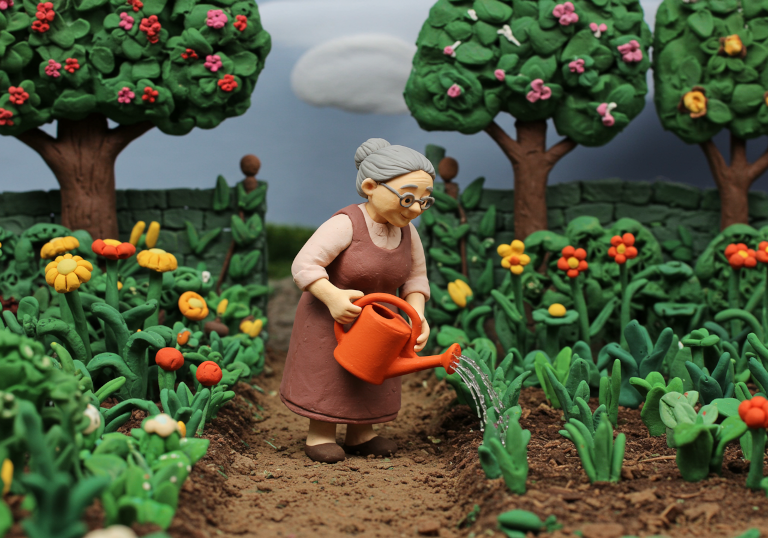
- Claymation scene. A medium wide shot of an elderly woman. She is wearing flowing clothing. She is standing in a lush garden watering the plants with an orange watering can
- Shot in the style of DSLR camera with the polarizing filter. A photo of two hot air balloons over the unique rock formations in Cappadocia, Turkey. The colors and patterns on these balloons contrast beautifully against the earthy tones of the landscape below. This shot captures the sense of adventure that comes with enjoying such an experience.
- A weathered, wooden mech robot covered in flowering vines stands peacefully in a field of tall wildflowers, with a a small blue bird resting on its outstrecteched hand. Digital Cartoon, with warm colors and soft lines. A large cliff with a waterfall looms behind.
- A view of a person's hand as they hold a little clay figurine of a bird in their hand and sculpt it with a modeling tool in their other hand. You can see the sculptor's scarf. Their hands are covered in clay dust. A macro DSLR image highlighting the texture and craftsmanship.
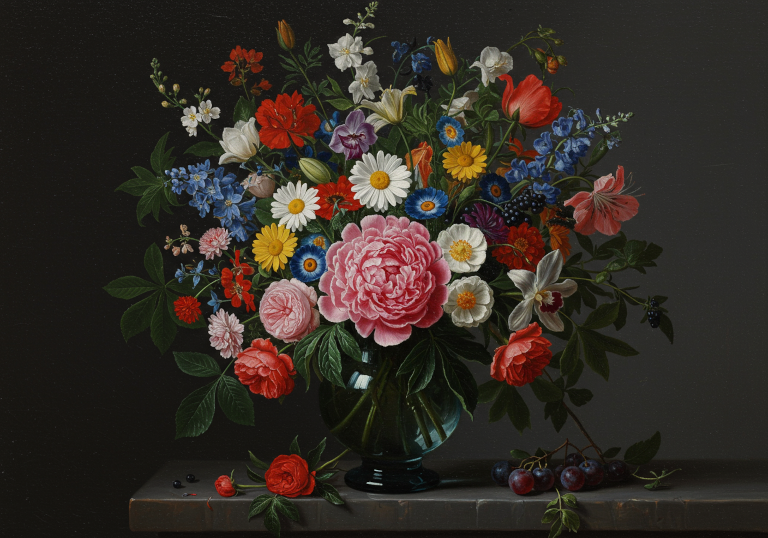
- A large, colorful bouquet of flowers in an old blue glass vase on the table. In front is one beautiful peony flower surrounded by various other blossoms like roses, lilies, daisies, orchids, fruits, berries, green leaves. The background is dark gray. Oil painting in the style of the Dutch Golden Age.
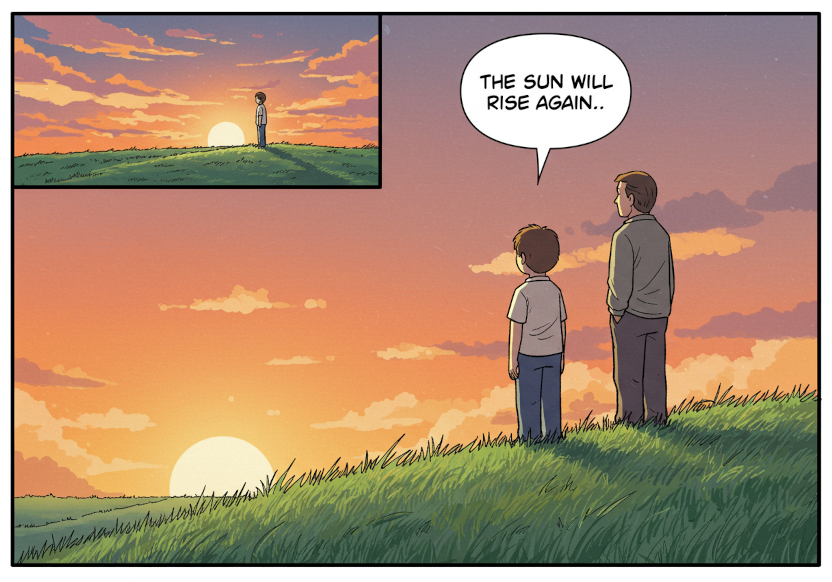
- A single comic book panel of a boy and his father on a grassy hill, staring at the sunset. A speech bubble points from the boy's mouth and says: The sun will rise again. Muted, late 1990s coloring style
Quickstart: Generate images from text prompts using Imagen
You can generate novel images using only descriptive text as an input. The following samples show a simplified case for generating images, but you can use additional parameters to tailor the generated images to your needs.
- Sign in to your Google Cloud account. If you're new to Google Cloud, create an account to evaluate how our products perform in real-world scenarios. New customers also get $300 in free credits to run, test, and deploy workloads.
-
In the Google Cloud console, on the project selector page, select or create a Google Cloud project.
Roles required to select or create a project
- Select a project: Selecting a project doesn't require a specific IAM role—you can select any project that you've been granted a role on.
-
Create a project: To create a project, you need the Project Creator role
(
roles/resourcemanager.projectCreator), which contains theresourcemanager.projects.createpermission. Learn how to grant roles.
-
Verify that billing is enabled for your Google Cloud project.
-
Enable the Vertex AI API.
Roles required to enable APIs
To enable APIs, you need the Service Usage Admin IAM role (
roles/serviceusage.serviceUsageAdmin), which contains theserviceusage.services.enablepermission. Learn how to grant roles. -
In the Google Cloud console, on the project selector page, select or create a Google Cloud project.
Roles required to select or create a project
- Select a project: Selecting a project doesn't require a specific IAM role—you can select any project that you've been granted a role on.
-
Create a project: To create a project, you need the Project Creator role
(
roles/resourcemanager.projectCreator), which contains theresourcemanager.projects.createpermission. Learn how to grant roles.
-
Verify that billing is enabled for your Google Cloud project.
-
Enable the Vertex AI API.
Roles required to enable APIs
To enable APIs, you need the Service Usage Admin IAM role (
roles/serviceusage.serviceUsageAdmin), which contains theserviceusage.services.enablepermission. Learn how to grant roles. -
Set up authentication for your environment.
Select the tab for how you plan to use the samples on this page:
Python
To use the Python samples on this page in a local development environment, install and initialize the gcloud CLI, and then set up Application Default Credentials with your user credentials.
Install the Google Cloud CLI.
If you're using an external identity provider (IdP), you must first sign in to the gcloud CLI with your federated identity.
If you're using a local shell, then create local authentication credentials for your user account:
gcloud auth application-default login
You don't need to do this if you're using Cloud Shell.
If an authentication error is returned, and you are using an external identity provider (IdP), confirm that you have signed in to the gcloud CLI with your federated identity.
For more information, see Set up ADC for a local development environment in the Google Cloud authentication documentation.
REST
To use the REST API samples on this page in a local development environment, you use the credentials you provide to the gcloud CLI.
Install the Google Cloud CLI.
If you're using an external identity provider (IdP), you must first sign in to the gcloud CLI with your federated identity.
For more information, see Authenticate for using REST in the Google Cloud authentication documentation.
-
Use the following samples to generate an image:
Python
REST
-
Set environment variables:
export GOOGLE_CLOUD_PROJECT=GOOGLE_CLOUD_PROJECT # Replace with your Google Cloud project
export GOOGLE_CLOUD_LOCATION=us-central1 # Replace with the appropriate location for your project
-
Run the following:
curl -X POST \
-H "Authorization: Bearer $(gcloud auth print-access-token)" \
-H "Content-Type: application/json; charset=utf-8" \
"https://${GOOGLE_CLOUD_LOCATION}-aiplatform.googleapis.com/v1/projects/${GOOGLE_CLOUD_PROJECT}/locations/${GOOGLE_CLOUD_LOCATION}/publishers/google/models/imagen-4.0-generate-preview-05-20:predict" -d \
$'{
  "instances": [
    {
      "prompt": "a cat reading a book"
    }
  ],
  "parameters": {
    "sampleCount": 1
  }
}'
The model returns a base64 image bytes object.
For more information, see the Imagen Generate images API.
-
Model versions
There are multiple image generation models that you can use. For more information, see Gemini models or Imagen models.
Try more examples
For a full list of Jupyter notebook tutorials using Imagen, see the Generative AI on Vertex AI cookbook.
When to use Gemini or Imagen on Vertex AI
In addition to using Gemini's built-in image generation capabilities, you can also access Imagen, our specialized image generation model.
| Attribute | Gemini Image | Imagen 4 |
|---|---|---|
| Strengths | Default recommendation. Unparalleled flexibility, contextual understanding, and simple and mask-free editing. Uniquely capable of multi-turn conversational editing. |
Best quality/latency |
| Availability | Generally available | Generally available |
| Latency | Higher. More computation is required for its advanced capabilities. | Low. Optimized for near-real-time performance. |
| Cost | Token-based pricing. | Cost-effective for specialized tasks. |
| Recommended tasks |
|
|
Gemini is your go-to model to start generating images. Choose Imagen 4 Ultra for advanced use-cases or when you need the best image quality (note that can only generate one image at a time).
What's next
Use the following links to view the feature documentation.


Learn about optional and required fields when sending an Imagen image generation request.
Image credit: All images generated using Imagen on Vertex AI.