

X4 is a specialized series of Compute Engine bare metal machine types that is designed to run multi-terabyte SAP HANA workloads. X4 maintenance is required for regular software and firmware updates. This maintenance ensures optimal, secure, and reliable performance of your X4 instances.
Unlike other Compute Engine machine types, X4 doesn't support the live migration process during maintenance events. This means that, for host maintenance events, Google must stop and update X4 host servers, making these events disruptive to your SAP HANA workloads running on the X4 server.
Types of host maintenance events
Host maintenance events are of two types:
Planned maintenance: A planned host maintenance event is a scheduled activity that begins with a 60-day advance notification to you.
Unplanned maintenance: Depending on the nature of the underlying issue, this can be emergent or critical.
Critical maintenance: This type of maintenance is to address a critical security update or a host error that caused your X4 instance to crash. Because of their unplanned and critical nature, there is no advance notification period for these events.
Emergent maintenance: An emergent host maintenance event is an unplanned maintenance that is needed to address security, hardware, or software issues of medium to high severity that have a high potential for causing outages. Because the change is deemed non-critical, Google provides you with a 14-day window of time during which you can start the maintenance at a time that minimizes the disruption to your workloads. During emergent maintenance, your X4 instance is moved to a different, healthy host.
Maintenance lifecycle
The lifecycle of a host maintenance event depends on whether it's a planned or an unplanned maintenance.
Triggering a maintenance event: During their advance notification period, you can manually trigger a planned or emergent maintenance. If you don't trigger any of these events before their planned start date and time, then Google automatically triggers it on the planned start date, at the planned start time or within a few minutes of it.
When the host server of your X4 instance undergoes an emergent maintenance, it is moved to a different, healthy host.
Maintenance duration: A host maintenance event typically lasts up to 2 hours, during which Google stops and restarts the running instance if needed.
Frequency of maintenance events: The frequency of maintenance events depends on the type of maintenance. Once a planned maintenance is completed, the earliest when you can receive notification about the next planned maintenance is at least after 30 days. However, emergent or unplanned maintenance might still occur during this period based on the criticality of the underlying issue.
Zonal isolation: Host maintenance events respect zonal isolation. This means that a Compute Engine instance in one zone of a region won't see a maintenance event within the same time window as an instance in another zone in that region.
The following sections describe the two ways in which a host maintenance event is triggered: manually by you or automatically by Google.
Maintenance event manually triggered by you
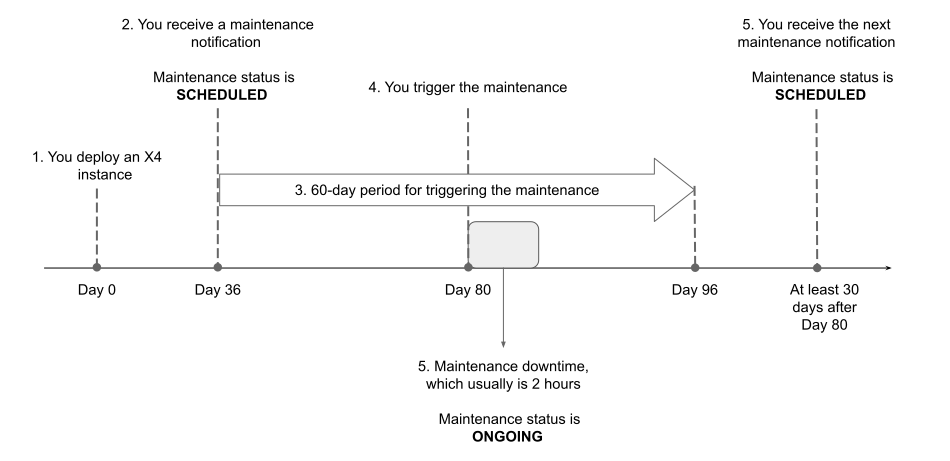
The following steps show an example sequence of actions that occur in the scenario where you trigger a planned host maintenance event. Triggering an emergent host maintenance event is the same, except that its advance notification period is 14 days.
- On day 0, you deploy an X4 instance.
On day 36, you receive from Google the notification about a planned host maintenance event.
If you look up your X4 instance's description by using the
gcloud compute instances describecommand, then you see"maintenanceStatus": "PENDING"in its response.Between day 36 and 96 (the 60-day advance notification period), you have the option to trigger the host maintenance event.
In some rare scenarios, a host maintenance event that you're notified about might become inapplicable for your X4 instance. For more information, see Maintenance event no longer applicable.
On day 80, after you create a backup of any data or configuration stored locally on your X4 instance, you trigger the planned host maintenance event for that instance. For example, you run the
gcloud compute instances perform-maintenancecommand.Google powers down your X4 instances for maintenance. The maintenance duration is usually 2 hours. During emergent maintenance, your X4 instance is moved to a different, healthy host.
You can use the
gcloud compute instances describecommand to see that the instance'smaintenanceStatusfield is set toONGOING.Once the maintenance activities are complete, Google restarts your X4 instances if needed.
The earliest when you can receive notification about the next planned host maintenance event is at least 30 days after the completion of this maintenance event. Note that unplanned maintenance can still occur during this period based on the criticality of the underlying issue.
The following diagram illustrates the preceding set of steps:
Maintenance event automatically triggered by Google
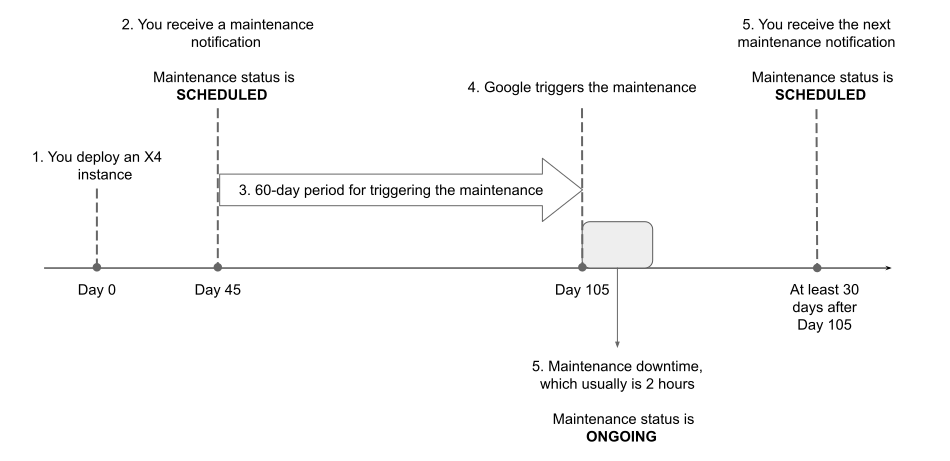
When a host maintenance event's advance notification period concludes and you didn't trigger it manually, Google triggers the maintenance event for you on the event's planned start date, at the planned start time or within a few minutes of it.
The following steps show an example sequence of actions that occur in the scenario where Google triggers a planned host maintenance event. These actions are the same for an emergent host maintenance event, except that its advance notification period is 14 days.
- On day 0, you deploy an X4 instance.
On day 45, you receive from Google the notification about a planned host maintenance event.
If you look up your X4 instance's description by using the
gcloud compute instances describecommand, then you see"maintenanceStatus": "PENDING"in its response.On day 105, which is the host maintenance event's planned start date, Google triggers the host maintenance event. Maintenance typically starts at the planned start time or within a few minutes of it.
If you look up your X4 instance's description by using the
gcloud compute instances describecommand, then you see"maintenanceStatus": "ONGOING"in its response.Google powers down your X4 instances for maintenance.
The maintenance window is usually 2 hours. During emergent maintenance, your X4 instance is moved to a different, healthy host.
Once the maintenance activities are successfully completed, Google restarts your X4 instances if needed.
The earliest when you can receive notification about the next planned host maintenance event is at least 30 days after the completion of this maintenance event. Note that emergent or unplanned maintenance can still occur during this period based on the criticality of the underlying issue.
The following diagram illustrates the preceding set of steps:
View information about a maintenance event
For each host maintenance event, Google sends you an advance
notification. The notification period depends on the type of maintenance - it's
60 days for a planned host maintenance event and 14 days for an emergent host
maintenance event. All planned host maintenance events for X4 are classified as
SCHEDULED maintenance, and all emergent host maintenance events are classified as
UNSCHEDULED.
To view information about a host maintenance event for your X4 instance, you can do the following:
- Query your X4 instance by using the Google Cloud CLI
- Query your X4 instance by using REST API
- Query your X4 instance's metadata server
- Check the logs in Cloud Logging
For information about how to perform these actions, including the required IAM roles and permissions, see Monitor and plan for a host maintenance event.
While using these options, you can filter your X4 instance by using the
machineType metadata field, which shows the machine type of your instance.
The following is an example of how information about your X4 instance appears in
the Logs Explorer:
metadata: {
  canReschedule: true
  latestWindowStartTime: "2025-07-21T00:00:01Z"
  machineType: "x4-1920-32t-metal"
  maintenanceStatus: "PENDING"
  type: "SCHEDULED"
  windowEndTime: "2025-07-21T04:00:00Z"
  windowStartTime: "2025-07-21T00:00:00Z"
}
methodName: "compute.instances.upcomingMaintenance"
Simulate a maintenance event
To observe the end-to-end process of a host maintenance event, or to test any integration or automation that you might have implemented, you can simulate a host maintenance event for your X4 instance by using the gcloud CLI or REST API.
When you try to simulate a host maintenance event on an X4 instance, the
instance terminated and restarted because the onHostMaintenance property for
X4 instances is fixed with the value TERMINATE. For more information, see
Available host maintenance properties.
For information about how to simulate a host maintenance event, see Simulate host maintenance for compute instances that terminate.
Trigger a maintenance event
You can trigger a host maintenance event at any time before the event's advance notification period concludes. You can do this by using the gcloud CLI or REST API.
To trigger a host maintenance event, don't use the gcloud CLI or REST API resources that stop and start Compute Engine instances.
For information about how to trigger a host maintenance event, or how to check its status, see Manually start a host maintenance event.
Maintenance event no longer applicable
In the rare event of an unplanned maintenance issue affecting your X4 instance, Google Cloud automatically migrates the instance to a different, healthy host. Similarly, if you manually stop and start your X4 instance during the advance notification period of a host maintenance event, then the instance is provisioned on an available host.
Google Cloud aims to maintain an up-to-date fleet of X4 machines. If the new host for your X4 instance is running the latest firmware, then the previously notified host maintenance event is no longer applicable for your X4 instance. In this situation, the host maintenance event is automatically resolved, potentially saving downtime for your SAP HANA workload.
Verify the completion of a maintenance event
To verify the successful completion of a host maintenance event for your Compute Engine X4 instance, you can do the following:
Query you instance by using the gcloud CLI or REST API. The response won't include the
upcomingMaintenancefield.For information about how to query your instance, see Check instances for a maintenance event notification.
In Cloud Logging, check the logs for your instance. You see a log message similar to the following:
Maintenance window is completed for this instance. All maintenance notifications on the instance has been removed.
For information about how to search the logs for your instance, see Check Cloud Logging for a maintenance event notification.
Monitor maintenance events
Setting up monitoring for host maintenance events of your Compute Engine X4 instances can help in keeping your team informed about the status of ongoing events and also about upcoming events.
You can monitor host maintenance events as follows:
Because each maintenance event sends multiple messages to Cloud Logging, you can set up a log-based alerting policy to search for specific maintenance event notifications and send alerts by using a notification channel.
You can filter the logs by using the
machineTypemetadata field, which contains the machine type corresponding to your X4 instance, such asx4-960-16t-metal,x4-1440-24t-metal, orx4-1920-32t-metal.For information about how to configure alerts for host maintenance events, see Configure alerts for host maintenance notifications.
Create a monitoring dashboard in your Google Cloud project by importing the
maintenance-system-events.jsontemplate. This dashboard template is available in the GoogleCloudPlatform/sapagent GitHub repository.For information about how to create a monitoring dashboard by uploading a JSON file, see Install a dashboard template.