


本文档介绍了如何在项目或集群级层为 Managed Service for Apache Spark 作业启用数据沿袭。
数据沿袭是Knowledge Catalog的一项功能,可让您跟踪数据在系统中的移动方式:数据来自何处、传递到何处以及对其应用了哪些转换。
数据沿袭适用于所有 Managed Service for Apache Spark 作业(SparkR 和 Spark 流式作业除外),并支持 BigQuery 和 Cloud Storage 数据源。它包含在 Managed Service for Apache Spark 2.0.74+、2.1.22+、2.2.50+、2.3.1+ 和 3.0 映像版本中。
在 Managed Service for Apache Spark 集群中启用此功能后,Managed Service for Apache Spark Spark 作业会捕获数据沿袭事件并将其发布到 Knowledge Catalog Data Lineage API。Managed Service for Apache Spark 使用 OpenLineage Spark 插件通过 OpenLineage 与 Data Lineage API 集成。
您可以通过 Knowledge Catalog 使用以下方式访问数据沿袭信息:
准备工作
在 Google Cloud 控制台中的项目选择器页面上,选择包含您要跟踪其沿袭的 Managed Service for Apache Spark 集群的项目。
启用 Data Lineage API。
即将推出的 Spark 数据沿袭变更:请参阅 Managed Service for Apache Spark 版本说明,了解相关公告。该变更将使您的项目和集群在您启用 Data Lineage API(请参阅控制服务的沿袭提取)时自动提供 Spark 数据沿袭,而无需额外的项目或集群级设置。
所需的角色
如果您使用默认的虚拟机服务账号创建 Managed Service for Apache Spark 集群,该账号将具有 Managed Service for Apache Spark Worker 角色,从而启用数据沿袭。除此之外没有其他要求。
不过,如果您创建的 Managed Service for Apache Spark 集群使用自定义服务账号,则必须按照下段所述向该自定义服务账号授予所需角色,才能在该集群上启用数据沿袭。
如需获得将数据沿袭与 Managed Service for Apache Spark 搭配使用所需的权限,请让您的管理员为您授予集群自定义服务账号的以下 IAM 角色:
-
授予以下角色之一:
- Managed Service for Apache Spark Worker (
roles/dataproc.worker) - Data Lineage Editor (
roles/datalineage.editor) - Data Lineage Producer (
roles/datalineage.producer) - Data Lineage Administrator (
roles/datalineage.admin)
- Managed Service for Apache Spark Worker (
如需详细了解如何授予角色,请参阅管理对项目、文件夹和组织的访问权限。
启用 Spark 数据沿袭
您可以在项目级层或集群级层启用 Spark 数据沿袭。
在项目级层启用 Spark 数据沿袭
在项目级层启用 Spark 数据沿袭后,在该项目中运行于 Managed Service for Apache Spark 集群上的后续 Spark 作业将启用 Spark 数据沿袭。
如需在项目级层启用 Spark 数据沿袭,请设置以下自定义项目元数据:
| 键 | 值 |
|---|---|
DATAPROC_LINEAGE_ENABLED |
true |
DATAPROC_CLUSTER_SCOPES |
https://www.googleapis.com/auth/cloud-platform只有在 2.0 映像版本集群中才需要设置此虚拟机访问范围。在 2.1 及更高版本的映像版本集群上,系统会自动设置此值。 |
您可以通过将 DATAPROC_LINEAGE_ENABLED 元数据设置为 false 在项目级层停用 Spark 数据沿袭。
在集群级层启用 Spark 数据沿袭
如果您在创建集群时启用 Spark 数据沿袭,则在 Managed Service for Apache Spark 集群上运行的受支持的 Spark 作业将启用 Spark 数据沿袭。此设置会替换项目级层的任何 Spark 数据沿袭设置:如果项目级层停用了 Spark 数据沿袭,但集群级层启用了 Spark 数据沿袭,则集群级层优先,并且在该集群上运行的受支持的 Spark 作业会启用数据沿袭。
如需在集群上启用 Spark 数据沿袭,请创建 Managed Service for Apache Spark 集群,并将 dataproc:dataproc.lineage.enabled 集群属性设置为 true。
gcloud CLI 示例
gcloud dataproc clusters create CLUSTER_NAME \
    --project PROJECT_ID \
    --region REGION \
    --properties 'dataproc:dataproc.lineage.enabled=true'
您可以在创建集群时将 dataproc:dataproc.lineage.enabled 属性设置为 false,从而在集群上停用 Spark 数据沿袭。
在集群上停用数据沿袭:如需创建已停用沿袭的集群,请设置
dataproc:dataproc.lineage.enabled=false。创建集群后,您无法在集群上停用 Spark 数据沿袭。如需在现有集群上停用 Spark 数据沿袭,您可以重新创建集群,并将dataproc:dataproc.lineage.enabled属性设置为false。在 2.0 映像版本集群上设置范围:Spark 数据沿袭需要 Managed Service for Apache Spark 集群虚拟机
cloud-platform访问范围。使用映像版本2.1及更高版本创建的 Managed Service for Apache Spark 映像版本集群已启用cloud-platform。如果您在创建集群时指定了 Managed Service for Apache Spark 映像版本2.0,请将范围设置为cloud-platform。
在作业上停用 Spark 数据沿袭
如果集群上启用了 Spark 数据沿袭,则可以在提交作业时传递值为空 ("") 的 spark.extraListeners 属性,从而在作业上停用 Spark 数据沿袭。
gcloud dataproc jobs submit spark \
    --cluster=CLUSTER_NAME \
    --project PROJECT_ID \
    --region REGION \
    --class CLASS \
    --jars=gs://APPLICATION_BUCKET/spark-application.jar \
    --properties=spark.extraListeners=''
提交 Spark 作业
当您在启用了 Spark 数据沿袭的 Managed Service for Apache Spark 集群上提交受支持的 Spark 作业时,Managed Service for Apache Spark 会捕获数据沿袭信息并将其报告给 Data Lineage API。
gcloud dataproc jobs submit spark \
    --cluster=CLUSTER_NAME \
    --project PROJECT_ID \
    --region REGION \
    --class CLASS \
    --jars=gs://APPLICATION_BUCKET/spark-application.jar \
    --properties=spark.openlineage.namespace=CUSTOM_NAMESPACE,spark.openlineage.appName=CUSTOM_APPNAME
注意:
- 添加用于唯一标识作业的
spark.openlineage.namespace和spark.openlineage.appName属性是可选的。如果您不添加这些属性,Managed Service for Apache Spark 将使用以下默认值:spark.openlineage.namespace的默认值:PROJECT_IDspark.openlineage.appName的默认值:spark.app.name
在 Knowledge Catalog 中查看沿袭
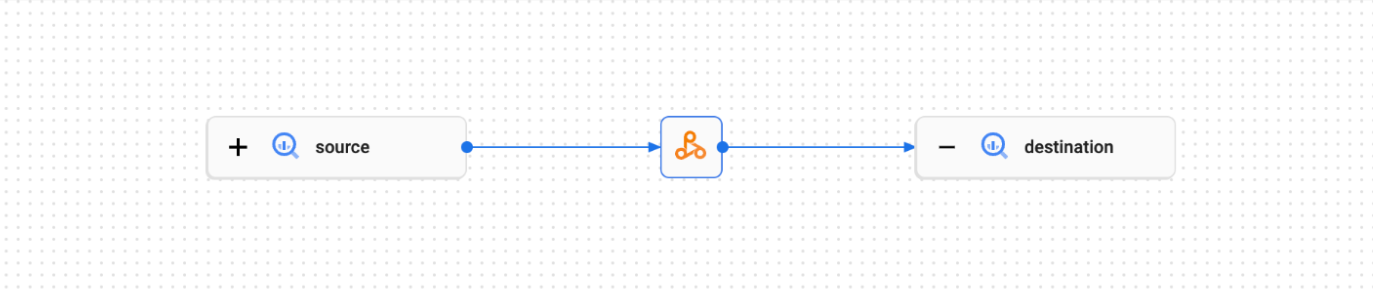
沿袭图显示了项目资源与创建这些资源的进程之间的关系。您可以在 Google Cloud 控制台中查看数据沿袭信息,也可以从 Data Lineage API 中以 JSON 数据的形式检索该信息。
PySpark 示例代码:
以下 PySpark 作业从公共 BigQuery 表中读取数据,然后将输出写入现有 BigQuery 数据集中的新表。它使用 Cloud Storage 存储桶进行临时存储。
#!/usr/bin/env python

from pyspark.sql import SparkSession
import sys

spark = SparkSession \
  .builder \
  .appName('LINEAGE_BQ_TO_BQ') \
  .getOrCreate()

bucket = 'gs://BUCKET`
spark.conf.set('temporaryCloudStorageBucket', bucket)

source = 'bigquery-public-data:samples.shakespeare'
words = spark.read.format('bigquery') \
  .option('table', source) \
  .load()
words.createOrReplaceTempView('words')

word_count = spark.sql('SELECT word, SUM(word_count) AS word_count FROM words GROUP BY word')

destination_table = 'PROJECT_ID:DATASET.TABLE'
word_count.write.format('bigquery') \
  .option('table', destination_table) \
  .save()
进行以下替换:
BUCKET:现有 Cloud Storage 存储桶的名称
PROJECT_ID、DATASET 和 TABLE:项目 ID、现有 BigQuery 数据集的名称,以及要在该数据集中创建的新表的名称(该表不得存在)
您可以在 Knowledge Catalog 界面中查看沿袭图。
后续步骤
- 详细了解数据沿袭。