提交作业

您可以通过以下方式将作业提交到现有 Managed Service for Apache Spark 集群:通过 jobs.submit API HTTP 或程序化请求,在本地终端窗口或 Cloud Shell 中使用 Google Cloud CLI gcloud 命令行工具,或 通过在 本地浏览器中打开的 Google Cloud 控制台。您还可以通过 SSH 连接到集群中的主 实例,然后 无需使用 Managed Service for Apache Spark,直接从实例运行作业。

作业并发 : 创建集群时,您可以使用 dataproc:dataproc.scheduler.max-concurrent-jobs 集群属性配置并发 Managed Service for Apache Spark 作业数量的上限。如果未设置此属性值,则并发作业数量的上限将计算为 max((masterMemoryMb - 3584) / masterMemoryMbPerJob, 5)masterMemoryMb 由主虚拟机的机器类型确定。 masterMemoryMbPerJob 默认为 1024,不过您可以在创建集群时使用 dataproc:dataproc.scheduler.driver-size-mb 集群属性对其进行配置。

如何提交作业

类路径隔离和自定义 JAR:请勿将自定义“胖 JAR”或捆绑 JAR(例如 Apache Iceberg 运行时或 Google Cloud bundle)直接复制到集群系统目录(例如 /usr/lib/spark/jars/)中。将自定义 JAR 放置在系统目录中会使用与代理的内置库冲突的传递依赖项(例如 Guava 或 Hadoop 库)污染 Managed Service for Apache Spark 代理的类路径。在执行作业管理操作(例如取消作业)时,此冲突可能会导致类解析错误(例如 ClassNotFoundExceptionNoClassDefFoundError),从而导致代理崩溃并使 YARN 应用成为孤立应用。

请改用以下受支持的方法之一:

  • 作业专用依赖项 :使用 Google Cloud CLI CLI 中的 --jars 标志、 Google Cloud 控制台中的 Jar 文件 字段或 API 中的 jarFileUris 字段提交作业时,指定 JAR 的 Cloud Storage 路径。Spark 会将依赖项分发给作业的驱动程序和执行器,而不会污染代理的类路径。
  • 集群范围的依赖项:在创建集群期间使用 spark:spark.jars 集群属性指定依赖项:
    --properties="spark:spark.jars=gs://YOUR_BUCKET/jar-1.jar,gs://YOUR_BUCKET/jar-2.jar"
    
    这会指示 Managed Service for Apache Spark 配置 /etc/spark/conf/spark-defaults.conf,自动将依赖项分发到所有作业的 Spark 驱动程序和执行器类路径,同时使节点本地 Managed Service for Apache Spark 代理保持干净隔离。

控制台

在浏览器中通过 Google Cloud 控制台打开 Managed Service for Apache Spark 提交作业 页面。

Spark 作业示例

如需提交示例 Spark 作业,请在提交作业页面上填写以下字段:

  1. 从集群列表中选择集群名称。
  2. 作业类型设置为 Spark
  3. 主类或 jar 设置为 org.apache.spark.examples.SparkPi
  4. 参数 设置为单个参数 1000
  5. file:///usr/lib/spark/examples/jars/spark-examples.jar 添加到 Jar 文件 (或 API jarFileUris 字段):
    1. file:/// 表示 Hadoop LocalFileSystem 方案。在创建集群时,Managed Service for Apache Spark 在集群主节点上安装了 /usr/lib/spark/examples/jars/spark-examples.jar。此路径仅用于 Managed Service for Apache Spark 提供的预安装 示例。请勿将自定义 JAR 复制到系统目录中 (请参阅如何提交作业中的注意事项)。
    2. 或者,您可以为其中一个 jar 指定 Cloud Storage 路径 (gs://your-bucket/your-jarfile.jar) 或 Hadoop 分布式文件 系统路径 (hdfs://path-to-jar.jar)。(如果您使用 API 提交作业,请在 jarFileUris 字段中指定此路径。)

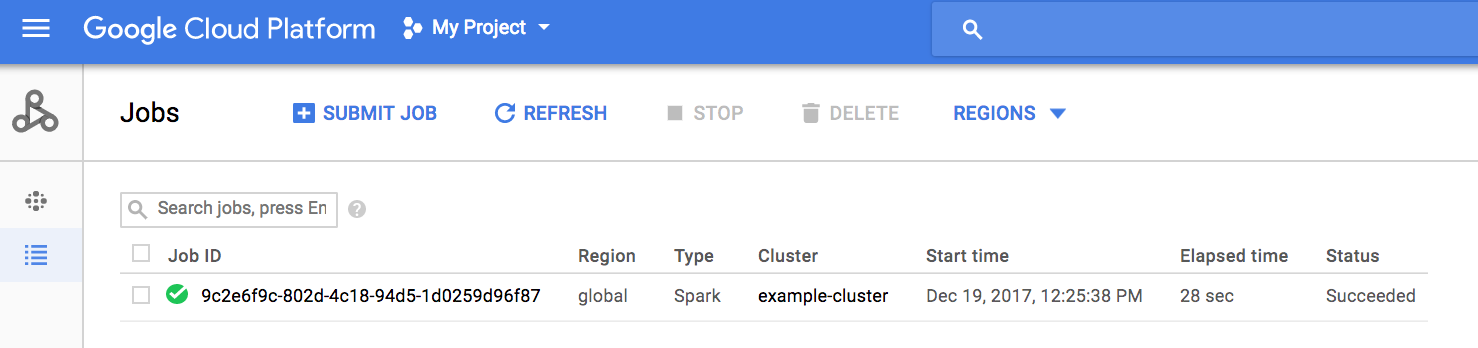
点击提交以启动作业。作业启动后,就会添加到作业列表中。

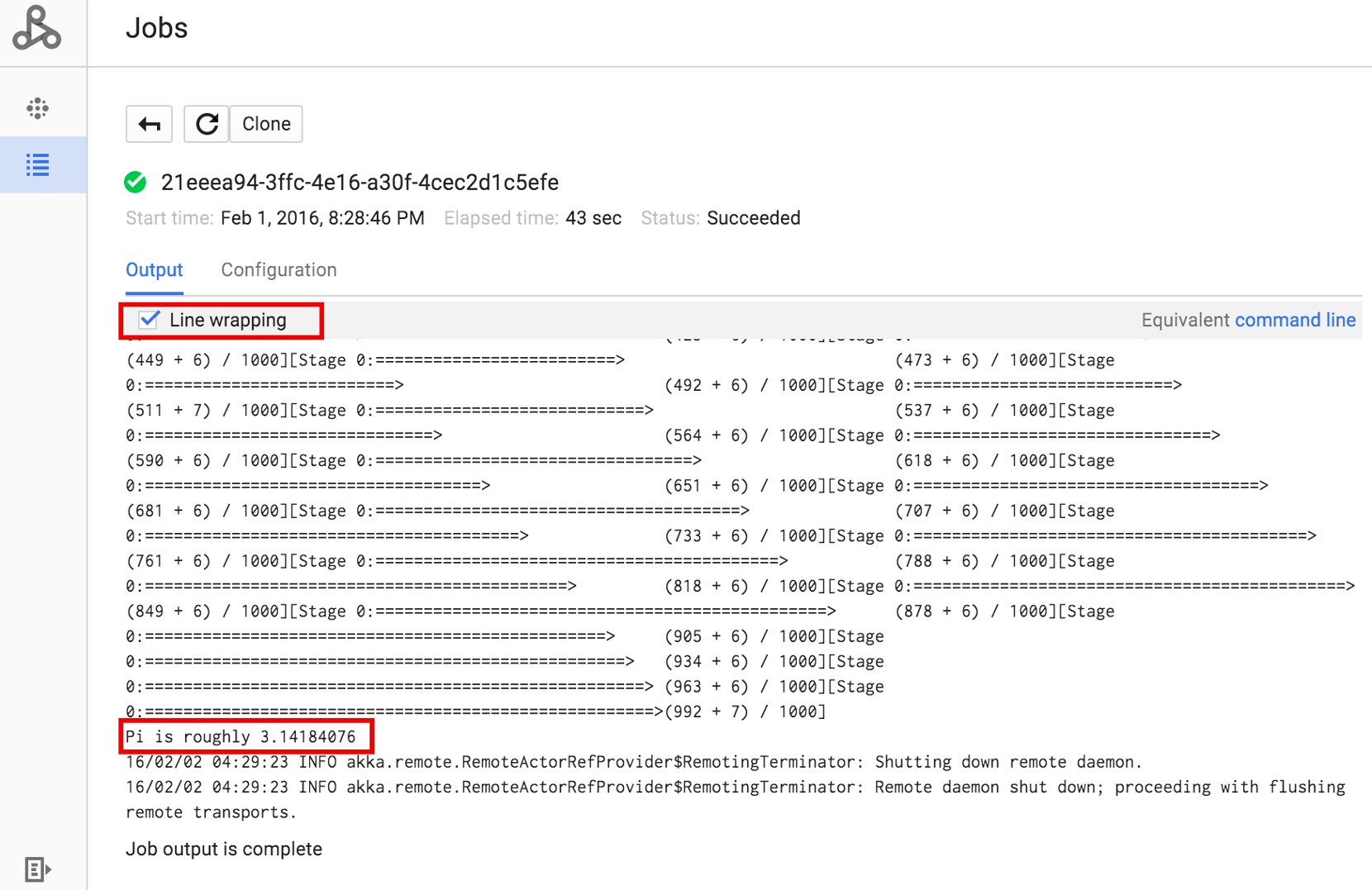
点击“作业 ID”以打开作业页面,您可以在该页面中查看作业的驱动程序输出。 由于此作业生成的输出行过长,超出浏览器窗口宽度,您可以勾选换行框,将所有输出文本显示在视图内,从而展示 pi 的计算结果。
您可以使用如下所示的 gcloud dataproc jobs wait 命令,从命令行查看作业的驱动程序输出(如需了解详情,请参阅查看作业的输出–GCLOUD 命令)。将项目 ID 复制并粘贴为 --project 标志的值,并将作业 ID(显示在“作业”列表中)作为最终参数。

gcloud dataproc jobs wait job-id \
    --project=project-id \
    --region=region

以下为示例 SparkPi 作业的驱动程序输出的片段:

...
2015-06-25 23:27:23,810 INFO [dag-scheduler-event-loop]
scheduler.DAGScheduler (Logging.scala:logInfo(59)) - Stage 0 (reduce at
SparkPi.scala:35) finished in 21.169 s

2015-06-25 23:27:23,810 INFO [task-result-getter-3] cluster.YarnScheduler
(Logging.scala:logInfo(59)) - Removed TaskSet 0.0, whose tasks have all
completed, from pool

2015-06-25 23:27:23,819 INFO [main] scheduler.DAGScheduler
(Logging.scala:logInfo(59)) - Job 0 finished: reduce at SparkPi.scala:35,
took 21.674931 s

Pi is roughly 3.14189648
...
Job [c556b47a-4b46-4a94-9ba2-2dcee31167b2] finished successfully.

driverOutputUri:
gs://sample-staging-bucket/google-cloud-dataproc-metainfo/cfeaa033-749e-48b9-...
...

gcloud

如需将作业提交到 Managed Service for Apache Spark 集群,请在本地终端窗口或 Cloud Shell中运行 gcloud CLI gcloud dataproc jobs submit 命令。

gcloud dataproc jobs submit job-command \
    --cluster=cluster-name \
    --region=region \
    other dataproc-flags \
    -- job-args
PySpark 作业提交示例
  1. 列出位于 Cloud Storage 中的可公开访问的 hello-world.py
    gcloud storage cat gs://dataproc-examples/pyspark/hello-world/hello-world.py
    
    文件列表:

    #!/usr/bin/python
    import pyspark
    sc = pyspark.SparkContext()
    rdd = sc.parallelize(['Hello,', 'world!'])
    words = sorted(rdd.collect())
    print(words)
  2. 将 PySpark 作业提交到 Managed Service for Apache Spark。
    gcloud dataproc jobs submit pyspark \
        gs://dataproc-examples/pyspark/hello-world/hello-world.py \
        --cluster=cluster-name  \
        --region=region
    
    终端输出:
    Waiting for job output...
    …
    ['Hello,', 'world!']
    Job finished successfully.
    
Spark 作业提交示例
  1. 运行预安装在 Managed Service for Apache Spark 集群主节点上的 SparkPi 示例。(file:///usr/lib/spark/examples/jars/spark-examples.jar 路径仅用于预安装示例;如需了解自定义 JAR 依赖项,请参阅如何提交作业中的注意事项。)
    gcloud dataproc jobs submit spark \
        --cluster=cluster-name \
        --region=region \
        --class=org.apache.spark.examples.SparkPi \
        --jars=file:///usr/lib/spark/examples/jars/spark-examples.jar \
        -- 1000
    
    终端输出:
    Job [54825071-ae28-4c5b-85a5-58fae6a597d6] submitted.
    Waiting for job output…
    …
    Pi is roughly 3.14177148
    …
    Job finished successfully.
    …
    

REST

本部分介绍如何使用 Managed Service for Apache Spark jobs.submit API 提交 Spark 作业以计算近似值 pi

在使用任何请求数据之前, 请进行以下替换:

  • project-id: Google Cloud 项目 ID
  • region集群地区
  • clusterName:集群名称

HTTP 方法和网址:

POST https://dataproc.googleapis.com/v1/projects/project-id/regions/region/jobs:submit

请求 JSON 正文:

{
  "job": {
    "placement": {
      "clusterName": "cluster-name"
    },
    "sparkJob": {
      "args": [
        "1000"
      ],
      "mainClass": "org.apache.spark.examples.SparkPi",
      "jarFileUris": [
        "file:///usr/lib/spark/examples/jars/spark-examples.jar"
      ]
    }
  }
}

如需发送您的请求,请展开以下选项之一:

您应该收到类似以下内容的 JSON 响应:

{
  "reference": {
    "projectId": "project-id",
    "jobId": "job-id"
  },
  "placement": {
    "clusterName": "cluster-name",
    "clusterUuid": "cluster-Uuid"
  },
  "sparkJob": {
    "mainClass": "org.apache.spark.examples.SparkPi",
    "args": [
      "1000"
    ],
    "jarFileUris": [
      "file:///usr/lib/spark/examples/jars/spark-examples.jar"
    ]
  },
  "status": {
    "state": "PENDING",
    "stateStartTime": "2020-10-07T20:16:21.759Z"
  },
  "jobUuid": "job-Uuid"
}

Java

  1. 安装客户端库
  2. 设置应用默认凭据
  3. 运行代码
    
    import com.google.api.gax.longrunning.OperationFuture;
    import com.google.cloud.dataproc.v1.Job;
    import com.google.cloud.dataproc.v1.JobControllerClient;
    import com.google.cloud.dataproc.v1.JobControllerSettings;
    import com.google.cloud.dataproc.v1.JobMetadata;
    import com.google.cloud.dataproc.v1.JobPlacement;
    import com.google.cloud.dataproc.v1.SparkJob;
    import com.google.cloud.storage.Blob;
    import com.google.cloud.storage.Storage;
    import com.google.cloud.storage.StorageOptions;
    import java.io.IOException;
    import java.util.concurrent.ExecutionException;
    import java.util.regex.Matcher;
    import java.util.regex.Pattern;
    
    public class SubmitJob {
    
      public static void submitJob() throws IOException, InterruptedException {
        // TODO(developer): Replace these variables before running the sample.
        String projectId = "your-project-id";
        String region = "your-project-region";
        String clusterName = "your-cluster-name";
        submitJob(projectId, region, clusterName);
      }
    
      public static void submitJob(String projectId, String region, String clusterName)
          throws IOException, InterruptedException {
        String myEndpoint = String.format("%s-dataproc.googleapis.com:443", region);
    
        // Configure the settings for the job controller client.
        JobControllerSettings jobControllerSettings =
            JobControllerSettings.newBuilder().setEndpoint(myEndpoint).build();
    
        // Create a job controller client with the configured settings. Using a try-with-resources
        // closes the client,
        // but this can also be done manually with the .close() method.
        try (JobControllerClient jobControllerClient =
            JobControllerClient.create(jobControllerSettings)) {
    
          // Configure cluster placement for the job.
          JobPlacement jobPlacement = JobPlacement.newBuilder().setClusterName(clusterName).build();
    
          // Configure Spark job settings.
          SparkJob sparkJob =
              SparkJob.newBuilder()
                  .setMainClass("org.apache.spark.examples.SparkPi")
                  .addJarFileUris("file:///usr/lib/spark/examples/jars/spark-examples.jar")
                  .addArgs("1000")
                  .build();
    
          Job job = Job.newBuilder().setPlacement(jobPlacement).setSparkJob(sparkJob).build();
    
          // Submit an asynchronous request to execute the job.
          OperationFuture<Job, JobMetadata> submitJobAsOperationAsyncRequest =
              jobControllerClient.submitJobAsOperationAsync(projectId, region, job);
    
          Job response = submitJobAsOperationAsyncRequest.get();
    
          // Print output from Google Cloud Storage.
          Matcher matches =
              Pattern.compile("gs://(.*?)/(.*)").matcher(response.getDriverOutputResourceUri());
          matches.matches();
    
          Storage storage = StorageOptions.getDefaultInstance().getService();
          Blob blob = storage.get(matches.group(1), String.format("%s.000000000", matches.group(2)));
    
          System.out.println(
              String.format("Job finished successfully: %s", new String(blob.getContent())));
    
        } catch (ExecutionException e) {
          // If the job does not complete successfully, print the error message.
          System.err.println(String.format("submitJob: %s ", e.getMessage()));
        }
      }
    }

Python

  1. 安装客户端库
  2. 设置应用默认凭据
  3. 运行代码
    import re
    
    
    from google.cloud import dataproc_v1 as dataproc
    from google.cloud import storage
    
    
    def submit_job(project_id, region, cluster_name):
        # Create the job client.
        job_client = dataproc.JobControllerClient(
            client_options={"api_endpoint": f"{region}-dataproc.googleapis.com:443"}
        )
    
        # Create the job config. 'main_jar_file_uri' can also be a
        # Google Cloud Storage URL.
        job = {
            "placement": {"cluster_name": cluster_name},
            "spark_job": {
                "main_class": "org.apache.spark.examples.SparkPi",
                "jar_file_uris": ["file:///usr/lib/spark/examples/jars/spark-examples.jar"],
                "args": ["1000"],
            },
        }
    
        operation = job_client.submit_job_as_operation(
            request={"project_id": project_id, "region": region, "job": job}
        )
        response = operation.result()
    
        # Dataproc job output gets saved to the Google Cloud Storage bucket
        # allocated to the job. Use a regex to obtain the bucket and blob info.
        matches = re.match("gs://(.*?)/(.*)", response.driver_output_resource_uri)
    
        output = (
            storage.Client()
            .get_bucket(matches.group(1))
            .blob(f"{matches.group(2)}.000000000")
            .download_as_bytes()
            .decode("utf-8")
        )
    
        print(f"Job finished successfully: {output}")


Go

  1. 安装客户端库
  2. 设置应用默认凭据
  3. 运行代码
    import (
    	"context"
    	"fmt"
    	"io"
    	"log"
    	"regexp"
    
    	dataproc "cloud.google.com/go/dataproc/apiv1"
    	"cloud.google.com/go/dataproc/apiv1/dataprocpb"
    	"cloud.google.com/go/storage"
    	"google.golang.org/api/option"
    )
    
    func submitJob(w io.Writer, projectID, region, clusterName string) error {
    	// projectID := "your-project-id"
    	// region := "us-central1"
    	// clusterName := "your-cluster"
    	ctx := context.Background()
    
    	// Create the job client.
    	endpoint := fmt.Sprintf("%s-dataproc.googleapis.com:443", region)
    	jobClient, err := dataproc.NewJobControllerClient(ctx, option.WithEndpoint(endpoint))
    	if err != nil {
    		log.Fatalf("error creating the job client: %s\n", err)
    	}
    
    	// Create the job config.
    	submitJobReq := &dataprocpb.SubmitJobRequest{
    		ProjectId: projectID,
    		Region:    region,
    		Job: &dataprocpb.Job{
    			Placement: &dataprocpb.JobPlacement{
    				ClusterName: clusterName,
    			},
    			TypeJob: &dataprocpb.Job_SparkJob{
    				SparkJob: &dataprocpb.SparkJob{
    					Driver: &dataprocpb.SparkJob_MainClass{
    						MainClass: "org.apache.spark.examples.SparkPi",
    					},
    					JarFileUris: []string{"file:///usr/lib/spark/examples/jars/spark-examples.jar"},
    					Args:        []string{"1000"},
    				},
    			},
    		},
    	}
    
    	submitJobOp, err := jobClient.SubmitJobAsOperation(ctx, submitJobReq)
    	if err != nil {
    		return fmt.Errorf("error with request to submitting job: %w", err)
    	}
    
    	submitJobResp, err := submitJobOp.Wait(ctx)
    	if err != nil {
    		return fmt.Errorf("error submitting job: %w", err)
    	}
    
    	re := regexp.MustCompile("gs://(.+?)/(.+)")
    	matches := re.FindStringSubmatch(submitJobResp.DriverOutputResourceUri)
    
    	if len(matches) < 3 {
    		return fmt.Errorf("regex error: %s", submitJobResp.DriverOutputResourceUri)
    	}
    
    	// Dataproc job output gets saved to a GCS bucket allocated to it.
    	storageClient, err := storage.NewClient(ctx)
    	if err != nil {
    		return fmt.Errorf("error creating storage client: %w", err)
    	}
    
    	obj := fmt.Sprintf("%s.000000000", matches[2])
    	reader, err := storageClient.Bucket(matches[1]).Object(obj).NewReader(ctx)
    	if err != nil {
    		return fmt.Errorf("error reading job output: %w", err)
    	}
    
    	defer reader.Close()
    
    	body, err := io.ReadAll(reader)
    	if err != nil {
    		return fmt.Errorf("could not read output from Dataproc Job: %w", err)
    	}
    
    	fmt.Fprintf(w, "Job finished successfully: %s", body)
    
    	return nil
    }
    

Node.js

  1. 安装客户端库
  2. 设置应用默认凭据
  3. 运行代码
    const dataproc = require('@google-cloud/dataproc');
    const {Storage} = require('@google-cloud/storage');
    
    // TODO(developer): Uncomment and set the following variables
    // projectId = 'YOUR_PROJECT_ID'
    // region = 'YOUR_CLUSTER_REGION'
    // clusterName = 'YOUR_CLUSTER_NAME'
    
    // Create a client with the endpoint set to the desired cluster region
    const jobClient = new dataproc.v1.JobControllerClient({
      apiEndpoint: `${region}-dataproc.googleapis.com`,
      projectId: projectId,
    });
    
    async function submitJob() {
      const job = {
        projectId: projectId,
        region: region,
        job: {
          placement: {
            clusterName: clusterName,
          },
          sparkJob: {
            mainClass: 'org.apache.spark.examples.SparkPi',
            jarFileUris: [
              'file:///usr/lib/spark/examples/jars/spark-examples.jar',
            ],
            args: ['1000'],
          },
        },
      };
    
      const [jobOperation] = await jobClient.submitJobAsOperation(job);
      const [jobResponse] = await jobOperation.promise();
    
      const matches =
        jobResponse.driverOutputResourceUri.match('gs://(.*?)/(.*)');
    
      const storage = new Storage();
    
      const output = await storage
        .bucket(matches[1])
        .file(`${matches[2]}.000000000`)
        .download();
    
      // Output a success message.
      console.log(`Job finished successfully: ${output}`);

在集群上直接提交作业

如果您想不使用 Managed Service for Apache Spark 而在集群上直接运行作业,请通过 SSH 连接到集群的 主节点,然后在 主节点上运行作业。

建立与虚拟机主实例的 SSH 连接后,在终端窗口针对集群的主节点运行命令,以执行以下操作:

  1. 打开 Spark shell。
  2. 运行一个 Spark 作业,用于计算可公开访问的 Cloud Storage 文件中的 Python“hello-world”文件(七行)的行数。
  3. 退出 shell。

    user@cluster-name-m:~$ spark-shell
    ...
    scala> sc.textFile("gs://dataproc-examples"
    + "/pyspark/hello-world/hello-world.py").count
    ...
    res0: Long = 7
    scala> :quit
    

在 Managed Service for Apache Spark 上运行 bash 作业

您可能希望将 bash 脚本作为 Managed Service for Apache Spark 作业运行,因为不支持将您使用的引擎用作顶级 Managed Service for Apache Spark 服务类型,或者因为您需要在使用脚本中的 hadoopspark-submit 启动作业之前先进行其他设置或计算参数。

Pig 示例

假设您已将 hello.sh bash 脚本复制到 Cloud Storage:

gcloud storage cp hello.sh gs://${BUCKET}/hello.sh

由于 pig fs 命令使用 Hadoop 路径,因此请将脚本从 Cloud Storage 复制到指定为 file:/// 的目的地,以确保它位于本地文件系统而非 HDFS 上。后续 sh 命令会自动引用本地文件系统,并且不需要 file:/// 前缀。

gcloud dataproc jobs submit pig --cluster=${CLUSTER} --region=${REGION} \
    -e='fs -cp -f gs://${BUCKET}/hello.sh file:///tmp/hello.sh; sh chmod 750 /tmp/hello.sh; sh /tmp/hello.sh'

或者,由于 Managed Service for Apache Spark 作业提交 --jars 参数将文件暂存到为作业生命周期创建的临时目录中,因此您可以将 Cloud Storage shell 脚本指定为 --jars 参数:

gcloud dataproc jobs submit pig --cluster=${CLUSTER} --region=${REGION} \
    --jars=gs://${BUCKET}/hello.sh \
    -e='sh chmod 750 ${PWD}/hello.sh; sh ${PWD}/hello.sh'

请注意,--jars 参数还可以引用本地脚本:

gcloud dataproc jobs submit pig --cluster=${CLUSTER} --region=${REGION} \
    --jars=hello.sh \
    -e='sh chmod 750 ${PWD}/hello.sh; sh ${PWD}/hello.sh'