


Managed Service for Apache Spark와 함께 spark-bigquery-connector를 사용하여 BigQuery에서 데이터를 읽고 쓸 수 있습니다. 이 튜토리얼에서는 spark-bigquery-connector를 사용하는 PySpark 애플리케이션을 보여줍니다.
커넥터 버전 확인
일괄 워크로드 또는 대화형 세션 런타임 버전에 설치된 BigQuery 커넥터 버전을 확인하려면 Managed Service for Apache Spark 런타임 출시를 참고하세요. 커넥터가 표시되지 않으면 애플리케이션에서 커넥터를 사용할 수 있도록 설정을 참고하세요.
애플리케이션에서 커넥터를 사용할 수 있도록 설정 (필요한 경우)
BigQuery 커넥터는 지원되는 모든 Managed Service for Apache Spark 런타임 버전에 설치됩니다.
커넥터 (Spark runtime 1.0)를 설치하지 않는 지원되지 않는 런타임 버전을 사용하는 경우 다음 두 가지 방법 중 하나로 애플리케이션에서 커넥터를 사용할 수 있습니다.
- Managed Service for Apache Spark 일괄 워크로드를 제출하거나 대화형 세션을 실행할 때
jars매개변수를 사용하여 커넥터 jar 파일을 가리킵니다. 다음 일괄 워크로드 예시에서는 커넥터 jar 파일을 지정합니다 (사용 가능한 커넥터 jar 파일 목록은 GitHub의 GoogleCloudDataproc/spark-bigquery-connector 저장소 참고).- Google Cloud CLI 예시:
gcloud dataproc batches submit pyspark \
    --region=REGION \
    --jars=spark-3.5-bigquery-version.jar \
    ... other args
- Google Cloud CLI 예시:
비용 계산
이 튜토리얼에서는 비용이 청구될 수 있는 Google Cloud구성요소를 사용합니다.
- Managed Service for Apache Spark
- BigQuery
- Cloud Storage
가격 계산기를 사용하여 예상 사용량을 토대로 예상 비용을 산출합니다.
결제 구성
기본적으로 사용자 인증 정보나 서비스 계정과 연결된 프로젝트에는 API 사용 요금이 청구됩니다. 다른 프로젝트에 요금을 청구하려면 spark.conf.set("parentProject", "<BILLED-GCP-PROJECT>") 구성 속성을 설정합니다.
.option("parentProject", "<BILLED-GCP-PROJECT>")처럼 읽기 또는 쓰기 작업에 이 속성을 추가할 수도 있습니다.
PySpark 워드카운트 배치 워크로드 제출
이 예에서는 BigQuery에서 Spark DataFrame으로 데이터를 읽어 들이고 표준 데이터 소스 API를 사용하여 단어 수를 계산합니다.
커넥터는 다음 작업 순서로 워드카운트 출력을 BigQuery에 씁니다.
Cloud Storage 버킷의 임시 파일로 데이터를 버퍼링합니다.
한 번의 작업으로 Cloud Storage 버킷에서 BigQuery로 데이터를 복사합니다.
BigQuery 로드 작업이 완료된 후 Cloud Storage에서 임시 파일을 삭제합니다 (Spark 애플리케이션이 종료되면 임시 파일도 삭제됨). 삭제에 실패하면 원치 않는 임시 Cloud Storage 파일을 삭제해야 하며, 이 파일은 보통
gs://BUCKET_NAME/.spark-bigquery-JOB_ID-UUID에 있습니다.
wordcount 워크로드 실행 단계
- 로컬 터미널 또는 Cloud Shell을 엽니다.
- 로컬 터미널 또는 Cloud Shell에서 bq 명령줄 도구를 사용하여
wordcount_dataset를 만듭니다.bq mk wordcount_dataset
- Google Cloud CLI를 사용하여 Cloud Storage 버킷을 만듭니다.
gcloud storage buckets create gs://BUCKET_NAME
BUCKET_NAME을 생성한 Cloud Storage 버킷의 이름으로 바꿉니다. - 다음 PySpark 코드를 복사하여 텍스트 편집기에서 로컬로
wordcount.py파일을 만듭니다.#!/usr/bin/python """BigQuery I/O PySpark example.""" from pyspark.sql import SparkSession spark = SparkSession \ .builder \ .appName('spark-bigquery-demo') \ .getOrCreate() # Cloud Storage bucket used by the connector for temporary BigQuery # export data. bucket = "BUCKET_NAME" spark.conf.set('temporaryGcsBucket', bucket) # Enable reading from BigQuery views and materializing query results. spark.conf.set('viewsEnabled', 'true') spark.conf.set('materializationDataset', 'wordcount_dataset') # Load data from BigQuery. words = spark.read.format('bigquery') \ .load('bigquery-public-data.samples.shakespeare') words.createOrReplaceTempView('words') # Perform word count. word_count = spark.sql( 'SELECT word, SUM(word_count) AS word_count FROM words GROUP BY word') word_count.show() word_count.printSchema() # Save the data to BigQuery word_count.write.format('bigquery') \ .save('wordcount_dataset.wordcount_output')
- PySpark 배치 워크로드를 제출합니다.
gcloud dataproc batches submit pyspark wordcount.py \
    --region=REGION \
    --deps-bucket=BUCKET_NAME
...
+---------+----------+
|     word|word_count|
+---------+----------+
|     XVII|         2|
|    spoil|        28|
|    Drink|         7|
|forgetful|         5|
|   Cannot|        46|
|    cures|        10|
|   harder|        13|
|  tresses|         3|
|      few|        62|
|  steel'd|         5|
| tripping|         7|
|   travel|        35|
|   ransom|        55|
|     hope|       366|
|       By|       816|
|     some|      1169|
|    those|       508|
|    still|       567|
|      art|       893|
|    feign|        10|
+---------+----------+
only showing top 20 rows

root
 |-- word: string (nullable = false)
 |-- word_count: long (nullable = true)
Google Cloud 콘솔에서 출력 테이블을 미리 보려면 BigQuery 페이지를 열고wordcount_output테이블을 선택한 다음 미리보기를 클릭합니다.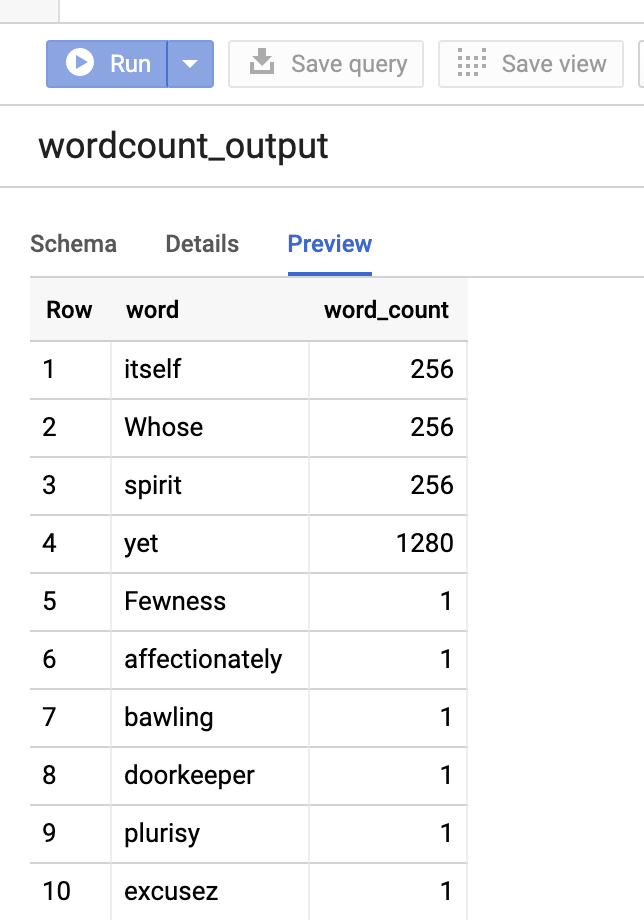
그림 1: BigQuery에서 출력 테이블 미리보기