

To properly secure a Gemini Enterprise app and mitigate the risk of data exfiltration, you must configure a VPC Service Controls perimeter. Using VPC Service Controls and Access Context Manager, you can protect and control access to your Gemini Enterprise app and connected enterprise data.
Set up VPC Service Controls with Gemini Enterprise
To protect your Gemini Enterprise resources using VPC Service Controls, do the following:
Ensure that you have a VPC Service Controls perimeter configured. You can create a new perimeter specifically for your Gemini Enterprise app, or use an existing perimeter that houses related resources.
For information about service perimeters, see Service perimeter details and configuration.
Add the Google Cloud project that contains your Gemini Enterprise app to the list of protected resources within the service perimeter.
Add the following APIs to the list of restricted services for the perimeter:
- Discovery Engine API:
discoveryengine.googleapis.com
- Discovery Engine API:
After the service perimeter is enabled and the Discovery Engine API is listed as a restricted service, VPC Service Controls enacts the following security measures:
The
discoveryengine.googleapis.comAPI can no longer be accessed from the public internet.Access to the Gemini Enterprise user interface is blocked, except where allowed by ingress rules.
Creating new data stores (which back Gemini Enterprise actions) is blocked until an administrator adds the required data sources and egress domains to the corresponding managed organization policy constraints. Existing data stores — including any that were previously enabled by request through a Google representative — continue to work without any further action. For more information, see Create data stores after enabling VPC Service Controls.
Restrict public access using Access Context Manager
Gemini Enterprise applications are made publicly accessible to the public internet. By default, Gemini Enterprise requires users to authenticate and requires authorization for access. VPC Service Controls and Access Context Manager provide additional controls that you can use to gate access.
Using Access Context Manager, you can define fine-grained, attribute-based access control for projects and resources in Google Cloud. To do this, you must define an access policy, which is an organization-wide container for access levels and service perimeters.
Access levels describe the requirements that must be met in order for a request to be honored. For example, you can restrict requests based on the following:
- Device type and operating system (requires a Chrome Enterprise Premium license)
- IP address
- User identity
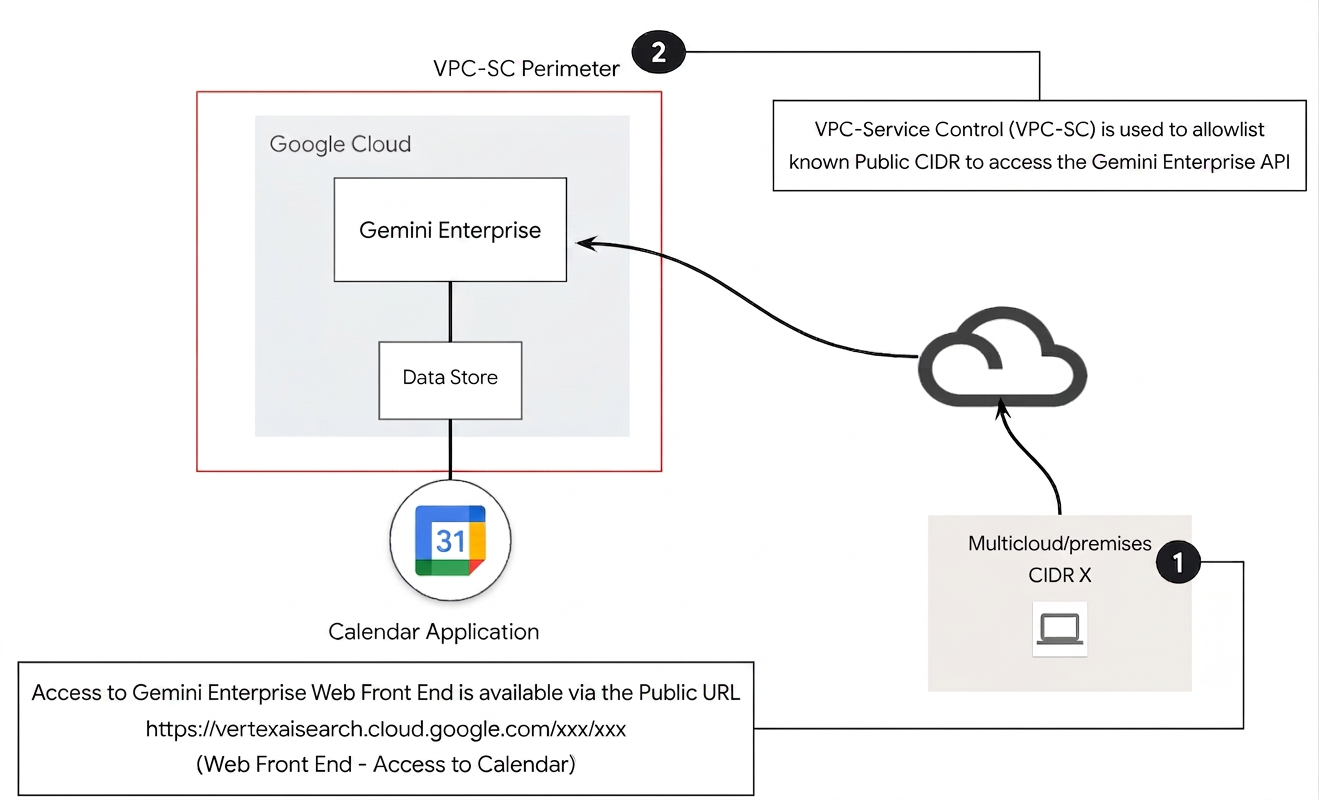
In this reference architecture, a public IP subnetwork access level is used to build the VPC Service Controls access policy.
To gate access to Gemini Enterprise using Access Context Manager, follow the instructions in Creating a basic access level to create a basic access level. Specify the following options:
For Create conditions in, choose Basic mode.
In the Access level title field, enter
corp-public-block.In the Conditions section, for When condition is met, return, select TRUE.
For IP Subnetworks, select Public IP.
For the IP address range, specify your external IP address.
Apply VPC Service Controls to existing data stores
Enforcing a VPC Service Controls perimeter on a project with existing data stores is not supported.
To enforce VPC Service Controls on an existing data store:
Delete and then recreate the data store.
This applies the service controls and lets traffic flow correctly.
Create data stores after enabling VPC Service Controls
VPC Service Controls primarily aims to prevent data exfiltration by creating a secure service perimeter around your projects and resources. New data stores (which back Gemini Enterprise actions, such as sending an email or creating a Jira ticket) are potential paths for data to leave this perimeter, so VPC Service Controls blocks the creation of new data stores until an administrator explicitly permits them through managed organization policy constraints.
When you enable VPC Service Controls on a Google Cloud project containing an Gemini Enterprise app, the UI prevents you from creating new data stores. Data stores created before the perimeter was enabled — and any services that were previously enabled by request through a Google representative — continue to work; only creating new ones is gated.
To let administrators create a new data store inside the perimeter:
Add the data source to the Restrict allowed data sources for data connectors managed organization policy constraint. Adding a data source to this constraint automatically permits its well-known essential domains (for example,
graph.microsoft.comandapi.atlassian.com).If the data store needs domains unique to your organization (for example,
cymbal.atlassian.netorcymbal.com), add those domains to the Restrict egress domains for data connectors managed organization policy constraint.
For an overview of these constraints, see Managed policy constraints.