


重要事項:建立 RAG 語料庫時,請設定語料庫 description。description 建立後即無法編輯。高品質的說明是有效跨語料庫檢索的關鍵,因為系統會根據說明,為查詢選取適當的語料庫。
本頁面說明 AsyncRetrieveContexts 和 AskContexts 這兩個 API,可支援 RAG 跨語料庫檢索,由後端的代理式檢索提供技術支援。
AsyncRetrieveContexts API:這個非同步 API 可讓使用者從多個 RAG 代管語料庫擷取相關內容。這項 API 會長時間執行。使用者可以透過作業 ID 取得查詢和結果的狀態。
AskContexts API:這是一種同步 API,可直接搜尋多個 RAG 管理的語料庫,生成查詢答案。
重要事項:如要使用這項功能,您必須將專案中的 Agent Platform 使用者角色授予 Gemini Enterprise Agent Platform 服務帳戶上的 RAG Engine:service-[Your project's automatically generated project number]@gcp-sa-vertex-rag.iam.gserviceaccount.com。
重要事項:這項功能僅適用於us-central1。
系統架構和語料庫選取
本節說明 RAG 跨語料庫檢索系統的架構,以及如何選取適當的語料庫進行檢索。
系統架構
跨語料庫檢索系統採用代理方法,可自動調度管理多個語料庫的檢索作業。架構的概略總覽包含下列元件:
- Orchestrator/Router:接收使用者查詢,並協調檢索程序。
- 規劃代理:分析查詢,並根據
descriptions判斷哪些語料庫最相關。 - 檢索引擎:對選取的 RAG 語料庫執行語意搜尋。
- 推論代理:評估檢索到的內容是否足以回答查詢。如果不足,則會產生意見回饋,根據充分情境感知 (SCA) 觸發另一個檢索迴圈。詳情請參閱 SCA 網誌文章和研究論文。
- LLM 生成器 (適用於
AskContexts):整合擷取的背景資訊,生成最終答案。
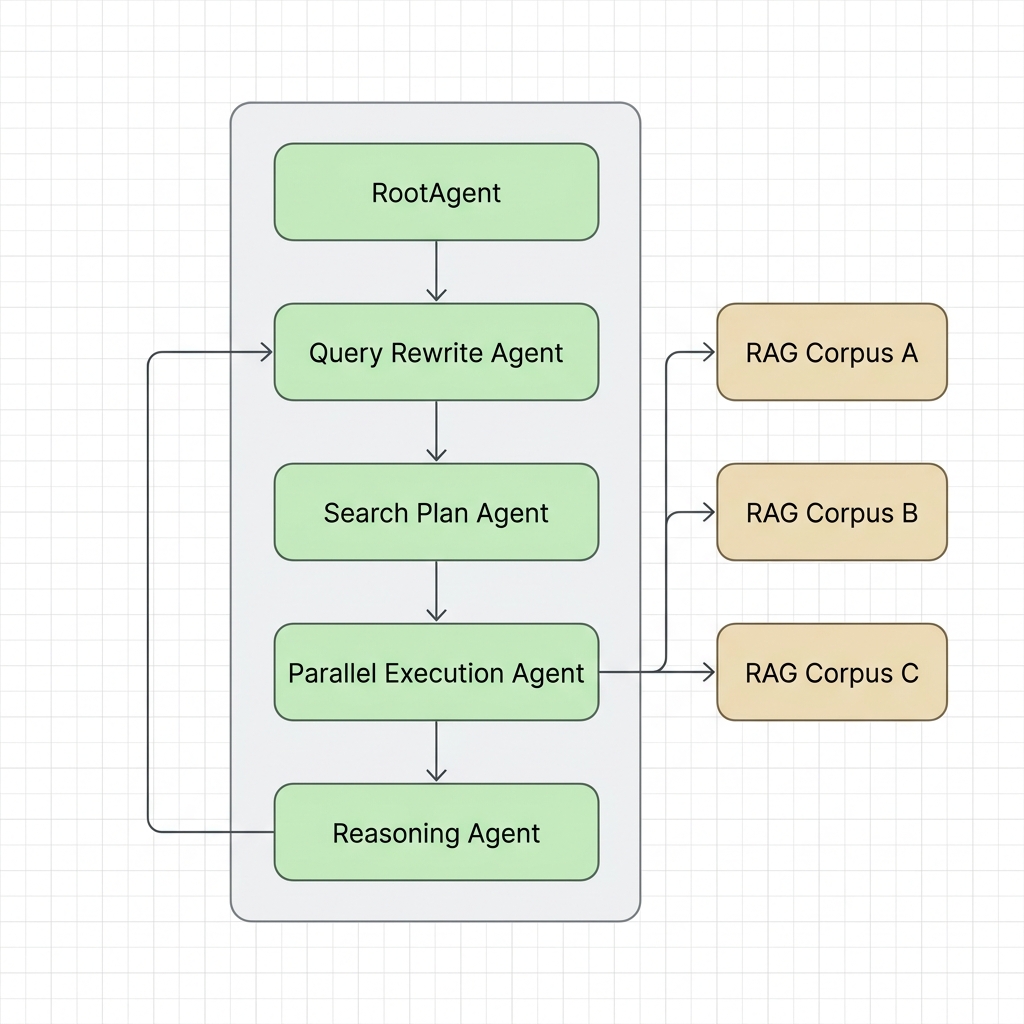
如何選取語料庫
在多個 RAG 代管語料庫執行查詢時,系統必須判斷哪個語料庫含有回答查詢所需的資訊。這項功能是透過代理式檢索實現:
- 語料庫對應:系統會維護可用 RAG 語料庫的對應關係,以及其技術說明 (在 RAG 語料庫的
description欄位中指定)。 - 語意比對:策略規劃代理 (由 Gemini 模型提供技術支援) 會根據可用語料庫的
descriptions評估使用者的查詢。 - 指定轉送:規劃工具會產生檢索計畫,將查詢的特定部分對應至最相關的語料庫,確保檢索作業集中且有效率,而非單純搜尋所有語料庫。
程式碼範例
下列程式碼範例說明如何使用 RAG Cross Corpus Retrieval API。
AsyncRetrieveContexts API
這個程式碼範例示範如何以非同步方式,從多個 RAG 語料庫擷取內容。
Python
from vertexai.preview import rag
import vertexai

PROJECT_ID = "PROJECT_ID"
LOCATION = "LOCATION"
RAG_CORPUS_1_ID = "RAG_CORPUS_1_ID"
RAG_CORPUS_2_ID = "RAG_CORPUS_2_ID"

# Initialize API once per session
vertexai.init(project=PROJECT_ID, location=LOCATION)

# Async retrieve contexts from multiple corpora
# This can be run in an environment like a Colab notebook.
response = await rag.async_retrieve_contexts(
    text="Why is the sky blue?",
    rag_resources=[
        rag.RagResource(
            rag_corpus=f"projects/{PROJECT_ID}/locations/{LOCATION}/ragCorpora/{RAG_CORPUS_1_ID}",
        ),
        rag.RagResource(
            rag_corpus=f"projects/{PROJECT_ID}/locations/{LOCATION}/ragCorpora/{RAG_CORPUS_2_ID}",
        ),
    ],
)
print(response)
REST
PROJECT_ID="PROJECT_ID"
LOCATION="LOCATION"
RAG_CORPUS_1_ID="RAG_CORPUS_1_ID"
RAG_CORPUS_2_ID="RAG_CORPUS_2_ID"
QUERY="Why is the sky blue?"

curl -X POST \
  -H "Authorization: Bearer $(gcloud auth print-access-token)" \
  -H "Content-Type: application/json" \
  "https://${LOCATION}-aiplatform.googleapis.com/v1beta1/projects/${PROJECT_ID}/locations/${LOCATION}:asyncRetrieveContexts" \
  -d '{
    "query": {
      "text": "'"$QUERY"'"
    },
    "tools": {
      "retrieval": {
        "disable_attribution": false,
        "vertex_rag_store": {
          "rag_resources": {
            "rag_corpus": "projects/'"${PROJECT_ID}"'/locations/'"${LOCATION}"'/ragCorpora/'"${RAG_CORPUS_1_ID}"'"
          },
          "rag_resources": {
            "rag_corpus": "projects/'"${PROJECT_ID}"'/locations/'"${LOCATION}"'/ragCorpora/'"${RAG_CORPUS_2_ID}"'"
          }
        }
      }
    }
  }'
取得作業結果
由於 AsyncRetrieveContexts 是長時間執行的作業,您可以使用 GetOperations API,透過作業 ID 輪詢結果。
Python
from google.cloud import aiplatform_v1beta1

PROJECT_ID = "PROJECT_ID"
LOCATION = "LOCATION"
OPERATION_ID = "OPERATION_ID"

client = aiplatform_v1beta1.VertexRagServiceClient(
    client_options={"api_endpoint": f"{LOCATION}-aiplatform.googleapis.com"}
)

operation = client.get_operation(
    request={"name": f"projects/{PROJECT_ID}/locations/{LOCATION}/operations/{OPERATION_ID}"}
)

if operation.done:
    print(operation.response)
else:
    print("Operation is still running")
REST
PROJECT_ID="PROJECT_ID"
LOCATION="LOCATION"
OPERATION_ID="OPERATION_ID"

curl -X GET \
  -H "Authorization: Bearer $(gcloud auth print-access-token)" \
  "https://${LOCATION}-aiplatform.googleapis.com/v1beta1/projects/${PROJECT_ID}/locations/${LOCATION}/operations/${OPERATION_ID}"
AskContexts API
這個程式碼範例示範如何同步搜尋多個 RAG 語料庫,直接生成答案。
Python
from vertexai.preview import rag
import vertexai

PROJECT_ID = "PROJECT_ID"
LOCATION = "LOCATION"
RAG_CORPUS_1_ID = "RAG_CORPUS_1_ID"
RAG_CORPUS_2_ID = "RAG_CORPUS_2_ID"

# Initialize API once per session
vertexai.init(project=PROJECT_ID, location=LOCATION)

# Ask contexts from multiple corpora
response = rag.ask_contexts(
    text="Why is the sky blue?",
    rag_resources=[
        rag.RagResource(
            rag_corpus=f"projects/{PROJECT_ID}/locations/{LOCATION}/ragCorpora/{RAG_CORPUS_1_ID}",
        ),
        rag.RagResource(
            rag_corpus=f"projects/{PROJECT_ID}/locations/{LOCATION}/ragCorpora/{RAG_CORPUS_2_ID}",
        ),
    ],
)
print(response)
REST
PROJECT_ID="PROJECT_ID"
LOCATION="LOCATION"
RAG_CORPUS_1_ID="RAG_CORPUS_1_ID"
RAG_CORPUS_2_ID="RAG_CORPUS_2_ID"
QUERY="Why is the sky blue?"

curl -X POST \
  -H "Authorization: Bearer $(gcloud auth print-access-token)" \
  -H "Content-Type: application/json" \
  "https://${LOCATION}-aiplatform.googleapis.com/v1beta1/projects/${PROJECT_ID}/locations/${LOCATION}:askContexts" \
  -d '{
    "query": {
      "text": "'"$QUERY"'"
    },
    "tools": {
      "retrieval": {
        "disable_attribution": false,
        "vertex_rag_store": {
          "rag_resources": {
            "rag_corpus": "projects/'"${PROJECT_ID}"'/locations/'"${LOCATION}"'/ragCorpora/'"${RAG_CORPUS_1_ID}"'"
          },
          "rag_resources": {
            "rag_corpus": "projects/'"${PROJECT_ID}"'/locations/'"${LOCATION}"'/ragCorpora/'"${RAG_CORPUS_2_ID}"'"
          }
        }
      }
    }
  }'
後續步驟
- 如要進一步瞭解 RAG API,請參閱「RAG Engine API」。
- 如要進一步瞭解 RAG 的回覆,請參閱「RAG Engine 的檢索和生成輸出內容」。
- 如要瞭解 RAG Engine,請參閱「RAG Engine 總覽」。