

CodeMender can scan each pull request in your continuous integration and
continuous delivery (CI/CD) pipeline. The check fails when CodeMender finds a
vulnerability with CRITICAL or HIGH severity in the code that the pull
request changes. Findings in code that the pull request didn't change appear in
the report, but they don't fail the check.
This document shows you how to do the following:
- Scan pull requests with GitHub Actions, and have CodeMender open a pull request with fixes.
- Scan pull requests with Cloud Build.
- Scan your changes before each commit with a Git pre-commit hook.
How pull request scans work
To scan a pull request, run cm find with the --diff flag and the pull
request's base branch:
cm find . --diff=origin/main
In response to this command, CodeMender does the following:
- Compares the pull request branch with the base branch, and scans the modified source files plus the files that directly depend on them, such as callers and importers.
- Distinguishes new vulnerabilities that the pull request introduces or
exposes from pre-existing findings, which are labeled
[LEGACY /
UNTOUCHED]
. Your CI check blocks only on vulnerabilities caused by the pull request. - Exits with status 1 when a finding caused by the pull request matches a
severity in
--fail-on. The default isCRITICAL,HIGH.
For more information about how --diff compares with other scanning modes, see
CodeMender find
modes.
Before you begin
CodeMender is available to a limited set of customers in Public Preview. Contact your sales team to get access.
- Sign in to your Google Cloud account. If you're new to Google Cloud, create an account to evaluate how our products perform in real-world scenarios. New customers also get $300 in free credits to run, test, and deploy workloads.
-
In the Google Cloud console, on the project selector page, select or create a Google Cloud project.
Roles required to select or create a project
- Select a project: Selecting a project doesn't require a specific IAM role—you can select any project that you've been granted a role on.
-
Create a project: To create a project, you need the Project Creator role
(
roles/resourcemanager.projectCreator), which contains theresourcemanager.projects.createpermission. Learn how to grant roles.
-
If you're using an existing project for this guide, verify that you have the permissions required to complete this guide. If you created a new project, then you already have the required permissions.
-
Verify that billing is enabled for your Google Cloud project.
Enable the Agent Platform API and Cloud Resource Manager API APIs, if any are not already enabled.
Roles required to enable APIs
To enable APIs, you need the
serviceusage.services.enablepermission. If you created the project, then you likely already have this permission through the Owner role (roles/owner). Otherwise, you can get this permission through the Service Usage Admin role (roles/serviceusage.serviceUsageAdmin). Learn how to grant roles.-
Install the Google Cloud CLI.
-
If you're using an external identity provider (IdP), you must first sign in to the gcloud CLI with your federated identity.
-
To initialize the gcloud CLI, run the following command:
gcloud init -
In the Google Cloud console, on the project selector page, select or create a Google Cloud project.
Roles required to select or create a project
- Select a project: Selecting a project doesn't require a specific IAM role—you can select any project that you've been granted a role on.
-
Create a project: To create a project, you need the Project Creator role
(
roles/resourcemanager.projectCreator), which contains theresourcemanager.projects.createpermission. Learn how to grant roles.
-
If you're using an existing project for this guide, verify that you have the permissions required to complete this guide. If you created a new project, then you already have the required permissions.
-
Verify that billing is enabled for your Google Cloud project.
Enable the Agent Platform API and Cloud Resource Manager API APIs, if any are not already enabled.
Roles required to enable APIs
To enable APIs, you need the
serviceusage.services.enablepermission. If you created the project, then you likely already have this permission through the Owner role (roles/owner). Otherwise, you can get this permission through the Service Usage Admin role (roles/serviceusage.serviceUsageAdmin). Learn how to grant roles.-
Install the Google Cloud CLI.
-
If you're using an external identity provider (IdP), you must first sign in to the gcloud CLI with your federated identity.
-
To initialize the gcloud CLI, run the following command:
gcloud init
Make sure that your CodeMender CLI release supports pull request scans. The
pipelines in this document download the latest stable release each time they
run. To check a local installation, run cm find --help and look for the
--diff flag. To update the CLI, run cm update. For more information, see
Install and configure the
CLI.
Required roles
To get the permissions that you need to set up CI/CD integrations for CodeMender, ask your administrator to grant you the following IAM roles on your project:
- Service Account Admin (
roles/iam.serviceAccountAdmin) - Project IAM Admin (
roles/resourcemanager.projectIamAdmin) -
Set up Workload Identity Federation for GitHub Actions:
Workload Identity Pool Admin (
roles/iam.workloadIdentityPoolAdmin) -
Create Cloud Build triggers:
- Cloud Build Editor (
roles/cloudbuild.builds.editor) - Service Account User (
roles/iam.serviceAccountUser)
- Cloud Build Editor (
-
Run the Git pre-commit hook locally:
Agent Platform User (
roles/aiplatform.user)
For more information about granting roles, see Manage access to projects, folders, and organizations.
You might also be able to get the required permissions through custom roles or other predefined roles.
To ensure that the CI/CD service account has the necessary permissions to run CodeMender in a CI/CD pipeline, ask your administrator to grant the following IAM roles to the CI/CD service account:
- Agent Platform User (
roles/aiplatform.user) on your project -
Write Cloud Build build logs:
Logs Writer (
roles/logging.logWriter) on your project -
Save SARIF reports in a Cloud Storage bucket:
Storage Object User (
roles/storage.objectUser) on the bucket
For more information about granting roles, see Manage access to projects, folders, and organizations.
Your administrator might also be able to give the CI/CD service account the required permissions through custom roles or other predefined roles.
Security considerations
When you run CodeMender in a GitHub Actions workflow, a Cloud Build trigger, or a Git pre-commit hook, CodeMender runs without asking for confirmation. Before you set up these integrations, consider the following:
- Confirmation prompts: The
--yesflag turns off the prompts that ask you to confirm the agent's commands and file writes. The--bypass-warningflag skips the warning that the agent can modify files and run commands on your system. Before you use these flags, read the Preview terms at the beginning of this document, including the terms about disabling human confirmation. - Sandbox: The pipelines turn off the CodeMender sandbox with
--sandbox=false. Commands that the agent runs, such as builds and tests when it fixes a finding, have the same access as the job, including its Google Cloud credentials and network access. The Linux sandbox uses user namespaces, which some CI environments, such as unprivileged containers, don't support. Turn off the sandbox only in isolated, disposable environments. If your CI environment supports the sandbox, remove--sandbox=false. - Runners: Run the GitHub Actions workflow on GitHub-hosted runners, such
as
ubuntu-24.04, which run each job in a new virtual machine. Don't use self-hosted runners that are reused between jobs. - Untrusted code: Code in a pull request can contain text that tries to steer the agent. The GitHub Actions workflow scans only pull requests from branches in the same repository, which only users with write access can create. For Cloud Build, use comment control so that an owner or collaborator must approve builds for pull requests from other contributors.
- Access: Grant each service account only the required Identity and Access Management (IAM) roles for its pipeline.
Scan pull requests with GitHub Actions
The workflow in this section scans each pull request in a repository on
GitHub.com. When CodeMender finds a vulnerability with CRITICAL or HIGH
severity in the pull request's changes, the workflow does the following:
- Fails the CodeMender scan check.
- Runs
cm fixfor each finding, and opens a pull request with the fixes into the pull request's branch.
The workflow also uploads the findings to GitHub code scanning.
Set up Workload Identity Federation
The workflow authenticates to Google Cloud with Workload Identity Federation, so you don't store a service account key in GitHub. Run the following commands with the Google Cloud CLI:
Set shell variables for your project and repository:
PROJECT_ID="PROJECT_ID"
GITHUB_ORG="GITHUB_ORG"
REPO="GITHUB_ORG/REPOSITORY"
Replace the following:
PROJECT_ID: your Google Cloud project ID.GITHUB_ORG: your GitHub organization name, or your GitHub username for a repository in a personal account.REPOSITORY: the name of your GitHub repository.
Enable the APIs that Workload Identity Federation uses:
gcloud services enable iam.googleapis.com \
    cloudresourcemanager.googleapis.com iamcredentials.googleapis.com \
    sts.googleapis.com --project="${PROJECT_ID}"
Create a service account for the workflow, and grant it the Agent Platform User IAM role (
roles/aiplatform.user):gcloud iam service-accounts create codemender-ci \ --project="${PROJECT_ID}" \ --display-name="CodeMender CI" gcloud projects add-iam-policy-binding "${PROJECT_ID}" \ --member="serviceAccount:codemender-ci@${PROJECT_ID}.iam.gserviceaccount.com" \ --role="roles/aiplatform.user"Create a workload identity pool. If you already have a pool for GitHub Actions, skip this step, and use your pool's ID instead of
githubin the following steps.gcloud iam workload-identity-pools create github \ --project="${PROJECT_ID}" \ --location="global" \ --display-name="GitHub Actions"Create a provider for GitHub in the pool. The attribute condition accepts tokens only from repositories that
GITHUB_ORGowns.gcloud iam workload-identity-pools providers create-oidc codemender \ --project="${PROJECT_ID}" \ --location="global" \ --workload-identity-pool="github" \ --display-name="CodeMender" \ --attribute-mapping="google.subject=assertion.sub,attribute.repository=assertion.repository,attribute.repository_owner=assertion.repository_owner" \ --attribute-condition="assertion.repository_owner == '${GITHUB_ORG}'" \ --issuer-uri="https://token.actions.githubusercontent.com"Let workflows in your repository use the service account:
POOL_ID=$(gcloud iam workload-identity-pools describe github \
    --project="${PROJECT_ID}" \
    --location="global" \
    --format="value(name)")

gcloud iam service-accounts add-iam-policy-binding \
    "codemender-ci@${PROJECT_ID}.iam.gserviceaccount.com" \
    --project="${PROJECT_ID}" \
    --role="roles/iam.workloadIdentityUser" \
    --member="principalSet://iam.googleapis.com/${POOL_ID}/attribute.repository/${REPO}"
Get the provider's full name. You need it in the next section.
gcloud iam workload-identity-pools providers describe codemender \
    --project="${PROJECT_ID}" \
    --location="global" \
    --workload-identity-pool="github" \
    --format="value(name)"
The output looks like the following:
projects/123456789/locations/global/workloadIdentityPools/github/providers/codemender
Changes to Workload Identity Federation and IAM can take up to 5 minutes to take effect. For more information, see Configure Workload Identity Federation with deployment pipelines.
Add repository secrets
In your repository, go to Settings > Secrets and variables > Actions, and add the following repository secrets:
| Secret | Value |
|---|---|
GCP_PROJECT_ID |
Your project ID. |
GCP_WIF_PROVIDER |
The provider's full name from the previous section. |
GCP_WIF_SERVICE_ACCOUNT |
codemender-ci@PROJECT_ID.iam.gserviceaccount.com,
where PROJECT_ID is your project ID.
|
For more information, see Using secrets in GitHub Actions.
Configure repository settings
- To let the autofix job open pull requests, go to Settings > Actions > General. Under Workflow permissions, select Allow GitHub Actions to create and approve pull requests, and then click Save. A repository in an organization inherits this setting from the organization. If you can't change it, ask an organization owner. If you don't use autofix, skip this step. For more information, see Managing GitHub Actions settings for a repository.
- Make sure that GitHub code scanning is available for the repository. For
private and internal repositories, code scanning requires GitHub Code
Security. If code scanning isn't available, delete the Upload results to
code scanning step and the
security-eventsandactionspermissions from the scan job. Otherwise, the upload fails, and so does the scan job. For more information, see Uploading a SARIF file to GitHub.
Add the workflow
Commit the following workflow to your repository as
.github/workflows/codemender.yml:
name: CodeMender

on:
  pull_request:

permissions: {}

defaults:
  run:
    shell: bash

env:
  CM_DOWNLOAD_URL: https://artifactregistry.googleapis.com/download/v1/projects/cmoc-prod/locations/us/repositories/codemender-cli-production/files/cm%3Astable%3Acm-linux-amd64.zip:download?alt=media

jobs:
  scan:
    name: CodeMender scan
    # Workflows for fork and Dependabot pull requests can't read this
    # repository's secrets, so they can't authenticate to Google Cloud.
    if: >-
      github.event.pull_request.head.repo.full_name == github.repository &&
      github.actor != 'dependabot[bot]'
    runs-on: ubuntu-24.04
    timeout-minutes: 15
    permissions:
      contents: read
      id-token: write         # Workload Identity Federation
      security-events: write  # Upload SARIF to code scanning
      actions: read           # Upload SARIF from a private repository
    outputs:
      findings: ${{ steps.scan.outputs.findings }}
    steps:
      - uses: actions/checkout@v7
        with:
          fetch-depth: 0  # cm needs the base branch history
          persist-credentials: false

      - uses: google-github-actions/auth@v3
        with:
          project_id: ${{ secrets.GCP_PROJECT_ID }}
          workload_identity_provider: ${{ secrets.GCP_WIF_PROVIDER }}
          service_account: ${{ secrets.GCP_WIF_SERVICE_ACCOUNT }}

      - name: Install the CodeMender CLI
        run: |
          curl -fsSL -o "$RUNNER_TEMP/cm.zip" "$CM_DOWNLOAD_URL"
          unzip -q -o "$RUNNER_TEMP/cm.zip" -d "$RUNNER_TEMP/cm"
          echo "$RUNNER_TEMP/cm" >> "$GITHUB_PATH"

      - name: Scan the pull request
        id: scan
        env:
          BASE_REF: ${{ github.base_ref }}
          FAIL_ON: CRITICAL,HIGH
        run: |
          cm init
          status=0
          cm find . \
            --diff="origin/$BASE_REF" \
            --diff-workers=16 \
            --fail-on="$FAIL_ON" \
            --format=sarif \
            --output=codemender.sarif \
            --sandbox=false \
            --yes \
            --bypass-warning || status=$?

          # Save the findings that failed the scan for the autofix job. Like the
          # CI gate, skip findings labeled [LEGACY / UNTOUCHED]: they're in code
          # that the pull request didn't change.
          echo '[]' > "$RUNNER_TEMP/codemender-findings.json"
          if [ "$status" -ne 0 ]; then
            cm report --format=json --status=OPEN \
              | jq --arg fail_on "$FAIL_ON" '
                  ($fail_on | ascii_upcase | split(",")) as $severities
                  | [.[]
                     | select(.title | startswith("[LEGACY / UNTOUCHED]") | not)
                     | select(.severity | ascii_upcase | IN($severities[]))]' \
              > "$RUNNER_TEMP/codemender-findings.json"
          fi
          echo "findings=$(jq length "$RUNNER_TEMP/codemender-findings.json")" >> "$GITHUB_OUTPUT"
          exit "$status"

      - name: Upload results to code scanning
        if: ${{ !cancelled() && hashFiles('codemender.sarif') != '' }}
        uses: github/codeql-action/upload-sarif@v4
        with:
          sarif_file: codemender.sarif
          category: codemender

      - name: Save findings for autofix
        if: ${{ !cancelled() && steps.scan.outputs.findings > 0 }}
        uses: actions/upload-artifact@v7
        with:
          name: codemender-findings
          path: ${{ runner.temp }}/codemender-findings.json
          retention-days: 1

  autofix:
    name: CodeMender autofix
    needs: scan
    if: ${{ !cancelled() && needs.scan.outputs.findings > 0 }}
    runs-on: ubuntu-24.04
    timeout-minutes: 60
    permissions:
      contents: write        # Push the fix branch
      pull-requests: write   # Open the fix pull request
      id-token: write        # Workload Identity Federation
    steps:
      - uses: actions/checkout@v7
        with:
          ref: ${{ github.head_ref }}
          persist-credentials: false

      - uses: google-github-actions/auth@v3
        with:
          project_id: ${{ secrets.GCP_PROJECT_ID }}
          workload_identity_provider: ${{ secrets.GCP_WIF_PROVIDER }}
          service_account: ${{ secrets.GCP_WIF_SERVICE_ACCOUNT }}

      - name: Install the CodeMender CLI
        run: |
          curl -fsSL -o "$RUNNER_TEMP/cm.zip" "$CM_DOWNLOAD_URL"
          unzip -q -o "$RUNNER_TEMP/cm.zip" -d "$RUNNER_TEMP/cm"
          echo "$RUNNER_TEMP/cm" >> "$GITHUB_PATH"

      - uses: actions/download-artifact@v8
        with:
          name: codemender-findings
          path: ${{ runner.temp }}/codemender

      - name: Fix findings
        run: |
          # Keep CodeMender state and the auth action's credentials file out of
          # the commits, and out of the `git clean` that cm fix runs.
          printf '%s\n' .cm_project 'gha-creds-*.json' >> .git/info/exclude

          cm init
          # Fix in the repository root instead of each file's directory.
          printf 'project_paths:\n  - "%s"\n' "$GITHUB_WORKSPACE" \
            >> ~/.codemender/config.yaml
          cm report import -f "$RUNNER_TEMP/codemender/codemender-findings.json"

          git config user.name "github-actions[bot]"
          git config user.email \
            "41898282+github-actions[bot]@users.noreply.github.com"

          cm report --format=json --status=OPEN \
            | jq -r '.[] | [.finding_id, .title] | @tsv' \
            > "$RUNNER_TEMP/findings.tsv"
          while IFS=$'\t' read -r id title; do
            # cm fix exits 0 when it makes no edits, so also check for changes.
            if cm fix "$id" \
                 --sandbox=false --yes --bypass-warning < /dev/null &&
               ! git diff --quiet; then
              git commit -q -a -m "Fix $title" -m "CodeMender finding $id"
            else
              echo "::warning::CodeMender didn't fix \"$title\" ($id)."
            fi
            # Discard files the fix agent created, such as test output.
            git reset -q --hard
            git clean -q -fd
          done < "$RUNNER_TEMP/findings.tsv"

      - uses: peter-evans/create-pull-request@v8
        with:
          branch: codemender/fix-pr-${{ github.event.pull_request.number }}
          base: ${{ github.head_ref }}
          title: "CodeMender fixes for #${{ github.event.pull_request.number }}"
          body: |
            CodeMender generated these fixes for findings in #${{ github.event.pull_request.number }}.
            Review each commit before you merge this pull request into `${{ github.head_ref }}`.
Workflow details
The following diagram shows how the pull request scan and autofix jobs interact:
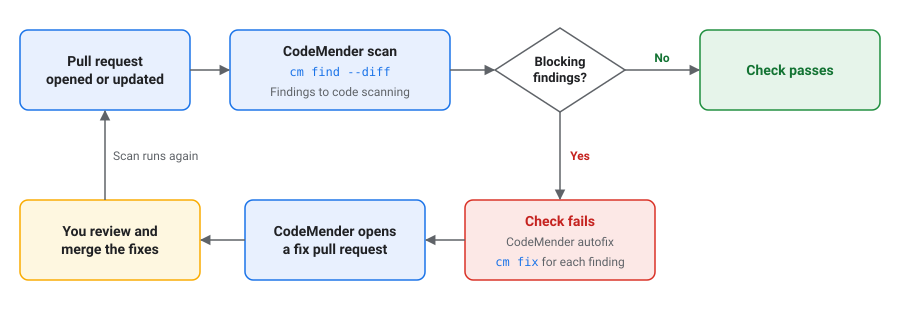
The CodeMender scan job does the following:
- Checks out the pull request with its full history. For pull requests, GitHub checks out a merge commit of the pull request branch into the base branch.
- Authenticates to Google Cloud and downloads the latest stable release of the CodeMender CLI.
- Runs
cm find --diffagainst the base branch. The job fails if CodeMender finds a vulnerability with a severity that's listed inFAIL_ONin the pull request's changes. - Uploads the report to GitHub code scanning, even when the scan fails the
job. The report includes findings labeled
[LEGACY / UNTOUCHED]. Code scanning also shows a finding in the pull request's checks when all of the finding's lines are in the pull request's diff. - Saves the findings that failed the job for the autofix job.
The scan job doesn't run for pull requests from forks or from Dependabot,
because workflows for those pull requests can't read the repository's secrets.
GitHub reports a skipped job as successful, so the check doesn't block these
pull requests, even if you make it a required check. Review these pull requests
yourself, or scan them locally with cm find --diff.
The CodeMender autofix job runs when the scan job saves findings. It does the following:
- Checks out the pull request branch.
- Runs
cm fixfor each finding, and commits each fix separately. If CodeMender doesn't fix a finding, the job logs a warning. The job commits only changes to files that are already in the repository, and discards any files that the fix agent creates, such as test output. - Opens a pull request from the
codemender/fix-pr-NUMBERbranch into the pull request branch, whereNUMBERis the pull request number. If the fix pull request already exists, the job updates it. If CodeMender doesn't fix any findings, or if the job reaches its 60-minute timeout, the job doesn't open a pull request.
Review and merge fixes
GitHub doesn't automatically run workflows for pull requests that a workflow
creates with the GITHUB_TOKEN. To scan the fix pull request, a user with write
access to the repository clicks Approve workflows to run in the fix pull
request.
When you merge the fix pull request, the pull request branch changes, and the workflow scans the original pull request again.
Customize the workflow
You can customize the workflow in the following ways:
- To change the severities that fail the check, in the Scan the pull
request step, set
FAIL_ONto a comma-separated list of severities without spaces, such asCRITICAL,HIGH,MEDIUM. Valid values areCRITICAL,HIGH,MEDIUM, andLOW. - To report findings without failing the check, set
FAIL_ON: "". The workflow still uploads findings to code scanning, but it doesn't run the autofix job. To scan pull requests into some branches only, add a
branchesfilter to thepull_requesttrigger. The workflow then doesn't scan fix pull requests, because their base is a pull request branch:on: pull_request: branches: [main]To turn off autofix, delete the
autofixjob and the Save findings for autofix step.
Scan pull requests with Cloud Build
The build in this section scans each pull request in a GitHub repository that's
connected to Cloud Build. The build and its GitHub check fail when
CodeMender finds a vulnerability with CRITICAL or HIGH severity in the pull
request's changes. The build doesn't fix findings.
Before you start, do the following:
- Connect your repository to Cloud Build as a second-generation repository. For more information, see Connect to a GitHub repository.
Enable the Cloud Build API and the IAM API in the project that has access to CodeMender. The build uses CodeMender in the project that runs the build.
PROJECT_ID="PROJECT_ID"
gcloud services enable cloudbuild.googleapis.com iam.googleapis.com \
    --project="${PROJECT_ID}"
Replace
PROJECT_IDwith your Google Cloud project ID.
Create a service account
Create a service account for the build. Grant it the Agent Platform User
IAM role (roles/aiplatform.user) to use CodeMender, and the
Logs Writer role (roles/logging.logWriter) to write build logs:
SA="codemender-build@${PROJECT_ID}.iam.gserviceaccount.com"

gcloud iam service-accounts create codemender-build \
    --project="${PROJECT_ID}" \
    --display-name="CodeMender Cloud Build"

gcloud projects add-iam-policy-binding "${PROJECT_ID}" \
    --member="serviceAccount:${SA}" \
    --role="roles/aiplatform.user"

gcloud projects add-iam-policy-binding "${PROJECT_ID}" \
    --member="serviceAccount:${SA}" \
    --role="roles/logging.logWriter"
To save SARIF reports in a Cloud Storage bucket, also grant the service account access to the bucket:
BUCKET="BUCKET"

gcloud storage buckets add-iam-policy-binding "gs://${BUCKET}" \
    --member="serviceAccount:${SA}" \
    --role="roles/storage.objectUser"
Replace BUCKET with the name of your Cloud Storage
bucket.
Add the build config
Commit the following build config to the root of your repository as
cloudbuild.yaml:
# Scans a pull request with CodeMender. The build fails when CodeMender finds
# a CRITICAL or HIGH vulnerability in the pull request's changes.
steps:
  - id: install-codemender
    name: gcr.io/google.com/cloudsdktool/google-cloud-cli:slim
    script: |
      #!/usr/bin/env bash
      set -euo pipefail
      curl -fsSL -o /tmp/cm.zip "$_CM_DOWNLOAD_URL"
      python3 -m zipfile -e /tmp/cm.zip /workspace/.codemender-cli
      chmod +x /workspace/.codemender-cli/cm

  - id: fetch-history
    name: gcr.io/google.com/cloudsdktool/google-cloud-cli:slim
    script: |
      #!/usr/bin/env bash
      set -euo pipefail
      : "${_BASE_BRANCH:?Run this build from a pull request trigger.}"
      # Triggers check out only the pull request's commit. CodeMender needs the
      # history back to where the pull request branched from the base branch.
      # Fetch from origin, or from GitHub if origin isn't configured.
      refspec="+refs/heads/$_BASE_BRANCH:refs/remotes/origin/$_BASE_BRANCH"
      git fetch --quiet --unshallow origin "$refspec" ||
        git fetch --quiet --unshallow \
          "https://github.com/$REPO_FULL_NAME.git" "$refspec"
      merge_base=$(git merge-base HEAD "origin/$_BASE_BRANCH")
      echo "Merge base with $_BASE_BRANCH: $merge_base"

  - id: scan
    name: gcr.io/google.com/cloudsdktool/google-cloud-cli:slim
    script: |
      #!/usr/bin/env bash
      set -uo pipefail
      export PATH="/workspace/.codemender-cli:$PATH"
      # The project that has access to CodeMender.
      export GOOGLE_CLOUD_PROJECT="$PROJECT_ID"
      cm init || exit 1
      status=0
      cm find . \
        --diff="origin/$_BASE_BRANCH" \
        --diff-workers=16 \
        --fail-on=CRITICAL,HIGH \
        --format=sarif \
        --output=codemender.sarif \
        --sandbox=false \
        --yes \
        --bypass-warning || status=$?

      # cm find writes the SARIF report when the scan completes.
      if [ -f codemender.sarif ]; then
        # cm find doesn't print finding details, so print them here.
        cm report --status=OPEN --format=md
        if [ -n "${_REPORT_BUCKET:-}" ]; then
          gcloud storage cp codemender.sarif \
            "gs://$_REPORT_BUCKET/codemender/$BUILD_ID.sarif" || status=1
        fi
      fi
      exit "$status"

substitutions:
  _CM_DOWNLOAD_URL: https://artifactregistry.googleapis.com/download/v1/projects/cmoc-prod/locations/us/repositories/codemender-cli-production/files/cm%3Astable%3Acm-linux-amd64.zip:download?alt=media
  _REPORT_BUCKET: ''  # Optional: a bucket to save the SARIF report in.

timeout: 1200s
options:
  automapSubstitutions: true
  logging: CLOUD_LOGGING_ONLY
Create the trigger
Create a trigger that runs the build for each pull request into main:
REGION="REGION"
CONNECTION="CONNECTION"
REPOSITORY="REPOSITORY"

gcloud builds triggers create github \
    --project="${PROJECT_ID}" \
    --region="${REGION}" \
    --name="codemender-scan" \
    --repository="projects/${PROJECT_ID}/locations/${REGION}/connections/${CONNECTION}/repositories/${REPOSITORY}" \
    --pull-request-pattern='^main$' \
    --comment-control=COMMENTS_ENABLED_FOR_EXTERNAL_CONTRIBUTORS_ONLY \
    --build-config=cloudbuild.yaml \
    --service-account="projects/${PROJECT_ID}/serviceAccounts/${SA}"
Replace the following:
REGION: the region of your Cloud Build repository connection.CONNECTION: the name of your Cloud Build repository connection.REPOSITORY: the name of the connected repository in Cloud Build.
Note the following options:
--pull-request-patternis a regular expression for the pull request's base branch. Use^and$to match the whole branch name.- With
--comment-control=COMMENTS_ENABLED_FOR_EXTERNAL_CONTRIBUTORS_ONLY, the build runs automatically for pull requests from repository owners and collaborators. For pull requests from other contributors, the build runs after an owner or collaborator comments/gcbrunon the pull request. - To save SARIF reports in a bucket, add
--substitutions=_REPORT_BUCKET="${BUCKET}".
You can also create the trigger in the Google Cloud console. For more information, see Building repositories from GitHub.
To show build logs in GitHub, add --include-logs-with-status when you create
the trigger, and grant the service account the Logs Viewer role
(roles/logging.viewer). Anyone who can view the check in GitHub can then read
the build logs, including the findings.
How the build works
The build has three steps:
install-codemenderdownloads the latest stable release of the CodeMender CLI.fetch-historyfetches the base branch and the history that CodeMender needs. Cloud Build checks out only the commit that started the build. The step fetches from theoriginremote. Iforiginisn't configured, the step fetches from GitHub without credentials, which works only for public repositories. In that case, a private repository needs credentials, such as an SSH key. For more information, see Accessing GitHub from a build using SSH keys.scanrunscm find --diffagainst the base branch. When the scan completes, the step prints all findings in the build log. If you set_REPORT_BUCKET, the step also copies the SARIF report togs://BUCKET/codemender/BUILD_ID.sarif.
To change the severities that fail the build, edit --fail-on in the scan
step. If you run the build without a pull request trigger, it fails with the
message Run this build from a pull request trigger.
Scan before each commit
A Git pre-commit hook can scan your staged changes and block the commit when
CodeMender finds a vulnerability with CRITICAL or HIGH severity. Developers
can skip the hook, so use it in addition to scanning in CI, not instead of it.
Each developer who uses the hook needs the following:
- The CodeMender CLI, installed and set up as described in Install and
configure the
CLI,
including
gcloud auth application-default loginandcm init. The hook needscmon thePATH. - The Agent Platform User role (
roles/aiplatform.user) in a project with access to CodeMender. CodeMender uses the project in theGOOGLE_CLOUD_PROJECTenvironment variable. If that variable isn't set, CodeMender uses the project from your Application Default Credentials or your gcloud CLI default project.
To add the hook, save the following script as .git/hooks/pre-commit in your
repository:
#!/bin/sh
# Scans staged changes with CodeMender before each commit.
if ! cm find . --diff --staged --fail-on=CRITICAL,HIGH \
    --yes --bypass-warning; then
  echo "CodeMender blocked this commit. To see the findings, run:" >&2
  echo "  cm report --status=OPEN" >&2
  echo "To commit anyway, run git commit --no-verify." >&2
  exit 1
fi
Make the script executable, and then add .cm_project to your .gitignore
file, so that you don't commit the file that CodeMender creates to track the
repository:
chmod +x .git/hooks/pre-commit
echo .cm_project >> .gitignore
When you run git commit, the hook scans the files with staged changes. The
scan can take a few minutes. The hook doesn't turn off the CodeMender sandbox.
To commit without the scan, run git commit --no-verify.
Scan flags
The following cm find flags control pull request scans. For all flags, run cm
find --help:
| Flag | Default | Description |
|---|---|---|
--diff[=REF] |
Off |
Scans the changes compared with REF, such as
origin/main. Without REF, scans
uncommitted changes to tracked files (compared against
HEAD). Can't be used with --deep.
|
--staged |
Off | With --diff, scans only staged changes. |
--diff-depth DEPTH |
1 |
Traversal depth for impact analysis (1 to 3, default: 1-hop). |
--diff-workers COUNT |
4 |
The number of files to scan at the same time, from 1 to 16. |
--diff-max-neighbors COUNT |
10 |
The maximum number of dependent files to scan. |
--fail-on SEVERITIES |
CRITICAL,HIGH |
With --diff, the severities that make cm find
exit with status 1. With an empty value, findings don't affect the exit
status.
|
--fail-on-truncation |
Off |
With --diff, exits with status 1 if CodeMender finds more
dependent files than --diff-max-neighbors allows.
|
--format FORMAT |
table |
The report format: table, json, or
sarif.
|
--output FILE |
Standard output | The file to write the report to. |
Troubleshooting
This section describes how to resolve common issues when running CodeMender in CI/CD pipelines.
Permission denied
The log shows a line like the following:
[1/1] ❌ src/app.py: start session failed: StartSession failed with HTTP 403 Forbidden.
The message can also include Permission 'aiplatform.interactions.create'
denied. Check the following:
- The project has access to CodeMender.
- The service account or user has the Agent Platform User role
(
roles/aiplatform.user) in the project. - The Agent Platform API is enabled in the project.
- CodeMender uses the right project. In GitHub Actions, check the
GCP_PROJECT_IDsecret. Cloud Build uses the project that runs the build. Locally, check theGOOGLE_CLOUD_PROJECTenvironment variable, or your default project if the variable isn't set.
Resource setup in progress
If the log shows Resource setup has just started. Please try again shortly. or
Resource setup is in progress. Please try again shortly., CodeMender is
setting up resources for your project, which typically takes a few minutes. Run
the job again later.
Unknown flag: --diff
If cm find fails with Error: unknown flag: --diff, your CLI release doesn't
support pull request scans. Run cm update, or download the latest release.
Base branch not found
If cm find fails with an error like the following, the base branch isn't in
the checkout:
Error: retrieving VCS diff: git diff failed: exit status 128: fatal: ambiguous argument 'origin/main': unknown revision or path not in the working tree.
Fetch the base branch and its history before you run cm find. In GitHub
Actions, set fetch-depth: 0 in actions/checkout.
Files not scanned
A line with ❌, such as [1/1] ❌ src/app.py: start session failed, means that
CodeMender couldn't scan that file. Check the error in the line, and then run
the job again.
No fix pull request
If the workflow doesn't open a fix pull request, check the following:
- If the autofix job fails when it creates the pull request, turn on Allow GitHub Actions to create and approve pull requests. For more information, see Configure repository settings.
- If the autofix job succeeds without opening a pull request, CodeMender didn't fix any findings. The job log shows a warning for each finding that CodeMender didn't fix.
Code scanning upload fails
If the upload step fails with GitHub Code Security or GitHub Advanced Security
must be enabled for this repository to use code scanning, enable GitHub Code
Security for the repository, or delete the upload step. For more information,
see Configure repository settings.
Warning not acknowledged
If cm fails with warning not acknowledged. Please run interactively once to
acknowledge or pass --bypass-warning, CodeMender needs confirmation that it
can't ask for in a non-interactive environment. Add --bypass-warning to the
command. Before you do, read the Preview terms at the top of this page.
For more help, contact your sales team.