

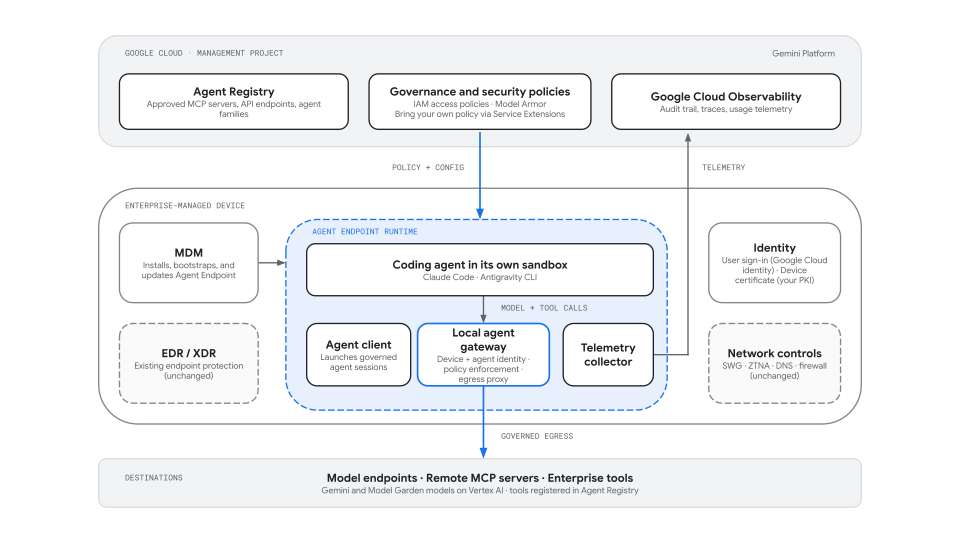
Agent Endpoint extends Gemini Platform governance to AI agents that run on the managed devices of your employees. It lets you define access, safety, identity, and observability policies one time in Google Cloud and enforce these policies consistently for local coding agents such as Claude Code and Antigravity CLI. This process uses the same control plane you use for agents running in the cloud.
Local coding agents and productivity assistants can read and write the local file system, execute commands, and call enterprise and external tools such as GitHub, Jira, and Slack. Because these agents run as the signed-in user, they inherit the user's privileges, local credentials, and access to proprietary data. These agents typically operate outside your existing security and audit frameworks, so security and platform teams have little visibility into which models and tools an agent calls, with which identity, and what data leaves the device.
Agent Endpoint closes this gap without requiring you to replace your endpoint security, network security, or mobile device management (MDM) stack, and without building a separate governance model for each agent vendor.
Overview
The following figure shows how Agent Endpoint connects the Agent Runtime on Gemini Enterprise Agent Platform control plane in Google Cloud to the agent runtime on a managed device.
Identity model
Agent Endpoint derives identity from systems you already operate rather than introducing new secrets on the device. When an administrator configures an agent's sandbox settings, they approve agents for the fleet as agent families, which are approved agent types such as Claude Code or Antigravity CLI.
Device identity: The corporate X.509 client certificate that your MDM or enterprise PKI already provisions into the device's OS keystore or TPM. You must first register your enterprise CA as a trust anchor in a Workload Identity Pool. When the Agent Endpoint runtime starts, it presents the certificate to Google Cloud over mTLS to obtain short-lived credentials. Agent Endpoint doesn't issue or push new device certificates.
Developer identity: The developer's sign-in when an agent is first launched. The developer must sign in to their Google Cloud account on the device, and the developer's identity is verified through the same authentication methods as the device.
Agent identity: The developer's identity, with the addition of the approved agent family. The agent identity is established after the developer's sign-in has been verified.
You can apply Identity and Access Management (IAM) access policies to all agent instances in your management scope or to specific agent identities. Because credentials are obtained on the device from the device identity, no service account keys or other static Google Cloud credentials need to be stored where an agent can read them.
Related governance controls
| Governance layer | Policy or mechanism | Purpose |
|---|---|---|
| Access control | IAM access policies | Controls which agent identities are authorized to connect to specific MCP servers, tools, and registered API endpoints, including agents running on devices. |
| Content safety | Model Armor | Scans prompts, responses, and tool calls from local agents for prompt injection, jailbreaks, and sensitive data. |
| Execution isolation | The coding agent's own sandbox (Claude Code, Antigravity CLI), configured by Agent Endpoint | Claude Code and Antigravity CLI each ship with their own sandbox, which uses operating-system isolation primitives (macOS Seatbelt, Linux bubblewrap or namespaces) to confine file system, process, and local network access. In Preview, Agent Endpoint enables centralized administration of those sandbox settings for each agent family, with enforcement performed natively by the agent's own sandbox (for example, the sandbox contained within Claude Code or Antigravity CLI), complementing the operating-system and application-level controls you already run. A Google-managed sandbox packaged with Agent Endpoint, isolating the entire agent process, is planned. |
| Tool and endpoint catalog | Agent Registry | Defines the approved MCP servers, API endpoints, and agent families that local agents can use. |
| Device management | Your MDM | Installs, bootstraps, updates, and keeps the Agent Endpoint runtime present on managed devices. |
| Endpoint and network security | Your EDR/XDR, secure web gateway, and zero-trust network access | Continue to protect the device and network independently of Agent Endpoint. |
Supported platforms, agents, and policies
While in Preview, Agent Endpoint supports the following platforms, agents, and governance controls.
| Component | Supported options |
|---|---|
| Operating systems | - macOS - Linux |
| Local agents | - Claude Code - Antigravity CLI |
| Sandboxing | - The coding agent's own sandbox (for example, Claude Code's sandbox, which uses macOS Seatbelt or Linux bubblewrap). Agent Endpoint doesn't ship a sandbox of its own in Preview; it centrally configures and enforces the agent's sandbox settings |
| Device deployment | - Enterprise MDM distribution of the Agent Endpoint runtime and bootstrap configuration - Device certificates from your existing MDM or enterprise PKI |
| Identity | - User sign-in with a Google Workspace or Cloud Identity account - Device identity from the corporate X.509 certificate in the device's OS keystore or TPM, trusted through X.509 Workload Identity Federation - Agent identity (SPIFFE ID) per approved agent family on each device, issued from a Google-managed agent identity pool |
| Governed traffic | - Model traffic to Gemini models on Vertex AI and to external model providers, inspected by Model Armor - Remote MCP servers (Streamable HTTP) and API endpoints registered in Agent Registry |
| Policies | - IAM access policies on MCP servers, tools, and registered API endpoints - Model Armor on prompts, responses, and tool calls |
| Observability | - Agent activity traces and usage telemetry exported to Google Cloud Observability |
Request enforcement flow
When a governed agent calls a model or remote MCP tool, Agent Endpoint processes the request in the following phases:
Agent start (device):
- The developer launches an agent through the Agent Endpoint client.
- The client signs the developer in, or reuses the developer's stored sign-in, and uses it to verify with Agent Registry that the developer is permitted to run the requested agent family and to register the developer's agent under that family.
- On the first launch of that agent family, the client authenticates the device with its corporate certificate and obtains the agent identity for the family: a certificate and SPIFFE ID that are reused on later launches.
- The client starts the agent in the agent's own sandbox, applying the sandbox settings defined for its agent family and the file system access rules (read-only, read-write, and denied paths) that your IT administrators distribute to the device, with its network egress configured to use the local agent gateway.
Request path (device and Google Cloud):
- The agent sends a model or tool request. The local agent gateway attaches the agent identity to the request; the agent itself never handles the credential.
- For remote MCP calls, the gateway resolves the target against the Agent Registry catalog, so only registered servers and tools are reachable.
- The request is evaluated against the IAM access policies attached to the management project, scoped to the agent family or to all agents in the project, and against your Model Armor templates. For Google Cloud destinations, the target service also checks the IAM roles granted to the agent identity. Requests that are denied by policy or flagged by Model Armor are blocked before they reach the destination.
Response path and telemetry:
- Model responses and tool results are inspected by Model Armor according to your templates and returned to the agent.
- The local telemetry collector exports traces and usage attributes for the interaction, including the agent identity, agent family, device, and user, to Google Cloud Observability.
Deployment lifecycle
Agent Endpoint separates administrator setup from the developer's day-to-day usage:
- Before deployment:
- Create the management project.
- Register your enterprise CA with a Workload Identity Pool so managed devices can authenticate with their existing certificates.
- Register approved MCP servers and API endpoints in Agent Registry.
- Define agent families.
- Attach IAM access policies and Model Armor templates.
- Device deployment:
- Distribute the Agent Endpoint runtime and a bootstrap configuration to managed devices through your MDM.
- Use existing MDM and OS controls to make Agent Endpoint the approved launch path for governed agents.
- After deployment:
- Developers launch the agent.
- The agent runs in its own sandbox with settings provided by Agent Endpoint.
- The agent's model and remote tool traffic is routed through the local agent gateway. Developers don't choose a sandbox or a policy.