

必要條件
設定閘道前,請先取得適當的 Identity and Access Management (IAM) 權限,確保專案具備適當的網路政策,並啟用輸出。
詳情請參閱「開始使用 Cloud NAT 的事前準備」。
Cloud NAT 閘道會使用外部 leaf 子網路做為輸入內容。如要進一步瞭解如何為 Cloud NAT 設定外部子網路,請參閱「為 Cloud NAT 建立外部子網路」。
建立及管理具有連線逾時的 Cloud NAT 閘道
本文說明如何建立及管理具有連線逾時的 Cloud NAT 閘道。這個用途會建立類似第一個情境的設定,但會為透過 Cloud NAT 閘道建立的連線指定逾時。
下圖顯示具有多個輸出 IP 的閘道設定範例:
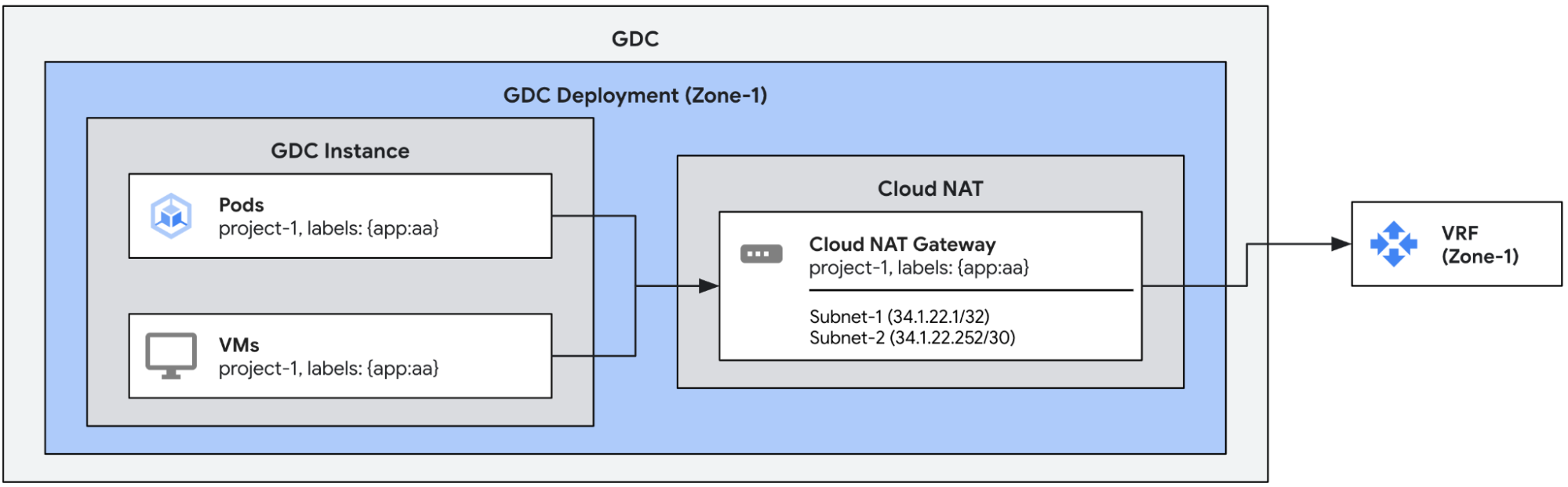
根據預設,透過 Cloud NAT 閘道建立的輸出連線具有下列逾時。如有需要,您可以手動設定。
| 逾時 | 預設 (秒) |
| 非 TCP 連線 | 60 |
| 閒置 TCP 連線 | 8000 |
| TCP 連線拆除 | 10 |
| 建立 TCP 連線 | 60 |
建立具有逾時的 Cloud NAT 閘道
這個範例定義了具有連線逾時的單一 Cloud NAT 閘道。如先前範例所示,這項設定會將 subnet-1 和 subnet-2 的輸出 IP 指派給含有 app:aa 標籤的端點輸出流量。此外,這項設定會以自訂值覆寫預設逾時。
apiVersion: networking.gdc.goog/v1
kind: CloudNATGateway
metadata:
  namespace: project-1
  name: gateway-1
spec:
  workloadSelector:   # Immutable
    labelSelector:
      workloads:
        matchLabels:
          app: aa
  subnetRefs:          # Mutable
  - subnet-1
  - subnet-2
  connectionOptions:   # Mutable
    nonTCPTimeoutSeconds: 10            # All non-TCP connections. 60 by default
    tcpTimeoutSeconds: 900              # Established TCP connections. 8000 by default
    tcpTeardownTimeoutSeconds: 10       # TCP connection teardown. 10 by default
    tcpEstablishmentTimeoutSeconds: 10  # TCP connection establishment. 60 by default
您可以使用下列 kubectl 指令檢查閘道狀態。
export MGMT_KUBECONFIG=<path_to_management_kubeconfig>
kubectl get cloudnatgateways gateway-1 -n project-1 --kubeconfig "${MGMT_KUBECONFIG:?}"
如果設定正確,Cloud NAT 閘道的狀態條件欄位會顯示類型為 Ready 的條件設為 true,且子網路標示為 OK,如下列範例輸出內容所示。
apiVersion: networking.gdc.goog/v1
kind: CloudNATGateway
metadata:
  namespace: project-1
  name: gateway-1
spec:
  workloadSelector:   # Immutable
    labelSelector:
      workloads:
        matchLabels:
          app: aa
  subnetRefs:         # Mutable
  - subnet-1
  - subnet-2
  connectionOptions:   # Mutable
    nonTCPTimeoutSeconds: 10
    tcpTimeoutSeconds: 900
    tcpTeardownTimeoutSeconds: 10
    tcpEstablishmentTimeoutSeconds: 10
status:
  conditions:
  - lastTransitionTime: "2025-08-20T21:31:36Z"
    message: ""
    observedGeneration: 1
    reason: Ready
    status: "True"
    type: Ready
  - lastTransitionTime: "2025-08-20T21:31:36Z"
    message: ""
    observedGeneration: 1
    reason: Ready
    status: "True"
    type: SubnetsReady
  - lastTransitionTime: "2025-08-20T21:31:36Z"
    message: ""
    observedGeneration: 1
    reason: Ready
    status: "True"
    type: PerimeterConfigurationReady
  - lastTransitionTime: "2025-08-20T21:31:36Z"
    message: ""
    observedGeneration: 1
    reason: Ready
    status: "True"
    type: EgressRoutesReady
  subnets:
  - name: subnet-1
    status: OK
  - name: subnet-2
    status: OK
如要確認新設定是否生效,請檢查閘道的狀態。