

Google Distributed Cloud (GDC) air-gapped supports standard clusters, a single-project, self-service Kubernetes cluster managed by the application operator group that offers greater flexibility for custom workloads. This page covers how to set up Cloud NAT for standard clusters, and describes some constraints and limitations on NAT configurations for this cluster type.
Before you begin
Before setting up a gateway, you must get appropriate Identity and Access Management (IAM) permissions ensure that your project has an appropriate network policy, and enable egress.
See Before you begin with Cloud NAT for details.
The Cloud NAT gateway uses external leaf subnets as inputs. For more
information about configuring external subnets for Cloud NAT, see
Create external subnets for Cloud NAT.
Overview
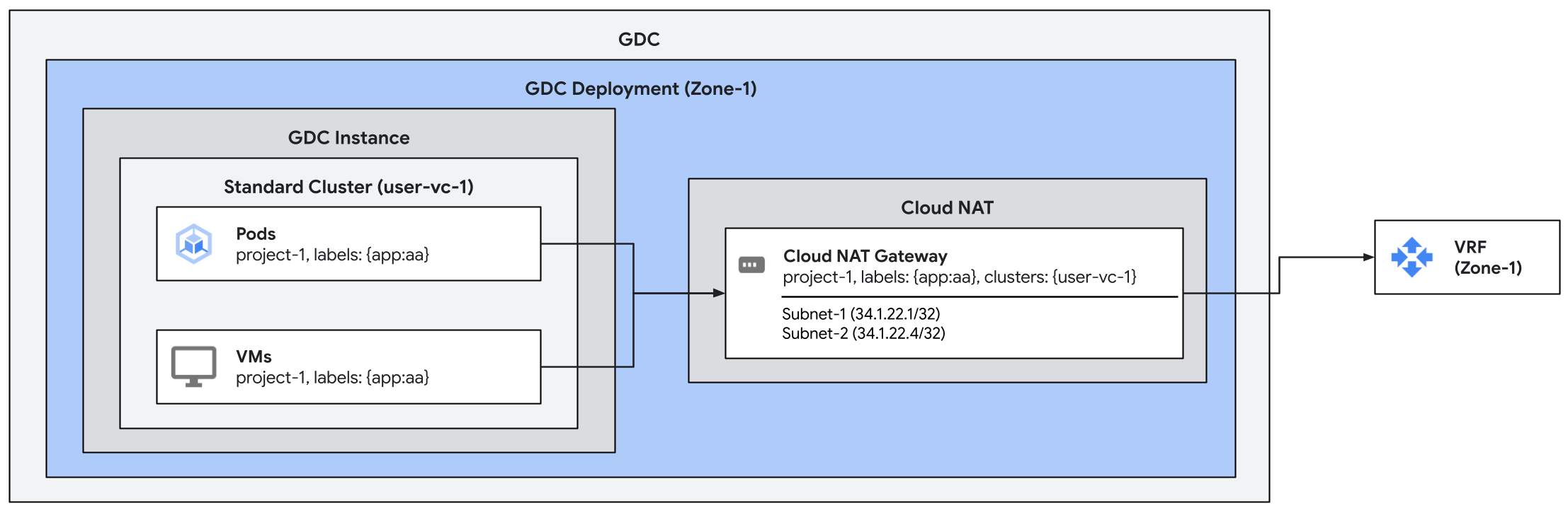
Cloud NAT gateways can be configured to handle egress traffic for the workloads running on standard clusters in two ways:
- Project-scoped gateway: A gateway that applies to all workload traffic on clusters within a project, which includes all shared and standard clusters. This is the configuration described in Create a Cloud NAT gateway.
- Cluster-scoped gateway: A gateway that applies only to workloads within a single, specified standard cluster. This is the gateway type demonstrated on this page.
These two methods are exclusively for workloads, and don't
apply to the nodes that make up a standard cluster. To enable
Cloud NAT for the
nodes that form a standard cluster, add the label
cluster.gdc.goog/enable-node-egress-to-outside-the-org: "true" to the
standard cluster object.
Create the Cloud NAT gateway
The process of creating a gateway for a standard cluster remains the same as the creation of any project-scoped Cloud NAT gateway.
In this case, we focus on the cluster-filtering capability for standard
cluster Cloud NAT and create a setup similar to the first scenario, but
specifying the name of the standard cluster user-vc-1 where the endpoints that
will route traffic through the gateway are located. As a result, this gateway
will be scoped to this specific cluster.
apiVersion: networking.gdc.goog/v1
kind: CloudNATGateway
metadata:
  namespace: project-1
  name: gateway-1
spec:
  workloadSelector:    # Immutable
    labelSelector:
      workloads:
        matchLabels:
          app: aa
      clusters:
        matchLabels:
          kubernetes.io/metadata.name: user-vc-1
  subnetRefs:           # Mutable
  - subnet-1
  - subnet-2
This configuration will select all the workloads with the labels app: aa
across all namespaces in the standard cluster user-vc-1.
Check the status of the gateway
Check the status of the gateways by running the following kubectl command.
export MGMT_KUBECONFIG=<path_to_management_kubeconfig>
kubectl get cloudnatgateways gateway-1 -n project-1 --kubeconfig "${MGMT_KUBECONFIG:?}"
If configured correctly, the Cloud NAT gateway's
status condition field should show the condition of the type Ready set to
true and the subnets marked as OK, as shown in the following sample output:
apiVersion: networking.gdc.goog/v1
kind: CloudNATGateway
metadata:
  namespace: project-1
  name: gateway-1
spec:
  workloadSelector:       # Immutable
    labelSelector:
      workloads:
        matchLabels:
          app: aa
      clusters:
        matchLabels:
          kubernetes.io/metadata.name: user-vc-1
  subnetRefs:       # Mutable
  - subnet-1
  - subnet-2
status:
  conditions:
  - lastTransitionTime: "2025-08-20T21:31:36Z"
    message: ""
    observedGeneration: 1
    reason: Ready
    status: "True"
    type: Ready
  - lastTransitionTime: "2025-08-20T21:31:36Z"
    message: ""
    observedGeneration: 1
    reason: Ready
    status: "True"
    type: SubnetsReady
  - lastTransitionTime: "2025-08-20T21:31:36Z"
    message: ""
    observedGeneration: 1
    reason: Ready
    status: "True"
    type: PerimeterConfigurationReady
  - lastTransitionTime: "2025-08-20T21:31:36Z"
    message: ""
    observedGeneration: 1
    reason: Ready
    status: "True"
    type: EgressRoutesReady
  subnets:
  - name: subnet-1
    status: OK
  - name: subnet-2
    status: OK
Test traffic
Test traffic by issuing a curl command from one of the pods or VMs assigned to
the gateway in the standard cluster towards an external endpoint. The receiving
endpoint should see a packet from one of the egress IPs associated with the
gateway. Endpoints in shared clusters with the same labels CANNOT egress
traffic using this gateway.
Constraints on cluster-specific gateway configurations
Workloads label matchers
(workloadSelector.labelSelector.workloads.matchLabels) from cluster-scoped
gateways MUST NOT OVERLAP with the workload label matchers from other
project-scoped gateways. As discussed in Constraints on Cloud NAT
configuration, the
workloadSelector.labelSelector.workloads.matchLabels must not overlap between
gateways in the same project and zone.
The other constraints listed in Constraints on Cloud NAT configuration also apply to cluster-scoped gateway configurations.