

This document explains the operating model for tags in a Google Distributed Cloud (GDC) air-gapped universe. Tags are a powerful tool for organizing projects based on business attributes. For the Preview feature release, tags are managed zonally, and don't propagate across multiple zones. Projects are the only resource in the GDC resource hierarchy that supports tags as part of the Preview release.
This document is for IT administrators within the platform administrator group, who are responsible for organizing and managing projects in a GDC universe. For more information, see Audiences for GDC air-gapped documentation.
About tags
Tags let customers add attributes to projects based on the configuration of key-value pairs. In GDC air-gapped, tags are applied to a project within a single zone and act as a grouping mechanism to organize projects within that zone. For more information, see the Tag attachment to resources section of this document.
Tags are designed to represent various business attributes, such as cost centers, departments, workload types, or security levels.
For example, you could create a tag key named Env that represents the
environment attribute you apply to all projects. Then you could apply the tag
value dev to group all non-production projects together for a development
boundary, and apply the tag value prod to all projects hosting production
workloads to distinguish the business boundary for customer-facing resources.
The following diagram illustrates two projects with three tag keys ENV, BU,
and CC with assigned tag values for each key.
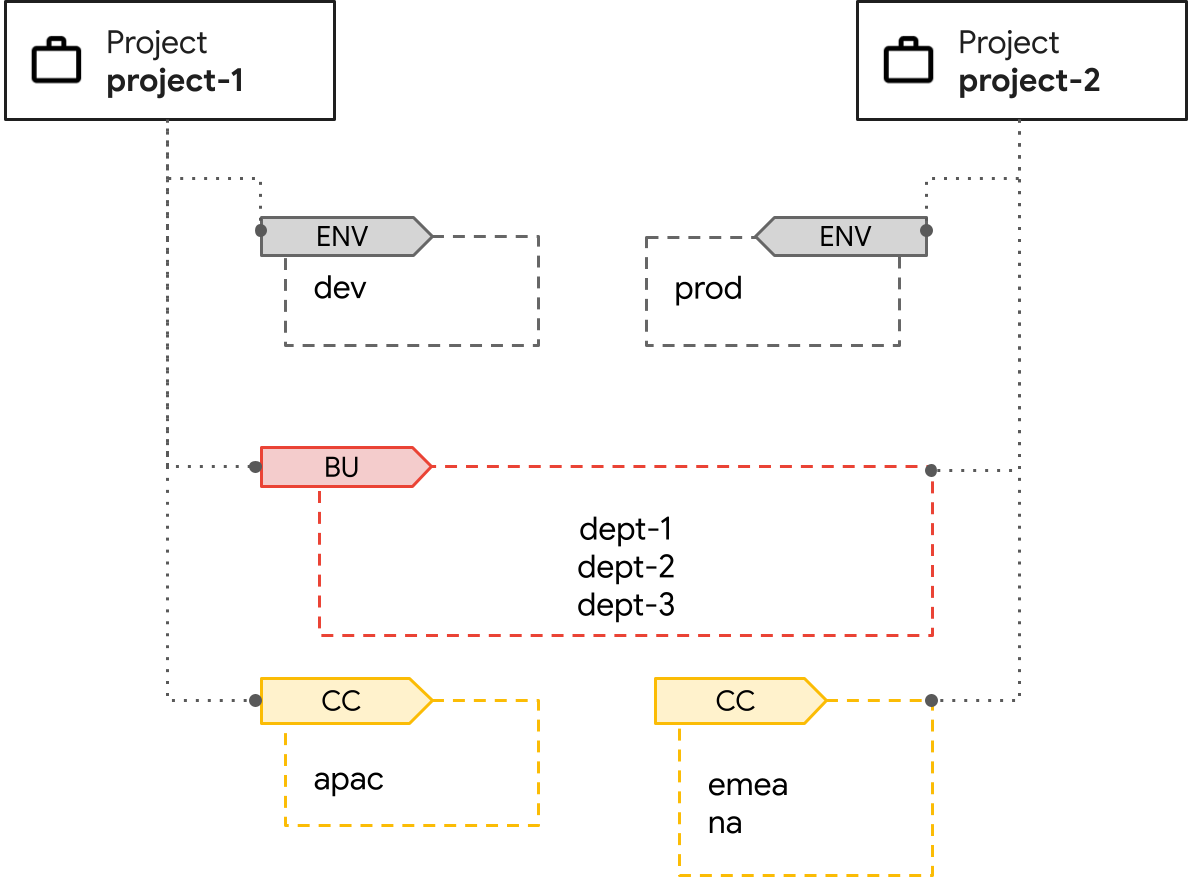
In the diagram, there are two projects designated separately for development and production
environments that share assigned business units dept-1, dept-2, and
dept-3. There's a cost center tag to separate the ownership of expenses across the
apac, emea, and na regions that manage the projects.
Tag keys and values have different permissions that provide refined access control for your project. For more information, see the Tag usage and permissions section of this document.
Tag attachment to resources
Tags can be attached to multiple projects. This grouping lets you create a
logical organization that is independent of the project structure itself. For
example, you could have resources in both a webapp-backend project and a
devops project that are part of the same business unit and environment.
Because tags are a zonal resource only, to propagate your tags across all instances of your project, you must manually create and apply tags in every zone in which your project resides.
Tag usage and permissions
To ensure proper ownership, GDC provides fine-grained control over the use of tags with permissions. Tag management is controlled through specific Identity and Access Management (IAM) roles. Each tag key and tag value requires specific role bindings for users to access and manage them.
You must be aware of the namespaces that your tag key and tag values reside within, which are system-generated during creation. Identifying and applying the namespaces when creating tag permissions is required.
The following table provides a reference for the tag IAM roles, the permissions that each tag role provides, and the namespaces to which the tag roles must be applied to take effect:
| Role name | Permissions | Namespaces |
|---|---|---|
tag-admin |
|
Required namespaces:
|
tag-KEY_NAME-admin |
|
Required namespaces:
|
tagvalue-editor for the specific tag key |
|
Required namespaces:
|
tagkey-user for the specific tag key |
|
Required namespaces:
|
tagvalue-VALUE_NAME-admin for the specific tag value |
|
Required namespaces:
|
tagvalue-user for the specific tag value |
|
Required namespaces:
|
Administrators can restrict who is allowed to create, update, and attach tag key-value pairs to projects. For more information, see Apply permissions to your tag key-value pair.
Limitations
The following limitations apply to tags as part of the Preview release:
- API support only: tag operations are only supported using the KRM API. The GDC console and gdcloud CLI don't support tag operations.
- Tags only apply to projects: support for other resource types, such as virtual machines, standard clusters, or buckets within a project, and direct binding to organizations, are not available.
- No inheritance or propagation: project tags don't propagate to existing sub-project resources, such as virtual machines. Policy inheritance using tags is not supported.
- Tags cannot enforce policies: you cannot set environment constraints and apply them to projects using tags.
- Tag name maximum length: both tag key and tag value names have a maximum length of 25 characters.
- Zonal support only: both tag keys and tag values are zonal, and only apply to a project within a single zone.
- Tags applied in Preview release won't be preserved: tags in the Preview release are meant for testing only, and won't be preserved when upgrading to future minor releases of GDC air-gapped.