

Overview
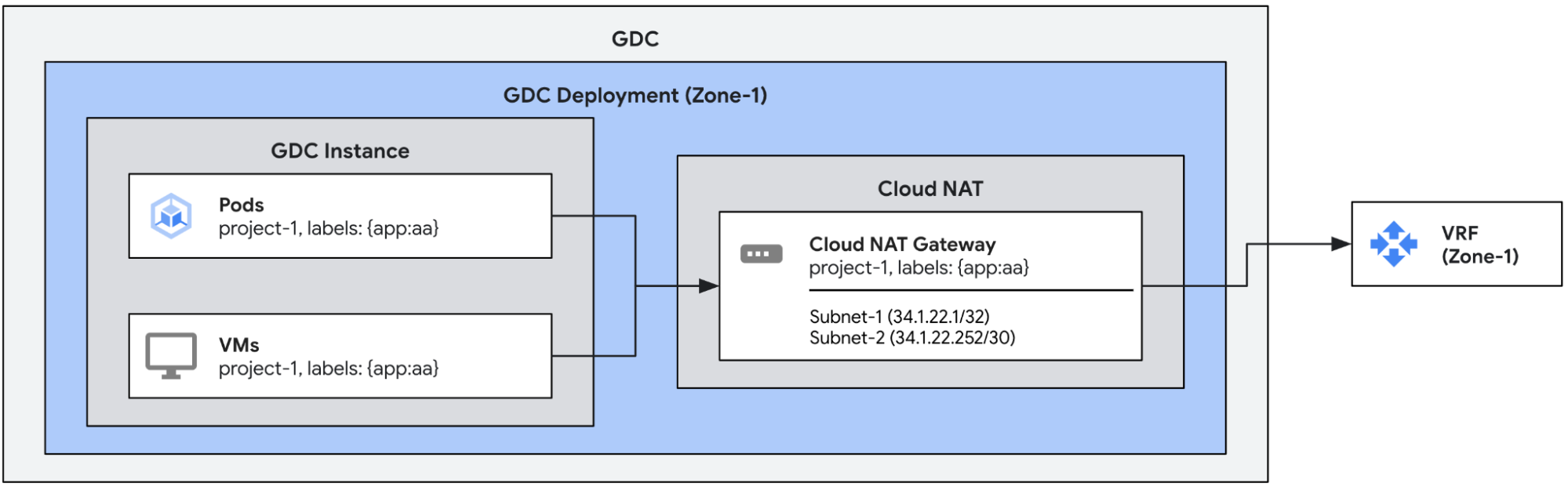
In this use case we will create a Cloud NAT gateway with multiple egress IPs assigned. These gateways will egress traffic from the pods and VMs that match the matching labels configured in the gateway. The gateway will automatically assign an egress IP to each endpoint that can egress traffic through it.
Prerequisites
Before setting up a gateway, you must get appropriate Identity and Access Management (IAM) permissions ensure that your project has an appropriate network policy, and enable egress.
See Before you begin with Cloud NAT for details.
The Cloud NAT gateway uses external leaf subnets as inputs. For more
information about configuring external subnets for Cloud NAT, see
Create external subnets for Cloud NAT.
Ensure a compatible pod or VM configuration
As mentioned in the NAT Overview, Cloud NAT is not compatible
with the default project egress configuration. Ensure that any pod or VM
that you want to use with Cloud NAT does NOT have the label
egress.networking.gke.io/enabled:true.
By default, a Virtual Machine External Access (VMEA) configures a VM to egress
traffic using the default project egress configuration. In other words it
automatically adds the label egress.networking.gke.io/enabled:"true" to the
VM. If said VM is configured to egress traffic using a Cloud NAT gateway
as well, this results in a collision between NAT configurations. To avoid this
collision: for every VMEA associated with a VM that is configured to egress
traffic through a Cloud NAT gateway, ensure that the VMEA associated
with that VM has the annotation egress.networking.gke.io/use-cloud-nat:"true".
The associated VM will then egress traffic exclusively through the
Cloud NAT gateway.
Create the Cloud NAT gateways
The following example defines a Cloud NAT gateway with two external leaf subnets
(subnet-1 and subnet-2). The gateway will use all the IPs in those subnets,
one from subnet-1 and four from the subnet-2, and automatically assign them to
the endpoints from each VM or pod with the specified labels. Multiple pods or VMs
can get the same egress IP assigned.
apiVersion: networking.gdc.goog/v1
kind: CloudNATGateway
metadata:
  namespace: project-1
  name: gateway-1
spec:
  workloadSelector:  # Immutable
    labelSelector:
      workloads:
        matchLabels:
          app: aa
  subnetRefs:        # Mutable
  - subnet-1
  - subnet-2
Check the status of the gateways
Check the status of the gateways by running the following kubectl command.
export MGMT_KUBECONFIG=<path_to_management_kubeconfig>
kubectl get cloudnatgateways gateway-1 -n project-1 --kubeconfig "${MGMT_KUBECONFIG:?}"
If configured correctly, the Cloud NAT gateway's status condition field
should show the condition of the type Ready set to true and the subnets
marked as OK, as shown in the following example output.
apiVersion: networking.gdc.goog/v1
kind: CloudNATGateway
metadata:
  namespace: project-1
  name: gateway-1
spec:
  workloadSelector:
    labelSelector:
      workloads:
        matchLabels:
          app: aa
  subnetRefs:
  - subnet-1
  - subnet-2
status:
  conditions:
  - lastTransitionTime: "2025-08-20T21:31:36Z"
    message: ""
    observedGeneration: 1
    reason: Ready
    status: "True"
    type: Ready
  - lastTransitionTime: "2025-08-20T21:31:36Z"
    message: ""
    observedGeneration: 1
    reason: Ready
    status: "True"
    type: SubnetsReady
  - lastTransitionTime: "2025-08-20T21:31:36Z"
    message: ""
    observedGeneration: 1
    reason: Ready
    status: "True"
    type: PerimeterConfigurationReady
  - lastTransitionTime: "2025-08-20T21:31:36Z"
    message: ""
    observedGeneration: 1
    reason: Ready
    status: "True"
    type: EgressRoutesReady
  subnets:
  - name: subnet-1
    status: OK
  - name: subnet-2
    status: OK
The Cloud NAT gateway status contains 4 conditions of the following types:
Ready: This condition summarizes the status of the Cloud NAT gateway. This condition is set to true if the gateway is fully set up.SubnetsReady: This condition indicates whether the subnets assigned to the gateway are valid.PerimeterConfigurationReady: This condition indicates whether the perimeter configuration has already been configured (e.g. external IPs assigned to externally-facing nodes, etc).EgressRoutesReady: This condition indicates whether the routes to egress traffic from the source endpoints have been already configured.
Test Traffic
We can test the traffic by issuing a curl command from one of the pods or VMs
assigned to the gateway towards an external endpoint. The receiving endpoint
should see one of the egress IPs associated with the gateway.