

Prerequisites
Before setting up a gateway, you must get appropriate Identity and Access Management (IAM) permissions ensure that your project has an appropriate network policy, and enable egress.
See Before you begin with Cloud NAT for details.
The Cloud NAT gateway uses external leaf subnets as inputs. For more
information about configuring external subnets for Cloud NAT, see
Create external subnets for Cloud NAT.
Create and manage Cloud NAT gateways with connection timeouts
This document describes how to create and manage Cloud NAT gateways with connection timeouts. This use case creates a setup similar to the first scenario, but specifies timeouts for connections established through the Cloud NAT gateway.
The following diagram shows an example gateway setup with multiple egress IPs:
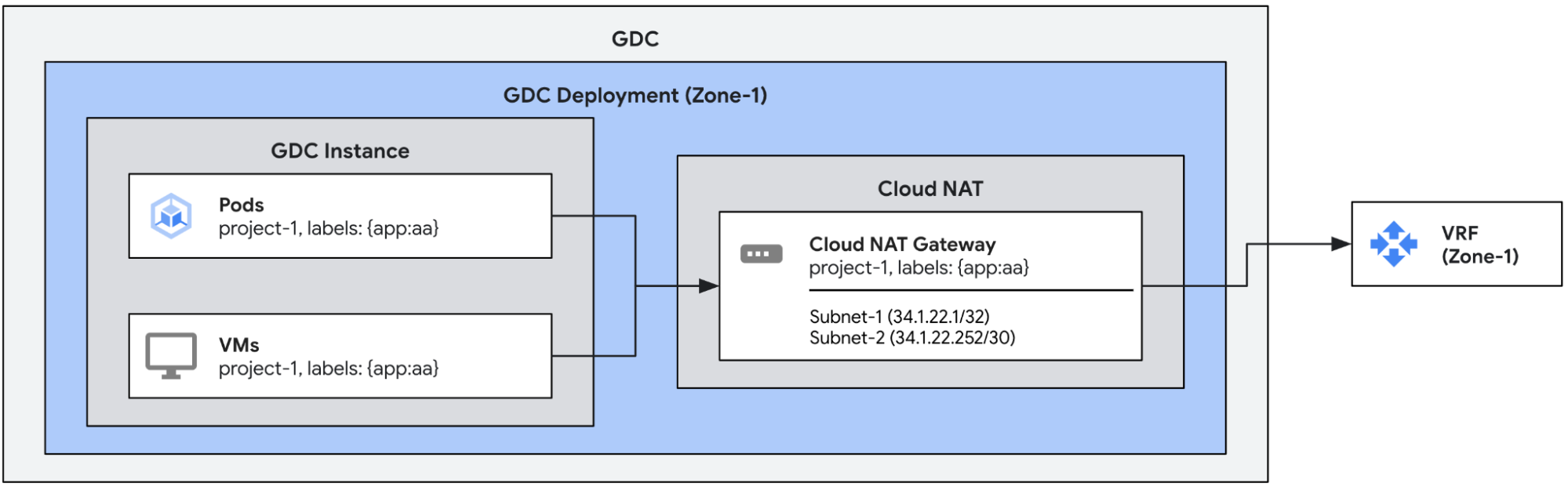
By default, egress connections created through a Cloud NAT gateway have the following timeouts. You can manually configure them if needed.
| Timeout | Default (seconds) |
| Non-TCP connections | 60 |
| Idle TCP connections | 8000 |
| TCP connections teardown | 10 |
| TCP connection establishment | 60 |
Create a Cloud NAT gateway with timeouts
This example defines a single Cloud NAT gateway with connection timeouts.
As in the earlier example, this configuration assigns the egress IPs from subnet-1
and subnet-2 to outgoing traffic from endpoints with the app:aa label.
Additionally, this configuration overrides the default timeouts with custom
values.
apiVersion: networking.gdc.goog/v1
kind: CloudNATGateway
metadata:
  namespace: project-1
  name: gateway-1
spec:
  workloadSelector:   # Immutable
    labelSelector:
      workloads:
        matchLabels:
          app: aa
  subnetRefs:          # Mutable
  - subnet-1
  - subnet-2
  connectionOptions:   # Mutable
    nonTCPTimeoutSeconds: 10            # All non-TCP connections. 60 by default
    tcpTimeoutSeconds: 900              # Established TCP connections. 8000 by default
    tcpTeardownTimeoutSeconds: 10       # TCP connection teardown. 10 by default
    tcpEstablishmentTimeoutSeconds: 10  # TCP connection establishment. 60 by default
The status of the gateways can be checked by using the following kubectl
command.
export MGMT_KUBECONFIG=<path_to_management_kubeconfig>
kubectl get cloudnatgateways gateway-1 -n project-1 --kubeconfig "${MGMT_KUBECONFIG:?}"
If configured correctly, the Cloud NAT gateway's status condition field
shows the condition of the type Ready set to true and the subnets marked as
OK, as shown in the following example output.
apiVersion: networking.gdc.goog/v1
kind: CloudNATGateway
metadata:
  namespace: project-1
  name: gateway-1
spec:
  workloadSelector:   # Immutable
    labelSelector:
      workloads:
        matchLabels:
          app: aa
  subnetRefs:         # Mutable
  - subnet-1
  - subnet-2
  connectionOptions:   # Mutable
    nonTCPTimeoutSeconds: 10
    tcpTimeoutSeconds: 900
    tcpTeardownTimeoutSeconds: 10
    tcpEstablishmentTimeoutSeconds: 10
status:
  conditions:
  - lastTransitionTime: "2025-08-20T21:31:36Z"
    message: ""
    observedGeneration: 1
    reason: Ready
    status: "True"
    type: Ready
  - lastTransitionTime: "2025-08-20T21:31:36Z"
    message: ""
    observedGeneration: 1
    reason: Ready
    status: "True"
    type: SubnetsReady
  - lastTransitionTime: "2025-08-20T21:31:36Z"
    message: ""
    observedGeneration: 1
    reason: Ready
    status: "True"
    type: PerimeterConfigurationReady
  - lastTransitionTime: "2025-08-20T21:31:36Z"
    message: ""
    observedGeneration: 1
    reason: Ready
    status: "True"
    type: EgressRoutesReady
  subnets:
  - name: subnet-1
    status: OK
  - name: subnet-2
    status: OK
To verify that the new configuration is in effect, you can Check the status of the gateways.