


אפשר לשלוח עבודה לאשכול קיים של Managed Service for Apache Spark באמצעות בקשת HTTP או בקשה פרוגרמטית של jobs.submit API, באמצעות כלי שורת הפקודה gcloud של Google Cloud CLI בחלון טרמינל מקומי או ב-Cloud Shell, או מGoogle Cloud המסוף שנפתח בדפדפן מקומי. אפשר גם להיכנס עם SSH למופע הראשי באשכול, ואז להריץ משימה ישירות מהמופע בלי להשתמש ב-Managed Service for Apache Spark.
מקבילות של משימות:
אפשר להגדיר את המספר המקסימלי של משימות מקבילות של Managed Service for Apache Spark
באמצעות מאפיין האשכול dataproc:dataproc.scheduler.max-concurrent-jobs כשיוצרים אשכול. אם לא מוגדר ערך למאפיין הזה, הגבול העליון של העבודות המקבילות מחושב כך:
max((masterMemoryMb - 3584) / masterMemoryMbPerJob, 5).
masterMemoryMb נקבע לפי סוג המכונה של ה-VM הראשי.
masterMemoryMbPerJob היא 1024 כברירת מחדל, אבל אפשר להגדיר אותה בזמן יצירת האשכול באמצעות מאפיין האשכול dataproc:dataproc.scheduler.driver-size-mb.
איך שולחים משרה
בידוד של Classpath וקובצי JAR מותאמים אישית: אל תעתיקו קובצי JAR מותאמים אישית או קובצי JAR של חבילות (כמו Apache Iceberg runtime או Google Cloud bundles) ישירות לספריות של מערכת האשכול, כמו /usr/lib/spark/jars/. הצבת קובצי JAR מותאמים אישית בספריות מערכת מזהמת את נתיב המחלקה של סוכן Managed Service for Apache Spark עם תלות טרנזיטיבית (כמו ספריות Guava או Hadoop) שמתנגשות עם הספריות המובנות של הסוכן. התנגשות כזו עלולה לגרום לשגיאות בפתרון בעיות בכיתה (כמו ClassNotFoundException או NoClassDefFoundError) כשמבצעים פעולות לניהול משימות כמו ביטול משימה, ולגרום לקריסת הסוכן ולהשארת אפליקציות YARN ללא בעלים.
במקום זאת, אפשר להשתמש באחת מהגישות הנתמכות הבאות:
- תלות ספציפית בעבודה: מציינים את הנתיב ב-Cloud Storage לקובצי ה-JAR כששולחים את העבודה באמצעות הדגל
--jarsב-Google Cloud CLI, בשדה Jar files במסוף Google Cloud או בשדהjarFileUrisב-API. Spark מפיץ את התלויות לדרייבר ולמבצעים של המשימה בלי לזהם את נתיב המחלקה של הסוכן. - תלויות ברמת האשכול: אפשר לציין תלויות במהלך יצירת האשכול באמצעות
spark:spark.jarsמאפיין האשכול: --properties="spark:spark.jars=gs://YOUR_BUCKET/jar-1.jar,gs://YOUR_BUCKET/jar-2.jar"
/etc/spark/conf/spark-defaults.conf, ומפיצה באופן אוטומטי את התלויות ל-Spark driver ול-executor classpaths לכל המשימות, תוך שמירה על בידוד נקי של הסוכן המקומי של הצומת Managed Service for Apache Spark.
המסוף
פותחים את הדף Managed Service for Apache Spark Submit a job בדפדפן במסוף Google Cloud .
דוגמה לעבודת Spark
כדי לשלוח עבודת Spark לדוגמה, ממלאים את השדות בדף Submit a job (שליחת עבודה) באופן הבא:
- בוחרים את שם האשכול מתוך רשימת האשכולות.
- מגדירים את סוג העבודה לערך
Spark. - מגדירים את Main class or jar (הכיתה או קובץ ה-JAR הראשיים) לערך
org.apache.spark.examples.SparkPi. - מגדירים את Arguments (ארגומנטים) לארגומנט היחיד
1000. - מוסיפים
file:///usr/lib/spark/examples/jars/spark-examples.jarאל Jar files (או אל שדה ה-APIjarFileUris):-
file:///מציין סכמה של Hadoop LocalFileSystem. Managed Service for Apache Spark installed/usr/lib/spark/examples/jars/spark-examples.jaron the cluster's master node when it created the cluster. הנתיב הזה משמש רק לדוגמאות שהותקנו מראש ומסופקות על ידי Managed Service for Apache Spark. אל תעתיקו קובצי JAR מותאמים אישית לספריות מערכת (ראו את האזהרה במאמר איך שולחים עבודה). - לחלופין, אפשר לציין נתיב של Cloud Storage (
gs://your-bucket/your-jarfile.jar) או נתיב של Hadoop Distributed File System (hdfs://path-to-jar.jar) לאחד מקובצי ה-JAR. (אם שולחים את העבודה באמצעות ה-API, מציינים את הנתיב הזה בשדהjarFileUris).
-
לוחצים על שליחה כדי להתחיל את העבודה. אחרי שהמשימה מתחילה, היא מתווספת לרשימת המשימות.
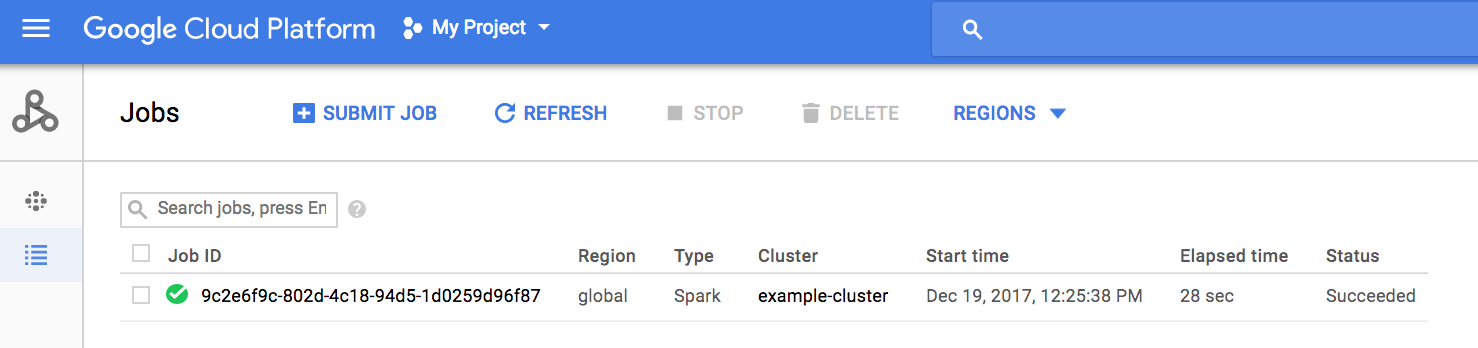
לוחצים על מזהה משימה כדי לפתוח את הדף Jobs (עבודות), שבו אפשר לראות את הפלט של מנהל ההתקן של המשימה. הפלט של העבודה הזו כולל שורות ארוכות שחורגות מהרוחב של חלון הדפדפן, ולכן אפשר לסמן את התיבה Line wrapping כדי להציג את כל טקסט הפלט בתוך התצוגה, וכך לראות את התוצאה המחושבת של pi.
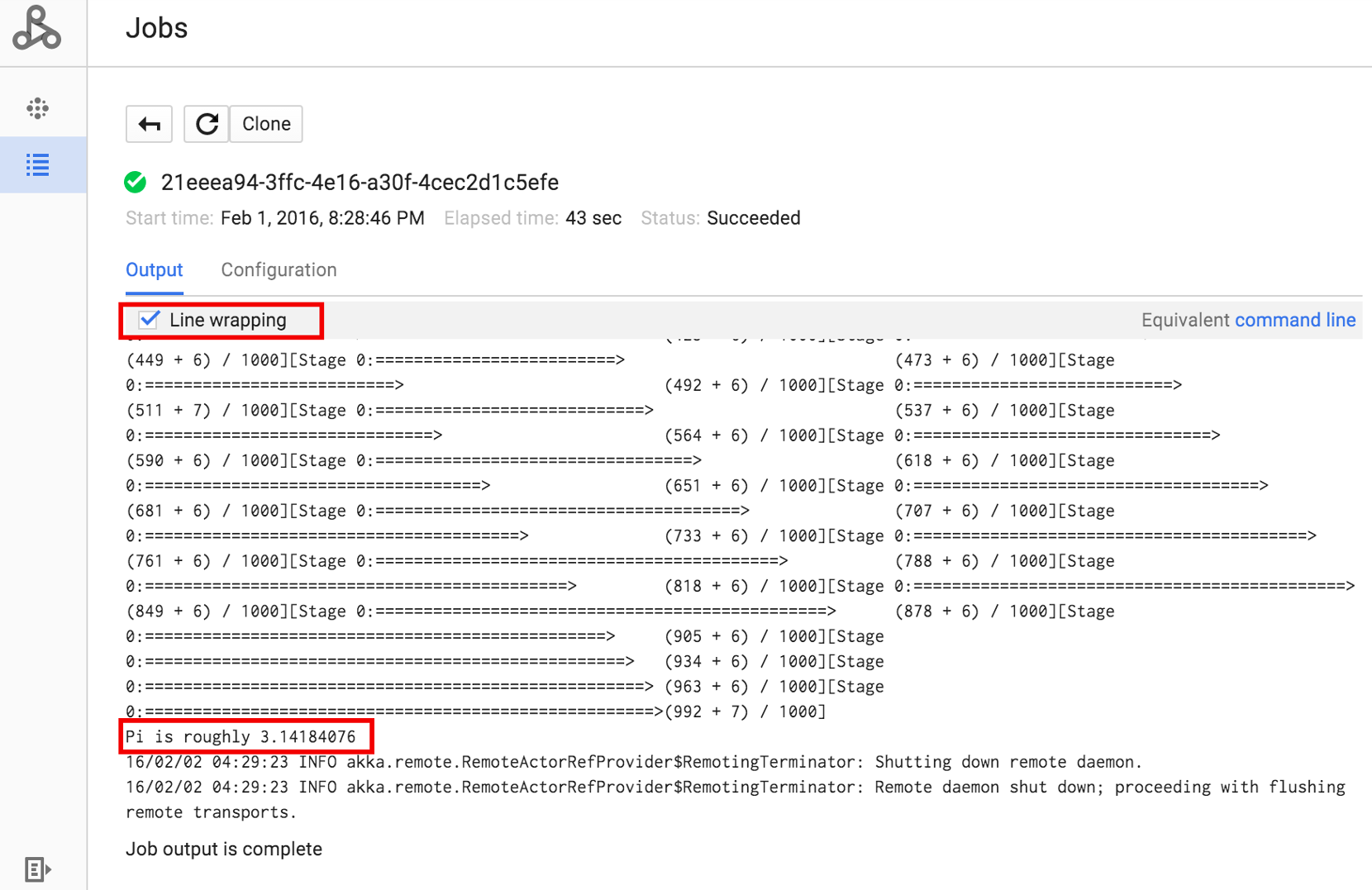
אפשר להציג את הפלט של מנהל התהליכים של העבודה משורת הפקודה באמצעות הפקודה gcloud dataproc jobs wait שמוצגת בהמשך (מידע נוסף זמין במאמר בנושא הצגת פלט של עבודה – פקודת GCLOUD).
מעתיקים ומדביקים את מזהה הפרויקט כערך של הדגל --project ואת מזהה המשרה (שמופיע ברשימת המשרות) כארגומנט האחרון.
gcloud dataproc jobs wait job-id \
    --project=project-id \
    --region=region
קטעי קוד מהפלט של מנהל ההתקן עבור עבודת הדגימה SparkPi:
...
2015-06-25 23:27:23,810 INFO [dag-scheduler-event-loop]
scheduler.DAGScheduler (Logging.scala:logInfo(59)) - Stage 0 (reduce at
SparkPi.scala:35) finished in 21.169 s

2015-06-25 23:27:23,810 INFO [task-result-getter-3] cluster.YarnScheduler
(Logging.scala:logInfo(59)) - Removed TaskSet 0.0, whose tasks have all
completed, from pool

2015-06-25 23:27:23,819 INFO [main] scheduler.DAGScheduler
(Logging.scala:logInfo(59)) - Job 0 finished: reduce at SparkPi.scala:35,
took 21.674931 s

Pi is roughly 3.14189648
...
Job [c556b47a-4b46-4a94-9ba2-2dcee31167b2] finished successfully.

driverOutputUri:
gs://sample-staging-bucket/google-cloud-dataproc-metainfo/cfeaa033-749e-48b9-...
...
gcloud
כדי לשלוח משימה לאשכול של Managed Service for Apache Spark, מריצים את הפקודה gcloud dataproc jobs submit של ה-CLI של gcloud באופן מקומי בחלון טרמינל או ב-Cloud Shell.
gcloud dataproc jobs submit job-command \
    --cluster=cluster-name \
    --region=region \
    other dataproc-flags \
    -- job-args
- הצגת רשימה של
hello-world.pyשנגישים באופן ציבורי וממוקמים ב-Cloud Storage.gcloud storage cat gs://dataproc-examples/pyspark/hello-world/hello-world.py
#!/usr/bin/python
import pyspark
sc = pyspark.SparkContext()
rdd = sc.parallelize(['Hello,', 'world!'])
words = sorted(rdd.collect())
print(words)
- שולחים את משימת PySpark אל Managed Service for Apache Spark.
gcloud dataproc jobs submit pyspark \
    gs://dataproc-examples/pyspark/hello-world/hello-world.py \
    --cluster=cluster-name  \
    --region=region
Waiting for job output...
…
['Hello,', 'world!']
Job finished successfully.
- מריצים את הדוגמה SparkPi שהותקנה מראש בצומת הראשי של אשכול Managed Service for Apache Spark. (הנתיב
file:///usr/lib/spark/examples/jars/spark-examples.jarמיועד לדוגמאות שהותקנו מראש בלבד. לגבי תלות ב-JAR מותאם אישית, אפשר לעיין באזהרה שבמאמר איך שולחים עבודה).gcloud dataproc jobs submit spark \ --cluster=cluster-name \ --region=region \ --class=org.apache.spark.examples.SparkPi \ --jars=file:///usr/lib/spark/examples/jars/spark-examples.jar \ -- 1000
Job [54825071-ae28-4c5b-85a5-58fae6a597d6] submitted.
Waiting for job output…
…
Pi is roughly 3.14177148
…
Job finished successfully.
…
REST
בקטע הזה מוסבר איך לשלוח משימת Spark כדי לחשב את הערך המשוער של pi באמצעות Managed Service for Apache Spark jobs.submit API.
לפני שמשתמשים בנתוני הבקשה, צריך להחליף את הנתונים הבאים:
- project-id: Google Cloud מזהה הפרויקט
- region: cluster region
- clusterName: שם האשכול
ה-method של ה-HTTP וכתובת ה-URL:
POST https://dataproc.googleapis.com/v1/projects/project-id/regions/region/jobs:submit
תוכן בקשת JSON:
{
  "job": {
    "placement": {
      "clusterName": "cluster-name"
    },
    "sparkJob": {
      "args": [
        "1000"
      ],
      "mainClass": "org.apache.spark.examples.SparkPi",
      "jarFileUris": [
        "file:///usr/lib/spark/examples/jars/spark-examples.jar"
      ]
    }
  }
}
כדי לשלוח את הבקשה צריך להרחיב אחת מהאפשרויות הבאות:
אתם אמורים לקבל תגובת JSON שדומה לזו:
{
  "reference": {
    "projectId": "project-id",
    "jobId": "job-id"
  },
  "placement": {
    "clusterName": "cluster-name",
    "clusterUuid": "cluster-Uuid"
  },
  "sparkJob": {
    "mainClass": "org.apache.spark.examples.SparkPi",
    "args": [
      "1000"
    ],
    "jarFileUris": [
      "file:///usr/lib/spark/examples/jars/spark-examples.jar"
    ]
  },
  "status": {
    "state": "PENDING",
    "stateStartTime": "2020-10-07T20:16:21.759Z"
  },
  "jobUuid": "job-Uuid"
}
Java
- התקנה של ספריית הלקוח
- הגדרת Application Default Credentials
- מריצים את הקוד.
Python
- התקנה של ספריית הלקוח
- הגדרת Application Default Credentials
- מריצים את הקוד .
Go
- התקנה של ספריית הלקוח
- הגדרת Application Default Credentials
- מריצים את הקוד .
Node.js
- התקנה של ספריית הלקוח
- הגדרת Application Default Credentials
- מריצים את הקוד .
שליחת משימה ישירות באשכול
אם רוצים להריץ משימה ישירות באשכול בלי להשתמש ב-Managed Service for Apache Spark, צריך להתחבר באמצעות SSH לצומת הראשי של האשכול, ואז להריץ את המשימה בצומת הראשי.
אחרי שיוצרים חיבור SSH למכונת ה-VM הראשית, מריצים פקודות בחלון טרמינל בצומת הראשי של האשכול כדי:
- פותחים מעטפת Spark.
- מריצים משימת Spark כדי לספור את מספר השורות בקובץ Python (בן שבע שורות) מסוג hello-world שנמצא בקובץ Cloud Storage שנגיש לכולם.
יוצאים מהמעטפת.
user@cluster-name-m:~$ spark-shell
...
scala> sc.textFile("gs://dataproc-examples"
+ "/pyspark/hello-world/hello-world.py").count
...
res0: Long = 7
scala> :quit
הרצת משימות bash ב-Managed Service for Apache Spark
יכול להיות שתרצו להריץ סקריפט bash כעבודה של Managed Service for Apache Spark, או כי המנועים שבהם אתם משתמשים לא נתמכים כסוג עבודה ברמה העליונה של Managed Service for Apache Spark, או כי אתם צריכים לבצע הגדרה נוספת או חישוב של ארגומנטים לפני הפעלת עבודה באמצעות hadoop או spark-submit מהסקריפט.
דוגמה ל-Pig
נניח שהעתקתם סקריפט bash בשם hello.sh ל-Cloud Storage:
gcloud storage cp hello.sh gs://${BUCKET}/hello.shמכיוון שהפקודה pig fs משתמשת בנתיבי Hadoop, צריך להעתיק את הסקריפט מ-Cloud Storage ליעד שצוין כ-file:/// כדי לוודא שהוא נמצא במערכת הקבצים המקומית ולא ב-HDFS. הפקודות הבאות shמתייחסות למערכת הקבצים המקומית באופן אוטומטי, ולא צריך להוסיף את הקידומת file:///.
gcloud dataproc jobs submit pig --cluster=${CLUSTER} --region=${REGION} \
    -e='fs -cp -f gs://${BUCKET}/hello.sh file:///tmp/hello.sh; sh chmod 750 /tmp/hello.sh; sh /tmp/hello.sh'
לחלופין, מכיוון שהמשימות של Managed Service for Apache Spark שולחות קובץ של שלבי ארגומנטים --jarsלספרייה זמנית שנוצרת למשך משך החיים של המשימה, אפשר לציין את סקריפט ה-Shell של Cloud Storage כארגומנט --jars:
gcloud dataproc jobs submit pig --cluster=${CLUSTER} --region=${REGION} \
    --jars=gs://${BUCKET}/hello.sh \
    -e='sh chmod 750 ${PWD}/hello.sh; sh ${PWD}/hello.sh'
שימו לב שהארגומנט --jars יכול גם להפנות לסקריפט מקומי:
gcloud dataproc jobs submit pig --cluster=${CLUSTER} --region=${REGION} \
    --jars=hello.sh \
    -e='sh chmod 750 ${PWD}/hello.sh; sh ${PWD}/hello.sh'