

You can submit a job to an existing Managed Service for Apache Spark cluster using a
jobs.submit API HTTP or programmatic request, using the Google Cloud CLI
gcloud command-line tool in a
local terminal window or in Cloud Shell, or
from the Google Cloud console opened in
a local browser. You can also SSH into the master
instance in your cluster, and then
run a job directly from the instance without using Managed Service for Apache Spark.
Job concurrency:
You can configure the maximum number of concurrent Managed Service for Apache Spark jobs
with the
dataproc:dataproc.scheduler.max-concurrent-jobs
cluster property when you create a cluster. If this property value is not set,
the upper limit on concurrent jobs is calculated as
max((masterMemoryMb - 3584) / masterMemoryMbPerJob, 5).
masterMemoryMb is determined by the master VM's machine type.
masterMemoryMbPerJob is 1024 by default, but is
configurable at cluster creation with the
dataproc:dataproc.scheduler.driver-size-mb cluster property.
How to submit a job
Classpath isolation and custom JARs: Don't copy custom "fat JARs" or bundle JARs (such as Apache Iceberg runtime or Google Cloud bundles) directly into cluster system directories, such as /usr/lib/spark/jars/. Placing custom JARs in system directories pollutes the classpath of the Managed Service for Apache Spark agent with transitive dependencies (such as Guava or Hadoop libraries) that conflict with the agent's built-in libraries. This conflict can cause class resolution errors (such as ClassNotFoundException or NoClassDefFoundError) when performing job management operations like canceling a job, causing the agent to crash and leaving YARN applications orphaned.
Instead, use one of the following supported approaches:
- Job-specific dependencies: Specify the Cloud Storage path to your JARs when you submit the job by using the
--jarsflag in the Google Cloud CLI CLI, the Jar files field in the Google Cloud console, or thejarFileUrisfield in the API. Spark distributes the dependencies to the driver and executors for the job without polluting the agent's classpath. - Cluster-wide dependencies: Specify dependencies during cluster creation by using the
spark:spark.jarscluster property:--properties="spark:spark.jars=gs://YOUR_BUCKET/jar-1.jar,gs://YOUR_BUCKET/jar-2.jar"
/etc/spark/conf/spark-defaults.conf, automatically distributing the dependencies to the Spark driver and executor classpaths for all jobs while leaving the node-local Managed Service for Apache Spark agent cleanly isolated.
Console
Open the Managed Service for Apache Spark Submit a job page in the Google Cloud console in your browser.
Spark job example
To submit a sample Spark job, fill in the fields on the Submit a job page, as follows:
- Select your Cluster name from the cluster list.
- Set Job type to
Spark. - Set Main class or jar to
org.apache.spark.examples.SparkPi. - Set Arguments to the single argument
1000. - Add
file:///usr/lib/spark/examples/jars/spark-examples.jarto Jar files (or the APIjarFileUrisfield):file:///denotes a Hadoop LocalFileSystem scheme. Managed Service for Apache Spark installed/usr/lib/spark/examples/jars/spark-examples.jaron the cluster's master node when it created the cluster. This path is used only for pre-installed examples provided by Managed Service for Apache Spark. Don't copy custom JARs into system directories (see the caution in How to submit a job).- Alternatively, you can specify a Cloud Storage path
(
gs://your-bucket/your-jarfile.jar) or a Hadoop Distributed File System path (hdfs://path-to-jar.jar) to one of your jars. (If you submit the job by using the API, specify this path in thejarFileUrisfield.)
Click Submit to start the job. Once the job starts, it is added to the Jobs list.
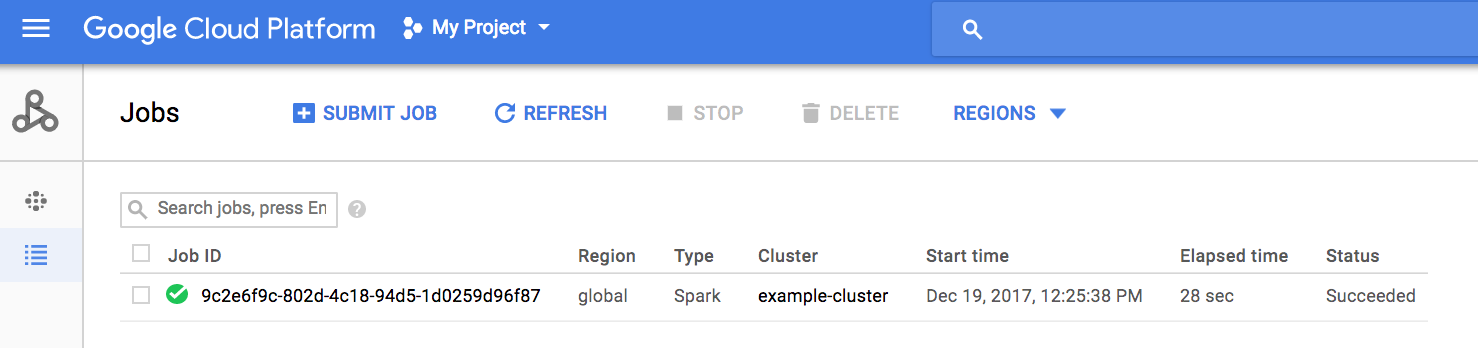
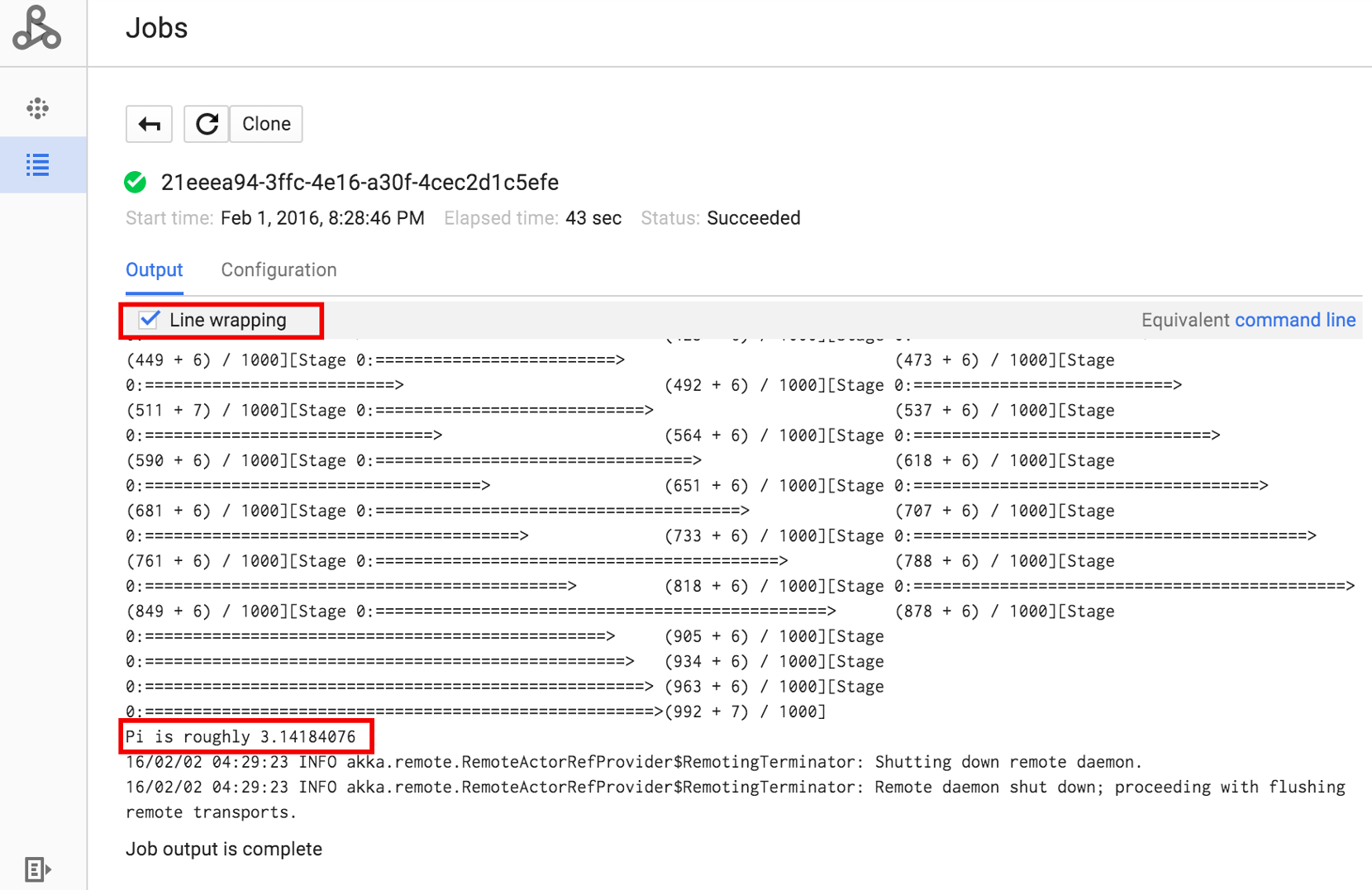
Click the Job ID to open the Jobs page, where you can view the job's driver output. Since this job produces long output lines that
exceed the width of the browser window, you can check the Line wrapping box to bring all
output text within view in order to display the calculated result for pi.
You can view your job's driver output from the command line using the
gcloud dataproc jobs wait
command shown below (for more information, see
View job output–GCLOUD COMMAND).
Copy and paste your project ID as the value for the --project flag and your
Job ID (shown on the Jobs list) as the final argument.
gcloud dataproc jobs wait job-id \
    --project=project-id \
    --region=region
Here are snippets from the driver output for the sample SparkPi
job:
...
2015-06-25 23:27:23,810 INFO [dag-scheduler-event-loop]
scheduler.DAGScheduler (Logging.scala:logInfo(59)) - Stage 0 (reduce at
SparkPi.scala:35) finished in 21.169 s

2015-06-25 23:27:23,810 INFO [task-result-getter-3] cluster.YarnScheduler
(Logging.scala:logInfo(59)) - Removed TaskSet 0.0, whose tasks have all
completed, from pool

2015-06-25 23:27:23,819 INFO [main] scheduler.DAGScheduler
(Logging.scala:logInfo(59)) - Job 0 finished: reduce at SparkPi.scala:35,
took 21.674931 s

Pi is roughly 3.14189648
...
Job [c556b47a-4b46-4a94-9ba2-2dcee31167b2] finished successfully.

driverOutputUri:
gs://sample-staging-bucket/google-cloud-dataproc-metainfo/cfeaa033-749e-48b9-...
...
gcloud
To submit a job to a Managed Service for Apache Spark cluster, run the gcloud CLI gcloud dataproc jobs submit command locally in a terminal window or in Cloud Shell.
gcloud dataproc jobs submit job-command \
    --cluster=cluster-name \
    --region=region \
    other dataproc-flags \
    -- job-args
- List the publicly accessible
hello-world.pylocated in Cloud Storage.gcloud storage cat gs://dataproc-examples/pyspark/hello-world/hello-world.py
#!/usr/bin/python
import pyspark
sc = pyspark.SparkContext()
rdd = sc.parallelize(['Hello,', 'world!'])
words = sorted(rdd.collect())
print(words)
- Submit the PySpark job to Managed Service for Apache Spark.
gcloud dataproc jobs submit pyspark \
    gs://dataproc-examples/pyspark/hello-world/hello-world.py \
    --cluster=cluster-name  \
    --region=region
Waiting for job output...
…
['Hello,', 'world!']
Job finished successfully.
- Run the SparkPi example pre-installed on the Managed Service for Apache Spark cluster's
master node. (The
file:///usr/lib/spark/examples/jars/spark-examples.jarpath is for pre-installed examples only; for custom JAR dependencies, see the caution in How to submit a job.)gcloud dataproc jobs submit spark \ --cluster=cluster-name \ --region=region \ --class=org.apache.spark.examples.SparkPi \ --jars=file:///usr/lib/spark/examples/jars/spark-examples.jar \ -- 1000
Job [54825071-ae28-4c5b-85a5-58fae6a597d6] submitted.
Waiting for job output…
…
Pi is roughly 3.14177148
…
Job finished successfully.
…
REST
This section shows you how to submit a Spark job to compute the approximate value
of pi using the Managed Service for Apache Spark
jobs.submit API.
Before using any of the request data, make the following replacements:
- project-id: Google Cloud project ID
- region: cluster region
- clusterName: cluster name
HTTP method and URL:
POST https://dataproc.googleapis.com/v1/projects/project-id/regions/region/jobs:submit
Request JSON body:
{
  "job": {
    "placement": {
      "clusterName": "cluster-name"
    },
    "sparkJob": {
      "args": [
        "1000"
      ],
      "mainClass": "org.apache.spark.examples.SparkPi",
      "jarFileUris": [
        "file:///usr/lib/spark/examples/jars/spark-examples.jar"
      ]
    }
  }
}
To send your request, expand one of these options:
You should receive a JSON response similar to the following:
{
  "reference": {
    "projectId": "project-id",
    "jobId": "job-id"
  },
  "placement": {
    "clusterName": "cluster-name",
    "clusterUuid": "cluster-Uuid"
  },
  "sparkJob": {
    "mainClass": "org.apache.spark.examples.SparkPi",
    "args": [
      "1000"
    ],
    "jarFileUris": [
      "file:///usr/lib/spark/examples/jars/spark-examples.jar"
    ]
  },
  "status": {
    "state": "PENDING",
    "stateStartTime": "2020-10-07T20:16:21.759Z"
  },
  "jobUuid": "job-Uuid"
}
Java
Python
Go
Node.js
Submit a job directly on your cluster
If you want to run a job directly on your cluster without using the Managed Service for Apache Spark, SSH into the master node of your cluster, then run the job on the master node.
After establishing an SSH connection to the VM master instance, run commands in a terminal window on the cluster's master node to:
- Open a Spark shell.
- Run a Spark job to count the number of lines in a (seven-line) Python "hello-world" file located in a publicly accessible Cloud Storage file.
Quit the shell.
user@cluster-name-m:~$ spark-shell
...
scala> sc.textFile("gs://dataproc-examples"
+ "/pyspark/hello-world/hello-world.py").count
...
res0: Long = 7
scala> :quit
Run bash jobs on Managed Service for Apache Spark
You may want to run a bash script as your Managed Service for Apache Spark job,
either because the engines you use aren't supported as a top-level
Managed Service for Apache Spark job type or because you need to do additional setup
or calculation of arguments before launching a job using hadoop or
spark-submit from your script.
Pig example
Assume you copied an hello.sh bash script into Cloud Storage:
gcloud storage cp hello.sh gs://${BUCKET}/hello.shSince the pig fs command uses Hadoop paths, copy the script from
Cloud Storage to a destination specified as file:/// to make sure
it's on the local filesystem instead of HDFS. The subsequent sh commands
reference the local filesystem automatically and do not require the file:///
prefix.
gcloud dataproc jobs submit pig --cluster=${CLUSTER} --region=${REGION} \
    -e='fs -cp -f gs://${BUCKET}/hello.sh file:///tmp/hello.sh; sh chmod 750 /tmp/hello.sh; sh /tmp/hello.sh'
Alternatively, since the Managed Service for Apache Spark jobs submit --jars
argument stages a file into a temporary directory created for the lifetime of
the job, you can specify your Cloud Storage shell script as a --jars
argument:
gcloud dataproc jobs submit pig --cluster=${CLUSTER} --region=${REGION} \
    --jars=gs://${BUCKET}/hello.sh \
    -e='sh chmod 750 ${PWD}/hello.sh; sh ${PWD}/hello.sh'
Note that the --jars argument can also reference a local script:
gcloud dataproc jobs submit pig --cluster=${CLUSTER} --region=${REGION} \
    --jars=hello.sh \
    -e='sh chmod 750 ${PWD}/hello.sh; sh ${PWD}/hello.sh'