


הדף הזה רלוונטי ל-Apigee ול-Apigee Hybrid.
לעיון במסמכי התיעוד של Apigee Edge
InvalidTimeout
הודעת השגיאה
פריסת ה-proxy ל-API דרך ממשק המשתמש או ה-API של Apigee נכשלת ומוצגת הודעת השגיאה הבאה:
Error Saving Revision revision_number
CacheLookupTimeoutInSeconds value value should be greater than zero.
הודעת שגיאה לדוגמה
Error Saving Revision 2
CacheLookupTimeoutInSeconds -1 value should be greater than zero.
דוגמה לצילום מסך של שגיאה

מטרה
אם רכיב <CacheLookupTimeoutInSeconds> של מדיניות ResponseCache מוגדר למספר שלילי, פריסת ה-proxy ל-API נכשלת.
לדוגמה, אם הערך של <CacheLookupTimeoutInSeconds> הוא -1, הפריסה של proxy ל-API תיכשל.
אבחון
מזהים את הערך הלא תקין שמשמש לרכיב
<CacheLookupTimeoutInSeconds>במדיניות ResponseCache. המידע הזה מופיע בהודעת השגיאה. לדוגמה, בשגיאה הבאה, הערך הלא תקין שמשמש לרכיב<CacheLookupTimeoutInSeconds>הוא-1:CacheLookupTimeoutInSeconds -1 value should be greater than zero.בודקים את כל כללי המדיניות של ResponseCache ב-API Proxy הספציפי שבו התרחשה הכשל. יכול להיות שיש מדיניות ResponseCache אחת או יותר שבהן מצוין רכיב
<CacheLookupTimeoutInSeconds>.לדוגמה, בהגדרת המדיניות הבאה, הערך של
<CacheLookupTimeoutInSeconds>הוא-1, שזהה לערך שמופיע בהודעת השגיאה:<?xml version="1.0" encoding="UTF-8" standalone="yes"?> <ResponseCache async="false" continueOnError="false" enabled="true" name="Response-Cache-1"> <DisplayName>Response Cache-1</DisplayName> <Properties/> <CacheKey> <Prefix/> <KeyFragment ref="request.uri" type="string"/> </CacheKey> <Scope>Exclusive</Scope> <ExpirySettings> <ExpiryDate/> <TimeOfDay/> <TimeoutInSec ref="">3600</TimeoutInSec> </ExpirySettings> <CacheLookupTimeoutInSeconds>-1</CacheLookupTimeoutInSeconds> </ResponseCache>אם
<CacheLookupTimeoutInSeconds>מוגדר כמספר שלם שלילי, זו הסיבה לשגיאה.
רזולוציה
צריך לוודא שהערך של רכיב <CacheLookupTimeoutInSeconds> במדיניות ResponseCache תמיד מצוין כמספר שלם לא שלילי.
כדי לתקן את מדיניות ResponseCache שמוצגת בדוגמה שלמעלה, אפשר לשנות את <CacheLookupTimeoutInSeconds> element ל-30.
<?xml version="1.0" encoding="UTF-8" standalone="yes"?>
<ResponseCache async="false" continueOnError="false" enabled="true" name="Response-Cache-1">
    <DisplayName>Response Cache-1</DisplayName>
    <Properties/>
    <CacheKey>
        <Prefix/>
        <KeyFragment ref="request.uri" type="string"/>
    </CacheKey>
    <Scope>Exclusive</Scope>
    <ExpirySettings>
        <ExpiryDate/>
        <TimeOfDay/>
        <TimeoutInSec ref="">3600</TimeoutInSec>
    </ExpirySettings>
    <CacheLookupTimeoutInSeconds>30</CacheLookupTimeoutInSeconds>
</ResponseCache>
InvalidCacheResourceReference
הודעת השגיאה
פריסת ה-proxy ל-API דרך ממשק המשתמש או ה-API של Apigee נכשלת ומוצגת הודעת השגיאה הבאה:
Error Deploying Revision revision_number to environment
Invalid cache resource reference cache_resource in Step definition response_cache_policy_name. Context Revision:revision_number;APIProxy:ResponseCache;Organization:organization;Environment:environment
הודעת שגיאה לדוגמה
Error Deploying Revision 2 to prod
Invalid cache resource reference itemscache in Step definition ItemsResponseCache. Context Revision:2;APIProxy:StoresInventory;Organization:kkalckstein-eval;Environment:prod
דוגמה לצילום מסך של שגיאה

מטרה
השגיאה הזו מתרחשת אם הרכיב <CacheResource> במדיניות ResponseCache מוגדר לשם שלא קיים בסביבה שבה מתבצעת הפריסה של proxy ל-API.
אבחון
מזהים את המטמון הלא תקין שנעשה בו שימוש ברכיב
<CacheResource>של מדיניות מטמון התגובות ואת הסביבה שבה השגיאה התרחשה. שני הפריטים האלה מופיעים בהודעת השגיאה. לדוגמה, בשגיאה הבאה, שם המטמון הלא תקין הואitemscacheושם הסביבה הואprod.Invalid cache resource reference itemscache in Step definition ItemsResponseCache. Context Revision:2;APIProxy:StoresInventory;Organization:kkalckstein-eval;Environment:prodבודקים את כל כללי המדיניות של ResponseCache ב-API Proxy הספציפי שבו התרחשה השגיאה. מזהים את מדיניות ResponseCache הספציפית שבה המטמון הלא תקין (שזוהה בשלב 1) מצוין ברכיב
<CacheResource>.לדוגמה, במדיניות הבאה הערך של
<CacheResource>הואitemscache, שזהה לערך שמופיע בהודעת השגיאה:<?xml version="1.0" encoding="UTF-8" standalone="yes"?> <ResponseCache async="false" continueOnError="false" enabled="true" name="ItemsResponseCache"> <DisplayName>ItemsResponseCache</DisplayName> <Properties/> <CacheKey> <Prefix/> <KeyFragment ref="request.uri" type="string"/> </CacheKey> <CacheResource>itemscache</CacheResource> <Scope>Exclusive</Scope> <ExpirySettings> <ExpiryDate/> <TimeOfDay/> <TimeoutInSec ref="">3600</TimeoutInSec> </ExpirySettings> <SkipCacheLookup/> <SkipCachePopulation/> </ResponseCache>בודקים אם המטמון (שנקבע בשלב 2) הוגדר בסביבה הספציפית (שזוהתה בשלב 1).
בממשק המשתמש של Apigee, מנווטים אל APIs > Environment Configuration (ממשקי API > הגדרת סביבה) ובודקים אם המטמון קיים בכרטיסייה Caches (מטמונים) בסביבה הספציפית. אם המטמון לא קיים, זו הסיבה לשגיאה.
לדוגמה, בצילום המסך שלמטה אפשר לראות שהמטמון בשם
itemscacheלא קיים.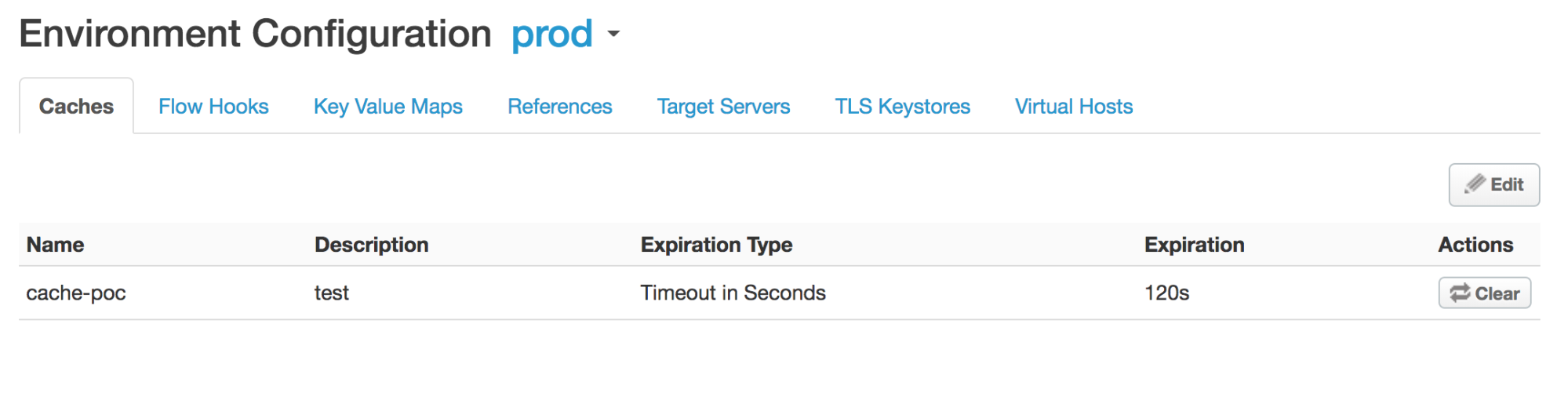
מכיוון שהמטמון שנקרא
itemscacheלא מוגדר בסביבתprod, מוצגת השגיאה:Invalid cache resource reference does_not_exist in Step definition Response-Cache-1. Context Revision:2;APIProxy:ResponseCache;Organization:kkalckstein-eval;Environment:prod
רזולוציה
מוודאים ששם המטמון שצוין ברכיב <CacheResource> נוצר בסביבה שבה רוצים לפרוס את proxy ל-API.
ResponseCacheStepAttachmentNotAllowedReq
הודעת השגיאה
פריסת ה-proxy ל-API דרך ממשק המשתמש או ה-API של Apigee נכשלת ומוצגת הודעת השגיאה הבאה:
Error Deploying Revision revision_number to environment
Response cache step definition response_cache_policy_name can not be attached more than once in the request path.
הודעת שגיאה לדוגמה
Error Deploying Revision 2 to test
Response cache step definition Response-Cache-1 can not be attached more than once in the request path.
דוגמה לצילום מסך של שגיאה

מטרה
השגיאה הזו מתרחשת אם אותו ResponseCache policy מצורף לכמה נתיבי בקשות בתוך flows של proxy ל-API.
לדוגמה, אם יש לכם את אותה מדיניות ResponseCache שמצורפת ל-Preflow של בקשת Proxy וגם ל-Target Endpoints, השגיאה הזו תתרחש.
אבחון
מזהים את השם של מדיניות ResponseCache שמצורפת יותר מפעם אחת. המידע הזה מופיע בהודעת השגיאה. לדוגמה, בשגיאה הבאה, השם של מדיניות ResponseCache הוא Response‑Cache‑1.
Error Deploying Revision 2 to test
Response cache step definition Response-Cache-1 can not be attached more than once in the request path.
בודקים את כל זרימות הבקשות ב-Proxy ובנקודות הקצה של היעד ב-API Proxy שבו התרחשה השגיאה. אם אותה מדיניות ResponseCache מצורפת לשני תהליכי בקשה או יותר, זהו הגורם לשגיאה.
בדוגמה הבאה, אותה מדיניות ResponseCache
Response-Cache-1מוגדרת בנתיב הבקשה של נקודת הקצה של ברירת המחדל של ה-proxy PreFlow, וב-PreFlow של נקודת היעד של ברירת המחדל:<?xml version="1.0" encoding="UTF-8" standalone="yes"?> <ProxyEndpoint name="default"> <Description/> <FaultRules/> <PreFlow name="PreFlow"> <Request> <Step> <Name>Response-Cache-1</Name> </Step> </Request> ... <?xml version="1.0" encoding="UTF-8" standalone="yes"?> <TargetEndpoint name="default"> <Description/> <FaultRules/> <PreFlow name="PreFlow"> <Request/> <Response/> </PreFlow> <PostFlow name="PostFlow"> <Request> <Step> <Name>Response-Cache-1</Name> </Step> </Request> ...
רזולוציה
חשוב לוודא שמדיניות ResponseCache מצורפת רק לנתיב בקשה אחד בכל התהליכים של API Proxy.
כדי לתקן את הדוגמה שמוצגת למעלה, צריך להסיר את מדיניות ResponseCache Response-Cache-1 מאחד משני תהליכי הבקשה.
ResponseCacheStepAttachmentNotAllowedResp
הודעת השגיאה
פריסת ה-proxy ל-API דרך ממשק המשתמש או ה-API של Apigee נכשלת ומוצגת הודעת השגיאה הבאה:
Error Deploying Revision revision_number to environment
Response cache step definition response_cache_policy_name can not be attached more than once in the response path.
הודעת שגיאה לדוגמה
Error Deploying Revision 2 to test
Response cache step definition Response-Cache-1 can not be attached more than once in the response path.
דוגמה לצילום מסך של שגיאה

מטרה
השגיאה הזו מתרחשת אם אותו ResponseCache policy מצורף למספר נתיבי תגובה בכל זרימות של proxy ל-API.
לדוגמה, אם אותה מדיניות ResponseCache מצורפת ל-Preflow של התגובה גם ב-Proxy וגם ב-Target Endpoints, השגיאה הזו מתרחשת.
אבחון
מזהים את השם של מדיניות ResponseCache שמצורפת יותר מפעם אחת. המידע הזה מופיע בהודעת השגיאה. לדוגמה, בשגיאה הבאה, השם של מדיניות ResponseCache הוא
Response-Cache-1.Error Deploying Revision 2 to test Response cache step definition Response-Cache-1 can not be attached more than once in the response path.בודקים את כל זרימות הבקשות ב-Proxy ובנקודות הקצה של היעד של ה-API Proxy שבו התרחשה השגיאה. אם אותה מדיניות ResponseCache מצורפת לשני תהליכי תגובה או יותר, זה הגורם לשגיאה.
בדוגמה הבאה, אותה מדיניות ResponseCache
Response-Cache-1מוגדרת בנתיב התגובה של נקודת הקצה של ה-Proxy שמוגדרת כברירת מחדל PreFlow, ובנקודת הקצה של היעד שמוגדרת כברירת מחדל PreFlow:<?xml version="1.0" encoding="UTF-8" standalone="yes"?> <ProxyEndpoint name="default"> <Description/> <FaultRules/> <PreFlow name="PreFlow"> <Request> <Step> <Name>Response-Cache</Name> </Step> </Request> <Response> <Step> <Name>Response-Cache-1</Name> </Step> </Response> </PreFlow> ... <?xml version="1.0" encoding="UTF-8" standalone="yes"?> <TargetEndpoint name="default"> <Description/> <FaultRules/> <PreFlow name="PreFlow"> <Request/> <Response/> </PreFlow> <PostFlow name="PostFlow"> <Request/> <Response> <Step> <Name>Response-Cache-1</Name> </Step> </Response> </PostFlow> ...
רזולוציה
מוודאים שמדיניות ResponseCache מצורפת רק לנתיב תגובה אחד בכל הזרימות של ה-API Proxy.
כדי לתקן את הדוגמה שמוצגת למעלה, צריך להסיר את מדיניות ResponseCache Response-Cache-1 מאחד משני נתיבי התגובה.
InvalidMessagePatternForErrorCode
הודעת השגיאה
פריסת ה-proxy ל-API דרך ממשק המשתמש או ה-API של Apigee נכשלת עם אחת מהודעות השגיאה הבאות:
Error Deploying Revision revision_number to environment
Invalid message pattern found for error code steps.cache.InvalidSkipCacheLookUpCondition.
או
Error Deploying Revision revision_number to environment
Invalid message pattern found for error code steps.cache.InvalidSkipCachePopulationCondition.
הודעת שגיאה לדוגמה
Error Deploying Revision 2 to prod
Invalid message pattern found for error code steps.cache.InvalidSkipCacheLookUpCondition.
או
Error Deploying Revision 2 to prod
Invalid message pattern found for error code steps.cache.InvalidSkipCachePopulationCondition.
דוגמה לצילום מסך של שגיאה

או

מטרה
השגיאה הזו מתרחשת אם הרכיב <SkipCacheLookup> או הרכיב <SkipCachePopulation> במדיניות ResponseCache מכילים תנאי לא תקין.
אבחון
בודקים את כל כללי המדיניות של ResponseCache ב-API Proxy שבו אירעה השגיאה, ומחפשים כללי מדיניות שבהם צוינו תנאים לרכיבים
<SkipCacheLookup>או<SkipCachePopulation>.בודקים אם התנאי שצוין לרכיב
<SkipCacheLookup>או לרכיב<SkipCachePopulation>לא תקין. אם כן, זו הסיבה לשגיאה.בדוגמה הבאה, רכיב
<SkipCachePopulation>משתמש באופרטור JavaScript === כדי לבדוק אם הערך והסוג שווים, וזה לא תקין.<?xml version="1.0" encoding="UTF-8" standalone="yes"?> <ResponseCache async="false" continueOnError="false" enabled="true" name="Response-Cache-1"> <DisplayName>Response Cache-1</DisplayName> <Properties/> <CacheKey> <Prefix/> <KeyFragment ref="request.uri" type="string"/> </CacheKey> <Scope>Exclusive</Scope> <ExpirySettings> <ExpiryDate/> <TimeOfDay/> <TimeoutInSec ref="">3600</TimeoutInSec> </ExpirySettings> <CacheLookupTimeoutInSeconds>2</CacheLookupTimeoutInSeconds> <SkipCacheLookup>request.header.bypass-cache === "true"</SkipCacheLookup> </ResponseCache>מכיוון שהאופרטור
===לא תקין, מוצגת השגיאה:Invalid message pattern found for error code steps.cache.InvalidSkipCacheLookUpCondition.
רזולוציה
חשוב לוודא שהמצב שצוין ברכיבים <SkipCacheLookup> ו/או <SkipCachePopulation> תמיד תקין.
כדי לתקן את המדיניות לדוגמה של ResponseCache שמוצגת למעלה, אפשר לשנות את <SkipCacheLookup> כך שישתמש באופרטור =:
<?xml version="1.0" encoding="UTF-8" standalone="yes"?>
<ResponseCache async="false" continueOnError="false" enabled="true" name="Response-Cache-1">
    <DisplayName>Response Cache-1</DisplayName>
    <Properties/>
    <CacheKey>
        <Prefix/>
        <KeyFragment ref="request.uri" type="string"/>
    </CacheKey>
    <Scope>Exclusive</Scope>
    <ExpirySettings>
        <ExpiryDate/>
        <TimeOfDay/>
        <TimeoutInSec ref="">3600</TimeoutInSec>
    </ExpirySettings>
    <CacheLookupTimeoutInSeconds>2</CacheLookupTimeoutInSeconds>
    <SkipCacheLookup>request.header.bypass-cache = "true"</SkipCacheLookup>
</ResponseCache>
CacheNotFound
הודעת השגיאה
פריסת proxy ל-API דרך ממשק המשתמש או ה-API של Apigee מניבה הודעת שגיאה כמו זו, וסטטוס הפריסה של proxy ל-API מסומן כפריסה חלקית:
Error: Cache : cache_resource, not found in organization : organization__environment.
הודעת שגיאה לדוגמה
Error Cache : Response-Cache-1, not found in organization : kkalckstein-eval__prod
מטרה
השגיאה הזו מתרחשת אם המטמון הספציפי שמוזכר בהודעת השגיאה לא נוצר ברכיב ספציפי של מעבד ההודעות.
רזולוציה
לקבלת עזרה, אפשר לפנות אל התמיכה של Apigee.