תמלול קולי

תמלול קולי מאפשר לכם להמיר את נתוני האודיו בסטרימינג לטקסט מתומלל בזמן אמת. ההצעות של Agent Assist מבוססות על טקסט, ולכן צריך להמיר נתוני אודיו לפני שאפשר להשתמש בהם. אפשר גם להשתמש באודיו בסטרימינג עם תמליל ב-Customer Experience Insights כדי לאסוף נתונים בזמן אמת על שיחות עם נציגים (לדוגמה, Topic Modeling).

יש שתי דרכים לתמלל אודיו בסטרימינג לשימוש ב-Agent Assist: באמצעות התכונה SIPREC, או באמצעות ביצוע קריאות gRPC עם נתוני אודיו כמטען ייעודי (payload). בדף הזה מתואר תהליך התמלול של נתוני אודיו בסטרימינג באמצעות קריאות gRPC.

תמלול קולי פועל באמצעות הזרמת דיבור לזיהוי דיבור. ב-Speech-to-Text יש כמה מודלים של זיהוי, רגילים ומשופרים. ‫Agent Assist לא מגביל את המודלים שבהם אפשר להשתמש עם תמלול קולי, אבל תמלול קולי נתמך ברמת הזמינות הכללית רק כשמשתמשים בו עם מודל הטלפוניה או עם Chirp 3. כדי לקבל תמליל באיכות אופטימלית, מומלץ להשתמש במודל Chirp 3, בכפוף לזמינות אזורית.

דרישות מוקדמות

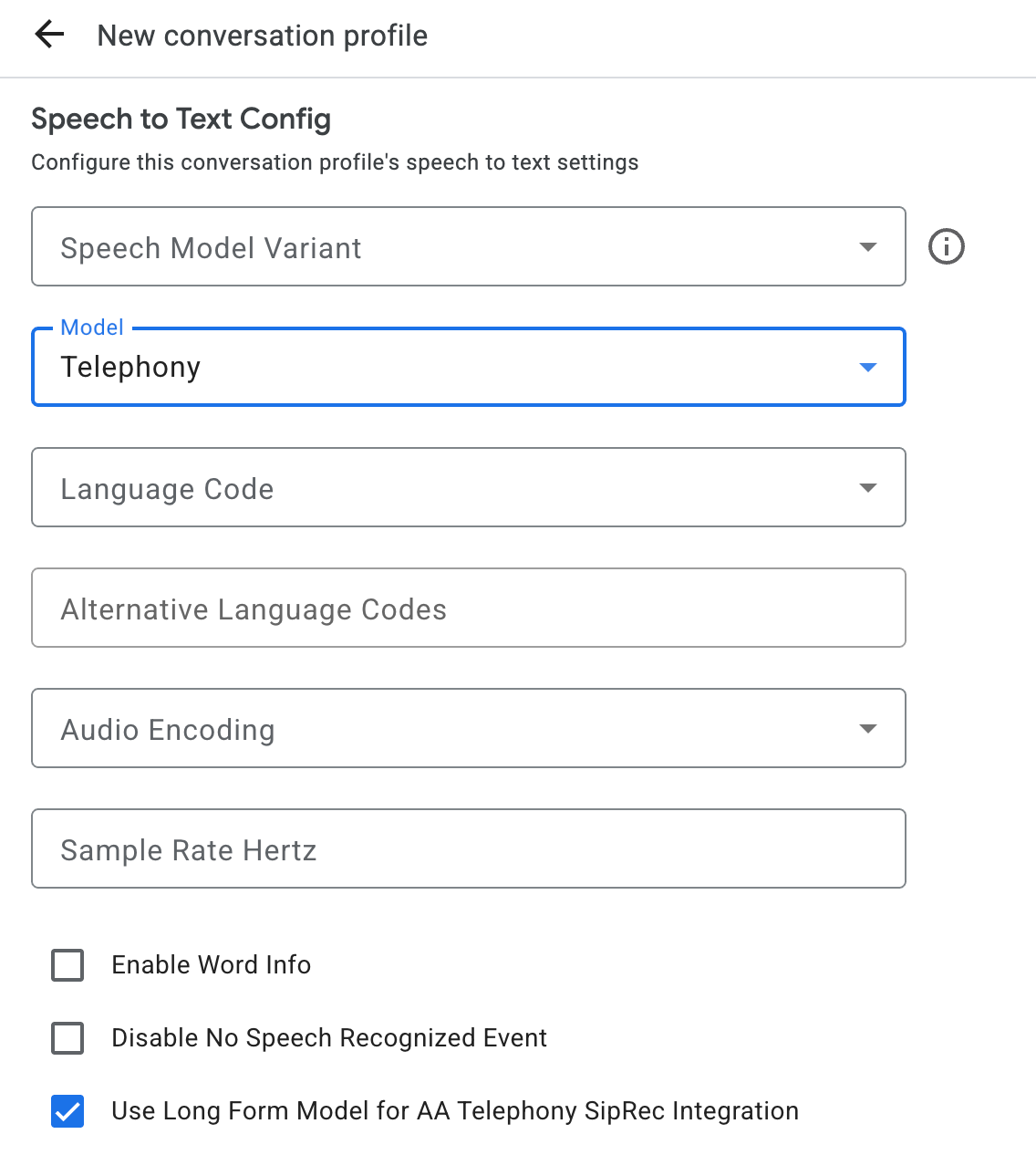
יצירת פרופיל שיחה

כדי ליצור פרופיל שיחה, משתמשים במסוף Agent Assist או מתקשרים ישירות לשיטת create במשאב ConversationProfile.

לגבי תמלול קולי, מומלץ להגדיר את ConversationProfile.stt_config כברירת המחדל InputAudioConfig כששולחים נתוני אודיו בשיחה.
קבלת תמלילים במהלך השיחה

כדי לקבל תמלילים בזמן הריצה של השיחה, צריך ליצור משתתפים לשיחה ולשלוח נתוני אודיו לכל משתתף.

יצירת משתתפים

יש שלושה סוגים של משתתפים. פרטים נוספים על התפקידים מופיעים במאמרי העזרה. מבצעים קריאה ל-create ב-participant ומציינים את role. רק משתמשים עם מינוי ל-END_USER או משתתפים בשיחה ב-HUMAN_AGENT יכולים להתקשר אל StreamingAnalyzeContent, שנדרש כדי לקבל תמליל.

שליחת נתוני אודיו וקבלת תמליל

אפשר להשתמש ב-StreamingAnalyzeContent כדי לשלוח את האודיו של המשתתף ל-Google ולקבל תמליל, עם הפרמטרים הבאים:

  • הבקשה הראשונה בשידור חייבת להיות InputAudioConfig. (השדות שמוגדרים כאן מבטלים את ההגדרות התואמות ב-ConversationProfile.stt_config.) אל תשלחו קלט אודיו עד לבקשה השנייה.

    • הערך של audioEncoding צריך להיות AUDIO_ENCODING_LINEAR_16 או AUDIO_ENCODING_MULAW.
    • model: זהו מודל הדיבור לטקסט שבו רוצים להשתמש כדי לתמלל את האודיו. מגדירים את השדה הזה לערך chirp_3. הווריאנט לא משפיע על איכות התמלול, ולכן אפשר לא לציין ווריאנט של מודל דיבור או לבחור באפשרות שימוש בטוב ביותר שזמין.
    • כדי לקבל את איכות התמלול הטובה ביותר, צריך להגדיר את הערך של singleUtterance ל-false. לא צפוי END_OF_SINGLE_UTTERANCE אם singleUtterance הוא false, אבל אפשר להסתמך על isFinal==true בתוך StreamingAnalyzeContentResponse.recognition_result כדי לסגור את הסטרים באופן חלקי.
    • פרמטרים אופציונליים נוספים: הפרמטרים הבאים הם אופציונליים. כדי לקבל גישה לפרמטרים האלה, צריך לפנות לנציג Google.
      • languageCode: language_code של האודיו. ערך ברירת המחדל הוא en-US.
      • alternativeLanguageCodes: התכונה הזו זמינה רק ברמת GA עבור מודל Chirp 3. שפות נוספות שאולי מזוהות באודיו. ‫Agent Assist משתמש בשדה language_code כדי לזהות באופן אוטומטי את השפה בתחילת האודיו, וזו השפה שמוגדרת כברירת מחדל בכל תורות השיחה הבאות. בשדה alternativeLanguageCodes אפשר לציין עוד אפשרויות ש-Agent Assist יכול לבחור מתוכן.
      • phraseSets: שם המשאב של התאמת מודל Speech-to-Text phraseSet.
        • כדי להגדיר התאמה למודל Chirp 3, מוסיפים ביטויים מוטבעים שמופרדים על ידי שורות חדשות, בלי פסיקים.
        • כדי להשתמש בהתאמת מודל עם מודלים אחרים כמו telephony לתמלול קולי, קודם צריך ליצור את phraseSet באמצעות Speech-to-Text API ולציין כאן את שם המשאב.
  • אחרי ששולחים את הבקשה השנייה עם מטען ייעודי (payload) של אודיו, אמורים להתחיל לקבל נתונים מסוימים StreamingAnalyzeContentResponses מהסטרימינג.

    • אפשר לסגור חצי מהסטרימינג (או להפסיק את השליחה בשפות מסוימות כמו Python) כשרואים ש-is_final מוגדר ל-true ב-StreamingAnalyzeContentResponse.recognition_result.
    • אחרי שסוגרים את הסטרימינג באופן חלקי, השרת ישלח בחזרה את התגובה שמכילה את התמליל הסופי, יחד עם הצעות אפשריות של Dialogflow או של Agent Assist.
  • אפשר למצוא את התמליל הסופי במיקומים הבאים:

  • צריך להתחיל שידור חדש אחרי שהשידור הקודם נסגר.

    • שליחה מחדש של אודיו: נתוני אודיו שנוצרו אחרי speech_end_offset של התגובה עם is_final=true עד לזמן ההתחלה של הסטרימינג החדש צריכים להישלח מחדש אל StreamingAnalyzeContent כדי לקבל את איכות התמלול הטובה ביותר.
  • בתרשים הבא מוצג אופן הפעולה של הזרם.

דוגמה לקוד של בקשת זיהוי סטרימינג

בדוגמת הקוד הבאה אפשר לראות איך לשלוח בקשה לסטרימינג של תמלול.

Python

כדי לבצע אימות ב-Agent Assist, צריך להגדיר את Application Default Credentials. מידע נוסף זמין במאמר הגדרת אימות לסביבת פיתוח מקומית.

# Copyright 2023 Google LLC
#
# Licensed under the Apache License, Version 2.0 (the "License");
# you may not use this file except in compliance with the License.
# You may obtain a copy of the License at
#
#     http://www.apache.org/licenses/LICENSE-2.0
#
# Unless required by applicable law or agreed to in writing, software
# distributed under the License is distributed on an "AS IS" BASIS,
# WITHOUT WARRANTIES OR CONDITIONS OF ANY KIND, either express or implied.
# See the License for the specific language governing permissions and
# limitations under the License.

"""Google Cloud Dialogflow API sample code using the StreamingAnalyzeContent
API.

Also please contact Google to get credentials of this project and set up the
credential file json locations by running:
export GOOGLE_APPLICATION_CREDENTIALS=<cred_json_file_location>

Example usage:
    export GOOGLE_CLOUD_PROJECT='cloud-contact-center-ext-demo'
    export CONVERSATION_PROFILE='FnuBYO8eTBWM8ep1i-eOng'
    export GOOGLE_APPLICATION_CREDENTIALS='/Users/ruogu/Desktop/keys/cloud-contact-center-ext-demo-78798f9f9254.json'
    python streaming_transcription.py

Then started to talk in English, you should see transcription shows up as you speak.

Say "Quit" or "Exit" to stop.
"""

import os
import re
import sys

from google.api_core.exceptions import DeadlineExceeded, OutOfRange

import pyaudio

from six.moves import queue

import conversation_management
import participant_management

PROJECT_ID = os.getenv("GOOGLE_CLOUD_PROJECT")
CONVERSATION_PROFILE_ID = os.getenv("CONVERSATION_PROFILE")

# Audio recording parameters
SAMPLE_RATE = 16000
CHUNK_SIZE = int(SAMPLE_RATE / 10)  # 100ms
RESTART_TIMEOUT = 160  # seconds
MAX_LOOKBACK = 3  # seconds
HALF_CLOSE_DURATION_MS = 90 * 1000  # milliseconds

YELLOW = "\033[0;33m"


class ResumableMicrophoneStream:
    """Opens a recording stream as a generator yielding the audio chunks."""

    def __init__(self, rate, chunk_size):
        self._rate = rate
        self.chunk_size = chunk_size
        self._num_channels = 1
        self._buff = queue.Queue()
        self.is_final = False
        self.closed = True
        # Count the number of times the stream analyze content restarts.
        self.restart_counter = 0
        self.last_start_time = 0
        # Time end of the last is_final in millisec since last_start_time.
        self.is_final_offset = 0
        # Save the audio chunks generated from the start of the audio stream for
        # replay after restart.
        self.audio_input_chunks = []
        self.new_stream = True
        self._audio_interface = pyaudio.PyAudio()
        self._audio_stream = self._audio_interface.open(
            format=pyaudio.paInt16,
            channels=self._num_channels,
            rate=self._rate,
            input=True,
            frames_per_buffer=self.chunk_size,
            # Run the audio stream asynchronously to fill the buffer object.
            # This is necessary so that the input device's buffer doesn't
            # overflow while the calling thread makes network requests, etc.
            stream_callback=self._fill_buffer,
        )

    def __enter__(self):
        self.closed = False
        return self

    def __exit__(self, type, value, traceback):
        self._audio_stream.stop_stream()
        self._audio_stream.close()
        self.closed = True
        # Signal the generator to terminate so that the client's
        # streaming_recognize method will not block the process termination.
        self._buff.put(None)
        self._audio_interface.terminate()

    def _fill_buffer(self, in_data, *args, **kwargs):
        """Continuously collect data from the audio stream, into the buffer in
        chunksize."""

        self._buff.put(in_data)
        return None, pyaudio.paContinue

    def generator(self):
        """Stream Audio from microphone to API and to local buffer"""
        try:
            # Handle restart.
            print("restart generator")
            # Flip the bit of is_final so it can continue stream.
            self.is_final = False
            total_processed_time = self.last_start_time + self.is_final_offset
            processed_bytes_length = (
                int(total_processed_time * SAMPLE_RATE * 16 / 8) / 1000
            )
            self.last_start_time = total_processed_time
            # Send out bytes stored in self.audio_input_chunks that is after the
            # processed_bytes_length.
            if processed_bytes_length != 0:
                audio_bytes = b"".join(self.audio_input_chunks)
                # Lookback for unprocessed audio data.
                need_to_process_length = min(
                    int(len(audio_bytes) - processed_bytes_length),
                    int(MAX_LOOKBACK * SAMPLE_RATE * 16 / 8),
                )
                # Note that you need to explicitly use `int` type for substring.
                need_to_process_bytes = audio_bytes[(-1) * need_to_process_length :]
                yield need_to_process_bytes

            while not self.closed and not self.is_final:
                data = []
                # Use a blocking get() to ensure there's at least one chunk of
                # data, and stop iteration if the chunk is None, indicating the
                # end of the audio stream.
                chunk = self._buff.get()

                if chunk is None:
                    return
                data.append(chunk)
                # Now try to the rest of chunks if there are any left in the _buff.
                while True:
                    try:
                        chunk = self._buff.get(block=False)

                        if chunk is None:
                            return
                        data.append(chunk)

                    except queue.Empty:
                        break
                self.audio_input_chunks.extend(data)
                if data:
                    yield b"".join(data)
        finally:
            print("Stop generator")


def main():
    """start bidirectional streaming from microphone input to Dialogflow API"""
    # Create conversation.
    conversation = conversation_management.create_conversation(
        project_id=PROJECT_ID, conversation_profile_id=CONVERSATION_PROFILE_ID
    )

    conversation_id = conversation.name.split("conversations/")[1].rstrip()

    # Create end user participant.
    end_user = participant_management.create_participant(
        project_id=PROJECT_ID, conversation_id=conversation_id, role="END_USER"
    )
    participant_id = end_user.name.split("participants/")[1].rstrip()

    mic_manager = ResumableMicrophoneStream(SAMPLE_RATE, CHUNK_SIZE)
    print(mic_manager.chunk_size)
    sys.stdout.write(YELLOW)
    sys.stdout.write('\nListening, say "Quit" or "Exit" to stop.\n\n')
    sys.stdout.write("End (ms)       Transcript Results/Status\n")
    sys.stdout.write("=====================================================\n")

    with mic_manager as stream:
        while not stream.closed:
            terminate = False
            while not terminate:
                try:
                    print(f"New Streaming Analyze Request: {stream.restart_counter}")
                    stream.restart_counter += 1
                    # Send request to streaming and get response.
                    responses = participant_management.analyze_content_audio_stream(
                        conversation_id=conversation_id,
                        participant_id=participant_id,
                        sample_rate_herz=SAMPLE_RATE,
                        stream=stream,
                        timeout=RESTART_TIMEOUT,
                        language_code="en-US",
                        single_utterance=False,
                        # Uncomment to process multiple utterances detected in the audio stream
                        # individually instead of stitching together to form a single utterance.
                        # output_multiple_utterances=True,
                    )

                    # Now, print the final transcription responses to user.
                    for response in responses:
                        if response.message:
                            print(response)
                        if response.recognition_result.is_final:
                            print(response)
                            # offset return from recognition_result is relative
                            # to the beginning of audio stream.
                            offset = response.recognition_result.speech_end_offset
                            stream.is_final_offset = int(
                                offset.seconds * 1000 + offset.microseconds / 1000
                            )
                            transcript = response.recognition_result.transcript
                            # Half-close upon final results for better streaming experiences
                            # (in Python just stop yielding requests)
                            if stream.is_final_offset > HALF_CLOSE_DURATION_MS:
                                stream.is_final = True
                            # Exit recognition if any of the transcribed phrase could be
                            # one of our keywords.
                            if re.search(r"\b(exit|quit)\b", transcript, re.I):
                                sys.stdout.write(YELLOW)
                                sys.stdout.write("Exiting...\n")
                                terminate = True
                                stream.closed = True
                                break
                except OutOfRange:
                    print("Maximum audio duration exceeded in the stream, restarting.")
                except DeadlineExceeded:
                    print("Deadline Exceeded, restarting.")

            if terminate:
                conversation_management.complete_conversation(
                    project_id=PROJECT_ID, conversation_id=conversation_id
                )
                break


if __name__ == "__main__":
    main()

כדי לראות את קובצי ה-Python של conversation_management ושל participant_management:

  1. עוברים למאגר GitHub של מסמכי Python.

    מעבר אל GitHub

  2. לוחצים על מעבר לקובץ ומזינים את שם הקובץ: conversation_management או participant_management.

  3. לוחצים על Enter.

שיטות מומלצות

זמן שליחת ההודעה הוא הזמן שבו מתחילה אמירה. אפשר להשתמש בזמן שליחת ההודעה כדי לקבוע את הסדר שבו מרכז שירות הלקוחות מציג או מנתח הודעות קוליות.