

Knowledge Assist גנרטיבי פרואקטיבי עוקב אחרי שיחה מתמשכת ומספק באופן יזום הצעות לשאילתות חיפוש ותשובות. התכונה 'עזרה יזומה באמצעות ידע גנרטיבי' תומכת בהקשר חיפוש, בכמה הצעות לשאילתות, ואפשר להתאים אישית את האירועים שמפעילים אותה.
הקשר החיפוש
התכונה 'עזרה יזומה של AI גנרטיבי לחיפוש' יוצרת שאילתת חיפוש והקשר. הוא מחלץ מידע מהשיחה כצמדים של מפתח וערך כדי לשפר את הקשר של החיפוש ולספק תשובות טובות יותר לשאילתת החיפוש.
אפשר גם להשבית את ההקשר של החיפוש. בתרחישים מסוימים, אפשר לבחור שלא להשתמש בהקשר החיפוש ולהשתמש רק בשאילתה עצמה. אפשר לשלוט בזה באמצעות השדה disable_query_search_context. כשהשדה הזה מוגדר לערך true, התכונה 'סיוע יזום מבוסס-ידע גנרטיבי' יוצרת את הקשר החיפוש אבל לא מוסיפה אותו לשאילתת החיפוש שנשלחת למאגר הידע.
כמה הצעות לשאילתות
התכונה 'סיוע פרואקטיבי בידע גנרטיבי' יכולה ליצור כמה שאילתות רלוונטיות בנושאים שונים שעולים בשיחה. הוא משתמש בשאילתה הראשית לחיפוש ידע אוטומטי ומספק בשאילתה הנוספת בתגובה כדי שהסוכן ישתמש בה לפי הצורך.
התאמה אישית של הפעלת אירועים
כברירת מחדל, CUSTOMER_MESSAGE מציע הצעות מ-Proactive generative knowledge assist. כדי להגדיר איזה אירוע יפעיל הצעה חדשה של Knowledge Assist פרואקטיבי באמצעות AI גנרטיבי, בוחרים באחת מהאפשרויות הבאות בשדה suggestion_trigger_event.
-
CUSTOMER_MESSAGE: שמירה על הודעת ברירת המחדל שהתקבלה ממשתמש הקצה. -
AGENT_MESSAGE: הודעה שנשלחת על ידי נציג אנושי. -
END_OF_UTTERANCE: Knowledge Assist יזום מבוסס-ידע גנרטיבי מזהה את סוף ההתבטאות של המשתמש.
הטמעה של Knowledge Assist גנרטיבי פרואקטיבי
כדי להתחיל להשתמש ב-Knowledge Assist יזום של AI גנרטיבי, פועלים לפי השלבים הבאים.
שלב 1: יצירת פרופיל שיחה
יוצרים פרופיל שיחה באמצעות מסוף Agent Assist או ממשק ה-API. מומלץ ליצור פרופיל שיחה באמצעות מסוף Agent Assist.
המסוף
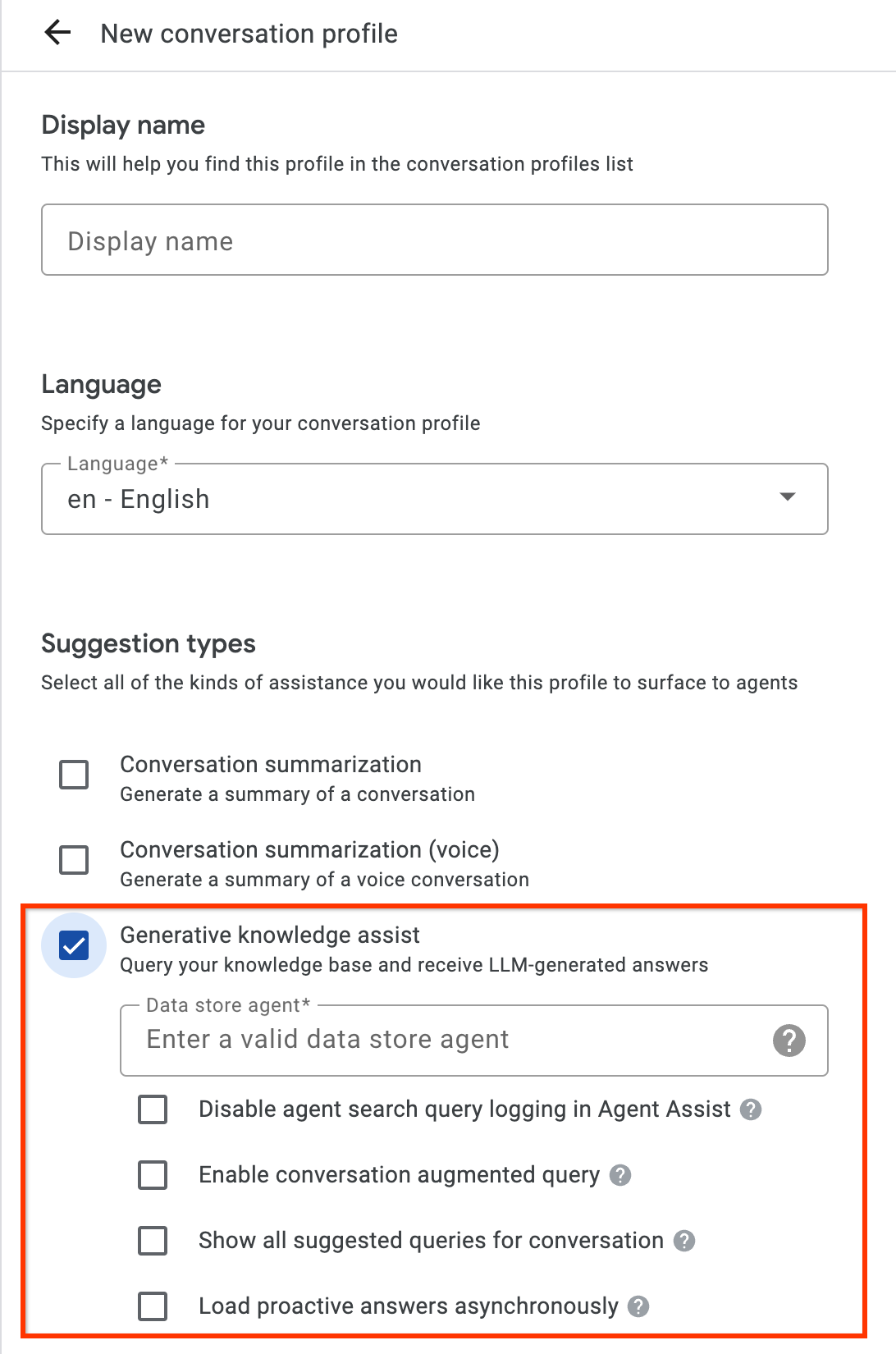
- מפעילים את סוג ההצעה Knowledge Assist גנרטיבי ומקשרים אותו לסוכן מאגר הנתונים מבוסס-הזרימה או לסוכן מאגר הנתונים מבוסס-הפלייבוק מהשלב הקודם. כך סוכן מאגר נתונים מבוסס-זרימה או סוכן מאגר נתונים מבוסס-ספר משחקים יכולים לספק באופן יזום הצעות לשאילתות ולתשובות, ולענות על שאילתות חיפוש ידניות של נציגים אנושיים.
- אופציונלי: כדי שהסוכן של מאגר הנתונים מבוסס-הזרימה או הסוכן של מאגר הנתונים מבוסס-ההפעלה יציגו את כל השאילתות האלה, גם אם לא נמצאה תשובה במסמכי הידע, מסמנים את תיבת הסימון הצגת כל השאילתות המוצעות לשיחה. הכלי הזה מיועד לבדיקת השאילתות שאפשר לשלוף מהשיחה המתמשכת.
- אופציונלי: כדי לקבל רק הצעות לשאילתות, מסמנים את תיבת הסימון טעינת תשובות פרואקטיביות באופן אסינכרוני. אפשר לשלוח ידנית את השאילתה המוצעת אל SearchKnowledge API ולשלוח אותה באופן אוטומטי במודולים של ממשק המשתמש ובסימולטור של מסוף Agent Assist.
API
השלבים הבאים יוצרים ConversationProfile עם אובייקט HumanAgentAssistantConfig. אפשר לבצע את הפעולות האלה גם באמצעות מסוף Agent Assist.
כדי ליצור פרופיל שיחה, קוראים לשיטת היצירה במשאב ConversationProfile ומעדכנים את הערך של baseline_model_version.
לפני שמשתמשים בנתוני הבקשה, צריך להחליף את הנתונים הבאים:- PROJECT_ID: מזהה הפרויקט
- LOCATION_ID: המזהה של המיקום
- AGENT_ID: המזהה של הסוכן מבוסס-הזרימה או מבוסס-ההפעלה של מאגר הנתונים מהשלב הקודם
 {
  "name": "projects/PROJECT_ID/locations/LOCATION/conversationProfiles/PROFILE_ID",
  "human_agent_assistant_config": {
    "human_agent_suggestion_config": {
      "feature_configs": [
        {
          "suggestion_feature": {
            "type": "KNOWLEDGE_ASSIST"
          },
          "query_config": {
            "dialogflow_query_source": {
              "agent": "projects/PROJECT_ID/locations/LOCATION/agents/AGENT_ID"
            }
          },
          "conversation_model_config": {
            "baseline_model_version": "2.0"
          }
        "disable_query_search_context": false,
    "enableQuerySuggestionWhenNoAnswer": false,
    "suggestion_trigger_event": "END_OF_UTTERANCE",
        }
      ]
    }
  }
}
שלב 2: טיפול בשיחות בזמן הריצה
התכונה 'סיוע פרואקטיבי בידע גנרטיבי' מעבדת שיחות בזמן ריצה כדי לספק באופן פרואקטיבי הצעות לשאילתות חיפוש על סמך ההקשר של השיחה הנוכחית והתשובה.
יצירת שיחה
קודם כול, צריך ליצור שיחה:
REST
כדי ליצור שיחה, מבצעים קריאה ל-method create במשאב Conversation.
לפני שמשתמשים בנתוני הבקשה, צריך להחליף את הנתונים הבאים:
- PROJECT_ID: מזהה הפרויקט בענן
- LOCATION_ID: מזהה המיקום
- CONVERSATION_PROFILE_ID: המזהה שקיבלתם כשנוצר פרופיל השיחה
ה-method של ה-HTTP וכתובת ה-URL:
POST https://dialogflow.googleapis.com/v2/projects/PROJECT_ID/locations/LOCATION_ID/conversations
תוכן בקשת JSON:
{
  "conversationProfile": "projects/PROJECT_ID/locations/LOCATION_ID/conversationProfiles/CONVERSATION_PROFILE_ID",
}
כדי לשלוח את הבקשה צריך להרחיב אחת מהאפשרויות הבאות:
אתם אמורים לקבל תגובת JSON שדומה לזו:
{
  "name": "projects/PROJECT_ID/locations/LOCATION_ID/conversations/CONVERSATION_ID",
  "lifecycleState": "IN_PROGRESS",
  "conversationProfile": "projects/PROJECT_ID/locations/LOCATION_ID/conversationProfiles/CONVERSATION_PROFILE_ID",
  "startTime": "2018-11-05T21:05:45.622Z"
}
פלח הנתיב אחרי conversations מכיל את מזהה השיחה החדש.
Python
מידע נוסף מופיע בתיעוד העזר של ה-API של חיפוש מבוסס סוכנים Python.
כדי לבצע אימות ב-חיפוש מבוסס סוכנים, צריך להגדיר את Application Default Credentials. מידע נוסף זמין במאמר הגדרת אימות לסביבת פיתוח מקומית.
יצירת משתמש-משתתף
כדי לראות הצעות, צריך להוסיף לשיחה משתתפים שהם משתמשים וסוכנים. קודם כול, מוסיפים את המשתמש-משתתף לשיחה:
REST
כדי ליצור משתמש-משתתף, צריך להפעיל את method create במשאב Participant.
לפני שמשתמשים בנתוני הבקשה, צריך להחליף את הנתונים הבאים:
- PROJECT_ID: מזהה הפרויקט בענן
- LOCATION_ID: מזהה המיקום
- CONVERSATION_ID: מזהה השיחה
ה-method של ה-HTTP וכתובת ה-URL:
POST https://dialogflow.googleapis.com/v2/projects/PROJECT_ID/locations/LOCATION_ID/conversations/CONVERSATION_ID/participants
תוכן בקשת JSON:
{
  "role": "END_USER",
}
כדי לשלוח את הבקשה צריך להרחיב אחת מהאפשרויות הבאות:
אתם אמורים לקבל תגובת JSON שדומה לזו:
{
  "name": "projects/PROJECT_ID/locations/LOCATION_ID/conversations/CONVERSATION_ID/participants/PARTICIPANT_ID",
  "role": "END_USER"
}
פלח הנתיב אחרי participants מכיל את מזהה המשתתף החדש שלכם.
Python
מידע נוסף מופיע בתיעוד העזר של ה-API של חיפוש מבוסס סוכנים Python.
כדי לבצע אימות ב-חיפוש מבוסס סוכנים, צריך להגדיר את Application Default Credentials. מידע נוסף זמין במאמר הגדרת אימות לסביבת פיתוח מקומית.
יצירת משתתף-סוכן
הוספת נציג/ה לשיחה:
REST
כדי ליצור משתתף שהוא סוכן, צריך להפעיל את method create במשאב Participant.
לפני שמשתמשים בנתוני הבקשה, צריך להחליף את הנתונים הבאים:
- PROJECT_ID: מזהה הפרויקט בענן
- LOCATION_ID: מזהה המיקום
- CONVERSATION_ID: מזהה השיחה
ה-method של ה-HTTP וכתובת ה-URL:
POST https://dialogflow.googleapis.com/v2/projects/PROJECT_ID/locations/LOCATION_ID/conversations/CONVERSATION_ID/participants
תוכן בקשת JSON:
{
  "role": "HUMAN_AGENT",
}
כדי לשלוח את הבקשה צריך להרחיב אחת מהאפשרויות הבאות:
אתם אמורים לקבל תגובת JSON שדומה לזו:
{
  "name": "projects/PROJECT_ID/locations/LOCATION_ID/conversations/CONVERSATION_ID/participants/PARTICIPANT_ID",
  "role": "HUMAN_AGENT"
}
פלח הנתיב אחרי participants מכיל את המזהה החדש של הסוכן האנושי.
Python
מידע נוסף מופיע בתיעוד העזר של ה-API של חיפוש מבוסס סוכנים Python.
כדי לבצע אימות ב-חיפוש מבוסס סוכנים, צריך להגדיר את Application Default Credentials. מידע נוסף זמין במאמר הגדרת אימות לסביבת פיתוח מקומית.
הוספה וניתוח של הודעה מהסוכן
בכל פעם שאחד מהמשתתפים מקליד הודעה בשיחה, צריך לשלוח את ההודעה הזו ל-API לעיבוד. ההצעות של הסוכן לאחסון נתונים מבוססות על ניתוח של הודעות ממשתמשים ומנציגים אנושיים. בדוגמה הבאה, הנציג האנושי מתחיל את השיחה בשאלה 'איך אוכל לעזור לך?'
עדיין לא מוחזרות הצעות בתשובה.
REST
כדי להוסיף ולנתח הודעה של נציג אנושי בשיחה, צריך לבצע קריאה ל-method analyzeContent במשאב Participant.
לפני שמשתמשים בנתוני הבקשה, צריך להחליף את הנתונים הבאים:
- PROJECT_ID: מזהה הפרויקט
- CONVERSATION_ID: מזהה השיחה
- PARTICIPANT_ID: מזהה המשתתף של הסוכן האנושי
ה-method של ה-HTTP וכתובת ה-URL:
POST https://dialogflow.googleapis.com/v2/projects/PROJECT_ID/conversations/CONVERSATION_ID/participants/PARTICIPANT_ID:analyzeContent
תוכן בקשת JSON:
{
  "textInput": {
    "text": "How may I help you?",
    "languageCode": "en-US"
  }
}
כדי לשלוח את הבקשה צריך להרחיב אחת מהאפשרויות הבאות:
אתם אמורים לקבל תגובת JSON שדומה לזו:
{
  "message": {
    "name": "projects/PROJECT_ID/conversations/CONVERSATION_ID/messages/MESSAGE_ID",
    "content": "How may I help you?",
    "languageCode": "en-US",
    "participant": "PARTICIPANT_ID",
    "participantRole": "HUMAN_AGENT",
    "createTime": "2020-02-13T00:01:30.683Z"
  }
}
Python
מידע נוסף מופיע בתיעוד העזר של ה-API של חיפוש מבוסס סוכנים Python.
כדי לבצע אימות ב-חיפוש מבוסס סוכנים, צריך להגדיר את Application Default Credentials. מידע נוסף זמין במאמר הגדרת אימות לסביבת פיתוח מקומית.
הוספת הודעה מהמשתמש להצעות
בתגובה לסוכן, המשתמש שואל: "מתי אוכל לקבל את ההחזר הכספי על ההחזרה?" הפעם, התשובה של ה-API מכילה שאילתה מוצעת ותשובה של AI גנרטיבי שמבוססת על מסמכי הידע.
REST
כדי להוסיף ולנתח הודעת משתמש בשיחה, צריך לבצע קריאה ל-method analyzeContent במשאב Participant.
לפני שמשתמשים בנתוני הבקשה, צריך להחליף את הנתונים הבאים:
- PROJECT_ID: מזהה הפרויקט
- CONVERSATION_ID: מזהה השיחה
- PARTICIPANT_ID: מזהה המשתתף של משתמש הקצה
ה-method של ה-HTTP וכתובת ה-URL:
POST https://dialogflow.googleapis.com/v2/projects/PROJECT_ID/conversations/CONVERSATION_ID/participants/PARTICIPANT_ID:analyzeContent
תוכן בקשת JSON:
{
  "textInput": {
    "text": "When can I get my return refund?",
    "languageCode": "en-US"
  }
}
כדי לשלוח את הבקשה צריך להרחיב אחת מהאפשרויות הבאות:
אתם אמורים לקבל תגובת JSON שדומה לזו:
{
  "message": {
    "name": "projects/PROJECT_ID/conversations/CONVERSATION_ID/messages/MESSAGE_ID",
    "content": "When can I get my return refund?",
    "languageCode": "en-US",
    "participant": "PARTICIPANT_ID",
    "participantRole": "END_USER",
    "createTime": "2020-02-13T00:07:35.925Z"
  },
  "humanAgentSuggestionResults": [
    {
      "suggestKnowledgeAssistResponse": {
        "knowledgeAssistAnswer": {
          "suggestedQuery": {
            "queryText": "Refund processing time"
          },
          "suggestedQueryAnswer": {
            "answerText": "After your return is processed, you receive your refund in 7 days. The refund amount should be for the full value of the items returned, but doesn't include shipping & service fees.",
            "generativeSource": {
              "snippets": [
                {
                  "title": "Returns & refunds - Help",
                  "uri": "https://example.com/",
                  "text": "When the package with your return arrives at the seller's return center, it may take up to 7 additional business days to process. Check the status of your refund with the return tracking number found on your orders page."
                }
              ]
            },
          },
          "answerRecord": "projects/PROJECT_ID/answerRecords/ANSWER_RECORD_ID"
        },
      }
    }
  ]
}
Python
מידע נוסף מופיע בתיעוד העזר של ה-API של חיפוש מבוסס סוכנים Python.
כדי לבצע אימות ב-חיפוש מבוסס סוכנים, צריך להגדיר את Application Default Credentials. מידע נוסף זמין במאמר הגדרת אימות לסביבת פיתוח מקומית.
השלמת השיחה
בסיום השיחה, משתמשים ב-API כדי להשלים את השיחה.
REST
כדי לסיים את השיחה, מבצעים קריאה ל-method complete במשאב conversations.
לפני שמשתמשים בנתוני הבקשה, צריך להחליף את הנתונים הבאים:
- PROJECT_ID: מזהה הפרויקט ב-GCP
- CONVERSATION_ID: המזהה שקיבלתם כשפתחתם את השיחה
ה-method של ה-HTTP וכתובת ה-URL:
POST https://dialogflow.googleapis.com/v2/projects/PROJECT_ID/conversations/CONVERSATION_ID:complete
כדי לשלוח את הבקשה צריך להרחיב אחת מהאפשרויות הבאות:
אתם אמורים לקבל תגובת JSON שדומה לזו:
{
  "name": "projects/PROJECT_ID/conversations/CONVERSATION_ID",
  "lifecycleState": "COMPLETED",
  "conversationProfile": "projects/PROJECT_ID/conversationProfiles/CONVERSATION_PROFILE_ID",
  "startTime": "2018-11-05T21:05:45.622Z",
  "endTime": "2018-11-06T03:50:26.930Z"
}
Python
מידע נוסף מופיע בתיעוד העזר של ה-API של חיפוש מבוסס סוכנים Python.
כדי לבצע אימות ב-חיפוש מבוסס סוכנים, צריך להגדיר את Application Default Credentials. מידע נוסף זמין במאמר הגדרת אימות לסביבת פיתוח מקומית.
סימולטור
אתם יכולים לבדוק את סוכן מאגר הנתונים שלכם שמבוסס על תרשים זרימה או על ספר הדרכה בסימולטור של Agent Assist.
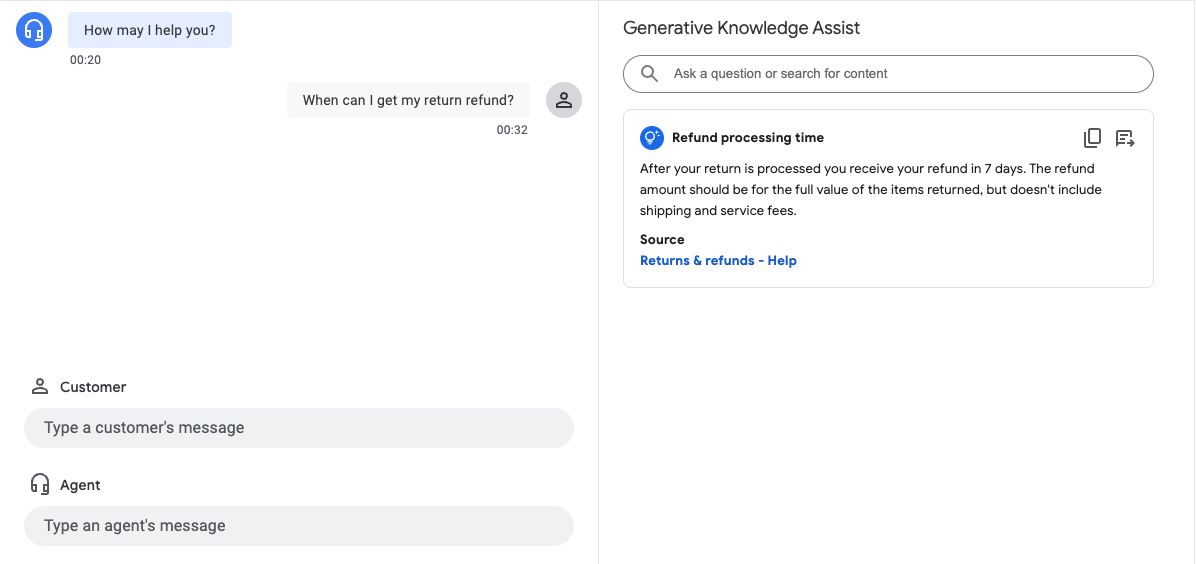
בדוגמה שלמעלה, הסוכן של מאגר הנתונים מבוסס-הזרימה מספק את ההצעות הבאות:
- הצעה לשאילתה: משך העיבוד של ההחזר הכספי.
- תשובה שנוצרה על ידי AI גנרטיבי: אחרי שההחזרה שלך תעובד, תקבל את ההחזר הכספי תוך 7 ימים. סכום ההחזר הכספי צריך להיות הערך המלא של הפריטים שהוחזרו, אבל הוא לא כולל דמי משלוח ועמלות שירות.
- שם מסמך הידע הרלוונטי: החזרות והחזרים כספיים – עזרה.
שלב 3: התראות על הצעות ללוח הזמנים ב-Pub/Sub
אתם יכולים להגדיר את השדה notificationConfig כשאתם יוצרים פרופיל שיחה כדי לקבל התראות על הצעות. באפשרות הזו נעשה שימוש ב-Pub/Sub כדי לשלוח התראות על הצעות לאפליקציה שלכם כשהשיחה מתקדמת והצעות חדשות זמינות.
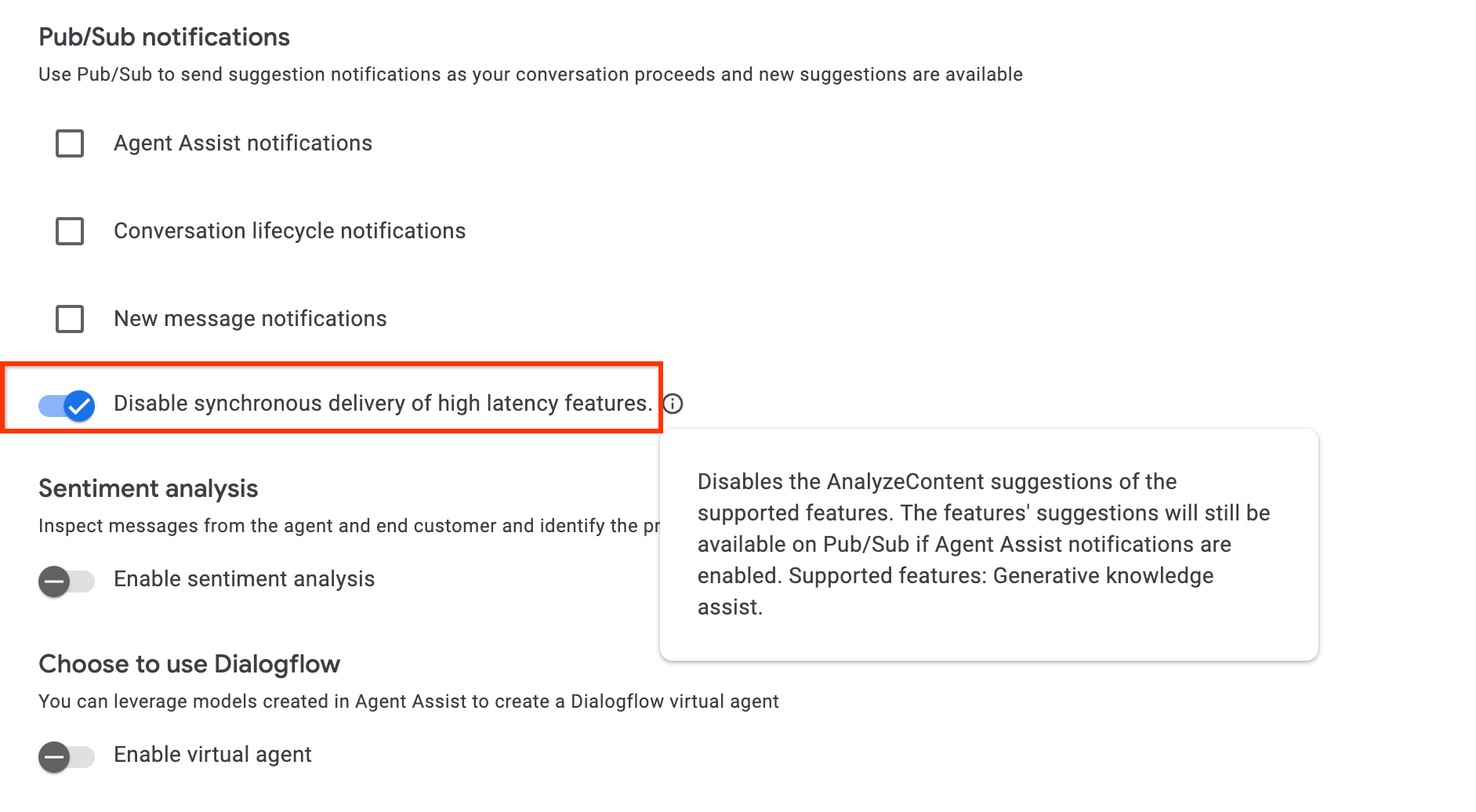
אם אתם משתמשים ב-API של AnalyzeContent כדי לבצע שילוב, אתם יכולים להפעיל את ההגדרה disable_high_latency_features_sync_delivery ב-ConversationProfile כדי לוודא שממשק AnalyzeContent API יגיב בלי לחכות להצעות של Proactive Knowledge Assist, ויספק את ההצעות דרך Pub/Sub.
אפשר גם להפעיל את ההגדרה הזו ממסוף Agent Assist.
גישה לנתונים באמצעות Customer Experience Insights
לחלופין, השאלות והתשובות שנוצרו על ידי התכונה 'סיוע פרואקטיבי ביצירת ידע גנרטיבי' מאוכלסות אוטומטית ב-Customer Experience Insights. כדי לגשת לנתונים האלה, פועלים לפי ההוראות במאמר הפעלת שילוב של זמן ריצה ב-Dialogflow.
שליחת משוב
הוראות לשליחת משוב מופיעות במאמר שליחת משוב ל-Agent Assist.
מענה לשאלות של סוכן
הנה דוגמה לבקשת JSON לשליחת משוב על מענה לשאלות של סוכן:
{
 "name": "projects/PROJECT_ID/locations/LOCATION_ID/answerRecords/ANSWER_RECORD_ID",
 "answerFeedback": {
   "displayed": true
   "clicked": true
   "correctnessLevel": "FULLY_CORRECT"
   "agentAssistantDetailFeedback": {
     "knowledgeSearchFeedback": {
       "answerCopied": true
       "clickedUris": [
         "url_1",
         "url_2",
         "url_3",
       ]
     }
   }
 }
}
הצעה יזומה של שאלות ותשובות
הדוגמה הבאה היא בקשת JSON לשליחת משוב על הצעות יזומות.
{
 "name": "projects/PROJECT_ID/locations/LOCATION_ID/answerRecords/ANSWER_RECORD_ID",
 "answerFeedback": {
   "displayed": true
   "clicked": true
   "correctnessLevel": "FULLY_CORRECT"
   "agentAssistantDetailFeedback": {
     "knowledgeAssistFeedback": {
       "answerCopied": true
       "clickedUris": [
         "url_1",
         "url_2",
         "url_3",
       ]
     }
   }
 }
}