הוספת כתוביות סמויות וכתוביות

בדף הזה מוסבר איך מוסיפים כתוביות סמויות וכתוביות לסרטון פלט.

כתוביות (או כתוביות סמויות) הן תצוגה חזותית של האודיו בסרטון. כתוביות הן בדרך כלל באותה שפה כמו האודיו, והן כוללות צלילי רקע ושינויים ברמקולים.

כתוביות משמשות בדרך כלל לתרגום הדיאלוג בסרטון לשפה אחרת. בדרך כלל הכתוביות לא כוללות צלילי רקע ושינויים ברמקולים.

בדף הזה אנחנו משתמשים במונח קובץ כתוביות קלט כדי להתייחס לקובץ טקסט שמכיל כתוביות סמויות או כתוביות. אתם מספקים את הקובץ הזה כקלט לעבודה.

הוספת כתוביות להגדרות האישיות של משימה

במאמר פורמטים נתמכים של קבצי קלט ופלט מפורטים הפורמטים הנתמכים של קובצי קלט של כתוביות. כדי לבדוק את ההגדרה, אנחנו מספקים קובץ וידאו לדוגמה וקובצי כתוביות לדוגמה.

בקטעים הבאים מוסבר איך להוסיף כתוביות להגדרת עבודה. בדף הזה אנחנו מניחים שאתם מכירים JobConfig בסיסי. מידע נוסף על יצירת משימות המרת קידוד זמין במאמר יצירה וניהול של משימות.

הוספת כתוביות

כדי ליצור משימה שמשבצת כתוביות בקונטיינר של קובץ הפלט של הסרטון:

  1. מוסיפים מערך inputs לתחילת הגדרות העבודה.

  2. מוסיפים אובייקט Input למערך inputs שמגדיר את המפתח ואת ה-URI של סרטון הקלט המשויך.

  3. מוסיפים עוד אובייקט Input שכולל את הנתיב לקובץ הכתוביות של הקלט.

  4. מוסיפים מערך editList להגדרות האישיות של המשימה. המערך הזה משמש להוספת קלט לציר הזמן של סרטון הפלט.

  5. מוסיפים אובייקט EditAtom למערך editList. האובייקט EditAtom הזה צריך להפנות למפתחות של סרטון הקלט והכתוביות שהוספתם במערך inputs. אפשר להגדיר startTimeOffset ו-endTimeOffset כדי לחתוך את סרטון הקלט.

  6. מוסיפים את הכתוביות למאגרי הפלט על ידי הוספת אובייקט textStream למערך elementaryStreams. מותר להטמיע רק סטרימינג אחד של טקסט, והוא מתווסף לכל סרטוני הפלט (כי יש רק ציר זמן אחד של פלט).

  7. משתמשים במערך mapping באובייקט ההגדרות textStream כדי להפנות למפתח האובייקט EditAtom.

ההגדרה לדוגמה הבאה מטמיעה כתוביות סמויות CEA-608 בסרטון.

אפשר להוסיף את ההגדרה הזו לתבנית של משימה או לכלול אותה בהגדרה של משימה אד-הוק:

REST

לפני שמשתמשים בנתוני הבקשה, צריך להחליף את הנתונים הבאים:

  • PROJECT_ID: מזהה הפרויקט ב- Google Cloud שמופיע בהגדרות IAM.
  • LOCATION: המיקום שבו המשימה תפעל. להשתמש באחד מהאזורים הנתמכים.
    הצגת מיקומים
    • us-central1
    • us-west1
    • us-west2
    • us-east1
    • us-east4
    • southamerica-east1
    • northamerica-northeast1
    • asia-east1
    • asia-northeast1
    • asia-northeast3
    • asia-south1
    • asia-southeast1
    • australia-southeast1
    • europe-west1
    • europe-west2
    • europe-west4
    • me-west1
    • me-central1
    • me-central2
  • STORAGE_BUCKET_NAME: השם של הקטגוריה שיצרתם ב-Cloud Storage.
  • STORAGE_INPUT_VIDEO: השם של סרטון בקטגוריית Cloud Storage שאתם מבצעים לו המרה, כמו my-vid.mp4. בשדה הזה צריך להביא בחשבון את כל התיקיות שיצרתם בדלי (לדוגמה, input/my-vid.mp4).
  • STORAGE_CAPTIONS_FILE: השם של קובץ הכתוביות בקטגוריה שלכם ב-Cloud Storage, כמו captions.srt. בשדה הזה צריך להביא בחשבון את כל התיקיות שיצרתם בדלי (לדוגמה, input/captions.srt).
  • STORAGE_OUTPUT_FOLDER: השם של תיקיית הפלט בקטגוריה של Cloud Storage שבה רוצים לשמור את פלט הסרטון המקודד.

כדי לשלוח את הבקשה צריך להרחיב אחת מהאפשרויות הבאות:

אתם אמורים לקבל תגובת JSON שדומה לזו:

{
  "name": "projects/PROJECT_NUMBER/locations/LOCATION/jobs/JOB_ID",
  "config": {
   ...
  },
  "state": "PENDING",
  "createTime": CREATE_TIME,
  "ttlAfterCompletionDays": 30
}

gcloud

לפני השימוש בנתוני הפקודה הבאים, צריך להחליף את הנתונים הבאים:

  • LOCATION: המיקום שבו המשימה תפעל. להשתמש באחד מהאזורים הנתמכים.
    הצגת מיקומים
    • us-central1
    • us-west1
    • us-west2
    • us-east1
    • us-east4
    • southamerica-east1
    • northamerica-northeast1
    • asia-east1
    • asia-northeast1
    • asia-northeast3
    • asia-south1
    • asia-southeast1
    • australia-southeast1
    • europe-west1
    • europe-west2
    • europe-west4
    • me-west1
    • me-central1
    • me-central2
  • STORAGE_BUCKET_NAME: השם של הקטגוריה שיצרתם ב-Cloud Storage.
  • STORAGE_INPUT_VIDEO: השם של סרטון בקטגוריית Cloud Storage שאתם מבצעים לו המרה, כמו my-vid.mp4. בשדה הזה צריך להביא בחשבון את כל התיקיות שיצרתם בדלי (לדוגמה, input/my-vid.mp4).
  • STORAGE_CAPTIONS_FILE: השם של קובץ הכתוביות בקטגוריה שלכם ב-Cloud Storage, כמו captions.srt. בשדה הזה צריך להביא בחשבון את כל התיקיות שיצרתם בדלי (לדוגמה, input/captions.srt).
  • STORAGE_OUTPUT_FOLDER: השם של תיקיית הפלט בקטגוריה של Cloud Storage שבה רוצים לשמור את פלט הסרטון המקודד.

שומרים את התוכן הבא בקובץ בשם request.json:

{
  "config": {
    "inputs": [
      {
        "key": "input0",
        "uri": "gs://STORAGE_BUCKET_NAME/STORAGE_INPUT_VIDEO"
      },
      {
        "key": "caption_input0",
        "uri": "gs://STORAGE_BUCKET_NAME/STORAGE_CAPTIONS_FILE"
      }
    ],
    "editList": [
      {
        "key": "atom0",
        "inputs": [
          "input0",
          "caption_input0"
        ]
      }
    ],
    "elementaryStreams": [
      {
        "key": "video-stream0",
        "videoStream": {
          "h264": {
            "heightPixels": 360,
            "widthPixels": 640,
            "bitrateBps": 550000,
            "frameRate": 60
          }
        }
      },
      {
        "key": "audio-stream0",
        "audioStream": {
          "codec": "aac",
          "bitrateBps": 64000
        }
      },
      {
        "key": "cea-stream0",
        "textStream": {
          "codec": "cea608",
          "mapping": [
            {
              "atomKey": "atom0",
              "inputKey": "caption_input0",
              "inputTrack": 0
            }
          ],
          "languageCode": "en-US",
          "displayName": "English"
        }
      }
    ],
    "muxStreams": [
      {
        "key": "sd-hls",
        "container": "ts",
        "elementaryStreams": [
          "video-stream0",
          "audio-stream0"
        ]
      },
      {
        "key": "sd-dash",
        "container": "fmp4",
        "elementaryStreams": [
          "video-stream0"
        ]
      },
      {
        "key": "audio-dash",
        "container": "fmp4",
        "elementaryStreams": [
          "audio-stream0"
        ]
      }
    ],
    "manifests": [
      {
        "fileName": "manifest.m3u8",
        "type": "HLS",
        "muxStreams": [
          "sd-hls"
        ]
      },
      {
        "fileName": "manifest.mpd",
        "type": "DASH",
        "muxStreams": [
          "sd-dash",
          "audio-dash"
        ]
      }
    ],
    "output": {
      "uri": "gs://STORAGE_BUCKET_NAME/STORAGE_OUTPUT_FOLDER/"
    }
  }
}

מריצים את הפקודה הבאה:

‫Linux,‏ macOS או Cloud Shell

gcloud transcoder jobs create --location=LOCATION --file=request.json

‏Windows (PowerShell)

gcloud transcoder jobs create --location=LOCATION --file=request.json

Windows‏ (cmd.exe)

gcloud transcoder jobs create --location=LOCATION --file=request.json

אמורים לקבל תגובה שדומה לזו:

{
  "name": "projects/PROJECT_NUMBER/locations/LOCATION/jobs/JOB_ID",
  "config": {
   ...
  },
  "state": "PENDING",
  "createTime": CREATE_TIME,
  "ttlAfterCompletionDays": 30
}

Go

לפני שמנסים את הדוגמה הזו, צריך לפעול לפי Goהוראות ההגדרה שבמדריך לתחילת העבודה עם Transcoder API באמצעות ספריות לקוח. מידע נוסף מופיע במאמרי העזרה של Transcoder API Go API.

כדי לבצע אימות ב-Transcoder API, צריך להגדיר את Application Default Credentials. מידע נוסף זמין במאמר הגדרת אימות לסביבת פיתוח מקומית.

import (
	"context"
	"fmt"
	"io"

	transcoder "cloud.google.com/go/video/transcoder/apiv1"
	"cloud.google.com/go/video/transcoder/apiv1/transcoderpb"
)

// createJobWithEmbeddedCaptions creates a job that embeds closed captions in the
// output video. See https://cloud.google.com/transcoder/docs/how-to/captions-and-subtitles
// for more information.
func createJobWithEmbeddedCaptions(w io.Writer, projectID string, location string, inputVideoURI string, inputCaptionsURI string, outputURI string) error {
	// projectID := "my-project-id"
	// location := "us-central1"
	// inputVideoURI := "gs://my-bucket/my-video-file"
	// inputCaptionsURI := "gs://my-bucket/my-captions-file"
	// outputURI := "gs://my-bucket/my-output-folder/"

	ctx := context.Background()
	client, err := transcoder.NewClient(ctx)
	if err != nil {
		return fmt.Errorf("NewClient: %w", err)
	}
	defer client.Close()

	// Set up elementary streams. The InputKey field refers to inputs in
	// the Inputs array defined the job config.
	elementaryStreams := []*transcoderpb.ElementaryStream{
		{
			Key: "video_stream0",
			ElementaryStream: &transcoderpb.ElementaryStream_VideoStream{
				VideoStream: &transcoderpb.VideoStream{
					CodecSettings: &transcoderpb.VideoStream_H264{
						H264: &transcoderpb.VideoStream_H264CodecSettings{
							BitrateBps:   550000,
							FrameRate:    60,
							HeightPixels: 360,
							WidthPixels:  640,
						},
					},
				},
			},
		},
		{
			Key: "audio_stream0",
			ElementaryStream: &transcoderpb.ElementaryStream_AudioStream{
				AudioStream: &transcoderpb.AudioStream{
					Codec:      "aac",
					BitrateBps: 64000,
				},
			},
		},
		{
			Key: "cea_stream0",
			ElementaryStream: &transcoderpb.ElementaryStream_TextStream{
				TextStream: &transcoderpb.TextStream{
					Codec: "cea608",
					Mapping: []*transcoderpb.TextStream_TextMapping{
						{
							AtomKey:    "atom0",
							InputKey:   "caption_input0",
							InputTrack: 0,
						},
					},
					LanguageCode: "en-US",
					DisplayName:  "English",
				},
			},
		},
	}

	req := &transcoderpb.CreateJobRequest{
		Parent: fmt.Sprintf("projects/%s/locations/%s", projectID, location),
		Job: &transcoderpb.Job{
			OutputUri: outputURI,
			JobConfig: &transcoderpb.Job_Config{
				Config: &transcoderpb.JobConfig{
					Inputs: []*transcoderpb.Input{
						{
							Key: "input0",
							Uri: inputVideoURI,
						},
						{
							Key: "caption_input0",
							Uri: inputCaptionsURI,
						},
					},
					EditList: []*transcoderpb.EditAtom{
						{
							Key:    "atom0",
							Inputs: []string{"input0", "caption_input0"},
						},
					},
					ElementaryStreams: elementaryStreams,
					MuxStreams: []*transcoderpb.MuxStream{
						{
							Key:               "sd-hls",
							Container:         "ts",
							ElementaryStreams: []string{"video_stream0", "audio_stream0"},
						},
						{
							Key:               "sd-dash",
							Container:         "fmp4",
							ElementaryStreams: []string{"video_stream0"},
						},
						{
							Key:               "audio-dash",
							Container:         "fmp4",
							ElementaryStreams: []string{"audio_stream0"},
						},
					},
					Manifests: []*transcoderpb.Manifest{
						{
							FileName:   "manifest.m3u8",
							Type:       transcoderpb.Manifest_HLS,
							MuxStreams: []string{"sd-hls"},
						},
						{
							FileName:   "manifest.mpd",
							Type:       transcoderpb.Manifest_DASH,
							MuxStreams: []string{"sd-dash", "audio-dash"},
						},
					},
				},
			},
		},
	}
	// Creates the job. Jobs take a variable amount of time to run.
	// You can query for the job state; see getJob() in get_job.go.
	response, err := client.CreateJob(ctx, req)
	if err != nil {
		return fmt.Errorf("CreateJob: %w", err)
	}

	fmt.Fprintf(w, "Job: %v", response.GetName())
	return nil
}

Java

לפני שמנסים את הדוגמה הזו, צריך לפעול לפי Javaהוראות ההגדרה שבמדריך לתחילת העבודה עם Transcoder API באמצעות ספריות לקוח. מידע נוסף מופיע במאמרי העזרה של Transcoder API Java API.

כדי לבצע אימות ב-Transcoder API, צריך להגדיר את Application Default Credentials. מידע נוסף זמין במאמר הגדרת אימות לסביבת פיתוח מקומית.


import com.google.cloud.video.transcoder.v1.AudioStream;
import com.google.cloud.video.transcoder.v1.CreateJobRequest;
import com.google.cloud.video.transcoder.v1.EditAtom;
import com.google.cloud.video.transcoder.v1.ElementaryStream;
import com.google.cloud.video.transcoder.v1.Input;
import com.google.cloud.video.transcoder.v1.Job;
import com.google.cloud.video.transcoder.v1.JobConfig;
import com.google.cloud.video.transcoder.v1.LocationName;
import com.google.cloud.video.transcoder.v1.Manifest;
import com.google.cloud.video.transcoder.v1.Manifest.ManifestType;
import com.google.cloud.video.transcoder.v1.MuxStream;
import com.google.cloud.video.transcoder.v1.Output;
import com.google.cloud.video.transcoder.v1.TextStream;
import com.google.cloud.video.transcoder.v1.TextStream.TextMapping;
import com.google.cloud.video.transcoder.v1.TranscoderServiceClient;
import com.google.cloud.video.transcoder.v1.VideoStream;
import java.io.IOException;

public class CreateJobWithEmbeddedCaptions {

  public static void main(String[] args) throws IOException {
    // TODO(developer): Replace these variables before running the sample.
    String projectId = "my-project-id";
    String location = "us-central1";
    String inputVideoUri = "gs://my-bucket/my-video-file";
    String inputCaptionsUri = "gs://my-bucket/my-captions-file";
    String outputUri = "gs://my-bucket/my-output-folder/";

    createJobWithEmbeddedCaptions(projectId, location, inputVideoUri, inputCaptionsUri, outputUri);
  }

  // Creates a job from an ad-hoc configuration that embeds captions in the output video.
  public static void createJobWithEmbeddedCaptions(
      String projectId,
      String location,
      String inputVideoUri,
      String inputCaptionsUri,
      String outputUri)
      throws IOException {
    // Initialize client that will be used to send requests. This client only needs to be created
    // once, and can be reused for multiple requests.
    try (TranscoderServiceClient transcoderServiceClient = TranscoderServiceClient.create()) {

      VideoStream videoStream0 =
          VideoStream.newBuilder()
              .setH264(
                  VideoStream.H264CodecSettings.newBuilder()
                      .setBitrateBps(550000)
                      .setFrameRate(60)
                      .setHeightPixels(360)
                      .setWidthPixels(640))
              .build();

      AudioStream audioStream0 =
          AudioStream.newBuilder().setCodec("aac").setBitrateBps(64000).build();

      TextStream textStream0 =
          TextStream.newBuilder()
              .setCodec("cea608")
              .addMapping(
                  0,
                  TextMapping.newBuilder()
                      .setAtomKey("atom0")
                      .setInputKey("caption_input0")
                      .setInputTrack(0)
                      .build())
              .build();

      JobConfig config =
          JobConfig.newBuilder()
              .addInputs(Input.newBuilder().setKey("input0").setUri(inputVideoUri))
              .addInputs(Input.newBuilder().setKey("caption_input0").setUri(inputCaptionsUri))
              .addEditList(
                  0, // Index in the edit list
                  EditAtom.newBuilder()
                      .setKey("atom0")
                      .addInputs("input0")
                      .addInputs("caption_input0")
                      .build())
              .setOutput(Output.newBuilder().setUri(outputUri))
              .addElementaryStreams(
                  ElementaryStream.newBuilder()
                      .setKey("video_stream0")
                      .setVideoStream(videoStream0))
              .addElementaryStreams(
                  ElementaryStream.newBuilder()
                      .setKey("audio_stream0")
                      .setAudioStream(audioStream0))
              .addElementaryStreams(
                  ElementaryStream.newBuilder().setKey("cea_stream0").setTextStream(textStream0))
              .addMuxStreams(
                  0,
                  MuxStream.newBuilder()
                      .setKey("sd")
                      .setContainer("mp4")
                      .addElementaryStreams("video_stream0")
                      .addElementaryStreams("audio_stream0")
                      .build())
              .addMuxStreams(
                  1,
                  MuxStream.newBuilder()
                      .setKey("sd_hls")
                      .setContainer("ts")
                      .addElementaryStreams("video_stream0")
                      .addElementaryStreams("audio_stream0")
                      .build())
              .addMuxStreams(
                  2,
                  MuxStream.newBuilder()
                      .setKey("sd_dash")
                      .setContainer("fmp4")
                      .addElementaryStreams("video_stream0")
                      .build())
              .addMuxStreams(
                  3,
                  MuxStream.newBuilder()
                      .setKey("audio_dash")
                      .setContainer("fmp4")
                      .addElementaryStreams("audio_stream0")
                      .build())
              .addManifests(
                  0,
                  Manifest.newBuilder()
                      .setFileName("manifest.m3u8")
                      .setType(ManifestType.HLS)
                      .addMuxStreams("sd_hls")
                      .build())
              .addManifests(
                  1,
                  Manifest.newBuilder()
                      .setFileName("manifest.mpd")
                      .setType(ManifestType.DASH)
                      .addMuxStreams("sd_dash")
                      .addMuxStreams("audio_dash")
                      .build())
              .build();

      CreateJobRequest createJobRequest =
          CreateJobRequest.newBuilder()
              .setJob(Job.newBuilder().setOutputUri(outputUri).setConfig(config).build())
              .setParent(LocationName.of(projectId, location).toString())
              .build();

      // Send the job creation request and process the response.
      Job job = transcoderServiceClient.createJob(createJobRequest);
      System.out.println("Job: " + job.getName());
    }
  }
}

Node.js

לפני שמנסים את הדוגמה הזו, צריך לפעול לפי Node.jsהוראות ההגדרה שבמדריך לתחילת העבודה עם Transcoder API באמצעות ספריות לקוח. מידע נוסף מופיע במאמרי העזרה של Transcoder API Node.js API.

כדי לבצע אימות ב-Transcoder API, צריך להגדיר את Application Default Credentials. מידע נוסף זמין במאמר הגדרת אימות לסביבת פיתוח מקומית.

/**
 * TODO(developer): Uncomment these variables before running the sample.
 */
// projectId = 'my-project-id';
// location = 'us-central1';
// inputVideoUri = 'gs://my-bucket/my-video-file';
// inputCaptionsUri = 'gs://my-bucket/my-captions-file';
// outputUri = 'gs://my-bucket/my-output-folder/';

// Imports the Transcoder library
const {TranscoderServiceClient} =
  require('@google-cloud/video-transcoder').v1;

// Instantiates a client
const transcoderServiceClient = new TranscoderServiceClient();

async function createJobWithEmbeddedCaptions() {
  // Construct request
  const request = {
    parent: transcoderServiceClient.locationPath(projectId, location),
    job: {
      outputUri: outputUri,
      config: {
        inputs: [
          {
            key: 'input0',
            uri: inputVideoUri,
          },
          {
            key: 'caption_input0',
            uri: inputCaptionsUri,
          },
        ],
        editList: [
          {
            key: 'atom0',
            inputs: ['input0', 'caption_input0'],
          },
        ],
        elementaryStreams: [
          {
            key: 'video-stream0',
            videoStream: {
              h264: {
                heightPixels: 360,
                widthPixels: 640,
                bitrateBps: 550000,
                frameRate: 60,
              },
            },
          },
          {
            key: 'audio-stream0',
            audioStream: {
              codec: 'aac',
              bitrateBps: 64000,
            },
          },
          {
            key: 'cea-stream0',
            textStream: {
              codec: 'cea608',
              mapping: [
                {
                  atomKey: 'atom0',
                  inputKey: 'caption_input0',
                  inputTrack: 0,
                },
              ],
              languageCode: 'en-US',
              displayName: 'English',
            },
          },
        ],
        muxStreams: [
          {
            key: 'sd-hls',
            container: 'ts',
            elementaryStreams: ['video-stream0', 'audio-stream0'],
          },
          {
            key: 'sd-dash',
            container: 'fmp4',
            elementaryStreams: ['video-stream0'],
          },
          {
            key: 'audio-dash',
            container: 'fmp4',
            elementaryStreams: ['audio-stream0'],
          },
        ],
        manifests: [
          {
            fileName: 'manifest.m3u8',
            type: 'HLS',
            muxStreams: ['sd-hls'],
          },
          {
            fileName: 'manifest.mpd',
            type: 'DASH',
            muxStreams: ['sd-dash', 'audio-dash'],
          },
        ],
      },
    },
  };

  // Run request
  const [response] = await transcoderServiceClient.createJob(request);
  console.log(`Job: ${response.name}`);
}

createJobWithEmbeddedCaptions();

Python

לפני שמנסים את הדוגמה הזו, צריך לפעול לפי Pythonהוראות ההגדרה שבמדריך לתחילת העבודה עם Transcoder API באמצעות ספריות לקוח. מידע נוסף מופיע במאמרי העזרה של Transcoder API Python API.

כדי לבצע אימות ב-Transcoder API, צריך להגדיר את Application Default Credentials. מידע נוסף זמין במאמר הגדרת אימות לסביבת פיתוח מקומית.


import argparse

from google.cloud.video import transcoder_v1
from google.cloud.video.transcoder_v1.services.transcoder_service import (
    TranscoderServiceClient,
)


def create_job_with_embedded_captions(
    project_id: str,
    location: str,
    input_video_uri: str,
    input_captions_uri: str,
    output_uri: str,
) -> transcoder_v1.types.resources.Job:
    """Creates a job based on an ad-hoc job configuration that embeds closed captions in the output video.

    Args:
        project_id (str): The GCP project ID.
        location (str): The location to start the job in.
        input_video_uri (str): Uri of the input video in the Cloud Storage
          bucket.
        input_captions_uri (str): Uri of the input captions file in the Cloud
          Storage bucket.
        output_uri (str): Uri of the video output folder in the Cloud Storage
          bucket.

    Returns:
        The job resource.
    """

    client = TranscoderServiceClient()

    parent = f"projects/{project_id}/locations/{location}"
    job = transcoder_v1.types.Job()
    job.output_uri = output_uri
    job.config = transcoder_v1.types.JobConfig(
        inputs=[
            transcoder_v1.types.Input(
                key="input0",
                uri=input_video_uri,
            ),
            transcoder_v1.types.Input(
                key="caption-input0",
                uri=input_captions_uri,
            ),
        ],
        edit_list=[
            transcoder_v1.types.EditAtom(
                key="atom0",
                inputs=["input0", "caption-input0"],
            ),
        ],
        elementary_streams=[
            transcoder_v1.types.ElementaryStream(
                key="video-stream0",
                video_stream=transcoder_v1.types.VideoStream(
                    h264=transcoder_v1.types.VideoStream.H264CodecSettings(
                        height_pixels=360,
                        width_pixels=640,
                        bitrate_bps=550000,
                        frame_rate=60,
                    ),
                ),
            ),
            transcoder_v1.types.ElementaryStream(
                key="audio-stream0",
                audio_stream=transcoder_v1.types.AudioStream(
                    codec="aac",
                    bitrate_bps=64000,
                ),
            ),
            transcoder_v1.types.ElementaryStream(
                key="cea-stream0",
                text_stream=transcoder_v1.types.TextStream(
                    codec="cea608",
                    mapping_=[
                        transcoder_v1.types.TextStream.TextMapping(
                            atom_key="atom0",
                            input_key="caption-input0",
                            input_track=0,
                        ),
                    ],
                    language_code="en-US",
                    display_name="English",
                ),
            ),
        ],
        mux_streams=[
            transcoder_v1.types.MuxStream(
                key="sd-hls",
                container="ts",
                elementary_streams=["video-stream0", "audio-stream0"],
            ),
            transcoder_v1.types.MuxStream(
                key="sd-dash",
                container="fmp4",
                elementary_streams=["video-stream0"],
            ),
            transcoder_v1.types.MuxStream(
                key="audio-dash",
                container="fmp4",
                elementary_streams=["audio-stream0"],
            ),
        ],
        manifests=[
            transcoder_v1.types.Manifest(
                file_name="manifest.m3u8",
                type_="HLS",
                mux_streams=["sd-hls"],
            ),
            transcoder_v1.types.Manifest(
                file_name="manifest.mpd",
                type_="DASH",
                mux_streams=["sd-dash", "audio-dash"],
            ),
        ],
    )
    response = client.create_job(parent=parent, job=job)
    print(f"Job: {response.name}")
    return response

הוספת כתוביות

כדי ליצור משימה שמפיקה קובצי כתוביות בכמה שפות שמופעלים ממניפסט, פועלים לפי השלבים הבאים:

  1. מוסיפים מערך inputs להגדרות האישיות של המשימה.

  2. מוסיפים אובייקט Input למערך inputs שמגדיר את המפתח ואת ה-URI של סרטון הקלט המשויך.

  3. מוסיפים עוד אובייקט Input שמגדיר את ה-URI של קובץ הכתוביות לקלט.

  4. מוסיפים מערך editList להגדרה. המערך הזה משמש להוספת הקלט לציר הזמן של סרטון הפלט.

  5. מוסיפים אובייקט EditAtom למערך editList שמפנה לאובייקטים במערך inputs לפי מפתח. אפשר להגדיר startTimeOffset ו-endTimeOffset כדי לחתוך את סרטון הקלט.

  6. מוסיפים את הכתוביות למאגרי הפלט על ידי הוספת אובייקט textStream למערך elementaryStreams.

  7. לקובץ הכתוביות העצמאי, מציינים את המאגר במערך muxStream. אפשר לראות את האובייקטים עם המפתחות text-vtt-en ו-text-vtt-es בהגדרה הבאה. כדי להוסיף כתוביות מוטמעות, צריך רק את הזרם הבסיסי.

התצורה הבאה יוצרת כמה קובצי WebVTT, אחד לכתוביות באנגלית ואחד לכתוביות בספרדית. כתוביות DASH בקובצי WebVTT נוצרות בפורמט המכולה fMP4.

אפשר להוסיף את ההגדרה הזו לתבנית של משימה או לכלול אותה בהגדרה של משימה אד-הוק:

REST

לפני שמשתמשים בנתוני הבקשה, צריך להחליף את הנתונים הבאים:

  • PROJECT_ID: מזהה הפרויקט ב- Google Cloud שמופיע בהגדרות IAM.
  • LOCATION: המיקום שבו המשימה תפעל. להשתמש באחד מהאזורים הנתמכים.
    הצגת מיקומים
    • us-central1
    • us-west1
    • us-west2
    • us-east1
    • us-east4
    • southamerica-east1
    • northamerica-northeast1
    • asia-east1
    • asia-northeast1
    • asia-northeast3
    • asia-south1
    • asia-southeast1
    • australia-southeast1
    • europe-west1
    • europe-west2
    • europe-west4
    • me-west1
    • me-central1
    • me-central2
  • STORAGE_BUCKET_NAME: השם של הקטגוריה שיצרתם ב-Cloud Storage.
  • STORAGE_INPUT_VIDEO: השם של סרטון בקטגוריית Cloud Storage שאתם מבצעים לו המרה, כמו my-vid.mp4. בשדה הזה צריך להביא בחשבון את כל התיקיות שיצרתם בדלי (לדוגמה, input/my-vid.mp4).
  • STORAGE_SUBTITLES_FILE1: השם של קובץ הכתוביות בקטגוריה שלכם ב-Cloud Storage, לדוגמה subtitles-en.srt לכתוביות באנגלית. בשדה הזה צריך להביא בחשבון את כל התיקיות שיצרתם בדלי (לדוגמה, input/subtitles-en.srt).
  • STORAGE_SUBTITLES_FILE2: השם של קובץ כתוביות אחר בקטגוריה שלכם ב-Cloud Storage, למשל subtitles-es.srt, לכתוביות בספרדית. בשדה הזה צריך להביא בחשבון את כל התיקיות שיצרתם בדלי (לדוגמה, input/subtitles-es.srt).
  • STORAGE_OUTPUT_FOLDER: השם של תיקיית הפלט בקטגוריה של Cloud Storage שבה רוצים לשמור את פלט הסרטון המקודד.

כדי לשלוח את הבקשה צריך להרחיב אחת מהאפשרויות הבאות:

אתם אמורים לקבל תגובת JSON שדומה לזו:

{
  "name": "projects/PROJECT_NUMBER/locations/LOCATION/jobs/JOB_ID",
  "config": {
   ...
  },
  "state": "PENDING",
  "createTime": CREATE_TIME,
  "ttlAfterCompletionDays": 30
}

gcloud

לפני השימוש בנתוני הפקודה הבאים, צריך להחליף את הנתונים הבאים:

  • LOCATION: המיקום שבו המשימה תפעל. להשתמש באחד מהאזורים הנתמכים.
    הצגת מיקומים
    • us-central1
    • us-west1
    • us-west2
    • us-east1
    • us-east4
    • southamerica-east1
    • northamerica-northeast1
    • asia-east1
    • asia-northeast1
    • asia-northeast3
    • asia-south1
    • asia-southeast1
    • australia-southeast1
    • europe-west1
    • europe-west2
    • europe-west4
    • me-west1
    • me-central1
    • me-central2
  • STORAGE_BUCKET_NAME: השם של הקטגוריה שיצרתם ב-Cloud Storage.
  • STORAGE_INPUT_VIDEO: השם של סרטון בקטגוריית Cloud Storage שאתם מבצעים לו המרה, כמו my-vid.mp4. בשדה הזה צריך להביא בחשבון את כל התיקיות שיצרתם בדלי (לדוגמה, input/my-vid.mp4).
  • STORAGE_SUBTITLES_FILE1: השם של קובץ הכתוביות בקטגוריה שלכם ב-Cloud Storage, לדוגמה subtitles-en.srt לכתוביות באנגלית. בשדה הזה צריך להביא בחשבון את כל התיקיות שיצרתם בדלי (לדוגמה, input/subtitles-en.srt).
  • STORAGE_SUBTITLES_FILE2: השם של קובץ כתוביות אחר בקטגוריה שלכם ב-Cloud Storage, למשל subtitles-es.srt, לכתוביות בספרדית. בשדה הזה צריך להביא בחשבון את כל התיקיות שיצרתם בדלי (לדוגמה, input/subtitles-es.srt).
  • STORAGE_OUTPUT_FOLDER: השם של תיקיית הפלט בקטגוריה של Cloud Storage שבה רוצים לשמור את פלט הסרטון המקודד.

שומרים את התוכן הבא בקובץ בשם request.json:

{
  "config": {
    "inputs": [
      {
        "key": "input0",
        "uri": "gs://STORAGE_BUCKET_NAME/STORAGE_INPUT_VIDEO"
      },
      {
        "key": "subtitle_input_en",
        "uri": "gs://STORAGE_BUCKET_NAME/STORAGE_SUBTITLES_FILE1"
      },
      {
        "key": "subtitle_input_es",
        "uri": "gs://STORAGE_BUCKET_NAME/STORAGE_SUBTITLES_FILE2"
      }
    ],
    "editList": [
      {
        "key": "atom0",
        "inputs": [
          "input0",
          "subtitle_input_en",
          "subtitle_input_es"
        ]
      }
    ],
    "elementaryStreams": [
      {
        "key": "video-stream0",
        "videoStream": {
          "h264": {
            "heightPixels": 360,
            "widthPixels": 640,
            "bitrateBps": 550000,
            "frameRate": 60
          }
        }
      },
      {
        "key": "audio-stream0",
        "audioStream": {
          "codec": "aac",
          "bitrateBps": 64000
        }
      },
      {
        "key": "vtt-stream-en",
        "textStream": {
          "codec": "webvtt",
          "languageCode": "en-US",
          "displayName": "English",
          "mapping": [
            {
              "atomKey": "atom0",
              "inputKey": "subtitle_input_en"
            }
          ]
        }
      },
      {
        "key": "vtt-stream-es",
        "textStream": {
          "codec": "webvtt",
          "languageCode": "es-ES",
          "displayName": "Spanish",
          "mapping": [
            {
              "atomKey": "atom0",
              "inputKey": "subtitle_input_es"
            }
          ]
        }
      }
    ],
    "muxStreams": [
      {
        "key": "sd-hls-fmp4",
        "container": "fmp4",
        "elementaryStreams": [
          "video-stream0"
        ]
      },
      {
        "key": "audio-hls-fmp4",
        "container": "fmp4",
        "elementaryStreams": [
          "audio-stream0"
        ]
      },
      {
        "key": "text-vtt-en",
        "container": "vtt",
        "elementaryStreams": [
          "vtt-stream-en"
        ],
        "segmentSettings": {
          "segmentDuration": "6s",
          "individualSegments": true
        }
      },
      {
        "key": "text-vtt-es",
        "container": "vtt",
        "elementaryStreams": [
          "vtt-stream-es"
        ],
        "segmentSettings": {
          "segmentDuration": "6s",
          "individualSegments": true
        }
      }
    ],
    "manifests": [
      {
        "fileName": "manifest.m3u8",
        "type": "HLS",
        "muxStreams": [
          "sd-hls-fmp4",
          "audio-hls-fmp4",
          "text-vtt-en",
          "text-vtt-es"
        ]
      }
    ],
    "output": {
      "uri": "gs://STORAGE_BUCKET_NAME/STORAGE_OUTPUT_FOLDER/"
    }
  }
}

מריצים את הפקודה הבאה:

‫Linux,‏ macOS או Cloud Shell

gcloud transcoder jobs create --location=LOCATION --file=request.json

‏Windows (PowerShell)

gcloud transcoder jobs create --location=LOCATION --file=request.json

Windows‏ (cmd.exe)

gcloud transcoder jobs create --location=LOCATION --file=request.json

אמורים לקבל תגובה שדומה לזו:

{
  "name": "projects/PROJECT_NUMBER/locations/LOCATION/jobs/JOB_ID",
  "config": {
   ...
  },
  "state": "PENDING",
  "createTime": CREATE_TIME,
  "ttlAfterCompletionDays": 30
}

Go

לפני שמנסים את הדוגמה הזו, צריך לפעול לפי Goהוראות ההגדרה שבמדריך לתחילת העבודה עם Transcoder API באמצעות ספריות לקוח. מידע נוסף מופיע במאמרי העזרה של Transcoder API Go API.

כדי לבצע אימות ב-Transcoder API, צריך להגדיר את Application Default Credentials. מידע נוסף זמין במאמר הגדרת אימות לסביבת פיתוח מקומית.

import (
	"context"
	"fmt"
	"io"

	"github.com/golang/protobuf/ptypes/duration"

	transcoder "cloud.google.com/go/video/transcoder/apiv1"
	"cloud.google.com/go/video/transcoder/apiv1/transcoderpb"
)

// createJobWithStandaloneCaptions creates a job that can use subtitles from a
// standalone file. See https://cloud.google.com/transcoder/docs/how-to/captions-and-subtitles
// for more information.
func createJobWithStandaloneCaptions(w io.Writer, projectID string, location string, inputVideoURI string, inputSubtitles1URI string, inputSubtitles2URI string, outputURI string) error {
	// projectID := "my-project-id"
	// location := "us-central1"
	// inputVideoURI := "gs://my-bucket/my-video-file"
	// inputSubtitles1URI := "gs://my-bucket/my-subtitles-file1"
	// inputSubtitles2URI := "gs://my-bucket/my-subtitles-file2"
	// outputURI := "gs://my-bucket/my-output-folder/"

	ctx := context.Background()
	client, err := transcoder.NewClient(ctx)
	if err != nil {
		return fmt.Errorf("NewClient: %w", err)
	}
	defer client.Close()

	// Set up elementary streams. The InputKey field refers to inputs in
	// the Inputs array defined the job config.
	elementaryStreams := []*transcoderpb.ElementaryStream{
		{
			Key: "video_stream0",
			ElementaryStream: &transcoderpb.ElementaryStream_VideoStream{
				VideoStream: &transcoderpb.VideoStream{
					CodecSettings: &transcoderpb.VideoStream_H264{
						H264: &transcoderpb.VideoStream_H264CodecSettings{
							BitrateBps:   550000,
							FrameRate:    60,
							HeightPixels: 360,
							WidthPixels:  640,
						},
					},
				},
			},
		},
		{
			Key: "audio_stream0",
			ElementaryStream: &transcoderpb.ElementaryStream_AudioStream{
				AudioStream: &transcoderpb.AudioStream{
					Codec:      "aac",
					BitrateBps: 64000,
				},
			},
		},
		{
			Key: "vtt_stream_en",
			ElementaryStream: &transcoderpb.ElementaryStream_TextStream{
				TextStream: &transcoderpb.TextStream{
					Codec:        "webvtt",
					LanguageCode: "en-US",
					DisplayName:  "English",
					Mapping: []*transcoderpb.TextStream_TextMapping{
						{
							AtomKey:  "atom0",
							InputKey: "subtitle_input_en",
						},
					},
				},
			},
		},
		{
			Key: "vtt_stream_es",
			ElementaryStream: &transcoderpb.ElementaryStream_TextStream{
				TextStream: &transcoderpb.TextStream{
					Codec:        "webvtt",
					LanguageCode: "es-ES",
					DisplayName:  "Spanish",
					Mapping: []*transcoderpb.TextStream_TextMapping{
						{
							AtomKey:  "atom0",
							InputKey: "subtitle_input_es",
						},
					},
				},
			},
		},
	}

	req := &transcoderpb.CreateJobRequest{
		Parent: fmt.Sprintf("projects/%s/locations/%s", projectID, location),
		Job: &transcoderpb.Job{
			OutputUri: outputURI,
			JobConfig: &transcoderpb.Job_Config{
				Config: &transcoderpb.JobConfig{
					Inputs: []*transcoderpb.Input{
						{
							Key: "input0",
							Uri: inputVideoURI,
						},
						{
							Key: "subtitle_input_en",
							Uri: inputSubtitles1URI,
						},
						{
							Key: "subtitle_input_es",
							Uri: inputSubtitles2URI,
						},
					},
					EditList: []*transcoderpb.EditAtom{
						{
							Key:    "atom0",
							Inputs: []string{"input0", "subtitle_input_en", "subtitle_input_es"},
						},
					},
					ElementaryStreams: elementaryStreams,
					MuxStreams: []*transcoderpb.MuxStream{
						{
							Key:               "sd-hls-fmp4",
							Container:         "fmp4",
							ElementaryStreams: []string{"video_stream0"},
						},
						{
							Key:               "audio-hls-fmp4",
							Container:         "fmp4",
							ElementaryStreams: []string{"audio_stream0"},
						},
						{
							Key:               "text-vtt-en",
							Container:         "vtt",
							ElementaryStreams: []string{"vtt_stream_en"},
							SegmentSettings: &transcoderpb.SegmentSettings{
								SegmentDuration: &duration.Duration{
									Seconds: 6,
								},
								IndividualSegments: true,
							},
						},
						{
							Key:               "text-vtt-es",
							Container:         "vtt",
							ElementaryStreams: []string{"vtt_stream_es"},
							SegmentSettings: &transcoderpb.SegmentSettings{
								SegmentDuration: &duration.Duration{
									Seconds: 6,
								},
								IndividualSegments: true,
							},
						},
					},
					Manifests: []*transcoderpb.Manifest{
						{
							FileName:   "manifest.m3u8",
							Type:       transcoderpb.Manifest_HLS,
							MuxStreams: []string{"sd-hls-fmp4", "audio-hls-fmp4", "text-vtt-en", "text-vtt-es"},
						},
					},
				},
			},
		},
	}
	// Creates the job. Jobs take a variable amount of time to run.
	// You can query for the job state; see getJob() in get_job.go.
	response, err := client.CreateJob(ctx, req)
	if err != nil {
		return fmt.Errorf("CreateJob: %w", err)
	}

	fmt.Fprintf(w, "Job: %v", response.GetName())
	return nil
}

Java

לפני שמנסים את הדוגמה הזו, צריך לפעול לפי Javaהוראות ההגדרה שבמדריך לתחילת העבודה עם Transcoder API באמצעות ספריות לקוח. מידע נוסף מופיע במאמרי העזרה של Transcoder API Java API.

כדי לבצע אימות ב-Transcoder API, צריך להגדיר את Application Default Credentials. מידע נוסף זמין במאמר הגדרת אימות לסביבת פיתוח מקומית.


import com.google.cloud.video.transcoder.v1.AudioStream;
import com.google.cloud.video.transcoder.v1.CreateJobRequest;
import com.google.cloud.video.transcoder.v1.EditAtom;
import com.google.cloud.video.transcoder.v1.ElementaryStream;
import com.google.cloud.video.transcoder.v1.Input;
import com.google.cloud.video.transcoder.v1.Job;
import com.google.cloud.video.transcoder.v1.JobConfig;
import com.google.cloud.video.transcoder.v1.LocationName;
import com.google.cloud.video.transcoder.v1.Manifest;
import com.google.cloud.video.transcoder.v1.Manifest.ManifestType;
import com.google.cloud.video.transcoder.v1.MuxStream;
import com.google.cloud.video.transcoder.v1.Output;
import com.google.cloud.video.transcoder.v1.SegmentSettings;
import com.google.cloud.video.transcoder.v1.TextStream;
import com.google.cloud.video.transcoder.v1.TextStream.TextMapping;
import com.google.cloud.video.transcoder.v1.TranscoderServiceClient;
import com.google.cloud.video.transcoder.v1.VideoStream;
import com.google.protobuf.Duration;
import java.io.IOException;

public class CreateJobWithStandaloneCaptions {

  public static void main(String[] args) throws IOException {
    // TODO(developer): Replace these variables before running the sample.
    String projectId = "my-project-id";
    String location = "us-central1";
    String inputVideoUri = "gs://my-bucket/my-video-file";
    String inputCaptionsUri = "gs://my-bucket/my-captions-file";
    String outputUri = "gs://my-bucket/my-output-folder/";

    createJobWithStandaloneCaptions(
        projectId, location, inputVideoUri, inputCaptionsUri, outputUri);
  }

  // Creates a job from an ad-hoc configuration that can use captions from a standalone file.
  public static void createJobWithStandaloneCaptions(
      String projectId,
      String location,
      String inputVideoUri,
      String inputCaptionsUri,
      String outputUri)
      throws IOException {
    // Initialize client that will be used to send requests. This client only needs to be created
    // once, and can be reused for multiple requests.
    try (TranscoderServiceClient transcoderServiceClient = TranscoderServiceClient.create()) {

      VideoStream videoStream0 =
          VideoStream.newBuilder()
              .setH264(
                  VideoStream.H264CodecSettings.newBuilder()
                      .setBitrateBps(550000)
                      .setFrameRate(60)
                      .setHeightPixels(360)
                      .setWidthPixels(640))
              .build();

      AudioStream audioStream0 =
          AudioStream.newBuilder().setCodec("aac").setBitrateBps(64000).build();

      TextStream textStream0 =
          TextStream.newBuilder()
              .setCodec("webvtt")
              .addMapping(
                  0,
                  TextMapping.newBuilder()
                      .setAtomKey("atom0")
                      .setInputKey("caption_input0")
                      .setInputTrack(0)
                      .build())
              .build();

      JobConfig config =
          JobConfig.newBuilder()
              .addInputs(Input.newBuilder().setKey("input0").setUri(inputVideoUri))
              .addInputs(Input.newBuilder().setKey("caption_input0").setUri(inputCaptionsUri))
              .addEditList(
                  0, // Index in the edit list
                  EditAtom.newBuilder()
                      .setKey("atom0")
                      .addInputs("input0")
                      .addInputs("caption_input0")
                      .build())
              .setOutput(Output.newBuilder().setUri(outputUri))
              .addElementaryStreams(
                  ElementaryStream.newBuilder()
                      .setKey("video_stream0")
                      .setVideoStream(videoStream0))
              .addElementaryStreams(
                  ElementaryStream.newBuilder()
                      .setKey("audio_stream0")
                      .setAudioStream(audioStream0))
              .addElementaryStreams(
                  ElementaryStream.newBuilder().setKey("vtt_stream0").setTextStream(textStream0))
              .addMuxStreams(
                  0,
                  MuxStream.newBuilder()
                      .setKey("sd_hls_fmp4")
                      .setContainer("fmp4")
                      .addElementaryStreams("video_stream0")
                      .build())
              .addMuxStreams(
                  1,
                  MuxStream.newBuilder()
                      .setKey("audio_hls_fmp4")
                      .setContainer("fmp4")
                      .addElementaryStreams("audio_stream0")
                      .build())
              .addMuxStreams(
                  2,
                  MuxStream.newBuilder()
                      .setKey("text_vtt")
                      .setContainer("vtt")
                      .addElementaryStreams("vtt_stream0")
                      .setSegmentSettings(
                          SegmentSettings.newBuilder()
                              .setSegmentDuration(Duration.newBuilder().setSeconds(6).build())
                              .setIndividualSegments(true)
                              .build())
                      .build())
              .addManifests(
                  0,
                  Manifest.newBuilder()
                      .setFileName("manifest.m3u8")
                      .setType(ManifestType.HLS)
                      .addMuxStreams("sd_hls_fmp4")
                      .addMuxStreams("audio_hls_fmp4")
                      .addMuxStreams("text_vtt")
                      .build())
              .build();

      CreateJobRequest createJobRequest =
          CreateJobRequest.newBuilder()
              .setJob(Job.newBuilder().setOutputUri(outputUri).setConfig(config).build())
              .setParent(LocationName.of(projectId, location).toString())
              .build();

      // Send the job creation request and process the response.
      Job job = transcoderServiceClient.createJob(createJobRequest);
      System.out.println("Job: " + job.getName());
    }
  }
}

Node.js

לפני שמנסים את הדוגמה הזו, צריך לפעול לפי Node.jsהוראות ההגדרה שבמדריך לתחילת העבודה עם Transcoder API באמצעות ספריות לקוח. מידע נוסף מופיע במאמרי העזרה של Transcoder API Node.js API.

כדי לבצע אימות ב-Transcoder API, צריך להגדיר את Application Default Credentials. מידע נוסף זמין במאמר הגדרת אימות לסביבת פיתוח מקומית.

/**
 * TODO(developer): Uncomment these variables before running the sample.
 */
// projectId = 'my-project-id';
// location = 'us-central1';
// inputVideoUri = 'gs://my-bucket/my-video-file';
// inputSubtitles1Uri = 'gs://my-bucket/my-captions-file1';
// inputSubtitles2Uri = 'gs://my-bucket/my-captions-file2';
// outputUri = 'gs://my-bucket/my-output-folder/';

// Imports the Transcoder library
const {TranscoderServiceClient} =
  require('@google-cloud/video-transcoder').v1;

// Instantiates a client
const transcoderServiceClient = new TranscoderServiceClient();

async function createJobWithStandaloneCaptions() {
  // Construct request
  const request = {
    parent: transcoderServiceClient.locationPath(projectId, location),
    job: {
      outputUri: outputUri,
      config: {
        inputs: [
          {
            key: 'input0',
            uri: inputVideoUri,
          },
          {
            key: 'subtitle_input_en',
            uri: inputSubtitles1Uri,
          },
          {
            key: 'subtitle_input_es',
            uri: inputSubtitles2Uri,
          },
        ],
        editList: [
          {
            key: 'atom0',
            inputs: ['input0', 'subtitle_input_en', 'subtitle_input_es'],
          },
        ],
        elementaryStreams: [
          {
            key: 'video-stream0',
            videoStream: {
              h264: {
                heightPixels: 360,
                widthPixels: 640,
                bitrateBps: 550000,
                frameRate: 60,
              },
            },
          },
          {
            key: 'audio-stream0',
            audioStream: {
              codec: 'aac',
              bitrateBps: 64000,
            },
          },
          {
            key: 'vtt-stream-en',
            textStream: {
              codec: 'webvtt',
              languageCode: 'en-US',
              displayName: 'English',
              mapping: [
                {
                  atomKey: 'atom0',
                  inputKey: 'subtitle_input_en',
                },
              ],
            },
          },
          {
            key: 'vtt-stream-es',
            textStream: {
              codec: 'webvtt',
              languageCode: 'es-ES',
              displayName: 'Spanish',
              mapping: [
                {
                  atomKey: 'atom0',
                  inputKey: 'subtitle_input_es',
                },
              ],
            },
          },
        ],
        muxStreams: [
          {
            key: 'sd-hls-fmp4',
            container: 'fmp4',
            elementaryStreams: ['video-stream0'],
          },
          {
            key: 'audio-hls-fmp4',
            container: 'fmp4',
            elementaryStreams: ['audio-stream0'],
          },
          {
            key: 'text-vtt-en',
            container: 'vtt',
            elementaryStreams: ['vtt-stream-en'],
            segmentSettings: {
              segmentDuration: {
                seconds: 6,
              },
              individualSegments: true,
            },
          },
          {
            key: 'text-vtt-es',
            container: 'vtt',
            elementaryStreams: ['vtt-stream-es'],
            segmentSettings: {
              segmentDuration: {
                seconds: 6,
              },
              individualSegments: true,
            },
          },
        ],
        manifests: [
          {
            fileName: 'manifest.m3u8',
            type: 'HLS',
            muxStreams: [
              'sd-hls-fmp4',
              'audio-hls-fmp4',
              'text-vtt-en',
              'text-vtt-es',
            ],
          },
        ],
      },
    },
  };

  // Run request
  const [response] = await transcoderServiceClient.createJob(request);
  console.log(`Job: ${response.name}`);
}

createJobWithStandaloneCaptions();

Python

לפני שמנסים את הדוגמה הזו, צריך לפעול לפי Pythonהוראות ההגדרה שבמדריך לתחילת העבודה עם Transcoder API באמצעות ספריות לקוח. מידע נוסף מופיע במאמרי העזרה של Transcoder API Python API.

כדי לבצע אימות ב-Transcoder API, צריך להגדיר את Application Default Credentials. מידע נוסף זמין במאמר הגדרת אימות לסביבת פיתוח מקומית.


import argparse

from google.cloud.video import transcoder_v1
from google.cloud.video.transcoder_v1.services.transcoder_service import (
    TranscoderServiceClient,
)
from google.protobuf import duration_pb2 as duration


def create_job_with_standalone_captions(
    project_id: str,
    location: str,
    input_video_uri: str,
    input_subtitles1_uri: str,
    input_subtitles2_uri: str,
    output_uri: str,
) -> transcoder_v1.types.resources.Job:
    """Creates a job based on an ad-hoc job configuration that can use subtitles from a standalone file.

    Args:
        project_id (str): The GCP project ID.
        location (str): The location to start the job in.
        input_video_uri (str): Uri of the input video in the Cloud Storage
          bucket.
        input_subtitles1_uri (str): Uri of an input subtitles file in the Cloud
          Storage bucket.
        input_subtitles2_uri (str): Uri of an input subtitles file in the Cloud
          Storage bucket.
        output_uri (str): Uri of the video output folder in the Cloud Storage
          bucket.

    Returns:
        The job resource.
    """

    client = TranscoderServiceClient()

    parent = f"projects/{project_id}/locations/{location}"
    job = transcoder_v1.types.Job()
    job.output_uri = output_uri
    job.config = transcoder_v1.types.JobConfig(
        inputs=[
            transcoder_v1.types.Input(
                key="input0",
                uri=input_video_uri,
            ),
            transcoder_v1.types.Input(
                key="subtitle-input-en",
                uri=input_subtitles1_uri,
            ),
            transcoder_v1.types.Input(
                key="subtitle-input-es",
                uri=input_subtitles2_uri,
            ),
        ],
        edit_list=[
            transcoder_v1.types.EditAtom(
                key="atom0",
                inputs=["input0", "subtitle-input-en", "subtitle-input-es"],
            ),
        ],
        elementary_streams=[
            transcoder_v1.types.ElementaryStream(
                key="video-stream0",
                video_stream=transcoder_v1.types.VideoStream(
                    h264=transcoder_v1.types.VideoStream.H264CodecSettings(
                        height_pixels=360,
                        width_pixels=640,
                        bitrate_bps=550000,
                        frame_rate=60,
                    ),
                ),
            ),
            transcoder_v1.types.ElementaryStream(
                key="audio-stream0",
                audio_stream=transcoder_v1.types.AudioStream(
                    codec="aac",
                    bitrate_bps=64000,
                ),
            ),
            transcoder_v1.types.ElementaryStream(
                key="vtt-stream-en",
                text_stream=transcoder_v1.types.TextStream(
                    codec="webvtt",
                    language_code="en-US",
                    display_name="English",
                    mapping_=[
                        transcoder_v1.types.TextStream.TextMapping(
                            atom_key="atom0",
                            input_key="subtitle-input-en",
                        ),
                    ],
                ),
            ),
            transcoder_v1.types.ElementaryStream(
                key="vtt-stream-es",
                text_stream=transcoder_v1.types.TextStream(
                    codec="webvtt",
                    language_code="es-ES",
                    display_name="Spanish",
                    mapping_=[
                        transcoder_v1.types.TextStream.TextMapping(
                            atom_key="atom0",
                            input_key="subtitle-input-es",
                        ),
                    ],
                ),
            ),
        ],
        mux_streams=[
            transcoder_v1.types.MuxStream(
                key="sd-hls-fmp4",
                container="fmp4",
                elementary_streams=["video-stream0"],
            ),
            transcoder_v1.types.MuxStream(
                key="audio-hls-fmp4",
                container="fmp4",
                elementary_streams=["audio-stream0"],
            ),
            transcoder_v1.types.MuxStream(
                key="text-vtt-en",
                container="vtt",
                elementary_streams=["vtt-stream-en"],
                segment_settings=transcoder_v1.types.SegmentSettings(
                    segment_duration=duration.Duration(
                        seconds=6,
                    ),
                    individual_segments=True,
                ),
            ),
            transcoder_v1.types.MuxStream(
                key="text-vtt-es",
                container="vtt",
                elementary_streams=["vtt-stream-es"],
                segment_settings=transcoder_v1.types.SegmentSettings(
                    segment_duration=duration.Duration(
                        seconds=6,
                    ),
                    individual_segments=True,
                ),
            ),
        ],
        manifests=[
            transcoder_v1.types.Manifest(
                file_name="manifest.m3u8",
                type_="HLS",
                mux_streams=[
                    "sd-hls-fmp4",
                    "audio-hls-fmp4",
                    "text-vtt-en",
                    "text-vtt-es",
                ],
            ),
        ],
    )
    response = client.create_job(parent=parent, job=job)
    print(f"Job: {response.name}")
    return response

הפעלת הסרטון

כדי לראות את הכתוביות ב-Windows, מפעילים את הסרטון באפליקציית 'סרטים ותוכניות טלוויזיה'. חשוב לבחור את רצועת הכתוביות.

כדי לראות את הכתוביות ב-MacOS או ב-Linux, אפשר להפעיל את הסרטון ב-Shaka Player. חשוב להפעיל את הכתוביות בתפריט כתוביות.

כדי להפעיל את קובץ המדיה שנוצר ב-Shaka Player, מבצעים את השלבים הבאים:

  1. הפיכת הקטגוריה של Cloud Storage שיצרתם לקריאה באופן ציבורי.
  2. כדי להפעיל שיתוף משאבים בין מקורות (CORS) בקטגוריה של Cloud Storage, מבצעים את הפעולות הבאות:
    1. יוצרים קובץ JSON שמכיל את הפרטים הבאים:
      [
        {
          "origin": ["https://shaka-player-demo.appspot.com/"],
          "responseHeader": ["Content-Type", "Range"],
          "method": ["GET", "HEAD"],
          "maxAgeSeconds": 3600
        }
      ]
    2. מריצים את הפקודה הבאה אחרי שמחליפים את JSON_FILE_NAME בשם של קובץ ה-JSON שיצרתם בשלב הקודם:
      gcloud storage buckets update gs://STORAGE_BUCKET_NAME --cors-file=JSON_FILE_NAME.json
  3. בוחרים אחד מקובצי ה-MP4 או קובצי המניפסט שנוצרו על ידי משימת הקידוד בפורמט אחר בקטגוריה של Cloud Storage. לוחצים על העתקת כתובת URL בעמודה גישה ציבורית של הקובץ.
  4. עוברים אל Shaka Player, נגן שידורים חיים באינטרנט.
  5. בסרגל הניווט העליון, לוחצים על תוכן בהתאמה אישית.
  6. לוחצים על הלחצן +.
  7. מדביקים את כתובת ה-URL הציבורית של הקובץ בתיבה Manifest URL (כתובת ה-URL של קובץ המניפסט).
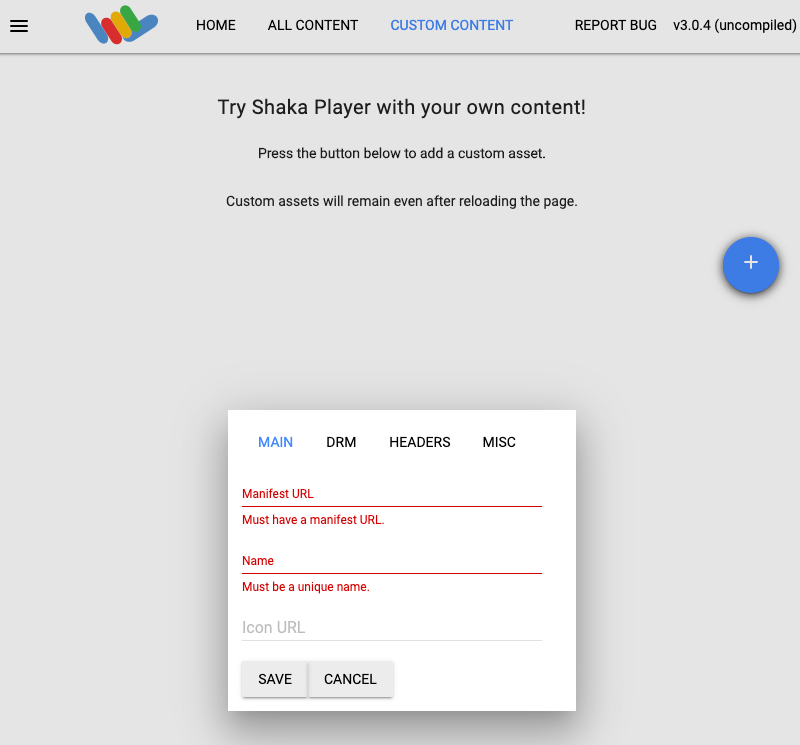
    מזינים את כתובת ה-URL של הקובץ ב-Shaka Player.

  8. מקלידים שם בתיבה שם.

  9. לוחצים על Save.

  10. לוחצים על הפעלה.

  11. לוחצים על לחצן האליפסה בפינה השמאלית התחתונה של הנגן ומפעילים את הכתוביות.

דוגמה

אפשר להשתמש בקבצים הבאים למשימת בדיקה:

קובץ הכתוביות שמוזן לא יכול להכיל שורות ריקות בין שורות הטקסט.