

A unary operator has a single relational child.
The following operators are unary operators:
- Aggregate
- Apply mutations
- Create batch
- Compute
- Compute struct
- DataBlockToRowAdapter
- Filter
- Limit
- Local split union
- Random Id Assign
- RowToDataBlockAdapter
- Serialize result
- Sort
- TVF
- Union input
Database schema
The queries and execution plans on this page are based on the following database schema:
CREATE TABLE Singers (
  SingerId   INT64 NOT NULL,
  FirstName  STRING(1024),
  LastName   STRING(1024),
  SingerInfo BYTES(MAX),
  BirthDate  DATE
) PRIMARY KEY(SingerId);

CREATE INDEX SingersByFirstLastName ON Singers(FirstName, LastName);

CREATE TABLE Albums (
  SingerId        INT64 NOT NULL,
  AlbumId         INT64 NOT NULL,
  AlbumTitle      STRING(MAX),
  MarketingBudget INT64
) PRIMARY KEY(SingerId, AlbumId),
  INTERLEAVE IN PARENT Singers ON DELETE CASCADE;

CREATE INDEX AlbumsByAlbumTitle ON Albums(AlbumTitle);

CREATE INDEX AlbumsByAlbumTitle2 ON Albums(AlbumTitle) STORING (MarketingBudget);

CREATE TABLE Songs (
  SingerId  INT64 NOT NULL,
  AlbumId   INT64 NOT NULL,
  TrackId   INT64 NOT NULL,
  SongName  STRING(MAX),
  Duration  INT64,
  SongGenre STRING(25)
) PRIMARY KEY(SingerId, AlbumId, TrackId),
  INTERLEAVE IN PARENT Albums ON DELETE CASCADE;

CREATE INDEX SongsBySingerAlbumSongNameDesc ON Songs(SingerId, AlbumId, SongName DESC), INTERLEAVE IN Albums;

CREATE INDEX SongsBySongName ON Songs(SongName);

CREATE TABLE Concerts (
  VenueId      INT64 NOT NULL,
  SingerId     INT64 NOT NULL,
  ConcertDate  DATE NOT NULL,
  BeginTime    TIMESTAMP,
  EndTime      TIMESTAMP,
  TicketPrices ARRAY<INT64>
) PRIMARY KEY(VenueId, SingerId, ConcertDate);
You can use the following Data Manipulation Language (DML) statements to add data to these tables:
INSERT INTO Singers (SingerId, FirstName, LastName, BirthDate)
VALUES (1, "Marc", "Richards", "1970-09-03"),
       (2, "Catalina", "Smith", "1990-08-17"),
       (3, "Alice", "Trentor", "1991-10-02"),
       (4, "Lea", "Martin", "1991-11-09"),
       (5, "David", "Lomond", "1977-01-29");

INSERT INTO Albums (SingerId, AlbumId, AlbumTitle)
VALUES (1, 1, "Total Junk"),
       (1, 2, "Go, Go, Go"),
       (2, 1, "Green"),
       (2, 2, "Forever Hold Your Peace"),
       (2, 3, "Terrified"),
       (3, 1, "Nothing To Do With Me"),
       (4, 1, "Play");

INSERT INTO Songs (SingerId, AlbumId, TrackId, SongName, Duration, SongGenre)
VALUES (2, 1, 1, "Let's Get Back Together", 182, "COUNTRY"),
       (2, 1, 2, "Starting Again", 156, "ROCK"),
       (2, 1, 3, "I Knew You Were Magic", 294, "BLUES"),
       (2, 1, 4, "42", 185, "CLASSICAL"),
       (2, 1, 5, "Blue", 238, "BLUES"),
       (2, 1, 6, "Nothing Is The Same", 303, "BLUES"),
       (2, 1, 7, "The Second Time", 255, "ROCK"),
       (2, 3, 1, "Fight Story", 194, "ROCK"),
       (3, 1, 1, "Not About The Guitar", 278, "BLUES");
Aggregate
An aggregate operator implements GROUP BY SQL statements and aggregate
functions (such as COUNT). The input for an aggregate operator is logically
partitioned into groups arranged on key columns (or into a single group if
GROUP BY isn't present). For each group, zero or more aggregates are computed.
The following query demonstrates this operator:
SELECT s.singerid,
       Avg(s.duration) AS average,
       Count(*)        AS count
FROM   songs AS s
GROUP  BY singerid;

/*----------+---------+-------+
 | SingerId | average | count |
 +----------+---------+-------+
 |        3 | 278     |     1 |
 |        2 | 225.875 |     8 |
 +----------+---------+-------*/
The query groups by SingerId and performs an AVG aggregation and a COUNT
aggregation.
The execution plan segment appears as follows:
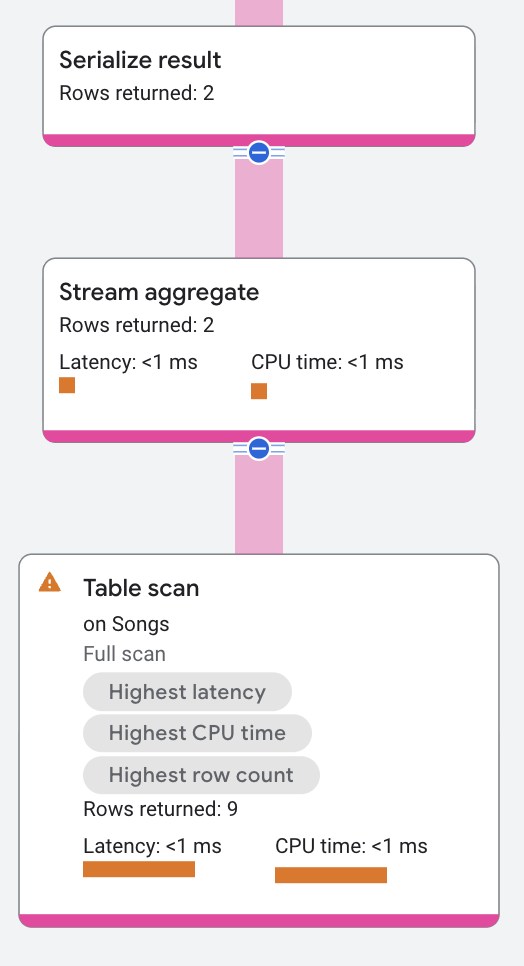
Aggregate operators can be stream-based or hash-based. The previous
execution plan shows a stream-based aggregate. Stream-based aggregates read from
pre-sorted input (if GROUP BY is present) and compute the group
without blocking. Hash-based aggregates build hash tables to maintain
incremental aggregates of multiple input rows simultaneously. Stream-based
aggregates are faster and use less memory than hash-based aggregates, but
require the input to be sorted (either by key columns or secondary
indexes).
For distributed scenarios, the aggregate operator splits into a local-global pair. Each remote server performs the local aggregation on its input rows, and then returns its results to the root server. The root server performs the global aggregation.
Properties and execution statistics
A property of an operator describes a trait that is used when the operator is executed. An execution statistic is a value collected during query execution to help you assess performance of the operator.
Properties
| Name | Description |
|---|---|
| Execution method | In Row execution, the operator processes one row at a time. In Batch execution, the operator processes a batch of rows at once. |
Execution statistics
| Name | Description |
|---|---|
| Latency | Elapsed time of all the executions done in the operator. |
| Cumulative latency | The total time of the current operator and its descendants. |
| CPU time | Sum of CPU time spent executing the operator. |
| Cumulative CPU time | The total CPU time spent executing the operator and its descendants. |
| Execution time | The total amount of time taken to run the query and process results. |
| Rows returned | The number of rows output by this operator |
| Number of executions | The number of times the operator was executed. Some executions can run in parallel. |
Apply mutations
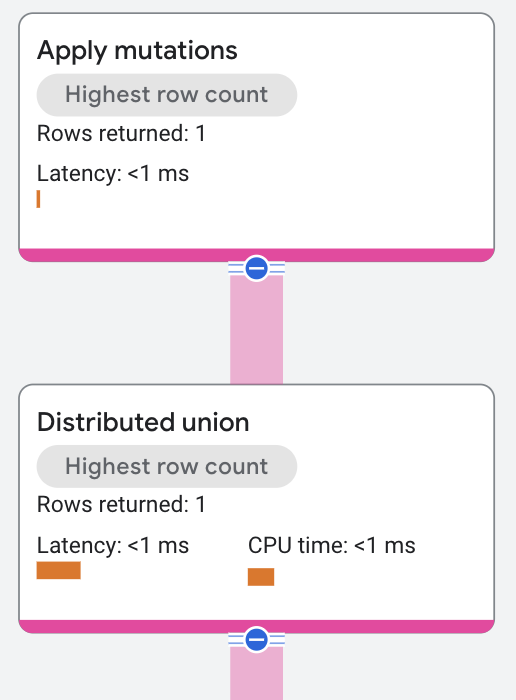
An apply mutations operator applies the mutations from a Data Manipulation Language (DML) statement to the table. It's the top operator in a query plan for a DML statement.
The following query demonstrates this operator:
DELETE FROM singers
WHERE  firstname = 'Alice';

/*
4 rows deleted  This statement deleted 4 rows and did not return any rows.
*/
The execution plan appears as follows:
Properties and execution statistics
A property of an operator describes a trait that is used when the operator is executed. An execution statistic is a value collected during query execution to help you assess performance of the operator.
Properties
| Name | Description |
|---|---|
| Execution method | In Row execution, the operator processes one row at a time. In Batch execution, the operator processes a batch of rows at once. |
Execution statistics
| Name | Description |
|---|---|
| Latency | Elapsed time of all the executions done in the operator. |
| Cumulative latency | The total time of the current operator and its descendants. |
| CPU time | Sum of CPU time spent executing the operator. |
| Cumulative CPU time | The total CPU time spent executing the operator and its descendants. |
| Execution time | The total amount of time taken to run the query and process results. |
| Rows returned | The number of rows output by this operator |
| Number of executions | The number of times the operator was executed. Some executions can run in parallel. |
Create batch
A create batch operator batches its input rows into a sequence. A create batch operation usually occurs as a part of a distributed cross apply operation. The input rows can be re-ordered during the batching. The number of input rows that get batched in each execution of the batch operator varies.
See the distributed cross apply operator for an example of a create batch operator in an execution plan.
Properties and execution statistics
A property of an operator describes a trait that is used when the operator is executed. An execution statistic is a value collected during query execution to help you assess performance of the operator.
Properties
| Name | Description |
|---|---|
| Execution method | In Row execution, the operator processes one row at a time. In Batch execution, the operator processes a batch of rows at once. |
Execution statistics
| Name | Description |
|---|---|
| Latency | Elapsed time of all the executions done in the operator. |
| Cumulative latency | The total time of the current operator and its descendants. |
| CPU time | Sum of CPU time spent executing the operator. |
| Cumulative CPU time | The total CPU time spent executing the operator and its descendants. |
| Execution time | The total amount of time taken to run the query and process results. |
| Rows returned | The number of rows output by this operator |
| Number of executions | The number of times the operator was executed. Some executions can run in parallel. |
Compute
A compute operator produces output by reading its input rows and adding one or more additional columns that are computed using scalar expressions. See the union all operator for an example of a compute operator in an execution plan.
Properties and execution statistics
A property of an operator describes a trait that is used when the operator is executed. An execution statistic is a value collected during query execution to help you assess performance of the operator.
Properties
| Name | Description |
|---|---|
| Execution method | In Row execution, the operator processes one row at a time. In Batch execution, the operator processes a batch of rows at once. |
Execution statistics
| Name | Description |
|---|---|
| Latency | Elapsed time of all the executions done in the operator. |
| Cumulative latency | The total time of the current operator and its descendants. |
| CPU time | Sum of CPU time spent executing the operator. |
| Cumulative CPU time | The total CPU time spent executing the operator and its descendants. |
| Execution time | The total amount of time taken to run the query and process results. |
| Rows returned | The number of rows output by this operator |
| Number of executions | The number of times the operator was executed. Some executions can run in parallel. |
Compute struct
A compute struct operator creates a variable for a structure that contains fields for each of the input columns.
The following query demonstrates this operator:
SELECT FirstName,
       ARRAY(SELECT AS STRUCT song.SongName, song.SongGenre
             FROM Songs AS song
             WHERE song.SingerId = singer.SingerId)
FROM singers AS singer
WHERE singer.SingerId = 3;

/*-----------+------------------------------------------------------+
 | FirstName | Unspecified                                          |
 +-----------+------------------------------------------------------+
 | Alice     | [["Not About The Guitar","BLUES"]]                   |
 +-----------+------------------------------------------------------*/
The execution plan appears as follows:
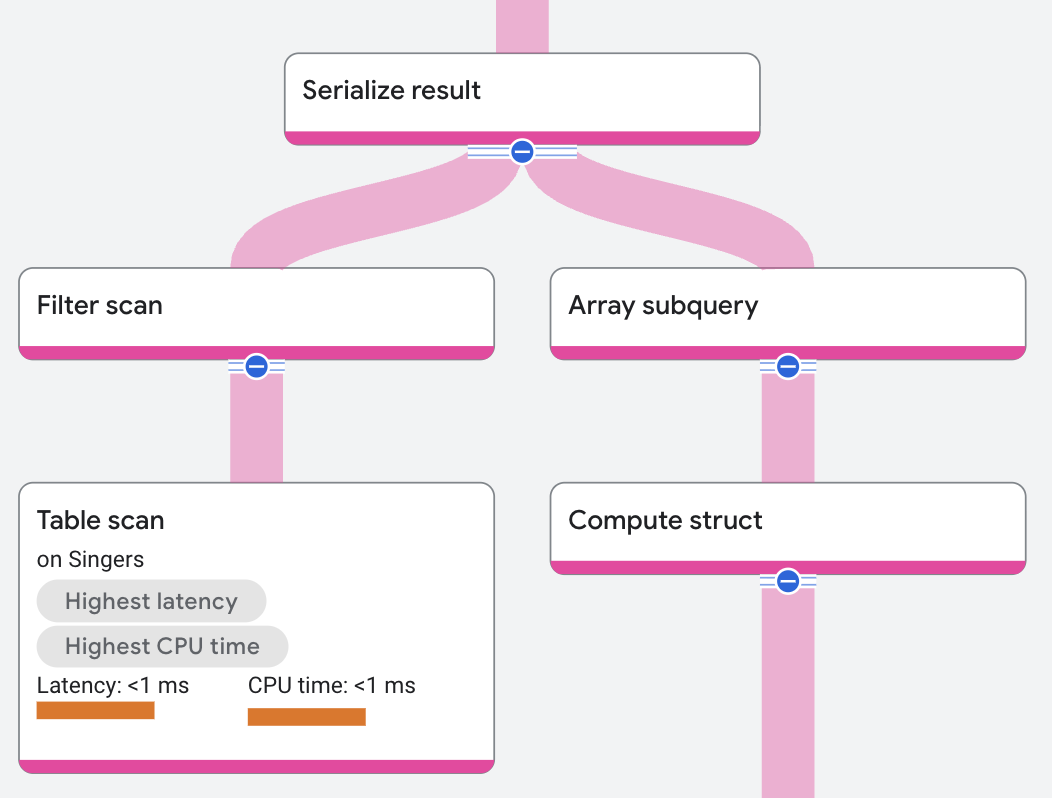
In the execution plan, the array subquery operator receives input from a compute
struct operator. The compute struct operator creates a structure from the
SongName and SongGenre columns in the Songs table.
Properties and execution statistics
A property of an operator describes a trait that is used when the operator is executed. An execution statistic is a value collected during query execution to help you assess performance of the operator.
Properties
| Name | Description |
|---|---|
| Execution method | In Row execution, the operator processes one row at a time. In Batch execution, the operator processes a batch of rows at once. |
Execution statistics
| Name | Description |
|---|---|
| Latency | Elapsed time of all the executions done in the operator. |
| Cumulative latency | The total time of the current operator and its descendants. |
| CPU time | Sum of CPU time spent executing the operator. |
| Cumulative CPU time | The total CPU time spent executing the operator and its descendants. |
| Execution time | The total amount of time taken to run the query and process results. |
| Rows returned | The number of rows output by this operator |
| Number of executions | The number of times the operator was executed. Some executions can run in parallel. |
Filter
A filter operator reads all rows from its input, applies a scalar predicate on each row, and then returns only the rows that satisfy the predicate.
The following query demonstrates this operator:
SELECT s.lastname
FROM   (SELECT s.lastname
        FROM   singers AS s
        LIMIT  3) s
WHERE  s.lastname LIKE 'Rich%';

/*----------+
 | LastName |
 +----------+
 | Richards |
 +----------*/
The execution plan appears as follows:
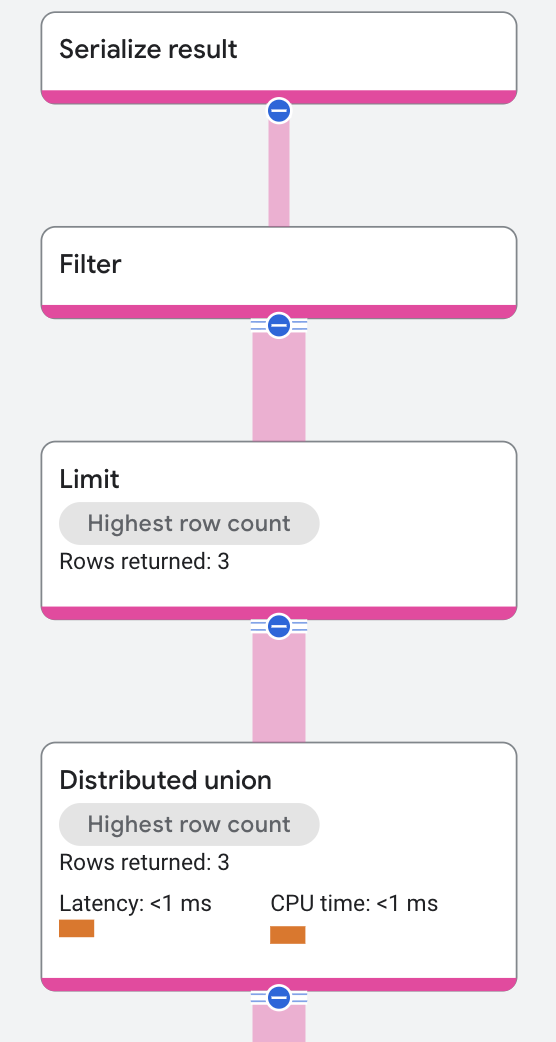
Spanner implements the predicate for singers whose last name starts with Rich as a
filter. The filter receives input from an index scan and outputs rows where LastName starts with Rich.
Properties and execution statistics
A property of an operator describes a trait that is used when the operator is executed. An execution statistic is a value collected during query execution to help you assess performance of the operator.
The Filter operator has additional distinct properties.Properties
| Name | Description |
|---|---|
| Condition | A predicate applied to each input row. When true the row is passed to the next operator; when false the row is discarded. |
| Execution method | In Row execution, the operator processes one row at a time. In Batch execution, the operator processes a batch of rows at once. |
Execution statistics
| Name | Description |
|---|---|
| Latency | Elapsed time of all the executions done in the operator. |
| Cumulative latency | The total time of the current operator and its descendants. |
| CPU time | Sum of CPU time spent executing the operator. |
| Cumulative CPU time | The total CPU time spent executing the operator and its descendants. |
| Execution time | The total amount of time taken to run the query and process results. |
| Rows returned | The number of rows output by this operator |
| Number of executions | The number of times the operator was executed. Some executions can run in parallel. |
Limit
A limit operator constrains the number of rows returned. An optional OFFSET
parameter specifies the starting row to return. In distributed scenarios, the
limit operator splits into a local-global pair. Each remote server
applies the local limit for its output rows, and then returns its results to the
root server. The root server aggregates the rows sent by the remote servers and
then applies the global limit.
The following query demonstrates this operator:
SELECT s.songname
FROM   songs AS s
LIMIT  3;

/*----------------------+
 | SongName             |
 +----------------------+
 | Not About The Guitar |
 | The Second Time      |
 | Starting Again       |
 +----------------------*/
The execution plan appears as follows:
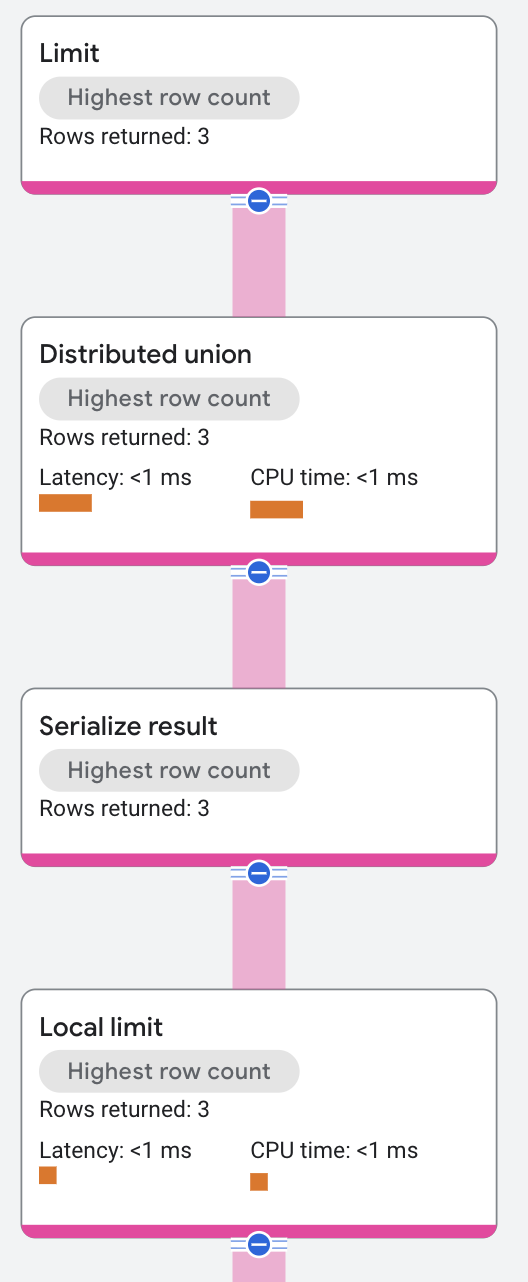
The local limit is the limit for each remote server. The root server aggregates the rows from the remote servers and then applies the global limit.
Properties and execution statistics
A property of an operator describes a trait that is used when the operator is executed. An execution statistic is a value collected during query execution to help you assess performance of the operator.
The Filter operator has additional distinct properties.Properties
| Name | Description |
|---|---|
| Condition | A predicate applied to each input row. When true the row is passed to the next operator; when false the row is discarded. |
| Execution method | In Row execution, the operator processes one row at a time. In Batch execution, the operator processes a batch of rows at once. |
Execution statistics
| Name | Description |
|---|---|
| Latency | Elapsed time of all the executions done in the operator. |
| Cumulative latency | The total time of the current operator and its descendants. |
| CPU time | Sum of CPU time spent executing the operator. |
| Cumulative CPU time | The total CPU time spent executing the operator and its descendants. |
| Execution time | The total amount of time taken to run the query and process results. |
| Rows returned | The number of rows output by this operator |
| Number of executions | The number of times the operator was executed. Some executions can run in parallel. |
Random ID assign
A random ID assign operator produces output by reading its input rows and
adding a random number to each row. It works with a Filter or Sort operator
to achieve sampling methods. Supported sampling methods are
Bernoulli
and Reservoir.
For example, the following query uses Bernoulli sampling with a sampling rate of 10 percent.
SELECT s.songname
FROM   songs AS s TABLESAMPLE bernoulli (10 PERCENT);

/*----------------+
 | SongName       |
 +----------------+
 | Starting Again |
 +----------------*/
Because the result is a sample, the result could vary each time the query is run even though the query is the same.
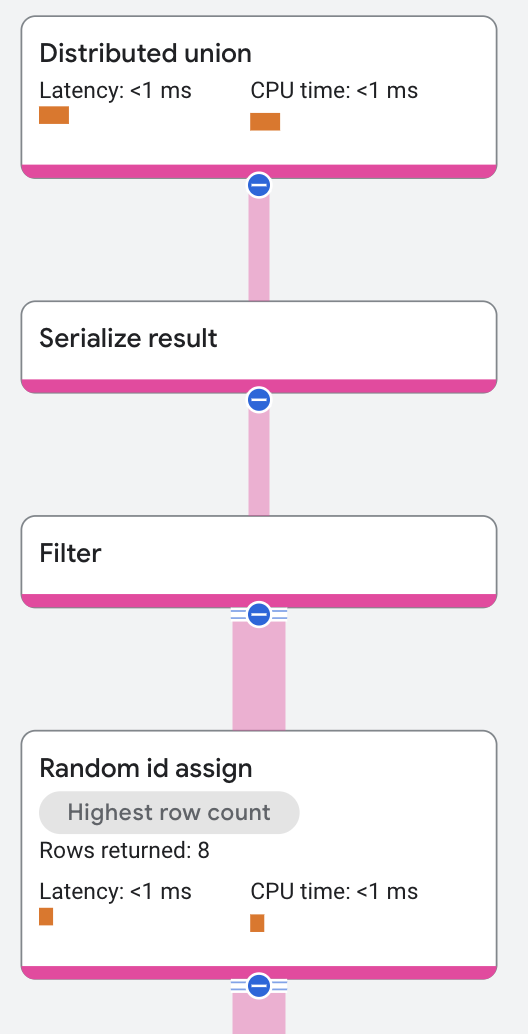
In this execution plan, the Random Id Assign operator receives its input from
a distributed union operator, which receives its input
from an index scan. The operator returns the rows with random ids and
the Filter operator then applies a scalar predicate on the random ids and
returns approximately 10 percent of the rows.
The following example uses Reservoir
sampling with a sampling rate of 2 rows.
SELECT s.songname
FROM   songs AS s TABLESAMPLE reservoir (2 rows);

/*------------------------+
 | SongName               |
 +------------------------+
 | I Knew You Were Magic  |
 | The Second Time        |
 +------------------------*/
Because the result is a sample, the result could vary each time the query is run even though the query is the same.
This is the execution plan:
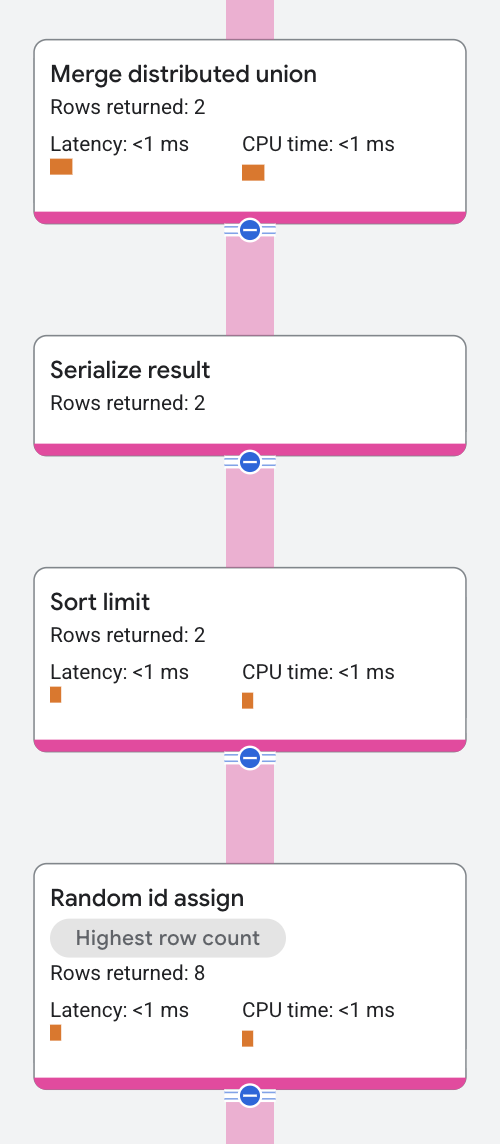
In this execution plan, the Random Id Assign operator receives its input from
a distributed union operator, which receives its input
from an index scan. The operator returns the rows with random ids and
the Sort operator then applies the sort order on the random ids and applies
LIMIT with 2 rows.
Properties and execution statistics
A property of an operator describes a trait that is used when the operator is executed. An execution statistic is a value collected during query execution to help you assess performance of the operator.
The Filter operator has additional distinct properties.Properties
| Name | Description |
|---|---|
| Condition | A predicate applied to each input row. When true the row is passed to the next operator; when false the row is discarded. |
| Execution method | In Row execution, the operator processes one row at a time. In Batch execution, the operator processes a batch of rows at once. |
Execution statistics
| Name | Description |
|---|---|
| Latency | Elapsed time of all the executions done in the operator. |
| Cumulative latency | The total time of the current operator and its descendants. |
| CPU time | Sum of CPU time spent executing the operator. |
| Cumulative CPU time | The total CPU time spent executing the operator and its descendants. |
| Execution time | The total amount of time taken to run the query and process results. |
| Rows returned | The number of rows output by this operator |
| Number of executions | The number of times the operator was executed. Some executions can run in parallel. |
Local split union
A local split union operator finds table splits stored on the local server, runs a subquery on each split, and then creates a union that combines all results.
A local split union appears in execution plans that scan a placement table. Placements can increase the number of splits in a table, making it more efficient to scan splits in batches based on their physical storage locations.
For example, suppose the Singers table uses a placement key to partition
singer data:
CREATE TABLE Singers (
    SingerId INT64 NOT NULL,
    SingerName STRING(MAX) NOT NULL,
    ...
    Location STRING(MAX) NOT NULL PLACEMENT KEY
) PRIMARY KEY (SingerId);
Now, consider this query:
SELECT BirthDate FROM Singers;
This is the execution plan:
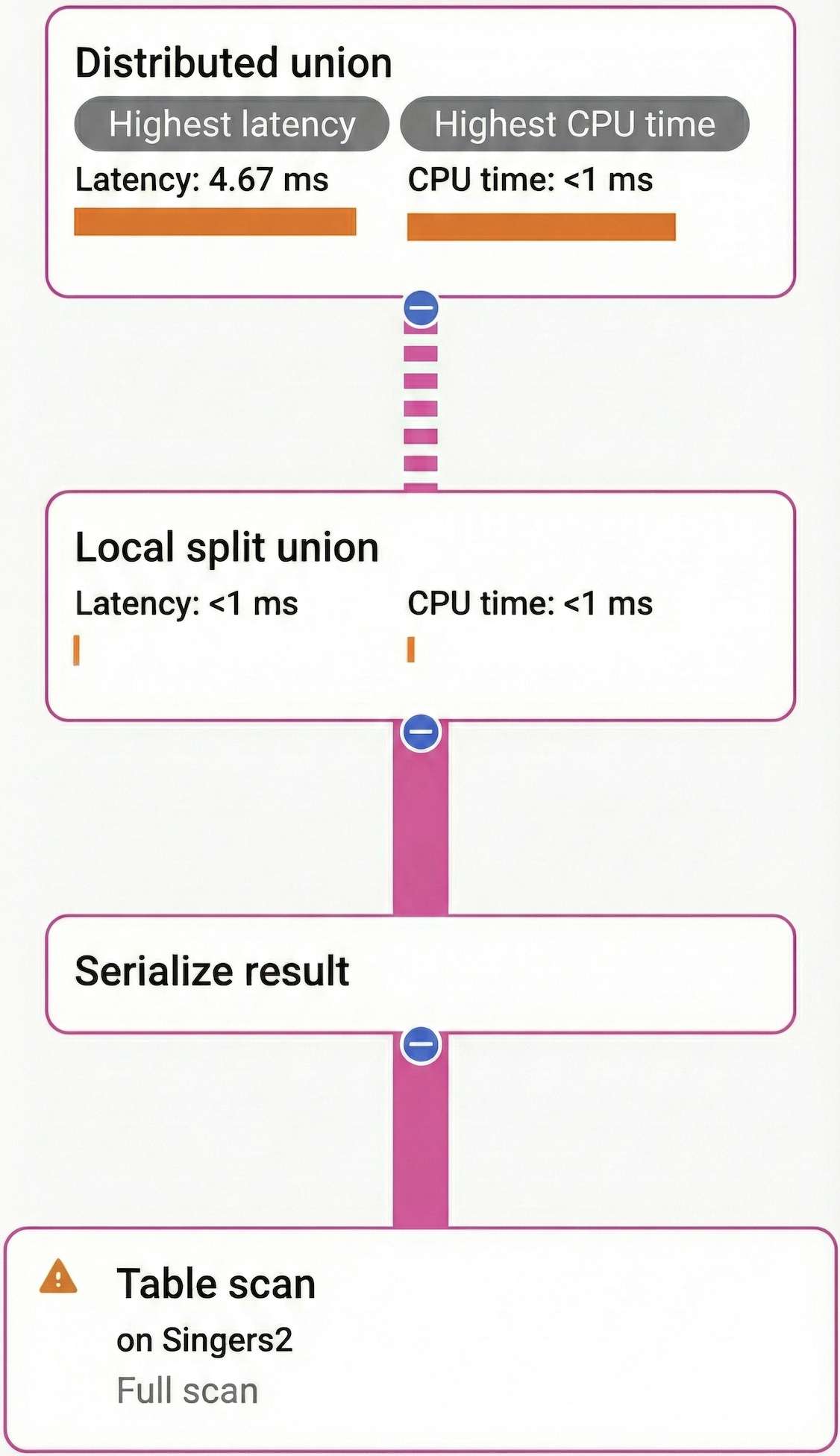
The distributed union sends a subquery to each batch of
splits physically stored together in the same server. On each server, the local
split union finds splits storing Singers data, executes the subquery on each
split, and returns the combined results. In this way, the distributed union and
local split union work together to efficiently scan the Singers table. Without
a local split union, the distributed union would send one RPC per split instead
of per split batch, resulting in redundant RPC round trips when there's more
than one split per batch.
Properties and execution statistics
A property of an operator describes a trait that is used when the operator is executed. An execution statistic is a value collected during query execution to help you assess performance of the operator.
The Filter operator has additional distinct properties.Properties
| Name | Description |
|---|---|
| Condition | A predicate applied to each input row. When true the row is passed to the next operator; when false the row is discarded. |
| Execution method | In Row execution, the operator processes one row at a time. In Batch execution, the operator processes a batch of rows at once. |
Execution statistics
| Name | Description |
|---|---|
| Latency | Elapsed time of all the executions done in the operator. |
| Cumulative latency | The total time of the current operator and its descendants. |
| CPU time | Sum of CPU time spent executing the operator. |
| Cumulative CPU time | The total CPU time spent executing the operator and its descendants. |
| Execution time | The total amount of time taken to run the query and process results. |
| Rows returned | The number of rows output by this operator |
| Number of executions | The number of times the operator was executed. Some executions can run in parallel. |
DataBlockToRowAdapter
The Spanner query optimizer automatically inserts a DataBlockToRowAdapter operator between a pair of operators that operate
using different execution methods. Its input is an operator using the
batch-oriented execution method and its output is fed into an operator executing
in the row-oriented execution method. For more information, see Optimize query
execution.
Properties and execution statistics
A property of an operator describes a trait that is used when the operator is executed. An execution statistic is a value collected during query execution to help you assess performance of the operator.
The Filter operator has additional distinct properties.Properties
| Name | Description |
|---|---|
| Condition | A predicate applied to each input row. When true the row is passed to the next operator; when false the row is discarded. |
| Execution method | In Row execution, the operator processes one row at a time. In Batch execution, the operator processes a batch of rows at once. |
Execution statistics
| Name | Description |
|---|---|
| Latency | Elapsed time of all the executions done in the operator. |
| Cumulative latency | The total time of the current operator and its descendants. |
| CPU time | Sum of CPU time spent executing the operator. |
| Cumulative CPU time | The total CPU time spent executing the operator and its descendants. |
| Execution time | The total amount of time taken to run the query and process results. |
| Rows returned | The number of rows output by this operator |
| Number of executions | The number of times the operator was executed. Some executions can run in parallel. |
RowToDataBlockAdapter
The Spanner query optimizer automatically inserts a RowToDataBlockAdapter operator between a pair of operators that operate
using different execution methods. Its input is an operator using the
row-oriented execution method and its output is fed into an operator executing
in the batch-oriented execution method. For more information, see Optimize
query execution.
Properties and execution statistics
A property of an operator describes a trait that is used when the operator is executed. An execution statistic is a value collected during query execution to help you assess performance of the operator.
The Filter operator has additional distinct properties.Properties
| Name | Description |
|---|---|
| Condition | A predicate applied to each input row. When true the row is passed to the next operator; when false the row is discarded. |
| Execution method | In Row execution, the operator processes one row at a time. In Batch execution, the operator processes a batch of rows at once. |
Execution statistics
| Name | Description |
|---|---|
| Latency | Elapsed time of all the executions done in the operator. |
| Cumulative latency | The total time of the current operator and its descendants. |
| CPU time | Sum of CPU time spent executing the operator. |
| Cumulative CPU time | The total CPU time spent executing the operator and its descendants. |
| Execution time | The total amount of time taken to run the query and process results. |
| Rows returned | The number of rows output by this operator |
| Number of executions | The number of times the operator was executed. Some executions can run in parallel. |
Serialize result
A serialize result operator is a special case of the compute struct operator that serializes each row of the final result of the query, for returning to the client.
The following query demonstrates this operator:
SELECT array
  (
    select as struct so.songname,
            so.songgenre
    FROM   songs AS so
    WHERE  so.singerid = s.singerid)
FROM  singers AS s;

/*------------------------------------------------------------------+
 | Unspecified                                                      |
 +------------------------------------------------------------------+
 | []                                                               |
 | [[Let's Get Back Together, COUNTRY], [Starting Again, ROCK]]     |
 | [["Not About The Guitar", "BLUES"]]                              |
 | []                                                               |
 | []                                                               |
 +------------------------------------------------------------------*/
The execution plan appears as follows:
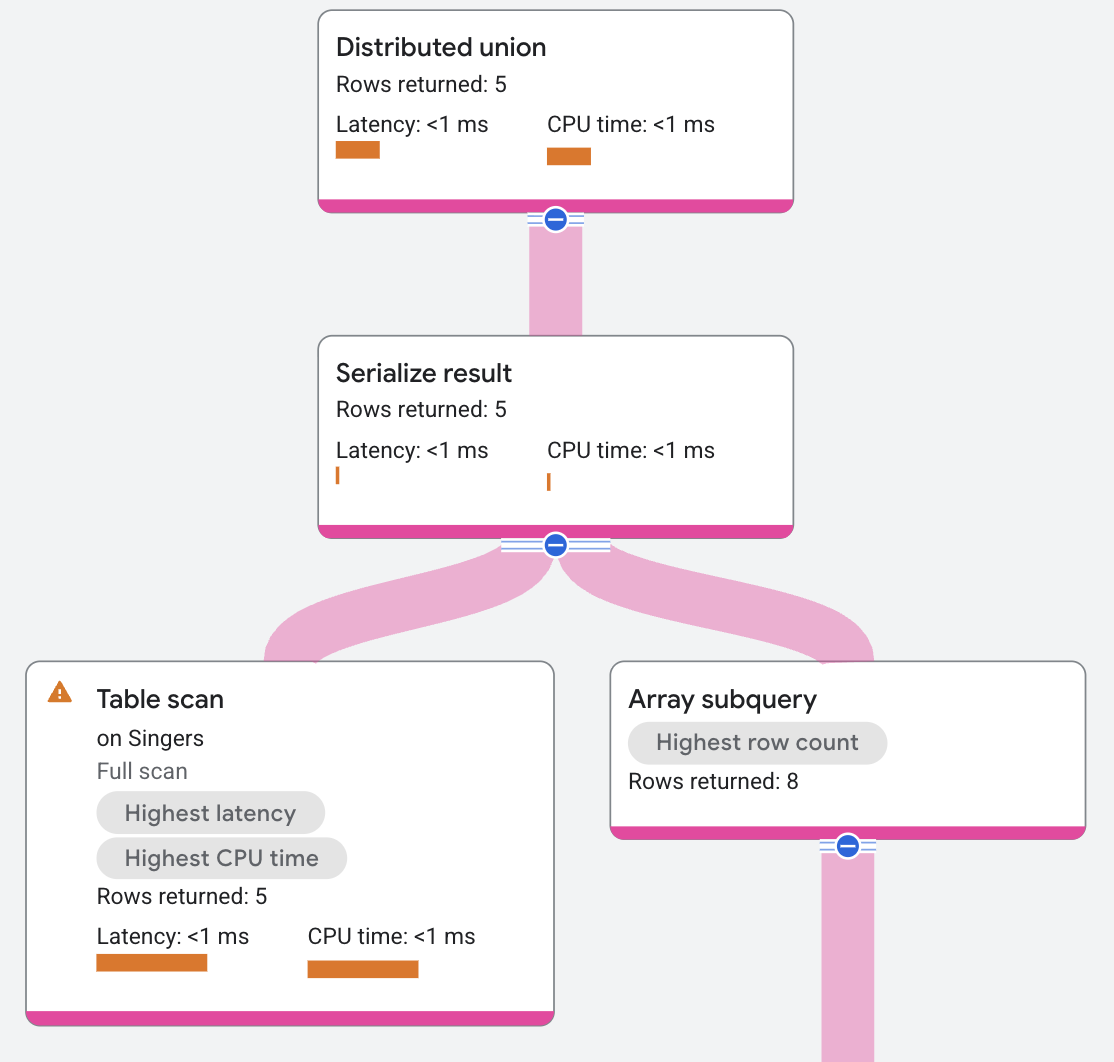
The serialize result operator creates a result that contains, for each row of
the Singers table, an array of SongName and SongGenre pairs for the songs
by the singer.
Properties and execution statistics
A property of an operator describes a trait that is used when the operator is executed. An execution statistic is a value collected during query execution to help you assess performance of the operator.
The Filter operator has additional distinct properties.Properties
| Name | Description |
|---|---|
| Condition | A predicate applied to each input row. When true the row is passed to the next operator; when false the row is discarded. |
| Execution method | In Row execution, the operator processes one row at a time. In Batch execution, the operator processes a batch of rows at once. |
Execution statistics
| Name | Description |
|---|---|
| Latency | Elapsed time of all the executions done in the operator. |
| Cumulative latency | The total time of the current operator and its descendants. |
| CPU time | Sum of CPU time spent executing the operator. |
| Cumulative CPU time | The total CPU time spent executing the operator and its descendants. |
| Execution time | The total amount of time taken to run the query and process results. |
| Rows returned | The number of rows output by this operator |
| Number of executions | The number of times the operator was executed. Some executions can run in parallel. |
Sort
A sort operator reads its input rows, orders them by column(s), and then returns the sorted results.
The following query demonstrates this operator:
SELECT s.songgenre
FROM   songs AS s
ORDER  BY songgenre;

/*--------------------------+
 | SongGenre                |
 +--------------------------+
 | BLUES                    |
 | BLUES                    |
 | BLUES                    |
 | BLUES                    |
 | CLASSICAL                |
 | COUNTRY                  |
 | ROCK                     |
 | ROCK                     |
 | ROCK                     |
 +--------------------------*/
The execution plan appears as follows:
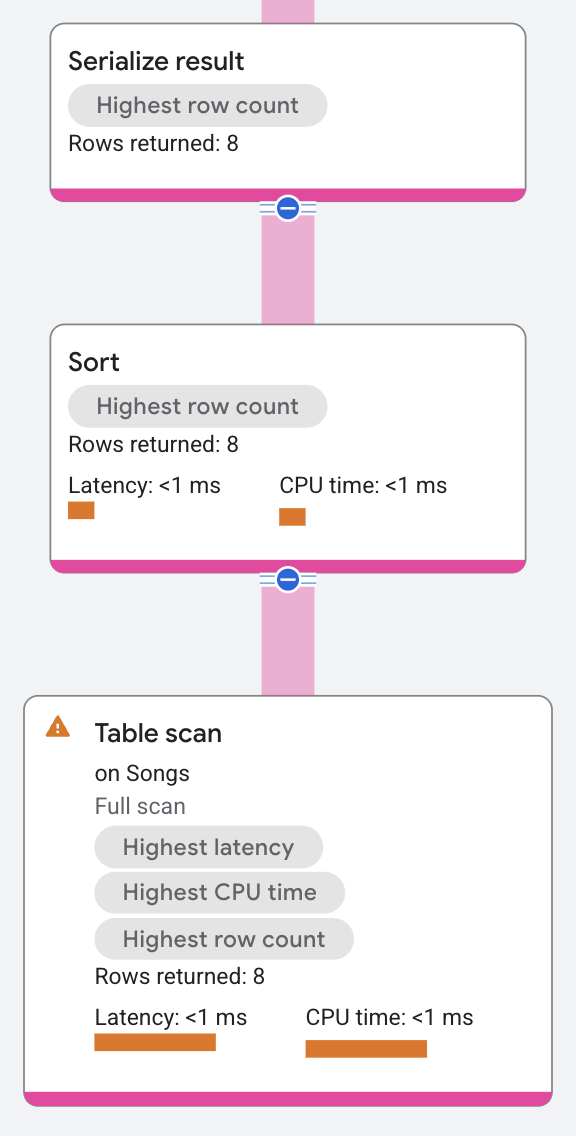
In this execution plan, the sort operator receives its input rows from a distributed union operator, sorts the input rows, and returns the sorted rows to a serialize result operator.
To constrain the number of rows returned, a sort operator can optionally have
LIMIT and OFFSET parameters. For distributed scenarios, a sort operator with
a LIMIT or OFFSET operator splits into a local-global pair. Each
remote server applies the sort order and the local limit or offset for its input
rows, and then returns its results to the root server. The root server
aggregates the rows sent by the remote servers, sorts them, and then applies the
global limit/offset.
The following query demonstrates this operator:
SELECT s.songgenre
FROM   songs AS s
ORDER  BY songgenre
LIMIT  3;

/*--------------------------+
 | SongGenre                |
 +--------------------------+
 | BLUES                    |
 | BLUES                    |
 | BLUES                    |
 +--------------------------*/
The execution plan appears as follows:
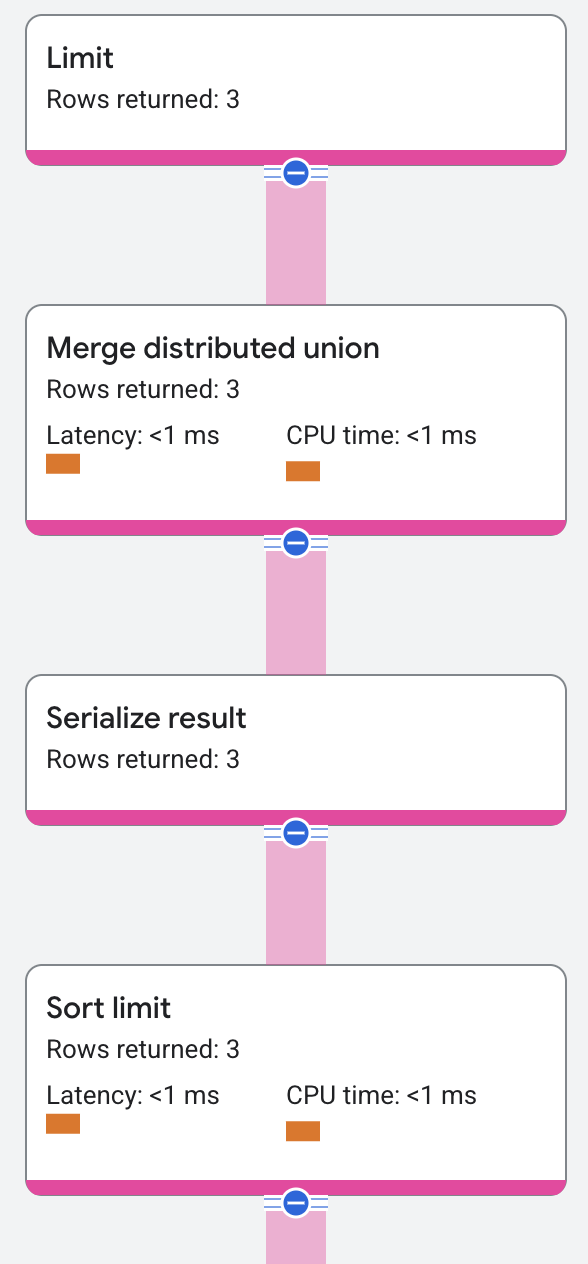
The execution plan shows the local limit for the remote servers and the global limit for the root server.
Properties and execution statistics
A property of an operator describes a trait that is used when the operator is executed. An execution statistic is a value collected during query execution to help you assess performance of the operator.
The Filter operator has additional distinct properties.Properties
| Name | Description |
|---|---|
| Condition | A predicate applied to each input row. When true the row is passed to the next operator; when false the row is discarded. |
| Execution method | In Row execution, the operator processes one row at a time. In Batch execution, the operator processes a batch of rows at once. |
Execution statistics
| Name | Description |
|---|---|
| Latency | Elapsed time of all the executions done in the operator. |
| Cumulative latency | The total time of the current operator and its descendants. |
| CPU time | Sum of CPU time spent executing the operator. |
| Cumulative CPU time | The total CPU time spent executing the operator and its descendants. |
| Execution time | The total amount of time taken to run the query and process results. |
| Rows returned | The number of rows output by this operator |
| Number of executions | The number of times the operator was executed. Some executions can run in parallel. |
TVF
A table valued function operator produces output by reading its input rows and applying the specified function. The function might implement mapping and return the same number of rows as input. It can also be a generator that returns more rows or a filter that returns fewer rows.
The following query demonstrates this operator:
SELECT genre,
       songname
FROM   ml.predict(model genreclassifier, TABLE songs)

/*-----------------------+--------------------------+
 | Genre                 | SongName                 |
 +-----------------------+--------------------------+
 | Country               | Not About The Guitar     |
 | Rock                  | The Second Time          |
 | Pop                   | Starting Again           |
 | Pop                   | Nothing Is The Same      |
 | Country               | Let's Get Back Together  |
 | Pop                   | I Knew You Were Magic    |
 | Electronic            | Blue                     |
 | Rock                  | 42                       |
 | Rock                  | Fight Story              |
 +-----------------------+--------------------------*/
Properties and execution statistics
A property of an operator describes a trait that is used when the operator is executed. An execution statistic is a value collected during query execution to help you assess performance of the operator.
The Filter operator has additional distinct properties.Properties
| Name | Description |
|---|---|
| Condition | A predicate applied to each input row. When true the row is passed to the next operator; when false the row is discarded. |
| Execution method | In Row execution, the operator processes one row at a time. In Batch execution, the operator processes a batch of rows at once. |
Execution statistics
| Name | Description |
|---|---|
| Latency | Elapsed time of all the executions done in the operator. |
| Cumulative latency | The total time of the current operator and its descendants. |
| CPU time | Sum of CPU time spent executing the operator. |
| Cumulative CPU time | The total CPU time spent executing the operator and its descendants. |
| Execution time | The total amount of time taken to run the query and process results. |
| Rows returned | The number of rows output by this operator |
| Number of executions | The number of times the operator was executed. Some executions can run in parallel. |
Union input
A union input operator returns results to a union all operator. See the union all operator for an example of a union input operator in an execution plan.
Properties and execution statistics
A property of an operator describes a trait that is used when the operator is executed. An execution statistic is a value collected during query execution to help you assess performance of the operator.
The Filter operator has additional distinct properties.Properties
| Name | Description |
|---|---|
| Condition | A predicate applied to each input row. When true the row is passed to the next operator; when false the row is discarded. |
| Execution method | In Row execution, the operator processes one row at a time. In Batch execution, the operator processes a batch of rows at once. |
Execution statistics
| Name | Description |
|---|---|
| Latency | Elapsed time of all the executions done in the operator. |
| Cumulative latency | The total time of the current operator and its descendants. |
| CPU time | Sum of CPU time spent executing the operator. |
| Cumulative CPU time | The total CPU time spent executing the operator and its descendants. |
| Execution time | The total amount of time taken to run the query and process results. |
| Rows returned | The number of rows output by this operator |
| Number of executions | The number of times the operator was executed. Some executions can run in parallel. |