

A scalar subquery is a SQL sub-expression that's part of a scalar expression. Spanner attempts to remove scalar subqueries whenever possible. However, in certain scenarios, plans explicitly contain scalar subqueries.
Database schema
The queries and execution plans on this page are based on the following database schema:
CREATE TABLE Singers (
  SingerId   INT64 NOT NULL,
  FirstName  STRING(1024),
  LastName   STRING(1024),
  SingerInfo BYTES(MAX),
  BirthDate  DATE
) PRIMARY KEY(SingerId);

CREATE INDEX SingersByFirstLastName ON Singers(FirstName, LastName);

CREATE TABLE Albums (
  SingerId        INT64 NOT NULL,
  AlbumId         INT64 NOT NULL,
  AlbumTitle      STRING(MAX),
  MarketingBudget INT64
) PRIMARY KEY(SingerId, AlbumId),
  INTERLEAVE IN PARENT Singers ON DELETE CASCADE;

CREATE INDEX AlbumsByAlbumTitle ON Albums(AlbumTitle);

CREATE INDEX AlbumsByAlbumTitle2 ON Albums(AlbumTitle) STORING (MarketingBudget);

CREATE TABLE Songs (
  SingerId  INT64 NOT NULL,
  AlbumId   INT64 NOT NULL,
  TrackId   INT64 NOT NULL,
  SongName  STRING(MAX),
  Duration  INT64,
  SongGenre STRING(25)
) PRIMARY KEY(SingerId, AlbumId, TrackId),
  INTERLEAVE IN PARENT Albums ON DELETE CASCADE;

CREATE INDEX SongsBySingerAlbumSongNameDesc ON Songs(SingerId, AlbumId, SongName DESC), INTERLEAVE IN Albums;

CREATE INDEX SongsBySongName ON Songs(SongName);

CREATE TABLE Concerts (
  VenueId      INT64 NOT NULL,
  SingerId     INT64 NOT NULL,
  ConcertDate  DATE NOT NULL,
  BeginTime    TIMESTAMP,
  EndTime      TIMESTAMP,
  TicketPrices ARRAY<INT64>
) PRIMARY KEY(VenueId, SingerId, ConcertDate);
You can use the following Data Manipulation Language (DML) statements to add data to these tables:
INSERT INTO Singers (SingerId, FirstName, LastName, BirthDate)
VALUES (1, "Marc", "Richards", "1970-09-03"),
       (2, "Catalina", "Smith", "1990-08-17"),
       (3, "Alice", "Trentor", "1991-10-02"),
       (4, "Lea", "Martin", "1991-11-09"),
       (5, "David", "Lomond", "1977-01-29");

INSERT INTO Albums (SingerId, AlbumId, AlbumTitle)
VALUES (1, 1, "Total Junk"),
       (1, 2, "Go, Go, Go"),
       (2, 1, "Green"),
       (2, 2, "Forever Hold Your Peace"),
       (2, 3, "Terrified"),
       (3, 1, "Nothing To Do With Me"),
       (4, 1, "Play");

INSERT INTO Songs (SingerId, AlbumId, TrackId, SongName, Duration, SongGenre)
VALUES (2, 1, 1, "Let's Get Back Together", 182, "COUNTRY"),
       (2, 1, 2, "Starting Again", 156, "ROCK"),
       (2, 1, 3, "I Knew You Were Magic", 294, "BLUES"),
       (2, 1, 4, "42", 185, "CLASSICAL"),
       (2, 1, 5, "Blue", 238, "BLUES"),
       (2, 1, 6, "Nothing Is The Same", 303, "BLUES"),
       (2, 1, 7, "The Second Time", 255, "ROCK"),
       (2, 3, 1, "Fight Story", 194, "ROCK"),
       (3, 1, 1, "Not About The Guitar", 278, "BLUES");
The following query demonstrates a scalar expression operator:
SELECT firstname,
  IF(firstname = 'Alice', (SELECT Count(*)
                          FROM   songs
                          WHERE  duration > 300), 0)
FROM   singers;

/*-----------+----+
 | FirstName |    |
 +-----------+----+
 | Alice     | 1  |
 | Catalina  | 0  |
 | David     | 0  |
 | Lea       | 0  |
 | Marc      | 0  |
 +-----------+----*/
The execution plan appears as follows:
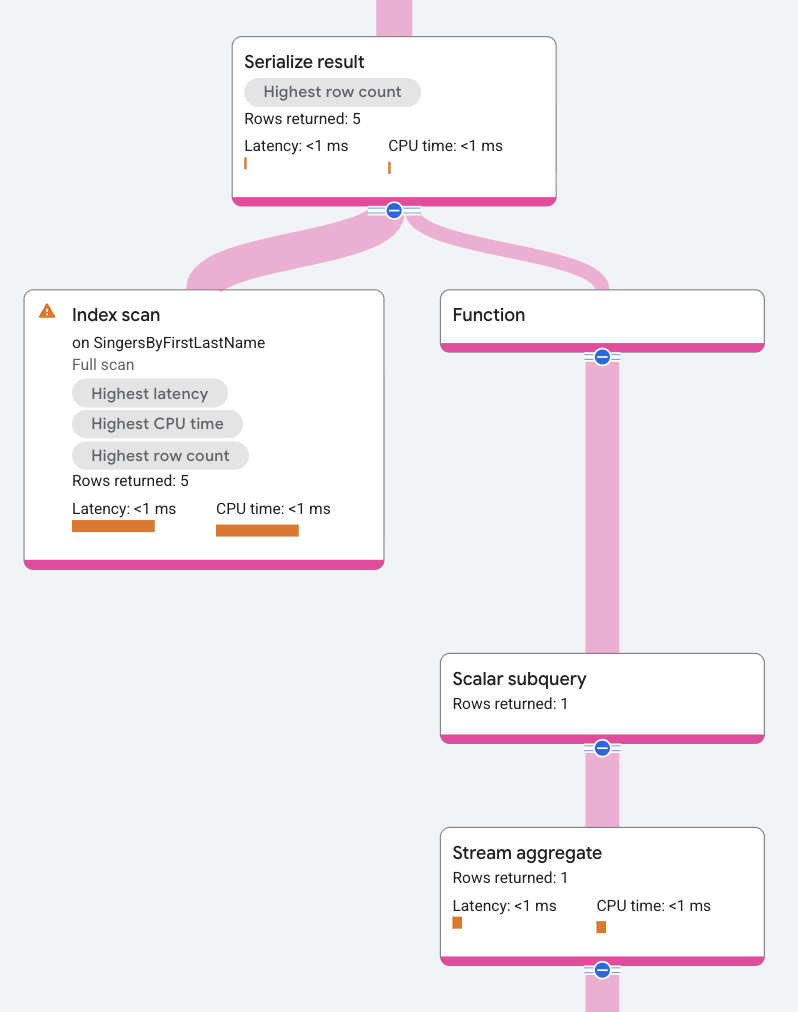
The execution plan displays a scalar subquery as Scalar Subquery above an aggregate operator.
Spanner sometimes converts scalar subqueries into another operator such as a join or cross apply, to possibly improve performance.
The following query demonstrates this operator:
SELECT *
FROM   songs
WHERE  duration = (SELECT Max(duration)
                   FROM   songs);

/*----------+---------+---------+---------------------+----------+-----------+
 | SingerId | AlbumId | TrackId | SongName            | Duration | SongGenre |
 +----------+---------+---------+---------------------+----------+-----------+
 |        2 |       1 |       6 | Nothing Is The Same |      303 |     BLUES |
 +----------+---------+---------+---------------------+----------+-----------*/
The execution plan appears as follows:
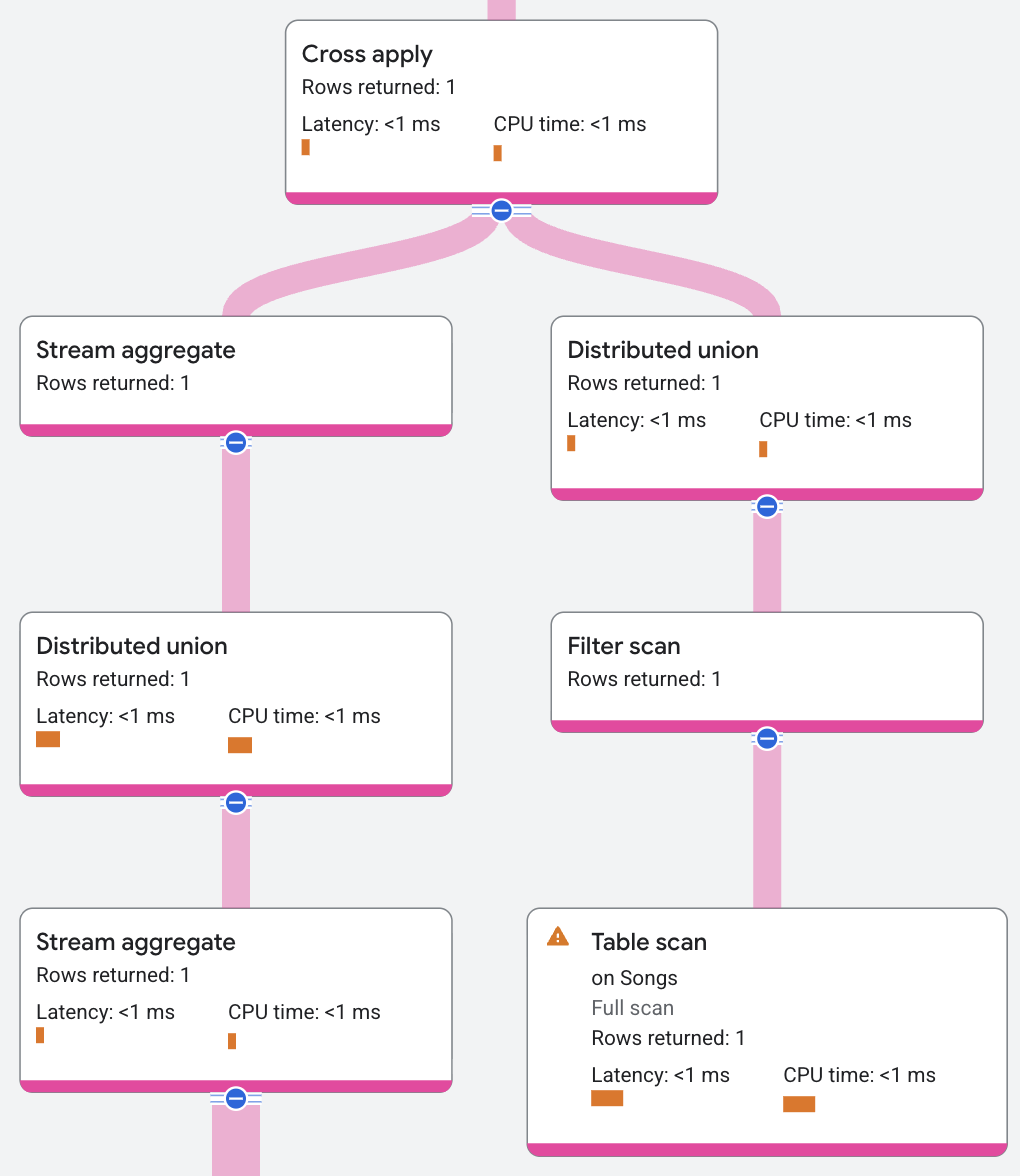
The execution plan excludes a scalar subquery because Spanner converted the scalar subquery to a cross apply.
Properties and execution statistics
A property of an operator describes a trait that is used when the operator is executed. An execution statistic is a value collected during query execution to help you assess performance of the operator.
Properties
| Name | Description |
|---|---|
| Execution method | In Row execution, the operator processes one row at a time. In Batch execution, the operator processes a batch of rows at once. |
Execution statistics
| Name | Description |
|---|---|
| Latency | Elapsed time of all the executions done in the operator. |
| Cumulative latency | The total time of the current operator and its descendants. |
| CPU time | Sum of CPU time spent executing the operator. |
| Cumulative CPU time | The total CPU time spent executing the operator and its descendants. |
| Execution time | The total amount of time taken to run the query and process results. |
| Rows returned | The number of rows output by this operator |
| Number of executions | The number of times the operator was executed. Some executions can run in parallel. |