


Agent Gateway 可讓您控管在 Cloud Run 建構及託管的 AI 代理傳出的流量。透過在 Secure Web Proxy 上執行的自行管理 Agent Gateway,轉送 Cloud Run 服務的輸出流量,即可強制執行集中式存取政策、檢查酬載內容安全性,並收集代理工作負載的觀測能力遙測資料。
本文說明如何在 Cloud Run 設定 Agent Gateway 的集中式架構,並說明如何執行下列操作:
- 建立必要的 Identity and Access Management (IAM) 角色和必要條件
- 建立自行管理的 Agent Gateway
- 設定 Cloud Run 周邊網路,以便存取 Traffic Director API
- 使用周邊網路和直連虛擬私有雲輸出,部署或更新 Cloud Run 服務
- 設定 Cloud Run 代理,信任 Agent Gateway
- 將輸出流量轉送至 Agent Gateway
- 在 Agent Gateway 設定存取權和內容安全政策
- 使用 Shared VPC 設定集中式跨專案部署作業
架構
在集中式自行管理部署作業中,Secure Web Proxy 會做為政策強制執行點,並在虛擬私有雲 (VPC) 網路中運作。周邊網路邊車容器會攔截 Cloud Run 代理的傳出流量,並透過直接虛擬私有雲輸出,將流量轉送至 Secure Web Proxy 執行個體。Secure Web Proxy 會從 Identity-Aware Proxy (IAP) 和 Model Armor 等政策決策點,強制執行存取和內容規則。
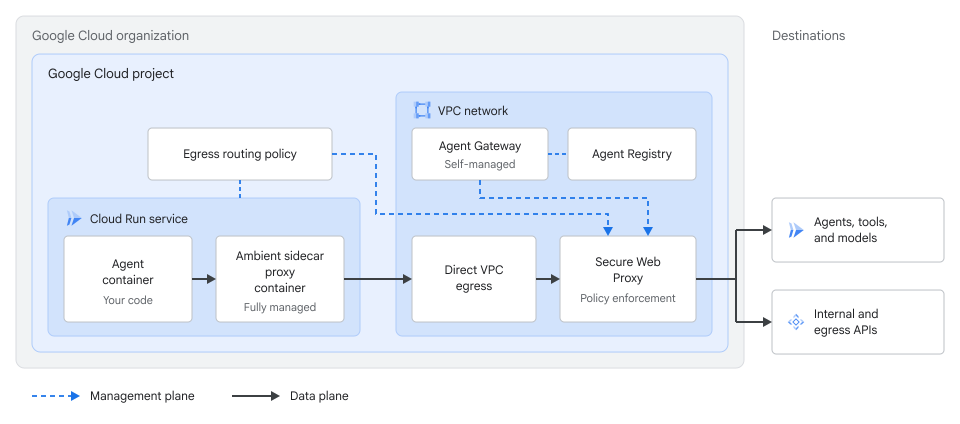
如要轉送及控管這個架構中的流量,請設定下列元件:
- 直連虛擬私有雲輸出和周邊網路:Cloud Run 服務會透過
--vpc-egress=all和--ambient-networking連線至虛擬私有雲網路,預設會使用區域範圍,並將所有傳出流量轉送至虛擬私有雲網路。 - 自行管理的 Agent Gateway:自行管理模式中的邏輯 Agent Gateway 資源,會指向虛擬私有雲網路中的 Secure Web Proxy 執行個體。
- 輸出路由政策:Network Services API
EgressRouting政策會將 Cloud Run 服務的傳出流量導向 Secure Web Proxy 執行個體。
事前準備
- 登入 Google Cloud 帳戶。如果您未曾使用過 Google Cloud,歡迎建立帳戶,親自體驗實際使用我們產品的成效。新客戶還能獲得價值 $300 美元的免費抵免額,用於執行、測試及部署工作負載。
-
In the Google Cloud console, on the project selector page, select or create a Google Cloud project.
Roles required to select or create a project
- Select a project: Selecting a project doesn't require a specific IAM role—you can select any project that you've been granted a role on.
-
Create a project: To create a project, you need the Project Creator role
(
roles/resourcemanager.projectCreator), which contains theresourcemanager.projects.createpermission. Learn how to grant roles.
-
Verify that billing is enabled for your Google Cloud project.
-
Install the Google Cloud CLI.
-
If you're using an external identity provider (IdP), you must first sign in to the gcloud CLI with your federated identity.
-
To initialize the gcloud CLI, run the following command:
gcloud init -
In the Google Cloud console, on the project selector page, select or create a Google Cloud project.
Roles required to select or create a project
- Select a project: Selecting a project doesn't require a specific IAM role—you can select any project that you've been granted a role on.
-
Create a project: To create a project, you need the Project Creator role
(
roles/resourcemanager.projectCreator), which contains theresourcemanager.projects.createpermission. Learn how to grant roles.
-
Verify that billing is enabled for your Google Cloud project.
-
Install the Google Cloud CLI.
-
If you're using an external identity provider (IdP), you must first sign in to the gcloud CLI with your federated identity.
-
To initialize the gcloud CLI, run the following command:
gcloud init 啟用 Cloud Run Admin API、Network Services API、網路安全 API、Service Extensions API、Model Armor API、憑證授權單位服務 API、Certificate Manager API、Cloud Resource Manager API、App Hub API、Identity and Access Management API、Identity-Aware Proxy API、Compute Engine API、Traffic Director API、Cloud DNS API、Network Connectivity API 和 Agent Registry API (如有尚未啟用的 API)。
啟用 API 所需的角色
如要啟用 API,您必須具備
serviceusage.services.enable權限。如果您建立了專案,可能已透過擁有者角色 (roles/owner) 取得這項權限。否則,您可以透過 Service Usage 管理員角色 (roles/serviceusage.serviceUsageAdmin) 取得這項權限。瞭解如何授予角色。- 建立虛擬私有雲網路和子網路,並在子網路啟用 Private Google Access。
- 在專案或組織中設定 Agent Registry。
- 安裝並初始化 Google Cloud CLI。
-
更新 gcloud CLI 元件:
gcloud components update
必要的角色
如要取得為 Cloud Run 設定 Agent Gateway 所需的權限,請要求管理員在專案中授予您下列 IAM 角色:
-
部署及管理 Cloud Run 資源:Cloud Run 管理員 (
roles/run.admin) -
管理 Agent Registry 資源:Agent Registry API 管理員 (
roles/agentregistry.admin) -
使用特定身分部署:IAM 服務帳戶使用者 (
roles/iam.serviceAccountUser) -
管理虛擬私有雲網路和子網路:Compute 網路管理員 (
roles/compute.networkAdmin) -
管理 Agent Gateway 和輸出轉送資源:網路服務管理員 (
roles/networkservices.admin) -
在 Agent Gateway 設定授權政策:網路安全管理員 (
roles/networksecurity.admin) -
建立擴充功能繫結:Service Extensions 管理員 (
roles/serviceextensions.admin) -
管理 Cloud DNS 區域和記錄集:DNS 管理員 (
roles/dns.admin) - 從 CA 服務匯出 CA 憑證:
-
設定 IAP 和 IAM 存取權政策:IAP 政策管理員 (
roles/iap.admin) 和存取權政策管理員 (roles/iam.accessPolicyAdmin) -
建立 Model Armor 範本:Model Armor 管理員 (
roles/modelarmor.admin) -
將專案層級 IAM 角色授予服務代理:專案 IAM 管理員 (
roles/resourcemanager.projectIamAdmin)
如要進一步瞭解如何授予角色,請參閱「管理專案、資料夾和組織的存取權」。
如果您使用 Shared VPC 設定跨專案部署作業,請要求管理員在組織或資料夾層級授予 roles/compute.xpnAdmin。
建立自行管理的 Agent Gateway
建立 Agent Gateway 資源前,請按照「將 Secure Web Proxy 部署為 Agent Gateway」一文的說明,在虛擬私有雲網路中部署及設定 Secure Web Proxy 執行個體:
- 設定 TLS 檢查,並建立閘道安全政策,附加
TlsInspectionPolicy。您不需要 Secure Web Proxy 安全性政策規則或網址清單。 - 使用
allowOpen: false和mtlsPolicy.clientValidationMode: ALLOW_INVALID_OR_MISSING_CLIENT_CERT建立ServerTlsPolicy資源。不要設定clientValidationTrustConfig。 - 部署 Secure Web Proxy 執行個體,並在建立閘道時,以明確 Proxy 轉送模式設定
addresses、ports、certificateUrls、gatewaySecurityPolicy和serverTlsPolicy,讓 Cloud Run 透過 mTLS 將代理的 Workload Identity 傳遞至 Secure Web Proxy 和 IAP。
Secure Web Proxy 執行個體準備就緒後,請建立指向該執行個體的自行管理 Agent Gateway 資源:
建立名為
my-agent-gateway.yaml的 YAML 設定檔:name: AGENT_GATEWAY_NAME registries: - "//agentregistry.googleapis.com/projects/PROJECT_ID/locations/REGION" selfManaged: resourceUris: - "projects/PROJECT_ID/locations/REGION/gateways/SWP_NAME"
更改下列內容:
AGENT_GATEWAY_NAME:要指派給 Agent Gateway 資源的名稱。PROJECT_ID:託管 Secure Web Proxy 執行個體的專案 ID。REGION:Secure Web Proxy 執行個體所在的區域,例如us-central1。SWP_NAME:Secure Web Proxy 執行個體的名稱。
匯入 Agent Gateway 設定:
gcloud beta network-services agent-gateways import AGENT_GATEWAY_NAME \
   --source="my-agent-gateway.yaml" \
   --location=REGION \
   --project=PROJECT_ID
驗證 Agent Gateway 資源:
gcloud beta network-services agent-gateways describe AGENT_GATEWAY_NAME \
   --location=REGION \
   --project=PROJECT_ID
確認輸出內容顯示
selfManaged設定和 Secure Web Proxy 執行個體的資源 URI,再繼續進行下一節。
設定 Cloud Run 周邊網路,以便存取 Traffic Director API
如果將 Cloud Run 服務設為使用直連虛擬私有雲輸出和--vpc-egress=all,容器執行個體的所有傳出連線都會透過虛擬私有雲網路轉送。這包括 Envoy sidecar 與 trafficdirector.REGION.rep.googleapis.com 的連線。
如要讓 Sidecar 解析並連上 Traffic Director API,請根據環境是否使用 VPC Service Controls,在虛擬私有雲網路中設定私人 Cloud DNS 區域:
不使用 VPC Service Controls
如果專案未使用 VPC Service Controls,請建立私人 Cloud DNS 區域,將 trafficdirector.REGION.rep.googleapis.com 的要求轉送至 Secure Web Proxy 閘道 IP 位址,讓 Secure Web Proxy 允許流量通過:
擷取 Secure Web Proxy 閘道的內部 IP 位址:
SWP_IP=$(gcloud network-services gateways describe SWP_NAME \
 --project="PROJECT_ID" \
 --location="REGION" \
 --format="value(addresses[0])")
更改下列內容:
SWP_NAME:Secure Web Proxy 執行個體的名稱。PROJECT_ID:您的 Google Cloud 專案 ID。REGION:部署作業所在的區域。
為 Traffic Director API 建立私人 Cloud DNS 代管區域:
gcloud dns managed-zones create td-swp-zone \
 --project="PROJECT_ID" \
 --dns-name="trafficdirector.REGION.rep.googleapis.com." \
 --description="Private DNS zone routing control plane traffic to SWP" \
 --visibility="private" \
 --networks="VPC_NETWORK_NAME"
將
VPC_NETWORK_NAME替換為虛擬私有雲網路名稱。新增
A記錄,將 Traffic Director API 區域性網域指向 Secure Web Proxy IP 位址:gcloud dns record-sets create "trafficdirector.REGION.rep.googleapis.com." \ --project="PROJECT_ID" \ --zone="td-swp-zone" \ --type="A" \ --ttl=300 \ --rrdatas="${SWP_IP}"
確認 DNS 記錄集在私人區域中有效:
gcloud dns record-sets list \
 --project="PROJECT_ID" \
 --zone="td-swp-zone"
確認
trafficdirector.REGION.rep.googleapis.com.的A記錄解析為 Secure Web Proxy IP 位址。
使用 VPC Service Controls
如果是 VPC Service Controls 環境,請佈建 Private Service Connect 區域端點,指定虛擬私有雲子網路中的區域 Traffic Director API,並使用私人 Cloud DNS 區域對應網域:
建立 Private Service Connect 區域端點,並指定區域 Traffic Director API 為目標:
gcloud network-connectivity regional-endpoints create td-rep-endpoint \
 --project="PROJECT_ID" \
 --region="REGION" \
 --network="projects/PROJECT_ID/global/networks/VPC_NETWORK_NAME" \
 --subnetwork="projects/PROJECT_ID/regions/REGION/subnetworks/VPC_SUBNET_NAME" \
 --target-google-api="trafficdirector.REGION.rep.googleapis.com"
更改下列內容:
PROJECT_ID:您的 Google Cloud 專案 ID。REGION:部署作業所在的區域。VPC_NETWORK_NAME:虛擬私有雲網路的名稱。VPC_SUBNET_NAME:虛擬私有雲子網路的名稱。
擷取區域端點的內部 IP 位址:
TD_ENDPOINT_IP=$(gcloud network-connectivity regional-endpoints describe td-rep-endpoint \
 --project="PROJECT_ID" \
 --region="REGION" \
 --format="value(address)")
為 Traffic Director API 建立私人 Cloud DNS 代管區域:
gcloud dns managed-zones create td-psc-zone \
 --project="PROJECT_ID" \
 --dns-name="trafficdirector.REGION.rep.googleapis.com." \
 --description="Private DNS zone for regional endpoint" \
 --visibility="private" \
 --networks="VPC_NETWORK_NAME"
新增
A記錄,將 Traffic Director API 區域網域解析為區域端點 IP 位址:gcloud dns record-sets create "trafficdirector.REGION.rep.googleapis.com." \ --project="PROJECT_ID" \ --zone="td-psc-zone" \ --type="A" \ --ttl=300 \ --rrdatas="${TD_ENDPOINT_IP}"
驗證區域端點和 DNS 記錄集:
gcloud dns record-sets list \
 --project="PROJECT_ID" \
 --zone="td-psc-zone"
確認
trafficdirector.REGION.rep.googleapis.com.的A記錄指向區域端點 IP 位址。
部署或更新 Cloud Run 服務,並啟用周邊網路和直連虛擬私有雲輸出
如要將 Cloud Run 代理連線至虛擬私有雲網路中的 Secure Web Proxy 執行個體,請啟用直連虛擬私有雲輸出和區域周邊網路,並使用Agent Identity設定服務。使用 --functional-type=agent 和 --identity-type=agent-identity 部署時,Cloud Run 會授予 roles/run.agentDefaultAccess,其中包含 roles/trafficdirector.client 和 roles/cloudtrace.agent 權限:
部署新的 Cloud Run 代理服務,或更新現有服務,啟用區域性周邊網路、所有傳出流量的直接虛擬私有雲輸出,以及代理身分:
新服務
gcloud beta run deploy SERVICE_NAME \
 --image=IMAGE_URL \
 --network=VPC_NETWORK_NAME \
 --subnet=VPC_SUBNET_NAME \
 --vpc-egress=all \
 --functional-type=agent \
 --identity-type=agent-identity \
 --ambient-networking \
 --set-env-vars="GOOGLE_API_USE_CLIENT_CERTIFICATE=false,GOOGLE_API_USE_MTLS_ENDPOINT=never" \
 --region=REGION \
 --project=PROJECT_ID
現有服務
gcloud beta run services update SERVICE_NAME \
 --network=VPC_NETWORK_NAME \
 --subnet=VPC_SUBNET_NAME \
 --vpc-egress=all \
 --functional-type=agent \
 --identity-type=agent-identity \
 --ambient-networking \
 --update-env-vars="GOOGLE_API_USE_CLIENT_CERTIFICATE=false,GOOGLE_API_USE_MTLS_ENDPOINT=never" \
 --region=REGION \
 --project=PROJECT_ID
更改下列內容:
SERVICE_NAME:Cloud Run 代理服務的名稱。IMAGE_URL:容器映像檔的參照,例如us-docker.pkg.dev/cloudrun/container/hello:latest。如果使用 Artifact Registry,則必須先建立存放區 REPO_NAME。網址格式為LOCATION-docker.pkg.dev/PROJECT_ID/REPO_NAME/PATH:TAG。VPC_NETWORK_NAME:託管 Secure Web Proxy 執行個體的虛擬私有雲網路名稱。如要瞭解如何建立虛擬私有雲網路和子網路,請參閱「建立及管理虛擬私有雲網路」。VPC_SUBNET_NAME:可連上 Secure Web Proxy 執行個體的虛擬私有雲子網路名稱。REGION:服務所在區域。PROJECT_ID:您的 Google Cloud 專案 ID。
確認 Cloud Run 服務使用周邊網路、直連虛擬私有雲輸出和代理身分:
gcloud beta run services describe SERVICE_NAME \
   --region=REGION \
   --project=PROJECT_ID
確認輸出內容顯示直連虛擬私有雲輸出子網路、
all-traffic輸出、區域周邊網路,以及指派的代理身分主體。
設定 Cloud Run 代理,信任 Agent Gateway
Secure Web Proxy 必須終止代理的傳出 TLS 工作階段,才能檢查 HTTPS 酬載並強制執行政策。Cloud Run 代理容器必須信任與 CA 服務或私人企業 PKI 中 Secure Web Proxy TLS 檢查政策相關聯的根或下層憑證授權單位 (CA) 憑證:
從 Secure Web Proxy 執行個體的 CA 服務集區,匯出 PEM 編碼的 CA 憑證:
gcloud privateca pools get-ca-certs CA_POOL_NAME \
   --location=REGION \
   --project=PROJECT_ID \
   --output-file=agent-gateway-root.crt
更改下列內容:
CA_POOL_NAME:與 Secure Web Proxy TLS 檢查政策相關聯的 CA 集區名稱。REGION:CA 集區的區域。PROJECT_ID:您的 Google Cloud 專案 ID。
更新 Cloud Run 服務,在環境變數中傳遞憑證內容:
gcloud beta run services update SERVICE_NAME \
   --region=REGION \
   --project=PROJECT_ID \
   --update-env-vars="AGENT_GATEWAY_ROOT_CERT=$(cat agent-gateway-root.crt)"
更改下列內容:
SERVICE_NAME:Cloud Run 代理服務的名稱。REGION:服務所在區域。PROJECT_ID:您的 Google Cloud 專案 ID。
舉例來說,下列 Debian 或 Ubuntu 容器進入點指令碼
entrypoint.sh會將AGENT_GATEWAY_ROOT_CERT安裝到系統信任存放區,並在啟動應用程式前匯出 Python 和 gRPC 用戶端的 CA 組合路徑:#!/usr/bin/env bash set -e if [ -n "${AGENT_GATEWAY_ROOT_CERT}" ]; then printf '%s\n' "${AGENT_GATEWAY_ROOT_CERT}" > /usr/local/share/ca-certificates/agent-gateway.crt update-ca-certificates export SSL_CERT_FILE=/etc/ssl/certs/ca-certificates.crt export REQUESTS_CA_BUNDLE=/etc/ssl/certs/ca-certificates.crt export GRPC_DEFAULT_SSL_ROOTS_FILE_PATH=/etc/ssl/certs/ca-certificates.crt fi exec "$@"
確認服務已設定
AGENT_GATEWAY_ROOT_CERT環境變數:gcloud beta run services describe SERVICE_NAME \ --region=REGION \ --project=PROJECT_ID \ --format="yaml(spec.template.spec.containers[0].env)"
將輸出流量轉送至 Agent Gateway
設定 Cloud Run 服務和 Agent Gateway 後,請建立 Network Services API EgressRouting 政策,將 Cloud Run 服務的傳出流量導向安全網路 Proxy 閘道:
建立
EgressRouting資源:gcloud alpha network-services egress-routings create my-run-egress-routing \ --location=REGION \ --project=PROJECT_ID \ --gateway="//networkservices.googleapis.com/projects/PROJECT_ID/locations/REGION/gateways/SWP_NAME" \ --sources="workloadUri=//run.googleapis.com/projects/PROJECT_ID/locations/REGION/services/SERVICE_NAME"
更改下列內容:
REGION:Cloud Run 服務和閘道的區域。PROJECT_ID:您的 Google Cloud 專案 ID。SWP_NAME:基礎 Secure Web ProxyGateway資源的名稱,而非AgentGateway資源。SERVICE_NAME:Cloud Run 代理服務的名稱。如要透過單一政策,將專案中的所有 Cloud Run 服務轉送至閘道,請將workloadUri設為//run.googleapis.com/projects/PROJECT_ID或//run.googleapis.com/projects/PROJECT_NUMBER。
EgressRouting生效後,Cloud Run 服務的所有傳出流量都會透過 Secure Web Proxy 轉送。請在下一節設定政策,允許及控管傳出要求。確認
EgressRouting資源處於啟用狀態:gcloud alpha network-services egress-routings describe my-run-egress-routing \ --location=REGION \ --project=PROJECT_ID
確認
sources列出 Cloud Run 工作負載 URI,且gateway參照 Secure Web Proxy 閘道資源。
在 Agent Gateway 設定政策
透過 Agent Gateway 轉送輸出流量後,請將授權政策和 Service Extensions 擴充功能繫結附加至 Agent Gateway 資源,控管代理的傳出要求:
- 基準流量和 MCP 工具篩選:使用
ALLOW授權政策,允許模型端點和核准的 Model Context Protocol (MCP) 方法和工具。 - 以身分為基礎的存取控管:將 IAP 與
ExtensionBinding資源繫結,並設定 IAM 統一存取政策,控管哪些代理可以呼叫特定 MCP 伺服器、工具或端點。 - 內容安全:將 Model Armor 與
ExtensionBinding資源繫結,檢查並清理提示和回覆,防範提示詞注入、敏感資料外洩或違反政策。
系統會忽略附加至基礎 Secure Web Proxy Gateway 資源的任何授權政策或閘道安全性政策規則。建立或更新 ExtensionBinding 資源後,變更最多可能需要五分鐘才會套用至閘道。如要瞭解網路規則、TLS 檢查、擴充功能繫結和 HTTP 規則的規則評估順序,請參閱「授權規則的評估順序」。
允許基準輸出和 MCP 流量
根據預設,Secure Web Proxy 會拒絕所有傳出流量,並顯示 403 Forbidden 錯誤,直到 Agent Gateway 資源上的 ALLOW AuthzPolicy 允許流量為止。
由於 Cloud Run 服務使用 --vpc-egress=all,所有傳出容器流量 (包括 MCP 工具呼叫和 LLM 要求) 都會透過閘道路由。將 ALLOW 授權政策附加至 Agent Gateway 資源,適用於下列兩種流量類型:
- MCP 伺服器和工具:請按照「使用授權政策限制 MCP 工具」中的操作說明,允許授權的 MCP 方法和工具。
- 模型和非 MCP 端點:使用第 4 層 SNI 規則或第 7 層
httpRules主機規則,允許向REGION-aiplatform.googleapis.com的 Vertex AI 等模型端點發出要求。第 4 層 SNI 規則會略過 TLS 檢查,如「使用 SNI 比對略過 TLS 攔截」所示。如果您使用 Model Armor 檢查模型酬載,第 7 層httpRules主機規則會保持 TLS 檢查功能啟用,如「設定代理目的地授權政策」所示。
設定 IAP 輸出政策
Agent Gateway 會使用 IAP 做為政策裁決引擎,評估 IAM 統一存取政策。如要強制執行代理身分政策,請在 IAM 統一存取政策中定義存取規則,並將 IAP 繫結至閘道:
- 使用 Cloud Run 服務的Agent Identity主體
principal://agents.global.org-ORGANIZATION_ID.system.id.goog/resources/run/projects/PROJECT_NUMBER/locations/REGION/services/SERVICE_NAME建立 IAM 統一存取政策,然後按照「建立 IAM 存取權政策」和「將統一存取政策繫結至專案」的說明,將政策繫結至專案或閘道。 - 按照「將 IAP 繫結至 Agent Gateway」一文的指示,使用
ExtensionBinding將 IAPiap.googleapis.com繫結至 Agent Gateway。
由於 --vpc-egress=all 會透過閘道傳送模型呼叫 (例如 REGION-aiplatform.googleapis.com),因此請將 IAP ExtensionBinding 中的 matchConditions 範圍設為 prefix: "urn:mcp",讓模型呼叫略過 IAP 評估。如要一併控管代理之間的流量,請新增 prefix: "urn:agent"。如果擴充功能繫結與其他主機相符,請在 IAM 統一存取政策中,為每個主機新增允許規則,例如 destination.unregistered.host == 'REGION-aiplatform.googleapis.com'。如需範例,請參閱「建立代理至未註冊端點政策」。
設定 Model Armor 政策
如要檢查及清理通過 Agent Gateway 的提示詞和回覆,請建立 Model Armor 範本,並繫結至閘道:
- 請按照「在閘道設定 Model Armor」一文的操作說明,建立區域性 Model Armor 要求和回覆範本,並將必要角色授予 Service Extensions 服務代理。
- 請按照「繫結 Model Armor 以清理提示詞和回覆」一文的操作說明,使用
ExtensionBinding將範本附加至 Agent Gateway。
使用 Shared VPC 設定集中式跨專案部署作業
在多專案組織中,您可以使用 Shared VPC,將 Cloud Run 代理部署在一或多個服務專案中,同時在專屬網路主專案中託管 Agent Gateway、Secure Web Proxy 執行個體和 Agent Registry:
- 專案 A,代理服務專案:託管 Cloud Run 代理服務和本機
EgressRouting政策。 - 專案 B,閘道和網路主專案:做為 Shared VPC 主專案,必須託管 Agent Gateway、Secure Web Proxy 執行個體、Agent Registry、
ExtensionBinding資源和 IAM 政策繫結。
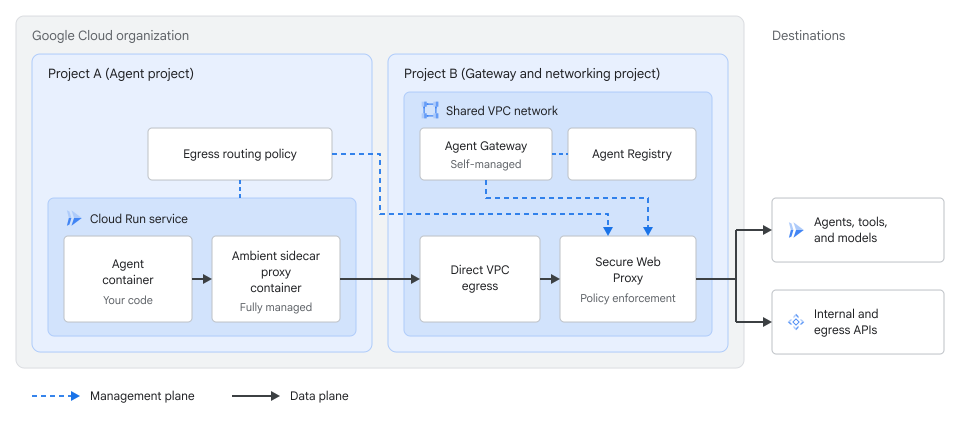
開始執行這些步驟前,請在專案 A 啟用 run.googleapis.com、compute.googleapis.com、networkservices.googleapis.com 和 trafficdirector.googleapis.com。如果代理會呼叫 Vertex AI,請一併啟用 aiplatform.googleapis.com。在專案 B 中,按照「建立自行管理的 Agent Gateway」一文所述,在 Shared VPC 虛擬私有雲網路部署 Secure Web Proxy 執行個體和 Agent Gateway 資源,並按照「設定 Cloud Run 周邊網路以存取 Traffic Director API」一文所述,設定 DNS 或 Private Service Connect 轉送,讓專案 A 中的周邊 Sidecar 能夠連上 Traffic Director API。
如要設定跨專案部署作業,請完成下列步驟:
將專案 B 設為 Shared VPC 主專案,將專案 A 附加為服務專案,並共用託管 Secure Web Proxy 執行個體的子網路。如要啟用 Shared VPC 並連接服務專案,您必須在組織或資料夾層級具備
roles/compute.xpnAdmin。如需操作說明,請參閱「使用直連虛擬私有雲輸出功能,將流量傳送至 Shared VPC 網路」和「佈建 Shared VPC」。在專案 B 中,將共用子網路的
roles/compute.networkUser授予專案 A 的 Cloud Run 服務代理:gcloud compute networks subnets add-iam-policy-binding SHARED_SUBNET_NAME \ --project=PROJECT_B_ID \ --region=REGION \ --member="serviceAccount:service-PROJECT_A_NUMBER@serverless-robot-prod.iam.gserviceaccount.com" \ --role="roles/compute.networkUser"
更改下列內容:
SHARED_SUBNET_NAME:專案 B 中共用子網路的名稱。PROJECT_B_ID:專案 B (閘道和 Shared VPC 主專案) 的專案 ID。REGION:共用子網路的區域。PROJECT_A_NUMBER:專案 A ( 代理服務專案) 的專案編號。
在專案 A 中部署 Cloud Run 代理服務,並指向專案 B 中的共用子網路:
gcloud beta run deploy SERVICE_NAME \
   --project=PROJECT_A_ID \
   --image=IMAGE_URL \
   --subnet=projects/PROJECT_B_ID/regions/REGION/subnetworks/SHARED_SUBNET_NAME \
   --vpc-egress=all \
   --functional-type=agent \
   --identity-type=agent-identity \
   --ambient-networking \
   --set-env-vars="GOOGLE_API_USE_CLIENT_CERTIFICATE=false,GOOGLE_API_USE_MTLS_ENDPOINT=never" \
   --region=REGION
更改下列內容:
SERVICE_NAME:專案 A 中 Cloud Run 代理服務的名稱。PROJECT_A_ID:專案 A ( 代理服務專案) 的專案 ID。IMAGE_URL:容器映像檔的參照,例如us-docker.pkg.dev/cloudrun/container/hello:latest。如果使用 Artifact Registry,則必須先建立存放區 REPO_NAME。網址格式為LOCATION-docker.pkg.dev/PROJECT_ID/REPO_NAME/PATH:TAG。
部署服務後,請按照「設定 Cloud Run 代理,使其信任 Agent Gateway」中的步驟,設定專案 A 中的代理,使其信任專案 B 中 Secure Web Proxy 執行個體的根 CA 憑證。
在專案 A 中建立
EgressRouting政策,參照專案 B 的 Secure Web Proxy 閘道。您必須在專案 A 中具備roles/networkservices.admin:gcloud alpha network-services egress-routings create my-central-egress-routing \ --location=REGION \ --project=PROJECT_A_ID \ --gateway="//networkservices.googleapis.com/projects/PROJECT_B_ID/locations/REGION/gateways/CENTRAL_SWP_NAME" \ --sources="workloadUri=//run.googleapis.com/projects/PROJECT_A_ID/locations/REGION/services/SERVICE_NAME"
將
CENTRAL_SWP_NAME替換為專案 B 中的 Secure Web Proxy 閘道名稱。如要透過專案 B 的閘道轉送專案 A 中的所有 Cloud Run 服務,請將workloadUri設為//run.googleapis.com/projects/PROJECT_A_ID或//run.googleapis.com/projects/PROJECT_A_NUMBER。確認專案 A 中的跨專案
EgressRouting資源處於有效狀態:gcloud alpha network-services egress-routings describe my-central-egress-routing \ --location=REGION \ --project=PROJECT_A_ID
按照「在 Agent Gateway 設定政策」一文的說明,在專案 B 的 Agent Gateway 資源上,設定集中式基準、IAP 和 Model Armor 政策:
- 按照「允許基準輸出和 MCP 流量」一節的指示,在專案 B 的 Agent Gateway 資源上,允許基準 MCP 和模型流量。
- 如要授權專案 A 中的代理呼叫專案 B 中註冊的 MCP 伺服器,請在專案 B 中建立 IAM 統一存取政策,其
principals清單參照專案 A 的專案編號principal://agents.global.org-ORGANIZATION_ID.system.id.goog/resources/run/projects/PROJECT_A_NUMBER/locations/REGION/services/SERVICE_NAME,將政策繫結至專案 B 或其 Agent Gateway 資源,並在專案 B 中附加 IAPExtensionBinding。 - 如要在專案 B 套用集中式 Model Armor 護欄,請建立區域 Model Armor 範本,將必要角色授予專案 B 的 Service Extensions 服務代理,並將 Model Armor
ExtensionBinding附加至專案 B 的 Agent Gateway 資源。
查看記錄和追蹤記錄
透過 Agent Gateway 轉送的傳出代理互動會產生記錄和分散式追蹤記錄,方便您監控政策決策及偵錯代理行為:
- 在 Cloud Logging 中查看 Cloud Run 服務和 Secure Web Proxy 閘道的要求記錄。詳情請參閱「查看及寫入容器記錄」和「Agent Gateway 交易記錄項目」。
- 在 Cloud Trace 中,分析代理和閘道的端對端要求延遲時間和追蹤記錄。詳情請參閱「使用 Trace 追蹤要求」。
如果傳出要求失敗或略過閘道,請參閱「排解 Agent Gateway 問題」。
支援的地區
您可以在下列區域使用 Cloud Run 上的 Agent Gateway:
europe-west1us-central1
限制
除了周邊網路限制和「將 Secure Web Proxy 部署為 Agent Gateway」中的 Secure Web Proxy 考量事項外,搭配使用 Agent Gateway 與 Cloud Run 時,也須注意下列限制:
- 如果透過檢查 TLS 的 Secure Web Proxy 執行個體,將傳出代理程式要求轉送至
*.mtls.googleapis.com和*.mtls.run.app端點,會因503錯誤而失敗,因為 Secure Web Proxy 會終止並重新啟動 TLS 工作階段,而不轉送用戶端憑證。 - 每個區域性自行管理的 Agent Gateway,其
registries清單最多支援一個區域性 Agent Registry。 - 根據預設,每個專案在各區域最多支援 10 項區域性
AgentGateway資源和 10 項區域性EgressRouting資源。新專案一開始的限制可能是每個區域 2 個。如要申請提高配額,請與帳戶團隊聯絡。 - 您必須從 CA 服務集區或私人企業 PKI 匯出根憑證或從屬憑證,並將代理程式容器設為信任該憑證。
後續步驟
- 排解 Agent Gateway 問題
- 設定 Cloud Run 的 Gemini Enterprise Agent Platform 功能
- 設定 Cloud Run 的周邊網路
- 使用直連虛擬私有雲輸出功能,將流量傳送至虛擬私有雲網路
- Agent Gateway 總覽
- 權杖管理總覽