


周邊網路提供 Cloud Run 內建的簡化資源網路體驗。這項服務為資源提供全代管資料層,可免除建構及維護自訂 Proxy 的作業負擔。此外,它也抽象化服務網格概念,因此您不必學習或設定網格,就能使用進階網路功能。
啟用周邊網路後,流量預設會原封不動通過,因此現有的 HTTP 和 TCP 流量會繼續運作。單獨啟用周邊網路不會改變資源的運作方式。周邊網路是基礎,可讓您選擇加入下一節所述的功能。
用途
周邊網路是 Cloud Run 進階網路功能的基礎。啟用周邊網路後,您可以選擇加入使用 Cloud Run 的 Agent Gateway。這項功能會根據貴組織集中管理的存取權和安全性政策,控管代理流量。
架構
周邊網路會在 Cloud Run 資源的每個容器執行個體中,與應用程式容器並行執行全代管 Envoy 邊車容器。sidecar 會攔截執行個體的網路流量,並套用 Cloud Run 發布的轉送和安全性政策。
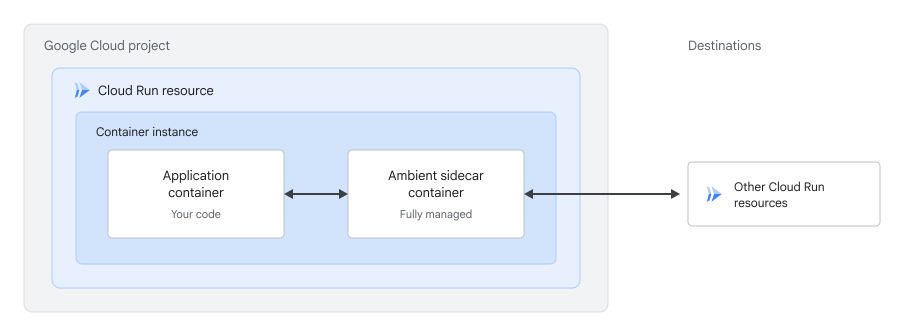
周邊網路範圍
周邊網路支援全域和區域範圍。範圍決定 sidecar 連線至全域或區域轉送層:
- 區域 (預設):Cloud Run 會將 sidecar 連線至區域轉送層,將轉送和安全性政策限制在服務區域內的目的地。這個範圍支援靜態、使用中和傳輸中資料的資料落地 (DRZ) 規定。如未指定範圍,周邊網路會使用區域範圍。
- 全域:Cloud Run 會將 sidecar 連線至全域轉送層,以便將流量轉送至任何區域的目的地。
使用周邊網路的每項功能都需要特定範圍:
| 功能 | 全域範圍 | 區域範圍 |
|---|---|---|
| Cloud Run 中的 Agent Gateway | 不支援 | 支援 |
限制
周邊網路有下列限制:
- 不支援 UDP 流量。周邊網路僅支援 HTTP 和 TCP 流量。
- 傳入要求不支援端對端 HTTP/2。詳情請參閱「已知問題」。
- 區域範圍不支援將
*.googleapis.com解析為 Private Google Access IP 位址的虛擬私有雲網路。詳情請參閱「已知問題」。 - 不支援第一代執行環境。如未指定執行環境,Cloud Run 會使用第二代。
- 容器執行個體需要較長時間才能啟動。詳情請參閱「已知問題」。
事前準備
- 登入 Google Cloud 帳戶。如果您未曾使用過 Google Cloud,歡迎建立帳戶,親自體驗實際使用我們產品的成效。新客戶還能獲得價值 $300 美元的免費抵免額,用於執行、測試及部署工作負載。
-
In the Google Cloud console, on the project selector page, select or create a Google Cloud project.
Roles required to select or create a project
- Select a project: Selecting a project doesn't require a specific IAM role—you can select any project that you've been granted a role on.
-
Create a project: To create a project, you need the Project Creator role
(
roles/resourcemanager.projectCreator), which contains theresourcemanager.projects.createpermission. Learn how to grant roles.
-
Verify that billing is enabled for your Google Cloud project.
-
In the Google Cloud console, on the project selector page, select or create a Google Cloud project.
Roles required to select or create a project
- Select a project: Selecting a project doesn't require a specific IAM role—you can select any project that you've been granted a role on.
-
Create a project: To create a project, you need the Project Creator role
(
roles/resourcemanager.projectCreator), which contains theresourcemanager.projects.createpermission. Learn how to grant roles.
-
Verify that billing is enabled for your Google Cloud project.
啟用 Cloud Run、Network Services 和 Traffic Director API (如有尚未啟用的 API)。
啟用 API 所需的角色
如要啟用 API,您必須具備
serviceusage.services.enable權限。如果您建立了專案,可能已透過擁有者角色 (roles/owner) 取得這項權限。否則,您可以透過 Service Usage 管理員角色 (roles/serviceusage.serviceUsageAdmin) 取得這項權限。瞭解如何授予角色。-
將 Cloud Run 資源的 CPU 限制提高 1 個 vCPU,並將記憶體限制提高 1 GiB。如果新的 CPU 限制不是支援的值,請使用下一個較高的支援值。ambient sidecar 會共用容器執行個體的 CPU 和記憶體,因此增加資源可確保應用程式保有需要的資源。
-
請參閱 Cloud Run 定價頁面,瞭解周邊網路 Sidecar 的用量。預先發布版期間,不會強制收取 Ambient 功能費用。
必要的角色
如要取得設定及部署 Cloud Run 服務所需的權限,請要求管理員授予您下列 IAM 角色:
- Cloud Run 服務的 Cloud Run 開發人員 (
roles/run.developer) - 服務身分的服務帳戶使用者 (
roles/iam.serviceAccountUser)
如果您是從原始碼部署服務或函式,則必須在專案和 Cloud Build 服務帳戶中,取得額外角色。
Cloud Run 資源的服務身分也必須具備下列角色:
- Traffic Director 用戶端 (
roles/trafficdirector.client) - Cloud Trace 代理 (
roles/cloudtrace.agent)
如要將這些角色授予服務身分,請使用 gcloud:
gcloud projects add-iam-policy-binding PROJECT_ID \
    --member="serviceAccount:RUN_CLIENT_SA@PROJECT_ID.iam.gserviceaccount.com" \
    --role="roles/trafficdirector.client"

gcloud projects add-iam-policy-binding PROJECT_ID \
    --member="serviceAccount:RUN_CLIENT_SA@PROJECT_ID.iam.gserviceaccount.com" \
    --role="roles/cloudtrace.agent"
更改下列內容:
- PROJECT_ID:您的 Google Cloud 專案 ID。
- RUN_CLIENT_SA:附加至 Cloud Run 服務的服務帳戶名稱。
如果服務身分缺少這些角色,Cloud Run 資源仍會部署,但使用周邊網路的功能將無法運作。
如要查看與 Cloud Run 相關聯的 IAM 角色和權限清單,請參閱「Cloud Run IAM 角色」和「Cloud Run IAM 權限」。如果 Cloud Run 服務與Google Cloud API (例如 Cloud 用戶端程式庫) 互動,請參閱服務身分設定指南。如要進一步瞭解如何授予角色,請參閱「部署權限」和「管理存取權」。
設定周邊網路
使用 gcloud 或 YAML 檔案設定周邊網路。
gcloud
如要在新服務上啟用周邊網路,請傳遞
--ambient-networking旗標,並視需要傳遞--ambient-scope旗標:gcloud beta run deploy SERVICE \ --image=IMAGE_URL \ --ambient-networking \ --ambient-scope=SCOPE \ --region=REGION
如要為現有服務啟用周邊網路,請將相同旗標傳遞至
gcloud beta run services update指令,部署已啟用周邊網路的新修訂版本:gcloud beta run services update SERVICE \ --ambient-networking \ --ambient-scope=SCOPE \ --region=REGION
如要停用周邊網路,請傳遞
--no-ambient-networking旗標:gcloud beta run services update SERVICE \ --no-ambient-networking \ --region=REGION
更改下列內容:
YAML
如要建立新服務,請略過這個步驟。如要更新現有服務,請下載其 YAML 設定:
gcloud run services describe SERVICE --format export > service.yaml
新增
run.googleapis.com/ambient-networking註解,並視需要新增run.googleapis.com/ambient-scope註解:spec: template: metadata: annotations: run.googleapis.com/ambient-networking: 'true' run.googleapis.com/ambient-scope: SCOPE
將 SCOPE 替換為周邊網路範圍,即
global或regional。如要停用周邊網路,請將run.googleapis.com/ambient-networking設為'false',並移除run.googleapis.com/ambient-scope註解。使用下列指令建立或更新服務:
gcloud run services replace service.yaml
gcloud run services replace指令預設會使用service.yaml檔案 (如有)。
查看周邊網路設定
如要查看 Cloud Run 服務目前的周邊網路設定,請按照下列步驟操作:
控制台
在 Google Cloud 控制台中,前往 Cloud Run 的「Services」(服務) 頁面:
按一下服務,開啟「Service details」(服務詳細資料) 頁面。
按一下 [網路] 分頁標籤。
在「Ambient networking」(周邊網路) 資訊卡中,查看「Scope」(範圍) 設定。
gcloud
使用下列指令:
gcloud beta run services describe SERVICE \
   --region=REGION
在傳回的設定中,找出
run.googleapis.com/ambient-networking和run.googleapis.com/ambient-scope註解。
後續步驟
- 瞭解 Cloud Run 上的 Agent Gateway。
- 瞭解如何為 Cloud Run 設定 Agent Platform 功能。
- 瞭解 Cloud Run 的服務對服務驗證。
- 瞭解如何使用 Cloud Trace 追蹤要求。