מעקב OpenTelemetry ב-Pub/Sub

בעזרת מעקב ב-OpenTelemetry אפשר לזהות את זמן האחזור של פעולות שונות בספריית הלקוח של Pub/Sub ולעקוב אחריהן, כמו פעולות של אגירת נתונים, ניהול חכירה ובקרה על זרימת נתונים. איסוף המידע הזה יכול לעזור לכם לנפות באגים בספריית הלקוח.

אלה כמה תרחישי שימוש אפשריים במעקב OpenTelemetry:

  • זמן האחזור של הפרסום בשירות ארוך מהרגיל.
  • מספר המסירות מחדש של ההודעות גבוה.
  • שינוי בפונקציית הקריאה החוזרת של לקוח המנוי גורם לעיבוד להימשך זמן רב מהרגיל.

לפני שמתחילים

לפני שמגדירים את OpenTelemetry, צריך לבצע את המשימות הבאות:

התפקידים הנדרשים

כדי לוודא שלחשבון השירות יש את ההרשאות הנדרשות לייצוא נתוני מעקב ל-Cloud Trace, צריך לבקש מהאדמין להקצות לחשבון השירות את תפקידי ה-IAM הבאים בפרויקט:

להסבר על מתן תפקידים, ראו איך מנהלים את הגישה ברמת הפרויקט, התיקייה והארגון.

התפקידים המוגדרים מראש האלה כוללים את ההרשאות שנדרשות לייצוא עקבות ל-Cloud Trace. כדי לראות בדיוק אילו הרשאות נדרשות, אפשר להרחיב את הקטע ההרשאות הנדרשות:

ההרשאות הנדרשות

כדי לייצא עקבות ל-Cloud Trace, נדרשות ההרשאות הבאות:

  • הכול: cloudtrace.traces.patch

יכול להיות שהאדמין יוכל גם להעניק לחשבון השירות את ההרשאות האלה באמצעות תפקידים בהתאמה אישית או תפקידים מוגדרים מראש אחרים.

תהליך העבודה של OpenTelemetry tracing

כדי להגדיר מעקב באמצעות OpenTelemetry, משתמשים בספריות הלקוח של Pub/Sub וב-OpenTelemetry SDK. כדי להתחבר לספריות Pub/Sub, צריך להגדיר באמצעות ה-SDK יצואן של נתוני מעקב וספק של נתוני מעקב. בספריות מסוימות, הגדרת ספק של כלי מעקב היא אופציונלית.

  • Trace exporter. ערכת OpenTelemetry SDK משתמשת ב-trace exporter כדי לקבוע לאן לשלוח מעקבים.

  • ספק Tracer. ספריות הלקוח של Pub/Sub משתמשות בספק של כלי המעקב כדי ליצור מעקבים.

כך מגדירים מעקב:

  1. יוצרים מופע של Cloud Trace OpenTelemetry exporter.
  2. אם נדרש, יוצרים מופע של Tracer Provider ורושמים אותו באמצעות OpenTelemetry SDK.
  3. מגדירים את הלקוח עם האפשרות להפעלת מעקב OpenTelemetry.
  4. משתמשים בספריות הלקוח של Pub/Sub כדי לפרסם הודעה.

איך פועל המעקב

לכל הודעה שמתפרסמת, ספריית הלקוח יוצרת מעקב חדש. המעקב הזה מייצג את כל מחזור החיים של ההודעה, מהרגע שבו מפרסמים הודעה ועד לרגע שבו מתקבל אישור על ההודעה. ה-trace כולל מידע כמו משך הפעולות, טווחי צאצאים וטווחי אב וטווחי צאצאים מקושרים.

טראס מורכב מטווח בסיסי ומטווחים משניים תואמים. הטווחים האלה מייצגים את העבודה שספריית הלקוח מבצעת כשמעבדת הודעה. כל מעקב אחר הודעות מכיל את הפרטים הבאים:

  • לפרסום. בקרה על זרימת נתונים, תזמון של מפתח ההזמנה, עיבוד באצווה ואורך של RPC לפרסום.
  • למינויים. בקרת בו-זמניות, תזמון של מפתחות להזמנה וניהול של חוזי שכירות.

כדי להעביר מידע מהצד של הפרסום לצד של ההרשמה, ספריות הלקוח מוסיפות מאפיין ספציפי למעקב בצד של הפרסום. מנגנון העברת ההקשר מופעל רק כשמעקב מופעל, והוא מתווסף עם הקידומת googclient_.

פרסום הודעות עם מעקב

בדוגמת הקוד הבאה אפשר לראות איך להפעיל מעקב באמצעות ספריית הלקוח של Pub/Sub ו-OpenTelemetry SDK. בדוגמה הזו, תוצאות המעקב מיוצאות אל Cloud Trace.

לתשומת ליבכם

כשיוצרים מופע של ספק ה-tracer, מגדירים יחס דגימה באמצעות OpenTelemetry SDK. היחס הזה קובע כמה עקבות ה-SDK צריך לדגום. שיעור דגימה נמוך יותר יכול לעזור להפחית את עלויות החיוב ולמנוע חריגה של השירות שלכם מהמכסת הטווח של Cloud Trace.

המשך

import (
	"context"
	"fmt"
	"io"

	"cloud.google.com/go/pubsub/v2"
	"go.opentelemetry.io/otel"
	"google.golang.org/api/option"

	texporter "github.com/GoogleCloudPlatform/opentelemetry-operations-go/exporter/trace"
	"go.opentelemetry.io/otel/sdk/resource"
	sdktrace "go.opentelemetry.io/otel/sdk/trace"
	semconv "go.opentelemetry.io/otel/semconv/v1.26.0"
)

// publishOpenTelemetryTracing publishes a single message with OpenTelemetry tracing
// enabled, exporting to Cloud Trace.
func publishOpenTelemetryTracing(w io.Writer, projectID, topicID string, sampling float64) error {
	// projectID := "my-project-id"
	// topicID := "my-topic"
	ctx := context.Background()

	exporter, err := texporter.New(texporter.WithProjectID(projectID),
		// Disable spans created by the exporter.
		texporter.WithTraceClientOptions(
			[]option.ClientOption{option.WithTelemetryDisabled()},
		),
	)
	if err != nil {
		return fmt.Errorf("error instantiating exporter: %w", err)
	}

	resources := resource.NewWithAttributes(
		semconv.SchemaURL,
		semconv.ServiceNameKey.String("publisher"),
	)

	// Instantiate a tracer provider with the following settings
	tp := sdktrace.NewTracerProvider(
		sdktrace.WithBatcher(exporter),
		sdktrace.WithResource(resources),
		sdktrace.WithSampler(
			sdktrace.ParentBased(sdktrace.TraceIDRatioBased(sampling)),
		),
	)

	defer tp.ForceFlush(ctx) // flushes any pending spans
	otel.SetTracerProvider(tp)

	// Create a new client with tracing enabled.
	client, err := pubsub.NewClientWithConfig(ctx, projectID, &pubsub.ClientConfig{
		EnableOpenTelemetryTracing: true,
	})
	if err != nil {
		return fmt.Errorf("pubsub: NewClient: %w", err)
	}
	defer client.Close()

	// client.Publisher can be passed a topic ID (e.g. "my-topic") or
	// a fully qualified name (e.g. "projects/my-project/topics/my-topic").
	// If a topic ID is provided, the project ID from the client is used.
	// Reuse this publisher for all publish calls to send messages in batches.
	publisher := client.Publisher(topicID)
	result := publisher.Publish(ctx, &pubsub.Message{
		Data: []byte("Publishing message with tracing"),
	})
	if _, err := result.Get(ctx); err != nil {
		return fmt.Errorf("pubsub: result.Get: %w", err)
	}
	fmt.Fprintln(w, "Published a traced message")
	return nil
}

C++‎

// Create a few namespace aliases to make the code easier to read.
namespace gc = ::google::cloud;
namespace otel = gc::otel;
namespace pubsub = gc::pubsub;

// This example uses a simple wrapper to export (upload) OTel tracing data
// to Google Cloud Trace. More complex applications may use different
// authentication, or configure their own OTel exporter.
auto project = gc::Project(project_id);
auto configuration = otel::ConfigureBasicTracing(project);

auto publisher = pubsub::Publisher(pubsub::MakePublisherConnection(
    pubsub::Topic(project_id, topic_id),
    // Configure this publisher to enable OTel tracing. Some applications may
    // chose to disable tracing in some publishers or to dynamically enable
    // this option based on their own configuration.
    gc::Options{}.set<gc::OpenTelemetryTracingOption>(true)));

// After this point, use the Cloud Pub/Sub C++ client library as usual.
// In this example, we will send a few messages and configure a callback
// action for each one.
std::vector<gc::future<void>> ids;
for (int i = 0; i < 5; i++) {
  auto id = publisher.Publish(pubsub::MessageBuilder().SetData("Hi!").Build())
                .then([](gc::future<gc::StatusOr<std::string>> f) {
                  auto id = f.get();
                  if (!id) {
                    std::cout << "Error in publish: " << id.status() << "\n";
                    return;
                  }
                  std::cout << "Sent message with id: (" << *id << ")\n";
                });
  ids.push_back(std::move(id));
}
// Block until the messages are actually sent.
for (auto& id : ids) id.get();

Python

לפני שמנסים את הדוגמה הזו, צריך לפעול לפי הוראות ההגדרה של Python במאמר תחילת העבודה המהירה: שימוש בספריות לקוח. מידע נוסף מופיע במאמרי העזרה של ה-API בשפת Python של Pub/Sub.


from opentelemetry import trace
from opentelemetry.sdk.trace import TracerProvider
from opentelemetry.sdk.trace.export import (
    BatchSpanProcessor,
)
from opentelemetry.exporter.cloud_trace import CloudTraceSpanExporter
from opentelemetry.sdk.trace.sampling import TraceIdRatioBased, ParentBased

from google.cloud.pubsub_v1 import PublisherClient
from google.cloud.pubsub_v1.types import PublisherOptions

# TODO(developer)
# topic_project_id = "your-topic-project-id"
# trace_project_id = "your-trace-project-id"
# topic_id = "your-topic-id"

# In this sample, we use a Google Cloud Trace to export the OpenTelemetry
# traces: https://cloud.google.com/trace/docs/setup/python-ot
# Choose and configure the exporter for your set up accordingly.

sampler = ParentBased(root=TraceIdRatioBased(1))
trace.set_tracer_provider(TracerProvider(sampler=sampler))

# Export to Google Trace.
cloud_trace_exporter = CloudTraceSpanExporter(
    project_id=trace_project_id,
)
trace.get_tracer_provider().add_span_processor(
    BatchSpanProcessor(cloud_trace_exporter)
)

# Set the `enable_open_telemetry_tracing` option to True when creating
# the publisher client. This in itself is necessary and sufficient for
# the library to export OpenTelemetry traces. However, where the traces
# must be exported to needs to be configured based on your OpenTelemetry
# set up. Refer: https://opentelemetry.io/docs/languages/python/exporters/
publisher = PublisherClient(
    publisher_options=PublisherOptions(
        enable_open_telemetry_tracing=True,
    ),
)

# The `topic_path` method creates a fully qualified identifier
# in the form `projects/{project_id}/topics/{topic_id}`
topic_path = publisher.topic_path(topic_project_id, topic_id)
# Publish messages.
for n in range(1, 10):
    data_str = f"Message number {n}"
    # Data must be a bytestring
    data = data_str.encode("utf-8")
    # When you publish a message, the client returns a future.
    future = publisher.publish(topic_path, data)
    print(future.result())

print(f"Published messages to {topic_path}.")

TypeScript

/**
 * TODO(developer): Uncomment these variables before running the sample.
 */
// const topicNameOrId = 'YOUR_TOPIC_OR_ID';
// const data = 'Hello, world!";

// Imports the Google Cloud client library
import {PubSub} from '@google-cloud/pubsub';

// Imports the OpenTelemetry API
import {NodeTracerProvider} from '@opentelemetry/sdk-trace-node';
import {diag, DiagConsoleLogger, DiagLogLevel} from '@opentelemetry/api';
import {SimpleSpanProcessor} from '@opentelemetry/sdk-trace-base';

// To output to the console for testing, use the ConsoleSpanExporter.
// import {ConsoleSpanExporter} from '@opentelemetry/sdk-trace-base';

// To output to Cloud Trace, import the OpenTelemetry bridge library.
import {TraceExporter} from '@google-cloud/opentelemetry-cloud-trace-exporter';

import {Resource} from '@opentelemetry/resources';
import {SEMRESATTRS_SERVICE_NAME} from '@opentelemetry/semantic-conventions';

// Enable the diagnostic logger for OpenTelemetry
diag.setLogger(new DiagConsoleLogger(), DiagLogLevel.DEBUG);

// Log spans out to the console, for testing.
// const exporter = new ConsoleSpanExporter();

// Log spans out to Cloud Trace, for production.
const exporter = new TraceExporter();

// Build a tracer provider and a span processor to do
// something with the spans we're generating.
const provider = new NodeTracerProvider({
  resource: new Resource({
    [SEMRESATTRS_SERVICE_NAME]: 'otel publisher example',
  }),
});
const processor = new SimpleSpanProcessor(exporter);
provider.addSpanProcessor(processor);
provider.register();

// Creates a client; cache this for further use.
const pubSubClient = new PubSub({enableOpenTelemetryTracing: true});

async function publishMessage(topicNameOrId: string, data: string) {
  // Publishes the message as a string, e.g. "Hello, world!"
  // or JSON.stringify(someObject)
  const dataBuffer = Buffer.from(data);

  // Cache topic objects (publishers) and reuse them.
  const publisher = pubSubClient.topic(topicNameOrId);

  const messageId = await publisher.publishMessage({data: dataBuffer});
  console.log(`Message ${messageId} published.`);

  // The rest of the sample is in service to making sure that any
  // buffered Pub/Sub messages and/or OpenTelemetry spans are properly
  // flushed to the server side. In normal usage, you'd only need to do
  // something like this on process shutdown.
  await publisher.flush();
  await processor.forceFlush();
  await new Promise(r => setTimeout(r, OTEL_TIMEOUT * 1000));
}

Node.js

/**
 * TODO(developer): Uncomment these variables before running the sample.
 */
// const topicNameOrId = 'YOUR_TOPIC_OR_ID';
// const data = 'Hello, world!";

// Imports the Google Cloud client library
const {PubSub} = require('@google-cloud/pubsub');

// Imports the OpenTelemetry API
const {NodeTracerProvider} = require('@opentelemetry/sdk-trace-node');
const {diag, DiagConsoleLogger, DiagLogLevel} = require('@opentelemetry/api');
const {SimpleSpanProcessor} = require('@opentelemetry/sdk-trace-base');

// To output to the console for testing, use the ConsoleSpanExporter.
// import {ConsoleSpanExporter} from '@opentelemetry/sdk-trace-base';

// To output to Cloud Trace, import the OpenTelemetry bridge library.
const {
  TraceExporter,
} = require('@google-cloud/opentelemetry-cloud-trace-exporter');

const {Resource} = require('@opentelemetry/resources');
const {
  SEMRESATTRS_SERVICE_NAME,
} = require('@opentelemetry/semantic-conventions');

// Enable the diagnostic logger for OpenTelemetry
diag.setLogger(new DiagConsoleLogger(), DiagLogLevel.DEBUG);

// Log spans out to the console, for testing.
// const exporter = new ConsoleSpanExporter();

// Log spans out to Cloud Trace, for production.
const exporter = new TraceExporter();

// Build a tracer provider and a span processor to do
// something with the spans we're generating.
const provider = new NodeTracerProvider({
  resource: new Resource({
    [SEMRESATTRS_SERVICE_NAME]: 'otel publisher example',
  }),
});
const processor = new SimpleSpanProcessor(exporter);
provider.addSpanProcessor(processor);
provider.register();

// Creates a client; cache this for further use.
const pubSubClient = new PubSub({enableOpenTelemetryTracing: true});

async function publishMessage(topicNameOrId, data) {
  // Publishes the message as a string, e.g. "Hello, world!"
  // or JSON.stringify(someObject)
  const dataBuffer = Buffer.from(data);

  // Cache topic objects (publishers) and reuse them.
  const publisher = pubSubClient.topic(topicNameOrId);

  const messageId = await publisher.publishMessage({data: dataBuffer});
  console.log(`Message ${messageId} published.`);

  // The rest of the sample is in service to making sure that any
  // buffered Pub/Sub messages and/or OpenTelemetry spans are properly
  // flushed to the server side. In normal usage, you'd only need to do
  // something like this on process shutdown.
  await publisher.flush();
  await processor.forceFlush();
  await new Promise(r => setTimeout(r, OTEL_TIMEOUT * 1000));
}

Java


import com.google.api.core.ApiFuture;
import com.google.cloud.opentelemetry.trace.TraceConfiguration;
import com.google.cloud.opentelemetry.trace.TraceExporter;
import com.google.cloud.pubsub.v1.Publisher;
import com.google.protobuf.ByteString;
import com.google.pubsub.v1.PubsubMessage;
import com.google.pubsub.v1.TopicName;
import io.opentelemetry.api.OpenTelemetry;
import io.opentelemetry.sdk.OpenTelemetrySdk;
import io.opentelemetry.sdk.resources.Resource;
import io.opentelemetry.sdk.trace.SdkTracerProvider;
import io.opentelemetry.sdk.trace.export.SimpleSpanProcessor;
import io.opentelemetry.sdk.trace.export.SpanExporter;
import io.opentelemetry.sdk.trace.samplers.Sampler;
import io.opentelemetry.semconv.ResourceAttributes;
import java.io.IOException;
import java.util.concurrent.ExecutionException;
import java.util.concurrent.TimeUnit;

public class OpenTelemetryPublisherExample {
  public static void main(String... args) throws Exception {
    // TODO(developer): Replace these variables before running the sample.
    String projectId = "your-project-id";
    String topicId = "your-topic-id";

    openTelemetryPublisherExample(projectId, topicId);
  }

  public static void openTelemetryPublisherExample(String projectId, String topicId)
      throws IOException, ExecutionException, InterruptedException {
    Resource resource =
        Resource.getDefault().toBuilder()
            .put(ResourceAttributes.SERVICE_NAME, "publisher-example")
            .build();

    // Creates a Cloud Trace exporter.
    SpanExporter traceExporter =
        TraceExporter.createWithConfiguration(
            TraceConfiguration.builder().setProjectId(projectId).build());

    SdkTracerProvider sdkTracerProvider =
        SdkTracerProvider.builder()
            .setResource(resource)
            .addSpanProcessor(SimpleSpanProcessor.create(traceExporter))
            .setSampler(Sampler.alwaysOn())
            .build();

    OpenTelemetry openTelemetry =
        OpenTelemetrySdk.builder().setTracerProvider(sdkTracerProvider).buildAndRegisterGlobal();

    TopicName topicName = TopicName.of(projectId, topicId);

    Publisher publisher = null;
    try {
      // Create a publisher instance with the created OpenTelemetry object and enabling tracing.
      publisher =
          Publisher.newBuilder(topicName)
              .setOpenTelemetry(openTelemetry)
              .setEnableOpenTelemetryTracing(true)
              .build();

      String message = "Hello World!";
      ByteString data = ByteString.copyFromUtf8(message);
      PubsubMessage pubsubMessage = PubsubMessage.newBuilder().setData(data).build();

      // Once published, returns a server-assigned message id (unique within the topic)
      ApiFuture<String> messageIdFuture = publisher.publish(pubsubMessage);
      String messageId = messageIdFuture.get();
      System.out.println("Published message ID: " + messageId);
    } finally {
      if (publisher != null) {
        // When finished with the publisher, shutdown to free up resources.
        publisher.shutdown();
        publisher.awaitTermination(1, TimeUnit.MINUTES);
      }
    }
  }
}

קבלת הודעות עם מעקב

המשך

import (
	"context"
	"fmt"
	"io"
	"sync/atomic"
	"time"

	"cloud.google.com/go/pubsub/v2"
	texporter "github.com/GoogleCloudPlatform/opentelemetry-operations-go/exporter/trace"
	"go.opentelemetry.io/otel"
	"go.opentelemetry.io/otel/sdk/resource"
	sdktrace "go.opentelemetry.io/otel/sdk/trace"
	semconv "go.opentelemetry.io/otel/semconv/v1.24.0"
	"google.golang.org/api/option"
)

func subscribeOpenTelemetryTracing(w io.Writer, projectID, subID string, sampleRate float64) error {
	// projectID := "my-project-id"
	// subID := "my-sub"
	// sampleRate := "1.0"
	ctx := context.Background()

	exporter, err := texporter.New(texporter.WithProjectID(projectID),
		// Disable spans created by the exporter.
		texporter.WithTraceClientOptions(
			[]option.ClientOption{option.WithTelemetryDisabled()},
		),
	)
	if err != nil {
		return fmt.Errorf("error instantiating exporter: %w", err)
	}

	resources := resource.NewWithAttributes(
		semconv.SchemaURL,
		semconv.ServiceNameKey.String("subscriber"),
	)

	// Instantiate a tracer provider with the following settings
	tp := sdktrace.NewTracerProvider(
		sdktrace.WithBatcher(exporter),
		sdktrace.WithResource(resources),
		sdktrace.WithSampler(
			sdktrace.ParentBased(sdktrace.TraceIDRatioBased(sampleRate)),
		),
	)

	defer tp.ForceFlush(ctx) // flushes any pending spans
	otel.SetTracerProvider(tp)

	// Create a new client with tracing enabled.
	client, err := pubsub.NewClientWithConfig(ctx, projectID, &pubsub.ClientConfig{
		EnableOpenTelemetryTracing: true,
	})
	if err != nil {
		return fmt.Errorf("pubsub.NewClient: %w", err)
	}
	defer client.Close()

	// client.Subscriber can be passed a subscription ID (e.g. "my-sub") or
	// a fully qualified name (e.g. "projects/my-project/subscriptions/my-sub").
	// If a subscription ID is provided, the project ID from the client is used.
	sub := client.Subscriber(subID)

	// Receive messages for 10 seconds, which simplifies testing.
	// Comment this out in production, since `Receive` should
	// be used as a long running operation.
	ctx, cancel := context.WithTimeout(ctx, 10*time.Second)
	defer cancel()

	var received int32
	err = sub.Receive(ctx, func(_ context.Context, msg *pubsub.Message) {
		fmt.Fprintf(w, "Got message: %q\n", string(msg.Data))
		atomic.AddInt32(&received, 1)
		msg.Ack()
	})
	if err != nil {
		return fmt.Errorf("sub.Receive: %w", err)
	}
	fmt.Fprintf(w, "Received %d messages\n", received)

	return nil
}

C++‎

#include "google/cloud/opentelemetry/configure_basic_tracing.h"
#include "google/cloud/opentelemetry_options.h"
#include "google/cloud/pubsub/message.h"
#include "google/cloud/pubsub/publisher.h"
#include "google/cloud/pubsub/subscriber.h"
#include "google/cloud/pubsub/subscription.h"
#include <iostream>

int main(int argc, char* argv[]) try {
  if (argc != 4) {
    std::cerr << "Usage: " << argv[0]
              << " <project-id> <topic-id> <subscription-id>\n";
    return 1;
  }

  std::string const project_id = argv[1];
  std::string const topic_id = argv[2];
  std::string const subscription_id = argv[3];

  // Create a few namespace aliases to make the code easier to read.
  namespace gc = ::google::cloud;
  namespace otel = gc::otel;
  namespace pubsub = gc::pubsub;

  auto constexpr kWaitTimeout = std::chrono::seconds(30);

  auto project = gc::Project(project_id);
  auto configuration = otel::ConfigureBasicTracing(project);

  // Publish a message with tracing enabled.
  auto publisher = pubsub::Publisher(pubsub::MakePublisherConnection(
      pubsub::Topic(project_id, topic_id),
      gc::Options{}.set<gc::OpenTelemetryTracingOption>(true)));
  // Block until the message is actually sent and throw on error.
  auto id = publisher.Publish(pubsub::MessageBuilder().SetData("Hi!").Build())
                .get()
                .value();
  std::cout << "Sent message with id: (" << id << ")\n";

  // Receive a message using streaming pull with tracing enabled.
  auto subscriber = pubsub::Subscriber(pubsub::MakeSubscriberConnection(
      pubsub::Subscription(project_id, subscription_id),
      gc::Options{}.set<gc::OpenTelemetryTracingOption>(true)));

  auto session =
      subscriber.Subscribe([&](pubsub::Message const& m, pubsub::AckHandler h) {
        std::cout << "Received message " << m << "\n";
        std::move(h).ack();
      });

  std::cout << "Waiting for messages on " + subscription_id + "...\n";

  // Blocks until the timeout is reached.
  auto result = session.wait_for(kWaitTimeout);
  if (result == std::future_status::timeout) {
    std::cout << "timeout reached, ending session\n";
    session.cancel();
  }

  return 0;
} catch (google::cloud::Status const& status) {
  std::cerr << "google::cloud::Status thrown: " << status << "\n";
  return 1;
}

Python

from opentelemetry import trace
from opentelemetry.sdk.trace import TracerProvider
from opentelemetry.sdk.trace.export import (
    BatchSpanProcessor,
)
from opentelemetry.exporter.cloud_trace import CloudTraceSpanExporter
from opentelemetry.sdk.trace.sampling import TraceIdRatioBased, ParentBased

from google.cloud import pubsub_v1
from google.cloud.pubsub_v1 import SubscriberClient
from google.cloud.pubsub_v1.types import SubscriberOptions

# TODO(developer)
# subscription_project_id = "your-subscription-project-id"
# subscription_id = "your-subscription-id"
# cloud_trace_project_id = "your-cloud-trace-project-id"
# timeout = 300.0

# In this sample, we use a Google Cloud Trace to export the OpenTelemetry
# traces: https://cloud.google.com/trace/docs/setup/python-ot
# Choose and configure the exporter for your set up accordingly.

sampler = ParentBased(root=TraceIdRatioBased(1))
trace.set_tracer_provider(TracerProvider(sampler=sampler))

# Export to Google Trace
cloud_trace_exporter = CloudTraceSpanExporter(
    project_id=cloud_trace_project_id,
)
trace.get_tracer_provider().add_span_processor(
    BatchSpanProcessor(cloud_trace_exporter)
)
# Set the `enable_open_telemetry_tracing` option to True when creating
# the subscriber client. This in itself is necessary and sufficient for
# the library to export OpenTelemetry traces. However, where the traces
# must be exported to needs to be configured based on your OpenTelemetry
# set up. Refer: https://opentelemetry.io/docs/languages/python/exporters/
subscriber = SubscriberClient(
    subscriber_options=SubscriberOptions(enable_open_telemetry_tracing=True)
)

# The `subscription_path` method creates a fully qualified identifier
# in the form `projects/{project_id}/subscriptions/{subscription_id}`
subscription_path = subscriber.subscription_path(
    subscription_project_id, subscription_id
)

# Define callback to be called when a message is received.
def callback(message: pubsub_v1.subscriber.message.Message) -> None:
    # Ack message after processing it.
    print(message.data)
    message.ack()

# Wrap subscriber in a 'with' block to automatically call close() when done.
with subscriber:
    try:
        # Optimistically subscribe to messages on the subscription.
        streaming_pull_future = subscriber.subscribe(
            subscription_path, callback=callback
        )
        streaming_pull_future.result(timeout=timeout)
    except TimeoutError:
        print("Successfully subscribed until the timeout passed.")
        streaming_pull_future.cancel()  # Trigger the shutdown.
        streaming_pull_future.result()  # Block until the shutdown is complete.

TypeScript

/**
 * TODO(developer): Uncomment these variables before running the sample.
 */
// const subscriptionNameOrId = 'YOUR_SUBSCRIPTION_OR_ID';

// Imports the Google Cloud client library
import {Message, PubSub} from '@google-cloud/pubsub';

// Imports the OpenTelemetry API
import {NodeTracerProvider} from '@opentelemetry/sdk-trace-node';
import {diag, DiagConsoleLogger, DiagLogLevel} from '@opentelemetry/api';
import {SimpleSpanProcessor} from '@opentelemetry/sdk-trace-base';

// To output to the console for testing, use the ConsoleSpanExporter.
// import {ConsoleSpanExporter} from '@opentelemetry/sdk-trace-base';

// To output to Cloud Trace, import the OpenTelemetry bridge library.
import {TraceExporter} from '@google-cloud/opentelemetry-cloud-trace-exporter';

import {Resource} from '@opentelemetry/resources';
import {SEMRESATTRS_SERVICE_NAME} from '@opentelemetry/semantic-conventions';

// Enable the diagnostic logger for OpenTelemetry
diag.setLogger(new DiagConsoleLogger(), DiagLogLevel.DEBUG);

// Log spans out to the console, for testing.
// const exporter = new ConsoleSpanExporter();

// Log spans out to Cloud Trace, for production.
const exporter = new TraceExporter();

// Build a tracer provider and a span processor to do
// something with the spans we're generating.
const provider = new NodeTracerProvider({
  resource: new Resource({
    [SEMRESATTRS_SERVICE_NAME]: 'otel subscriber example',
  }),
});
const processor = new SimpleSpanProcessor(exporter);
provider.addSpanProcessor(processor);
provider.register();

// Creates a client; cache this for further use.
const pubSubClient = new PubSub({enableOpenTelemetryTracing: true});

async function subscriptionListen(subscriptionNameOrId: string) {
  const subscriber = pubSubClient.subscription(subscriptionNameOrId);

  // Message handler for subscriber
  const messageHandler = async (message: Message) => {
    console.log(`Message ${message.id} received.`);
    message.ack();
  };

  // Error handler for subscriber
  const errorHandler = async (error: Error) => {
    console.log('Received error:', error);
  };

  // Listens for new messages from the topic
  subscriber.on('message', messageHandler);
  subscriber.on('error', errorHandler);

  // Ensures that all spans got flushed by the exporter. This function
  // is in service to making sure that any buffered Pub/Sub messages
  // and/or OpenTelemetry spans are properly flushed to the server
  // side. In normal usage, you'd only need to do something like this
  // on process shutdown.
  async function shutdown() {
    await subscriber.close();
    await processor.forceFlush();
    await new Promise(r => setTimeout(r, OTEL_TIMEOUT * 1000));
  }

  // Wait a bit for the subscription to receive messages, then shut down
  // gracefully. This is for the sample only; normally you would not need
  // this delay.
  await new Promise<void>(r =>
    setTimeout(async () => {
      subscriber.removeAllListeners();
      await shutdown();
      r();
    }, SUBSCRIBER_TIMEOUT * 1000),
  );
}

Node.js

/**
 * TODO(developer): Uncomment these variables before running the sample.
 */
// const subscriptionNameOrId = 'YOUR_SUBSCRIPTION_OR_ID';

// Imports the Google Cloud client library
const {PubSub} = require('@google-cloud/pubsub');

// Imports the OpenTelemetry API
const {NodeTracerProvider} = require('@opentelemetry/sdk-trace-node');
const {diag, DiagConsoleLogger, DiagLogLevel} = require('@opentelemetry/api');
const {SimpleSpanProcessor} = require('@opentelemetry/sdk-trace-base');

// To output to the console for testing, use the ConsoleSpanExporter.
// import {ConsoleSpanExporter} from '@opentelemetry/sdk-trace-base';

// To output to Cloud Trace, import the OpenTelemetry bridge library.
const {
  TraceExporter,
} = require('@google-cloud/opentelemetry-cloud-trace-exporter');

const {Resource} = require('@opentelemetry/resources');
const {
  SEMRESATTRS_SERVICE_NAME,
} = require('@opentelemetry/semantic-conventions');

// Enable the diagnostic logger for OpenTelemetry
diag.setLogger(new DiagConsoleLogger(), DiagLogLevel.DEBUG);

// Log spans out to the console, for testing.
// const exporter = new ConsoleSpanExporter();

// Log spans out to Cloud Trace, for production.
const exporter = new TraceExporter();

// Build a tracer provider and a span processor to do
// something with the spans we're generating.
const provider = new NodeTracerProvider({
  resource: new Resource({
    [SEMRESATTRS_SERVICE_NAME]: 'otel subscriber example',
  }),
});
const processor = new SimpleSpanProcessor(exporter);
provider.addSpanProcessor(processor);
provider.register();

// Creates a client; cache this for further use.
const pubSubClient = new PubSub({enableOpenTelemetryTracing: true});

async function subscriptionListen(subscriptionNameOrId) {
  const subscriber = pubSubClient.subscription(subscriptionNameOrId);

  // Message handler for subscriber
  const messageHandler = async message => {
    console.log(`Message ${message.id} received.`);
    message.ack();
  };

  // Error handler for subscriber
  const errorHandler = async error => {
    console.log('Received error:', error);
  };

  // Listens for new messages from the topic
  subscriber.on('message', messageHandler);
  subscriber.on('error', errorHandler);

  // Ensures that all spans got flushed by the exporter. This function
  // is in service to making sure that any buffered Pub/Sub messages
  // and/or OpenTelemetry spans are properly flushed to the server
  // side. In normal usage, you'd only need to do something like this
  // on process shutdown.
  async function shutdown() {
    await subscriber.close();
    await processor.forceFlush();
    await new Promise(r => setTimeout(r, OTEL_TIMEOUT * 1000));
  }

  // Wait a bit for the subscription to receive messages, then shut down
  // gracefully. This is for the sample only; normally you would not need
  // this delay.
  await new Promise(r =>
    setTimeout(async () => {
      subscriber.removeAllListeners();
      await shutdown();
      r();
    }, SUBSCRIBER_TIMEOUT * 1000),
  );
}

Java


import com.google.cloud.opentelemetry.trace.TraceConfiguration;
import com.google.cloud.opentelemetry.trace.TraceExporter;
import com.google.cloud.pubsub.v1.AckReplyConsumer;
import com.google.cloud.pubsub.v1.MessageReceiver;
import com.google.cloud.pubsub.v1.Subscriber;
import com.google.pubsub.v1.ProjectSubscriptionName;
import com.google.pubsub.v1.PubsubMessage;
import io.opentelemetry.api.OpenTelemetry;
import io.opentelemetry.sdk.OpenTelemetrySdk;
import io.opentelemetry.sdk.resources.Resource;
import io.opentelemetry.sdk.trace.SdkTracerProvider;
import io.opentelemetry.sdk.trace.export.SimpleSpanProcessor;
import io.opentelemetry.sdk.trace.export.SpanExporter;
import io.opentelemetry.sdk.trace.samplers.Sampler;
import io.opentelemetry.semconv.ResourceAttributes;
import java.util.concurrent.TimeUnit;
import java.util.concurrent.TimeoutException;

public class OpenTelemetrySubscriberExample {
  public static void main(String... args) throws Exception {
    // TODO(developer): Replace these variables before running the sample.
    String projectId = "your-project-id";
    String subscriptionId = "your-subscription-id";

    openTelemetrySubscriberExample(projectId, subscriptionId);
  }

  public static void openTelemetrySubscriberExample(String projectId, String subscriptionId) {
    Resource resource =
        Resource.getDefault().toBuilder()
            .put(ResourceAttributes.SERVICE_NAME, "subscriber-example")
            .build();

    // Creates a Cloud Trace exporter.
    SpanExporter traceExporter =
        TraceExporter.createWithConfiguration(
            TraceConfiguration.builder().setProjectId(projectId).build());

    SdkTracerProvider sdkTracerProvider =
        SdkTracerProvider.builder()
            .setResource(resource)
            .addSpanProcessor(SimpleSpanProcessor.create(traceExporter))
            .setSampler(Sampler.alwaysOn())
            .build();

    OpenTelemetry openTelemetry =
        OpenTelemetrySdk.builder().setTracerProvider(sdkTracerProvider).buildAndRegisterGlobal();

    ProjectSubscriptionName subscriptionName =
        ProjectSubscriptionName.of(projectId, subscriptionId);

    // Instantiate an asynchronous message receiver.
    MessageReceiver receiver =
        (PubsubMessage message, AckReplyConsumer consumer) -> {
          // Handle incoming message, then ack the received message.
          System.out.println("Id: " + message.getMessageId());
          System.out.println("Data: " + message.getData().toStringUtf8());
          consumer.ack();
        };

    Subscriber subscriber = null;
    try {
      subscriber =
          Subscriber.newBuilder(subscriptionName, receiver)
              .setOpenTelemetry(openTelemetry)
              .setEnableOpenTelemetryTracing(true)
              .build();

      // Start the subscriber.
      subscriber.startAsync().awaitRunning();
      System.out.printf("Listening for messages on %s:\n", subscriptionName.toString());
      // Allow the subscriber to run for 30s unless an unrecoverable error occurs.
      subscriber.awaitTerminated(30, TimeUnit.SECONDS);
    } catch (TimeoutException timeoutException) {
      // Shut down the subscriber after 30s. Stop receiving messages.
      subscriber.stopAsync();
    }
  }
}

ניתוח נתוני מעקב

בקטעים הבאים מוסבר בפירוט איך לעקוב אחרי טרייס ולנתח אותו במסוף Google Cloud .

לתשומת ליבכם

  • כשמפרסמים קבוצה של הודעות, הטווח של ה-RPC של הפרסום נרשם במעקב נפרד.
  • ל-RPC של פרסום יש כמה טווחי מקור, כי כמה קריאות ליצירה יכולות להוביל ל-RPC של פרסום כשהן מועברות יחד.
  • ל-Spans ב-OpenTelemetry יכולים להיות אפס או Span הורה אחד.

    אי אפשר לייצג טווחי זמן שמייצגים פעולות באצווה, כמו פרסום אצווה (שבאופן הגיוני אמורות להיות להן כמה הורים) באמצעות טווחי זמן הורה עם אפס או עם הורה אחד.

מעקב אחר טווחי זמן שנוצרו במהלך מחזור החיים של ההודעה

בתמונה הבאה מוצגת דוגמה לטווחים שנוצרים במעקב יחיד עבור הודעה יחידה.
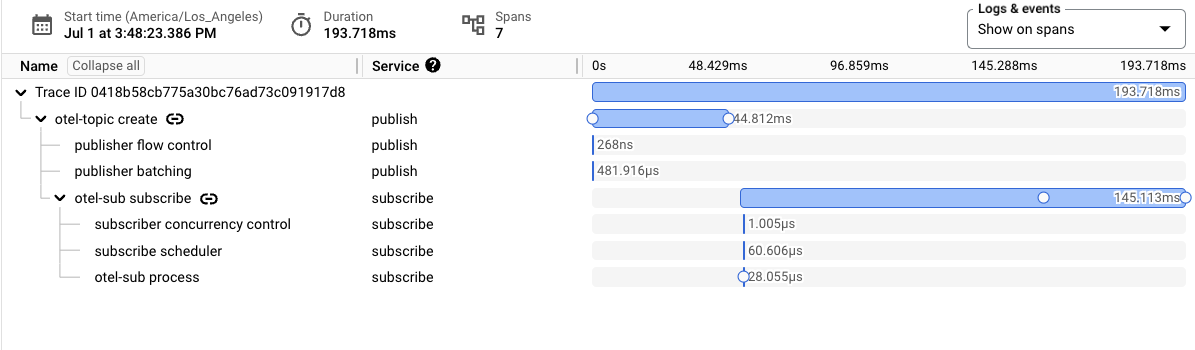
הצגת טווחים במעקב

כל טווח יכול לכלול מאפיינים נוספים. מאפייני Span מעבירים מטא-נתונים נוספים, כמו מפתח ההזמנה של ההודעה, מזהה ההודעה והגודל שלה.
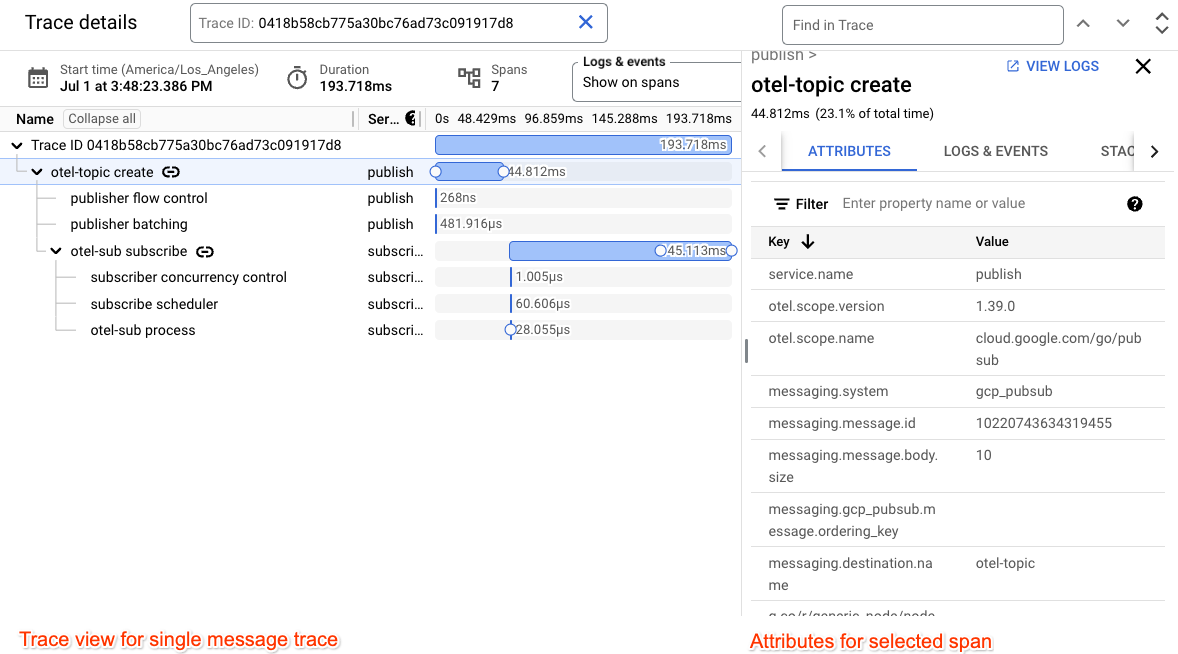
הצגת טווחים במעקב

הטווחים העיקריים של פרסום והרשמה מורחבים עם אירועים של טווחים שמתאימים לזמן שבו מתבצעת קריאה לרשת ולזמן שבו היא מסתיימת.

הצגת טווחים במעקב

פתרון בעיות נפוצות

הבעיות הבאות עלולות לגרום לבעיות במעקב:

  • לחשבון השירות שבו אתם משתמשים לייצוא עקבות אין את התפקיד הנדרש roles/cloudtrace.agent.
  • הגעתם למכסה של המספר המקסימלי של טווחי נתונים שהמערכת מעכלת ב-Cloud Trace.
  • האפליקציה שלך מסתיימת בלי לקרוא לפונקציית ה-flush המתאימה.

המאמרים הבאים