


目标
本教程介绍如何在新集群上安装 Managed Service for Apache Spark Jupyter 组件 ,然后使用 Managed Service for Apache Spark 组件网关从本地浏览器连接到在 集群上运行的 Jupyter 笔记本界面。
Google Cloud费用
在本文档中,您将使用的以下收费组件: Google Cloud
您可使用 价格计算器 根据您的预计使用情况来估算费用。
准备工作
如果您尚未创建项目和 Cloud Storage 存储桶,请先创建这些资源。 Google Cloud
设置项目
- 登录您的 Google Cloud 账号。 如果您是新手,请创建一个账号来评估我们的产品在实际场景中的表现。 Google Cloud新客户还可获享 $300 赠金,用于 运行、测试和部署工作负载。
-
In the Google Cloud console, on the project selector page, select or create a Google Cloud project.
Roles required to select or create a project
- Select a project: Selecting a project doesn't require a specific IAM role—you can select any project that you've been granted a role on.
-
Create a project: To create a project, you need the Project Creator role
(
roles/resourcemanager.projectCreator), which contains theresourcemanager.projects.createpermission. Learn how to grant roles.
-
Verify that billing is enabled for your Google Cloud project.
Enable the Dataproc, Compute Engine, and Cloud Storage APIs.
Roles required to enable APIs
To enable APIs, you need the
serviceusage.services.enablepermission. If you created the project, then you likely already have this permission through the Owner role (roles/owner). Otherwise, you can get this permission through the Service Usage Admin role (roles/serviceusage.serviceUsageAdmin). Learn how to grant roles.-
安装 Google Cloud CLI。
-
如果您使用的是外部身份提供方 (IdP),则必须先使用联合身份登录 gcloud CLI。
-
如需初始化 gcloud CLI,请运行以下命令:
gcloud init -
In the Google Cloud console, on the project selector page, select or create a Google Cloud project.
Roles required to select or create a project
- Select a project: Selecting a project doesn't require a specific IAM role—you can select any project that you've been granted a role on.
-
Create a project: To create a project, you need the Project Creator role
(
roles/resourcemanager.projectCreator), which contains theresourcemanager.projects.createpermission. Learn how to grant roles.
-
Verify that billing is enabled for your Google Cloud project.
Enable the Dataproc, Compute Engine, and Cloud Storage APIs.
Roles required to enable APIs
To enable APIs, you need the
serviceusage.services.enablepermission. If you created the project, then you likely already have this permission through the Owner role (roles/owner). Otherwise, you can get this permission through the Service Usage Admin role (roles/serviceusage.serviceUsageAdmin). Learn how to grant roles.-
安装 Google Cloud CLI。
-
如果您使用的是外部身份提供方 (IdP),则必须先使用联合身份登录 gcloud CLI。
-
如需初始化 gcloud CLI,请运行以下命令:
gcloud init
在您的项目中创建 Cloud Storage 存储桶 ,以存储您在本教程中创建的任何笔记本。
- 在 Google Cloud 控制台中,前往 Cloud Storage 存储分区 页面。
- 点击 创建。
- 在创建存储桶 页面上,输入您的存储桶信息。要转到下一步
,请点击继续。
- 在开始使用 部分中,执行以下操作:
-
在选择存储数据的位置 部分中,执行以下操作:
- 选择位置类型。
- 从位置类型下拉菜单中选择一个位置,用于永久存储存储桶的数据。
- 如需设置 跨存储桶复制,请选择
通过 Storage Transfer Service 添加跨存储桶复制 ,然后
按照以下步骤操作:
设置跨存储桶复制
- 在存储桶 菜单中,选择一个存储桶。
在复制设置 部分中, 点击配置 以配置 复制作业的设置。
系统会显示配置跨存储桶复制 窗格 显示。
- 如需按对象名称前缀过滤要复制的对象, 请输入要用于包含或排除对象的前缀,然后点击 添加前缀。
- 如需为复制的对象设置存储类别, 请从存储类别菜单中选择一个存储类别。 如果您跳过此步骤,则复制的对象会默认使用 目标存储桶的存储类别。
- 点击完成 。
- 在选择存储数据的位置 部分中,执行以下操作:
- 在选择如何控制对对象的访问权限 部分中,选择 存储桶是否强制执行禁止公开访问, 然后为存储桶对象选择访问权限控制方法。
-
在选择如何保护对象数据 部分中,执行以下操作:
- 在数据保护 下,选择您要为存储桶设置的任何选项。
- 如需选择对象数据的加密方式,请展开 数据加密 部分 (),然后选择 数据加密 方法。
- 点击创建 。 您的笔记本将存储在 Cloud Storage 中的
gs://bucket-name/notebooks/jupyter.
创建集群并安装 Jupyter 组件
打开 Jupyter 和 JupyterLab 界面
点击 Google Cloud 控制台的Google Cloud 控制台组件网关链接,以打开集群主节点上运行的 Jupyter 笔记本或 JupyterLab 界面。
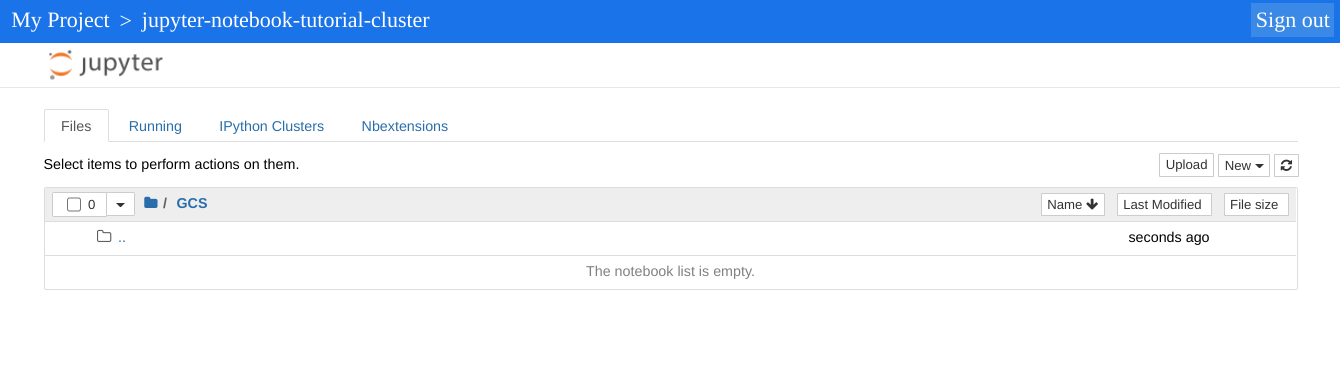
Jupyter 实例显示的顶级目录是一个虚拟目录,可让您查看 Cloud Storage 存储桶或本地文件系统的内容。您可以通过点击 Cloud Storage 的 GCS 链接或集群中主节点的本地文件系统的本地磁盘来选择位置。
- 点击 GCS 链接。Jupyter 笔记本网页界面会显示存储在 Cloud Storage 存储桶中的笔记本,包括您在本教程中创建的所有笔记本。
清理
完成本教程后,您可以清理您创建的资源,让它们停止使用配额,以免产生费用。以下部分介绍如何删除或关闭这些资源。
删除项目
为了避免产生费用,最简单的方法是删除您为本教程创建的项目。
要删除项目,请执行以下操作:
- 在 Google Cloud 控制台中,前往 管理资源 页面。
- 在项目列表中,选择要删除的项目,然后点击删除。
- 在对话框中输入项目 ID,然后点击 关闭以删除项目。
删除集群
- 如需删除您的集群,请输入以下命令:
gcloud dataproc clusters delete cluster-name \
    --region=${REGION}
删除存储桶
- 如需删除您在准备工作第 2 步中创建的 Cloud Storage 存储桶,包括存储在存储桶中的笔记本,请运行以下命令:
gcloud storage rm gs://${BUCKET_NAME} --recursive