


使用客户端库创建集群
下面列出的示例代码介绍了如何使用 Cloud 客户端库创建 Managed Service for Apache Spark 集群,在集群上运行作业,然后删除 集群。
您还可以通过以下方法执行这些任务:
- 快速入门:使用 API Explorer 中介绍的 API REST 请求
- 使用 使用 Google Cloud 控制台创建集群中的 Google Cloud 控制台
- 使用 Google Cloud CLI 在 使用 Google Cloud CLI 创建集群中
准备工作
- 登录您的 Google Cloud 账号。如果您是 Google Cloud的新用户, 请创建账号,以便在 真实场景中评估我们产品的性能。新客户还可以获得 300 美元的免费抵用金,用于 运行、测试和部署工作负载。
-
In the Google Cloud console, on the project selector page, select or create a Google Cloud project.
Roles required to select or create a project
- Select a project: Selecting a project doesn't require a specific IAM role—you can select any project that you've been granted a role on.
-
Create a project: To create a project, you need the Project Creator role
(
roles/resourcemanager.projectCreator), which contains theresourcemanager.projects.createpermission. Learn how to grant roles.
-
Verify that billing is enabled for your Google Cloud project.
Enable the Dataproc API.
Roles required to enable APIs
To enable APIs, you need the
serviceusage.services.enablepermission. If you created the project, then you likely already have this permission through the Owner role (roles/owner). Otherwise, you can get this permission through the Service Usage Admin role (roles/serviceusage.serviceUsageAdmin). Learn how to grant roles.-
In the Google Cloud console, on the project selector page, select or create a Google Cloud project.
Roles required to select or create a project
- Select a project: Selecting a project doesn't require a specific IAM role—you can select any project that you've been granted a role on.
-
Create a project: To create a project, you need the Project Creator role
(
roles/resourcemanager.projectCreator), which contains theresourcemanager.projects.createpermission. Learn how to grant roles.
-
Verify that billing is enabled for your Google Cloud project.
Enable the Dataproc API.
Roles required to enable APIs
To enable APIs, you need the
serviceusage.services.enablepermission. If you created the project, then you likely already have this permission through the Owner role (roles/owner). Otherwise, you can get this permission through the Service Usage Admin role (roles/serviceusage.serviceUsageAdmin). Learn how to grant roles.
运行代码
试用演示:点击在 Cloud Shell 中打开运行 Python Cloud 客户端库演示,以创建集群、运行 PySpark 作业,然后删除集群。
Go
Java
- 安装客户端库 如需了解详情,请参阅设置 Java 开发环境。
- 设置身份验证
- 克隆并运行示例 GitHub 代码。
Node.js
- 安装客户端库 如需了解详情,请参阅设置 Node.js 开发环境。
- 设置身份验证
- 克隆并运行示例 GitHub 代码。
Python
- 安装客户端库 如需了解详情,请参阅设置 Python 开发环境。
- 设置身份验证
- 克隆并运行示例 GitHub 代码。
查看输出
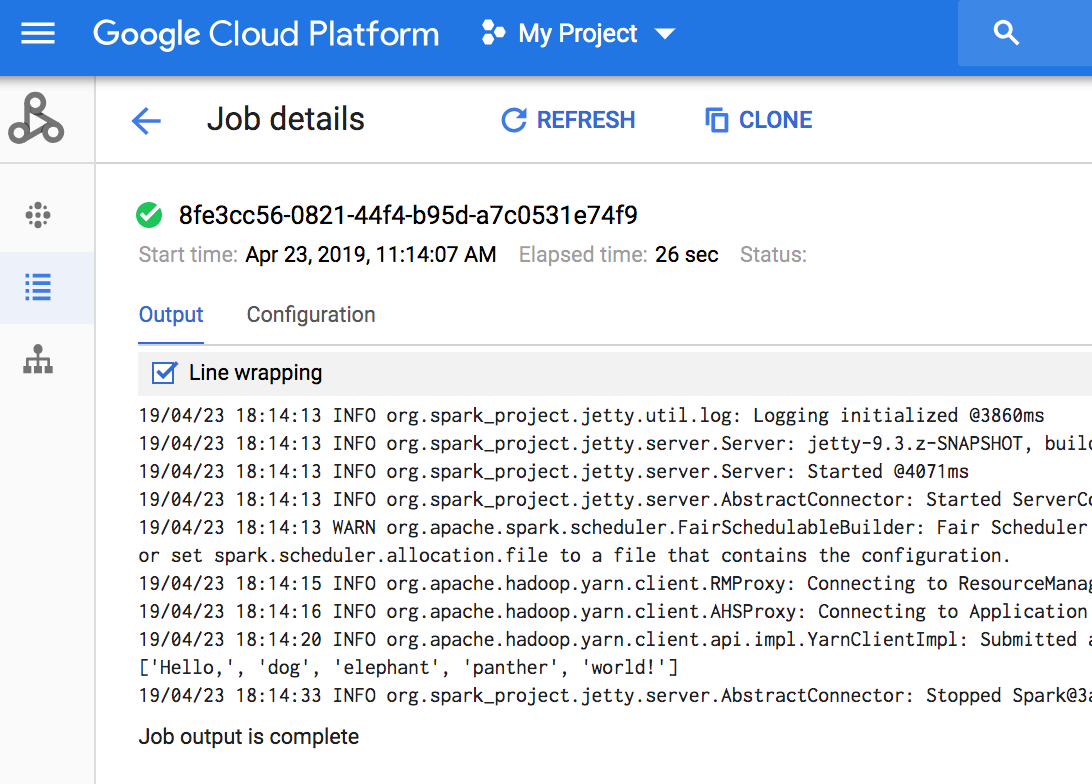
代码会将作业驱动程序日志输出到 Cloud Storage 中的默认 Managed Service for Apache Spark 暂存存储桶 。您可以在项目的 Managed Service for Apache Spark 的 Google Cloud 控制台 的 Google Cloud 控制台 作业页面中查看作业驱动程序输出。点击任务 ID 以在作业详情 页面上查看作业输出。
后续步骤
- 请参阅 Managed Service for Apache Spark Cloud 客户端库 的其他资源。