


您可以将 spark-bigquery-connector 与 Managed Service for Apache Spark 搭配使用,以从 BigQuery 中读取数据以及将数据写入其中。本教程演示了使用 spark-bigquery-connector 的 PySpark 应用。
确认连接器版本
请参阅 Managed Service for Apache Spark 运行时版本,确定在批量工作负载或交互式会话运行时版本中安装的 BigQuery 连接器版本。如果未列出连接器,请参阅将连接器提供给应用。
将连接器提供给应用(如果需要)
BigQuery 连接器已安装在所有受支持的 Managed Service for Apache Spark 运行时版本中。如果您使用的是不受支持的运行时版本(不会安装连接器 [Spark runtime 1.0]),则可以通过以下任一方式将连接器提供给应用:
- 提交 Managed Service for Apache Spark 批量工作负载或运行交互式会话时,可以使用
jars参数指向连接器 JAR 文件。以下批处理工作负载示例指定了一个连接器 JAR 文件(如需查看可用连接器 JAR 文件的列表,请参阅 GitHub 上的 GoogleCloudDataproc/spark-bigquery-connector 代码库)。- Google Cloud CLI 示例:
gcloud dataproc batches submit pyspark \
    --region=REGION \
    --jars=spark-3.5-bigquery-version.jar \
    ... other args
- Google Cloud CLI 示例:
计算费用
本教程使用 Google Cloud的可计费组件,包括:
- Managed Service for Apache Spark
- BigQuery
- Cloud Storage
请使用价格计算器根据您的预计使用情况来估算费用。
配置结算功能
默认情况下,与凭证或服务账号关联的项目将为 API 使用支付费用。如需对其他项目计费,请设置以下配置属性:spark.conf.set("parentProject", "<BILLED-GCP-PROJECT>")。
您还可以将此属性添加到读取或写入操作,如下所示:.option("parentProject", "<BILLED-GCP-PROJECT>")。
提交 PySpark 字数统计批处理工作负载
此示例展示如何将 BigQuery 中的数据读取到 Spark DataFrame 中,以使用标准数据源 API执行字数统计操作。
连接器通过以下操作序列将字数统计输出写入 BigQuery:
将数据缓冲到 Cloud Storage 存储桶中的临时文件
将一项操作中的数据从 Cloud Storage 存储桶复制到 BigQuery 中
系统在 BigQuery 加载操作完成后删除 Cloud Storage 中的临时文件(临时文件在 Spark 应用终止后也会被删除)。如果删除失败,您需要删除所有不需要的临时 Cloud Storage 文件,这些文件通常放在
gs://BUCKET_NAME/.spark-bigquery-JOB_ID-UUID中。
运行字数统计工作负载的步骤
- 打开本地终端或 Cloud Shell。
- 在本地终端或 Cloud Shell 中使用 bq 命令行工具创建
wordcount_dataset。bq mk wordcount_dataset
- 使用 Google Cloud CLI 创建 Cloud Storage 存储桶。
gcloud storage buckets create gs://BUCKET_NAME
BUCKET_NAME替换为您创建的 Cloud Storage 存储桶的名称。 - 通过复制以下 PySpark 代码,在文本编辑器中本地创建文件
wordcount.py。#!/usr/bin/python """BigQuery I/O PySpark example.""" from pyspark.sql import SparkSession spark = SparkSession \ .builder \ .appName('spark-bigquery-demo') \ .getOrCreate() # Cloud Storage bucket used by the connector for temporary BigQuery # export data. bucket = "BUCKET_NAME" spark.conf.set('temporaryGcsBucket', bucket) # Enable reading from BigQuery views and materializing query results. spark.conf.set('viewsEnabled', 'true') spark.conf.set('materializationDataset', 'wordcount_dataset') # Load data from BigQuery. words = spark.read.format('bigquery') \ .load('bigquery-public-data.samples.shakespeare') words.createOrReplaceTempView('words') # Perform word count. word_count = spark.sql( 'SELECT word, SUM(word_count) AS word_count FROM words GROUP BY word') word_count.show() word_count.printSchema() # Save the data to BigQuery word_count.write.format('bigquery') \ .save('wordcount_dataset.wordcount_output')
- 提交 PySpark 批处理工作负载:
gcloud dataproc batches submit pyspark wordcount.py \
    --region=REGION \
    --deps-bucket=BUCKET_NAME
...
+---------+----------+
|     word|word_count|
+---------+----------+
|     XVII|         2|
|    spoil|        28|
|    Drink|         7|
|forgetful|         5|
|   Cannot|        46|
|    cures|        10|
|   harder|        13|
|  tresses|         3|
|      few|        62|
|  steel'd|         5|
| tripping|         7|
|   travel|        35|
|   ransom|        55|
|     hope|       366|
|       By|       816|
|     some|      1169|
|    those|       508|
|    still|       567|
|      art|       893|
|    feign|        10|
+---------+----------+
only showing top 20 rows

root
 |-- word: string (nullable = false)
 |-- word_count: long (nullable = true)
要在 Google Cloud 控制台中预览输出表,请打开 BigQuery 页面,选择wordcount_output表,然后点击预览。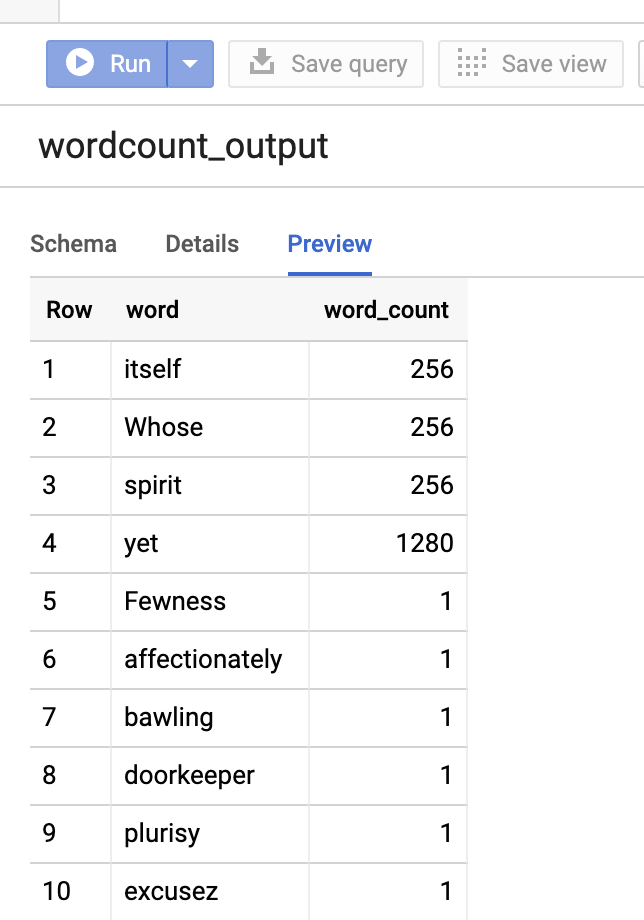
图 1:在 BigQuery 中预览输出表