


Google Managed Service for Apache Spark 叢集內建的一些開放原始碼元件,例如 Apache Hadoop 和 Apache Spark,會提供網路介面。這些介面可用於管理及監控叢集資源和設施,如 YARN 資源管理工具、Hadoop 分散式檔案系統 (HDFS)、MapReduce 和 Spark。透過元件閘道,您可以安全地存取 Managed Service for Apache Spark 預設和選用元件的網頁端點。
使用支援的 Managed Service for Apache Spark 映像檔版本建立叢集後,即可啟用元件網路介面存取權,不必依賴 SSH 通道或修改防火牆規則來允許傳入流量。
注意事項
- 使用者必須具備 dataproc.clusters.use Identity and Access Management 權限,才能存取已啟用的元件網頁介面。請參閱「Managed Service for Apache Spark 角色」。
- 您可以使用元件閘道存取 REST API,例如 Apache Hadoop YARN 和 Apache Livy,以及歷來伺服器。
- 啟用元件閘道後,Managed Service for Apache Spark 會將下列服務新增至叢集的第一個主要節點:
- Apache Knox。預設 Knox Gateway SSL 憑證的效期為 13 個月,自叢集建立日期起算。如果過期,所有 Component Gateway 網頁介面網址都會失效。如要取得新憑證,請參閱「重新產生 Component Gateway SSL 憑證」。
- 反向 Proxy
- 元件閘道不會直接存取
node:port介面,但會自動代理特定服務子集。如要存取節點上的服務 (node:port),請使用 SSH SOCKS Proxy。
建立具有元件閘道的叢集
Google Cloud 控制台
使用 Google Cloud 控制台建立叢集時,系統預設會啟用 Managed Service for Apache Spark 元件 UI (透過元件閘道)。如要停用這項設定,請取消勾選「在 UI 啟用元件」核取方塊:
- 開啟「建立叢集」頁面。
- 按一下「其他設定」展開該部分。
- 編輯「選用元件」。
- 在開啟的面板中,選取或取消選取「在 UI 中啟用元件」核取方塊。
- 按一下 [儲存]。
gcloud CLI 指令
在本機的終端機視窗或在 Cloud Shell 中執行 gcloud CLI gcloud dataproc clusters create 指令。
gcloud dataproc clusters create cluster-name \
    --enable-component-gateway \
    --region=region \
    other args ...
REST API
將 EndpointConfig.enableHttpPortAccess 屬性設為 true,使其成為 clusters.create 要求的一部分。
使用元件閘道網址存取網路介面
在叢集上啟用元件閘道後,只要按一下 Google Cloud 控制台中提供的連結,即可連線至叢集第一個主要節點上執行的元件網頁介面。Component Gateway 也會使用埠名對應至網址的對應表,設定 endpointConfig.httpPorts。除了使用控制台,您也可以使用 gcloud 指令列工具或 Dataproc REST API 查看這項對應資訊,然後將網址複製及貼上瀏覽器中,連線至元件的 UI。
控制台
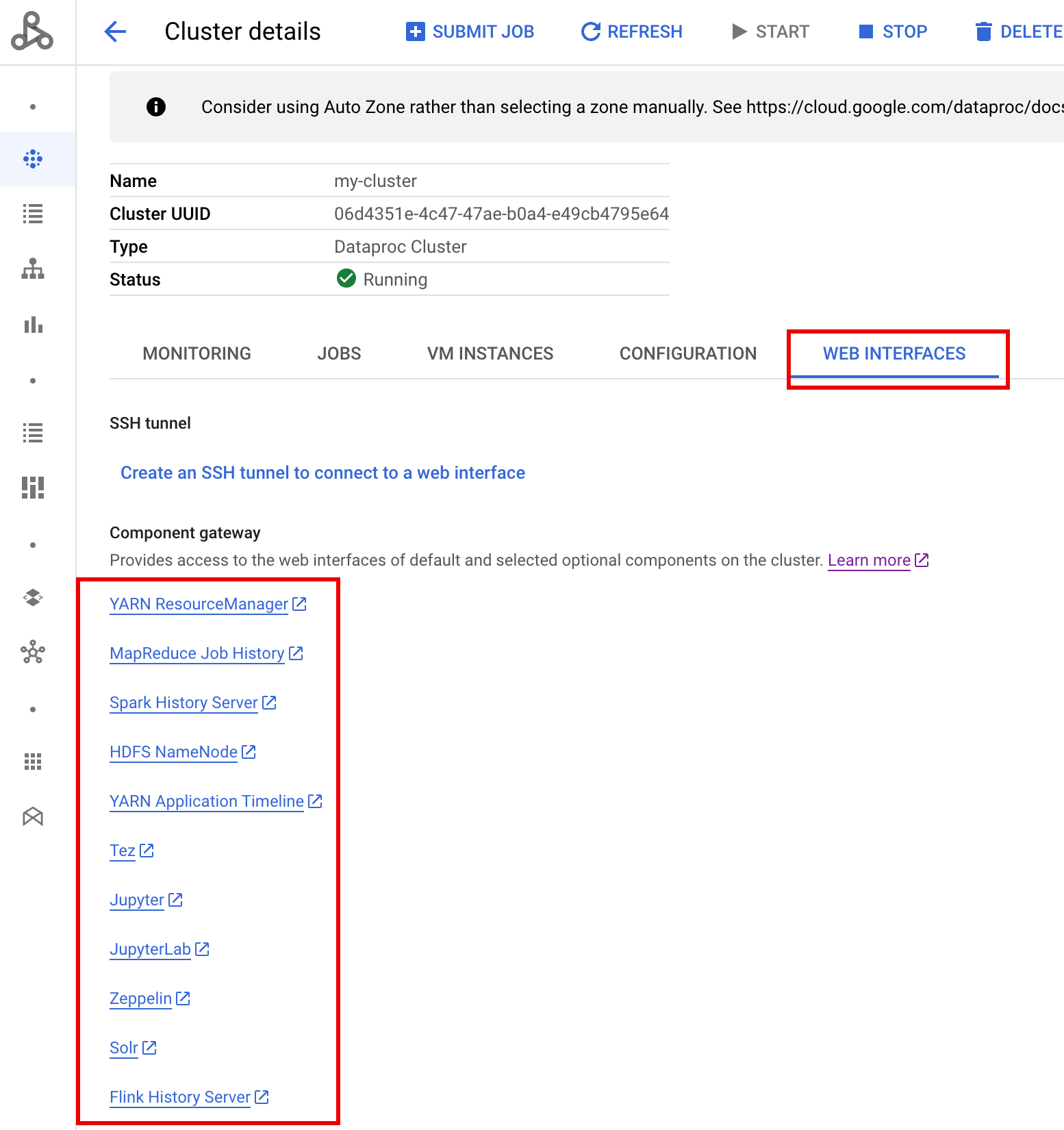
前往 Google Cloud 控制台的 Managed Service for Apache Spark「叢集」表單,然後選取叢集以開啟「叢集詳細資料」表單。按一下「Web Interfaces」(網路介面) 分頁標籤,即可顯示元件閘道連結清單,這些連結會連至叢集上安裝的預設和選用元件網路介面。按一下連結,在本機瀏覽器中開啟叢集主要節點上執行的網頁介面。
gcloud CLI 指令
在本機的終端機視窗或在 Cloud Shell 中執行 gcloud CLI gcloud dataproc clusters describe 指令。
gcloud dataproc clusters describe cluster-name \
    --region=region
輸出內容範例
...
config:
  endpointConfig:
    enableHttpPortAccess: true
    httpPorts:
      HDFS NameNode:
 https://584bbf70-7a12-4120-b25c-31784c94dbb4-dot-dataproc.google.com/hdfs/
      MapReduce Job History:
 https://584bbf70-7a12-4120-b25c-31784c94dbb4-dot-dataproc.google.com/jobhistory/
      Spark HistoryServer:
 https://584bbf70-7a12-4120-b25c-31784c94dbb4-dot-dataproc.google.com/sparkhistory/
      YARN ResourceManager:
 https://584bbf70-7a12-4120-b25c-31784c94dbb4-dot-dataproc.google.com/yarn/
      YARN Application Timeline:
 https://584bbf70-7a12-4120-b25c-31784c94dbb4-dot-dataproc.google.com/apphistory/
...
REST API
呼叫 clusters.get,取得通訊埠名稱對應至網址的 endpointConfig.httpPorts 對應。搭配 VPC-SC 使用元件閘道
元件閘道支援 VPC Service Controls。為強制執行 service perimeter,透過元件閘道對介面提出的要求會視為 Dataproc API 途徑的一部分,而控管 dataproc.googleapis.com 權限的任何存取權政策,也會控管元件閘道 UI 的存取權。
Component Gateway 也支援 VPC-SC 設定,這些設定依賴私有 Google 連線,適用於沒有外部 IP 位址的 Managed Service for Apache Spark 叢集,但您必須手動設定網路,允許從 Managed Service for Apache Spark 主 VM 透過受限的 Google 虛擬 IP 範圍 *.dataproc.cloud.google.com199.36.153.4/30 存取 *.dataproc.cloud.google.com,方法如下:
- 按照操作說明為所有 Google API 設定 Google 私人連線。
- 使用 Cloud DNS 設定 DNS,或在 Managed Service for Apache Spark 主節點上本機設定 DNS,以允許存取
*.dataproc.cloud.google.com。
使用 Cloud DNS 設定 DNS
建立 Cloud DNS 區域,將傳向 *.dataproc.cloud.google.com 的流量對應至受限 Google API 虛擬 IP 範圍。
建立虛擬私有雲網路的代管私人區域。
gcloud dns managed-zones create ZONE_NAME \
 --visibility=private \
 --networks=https://www.googleapis.com/compute/v1/projects/PROJECT_ID/global/networks/NETWORK_NAME \
 --description=DESCRIPTION \
 --dns-name=dataproc.cloud.google.com \
 --project=PROJECT_ID
ZONE_NAME:您要建立的區域名稱。例如:
vpc。後續步驟都會用到這個名稱。PROJECT_ID:託管虛擬私有雲網路的專案 ID。
NETWORK_NAME 是您虛擬私有雲網路的名稱。
DESCRIPTION:代管區域的選用人類可讀說明。
啟動交易。
gcloud dns record-sets transaction start --zone=ZONE_NAME
- ZONE_NAME 是區域名稱。
新增 DNS 記錄。
gcloud dns record-sets transaction add --name=*.dataproc.cloud.google.com. \ --type=A 199.36.153.4 199.36.153.5 199.36.153.6 199.36.153.7 \ --zone=ZONE_NAME \ --ttl=300- ZONE_NAME 是區域名稱。
gcloud dns record-sets transaction add --name=dataproc.cloud.google.com. \ --type=A 199.36.153.4 199.36.153.5 199.36.153.6 199.36.153.7 \ --zone=ZONE_NAME \ --ttl=300- ZONE_NAME 是區域名稱。
執行交易。
gcloud dns record-sets transaction execute --zone=ZONE_NAME --project=PROJECT_ID
ZONE_NAME 是區域名稱。
PROJECT_ID:託管虛擬私有雲網路的專案 ID。
使用初始化動作在本機設定 Managed Service for Apache Spark 主要節點的 DNS
您可以在 Managed Service for Apache Spark 主節點上設定本機 DNS,允許與 dataproc.cloud.google.com 建立私人連線。這項程序適用於短期測試和開發作業。不建議用於正式環境工作負載。
將初始化動作暫存至 Cloud Storage。
cat <<EOF >component-gateway-vpc-sc-dns-init-action.sh #!/bin/bash readonly ROLE="$(/usr/share/google/get_metadata_value attributes/dataproc-role)" if [[ "${ROLE}" == 'Master' ]]; then readonly PROXY_ENDPOINT=$(grep "^dataproc.proxy.agent.endpoint=" \ "/etc/google-managed-spark/dataproc.properties" | \ tail -n 1 | cut -d '=' -f 2- | sed -r 's/\\([#!=:])/\1/g') readonly HOSTNAME=$(echo ${PROXY_ENDPOINT} | \ sed -n -E 's;^https://([^/?#]*).*;\1;p') echo "199.36.153.4 ${HOSTNAME} # Component Gateway VPC-SC" >> "/etc/hosts" fi EOF gcloud storage cp component-gateway-vpc-sc-dns-init-action.sh gs://BUCKET/- BUCKET 是可從 Managed Service for Apache Spark 叢集存取的 Cloud Storage bucket。
建立 Managed Service for Apache Spark 叢集,並啟用暫存初始化動作和元件閘道。
gcloud dataproc clusters create cluster-name \
    --region=region \
    --initialization-actions=gs://BUCKET/component-gateway-vpc-sc-dns-init-action.sh \
    --enable-component-gateway \
    other args ...
- BUCKET 是步驟 1 中使用的 Cloud Storage bucket。
透過元件閘道以程式輔助方式使用 HTTP API
元件閘道是整合 Apache Knox 的 Proxy。透過 Apache Knox 公開的端點可透過 https://component-gateway-base-url/component-path 存取。
如要透過程式以 Component Gateway 進行驗證,請傳遞包含 OAuth 2.0 不記名權杖的 Proxy-Authorization 標頭。
$ ACCESS_TOKEN="$(gcloud auth print-access-token)"
$ curl -H "Proxy-Authorization: Bearer ${ACCESS_TOKEN}" "https://xxxxxxxxxxxxxxx-dot-us-central1.dataproc.googleusercontent.com/yarn/jmx"
{
  "beans" : [ {
    "name" : "Hadoop:service=ResourceManager,name=RpcActivityForPort8031",
    "modelerType" : "RpcActivityForPort8031",
    "tag.port" : "8031",
    "tag.Context" : "rpc",
    "tag.NumOpenConnectionsPerUser" : "{\"yarn\":2}",
    "tag.Hostname" : "demo-cluster-m",
    "ReceivedBytes" : 1928581096,
    "SentBytes" : 316939850,
    "RpcQueueTimeNumOps" : 7230574,
    "RpcQueueTimeAvgTime" : 0.09090909090909091,
    "RpcProcessingTimeNumOps" : 7230574,
    "RpcProcessingTimeAvgTime" : 0.045454545454545456,
...
Component Gateway 會先移除 Proxy-Authorization 標頭,再將要求轉送至 Apache Knox。
如要找出元件閘道基本網址,請執行下列指令:
gcloud dataproc clusters describe:
$ gcloud dataproc clusters describe <var>cluster-name</var> \
--region=<var>region</var>
...
endpointConfig:
enableHttpPortAccess: true
httpPorts:
HDFS NameNode: https://xxxxxxxxxxxxxxx-dot-us-central1.dataproc.googleusercontent.com/hdfs/dfshealth.html
MapReduce Job History: https://xxxxxxxxxxxxxxx-dot-us-central1.dataproc.googleusercontent.com/jobhistory/
Spark History Server: https://xxxxxxxxxxxxxxx-dot-us-central1.dataproc.googleusercontent.com/sparkhistory/
Tez: https://xxxxxxxxxxxxxxx-dot-us-central1.dataproc.googleusercontent.com/apphistory/tez-ui/
YARN Application Timeline: https://xxxxxxxxxxxxxxx-dot-us-central1.dataproc.googleusercontent.com/apphistory/
YARN ResourceManager: https://xxxxxxxxxxxxxxx-dot-us-central1.dataproc.googleusercontent.com/yarn/
...
基準網址是 httpPorts 底下網址的架構和授權部分。在這個範例中為 https://xxxxxxxxxxxxxxx-dot-us-central1.dataproc.googleusercontent.com/。
重新產生 Component Gateway SSL 憑證
元件閘道的預設 Knox Gateway SSL 憑證適用於:
如果叢集是使用 2.0.93、2.1.41、2.2.7 以上版本的映像檔建立,則為自 Managed Service for Apache Spark 叢集建立日期起算 5 年。
使用較舊的映像檔版本建立叢集時,自 Managed Service for Apache Spark 叢集建立日期起算 13 個月。
如果憑證過期,所有 Component Gateway 網頁介面網址都會失效。
如果 SSL 憑證是由貴機構提供,請向該機構取得新憑證,然後以新憑證替換舊憑證。
如果您使用預設的自行簽署 SSL 憑證,請按照下列步驟續訂:
使用 SSH 連線至 Managed Service for Apache Spark 叢集主要執行個體,並加上
m-0名稱後置字元。在
/var/lib/knox/security/keystores/gateway.jks路徑中找出gateway.jks。keytool -list -v -keystore /var/lib/knox/security/keystores/gateway.jks
將
gateway.jks檔案移至備份目錄。mv /var/lib/knox/security/keystores/gateway.jks /tmp/backup/gateway.jks
重新啟動 Knox 服務,建立新的自行簽署憑證。
systemctl restart knox
確認元件閘道和 Knox 狀態。
systemctl status google-dataproc-component-gateway
systemctl status knox
後續步驟
- 建立叢集,並使用 Managed Service for Apache Spark 元件。