

You can use Private Service Connect to access a private connections Looker (Google Cloud core) instance or connect a private connections Looker (Google Cloud core) instance to other internal or external services. In order to use Private Service Connect, your Looker (Google Cloud core) instance must meet the following criteria:
- Instance editions must be Enterprise (
core-enterprise-annual) or Embed (core-embed-annual). - Private Service Connect must be enabled upon instance creation.
Private Service Connect allows inbound access to Looker (Google Cloud core) using endpoints or backends. Network endpoint groups (NEGs), once exposed as Private Service Connect service producers, enable Looker (Google Cloud core) to access outbound on-premises resources, multi-cloud environments, VPC workloads, or internet services.
To learn more about Private Service Connect, watch the What is Private Service Connect? and Private Service Connect and Service Directory: A revolution to connect your application in Cloud videos.
Service attachment
When you create a Looker (Google Cloud core) instance that is enabled to use Private Service Connect, Looker (Google Cloud core) creates a service attachment for the instance automatically. A service attachment is an attachment point that VPC networks use to access the instance. The service attachment has a URI, which is used for making connections. You can find that URI on the Details tab of the instance configuration page of the Google Cloud console.
You next create a Private Service Connect backend that another VPC network uses to connect to the service attachment. This enables the network to access the Looker (Google Cloud core) instance.
Updating your service attachment
To enable new features like global access and Google-managed certificates, your instance's inbound Private Service Connect endpoints or backends must point to an updated service attachment. See the Migrating Private Service Connect connections to the new service attachment URI documentation page for more information and instructions.
Using global access
Looker (Google Cloud core) instances that use the updated Private Service Connect service attachment URI support global access. Global access lets you create a Private Service Connect endpoint in a different region from your Looker (Google Cloud core) instance. For example, if your instance is in us-central1, you can create a load balancer with a Private Service Connect network endpoint group (NEG) in us-west1 to access the instance.
To enable this feature, select the Enable global access on the forwarding rule for your Private Service Connect backend or endpoint.
Inbound access
Inbound access concerns configuring routing from clients to Looker (Google Cloud core). Looker (Google Cloud core) deployed with Private Service Connect supports backend connections for inbound access.
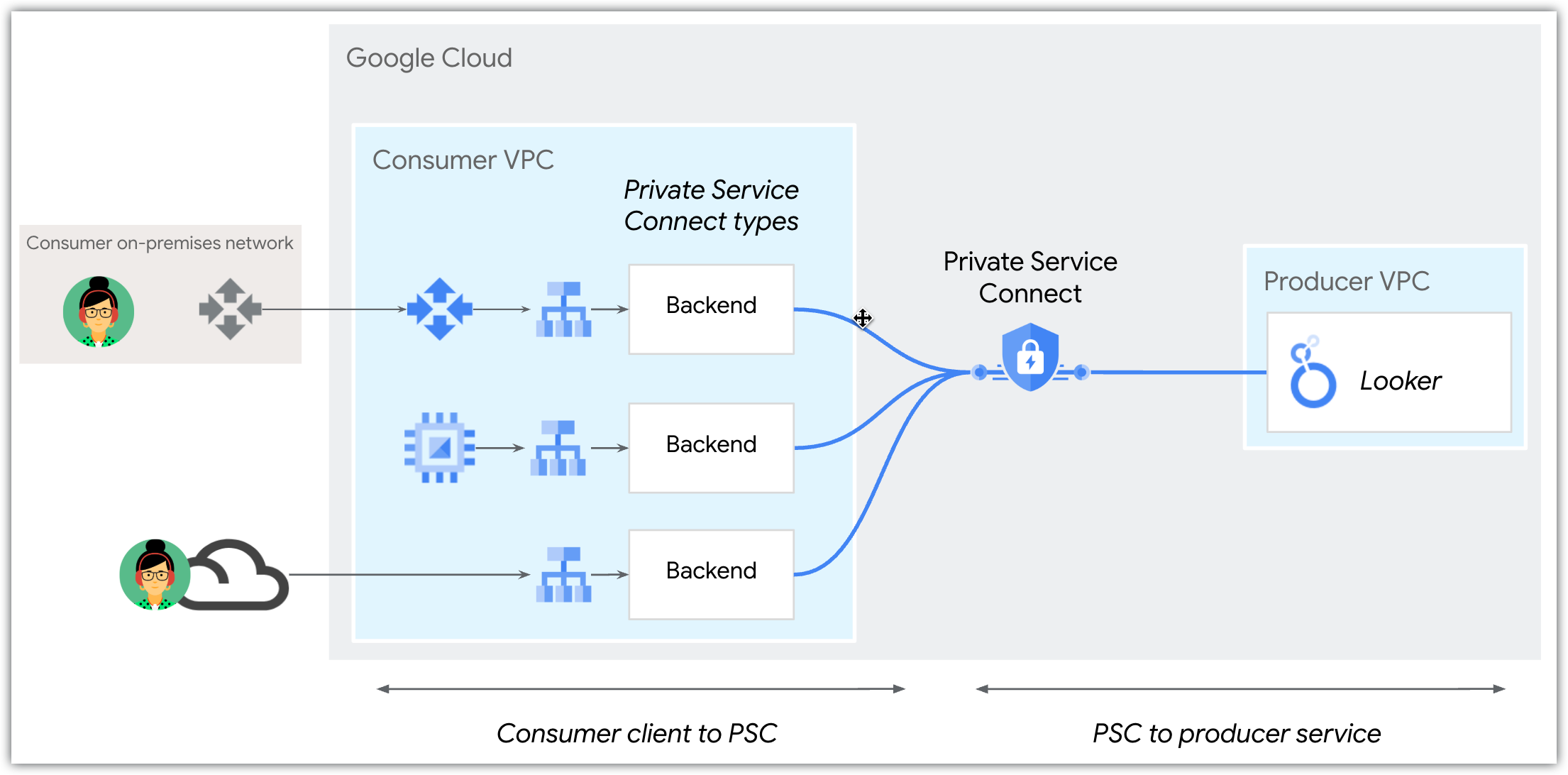
Looker (Google Cloud core) Private Service Connect instances can be accessed by service consumers through an external regional application load balancer or privately through a Private Service Connect backend. However, Looker (Google Cloud core) supports a single custom domain, so inbound access to a Looker (Google Cloud core) instance must be either public or private, not both public and private.
Backends
Backends are deployed by using network endpoint groups (NEGs), which let consumers direct public and private traffic to their load balancer before the traffic reaches a Private Service Connect service, and also offer certificate termination. With a load balancer, backends provide the following options:
- Observability (every connection is logged)
- Cloud Armor integration
- URL private labeling and client-side certificates
- Request decoration (adding custom request headers)
- Response decoration (adding custom response headers)
Using Google-managed certificates with a custom domain
You can use a Google-managed certificate for custom domains that use the *.private.looker.app format. To do this, configure your private DNS to point your custom domain (for example, my-instance.private.looker.app) to the IP address of your PSC endpoint.
Because the certificate for the *.private.looker.app domain is managed by Google, you don't need to create or manage your own certificates.
You can continue to use other custom domains, but you must manage and provide your own certificates for them. For more information, see the Using a custom domain with Google-managed certificates documentation page.
Access outbound services
Looker (Google Cloud core) acts as a service consumer when establishing communication to other services in your VPC, multi-cloud network, or the internet. Connecting to these services from Looker (Google Cloud core) is considered outbound traffic.
If you want to connect to an external service that uses the standard web protocol, HTTPS, with available ports 443 or 8443, you can use Looker (Google Cloud core)'s controlled native egress and the Global FQDN setting to set up your connection. However, if the external service uses a different protocol, that external service must be published using Private Service Connect to enable it to connect to your Looker (Google Cloud core) instance using Local FQDN.
To connect to published services, perform the following steps:
- Ensure that the service is published. Some Google Cloud services may take care of this for you; for example, Cloud SQL offers a way to create an instance with Private Service Connect enabled. Otherwise, follow the instructions for publishing a service by using Private Service Connect and refer to the additional guidance in the Looker (Google Cloud core) instructions.
- Specify the outbound (egress) connection from Looker (Google Cloud core) to the service.
You can use hybrid connectivity NEGs or internet NEGs when accessing services with Private Service Connect:
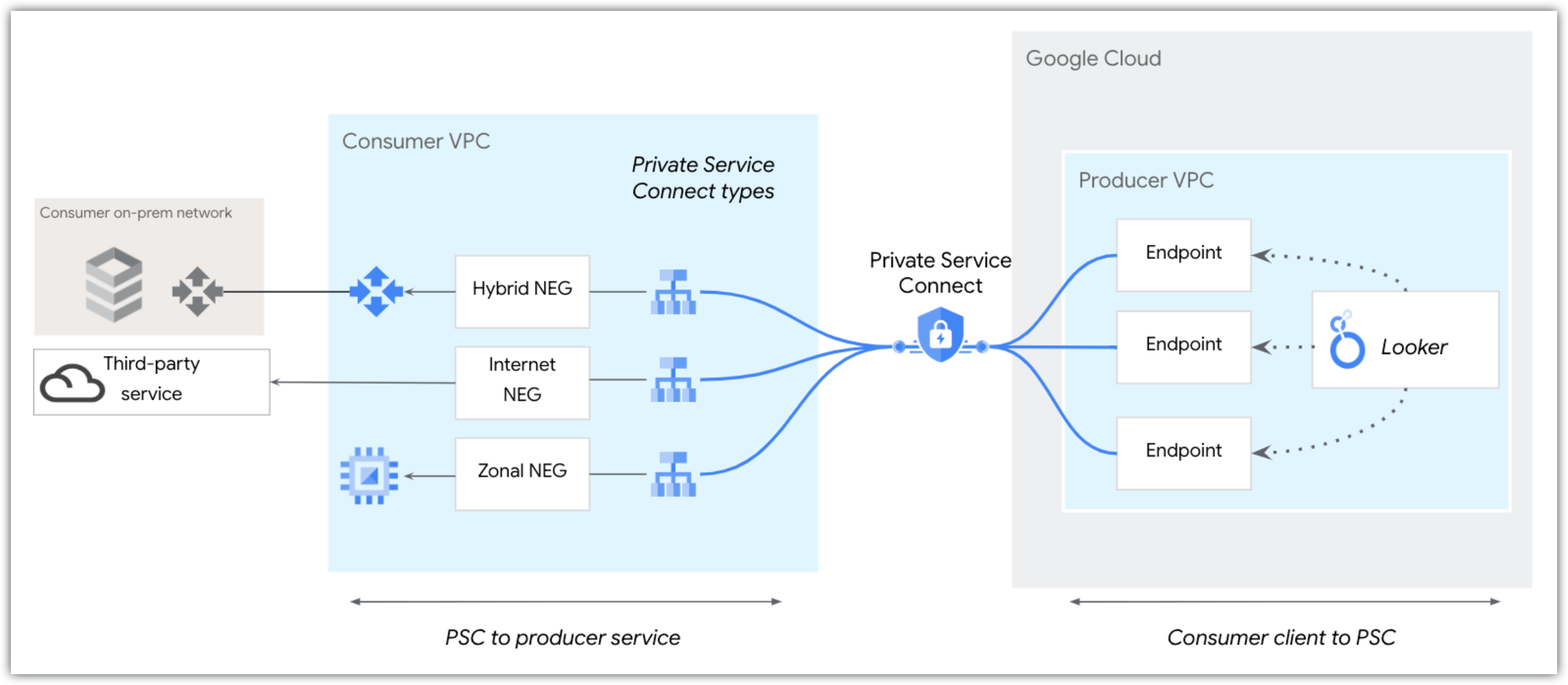
A hybrid connectivity NEG provides access to private endpoints, such as on-premises or multi-cloud endpoints. A hybrid connectivity NEG is a combination of an IP address and port configured as a backend to a load balancer. It is deployed within the same VPC as the Cloud Router. This deployment enables services in your VPC to reach routable endpoints through hybrid connectivity, such as Cloud VPN or Cloud Interconnect.
An internet NEG provides access to public endpoints, for example, a GitHub endpoint. An internet NEG specifies an external backend for the load balancer. This external backend referenced by the internet NEG is accessible through the internet.
You can establish a outbound connection from Looker (Google Cloud core) to service producers in any region. For example, if you have Cloud SQL Private Service Connect instances in regions us-west1 and us-east4, you can create a outbound connection from a Looker (Google Cloud core) Private Service Connect instance deployed in us-central1.
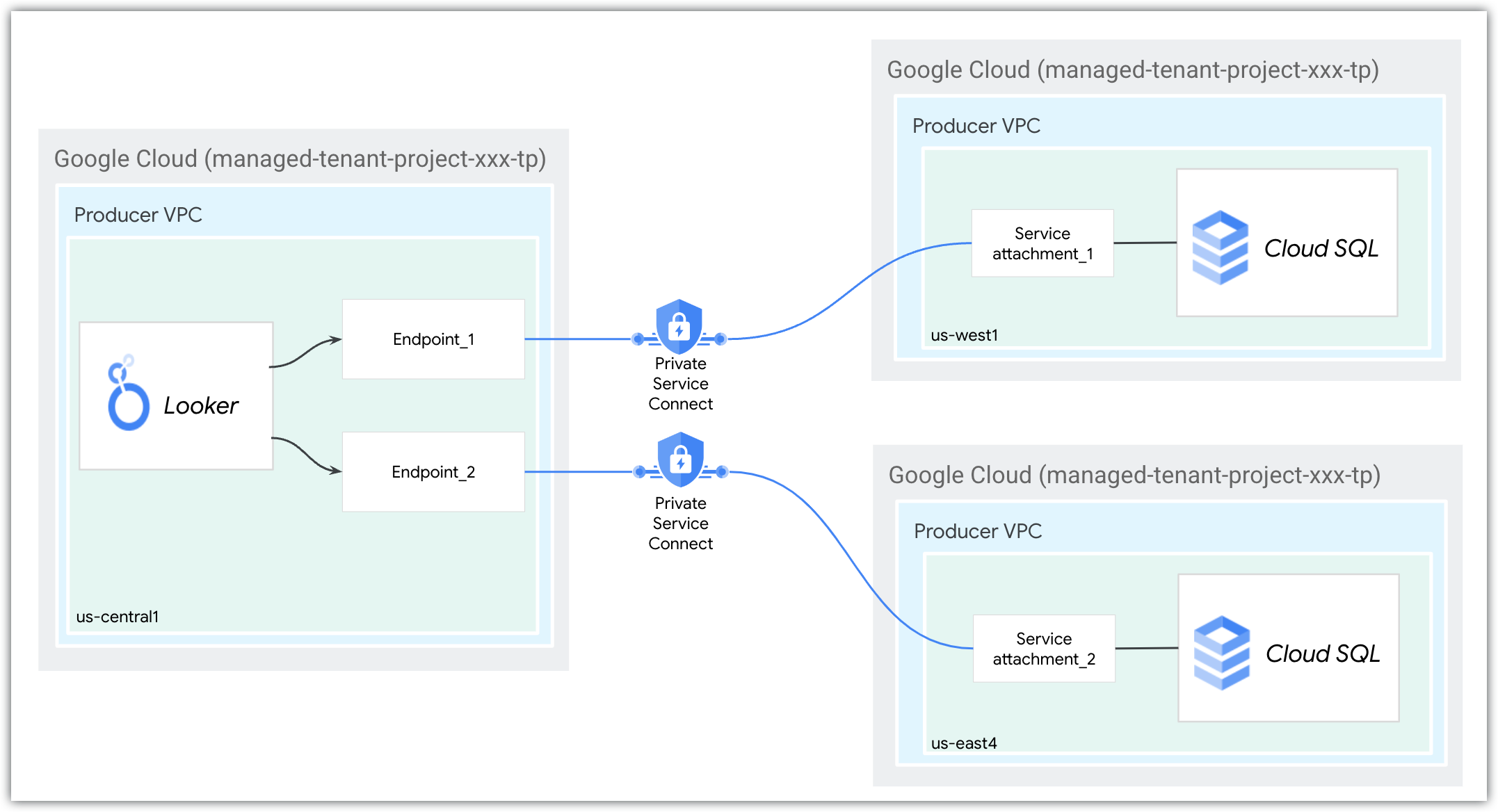
The two regional service attachments with unique domain names would be specified as follows. The --region flags refer to the region of the Looker (Google Cloud core) Private Service Connect instance, while the regions of the Cloud SQL instances are included in their service attachment URIs:
gcloud looker instances update looker-psc-instance \
--psc-service-attachment domain=sql.database1.com,attachment=projects/123/regions/us-west1/serviceAttachments/sql-database1-svc-attachment --region=us-central1 \
--psc-service-attachment domain=sql.database2.com,attachment=projects/123/regions/us-east4/serviceAttachment/sql-database2-svc-attachment --region=us-central1
Outbound access to non-Google managed services requires that you enable global access on the producer load balancer to allow inter-region communication.
What's next
- Create a Looker (Google Cloud core) Private Service Connect instance
- Access a Looker (Google Cloud core) instance using Private Service Connect
- Troubleshoot Looker (Google Cloud core) networking issues