


Google Distributed Cloud 中的 Pod 支援多個網路介面 (多 NIC),可讓您將控制層流量與資料層流量區隔開來。其他網路介面也為 Pod 提供多點傳播功能。Pod 的多 NIC 支援使用者、混合和獨立叢集,以及 1.34 以上版本的管理員叢集。
如要在 GKE On-Prem API 中設定這項功能,請對使用者叢集使用 BareMetalNetworkConfig,或在 1.34 以上版本中,對管理員叢集使用 BareMetalAdminNetworkConfig。
多個網路介面的用途
對於使用網路功能虛擬化 (NFV) 的系統,網路層隔離非常重要,例如廣域網路中的軟體定義網路 (SD-WAN)、雲端存取安全代理程式 (CASB) 和新一代防火牆 (NG-FW)。這類 NFV 必須存取多個介面,才能在以容器形式運作時,將管理和資料層分開。
多網路介面設定支援將網路介面與節點集區建立關聯,這有助於提升效能。叢集可以包含多種節點類型。將高效能機器分組到一個節點集區時,您可以為節點集區新增其他介面,改善流量。
設定多個網路介面
一般來說,為 Pod 設定多個網路介面有三個步驟:
使用叢集自訂資源中的
multipleNetworkInterfaces欄位,為叢集啟用多 NIC。使用
NetworkAttachmentDefinition自訂資源指定網路介面。使用
k8s.v1.cni.cncf.io/networks註解將網路介面指派給 Pod。
我們也提供額外資訊,協助您根據網路需求,以最合適的方式設定及使用多 NIC 功能。
啟用多 NIC
如要為 Pod 啟用多 NIC,請在叢集自訂資源的 clusterNetwork 區段中新增 multipleNetworkInterfaces 欄位,並將其設為 true。
  ...
  clusterNetwork:
    multipleNetworkInterfaces: true
    pods:
      cidrBlocks:
      - 192.168.0.0/16
    services:
      cidrBlocks:
      - 10.96.0.0/20
  ...
指定網路介面
使用 NetworkAttachmentDefinition 自訂資源指定其他網路介面。NetworkAttachmentDefinition 自訂資源對應至 Pod 可用的網路。您可以在叢集設定中指定自訂資源 (如下例所示),也可以直接建立 NetworkAttachmentDefinition 自訂資源。
---
apiVersion: baremetal.cluster.gke.io/v1
kind: Cluster
metadata:
  name: my-cluster
  namespace: cluster-my-cluster
spec:
    type: user
    clusterNetwork:
      multipleNetworkInterfaces: true
...
---
apiVersion: "k8s.cni.cncf.io/v1"
kind: NetworkAttachmentDefinition
metadata:
  name: gke-network-1
  namespace: cluster-my-cluster
spec:
  config: '{
  "cniVersion":"0.3.0",
  "type": "ipvlan",
  "master": "enp2342",  # defines the node interface that this pod interface would
                         map to.
  "mode": "l2",
  "ipam": {
    "type": "whereabouts",
    "range": "172.120.0.0/24"
  }
}'
---
apiVersion: "k8s.cni.cncf.io/v1"
kind: NetworkAttachmentDefinition
metadata:
  name: gke-network-2
  namespace: cluster-my-cluster
spec:
  config: '{
  "cniVersion":"0.3.0",
  "type": "macvlan",
  "mode": "bridge",
  "master": "vlan102",
  "ipam": {
    "type": "static",
    "addresses": [
      {
        "address": "10.10.0.1/24",
        "gateway": "10.10.0.254"
      }
    ],
    "routes": [
      { "dst": "192.168.0.0/16", "gw": "10.10.5.1" }
    ]
  }
}'
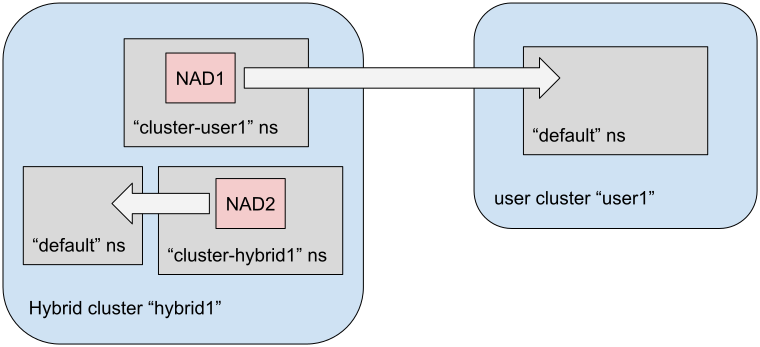
在叢集設定檔中指定 NetworkAttachmentDefinition 自訂資源時,Google Distributed Cloud 會在叢集建立後,使用這個名稱控管 NetworkAttachmentDefinition 自訂資源。Google Distributed Cloud 會將叢集命名空間中的這項自訂資源視為可靠資料來源,並將其協調至目標叢集的 default 命名空間。
下圖說明 Google Distributed Cloud 如何將 NetworkAttachmentDefinition 自訂資源從叢集專屬命名空間,協調至 default 命名空間。
雖然這是選用步驟,但建議您在建立叢集時,按照這種方式指定 NetworkAttachmentDefinition 自訂資源。在建立叢集時指定自訂資源,對使用者叢集最有利,因為您可以從管理員叢集控管 NetworkAttachmentDefinition 自訂資源。
如果您選擇在建立叢集時不指定 NetworkAttachmentDefinition 自訂資源,可以直接將 NetworkAttachmentDefinition 自訂資源新增至現有的目標叢集。Google Distributed Cloud 會協調叢集命名空間中定義的 NetworkAttachmentDefinition 自訂資源。刪除時也會進行對帳。從叢集命名空間移除 NetworkAttachmentDefinition 自訂資源時,Google Distributed Cloud 會從目標叢集移除自訂資源。
將網路介面指派給 Pod
使用 k8s.v1.cni.cncf.io/networks 註解,將一或多個網路介面指派給 Pod。每個網路介面都會以命名空間和 NetworkAttachmentDefinition 自訂資源名稱指定,並以正斜線 (/) 分隔。
---
apiVersion: v1
kind: Pod
metadata:
  name: samplepod
  annotations:
    k8s.v1.cni.cncf.io/networks: NAMESPACE/NAD_NAME
spec:
  containers:
  ...
更改下列內容:
NAMESPACE:命名空間。請使用default做為預設命名空間,這是標準做法。例外狀況請參閱「安全疑慮」。NAD_NAME:NetworkAttachmentDefinition自訂資源的名稱。
如要指定多個網路介面,請使用逗號分隔的清單。
在以下範例中,系統會將兩個網路介面指派給 samplepod Pod。網路介面是由目標叢集預設命名空間中的兩個 NetworkAttachmentDefinition 自訂資源名稱 gke-network-1 和 gke-network-2 指定。
---
apiVersion: v1
kind: Pod
metadata:
  name: samplepod
  annotations:
    k8s.v1.cni.cncf.io/networks: default/gke-network-1,default/gke-network-2
spec:
  containers:
  ...
限制 NodePool 的網路介面
使用 k8s.v1.cni.cncf.io/nodeSelector 註解,指定 NetworkAttachmentDefinition 自訂資源有效的節點集區。Google Distributed Cloud 會強制將參照這項自訂資源的所有 Pod 部署到這些特定節點。在以下範例中,Google Distributed Cloud 會強制將指派 gke-network-1 網路介面的所有 Pod 部署至 multinicNP 節點集區。Google Distributed Cloud 會據此使用 baremetal.cluster.gke.io/node-pool 標籤標記 NodePool。
apiVersion: "k8s.cni.cncf.io/v1"
kind: NetworkAttachmentDefinition
metadata:
  annotations:
    k8s.v1.cni.cncf.io/nodeSelector: baremetal.cluster.gke.io/node-pool=multinicNP
  name: gke-network-1
spec:
...
您不一定要使用標準標籤,您可以將自訂標籤套用至叢集節點,從這些節點建立自訂集區。使用 kubectl label nodes 指令套用自訂標籤:
kubectl label nodes NODE_NAME LABEL_KEY=LABEL_VALUE
更改下列內容:
NODE_NAME:要加上標籤的節點名稱。LABEL_KEY:標籤要使用的鍵。LABEL_VALUE:標籤名稱。
為節點加上標籤後,請在該節點上套用 baremetal.cluster.gke.io/label-taint-no-sync 註解,防止 Google Distributed Cloud 協調標籤。使用 kubectl get nodes --show-labels 指令,確認節點是否已加上標籤。
安全疑慮
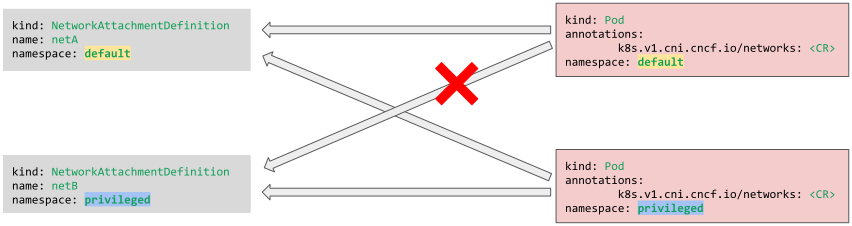
NetworkAttachmentDefinition 自訂資源提供網路的完整存取權,因此叢集管理員必須謹慎提供建立、更新或刪除權限給其他使用者。如果必須隔離特定 NetworkAttachmentDefinition 自訂資源,可以將其放在非預設命名空間中,只有該命名空間中的 Pod 才能存取。為協調叢集設定檔中指定的 NetworkAttachmentDefinition 自訂資源,這些資源一律會放在預設命名空間中。
在下圖中,default 命名空間中的 Pod 無法存取 privileged 命名空間中的網路介面。
支援的 CNI 外掛程式
本節列出 Google Distributed Cloud 多 NIC 功能支援的 CNI 外掛程式。指定 NetworkAttachmentDefinition 自訂資源時,請僅使用下列外掛程式。
建立介面:
ipvlanmacvlanbridgesriov
Meta 外掛程式:
portmapsbrtuning
IPAM 外掛程式:
host-localstaticwhereabouts
路徑設定
指派一或多個 NetworkAttachmentDefinition 自訂資源的 Pod 具有多個網路介面。根據預設,在這種情況下,路由表只會透過指派的 NetworkAttachmentDefinition 自訂資源,擴充本機可用的額外介面。預設閘道仍設為使用 Pod 的主要/預設介面 eth0。
您可以使用下列 CNI 外掛程式修改這項行為:
sbrstaticwhereabouts
舉例來說,您可能希望「所有」流量都透過預設閘道 (即預設介面) 傳輸。不過,某些特定流量會透過其中一個非預設介面傳輸。由於這兩種介面類型都提供相同的端點,因此可能難以根據目的地 IP (正常轉送) 區分流量。在這種情況下,來源型轉送 (SBR) 就能派上用場。
SBR 外掛程式
sbr 外掛程式可讓應用程式控管轉送決策。應用程式會控制要使用什麼做為其建立連線的來源 IP 位址。如果應用程式選擇使用 NetworkAttachmentDefinition 自訂資源的 IP 位址做為來源 IP,封包就會進入 sbr 設定的其他轉送表。sbr 路由表會將 NetworkAttachmentDefinition 自訂資源的介面設為預設閘道。該表格中的預設閘道 IP 是透過 whereabouts 或 static 外掛程式中的 gateway 欄位控制。提供 sbr 外掛程式做為鏈結外掛程式。如要進一步瞭解 sbr 外掛程式 (包括使用資訊),請參閱「來源型轉送外掛程式」。
以下範例顯示在 whereabouts 中設定的 "gateway":"21.0.111.254",以及在 ipvlan 後方設為鏈結外掛程式的 sbr:
# ip route
default via 192.168.0.64 dev eth0  mtu 1500
192.168.0.64 dev eth0 scope link
# ip route list table 100
default via 21.0.111.254 dev net1
21.0.104.0/21 dev net1 proto kernel scope link src 21.0.111.1
靜態和 Whereabouts 外掛程式
whereabouts 外掛程式基本上是 static 外掛程式的擴充功能,兩者共用轉送設定。如需設定範例,請參閱靜態 IP 位址管理外掛程式。您可以定義閘道和路徑,並新增至 Pod 的轉送表。不過,您無法透過這種方式修改 Pod 的預設閘道。
以下範例顯示在 NetworkAttachmentDefinition 自訂資源中新增 "routes": [{ "dst": "172.31.0.0/16" }]:
# ip route
default via 192.168.0.64 dev eth0  mtu 1500
172.31.0.0/16 via 21.0.111.254 dev net1
21.0.104.0/21 dev net1 proto kernel scope link src 21.0.111.1
192.168.0.64 dev eth0 scope link
設定範例
本節說明多 NIC 功能支援的一些常見網路設定。
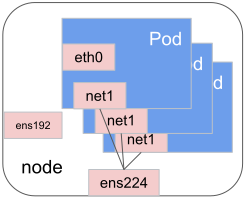
多個 Pod 使用單一網路連結
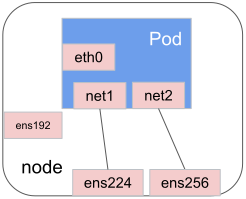
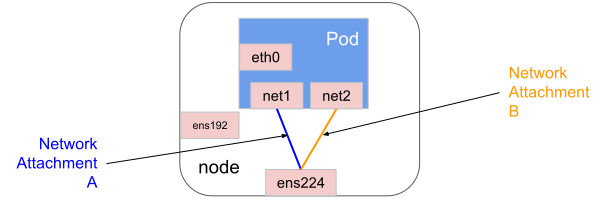
單一 Pod 使用多個網路連結
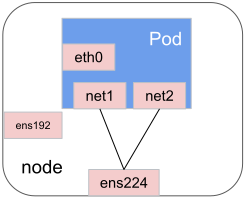
多個網路連結指向單一 Pod 使用的相同介面
單一 Pod 多次使用相同的網路連結
疑難排解
如果額外網路介面設定錯誤,指派給這些介面的 Pod 就不會啟動。本節重點說明如何找出多 NIC 功能疑難排解問題的資訊。
查看 Pod 事件
Multus 會透過 Kubernetes Pod 事件回報失敗。使用下列 kubectl describe 指令,查看特定 Pod 的事件:
kubectl describe pod POD_NAME
查看記錄
您可以在下列位置找到每個節點的 Whereabouts 和 Multus 記錄:
/var/log/whereabouts.log/var/log/multus.log
查看 Pod 介面
使用 kubectl exec 指令檢查 Pod 介面。成功套用 NetworkAttachmentDefinition 自訂資源後,Pod 介面會顯示如下:
$ kubectl exec samplepod-5c6df74f66-5jgxs -- ip a
1: lo: <LOOPBACK,UP,LOWER_UP> mtu 65536 qdisc noqueue state UNKNOWN group default qlen 1000
    link/loopback 00:00:00:00:00:00 brd 00:00:00:00:00:00
    inet 127.0.0.1/8 scope host lo
       valid_lft forever preferred_lft forever
2: net1: <BROADCAST,MULTICAST,UP,LOWER_UP> mtu 1500 qdisc noqueue state UNKNOWN group default
    link/ether 00:50:56:82:3e:f0 brd ff:ff:ff:ff:ff:ff
    inet 21.0.103.112/21 scope global net1
       valid_lft forever preferred_lft forever
38: eth0@if39: <BROADCAST,MULTICAST,UP,LOWER_UP> mtu 1500 qdisc noqueue state UP group default
    link/ether 36:23:79:a9:26:b3 brd ff:ff:ff:ff:ff:ff link-netnsid 0
    inet 192.168.2.191/32 scope global eth0
       valid_lft forever preferred_lft forever
取得 Pod 狀態
使用 kubectl get 擷取特定 Pod 的網路狀態:
kubectl get pods POD_NAME -oyaml
以下是輸出內容範例,顯示具有多個網路的 Pod 狀態:
apiVersion: v1
kind: Pod
metadata:
  annotations:
    k8s.v1.cni.cncf.io/network-status: |-
      [{
          "name": "",
          "interface": "eth0",
          "ips": [
              "192.168.1.88"
          ],
          "mac": "36:0e:29:e7:42:ad",
          "default": true,
          "dns": {}
      },{
          "name": "default/gke-network-1",
          "interface": "net1",
          "ips": [
              "21.0.111.1"
          ],
          "mac": "00:50:56:82:a7:ab",
          "dns": {}
      }]
    k8s.v1.cni.cncf.io/networks: gke-network-1