

Google Distributed Cloud is a fully managed software and hardware solution that extends Google Cloud infrastructure and services into your data center. Google Distributed Cloud is also available as a software-only product that runs on your own hardware. Google Distributed Cloud software can be installed on either VMware or bare metal. This guide is for Google Distributed Cloud software that runs directly on your bare metal machines.
Google Distributed Cloud software is based on Google Kubernetes Engine (GKE), with its own Kubernetes package that extends GKE for use in an on-premises environment. With Google Distributed Cloud you can create, manage, and upgrade GKE clusters on your own premises while using Google Cloud features, and deploy and operate containerized applications on your clusters at scale using Google's infrastructure.
Why use Distributed Cloud software only for bare metal?
Running Distributed Cloud software only for bare metal on your existing enterprise infrastructure provides direct hardware access, enterprise security, and central management across environments.
Direct hardware control and performance
Deploying directly on physical servers gives you direct control over application scale, latency, and performance while lowering costs by using your existing infrastructure. Google Distributed Cloud manages application deployment and health across your existing corporate data centers for more efficient operation. You can optimize workloads for specialized hardware types, such as GPUs and SSDs, and run low-latency applications at the network edge without hypervisor overhead.
Operating system-level security
Because you maintain direct control over your node operating systems and network configurations, you can customize security policies to match your compliance requirements. Clusters communicate with Google APIs over lightweight secure connections, eliminating virtual machine complexity while retaining existing security controls.
Centralized management and monitoring
Manage, monitor, and troubleshoot clusters from the Google Cloud console using Cloud Monitoring and the Connect Agent. This central visibility helps you maintain reliability and adjust application scale across distributed data centers.
Enterprise reliability and operations
Google Distributed Cloud includes production-ready operational features:
- High availability: Support for multiple control plane nodes ensures that you can administer your environment even if a node fails.
- Automated preflight checks: Built-in validation helps verify your hardware and operating system configurations before installation.
- Integrated load balancing: Layer 4 and Layer 7 load balancing mechanisms are deployed automatically during cluster creation.
- Database maintenance: Automated defragmentation (
etcddefrag) reclaims storage to maintainetcdhealth and stability.
How it works
In GKE clusters running in Google Cloud, Google manages the Kubernetes control plane and network infrastructure. For Google Distributed Cloud clusters running in your data center, Google Cloud provides administrative and control plane software that you download and install on your physical Linux servers. You manage these on-premises clusters in Google Cloud alongside cloud-based clusters as part of a unified fleet.
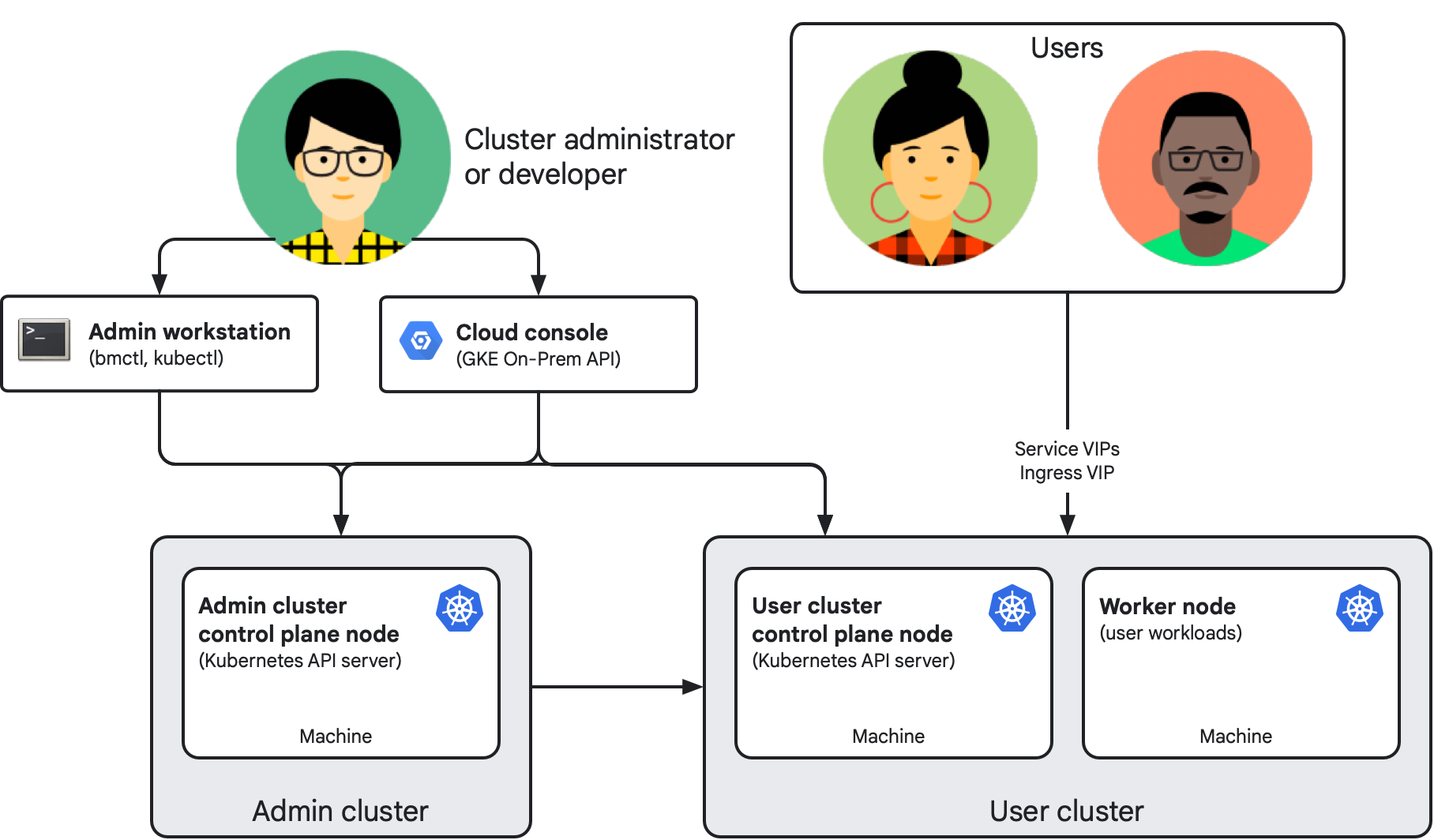
The following diagram shows the architecture of a completed installation with an admin cluster and a user cluster:
Key components
A software-only bare-metal deployment consists of the following components:
- Admin cluster: Manages the lifecycle of user clusters using Kubernetes Resource Management (KRM). The standard deployment consists of an admin cluster that manages the lifecycle of one or more user clusters. An admin cluster consists of one or more physical Linux machines that serve as control plane nodes. Each node machine in the installation has its own IP address.
- User cluster: Runs your containerized workloads. Each user cluster consists of at least one control plane node and one worker node.
- Admin workstation: A dedicated machine that hosts configuration files
and administrative tools:
bmctl: Creates, updates, and manages clusters.kubectl: Interacts with admin and user clusters and manages workloads.
- GKE On-Prem API: The Google Cloud-hosted API for cluster lifecycle management. Clients, like Google Cloud console, Google Cloud CLI, and Terraform, let you manage on-premises clusters without logging in to the admin workstation.
- Google Cloud console: Provides a web interface for your Google Cloud project, including on-premises clusters. The Google Cloud console displays key metrics about your clusters to help you monitor cluster health and fleet status.
- Virtual IP addresses (VIPs): Virtual IPs configured during installation.
Cluster administrators and developers use
kubectlto access cluster control planes through control plane VIPs. Application users and developers use Service and Ingress VIPs to access and expose workloads, respectively.
Connecting to the fleet
User clusters, and optionally admin clusters, are registered to a fleet, which is a logical grouping of Kubernetes clusters that provides unified management across environments. Fleets let your organization uplevel management from individual clusters to entire groups of clusters and can help your teams adopt similar best practices to those used at Google. You can view clusters together in the Google Cloud console and use fleet-enabled features to manage, govern, and operate workloads at scale.
Each cluster connects to Google Cloud through the Connect Agent, which deploys automatically during cluster installation. Fleet membership also determines billing for Google Distributed Cloud.
Pricing
On-premises clusters created with Google Distributed Cloud are billed per vCPU. To enable billing, enable the Anthos API in your Google Cloud project.
For pricing details and sales contact information, see Google Kubernetes Engine pricing.
Versions
To learn about Google Distributed Cloud versions, see Version Support Policy.
This documentation covers all supported versions of Google Distributed Cloud. Where relevant, Google also retains limited information for older, unsupported versions in this documentation. Version-specific differences in requirements and behavior are noted in the documentation. When a new feature becomes available, the supported version for the feature is documented.
For a list of the supported minor versions and available patches, see Versioning.
Starting with the 1.29 release, we no longer create a numbered directory for the previous minor release documentation. You can find archived documentation for version 1.16 and earlier by adding the minor version number in the following URL:
https://cloud.google.com/anthos/clusters/docs/bare-metal/VERSION/
Replace VERSION with a minor version from 1.0 to 1.16 and copy the URL to the address bar in your browser.
Installing Distributed Cloud software only for bare metal
Because clusters created using Google Distributed Cloud run in your own infrastructure, they're highly configurable. Once you select the deployment model that meets your particular organizational and use case needs, you can choose from a range of supported load balancing modes, IP addressing options, security features, connectivity options, and more. Setting up a cluster involves making decisions before and during installation. This documentation set includes guides to help your team decide on the right features and options for you. To ensure that your installation meets the needs of your organization, consult with your networking and application teams.
Where your data is stored
When you run Distributed Cloud software only for bare metal, your clusters, applications, and business data stay in your data center. By default, Google Distributed Cloud sends Google Cloud information about your clusters, such as their settings, health, and usage, but it doesn't send your application data.
Data that stays in your data center
The following data stays in your data center:
- Containers, Pods, PersistentVolumes, local storage backends, and the data that your applications process.
- The control plane (
kube-apiserver,kube-scheduler, andkube-controller-manager) and theetcddatabase, which stores all of your Kubernetes objects. - Private keys for the certificate authorities (CAs),
including the cluster CA, the
etcdCA, and the front-proxy CA. The admin cluster's user cluster namespace stores user cluster CAs. - Application secrets, OAuth tokens, SSH private keys,
container registry credentials, and service account key files are stored in
etcdor on your administrator workstation. They aren't sent to the GKE On-Prem API, and the default diagnostic snapshot doesn't include cluster credentials. - Your cluster configuration file is stored on your administrator workstation. If a cluster is enrolled in the GKE On-Prem API, some settings are sent. See Data that's sent to Google Cloud for more information.
- Audit logs are written to disk only if you turn off Cloud Audit Logs on the control plane nodes.
- If you set up a service account for diagnostic snapshot uploads, the file is uploaded to Cloud Storage. You can choose whether to share a snapshot with Cloud Customer Care.
Data that's sent to Google Cloud
The following table shows what's sent, how it's used and stored, and whether you can turn it off:
| Data | What's sent | Use and storage | Default |
|---|---|---|---|
| Connection and fleet registration ( gkehub.googleapis.com,
gkeconnect.googleapis.com) |
|
Manage clusters from the Google Cloud console, the connect gateway, and fleet with Connect Agent. | Required |
| Cluster settings and status ( gkeonprem.googleapis.com) |
|
Lets you manage clusters with the Google Cloud console, the
Google Cloud CLI, or Terraform. Stored by the GKE On-Prem API in the region set
in gkeOnPremAPI.location, which defaults to
clusterOperations.location. |
On in version 1.16 and later, if the GKE On-Prem API is
enabled in your Google Cloud project. To turn it off, set
gkeOnPremAPI.enabled to false. |
| Billing usage ( anthos.googleapis.com) |
vCPU capacity, node count, and license entitlement status. | Used for metering, billing, and license checks. | Required. Billing records are buffered during an outage and sent later. |
| System health data ( logging.googleapis.com, monitoring.googleapis.com,
opsconfigmonitoring.googleapis.com) |
|
Used for Cloud Monitoring, Google Cloud console status views, and
Customer Care troubleshooting. Stored in the Google Cloud project
set in clusterOperations.projectID. Metrics are stored in the
region set in clusterOperations.location, and logs follow your
Log Router settings. |
On for system logs and metrics, which full
Customer Care support and SLA coverage require. Off
for application logs and metrics, unless you set
enableCloudLoggingForApplications or
enableGMPForApplications to true in the
Stackdriver resource. |
| Audit logs ( anthosaudit.googleapis.com) |
Admin Activity audit logs (audit-proxy): who changed what
through the kube-apiserver, and when. Entries include the time,
cluster, host or VM, user or service account, RBAC role, operation, and
result. Read requests aren't recorded. |
Stored in Cloud Audit Logs in your Google Cloud project, in the
_Required bucket, and kept for 400 days. |
On. To turn it off, set
clusterOperations.disableCloudAuditLogging to true.
Audit logs are then kept only on the control plane nodes' disks. |
What's next
To get started with Google Distributed Cloud, see the following guides:
- Create demo Google Distributed Cloud admin and user clusters on Compute Engine VMs
- Plan for a basic installation on your hardware
- Create basic clusters on your hardware