

This document describes how to access the metrics generated by your Gemini Enterprise app. These metrics provide insights into the performance and health of your application.
You can view metric telemetry using either the Metrics Explorer or directly within individual agents using the agent's Observability tab.
Key concepts
This section introduces key concepts related to observability in Gemini Enterprise.
| Concept | Description |
|---|---|
| Metrics | Metrics are numerical measurements that systems collect over time. These measurements represent the performance, resource utilization, or behavior of a system. Engineers use metrics to monitor system health, identify trends, and trigger alerts. |
| Agent-scoped metrics | Metrics that measure the activity of an individual agent, such as its sessions, conversational turns, and tool invocations. They are listed under the Gemini Enterprise Agent resource type, and they are collected only when the Enable instrumentation of OpenTelemetry traces and logs observability setting is turned on for that agent. |
| App-scoped metrics | Metrics that measure all traffic to an app rather than to a single agent, such as its request count and end-to-end latency. They are listed under the Gemini Enterprise Engine resource type, where Engine is the API name for a Gemini Enterprise app, and they are collected regardless of the observability settings. |
Before you begin
Make sure you have the following:
The Gemini Enterprise Admin role or Google Cloud console Gemini Enterprise User role.
An existing Gemini Enterprise web app. For information about creating a new app, see Create an app.
To access the Metrics Explorer, you must have the Monitoring Viewer role (
roles/monitoring.viewer).Enable the Enable instrumentation of OpenTelemetry traces and logs observability setting. Depending on the agent type, enable this in the app-level configurations (for the Core Assistant agent) or inside the agent's Configuration tab (for Workflow Builder employee-made agents and Deep Research agents). For more information, see Manage observability settings. This setting is required for the agent-scoped metrics. The app-scoped metrics, which are listed under the Gemini Enterprise Engine resource type, are collected without it.
Data retention
Metrics generated by your Gemini Enterprise app are stored in
Cloud Monitoring in your Google Cloud project, and their retention is governed
by Cloud Monitoring. Gemini Enterprise metrics are published under the
discoveryengine.googleapis.com/ prefix, which falls under the "all other
Google Cloud metrics" tier and is retained for 6 weeks by default. Data
older than the retention period is automatically deleted. For the authoritative
and most current retention values, see
Data retention in the
Cloud Monitoring quotas and limits documentation.
Access metrics in Metrics Explorer
To access the metrics, follow these steps:
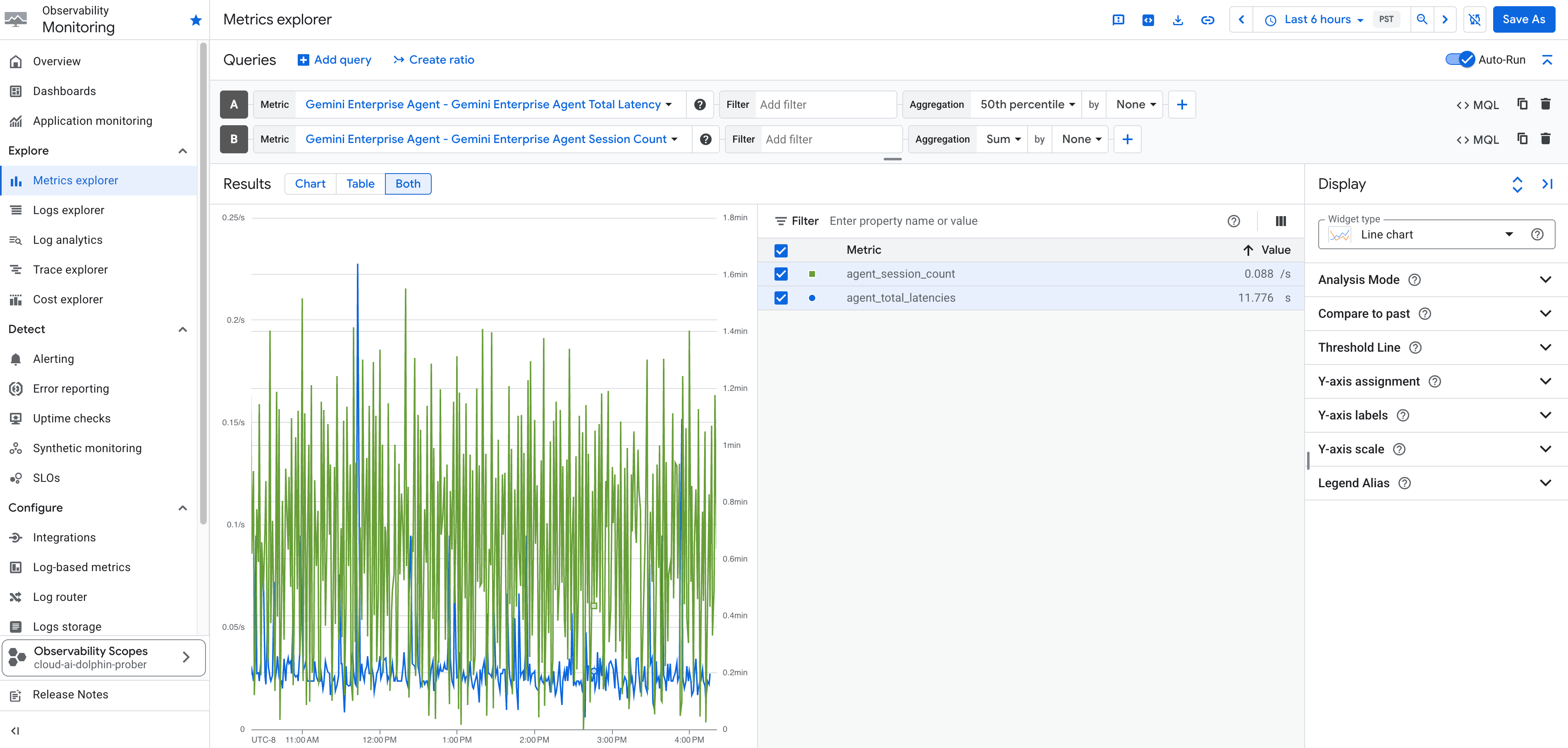
In the Google Cloud console, go to the Metrics Explorer page.
Select the Google Cloud project where your Gemini Enterprise app was created.
Click Select a metric to open a search bar.
In the search bar, look for the following metrics:
Metric Name Description Gemini Enterprise Agent - Gemini Enterprise Agent Session Count The number of sessions handled by the Gemini Enterprise Agent. Gemini Enterprise Agent - Gemini Enterprise Agent Tool Count The number of times tools were invoked by the Gemini Enterprise Agent. Gemini Enterprise Agent - Gemini Enterprise Agent Turn Count The number of conversational turns within Gemini Enterprise Agent sessions. Gemini Enterprise Agent - Gemini Enterprise Agent Total Latency The total latency of responses from the Gemini Enterprise Agent. Gemini Enterprise Agent - Gemini Enterprise Agent Tool Total Latency The total latency incurred by tool executions within the Gemini Enterprise Agent. Gemini Enterprise DataConnector - Gemini Enterprise DataConnector Request Count The total count of requests made to the Gemini Enterprise data connectors (also referred to as data stores in the Google Cloud console). Gemini Enterprise DataConnector - Gemini Enterprise DataConnector Request Latencies (Beta) The latency of requests made to the Gemini Enterprise data connectors (also referred to as data stores in the Google Cloud console) in milliseconds. Gemini Enterprise Engine - Gemini Enterprise Engine Request Count The total number of requests received by your Gemini Enterprise app, across all traffic to the app rather than a single agent. Broken down by API method, canonical gRPC response code, response code class, query type, and model. Gemini Enterprise Engine - Gemini Enterprise Engine Request Total Latency The distribution of end-to-end request latency for your Gemini Enterprise app. Recorded for every request, including requests that return an error. Gemini Enterprise Engine - Gemini Enterprise Engine Time to First Answer Latency The distribution of latency between receiving a request and streaming the first answer token. Recorded only for requests that produce at least one answer token. Gemini Enterprise Engine - Gemini Enterprise Engine Time to First Token Latency The distribution of latency between receiving a request and streaming the first token, whether that token is part of the model's thinking process or a final answer. Recorded only for requests that produce at least one streamed token. Select the metric you want to explore and click Apply.
Optionally, set additional label filters, aggregation elements, and adjust the time range.
Access metrics for agents
You can also view operational, tool-specific, and session metric dashboards directly for individual agents on the agent's Observability tab in the Google Cloud console.
To access metrics for an agent:
- In the Google Cloud console, navigate to your app, and then click Agents.
- Select the agent you want to inspect, and then click the Observability tab.
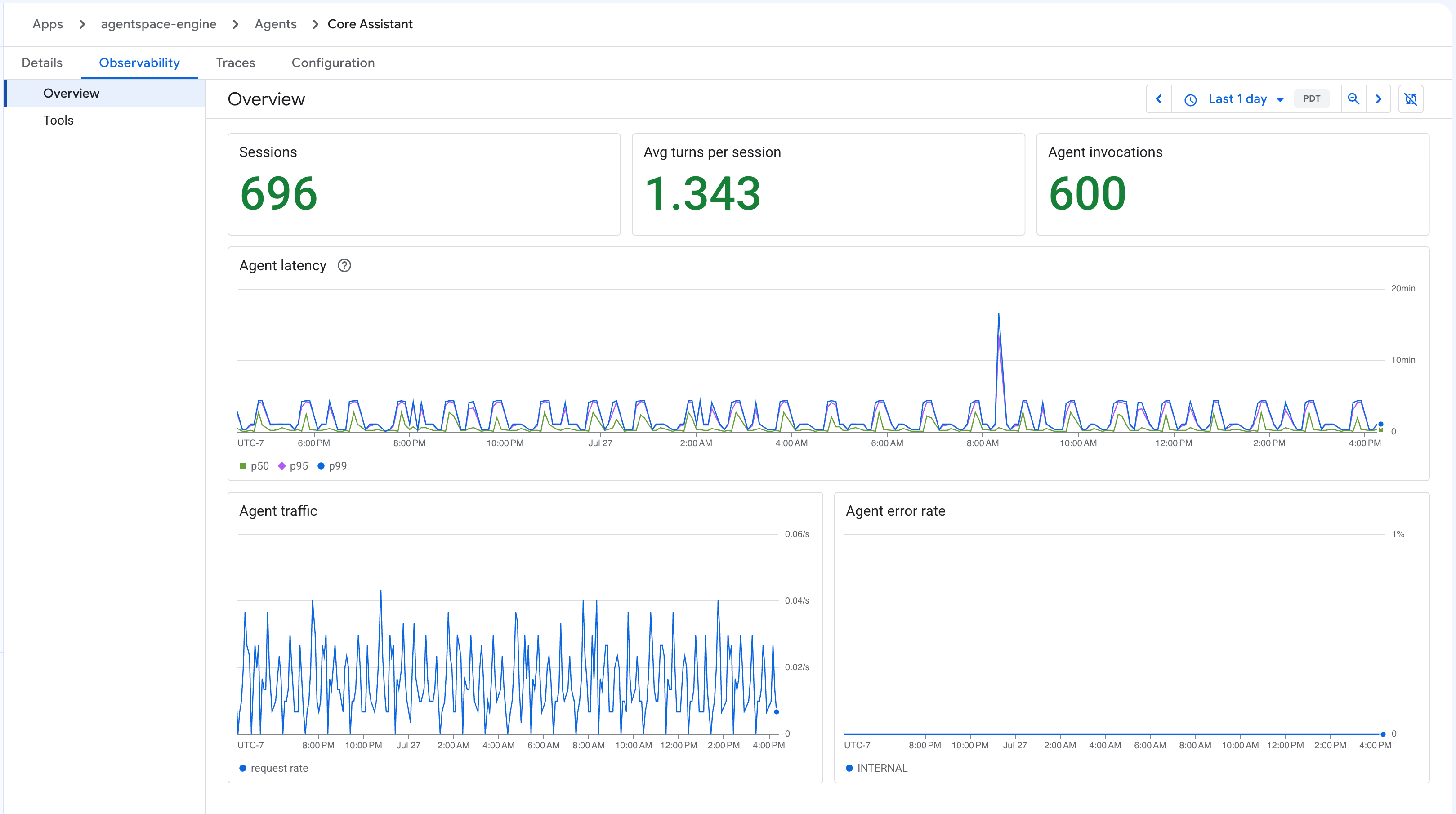
The Observability tab provides key operational telemetry divided into four views: Overview, Tools, Latency, and Error rate.
Overview metrics
This view provides a dashboard summarizing standard session and agent health data, which includes:
- Sessions: Total user session count.
- Avg. time per session: Average time elapsed during a session.
- Agent invocations: Total times that the agent was called.
- Agent latency: Latency across time and specific metrics.
- Agent traffic: Inbound request volume.
- Agent error rate: Percentage of failed agent invocations.
Tools metrics
This view focuses specifically on the usage and latency of tools connected to your agent, which includes:
- Total calls: Number of tool execution requests.
- P95 duration by tool: The 95th percentile latency of executions, categorized by tool.
- Count of calls by tool: Total call count divided among different tools.
- Error rate by tool: The failure rate of executions by tool.
- "No tool called" rate: The rate at which interactions did not trigger any tool execution.
Latency metrics
This view displays your agent's response latency. Each metric is shown as a p50 and p95 summary card for the selected time range, and as a time-series chart showing trends over time. You can also filter the latency metrics by feature. The view displays the following metrics:
- Time to First Token (TTFT): The latency between receiving a request and streaming the first token, whether that token is part of the model's thinking process or of the answer.
- Time to First Answer (TTFA): The latency between receiving a request and streaming the first answer token, which is the first token that isn't part of the model's thinking. If the agent calls a tool after it starts answering, the measurement restarts, so TTFA reflects when the answer that the user reads began streaming, not any interim narration.
- Time to Last Token (TTLT): The latency between receiving a request and streaming the last token, which is when the response is complete.
Filter latency metrics by feature
A feature is the kind of interaction that a turn represents, such as a web search or an image generation. Filter the latency metrics by feature to see which kinds of interaction are slowest, and to keep one slow feature from skewing your overall latency.
To filter the latency metrics by feature:
- On the agent's Observability tab, click the Latency view.
- Click Filter by feature.
- Select the feature that you want to inspect.
The summary cards and the time-series charts then show only the turns for that feature.
To compare all of the features at once, use the Features telemetry table, which lists the following for each feature:
- Share of traffic: The percentage of turns attributed to the feature.
- TTFT, TTFA, and TTLT: The p50 and p95 latency for the feature.
You can filter using the following features:
- Parametric: Interactions that send requests to the model for text output only, without tools, such as translation tasks.
- Media generation: Image and video generation tasks.
- Web search only: Interactions that send requests to the model using the web search tool.
- Uploaded file analysis: Interactions that send requests to the model alongside user-uploaded files.
- Connector: Queries that send requests to internal or third-party connectors.
- Canvas: Generation tasks that use Canvas.
- Skill: Interactions that invoke a skill.
- Other: A catch-all for turns that span several features or that are not yet classified.

Error rate metrics
This view shows how your agent's requests resolve, grouped by response class: OK (2xx), Client errors (4xx), Server errors (5xx), and Canceled. It includes:
- Request volume by response class: Inbound request count over time, stacked by response class.
- Error rate by response class: The percentage of requests that failed over time, split by response class.
- Client error codes (4xx) and Server error codes (5xx): The
individual canonical gRPC response codes over time, such as
INVALID_ARGUMENTorINTERNAL, so you can tell which specific errors drive a spike. - Totals: The number of requests and the percentage of total requests for each outcome over the selected time range, with separate tables that rank the individual client and server error codes.

What's next
- Create dashboards with the Gemini Enterprise metrics. For more information, see Create and manage custom dashboards.
- Create alerts when metrics cross a threshold. For more information, see Create metric-threshold alerting policies
- To turn off Metrics Explorer tracking, see Turn off observability settings.